---
page_type: sample
languages:
- javascript
products:
- msal-js
- ms-graph
- azure-app-services
- azure-storage
- azure-key-vault
- azure-functions
- microsoft-entra-id
- azure-active-directory-b2c
- microsoft-identity-platform
description: "Tutorial: Enable your JavaScript single-page application (SPA) to sign-in users and call APIs with the Microsoft identity platform"
urlFragment: "ms-identity-javascript-tutorial"
---
# Tutorial: Enable your JavaScript single-page application (SPA) to sign-in users and call APIs with the Microsoft identity platform
[](https://github.com/Azure-Samples/ms-identity-javascript-tutorial/actions/workflows/node.js.yml)
[](https://github.com/Azure-Samples/ms-identity-javascript-tutorial/actions/workflows/codeql.yml)



The [Microsoft identity platform](https://docs.microsoft.com/azure/active-directory/develop/v2-overview), along with [Microsoft Entra ID](https://docs.microsoft.com/azure/active-directory/fundamentals/active-directory-whatis) (Microsoft Entra ID) and [Azure Azure Active Directory B2C](https://docs.microsoft.com/azure/active-directory-b2c/overview) (Azure Active Directory B2C) are central to the **Azure** cloud ecosystem. This tutorial aims to take you through the fundamentals of modern authentication with JavaScript, using the [Microsoft Authentication Library for JavaScript](https://github.com/AzureAD/microsoft-authentication-library-for-js) (MSAL.js).
We recommend following the chapters in successive order. However, the code samples are self-contained, so feel free to pick samples by topics that you may need at the moment.
> :warning: This is a *work in progress*. Come back frequently to discover more samples.
## Prerequisites
- [Node.js](https://nodejs.org/en/download/)
- [Visual Studio Code](https://code.visualstudio.com/download)
- [VS Code Azure Tools Extension](https://marketplace.visualstudio.com/items?itemName=ms-vscode.vscode-node-azure-pack)
- A modern web browser
Please refer to each sample's README for sample-specific prerequisites.
## Recommendations
- [jwt.ms](https://jwt.ms) for inspecting your tokens
- [Fiddler](https://www.telerik.com/fiddler) for monitoring your network activity and troubleshooting
- Follow the [Microsoft Entra ID Blog](https://techcommunity.microsoft.com/t5/azure-active-directory-identity/bg-p/Identity) to stay up-to-date with the latest developments
Please refer to each sample's README for sample-specific recommendations.
## Contents
### Chapter 1: Sign-in a user to your application
| | |
|---------------|---------------|
| 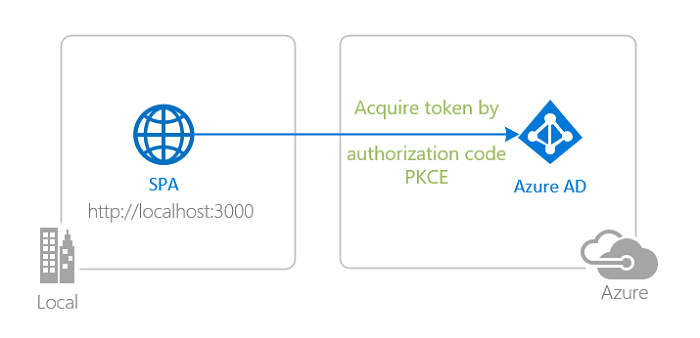 | [**Sign-in with Microsoft Entra ID**](./1-Authentication/1-sign-in) Sign-in your users with the **Microsoft Entra ID** and learn to work with **ID Tokens**. Learn how **single sign-on (SSO)** works. Learn to secure your apps to operate in **national clouds**. |
|
| [**Sign-in with Microsoft Entra ID**](./1-Authentication/1-sign-in) Sign-in your users with the **Microsoft Entra ID** and learn to work with **ID Tokens**. Learn how **single sign-on (SSO)** works. Learn to secure your apps to operate in **national clouds**. |
| 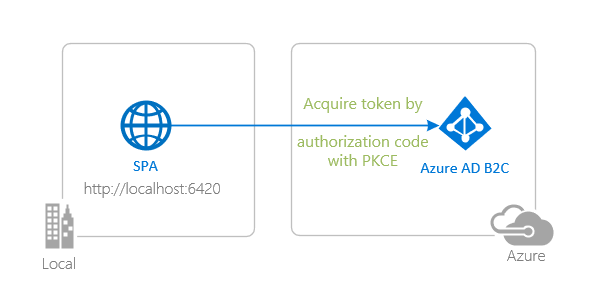 | [**Sign-in with Azure Active Directory B2C**](./1-Authentication/2-sign-in-b2c) Sign-in your customers with **Azure Active Directory B2C**. Learn to integrate with **external social identity providers**. Learn how to use **user-flows** and **custom policies**. |
### Chapter 2: Sign-in a user and get an Access Token for Microsoft Graph
| | |
|----------------|---------------|
|
| [**Sign-in with Azure Active Directory B2C**](./1-Authentication/2-sign-in-b2c) Sign-in your customers with **Azure Active Directory B2C**. Learn to integrate with **external social identity providers**. Learn how to use **user-flows** and **custom policies**. |
### Chapter 2: Sign-in a user and get an Access Token for Microsoft Graph
| | |
|----------------|---------------|
|  | [**Get an Access Token from Microsoft Entra ID and call Microsoft Graph**](./2-Authorization-I/1-call-graph) Authenticate your users and acquire an **Access Token** for Microsoft Graph and then call the **Microsoft Graph API**. |
### Chapter 3: Protect an API and call the API from your client app
| | |
|-----------------|---------------|
|
| [**Get an Access Token from Microsoft Entra ID and call Microsoft Graph**](./2-Authorization-I/1-call-graph) Authenticate your users and acquire an **Access Token** for Microsoft Graph and then call the **Microsoft Graph API**. |
### Chapter 3: Protect an API and call the API from your client app
| | |
|-----------------|---------------|
|  | [**Protect and call a web API on Microsoft Entra ID**](./3-Authorization-II/1-call-api) Protect your web API with the **Microsoft Entra ID**. Use a client application to sign-in a user, acquire an **Access Token** for your web API and call your protected Web API. |
|
| [**Protect and call a web API on Microsoft Entra ID**](./3-Authorization-II/1-call-api) Protect your web API with the **Microsoft Entra ID**. Use a client application to sign-in a user, acquire an **Access Token** for your web API and call your protected Web API. |
|  | [**Protect and call a web API on Azure Active Directory B2C**](./3-Authorization-II/2-call-api-b2c) Protect your web API with **Azure Active Directory B2C**. Use a client application to sign-in a user, acquire an **Access Token** for your web API and call your protected web API. |
### Chapter 4: Deploy your applications to Azure
| | |
|-----------------|---------------|
|
| [**Protect and call a web API on Azure Active Directory B2C**](./3-Authorization-II/2-call-api-b2c) Protect your web API with **Azure Active Directory B2C**. Use a client application to sign-in a user, acquire an **Access Token** for your web API and call your protected web API. |
### Chapter 4: Deploy your applications to Azure
| | |
|-----------------|---------------|
|  | [**Deploy to Azure Storage and App Service**](./4-Deployment) Prepare your app for deployment to various **Azure** services. Learn how to package and upload files, configure authentication parameters and use **Azure** services for managing your operations. |
## We'd love your feedback!
Were we successful in addressing your learning objective? Consider taking a moment to [share your experience with us](https://forms.office.com/Pages/ResponsePage.aspx?id=v4j5cvGGr0GRqy180BHbR73pcsbpbxNJuZCMKN0lURpUNDVHTkg2VVhWMTNYUTZEM05YS1hSN01EOSQlQCN0PWcu).
## More information
Learn more about the **Microsoft identity platform**:
- [Microsoft identity platform](https://docs.microsoft.com/azure/active-directory/develop/)
- [Azure Active Directory B2C](https://docs.microsoft.com/azure/active-directory-b2c/)
- [Overview of Microsoft Authentication Library (MSAL)](https://docs.microsoft.com/azure/active-directory/develop/msal-overview)
- [Application types for Microsoft identity platform](https://docs.microsoft.com/azure/active-directory/develop/v2-app-types)
- [Understanding Microsoft Entra application consent experiences](https://docs.microsoft.com/azure/active-directory/develop/application-consent-experience)
- [Understand user and admin consent](https://docs.microsoft.com/azure/active-directory/develop/howto-convert-app-to-be-multi-tenant#understand-user-and-admin-consent)
- [Application and service principal objects in Microsoft Entra ID](https://docs.microsoft.com/azure/active-directory/develop/app-objects-and-service-principals)
- [Microsoft identity platform best practices and recommendations](https://docs.microsoft.com/azure/active-directory/develop/identity-platform-integration-checklist)
See more code samples:
- [MSAL code samples](https://docs.microsoft.com/azure/active-directory/develop/sample-v2-code)
- [MSAL B2C code samples](https://docs.microsoft.com/azure/active-directory-b2c/code-samples)
## Community Help and Support
Use [Stack Overflow](http://stackovergrant.com/questions/tagged/msal) to get support from the community.
Ask your questions on Stack Overflow first and browse existing issues to see if someone has asked your question before.
Make sure that your questions or comments are tagged with [`ms-identity` `azure-ad` `azure-ad-b2c` `msal` `javascript`].
If you find a bug in the sample, please raise the issue on [GitHub Issues](../../issues).
To provide a recommendation, visit the following [User Voice page](https://feedback.azure.com/forums/169401-azure-active-directory).
## Contributing
This project welcomes contributions and suggestions. Most contributions require you to agree to a
Contributor License Agreement (CLA) declaring that you have the right to, and actually do, grant us
the rights to use your contribution. For details, visit https://cla.opensource.microsoft.com.
## Code of Conduct
This project has adopted the [Microsoft Open Source Code of Conduct](https://opensource.microsoft.com/codeofconduct/).
For more information see the [Code of Conduct FAQ](https://opensource.microsoft.com/codeofconduct/faq/) or
contact [opencode@microsoft.com](mailto:opencode@microsoft.com) with any additional questions or comments.
| [**Deploy to Azure Storage and App Service**](./4-Deployment) Prepare your app for deployment to various **Azure** services. Learn how to package and upload files, configure authentication parameters and use **Azure** services for managing your operations. |
## We'd love your feedback!
Were we successful in addressing your learning objective? Consider taking a moment to [share your experience with us](https://forms.office.com/Pages/ResponsePage.aspx?id=v4j5cvGGr0GRqy180BHbR73pcsbpbxNJuZCMKN0lURpUNDVHTkg2VVhWMTNYUTZEM05YS1hSN01EOSQlQCN0PWcu).
## More information
Learn more about the **Microsoft identity platform**:
- [Microsoft identity platform](https://docs.microsoft.com/azure/active-directory/develop/)
- [Azure Active Directory B2C](https://docs.microsoft.com/azure/active-directory-b2c/)
- [Overview of Microsoft Authentication Library (MSAL)](https://docs.microsoft.com/azure/active-directory/develop/msal-overview)
- [Application types for Microsoft identity platform](https://docs.microsoft.com/azure/active-directory/develop/v2-app-types)
- [Understanding Microsoft Entra application consent experiences](https://docs.microsoft.com/azure/active-directory/develop/application-consent-experience)
- [Understand user and admin consent](https://docs.microsoft.com/azure/active-directory/develop/howto-convert-app-to-be-multi-tenant#understand-user-and-admin-consent)
- [Application and service principal objects in Microsoft Entra ID](https://docs.microsoft.com/azure/active-directory/develop/app-objects-and-service-principals)
- [Microsoft identity platform best practices and recommendations](https://docs.microsoft.com/azure/active-directory/develop/identity-platform-integration-checklist)
See more code samples:
- [MSAL code samples](https://docs.microsoft.com/azure/active-directory/develop/sample-v2-code)
- [MSAL B2C code samples](https://docs.microsoft.com/azure/active-directory-b2c/code-samples)
## Community Help and Support
Use [Stack Overflow](http://stackovergrant.com/questions/tagged/msal) to get support from the community.
Ask your questions on Stack Overflow first and browse existing issues to see if someone has asked your question before.
Make sure that your questions or comments are tagged with [`ms-identity` `azure-ad` `azure-ad-b2c` `msal` `javascript`].
If you find a bug in the sample, please raise the issue on [GitHub Issues](../../issues).
To provide a recommendation, visit the following [User Voice page](https://feedback.azure.com/forums/169401-azure-active-directory).
## Contributing
This project welcomes contributions and suggestions. Most contributions require you to agree to a
Contributor License Agreement (CLA) declaring that you have the right to, and actually do, grant us
the rights to use your contribution. For details, visit https://cla.opensource.microsoft.com.
## Code of Conduct
This project has adopted the [Microsoft Open Source Code of Conduct](https://opensource.microsoft.com/codeofconduct/).
For more information see the [Code of Conduct FAQ](https://opensource.microsoft.com/codeofconduct/faq/) or
contact [opencode@microsoft.com](mailto:opencode@microsoft.com) with any additional questions or comments.