# Uploaders
An **uploader** is a key for one program - a screenshot tool, a phone
shortcut, a script - that puts files into one of your folders and answers
each upload with a link. You make it in filex, where you also choose the
folder and what the link opens; the program gets the key and nothing else.
Any program that can send a file as a form works: [ShareX](https://getsharex.com/)
(filex makes its settings file for you), `curl`, PowerShell, an iOS or macOS
Shortcut, a Flameshot or Spectacle hotkey through a one-line script.
- [Make an uploader](#make-an-uploader)
- [ShareX](#sharex)
- [Other programs](#other-programs)
- [The link an upload answers with](#the-link-an-upload-answers-with)
- [The deletion link](#the-deletion-link)
- [What a key can do](#what-a-key-can-do)
- [The upload endpoint](#the-upload-endpoint)
- [Managing uploaders over the API](#managing-uploaders-over-the-api)
- [Moving from the ShareX endpoint](#moving-from-the-sharex-endpoint)
- [Troubleshooting](#troubleshooting)
---
## Make an uploader
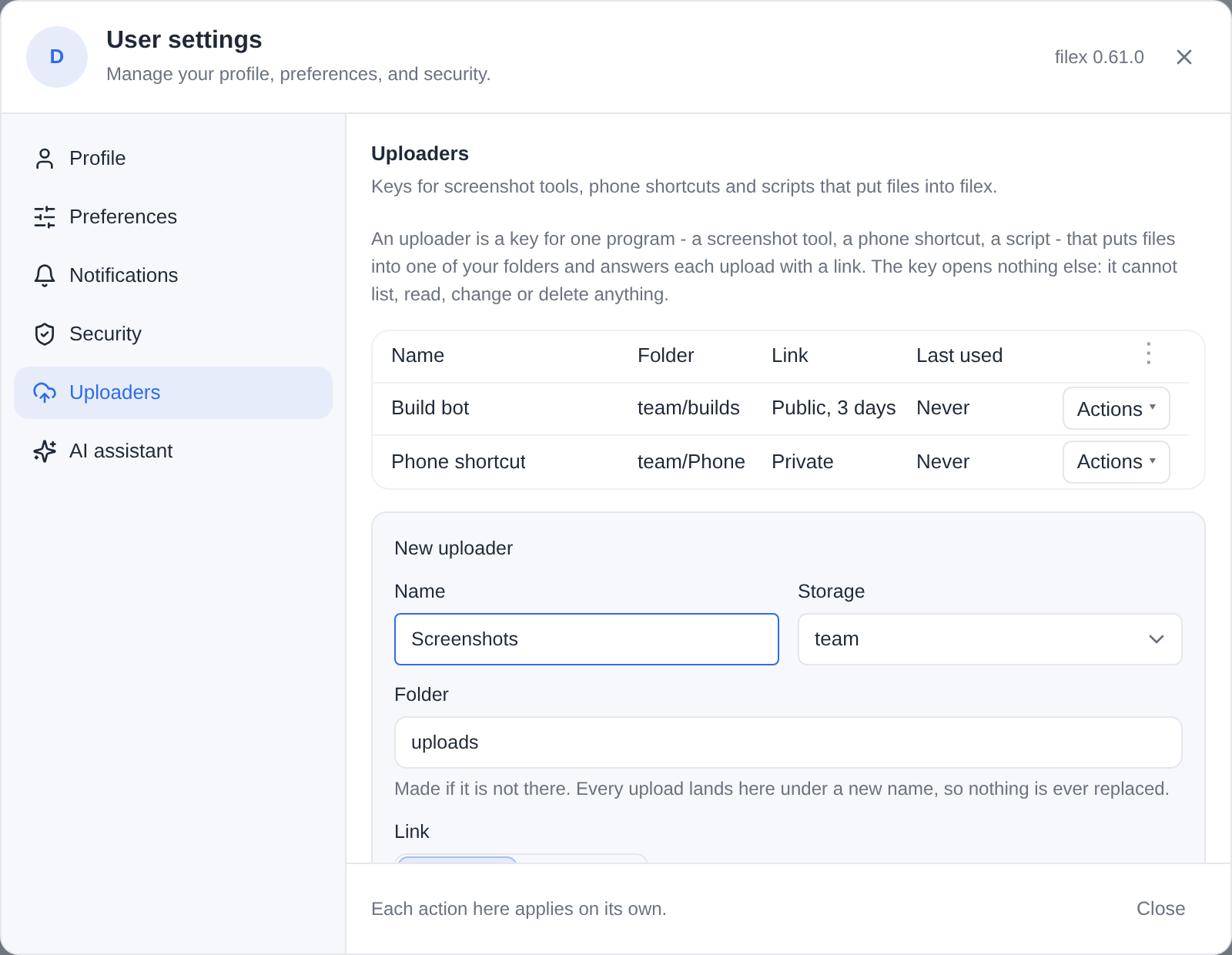
Open **Account settings → Uploaders** from the avatar menu - the same tab in
the web app, the admin panel and the desktop app.
| Field | What it decides |
|---|---|
| **Name** | What the uploader is called in the list, and in the settings file a program gets. |
| **Storage** and **Folder** | Where every upload lands. The folder is made if it is not there (default `uploads`). Each upload is stored under a new, random-prefixed name, so an upload never replaces a file and never takes over the link of an earlier one. |
| **Link** | **Public link**: a [share link](SHARING.md#share-links-download) anybody with it may open, without signing in; images and text open in the browser. **Private link**: the file in filex, which opens after signing in, for people who may see the folder. |
| **Link life** | For a public link. **Longest allowed** follows the server's ceiling (`share.max_ttl_days`, and your role's own limit if it has one); **Days** asks for fewer. The form says the ceiling; a longer life is cut to it. Where the server sets no ceiling, Longest allowed means the link does not expire. |
| **Short link** | Offered only when an app on this server shortens links and you hold its permission ([APP-PLUGINS.md → Short links](APP-PLUGINS.md#short-links)). **Its short address** answers each upload with the short address the app gives the link; **The link itself** (the default) answers the link as it is. |
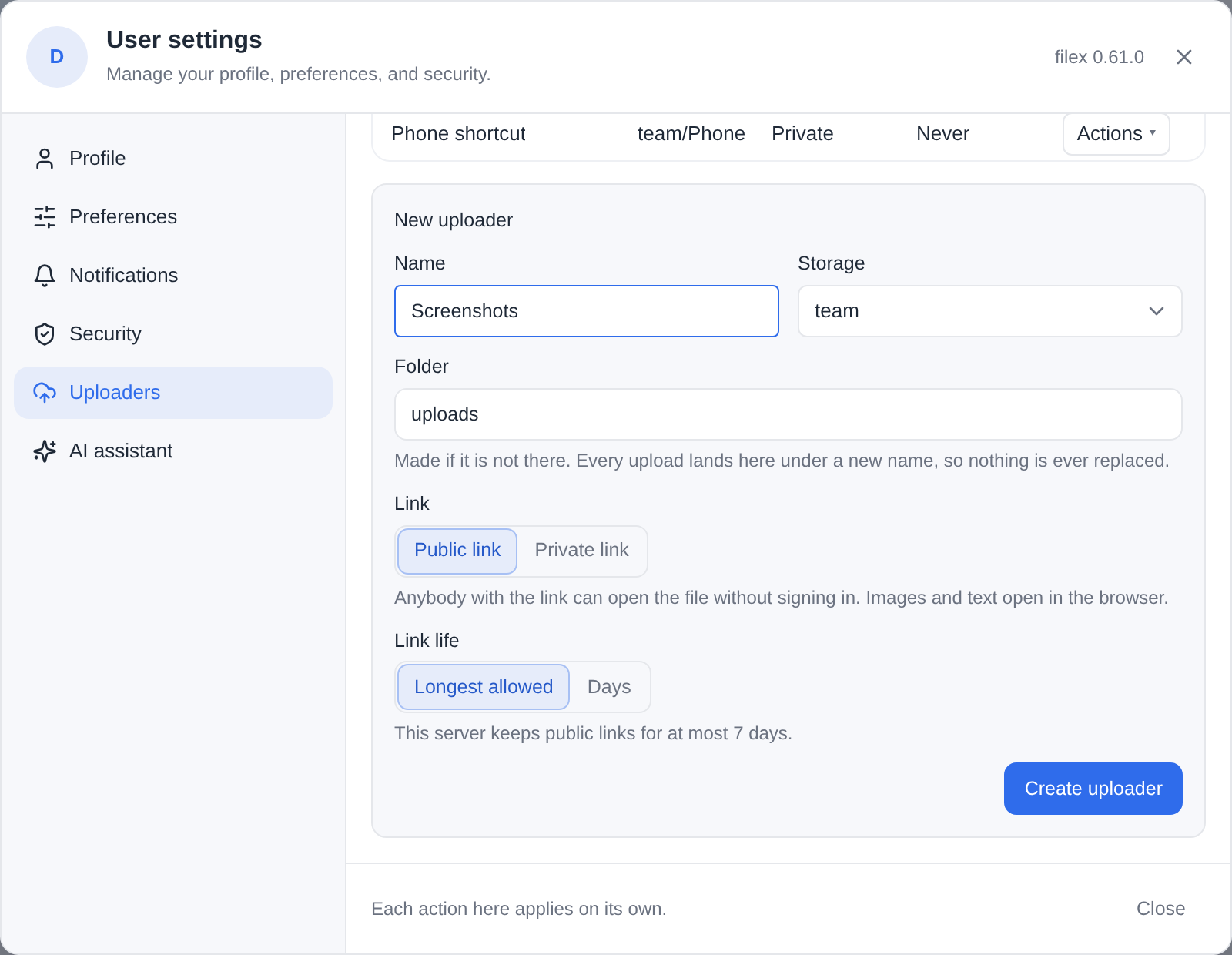
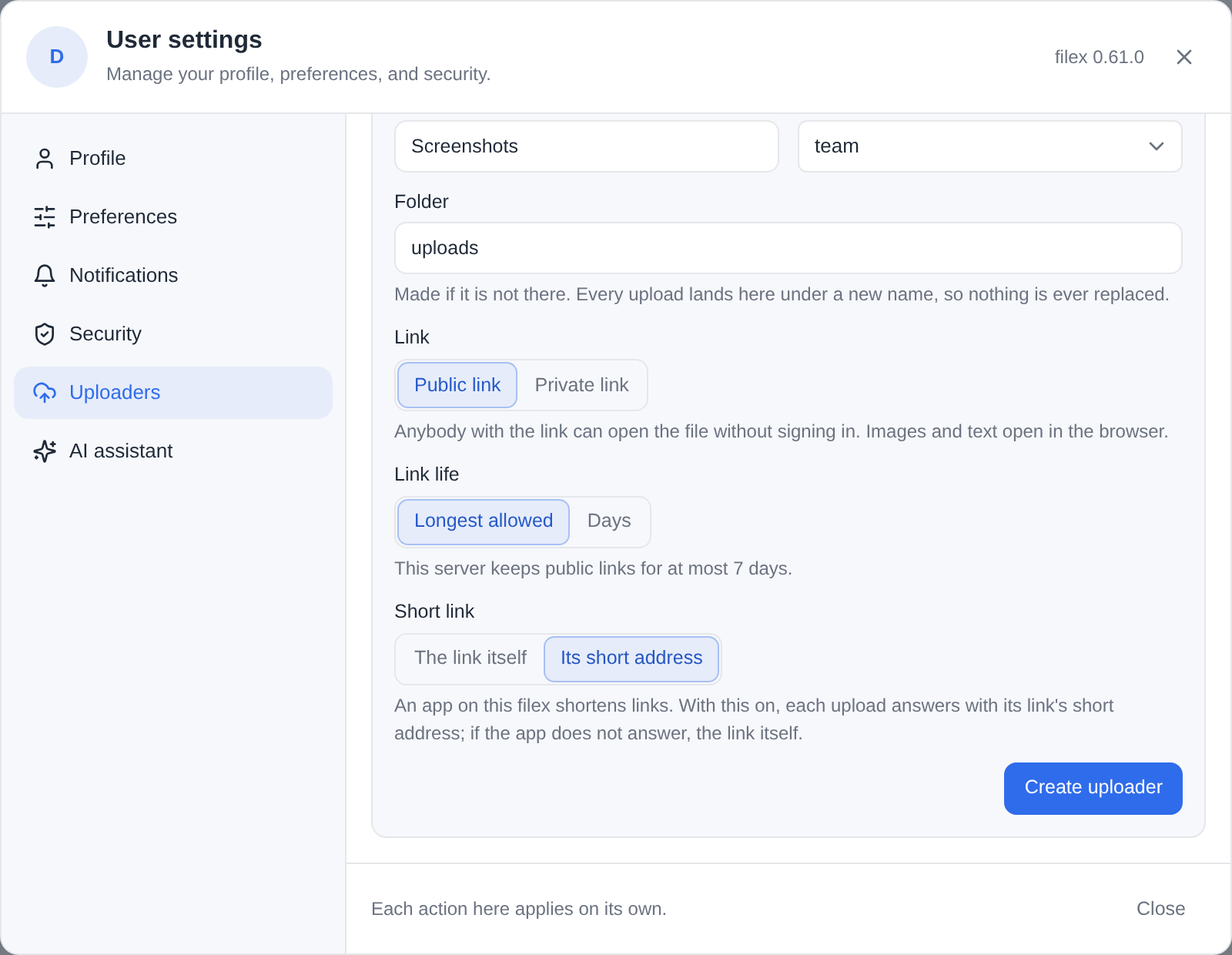
**Create uploader** shows the key **once**, with:
- **Download ShareX settings (.sxcu)** - one ShareX custom uploader for
images, text and files, with this server's address and the key in it;
- a `curl` line that uploads a file.
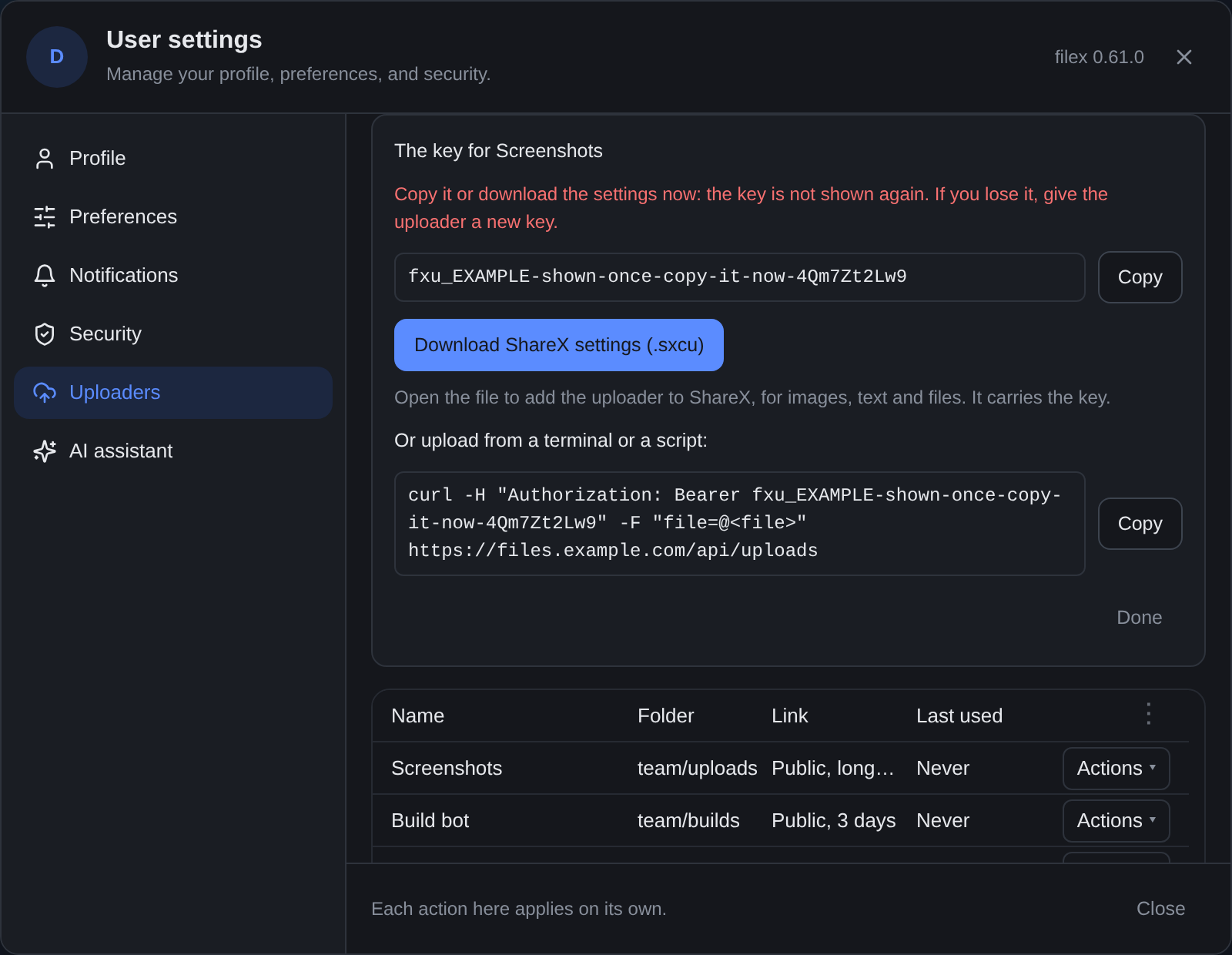
The key is stored as a hash: filex cannot show it again. Lost it? **New key**
on the uploader's row gives it a new one and the old key stops working at
once. **Edit** changes the name, the folder or the link; the key stays.
**Delete** removes the uploader and its key; what it uploaded stays, and so do
the links and deletion links it answered with.
Who may make one: an account with the **`access.api`** permission (the same
permission an API key needs), and **`share.links`** for public links -
without it, an uploader answers with private links only. The account also
needs to be allowed to add files to the folder.
([PERMISSIONS.md](PERMISSIONS.md))
---
## ShareX
1. Make an uploader and click **Download ShareX settings (.sxcu)**.
2. Double-click the file (or in ShareX: **Destinations → Custom uploader
settings… → Import → From file…**). ShareX adds one uploader, named after
yours and the server.
3. In **Destinations**, pick it for **Image uploader**, **Text uploader** and
**File uploader** (**Custom image/text/file uploader**).
Capture as usual: the link goes to your clipboard, and ShareX's history keeps
the link, a thumbnail (for an image) and the [deletion link](#the-deletion-link).
The file is ordinary ShareX JSON. What it sends and reads:
```json
{
"Version": "17.0.0",
"Name": "Screenshots (files.example.com)",
"DestinationType": "ImageUploader, TextUploader, FileUploader",
"RequestMethod": "POST",
"RequestURL": "https://files.example.com/api/uploads",
"Headers": { "Authorization": "Bearer fxu_…" },
"Body": "MultipartFormData",
"FileFormName": "file",
"URL": "{json:url}",
"ThumbnailURL": "{json:thumbnail_url}",
"DeletionURL": "{json:deletion_url}",
"ErrorMessage": "{json:error}"
}
```
⚠ The file carries the key. Treat it as you would a password; if it leaks,
give the uploader a new key (the old file stops working) or delete it.
**Setting ShareX up by hand.** filex.sxcu is the
same file with placeholders instead of an address and a key, for any filex
server: a key you made over [the API](#managing-uploaders-over-the-api), or a
setup guide of your own. Import it as above, then in **Custom uploader
settings** replace `YOUR-FILEX-HOST` in the **Request URL** with your server's
address (and its path, when filex is served under one) and `fxu_YOUR_KEY` in
the `Authorization` header with the uploader's key. The placeholders are plain
text on purpose: ShareX's `{prompt:...}` does not ask once at import, it opens
a box at every upload.
---
## Other programs
Every program sends the same request: a `POST` to `/api/uploads` with the file
in a multipart field named `file` and the key as a bearer.
**curl** (the line the form gives you):
```bash
curl -H "Authorization: Bearer $KEY" -F "file=@shot.png" https://files.example.com/api/uploads
```
**PowerShell 7:**
```powershell
Invoke-RestMethod -Method Post -Uri https://files.example.com/api/uploads `
-Headers @{ Authorization = "Bearer $env:FILEX_UPLOADER_KEY" } `
-Form @{ file = Get-Item .\shot.png }
```
**Flameshot** (Linux), bound to a hotkey: the screenshot goes straight from
the capture to filex, and the link to the clipboard.
```bash
flameshot gui --raw | curl -s -H "Authorization: Bearer $KEY" \
-F "file=@-;filename=screenshot.png" https://files.example.com/api/uploads \
| jq -r .url | xclip -selection clipboard
```
**iOS / macOS Shortcuts:** *Get Contents of URL* with method **POST**, a header
`Authorization` = `Bearer `, request body **Form**, one field `file` of
type **File**; then *Get Dictionary Value* `url` and *Copy to Clipboard*.
---
## The link an upload answers with
| The uploader's link | `url` in the answer | Who can open it |
|---|---|---|
| **Public** | `https://files.example.com/s/?inline=1` - a [share link](SHARING.md#share-links-download); `?inline=1` makes an image or a text file render in the browser instead of downloading (an HTML or SVG file renders sandboxed, without scripts) | anybody with the link, until it expires or is revoked |
| **Private** | `https://files.example.com/drive/explore?select=://#/` - the explorer, opened on the folder with the file selected | whoever signs in and may see the file there; nobody else |
A public upload's link is listed in **My shares** like any link you make,
and may be revoked there. It follows its creator as every link does
([SHARING.md](SHARING.md#a-link-follows-its-creator)): an account that may no
longer make links, or is switched off, closes it.
`thumbnail_url` is in the answer for a public upload of an image (it is the
same link); a private upload has none, because a thumbnail would need a
sign-in too.
**Short link on:** `url` is the short address the shortening app gives the
link (`https://l.example.com/k3Fz9q`, for one), made for the uploader's
owner and kept by the app; `thumbnail_url` and the deletion link stay
filex's own. A shortener that is busy, failing or gone never fails an
upload: the answer then carries the link itself. Turning the switch off, or
the app being removed, changes only the uploads after it.
---
## The deletion link
Every upload's answer carries a `deletion_url`, `https://files.example.com/x/`.
Whoever holds it may delete **that one file**: it goes to its owner's trash
(and can be restored from there), and its public link is revoked.
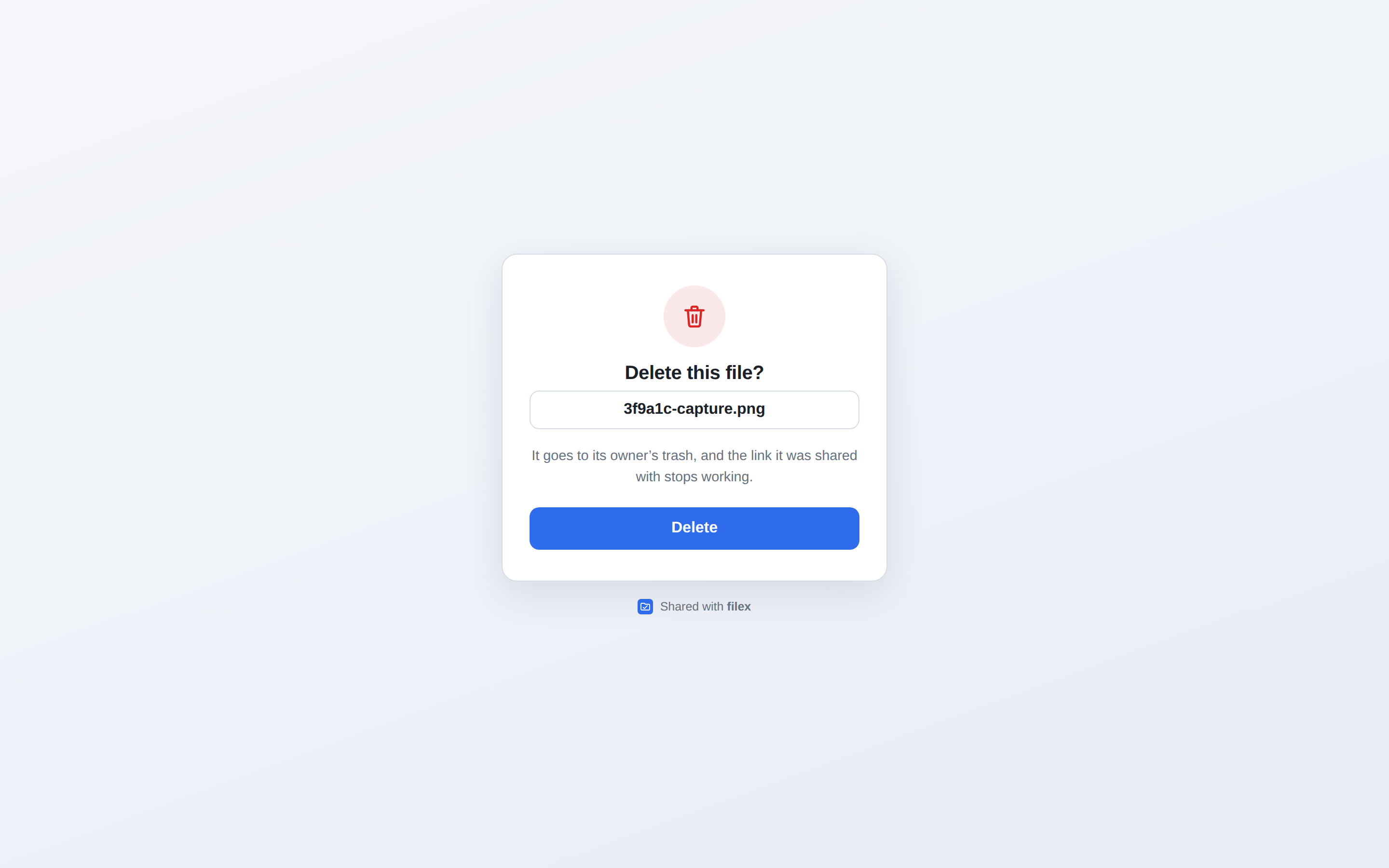
- **Opening the link never deletes.** Chat apps and mail scanners fetch every
link they are shown to draw a preview, so a `GET` answers a small page with
the file's name and one **Delete** button; only that button (a `POST`)
deletes. A deletion link pasted into a channel stays harmless.
- **One use.** A used link, an unknown one and a garbled one answer the same
page: nothing was deleted.
- **The file, not the path.** A file renamed or moved since is still the one
the link deletes, and a file that later takes its old name is never touched.
A file already deleted answers "File already gone".
- **As the owner, as they are now.** The deletion runs as the account that
owns the uploader: an account that may no longer delete the file there is
told so, and nothing happens.
- Deleting the uploader does not end its deletion links: they still delete
what it uploaded.
The page speaks the visitor's language, like every public page
([SHARING.md](SHARING.md)), and is a template an administrator can rewrite
(`page.delete_confirm`, `page.delete_done`: [TEMPLATES.md](TEMPLATES.md)). Each deletion is written to the audit log
(`uploader.file_delete`).
---
## What a key can do
An uploader's key is not an API key. It is looked up by **one** route,
`POST /api/uploads`, and nothing else in filex knows it:
- it cannot list, read, download, change, move or delete anything - not even
what it uploaded (that is the [deletion link](#the-deletion-link)'s job);
- the request names no folder: a `folder` or `path` field is ignored, and the
file goes where the uploader says;
- an upload never replaces a file: every upload is a new name;
- the agent API, MCP, WebDAV, S3, SFTP and the explorer's routes refuse it as
no credential at all (`401`).
So a settings file that leaks - copied between machines, pasted into a chat -
can add files to one folder and do nothing else, and **New key** or
**Delete** ends that.
Every upload is checked as the owner **as the account is now**: switched off,
or without `access.api`, the key is refused; the folder is held by its
storage's id, and a storage that was removed - or, on a multi-tenant server,
moved to another tenant - takes nothing. The owner's quota, per-file limit,
blocked file types and encryption rules apply as to any upload; a folder that
is end-to-end encrypted takes no upload from a key (it has nothing to encrypt
with). Every upload is in the audit log as `uploader.upload`, with the
uploader's name.
---
## The upload endpoint
```
POST /api/uploads
Content-Type: multipart/form-data
Authorization: Bearer (or: X-Filex-Uploader-Key: )
file the bytes
```
**`200`:**
```json
{
"url": "https://files.example.com/s/AbC123?inline=1",
"deletion_url": "https://files.example.com/x/Qm7Zt2Lw9…",
"thumbnail_url": "https://files.example.com/s/AbC123?inline=1"
}
```
An error answers `{"error": "", "code": ""}` - `error` is
written for a person, in the language the request asks for
(`Accept-Language`), because the program on the other end shows it as it is:
| Status | `code` | What to do |
|---|---|---|
| `401` | `uploader_key_missing` | Send the key as `Authorization: Bearer `. |
| `401` | `uploader_key_unknown` | The uploader was deleted or given a new key: download its settings again. |
| `403` | `account_disabled` (in `reason`) | The owner's account is switched off. |
| `403` | `uploader_owner_no_keys` | The owner lost `access.api`. |
| `403` | `uploader_public_denied` | The uploader is public and the owner may not make links there: make it private, or ask for `share.links`. Nothing was stored. |
| `410` | `uploader_storage_gone` | The folder's storage was removed or moved: point the uploader at another folder. |
| `400` | `upload_bad_form`, `upload_file_missing` | Multipart, one field named `file`. |
| `409` | `E2E_PLAINTEXT_REFUSED` | The folder is end-to-end encrypted, and a key has nothing to encrypt with: choose another folder ([E2E-ENCRYPTION.md](E2E-ENCRYPTION.md)). |
| `413` | `upload_too_large` | One upload carries at most **512 MiB**; also the owner's per-file limit and quota (`FILE_TOO_LARGE`, `QUOTA_EXCEEDED`, [QUOTAS.md](QUOTAS.md)). |
Above the upload chunk size the bytes go through filex's staging area, so a
long screen recording is answered as soon as filex holds it
([UPLOADS.md](UPLOADS.md)). Writes stamp `origin: "uploader"` on their file
events and webhooks ([NOTIFICATIONS.md](NOTIFICATIONS.md)).
---
## Managing uploaders over the API
The Uploaders tab is a client of these routes; any signed-in session (and a
personal API key with `write`) may use them for its own account.
| Route | |
|---|---|
| `GET /api/auth/uploaders` | `{uploaders, endpoint, link_max_days, may_link_publicly, may_create, default_folder, storages, short_links_available}` |
| `POST /api/auth/uploaders` | `{name, storage, folder, visibility, link_days, short_link}` → `201 {uploader, key, setup, link_days_clamped}`; `setup` is `{endpoint, sharex, sharex_file, curl}`, built from the key |
| `PATCH /api/auth/uploaders/{id}` | any of the fields above → `{uploader, link_days_clamped}` |
| `POST /api/auth/uploaders/{id}/key` | a new key → `{uploader, key, setup}`; the old key stops working |
| `DELETE /api/auth/uploaders/{id}` | `204` |
Creating, changing and a new key need `access.api`; a request with an API key
needs the key's `write` and a folder inside its `root:` - a key makes no
credential wider than itself. Deleting needs nothing. Somebody else's uploader
answers `404`, like one that does not exist.
---
## Moving from the ShareX endpoint
Before 0.60, ShareX uploaded to `POST /api/sharex/upload` with an **API key**
(`write`) and a `folder` field. That endpoint still works, unchanged - same
answer (`{"url": …}`), same `origin: "sharex"` on its events - and answers a
`Deprecation: true` header. **It is removed in the next major release.**
To move: make an uploader (choose the folder your captures went to, `sharex`
by default), import its `.sxcu`, and delete the API key you made for ShareX
on the API keys page. The new answer also carries a thumbnail and a deletion
link.
---
## Troubleshooting
- **`uploader_key_unknown` right after importing** - the uploader was given a
new key after you downloaded the file: download the settings again.
- **The link opens a sign-in page** - the uploader is private; that is what a
private link does. Switch it to public with **Edit** if strangers should
open it.
- **The link stopped working after a week** - the server's link ceiling
(`share.max_ttl_days`, 7 days unless an administrator changed it on the
Protection page). The form says the ceiling; an administrator can raise it
or set `0` for none.
- **Public link is greyed out** - your account may not make public links
(`share.links`). Private links still work.
- **A link preview deleted my file?** It cannot: a deletion link's `GET`
only shows the page. Only its **Delete** button deletes.