
[](https://travis-ci.org/BigstickCarpet/postman-bdd)
[](https://ci.appveyor.com/project/BigstickCarpet/postman-bdd)
[](https://coveralls.io/r/BigstickCarpet/postman-bdd)
[](https://www.codacy.com/public/jamesmessinger/postman-bdd)
[](http://inch-ci.org/github/BigstickCarpet/postman-bdd)
[](https://david-dm.org/BigstickCarpet/postman-bdd)
[](https://www.npmjs.com/package/postman-bdd)
[](http://bower.io/)
[](LICENSE)
Overview
--------------------------
The [Postman REST client](http://getpostman.com) allows you to [write tests](https://www.getpostman.com/docs/writing_tests) for your APIs, such as ensuring that your endpoints return the proper HTTP status codes, headers, and content. It even has has a built-in [test runner](https://www.getpostman.com/docs/running_collections) that makes it easy to run all of your tests and immediately see the results. And you can use the [Newman command-line tool](https://www.getpostman.com/docs/newman_intro) to automate your tests and integrate them into your CI and deployment pipeline.
Postman's built-in test framework uses a boolean-flag syntax for testing, like this:
```javascript
tests['The correct response code was returned'] = responseCode.code === 200;
tests['The Location header is set'] = postman.getResponseHeader('Location');
tests['The Content-Type is JSON'] = postman.getResponseHeader('Content-Type') === 'application/json';
tests['The response has an ID property'] = JSON.parse(responseBody).id = 12345;
```
But Postman BDD allows you to use BDD syntax to structure your tests and [fluent Chai-JS syntax](http://chaijs.com/api/bdd/) to write assertions. So the above test suite could look like this instead:
```javascript
describe('Get customer info', () => {
it('should return a 200 response', () => {
response.should.have.status(200);
});
it('should set the Location header', () => {
response.should.have.header('Location');
});
it('should return a JSON response', () => {
response.should.be.json;
});
it('should return the correct customer', () => {
response.body.should.have.property('id', 12345);
});
});
```
Features & Benefits
--------------------------
- **BDD & fluent syntax**
Makes tests easier to write and read
- **BDD Hooks**
Use `before`, `after`, `beforeEach`, and `afterEach` hooks to reuse code and tests
- **Automatic Response Parsing**
If the response is JSON or XML, then it is automatically parsed for you. No need to call `JSON.parse()` or `xml2Json()` first.
- **Automatic Error Handling**
If a script error occurs, only that _one_ test fails. Other tests still run.
- **Lots of Assertions**
Full access to all [Chai-JS](http://chaijs.com/api/bdd/) and [Chai-HTTP](http://chaijs.com/plugins/chai-http/#assertions) assertions
- **Custom Assertions**
Define custom Chai-JS assertions for your API to encapsulate logic and make tests more readable
(e.g. `response.body.should.be.a.customer`)
- **Nested `describe` blocks**
You can nest `describe` blocks to logically group your tests
- **JSON Schema Validation**
Use `response.body.should.have.schema(someJsonSchema)` to validate responses against a [JSON Schema](https://spacetelescope.github.io/understanding-json-schema/basics.html)
- **Detailed logging**
You can increase or decrease the amount of information that Postman BDD logs by setting `postmanBDD.logLevel`. Errors and warnings are logged by default.
Installation
--------------------------
There are two simple steps to installing Postman BDD:
**1. Download Postman BDD**
Create a `GET` request in Postman and point it to the following URL:
[`http://bigstickcarpet.com/postman-bdd/dist/postman-bdd.min.js`](http://bigstickcarpet.com/postman-bdd/dist/postman-bdd.min.js)
**2. Install Postman BDD**
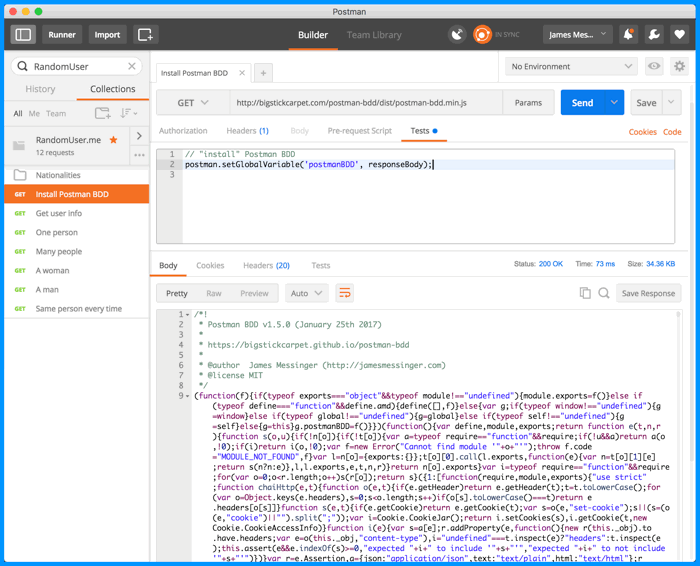
In the same request that you created in Step 1, go to the "Tests" tab and add the following script:
```javascript
// "install" Postman BDD
postman.setGlobalVariable('postmanBDD', responseBody);
```
Here's what that should look like:
Usage
--------------------------
You now have Postman BDD installed globally. You can use it in any Postman request by "loading" it with the following script:
```javascript
// Load Postman BDD
eval(globals.postmanBDD);
```
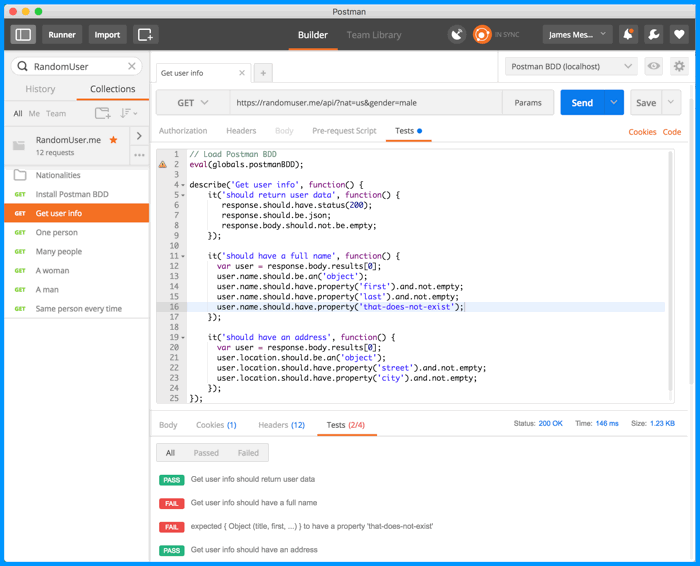
After you've loaded Postman BDD, you can write your tests using BDD syntax and [Chai-JS assertions](http://chaijs.com/api/bdd/). Here's an screenshot of [a sample collection](https://documenter.getpostman.com/view/220187/postman-bdd-examples/6Z3uY71):
Writing Tests
--------------------------
Postman BDD uses [Chai.js](http://chaijs.com/api/bdd/), [Chai-HTTP](https://github.com/chaijs/chai-http#assertions), and [SuperAgent](https://visionmedia.github.io/superagent/#response-properties) under the hood, so you have access to all three of those libraries to write your tests. Of course, you also have access to the [Postman scripting environment](https://www.getpostman.com/docs/sandbox), which provides several helpful utility functions and libraries.
The best way to learn how to use Postman-BDD is to [check out this sample collection](https://documenter.getpostman.com/view/220187/postman-bdd-examples/6Z3uY71), which includes several examples of both simple and complex API test cases. It also demonstrates some advanced usage, such as re-using code, writing your own custom assertions, etc. Click this button to open the sample collection in Postman:
[](https://app.getpostman.com/run-collection/3aa9116ba36136628303)
### `response` object
The [`response` object](https://visionmedia.github.io/superagent/#response-properties) is what you'll be doing most of your assertions on. It contains all the information about your HTTP response, such as [`response.text`](https://visionmedia.github.io/superagent/#response-text), [`response.body`](https://visionmedia.github.io/superagent/#response-body), [`response.status`](https://visionmedia.github.io/superagent/#response-status), and even a few shortcut properties like [`response.ok`](https://visionmedia.github.io/superagent/#response-status) and [`response.error`](https://visionmedia.github.io/superagent/#response-status).
### `expect` and `should` assertions
You can use any of the [Chai-HTTP assertions](https://github.com/chaijs/chai-http#assertions) via Chai's [`expect` interface](http://chaijs.com/guide/styles/#expect) or [`should` interface](http://chaijs.com/guide/styles/#should). It's just a matter of personal preference. For example, the following two assertions are identical:
```javascript
// expect interface
expect(response).to.have.header('content-type', 'application/json');
// should interface
response.should.have.header('content-type', 'application/json');
```
Running tests in bulk
--------------------------
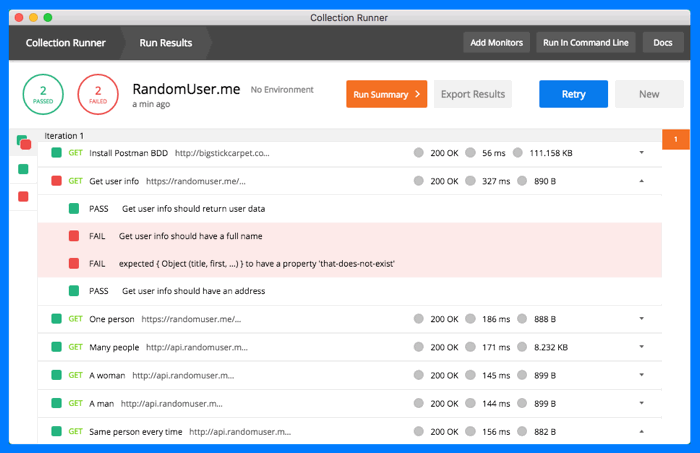
The normal Postman UI allows you to test individual requests one-by-one and see the results. That's great for debugging a specific endpoint or scenario, but if you want to run _all_ of your tests, then you'll want to use Postman's Collection Runner. To do that, click the "_Runner_" button in the header bar.
Select the collection you want to run, and any other options that you want — such as an [environment](http://www.getpostman.com/docs/environments), a [data file](http://www.getpostman.com/docs/multiple_instances), or the number of iterations to run. Then click the "_Start Test_" button. You'll see the test results on the right-hand side, as well as a pass/fail summary at the top. You can also click the "info" icon for any request to see detailed test results for that request.
Running tests from the command line
--------------------------
Postman has a command-line test runner called [Newman](http://www.getpostman.com/docs/newman_intro). If you prefer the CLI instead of a GUI, then this the tool for you. It's also ideal for [continuous-integration](https://en.wikipedia.org/wiki/Continuous_integration) and [continuous-delivery](https://en.wikipedia.org/wiki/Continuous_delivery) testing. Just like the Collection Runner, you can run your entire suite of tests, or just a single folder. You can load data from a file, and even write the test results to an output file in various formats (JSON, XML, HTML)
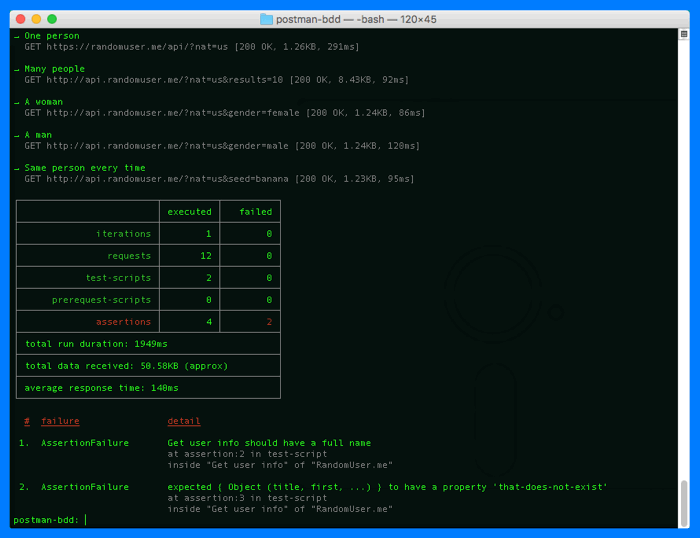
> **NOTE:** Global variables that you create in the Postman app **don't** automatically exist in the Newman CLI. This includes the `postmanBDD` variable. You can import global variables into Newman using the [`--globals`command line argument](https://github.com/postmanlabs/newman#command-line-options). Another option is to [install Postman BDD](#installation) as the first request in your collection; that way the collection works anywhere you run it, without relying on the existence of global variables.
Contributing
--------------------------
I welcome any contributions, enhancements, and bug-fixes. [File an issue](https://github.com/BigstickCarpet/postman-bdd/issues) on GitHub and [submit a pull request](https://github.com/BigstickCarpet/postman-bdd/pulls).
#### Building/Testing
To build/test the project locally on your computer:
1. __Clone this repo__
`git clone https://github.com/bigstickcarpet/postman-bdd.git`
2. __Install dependencies__
`npm install`
3. __Run the tests__
`npm test`
4. __Start the local web server__
`npm start` (then browse to [http://localhost:8080/](http://localhost:8080)
5. __Run Postman__
Download it [here](http://getpostman.com/apps) (it's free)
5. __Run the Postman BDD Collection__
Import the [Postman BDD Collection](test/newman/postman_bdd_collection.json), and then use the [Postman BDD (localhost) Environment](test/newman/postman_bdd_localhost_environment.json) or the [Postman BDD (GitHub) Environment](test/newman/postman_bdd_github_environment.json) to run the collection.
License
--------------------------
Postman BDD is 100% free and open-source, under the [MIT license](LICENSE). Use it however you want.