
The most popular app store for Raspberry Pi computers. 100% free, open-source and written in shell scripts.
View changelog | Apps List | Report an error | Make a general suggestion | Suggest new app | Submit a new app








Made with ❤ by Botspot, theofficialgman, and contributors
Check out our website: pi-apps.io
## Introduction Installing software on ARM Linux is easy... until it isn't. Many popular apps just don't appear in the `apt` repositories, and it's very easy for inexperienced users to mess up their OS trying to install such apps manually. **We're trying to solve this problem.** Introducing Pi-Apps, a well-maintained collection of scripts that automatically install hard-to-install apps. See the full list [here](https://pi-apps.io/wiki/getting-started/apps-list/). Pi-Apps is not your average app store. Rather than require any standardized packaging format or centralized hosting, our shell scripts download the app from *where it already is*. Scripts offer tremendous flexibility. If you can manually install it, then Pi-Apps can automatically install it. [Please help us expand our list of apps.](https://pi-apps.io/wiki/development/Creating-an-app/) *You don't have to be the app developer to get it added to Pi-Apps!* (You just have to know a little bit of bash scripting) Pi-Apps now serves **over 1,000,000 people** and hosts [over 200 apps](https://pi-apps.io/wiki/getting-started/apps-list/). ## Install Pi-Apps Open a terminal and run this command: ```bash wget -qO- https://raw.githubusercontent.com/Botspot/pi-apps/master/install | bash ```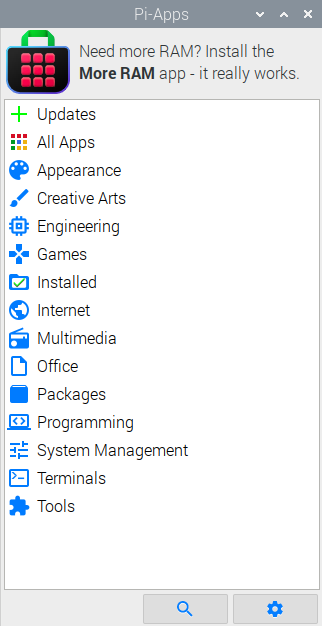 ### Supported systems:
#### Raspberry Pi
### Supported systems:
#### Raspberry Pi  (2 v1.2/Zero 2 W/3/4/5)
- [**Raspberry Pi OS**](https://www.raspberrypi.com/software/operating-systems/) (32-bit Bookworm/64-bit Bookworm/64-bit Trixie): fully supported
-
(2 v1.2/Zero 2 W/3/4/5)
- [**Raspberry Pi OS**](https://www.raspberrypi.com/software/operating-systems/) (32-bit Bookworm/64-bit Bookworm/64-bit Trixie): fully supported
-  [**Ubuntu**](https://ubuntu.com/download/raspberry-pi) (Jammy/Noble): fully supported
#### Nintendo Switch
[**Ubuntu**](https://ubuntu.com/download/raspberry-pi) (Jammy/Noble): fully supported
#### Nintendo Switch  -
-  [**Switchroot L4T Ubuntu Noble (24.04)**](https://wiki.switchroot.org/wiki/linux/l4t-ubuntu-noble-installation-guide): fully supported
- [**Switchroot L4T Ubuntu Jammy (22.04)**](https://wiki.switchroot.org/wiki/linux/l4t-ubuntu-jammy-installation-guide): fully supported
#### Nvidia Jetson
[**Switchroot L4T Ubuntu Noble (24.04)**](https://wiki.switchroot.org/wiki/linux/l4t-ubuntu-noble-installation-guide): fully supported
- [**Switchroot L4T Ubuntu Jammy (22.04)**](https://wiki.switchroot.org/wiki/linux/l4t-ubuntu-jammy-installation-guide): fully supported
#### Nvidia Jetson  - [**Nvidia Jetpack 7**](https://developer.nvidia.com/embedded/jetpack) (Ubuntu Noble): fully supported
- [**Nvidia Jetpack 6**](https://developer.nvidia.com/embedded/jetpack-sdk-621) (Ubuntu Jammy): fully supported
#### Apple Silicon Macs
- [**Ubuntu Asahi**](https://ubuntuasahi.org/) (Ubuntu Noble): Not actively tested but all available apps should work
#### [**Pine64**](https://www.pine64.org/), [**Orange Pi**](http://www.orangepi.org/), [**Radxa**](https://rockpi.org/), [**Banana Pi**](https://banana-pi.org/), [**Khadas**](https://www.khadas.com/), [**Inovato**](https://www.inovato.com/), [**Libre Computer**](https://libre.computer/), and other **ARMv7/ARMv8/ARMv9** Devices
-
- [**Nvidia Jetpack 7**](https://developer.nvidia.com/embedded/jetpack) (Ubuntu Noble): fully supported
- [**Nvidia Jetpack 6**](https://developer.nvidia.com/embedded/jetpack-sdk-621) (Ubuntu Jammy): fully supported
#### Apple Silicon Macs
- [**Ubuntu Asahi**](https://ubuntuasahi.org/) (Ubuntu Noble): Not actively tested but all available apps should work
#### [**Pine64**](https://www.pine64.org/), [**Orange Pi**](http://www.orangepi.org/), [**Radxa**](https://rockpi.org/), [**Banana Pi**](https://banana-pi.org/), [**Khadas**](https://www.khadas.com/), [**Inovato**](https://www.inovato.com/), [**Libre Computer**](https://libre.computer/), and other **ARMv7/ARMv8/ARMv9** Devices
-  [Debian Bookworm/Trixie](https://www.debian.org/distrib/) (Official Releases from Debian **ONLY**): Not actively tested but all available apps should work
- [Ubuntu Jammy/Noble](https://ubuntu.com/download/desktop) (Official Releases from Canonical **ONLY**): Not actively tested but all available apps should work
### Unsupported systems:
- 32-bit ARM operating systems. We've stopped supporting Trixie 32-bit due to how many apps depend on 32-bit packages that Debian [renamed](https://wiki.debian.org/ReleaseGoals/64bit-time) to mitigate yk2038.
- Bookworm 32-bit is still supported until EOL.
- Raspberry Pi Pico: These devices are microcontrollers and cannot run linux.
- All **UNOFFICIAL** Debian and Ubuntu based releases (unless mentioned above): Expect many apps to have issues.
- Examples: **Orange Pi OS**,
[Debian Bookworm/Trixie](https://www.debian.org/distrib/) (Official Releases from Debian **ONLY**): Not actively tested but all available apps should work
- [Ubuntu Jammy/Noble](https://ubuntu.com/download/desktop) (Official Releases from Canonical **ONLY**): Not actively tested but all available apps should work
### Unsupported systems:
- 32-bit ARM operating systems. We've stopped supporting Trixie 32-bit due to how many apps depend on 32-bit packages that Debian [renamed](https://wiki.debian.org/ReleaseGoals/64bit-time) to mitigate yk2038.
- Bookworm 32-bit is still supported until EOL.
- Raspberry Pi Pico: These devices are microcontrollers and cannot run linux.
- All **UNOFFICIAL** Debian and Ubuntu based releases (unless mentioned above): Expect many apps to have issues.
- Examples: **Orange Pi OS**,  [**Pop_OS!**](https://pop.system76.com/), **Kali Linux**, and **ChromeOS Crostini** Debian Container
- Anything Non-Debian and Non-Ubuntu: Expect the majority of apps and the appstore to be broken.
- Examples: **Slackware**, **RHEL**, **Fedora**, **SUSE**, **Arch Linux**, **Gentoo**, **Void Linux**, **NixOS**
- Anything not already mentioned: Expect nothing to work.
- Examples: **Microsoft Windows**, **MacOS**, **Android**, and **ChromeOS**
## Badge
If your application is on Pi-Apps, please consider adding this pretty badge/hyperlink to your README (dark and light modes available):
[](https://github.com/Botspot/pi-apps) [](https://github.com/Botspot/pi-apps)
Embed code (Dark):
```
[](https://github.com/Botspot/pi-apps)
```
Embed code (Light):
```
[](https://github.com/Botspot/pi-apps)
```
### Q&A with Botspot
- Why did you make Pi-Apps?
> For a long time I have been saddened by how difficult it is to install software on Linux. In that regard, nearly all other operating systems put us to shame.
> How will people discover useful, free software?
> Most people **don't**.
> One day I realized: Why not make a collection of scripts to install popular apps? This would save so much time, and makes it much easier to use a Raspberry Pi as a daily, desktop computer solution.
- How long did it take to program this?
> Why would you think it's not still under development? 🤪
> Pi-Apps took around 14 days to lay the groundwork, and ever since then it has been continually, and exponentially, improved. I (Botspot) am not the sole programmer anymore - [others](https://github.com/Botspot/pi-apps/graphs/contributors) have stepped in and made improvements too.
- Is Pi-Apps free?
> Absolutely! [Donations are welcome](https://github.com/sponsors/botspot), but Pi-Apps itself will always be free and open-source.
## Star History
[**Pop_OS!**](https://pop.system76.com/), **Kali Linux**, and **ChromeOS Crostini** Debian Container
- Anything Non-Debian and Non-Ubuntu: Expect the majority of apps and the appstore to be broken.
- Examples: **Slackware**, **RHEL**, **Fedora**, **SUSE**, **Arch Linux**, **Gentoo**, **Void Linux**, **NixOS**
- Anything not already mentioned: Expect nothing to work.
- Examples: **Microsoft Windows**, **MacOS**, **Android**, and **ChromeOS**
## Badge
If your application is on Pi-Apps, please consider adding this pretty badge/hyperlink to your README (dark and light modes available):
[](https://github.com/Botspot/pi-apps) [](https://github.com/Botspot/pi-apps)
Embed code (Dark):
```
[](https://github.com/Botspot/pi-apps)
```
Embed code (Light):
```
[](https://github.com/Botspot/pi-apps)
```
### Q&A with Botspot
- Why did you make Pi-Apps?
> For a long time I have been saddened by how difficult it is to install software on Linux. In that regard, nearly all other operating systems put us to shame.
> How will people discover useful, free software?
> Most people **don't**.
> One day I realized: Why not make a collection of scripts to install popular apps? This would save so much time, and makes it much easier to use a Raspberry Pi as a daily, desktop computer solution.
- How long did it take to program this?
> Why would you think it's not still under development? 🤪
> Pi-Apps took around 14 days to lay the groundwork, and ever since then it has been continually, and exponentially, improved. I (Botspot) am not the sole programmer anymore - [others](https://github.com/Botspot/pi-apps/graphs/contributors) have stepped in and made improvements too.
- Is Pi-Apps free?
> Absolutely! [Donations are welcome](https://github.com/sponsors/botspot), but Pi-Apps itself will always be free and open-source.
## Star History