I suck at python ~ Bartosz 19/06/2025
python is funny ~ Arnav 18/09/2025
# Fraudpheus
## Origin
So... it's named Fraudpheus cause its main purpose was to communicate with
people who are accused of committing fraud in Summer of Making program made by Hack Club.
We were receiving lots of DMs, and even emails from angry people, some were searching
other ways to reach us by finding our social medias.
To make it more private and safer for us, We've created a bot which keeps our identities hidden
## Features
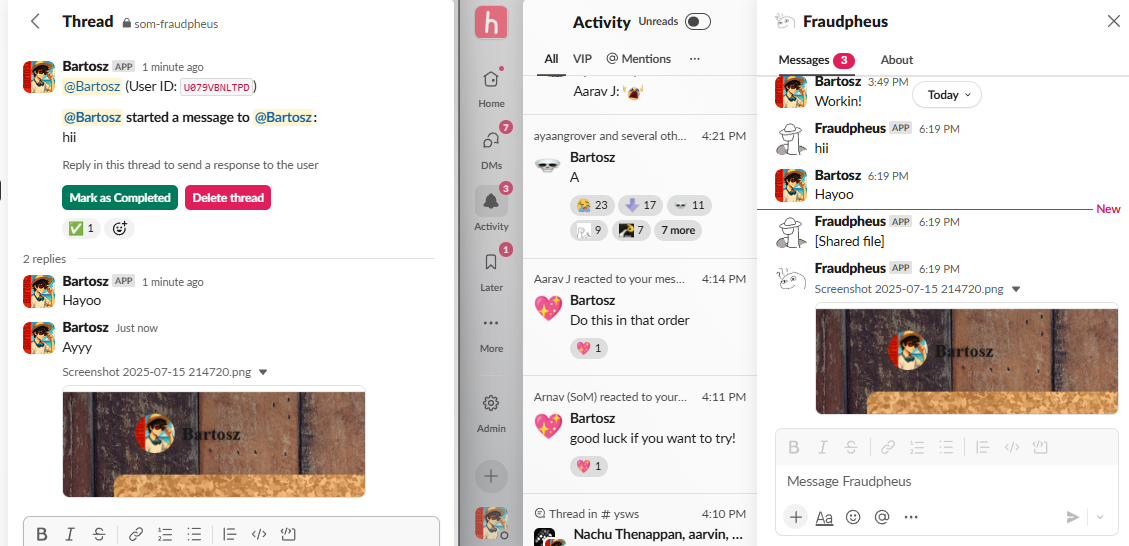
- Communicating between people who DM your bot and members of certain channel
- AI-powered responses that help handle common queries automatically (with human approval)
- Smart triages that categorize and prioritize incoming messages
- Custom "hidden" messages by typing `!` at the start of reply - won't be sent as DM,
stays in the channel for team notes
- Macros for quick responses to frequently asked questions
- Keeping track of which cases are resolved and which not by marking threads as completed
- Deleting threads to keep the channel clean
- Transferring files between channel members and people DMing the bot
- Integration with wakatime/hackatime fraud detectors
## Usage
- Type `/fdchat @user msg` where `user` is a mention of someone (ping) and `msg` is your desired message.
It will send a message to the person you mentioned
- Type `!msg` in existing thread of your channel to have a hidden message which won't be sent to chosen user.
- Clicking `Mark as Completed` marks the thread as completed and puts a checkmark as a reaction.
- Clicking `Delete thread` deletes the thread both from the channel and from the db.
- New messages started by users DMing your bot, or answering to completed threads will appear as a new thread.
 ## Setup
### Slack App
Create a Slack App with these scopes:
## Setup
### Slack App
Create a Slack App with these scopes:
Bot token scopes
- `channels:history`
- `channels:read`
- `chat:write`
- `chat:write.customize`
- `chat:write.public`
- `commands`
- `files:read`
- `files:write`
- `groups:history`
- `im:history`
- `im:read`
- `im:write`
- `reactions:read`
- `reactions:write`
- `users:read`
User scopes
- `channels:history`
- `channels:read`
- `channels:write`
- `chat:write`
- `im:history`
- `im:read`
- `users:read`
Add a slash command, initial one is `fdchat`, you can change it in code though.
Make sure to turn the option `Escape channels, users, and links sent to your app` on.
### Airtable
You need to create a database on Airtable.
You need to have at least two tables.
- `Active Threads`
- `Completed Threads`
They have to include these fields:
Active Threads
- `user_id` - single line text
- `channel` - single line text
- `created_at` - created time
- `last_activity` - last modified time
- `message_ts` - single line text
- `thread_ts` - single line text
- `funny_field` - single line text
Completed Threads
- `user_id` - single line text
- `channel` - single line text
- `completed_at` - created time
- `message_ts` - single line text
- `thread_ts` - single line text
### env
Create a `.env` file in the roof directory of this project (outside of `src/`)
Fill it out based on `example.env` file
User token is used for deleting messages of other users, as only admins can do that. If you
don't have admin privileges, fill it - but keep in mind your bot won't delete all messages when destroying threads
### Preparing python stuff
```
# Create virtual environment
python3 -m venv venv
# Activate it
source venv/bin/activate
# Install dependencies
pip install -r requirements.txt
```
After that your bot should be ready to run!
Just remember to add that bot to the channel