---
template: overrides/blogs.html
tags:
- docker
---
# First Experience with Docker
!!! info
Author: Tina, Published on November 5th, 2021, Reading time: about 6 minutes, WeChat Official Account Article Link: [:fontawesome-solid-link:]()
## 1. Introduction
As the author did not have much experience in product development and deployment, it did take some time to learn the concepts and applications of Docker. Today, I will share with you how to open the door to Docker from scratch.
## 2. Basic Concepts of Docker
Docker is an open-source software that programmers can use Python, Java, and other object-oriented languages to design products. Why do we need to use it? This is because we need many specific packages and configuration files to build an environment when we are developing. If users want to call it in different system environments, it is a very time-consuming and laborious task. This is where Docker comes in handy. Docker can help package the dependency packages and environment that our product needs, so that users can more directly and easily use our products.
Talking about Docker, we naturally cannot do without the concepts of image, container, and image repository. Here, I will use a metaphor that is close to reality to help you understand these three concepts more vividly.
Think of our product as a car. If a consumer likes the model of this car, without Docker, he may need to replicate the production process of this car from scratch.
The image is like the prototype of this car, which is the initial appearance of the car, including basic components such as tires, engines, and steering wheels. The image here determines the car model.
A container is the different versions designed to suit different tastes in the market, such as luxury, simple, etc., and even decorated according to the buyer's preferences after purchase. In other words, containers are application instances based on images. Containers are independent of each other but may come from the same image. Through commands, we can create, run, stop, and delete containers.
The image repository is like a parking lot that stores all kinds of cars. This is easier to understand. This repository concept is very similar to Github Repo, where all images are stored.
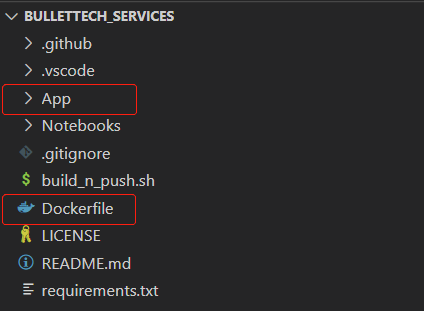
One of the most common ways to build images is to create a Dockerfile. In the example above, it is equivalent to designing a blueprint for a car. The Dockerfile needs to be placed in the root directory along with the main function of the program to facilitate finding all the files you need at runtime.
Dockerfile Storage Rules
## 3. Deployment Process of Docker
### 3.1 Create Dockerfile
A brief introduction to the components of the [Dockerfile](https://docs.docker.com/engine/reference/builder/ "Dockerfile"):
```Docker
FROM # specify the base image
MAINTAINER # indicate the creator of the image
# specify the local path and add files (adding local files, COPY is recommended by the official website)
COPY
RUN # command to create the image
# add files by specifying the path (ADD can not only decompress the local tar file, but also copy files from the URL)
ADD
WORKDIR # specify the working directory of the image
EXPOSE # specify the interaction port
CMD # command to start the image
```
### 3.2 Create an Image
Here are three common ways to create an image:
```Docker
# 1. Create based on the Dockerfile in the current path
docker build .
# 2. Create based on the Dockerfile found by github URL path
docker build github.com/creack/docker-firefox
# 3. Create based on the local Dockerfile
docker build -t /path/to/Dockerfile .
```
### 3.3 Running the Container
The container is the running image, and you can start the container by selecting the image you want to run by checking the image.
- Run in the background `-d`:
```Docker
docker run --name mycontainer -d myimage:latest
```
Use the docker image myimage:latest to run the container in the background mode and name it mycontainer.
- Run by specifying the port `-p`:
```Docker
docker run -p 127.0.0.1:80:8000/tcp ubuntu bash
```
Bind the container port 8080 and map it to port 80 of 127.0.0.1 on the local machine. tcp represents the port protocol, and enter the ubuntu system to run the container using the bash command.
- Assign a virtual terminal `-it`:
```Docker
docker run --name mycontainer -it myimage:latest
```
`-it` means to allocate a virtual terminal for the container to run.
If you want to learn more about Docker run in detail, please refer to the [official documentation](https://docs.docker.com/engine/reference/run/ "Docker run refernce").
### 3.4 Other Common Commands of Docker
Finally, some basic operations are listed below to help you operate and push the created image service quickly.
```Docker
docker pull # Pull the image from the private or public repository
docker images # View the image
docker ps # List the current running container
docker ps -a | grep # View the test container information
docker stats # View the running resources being used
docker container logs # View the log
docker stop # Stop the container
docker start # Restart the stopped container
docker rm # Delete the container
docker push [image_version] # Push the image to the remote repository
docker image prune # Delete the suspended image
docker container prune # Clean up stopped containers
docker container prune --filter "container id" # Do not clean up specific container IDs
docker rm -v $(docker ps -aq -f status=exited) # Delete all exited containers
```
## 4. Conclusion
These concepts seem very abstract, especially for those who have never touched this knowledge before (such as the author herself). But when you read and think repeatedly and practice by yourself, you will find that this thing is not that complicated. It is just a tool to help you deploy web pages and other products. Next time, we will discuss how to manage data in containers in a persistent manner.
I hope this sharing can help you explore Docker, and welcome everyone to leave a message for discussion.