








---
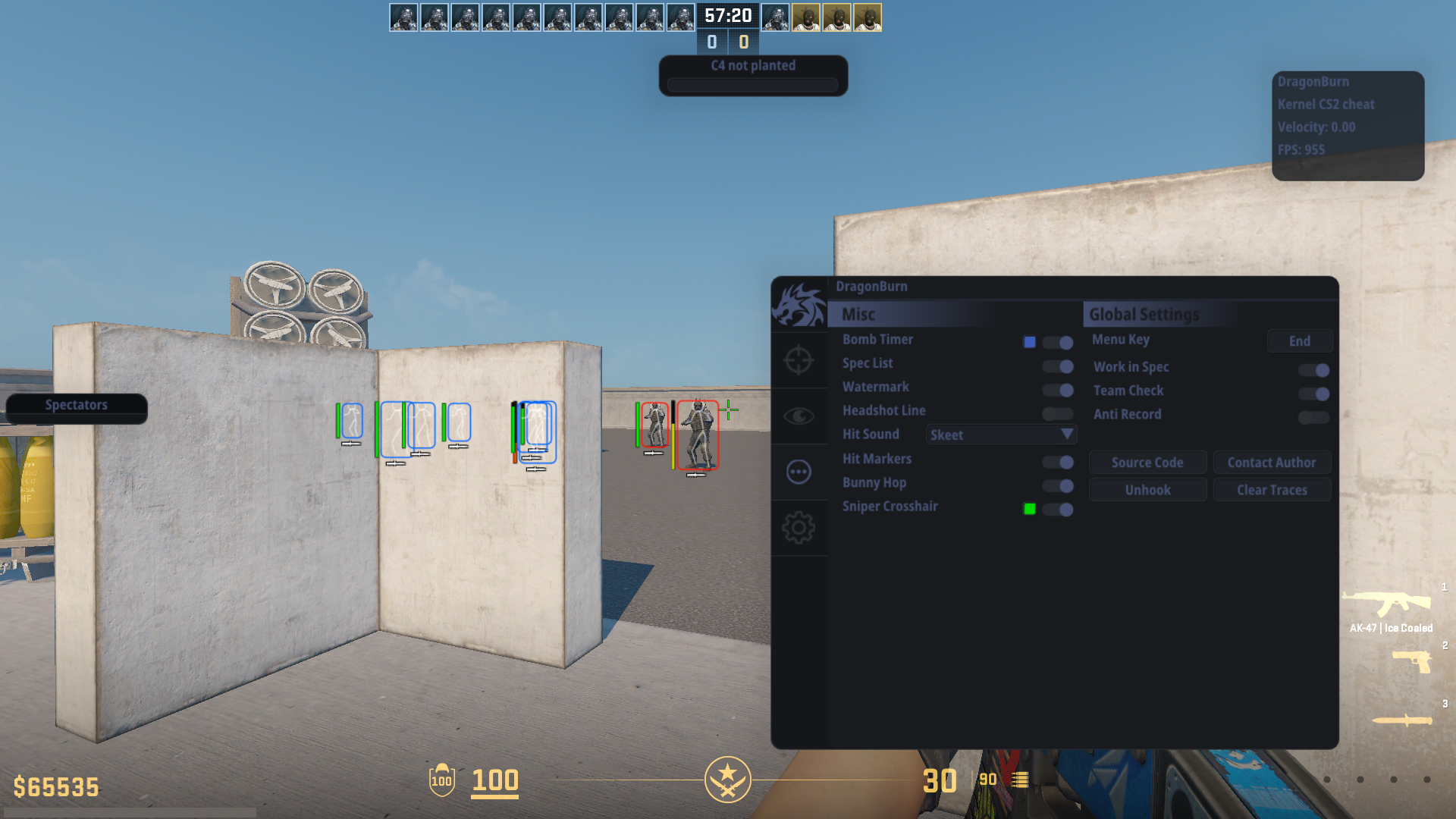
DragonBurn is one of the best CS2 kernel mode read only external cheats. It has a wide range of features, full customization, and automatic offset updates. Undetected by all anti-cheats except faceit.
Download latest release
⭐Please, star this repo if it was helpful⭐
---
### 🌐Join our community

 ---
### 📋Features
Press END key to open/close menu.
---
### 📋Features
Press END key to open/close menu.
Visual
- Box ESP
- Box Type
- Box Rounding
- Filled Box ESP
- Gradient Filled Box ESP
- Skeleton
- Snap Line
- Sound esp
- Bomb esp
- Bomb carrier esp
- Visual Color
- Eye Ray
- Health Bar
- Armor Bar
- Weapon
- Ammo
- Distance
- Name
- Scoped
- Blind
- Blind Hide
- AWP Crosshair
- Visual Preview
- etc
Radar Hack
- Point Size
- Proportion
- Range
- Alpha
Aimbot
- Start Bullet
- Aim Lock
- Draw Fov
- Visible Check
- Auto Only
- Flash Check
- Scope Check
- Humanization
- FOV
- Smooth
- Multi Hitboxes Selection
RCS
- Yaw
- Pitch
- Preview
Trigger Bot
- Scope Check
- Flash Check
- Stop Check
- Shot Delay
- Shot Duration
- TTD
Misc
- Bomb Timer
- Bunny Hop
- Head Line
- Hit Sound
- Hit Markers
- Auto knife
- Auto zeus
- Auto accept
- Spectator list
- Watermark
- Anti Record
---
### 🛠️How to use
At the beginning, download latest release or compile project by yourself. You need only 2 files `DragonBurn.exe` and `DragonBurn-kernel.exe`.
> [!NOTE]
> Kernel driver is closed-source for safety reasons. Please download the compiled binary from the releases.
Once downloaded, run `DragonBurn-kernel.exe` to map the driver. If u see `[+] success` all fine, then just run `DragonBurn.exe` and gl hf.
---
### ❌Errors
 > Error: `Windows Defender, other antivirus programs, or anti-cheats may flag cheat as virus`
>
> Solution: Turn off real-time protection
---
### ❌Mapper errors
cmd should be opened as admin
> Error: `[x] Kernel-mode driver image is empty`
>
> Solution: Fill `std::vector image = {};` in `cfg.h` with kernel binaries
> Error: `[x] \Device\Nal is already in use.`
>
> Solution: Use [NalFix](https://github.com/VollRagm/NalFix)
> Error: `[x] Your vulnerable driver list is enabled and have blocked the driver loading`
>
> Solution: Disable vulnerable driver list, [official solution](https://support.microsoft.com/en-au/topic/kb5020779-the-vulnerable-driver-blocklist-after-the-october-2022-preview-release-3fcbe13a-6013-4118-b584-fcfbc6a09936)
> Still getting: `[x] Failed to register and start service for the vulnerable driver`
>
> Solution: Turn off all antiviruses and all anti-cheat clients, usually caused by faceit anti-cheat
>
> Faceit: `sc stop faceit`
> Vanguard: `sc stop vgc` `sc stop vgk`
> [!TIP]
> These cmds should fix any issues (after executing restart pc):
>
> ```
> reg add \"HKLM\SYSTEM\CurrentControlSet\Control\DeviceGuard\Scenarios\HypervisorEnforcedCodeIntegrity\" /v Enabled /t REG_DWORD /d 0 /f
>
> reg add \"HKLM\SYSTEM\CurrentControlSet\Control\Lsa\" /v RunAsPPL /t REG_DWORD /d 0 /f
>
> reg add \"HKEY_LOCAL_MACHINE\System\CurrentControlSet\Control\DeviceGuard\" /v EnableVirtualizationBasedSecurity /t REG_DWORD /d 00000000 /f
>
> bcdedit /set hypervisorlaunchtype off
>
> reg add \"HKEY_LOCAL_MACHINE\SYSTEM\CurrentControlSet\Control\CI\Config\" /v VulnerableDriverBlocklistEnable /t REG_DWORD /d 00000000 /f
> ```
---
### 🖼️Preview
> Error: `Windows Defender, other antivirus programs, or anti-cheats may flag cheat as virus`
>
> Solution: Turn off real-time protection
---
### ❌Mapper errors
cmd should be opened as admin
> Error: `[x] Kernel-mode driver image is empty`
>
> Solution: Fill `std::vector image = {};` in `cfg.h` with kernel binaries
> Error: `[x] \Device\Nal is already in use.`
>
> Solution: Use [NalFix](https://github.com/VollRagm/NalFix)
> Error: `[x] Your vulnerable driver list is enabled and have blocked the driver loading`
>
> Solution: Disable vulnerable driver list, [official solution](https://support.microsoft.com/en-au/topic/kb5020779-the-vulnerable-driver-blocklist-after-the-october-2022-preview-release-3fcbe13a-6013-4118-b584-fcfbc6a09936)
> Still getting: `[x] Failed to register and start service for the vulnerable driver`
>
> Solution: Turn off all antiviruses and all anti-cheat clients, usually caused by faceit anti-cheat
>
> Faceit: `sc stop faceit`
> Vanguard: `sc stop vgc` `sc stop vgk`
> [!TIP]
> These cmds should fix any issues (after executing restart pc):
>
> ```
> reg add \"HKLM\SYSTEM\CurrentControlSet\Control\DeviceGuard\Scenarios\HypervisorEnforcedCodeIntegrity\" /v Enabled /t REG_DWORD /d 0 /f
>
> reg add \"HKLM\SYSTEM\CurrentControlSet\Control\Lsa\" /v RunAsPPL /t REG_DWORD /d 0 /f
>
> reg add \"HKEY_LOCAL_MACHINE\System\CurrentControlSet\Control\DeviceGuard\" /v EnableVirtualizationBasedSecurity /t REG_DWORD /d 00000000 /f
>
> bcdedit /set hypervisorlaunchtype off
>
> reg add \"HKEY_LOCAL_MACHINE\SYSTEM\CurrentControlSet\Control\CI\Config\" /v VulnerableDriverBlocklistEnable /t REG_DWORD /d 00000000 /f
> ```
---
### 🖼️Preview


---
### 📲Contacts

 ---
### 💸Support
---
### 💸Support
 ---
---