Multimodal Sheet Music Dataset
==============================
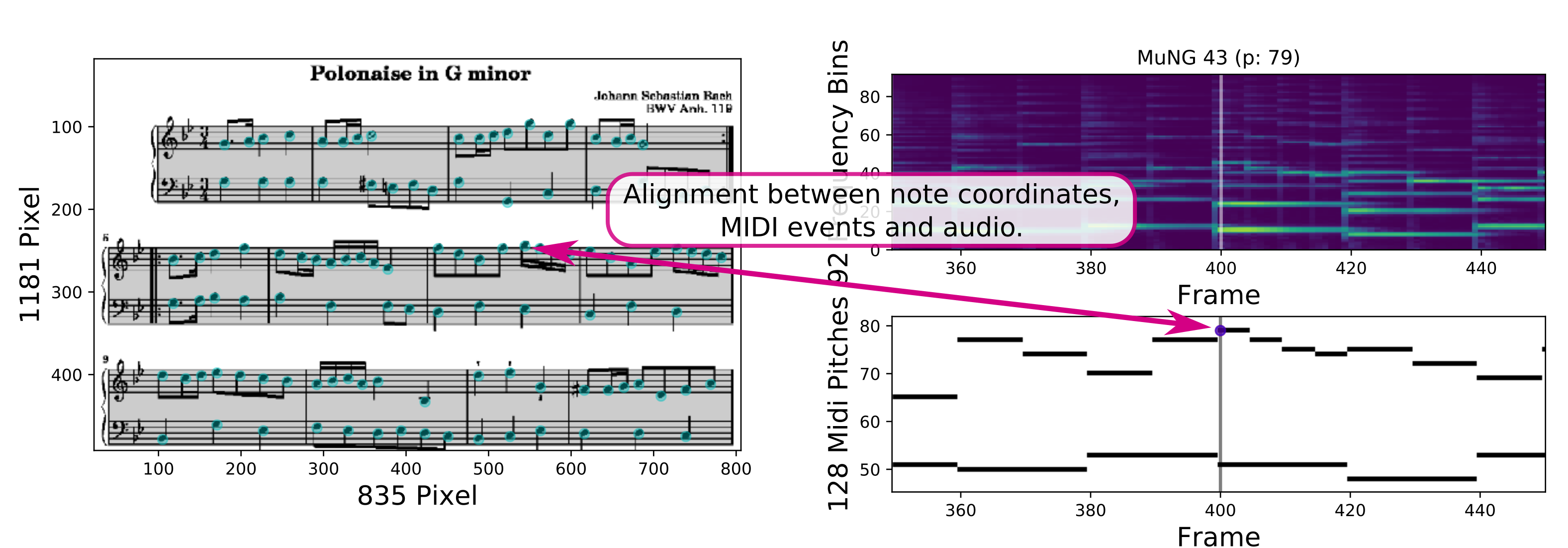
MSMD is a synthetic dataset of 497 pieces of (classical) music
that contains both audio and score representations of the pieces
aligned at a fine-grained level (344,742 pairs of noteheads
aligned to their audio/MIDI counterpart). It can be used for training
and evaluating multimodal models that enable crossing from one
modality to the other, such as retrieving sheet music using recordings
or following a performance in the score image.
The figure below shows an example of the data contained in MSMD.
If you have any questions, do not hesitate to contact the authors
of the dataset:
- matthias.dorfer@jku.at
- hajicj@ufal.mff.cuni.cz
MSMD was first used in the paper:
[1] Matthias Dorfer, Jan Hajič jr., Andreas Arzt, Harald Frostel, Gerhard Widmer.
[Learning Audio-Sheet Music Correspondences for Cross-Modal Retrieval
and Piece Identification](https://transactions.ismir.net/articles/10.5334/tismir.12/)
([PDF](https://transactions.ismir.net/articles/10.5334/tismir.12/galley/8/download/)).
Transactions of the International Society
for Music Information Retrieval, issue 1, 2018.
If you use the dataset, we kindly ask that you cite this paper.
The appendix of our article also contains a detailed description of the MSMD dataset
and its structure.
If you would like to reproduce or extend our experiments please
take a look at [our corresponding repository](https://github.com/CPJKU/audio_sheet_retrieval).
**Dataset Update 01-17-2019**:
After working with the dataset for a while
we recognized alignment errors in a few pieces which are caused by
problems with Lilypond (in particular with pieces containing "Da capo").
The problem usually affected the alignment towards the end of a piece.
Unfortunately, this is hard to detect and therefore also to fix automatically
as Lilypond has no general rule how "Da capos" are encoded.
Therefore, we decided to remove these pieces from the dataset.
We updated all splits files accordingly (also see ```msmd/splits/README```).
You can still find the original split files on tag "v1.0".
Getting started (Quick Guide)
-----------------------------
1.) Clone this repository
```
git clone git@github.com:CPJKU/msmd.git
```
2.) Follow the steps listed in **Setup and Requirements**
3.) [Download](https://zenodo.org/record/2597505/files/msmd_aug_v1-1_no-audio.zip?download=1) the preprocessed MSMD data set.
4.) Check out the [tutorials](tutorials) provided along with this repository.
5.) If you want to build the entire data set on your own, check out our [data set tutorial](tutorial.md) (optional).
Setup and Requirements
----------------------
For a list of required python packages see the *requirements.txt*
or just install them all at once using pip.
```
pip install -r requirements.txt
```
We also provide an [anaconda environment file](https://conda.io/docs/user-guide/tasks/manage-environments.html#creating-an-environment-from-an-environment-yml-file)
which can be installed as follows:
```
conda env create -f environment.yaml
```
To install the *audio_sheet_retrieval* package in develop mode (this is what we recommend) run
```
python setup.py develop --user
```
in the root folder of the package.
For users planning to recreate the dataset from scratch, you need some more programs.
We cannot support all platforms, because of that we report what was installed on our system:
* Ubuntu 18.04
* ffmpeg version 3.4.4
* fluidsynth 1.1.9 (soundfonts should be placed in `~/.fluidsynth`)
* GNU LilyPond 2.18.2
* ImageMagick 6.9.7-4 (you have to set these rights in order to make `convert` work properly: https://askubuntu.com/a/1085339)
Dataset structure
-----------------
MSMD is structured into pieces.
Pieces are abstract musical entities, encoded with a LilyPond file extracted
from Mutopia, that can be embodied in MSMD either as *scores*, the visual modality,
or *performances*, the audio modality. We extract various *views* of a score,
and *features* of a performance. Finally, we align noteheads in the score
to note events in the performances.
With respect to the file system, MSMD is a directory. Inside are piece
directories, with names derived from Mutopia. Each piece directory
has two subdirectories: performances/ and scores/. Then, each performance
or score is a directory inside the corresponding subdir, containing its
own encoding (PDF for scores, MIDI for performances) and derived features.
An example file structure for a piece with one score and two performances:
```
BachCPE__cpe-bach-rondo__cpe-bach-rondo/
BachCPE__cpe-bach-rondo__cpe-bach-rondo.ly
BachCPE__cpe-bach-rondo__cpe-bach-rondo.norm.ly
BachCPE__cpe-bach-rondo__cpe-bach-rondo.midi
meta.yml
scores/
BachCPE__cpe-bach-rondo__cpe-bach-rondo_ly/
BachCPE__cpe-bach-rondo__cpe-bach-rondo_ly.pdf
coords/
notes_01.npy
notes_02.npy
notes_03.npy
systems_01.npy
systems_02.npy
systems_03.npy
img/
01.png
02.png
03.png
mung/
01.xml
02.xml
03.xml
performances/
BachCPE__cpe-bach-rondo__cpe-bach-rondo_tempo-900_YamahaGrandPiano/
BachCPE__cpe-bach-rondo__cpe-bach-rondo_tempo-900_YamahaGrandPiano.midi
features/
BachCPE__cpe-bach-rondo__cpe-bach-rondo_tempo-900_YamahaGrandPiano_midi.npy
BachCPE__cpe-bach-rondo__cpe-bach-rondo_tempo-900_YamahaGrandPiano_notes.npy
BachCPE__cpe-bach-rondo__cpe-bach-rondo_tempo-900_YamahaGrandPiano_onsets.npy
BachCPE__cpe-bach-rondo__cpe-bach-rondo_tempo-900_YamahaGrandPiano_spec.npy
BachCPE__cpe-bach-rondo__cpe-bach-rondo_tempo-1000_ElectricPiano/
BachCPE__cpe-bach-rondo__cpe-bach-rondo_tempo-1000_ElectricPiano.midi
features/
BachCPE__cpe-bach-rondo__cpe-bach-rondo_tempo-1000_ElectricPiano_midi.npy
BachCPE__cpe-bach-rondo__cpe-bach-rondo_tempo-1000_ElectricPiano_notes.npy
BachCPE__cpe-bach-rondo__cpe-bach-rondo_tempo-1000_ElectricPiano_onsets.npy
BachCPE__cpe-bach-rondo__cpe-bach-rondo_tempo-1000_ElectricPiano_spec.npy
```
Piece
-----
Each piece has the base LilyPond *.ly file, a normalized *.ly file,
and a MIDI file generated directly from the normalized MIDI.
Next, there is a meta.yml file that contains some information about
the piece, such as the number of aligned notehead/note event pairs.
Finally, there are the performances/ and scores/ subdirectories
that, obviously, hold the Performances and Scores generated for this
piece.
Performance
-----------
Each performance is a subdirectory of the piece's performances/ subdir.
The authority encoding of the performance is a MIDI file derived
from the piece MIDI. Currently, we only change its tempo.
From the MIDI file, we generate an audio file using a piano soundfont.
The audio is used to compute the spectrogram, and then discarded,
so it does not show up in the example file structure of a piece
described above. The tempo change and soundfont used for rendering
the audio/spectrogram is added to the performance name.
The features computed from the audio and the performance MIDI are
then stored in the features/ subdirectory. We compute:
* MIDI matrix
* Note events list
* Onsets list
* Spectrogram
For the frame-wise features (MIDI matrix and spectrogram), the frame
rate is set to 20 frames per second.
The MIDI matrix is a 128 x N_FRAMES binary matrix. If a given pitch
is active in a given frame, that matrix cell contains a 1.
The note events list is derived from the performance MIDI by pairing
the corresponding note-on and note-off events. It is a N_EVENTS x 5
numpy array. The columns are: onset time (in seconds), pitch,
duration (in seconds), and track and channel (the last two are
not necessary for anything).
The onsets list is a vector of length N_EVENTS. It maps the note events
to onset frames. This is how note events are related to the MIDI matrix
and the spectrogram.
The spectrogram is a 92 x N_FRAMES matrix, computed from the synthesized audio.
It is computed with a sample rate of 22050 Hz, FFT window size of 2048 samples.
For dimensionality reduction we apply a normalized 16-band logarithmic
filterbank allowing only frequencies from 30Hz to 16kHz, which results
in those 92 frequency bins.
Scores
------
Each score is a subdirectory of the piece's scores/ subdir.
The scores are based on the PDF generated by LilyPond,
which is stored in the score directory. For a score,
we generate:
* Page images,
* Coordinates of noteheads and systems,
* MuNG (MUSCIMA++ Notation Graph) -- holds alignment to performances
From this PDF, we render the page images (imgs/01.png, /02.png, /03.png).
We store notehead and system coordinates for each page in
the coords/ subdirectory of the score.
Notehead coordinates are their centroids. For system regions,
we store the coordinates of their corners.
Finally, we store the MUSCIMA++ Notation Graph (MuNG) representation,
an XML format for describing music notation.
The graph stores how noteheads are grouped into systems, which is not
always trivial (see Appendix A of the article [1]).
And more importantly, the XML records for individual noteheads
also store the all-important alignment between a score and a performance.
The MuNG format and how alignment between the scores and performances
is stored is described in the next section.
MuNG format and Alignment
-------------------------
The MuNG XML for a notehead in MSMD looks like this:
```
0
notehead-full
118
598
9
7
0:0 1:63
1824
255
0
48
12.727274
68
textedit:///media/matthias/Data/msmd_aug/BachCPE__cpe-bach-rondo__cpe-bach-rondo/BachCPE__cpe-bach-rondo__cpe-bach-rondo.norm.ly:704:15:16
```
The xml:id of the is the unique identifier for the given notehead
within the entire MSMD dataset.
The is its identifier within the given score, which works across pages
even though the MuNG for each page is stored in a separate file.
The , , and elements denote its bounding box.
(The is irrelevant in MSMD, but required by the MuNG specification,
so it is just filled with 1's.)
The element stores the of the *system* MuNG object. This
is how we group noteheads into systems, which is necessary for properly
"unrolling" the score when aligning noteheads to the note events.
The elements holds additional descriptors that are not required
the MuNG format, but are an MSMD-specific extension of MuNG.
* The elements that point to a performance have their "key"
attribute start with the name of the performance.
* The points to the Note Events
List element from performance ${PERF_NAME} to which this particular
notehead corresponds. THIS IS THE KEY ELEMENT FOR ALIGNING THE SCORE
TO THE AUDIO (SPECTROGRAM).
* The element points to the frame
in the MIDI matrix and spectrogram of performance ${PERF_NAME} to which
this particular notehead corresponds. This is derived from the alignment;
it simplifies operation to store this in the MuNG.
* The element points to the exact
time in the audio of the performance when the notehead is interpreted.
(This is also here just for convenience, but note that we do not retain
the audio; however, if you re-render it from the performance MIDI, this
element will make it easy to align noteheads directly to audio.)
* The holds a reference to the exact location in the
normalized LilyPond file from which this notehead was rendered by the LilyPond
engraving engine. It helped us recover the pitch associated with this
notehead.
* The element holds the MIDI pitch code
associated with this notehead. This information is extracted from
the originating LilyPond file (see Appendix A of [1]).
To load MuNG files and use this representation, we recommend using
the muscima package (https://github.com/hajicj/muscima) of the MuNG format
authors.
Manipulating MSMD
-----------------
To explore the code for loading and manipulating MSMD, we suggest
starting from the function:
```
data_pools/data_pools.py:prepare_piece_data()
```
of the accompanying software of MSMD. This function implements
the preprocessing pipeline described in sec. 3 of article [1],
which includes loading the alignment from MuNG to present
corresponding snippets of sheet music and excerpts of the spectrogram
to the cross-modal retrieval model training.
A Python abstraction over MSMD is implemented in the data_model/
module. Going from an abstraction over the entire dataset
downwards, to abstractions over the Piece and its corresponding
Performances and Scores, there are classes:
```
msmd.py:MSMD
piece.py:Piece
performance.py:Performance
score.py:Score
```
The classes' docstrings contain further details on how to use
these objects. The classes are quite light-weight and mainly intended
to ease loading MSMD from Python scripts.
If you want to explore how MSMD was generated, refer to:
```
sheet_manager_app.py:MSMDManager.process_piece()
```
The process is described in Appendix A of [1].