
DSH App
A Codex-style DSH workbench: shared Desktop and Web, with files, Git, skills, MCP and usage in one client.
简体中文 · English · Releases · Report an issue




DSH App is a community plugin for Windows with its own client layout and Electron shell. Desktop and browser connect to the same backend in your existing `web` profile, retaining conversations, models and compatible extensions. This is not the official DeepSeek desktop client, and it does not depend on the Codex UI plugin.
[Features](#features) · [Integrated-and-conflicting-plugins](#integrated-and-conflicting-plugins) · [Demos](#demos) · [Installation](#installation) · [Usage](#usage) · [Update-and-uninstall](#update-and-uninstall) · [FAQ](#faq)
## Features
- **One workbench:** navigation rail, project and session sidebar, integrated title bar, main-area Settings, light/dark appearance and consistent fonts, shared by Desktop and Web.
- **Files and Git included:** the integrated Better Sidebar engine retains its editor, previews, diffs, tasks, side chat and extension contribution APIs.
- **One plugin center:** Browse combines discovery and installed management, with Skills and MCP as primary subpages. Cancellable requests and restart apply package changes.
- **Balance and usage together:** the sidebar shows the official DeepSeek API balance; one page combines costs, tokens, budgets and current-session context while retaining historical accounting.
- **Visible startup and recovery:** backend logs appear inside the window, with independent diagnostics, retry and recovery actions when a valid backup exists.
| Task | What DSH App provides |
| --- | --- |
| Use Desktop and Web together | One backend, one `web` profile, shared conversations and plugins |
| Open and close the app | Native window, whale tray and single-instance behavior; close to tray |
| Navigate the workbench | Integrated title bar, search, back/forward, action menu and window controls |
| Built-in client layout | Icon navigation rail, project and session sidebar, full conversation search, and rounded conversation and composer surfaces shared by desktop and Web |
| Recover from startup failures | Saved light/dark appearance, live backend logs and elapsed time; failed front-end loads return to a safe page with retry, diagnostics and backup-backed recovery actions |
| Update core and plugins | Core update button only when a newer release exists; installation, restart, configuration backup and recovery |
| Diagnose and recover | Plugin status and startup-failure logs, individual disable/retry, plugin-update recovery and rollback to a backed-up DSH version |
| Track model configuration | Original model IDs, ASS provider markers and observed configuration changes |
| Track cost and balance | Official DeepSeek API account balances, local tokens, model-usage estimates, budget reminders, and imported `dsh-cost-meter` history |
| Inspect context | Current-session occupancy and composition, request trends, tool timing, compactions and recent activity, integrated into Cost and usage |
| Built-in plugin market | Search, categories, source installation and installed-plugin update checks; persistent install, update and removal requests applied during desktop restart |
| Built-in skill management | Browse, create, edit, enable, import and restore skills under Plugins → Skills, using local and project libraries |
| Built-in MCP | Connections, catalog, OAuth, custom servers, discovery, policies, workspace scopes and backups under Plugins → MCP, retaining original image and emoji artwork |
| Built-in sidebar workbench | File tree, search, upload and ZIP, CodeMirror, Markdown/Mermaid/HTML previews, Git staging/commits/history/worktrees, AI changes, subagents and tasks, Side Chat, split workbench and extension viewers, using the official right sidebar and terminal |
The package owns its client layout, desktop window and maintenance features, with no Codex UI dependency. Official DSH services and components continue to handle projects, sessions, archiving, model selection and sending. The rail exposes Chat, Automations, Plugins and Settings. Plugins contains Browse, Skills and MCP. Browse merges discovery with installed management through All, Installed, Updates and Available filters; Skills and MCP do not add duplicate Settings or rail entries. Conversation search remains available from the search button.
The gear button opens official Settings sections in the main area. MCP uses an owned React page that directly follows DSH appearance and fonts, without embedding the old web app. Interface text uses local Segoe UI and Microsoft YaHei fonts; code and logs remain monospace. Native caption controls are 30 DIP high, leaving a gap above the rounded main panel.
The current validation baseline is DSH `0.2.0-rc.2`, a release candidate. Other core versions require renewed client API checks; successful installation alone does not establish compatibility.
Full-text search builds a local in-memory index on the first query, without contacting an external service or loading that index during cold startup. The first query can take longer than subsequent queries. Explicit profile search settings override the bundle default.
## Integrated and conflicting plugins
> **Resolve duplicate plugins before installation.** DSH App already provides the features below. Remove or disable each predecessor's complete bundle in the same profile. Hiding a button can still leave duplicate routes, storage owners, model tools or client modules. The built-in market omits these packages and rejects reinstalling them; direct CLI installs still require care. DSH App does not automatically uninstall your plugins.
| Predecessor package | Replacement in DSH App | Conflict when both are enabled |
| --- | --- | --- |
| `dsh-better-sidebar` | Built-in files, Git, tasks, Side Chat and split workbench | Duplicate `/sidebar` routes, workbench registrations and public module names |
| `dsh-mcp-connector` | **Plugins → MCP** | Competing MCP storage, grant and connection services |
| `@michengai/dsh-codex-ui` | Owned layout, rail, session sidebar and title bar | Competing sidebar and main-view ownership |
| `dshmarket` | **Plugins → Browse** | Competing installation queues, updates and restart flows |
| `dsh-cost-meter` | **Cost and usage** | Duplicate usage listeners and accounting |
| `dsh-context` | **Cost and usage → Current conversation** | Duplicate context displays and event statistics |
| `@linxin666/dsh-client-ui-skill-explorer` | **Plugins → Skills** | Duplicate skill browsing and configuration |
| `@michengai/dsh-skills-manager` | **Plugins → Skills** and official skill providers | Competing skill sources, invocation policies and registrations |
Integration has two implementations. The MCP Host retains the MIT-licensed `dsh-mcp-connector@0.2.63` engine; Better Sidebar retains the MIT-licensed `dsh-better-sidebar@0.24.1` Host, client and lazy runtime scripts. This project rewrites the layout, skills, costs, context and plugin market. Licenses, pinned versions, original file hashes and local changes for the retained engines are recorded in [NOTICE.md](NOTICE.md), [MCP provenance](lib/mcp/upstream/provenance.json) and [sidebar provenance](lib/sidebar/upstream/PROVENANCE.md). Both engines update with DSH App instead of separate predecessor packages.
Back up the profile and data before migration, then check these items. **Do not delete your DSH data directory:**
1. Better Sidebar: copy its effective preferences into DSH App's `sidebar` configuration field before removing the package. Per-session tabs, layouts and editor state retain their storage keys. Extensions retain `ctx.betterSidebar`, tab/viewer/icon/badge/settings registrations and public module aliases. See [the integrated sidebar](lib/sidebar/README.md) for features and APIs.
2. MCP: keep the original `mcp_connector` storage and grant journal. The integrated engine reuses connections, policies, scopes and backups. While the old MCP package is enabled, the owned Host leaves that storage to it; remove the package and restart to transfer ownership.
3. Skills: keep skill files and the old manager's state file. The owned implementation reads existing sources and policies, with distinct model and command invocation states. While the old Skills Manager is enabled, the owned providers avoid duplicate registration.
4. Costs: the first read imports the old ledger without modifying its file. Confirm that history is visible before removing the predecessor. Unpriced calls retain tokens and counts; new prices apply only to subsequent calls.
5. Market: cancel unfinished `dshmarket` operations before removing it, preventing two queues from managing one profile.
Official scheduling, auto-review, Agent Team and voice input, plus compatible extensions such as GitGraph, can remain enabled. This table is not a compatibility guarantee for every community plugin. Uninstalling DSH App removes these integrated features and restores the official sidebar; it does not automatically reinstall predecessor packages.
## Demos
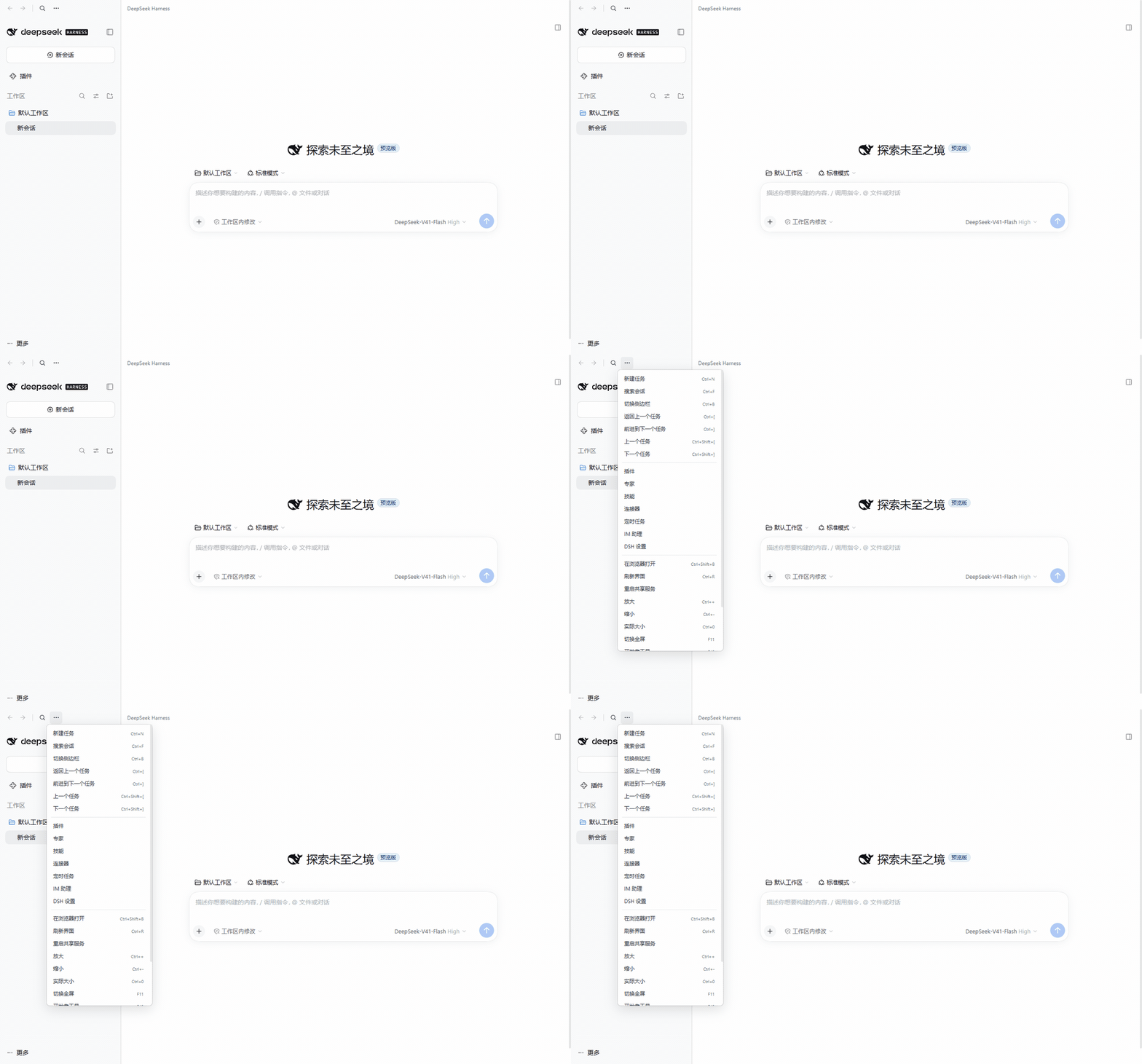
These recordings show the earlier desktop shell, **not the current 0.3.6 workbench layout**.
**Desktop window and title bar**
**Diagnostics and functional checks**
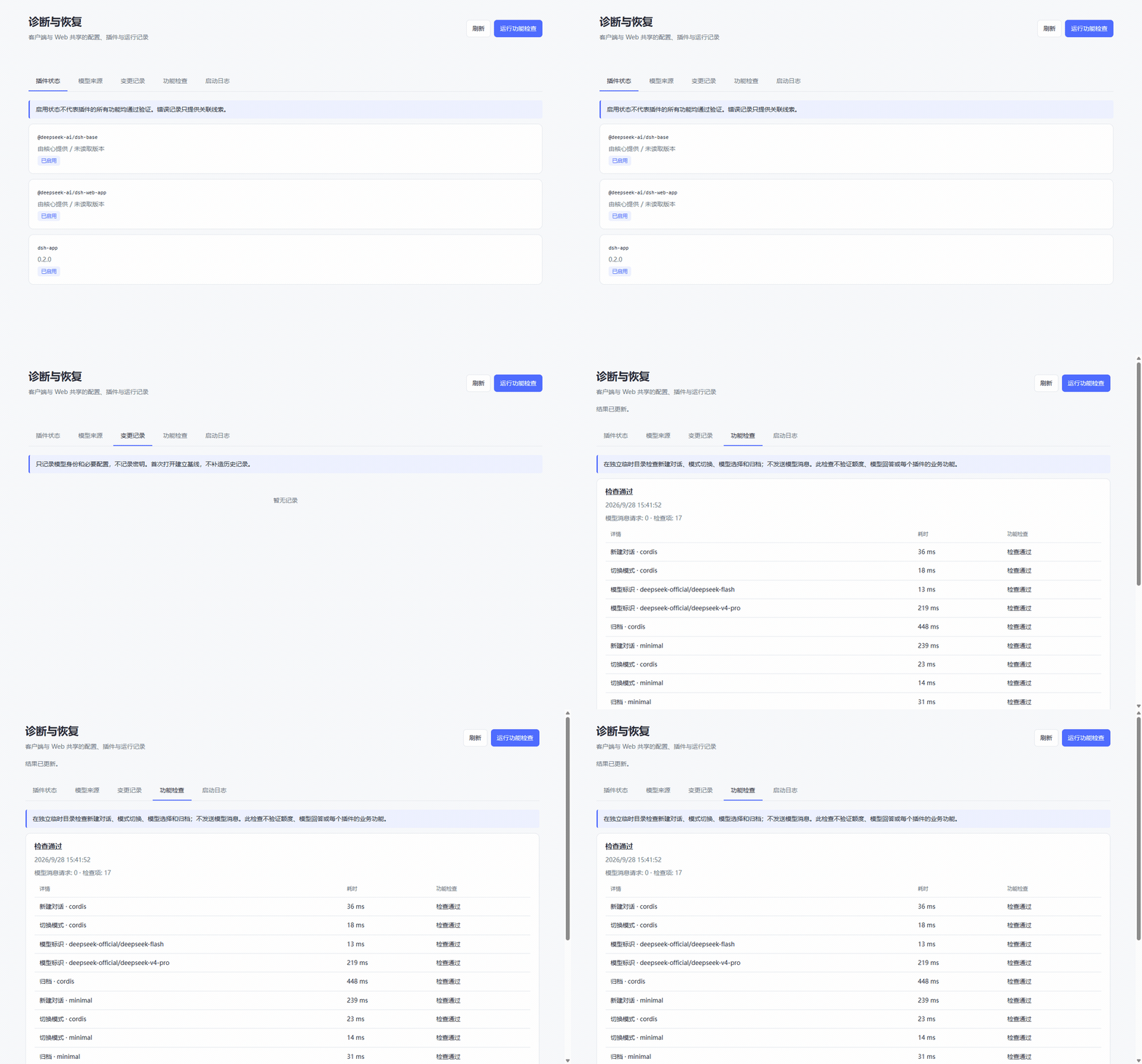
Recorded with real DSH `0.1.7-rc.2`, the stock Web interface and a separate demo home without personal conversations. GIFs show key frames captured in one run. The check sends no model messages; playback is paced to show the workflow, not to measure performance.
## Installation
### Prerequisites
- Windows, **Node.js 24+** and **pnpm 11**.
- An installed [DeepSeek Harness](https://github.com/deepseek-ai/deepseek-harness), with `dsh` available in your terminal.
- DSH App **0.3.6** targets the DSH **0.2.0-rc.2** client APIs. Its package version requirement prevents activation on older cores. Electron is **44**; run the functional check when using another core version.
- Remove or disable duplicate bundles using the conflict table above, retaining preferences and data needed for migration.
### 1. Add the plugin
Run in PowerShell:
```powershell
dsh plugin --profile web add 'git+https://github.com/CaT-Hode/DSH-app.git'
```
This is a GitHub installation source. There is currently no npm release named `dsh-app` from this project. A `.tgz` downloaded from Releases can also be passed to `dsh plugin --profile web add`.
### 2. Activate it once
```powershell
dsh --profile web --no-open
```
Wait for the Web server to become ready. The plugin remembers the DSH launch entry. Press `Ctrl+C` to stop this foreground server.
### 3. Open the desktop app
```powershell
$dshHome = if ($env:DSH_HOME) { $env:DSH_HOME } else { Join-Path $HOME '.dsh' }
& (Join-Path $dshHome 'profiles\web\node_modules\.bin\dsh-app.cmd')
```
Use step 3 for later cold starts. Electron opens its own window; the backend console is hidden and its startup output appears inside the app. Loading and safe failure pages read the active profile's appearance preference before the backend starts: white in light mode, black in dark mode, and the system appearance when System is selected or no preference is saved.
Ask a local agent to install it
```text
Follow https://github.com/CaT-Hode/DSH-app to install DSH App into my existing web profile. Verify the core version, Node.js 24+ and pnpm 11. Back up the profile and data, migrate predecessor preferences and remove duplicate plugins using the conflict table, retaining models, conversations and compatible extensions. Add the GitHub plugin source, start Web once to activate it, then open dsh-app.cmd. Do not delete old ledgers, MCP storage or skill files, or confuse this project with an npm package named dsh-app.
```
## Usage
| Goal | Entry point |
| --- | --- |
| Open the same service in a browser | Tray or title-bar menu → **Open in browser** |
| Inspect diagnostics | Title-bar `…` or whale tray → **Diagnostics and recovery** |
| Recover a startup or front-end failure | Safe startup page → **Restart / Diagnostics and recovery**; plugin or DSH recovery appears when a valid backup exists |
| Exercise conversation and model operations | Diagnostics → **Run functional check** |
| Disable a failing plugin | Plugins → **Disable and restart** |
| Retry the plugin | The same page → **Enable and restart** |
| Inspect model changes | **Model sources / Change history** |
| Inspect costs and balance | **Cost and usage** at the bottom of the sidebar shows the official API balance, monthly costs, tokens and budget; click it for details. The shared Web service also serves `/dsh-app/cost` |
| Inspect the selected conversation's context | **Current conversation** on the same **Cost and usage** page, or click the context summary beneath the composer |
| Manage skills | **Plugins → Skills**, for viewing, creation, editing, enablement, import, recovery and library settings |
| Configure files, previews and task workbench | **Settings → General** uses compact rows for defaults, feature switches and extension options; Side card is no longer a separate page |
| Reload the interface | `Ctrl+R` |
| Hide or quit | Close hides to tray; **Exit DSH App** in the tray fully quits |
After authenticating to the shared backend, a browser can read the same records at `/dsh-app/diagnostics`. Restart and recovery actions run in the desktop app. If the DSH front end cannot load, the independent safe startup page can still open diagnostics and run recovery backed by a valid snapshot. The app only stops a backend it owns; an externally started Web server retains its own lifetime.
On its first read, the cost page copies daily, model and conversation totals plus pricing and budget settings from an existing `dsh-cost-meter` ledger into a separate file; the original is unchanged. It then records only new model-usage events, with no historical session scan during cold start. Amounts are estimates from saved prices; calls without a price remain counted and marked unpriced. ASS provider IDs are separate from vendor pricing tables. Enter the actual USD rates for that provider and model under **Model prices**, in dollars per million tokens; saved rates apply to subsequent calls and leave historical costs unchanged. Cache reads and writes use separate configured rates, and budgets use the selected display currency. After confirming the history, you can uninstall the old cost plugin through the plugin market.
Account balances come from the [official DeepSeek `user/balance` API](https://api-docs.deepseek.com/api/get-user-balance/) and display the original currencies, total, granted and topped-up balances independently of local cost estimates. The server resolves the official credential from the active DeepSeek API-key provider configuration. It explains and skips requests when the official provider is absent, its key is missing, its endpoint points to a third party, or its credential reference is shared with a third-party provider. Keys are never sent to the browser or written into the balance cache; ASS, MIFY and other third-party balances are not queried. Requests begin on the first display and do not hold up startup. Defaults are a five-minute cache, five-second timeout, 60-second error retry interval and 30-second minimum manual refresh interval; configure `balance.refreshMs`, `balance.timeoutMs`, `balance.retryMs` and `balance.minRefreshMs` on the plugin to adjust them. Failed requests retain the same account’s last successful balance with its timestamp and stale status. Changing the key hides the previous account’s balance.
Cost and usage is one continuous page with one page scroll area. A Today, This month or All time selector controls the all-conversation cost, token and call overview; expense history, budgets and prices are expandable. Beneath the account balance, Current conversation follows the selected session and shows context occupancy and estimated composition, request input/output and duration, tool failures, compactions, pruning and injections. It omits duplicate cumulative token and call cards. API usage and character estimates are labeled separately; estimated composition is not a billing input. The module reads the selected conversation's log projections on demand and updates incrementally, without scanning all historical sessions or polling. Request trends and activity retain recent entries. File browsing and team features remain owned by their respective modules.
Plugins → Browse merges the built-in market with installed management and loads the community catalog on demand. It supports search, categories, All/Installed/Updates/Available filters, exact npm versions and GitHub sources. Uncatalogued installed packages remain manageable. Official features retain their official activation and configuration services; retired integrations no longer offer duplicate installation actions. Install, update and uninstall actions create cancellable local requests. Restart and apply stops the backend, backs up the profile, invokes the official `dsh plugin` command and verifies installed versions and activation. Requests become applied only after the backend is ready. Updates retain their previous enabled state; uninstalling retains plugin data. Failures keep the requests, diagnostics and recovery backup. A standalone Web service needs its owner to restart it. The market no longer depends on `dshmarket`; cancel unfinished operations in that plugin before removing it. MCP update guidance opens the built-in market.
DSH App owns skill management without a Skills Manager or Skill Explorer dependency. The page connects to DSH's official skill registry, reads existing local and project libraries, and respects the old manager's source and disabled states without rewriting its state file. Model invocation flags remain in SKILL.md. Editing checks file revisions to avoid overwriting external changes. Removal uses a recoverable trash; restore never replaces an existing file. Local directories, folder uploads, ZIPs and public GitHub sources can be imported. Imports copy files without executing scripts and reject escaping paths, links, collisions and oversized files. Removing the two old community plugins only changes packages and activation; existing skill files remain.
## Update and uninstall
**Update DSH App:** exit the app, repeat the installation command, activate the new plugin through Web, and launch the app again. Once the community catalog lists it, the market's update/restart flow can also be used.
**Update DSH core:** when a newer version exists, click the title-bar update button and choose **Install and restart**. Before switching, the app checks presets, models and conversation operations in a temporary home. It then verifies the rendered interface. A failed upgrade attempts to restore the previous core and configuration. This does not change the global `dsh` command or a source checkout, and does not reverse session or plugin-data migrations.
**Uninstall:** exit the app, then run:
```powershell
dsh plugin --profile web remove dsh-app
```
Restart DSH Web to restore its official sidebar. Existing conversations and other plugins remain available; uninstalling does not delete sessions or the cost ledger. Reinstall removed predecessors yourself if needed. Restoring an older core does not replace preference or data migration.
## FAQ
Electron is missing, or the first launch fails
Electron is an optional dependency. Its binary download may require network access; installation policy or a download failure can leave the Host plugin installed without a usable Electron executable. Set `DSH_APP_ELECTRON` to an existing compatible `electron.exe` and retry. If the app cannot locate DSH, complete the one-time Web activation first.
Does the ASS marker identify who changed a model?
No. It recognizes ASS's provider-ID convention. Change history retains observed before/after values while the Host runs; external writers stay unknown. First use establishes a baseline, with no invented past history, and intermediate writes between observations can be missed. Model audit records omit API keys.
Does a functional check call models or change my conversations?
It creates blank conversations in a temporary DSH home, changes presets and models, and archives them. It sends no model messages and does not use your existing conversations. It does not validate balances or model responses. Plugins still execute their normal startup effects.
Can I configure paths, the port and history retention?
| Setting | Purpose |
| --- | --- |
| `DSH_HOME` | Use an existing non-default DSH data directory |
| `DSH_APP_ELECTRON` | Electron executable path |
| `DSH_APP_NODE` / `DSH_APP_CLI` | Explicit backend Node and DSH CLI paths |
| `DSH_APP_PORT` | Loopback port; default `0` lets the OS choose |
| `DSH_APP_PNPM_CLI` | pnpm 11 `pnpm.cjs` used for core upgrades |
| Host `auditIntervalMs` | Model observation interval; default 2000 ms, range 500–60000 |
| Host `historyLimit` | Model change retention; default 200, range 1–2000 |
| Host `contextInsight.historyLimit` / `contextInsight.activityLimit` | Retained request/activity entries for the selected conversation; default 32 each, range 2–1000 each |
| Host `contextInsight.toolLimit` / `contextInsight.pendingLimit` | Retained tool names/pending calls; defaults 16/128, range 2–1000 each. Calls beyond the tool-name cap are grouped under Other tools |
| Host `skills.maxContentBytes` / `skills.maxArchiveBytes` / `skills.maxExpandedBytes` / `skills.maxFiles` | Skill text, ZIP, expanded bytes and file limits; defaults 1 MiB / 32 MiB / 64 MiB / 1000 |
| Host `skills.requestTimeoutMs` | GitHub skill import request timeout; default 15000 ms, range 1000–60000 |
Startup logs, configuration backups, quarantine records and model history are stored locally under `$DSH_HOME/dsh-app`. The repository-backed Windows adapter uses `desktop-link`. Connection descriptors contain authentication tokens and must not be included in public issue reports.
## Ecosystem and scope
DSH App installs through the standard `dsh.bundle.patch` declaration and targets the `web` profile. Community plugins are discoverable through the [dsh-plugin GitHub topic](https://github.com/topics/dsh-plugin). The plugin market uses the [awesome-dsh-plugin](https://github.com/awesome-dsh-plugin/awesome-dsh-plugin) community catalog; its maintainers review submissions.
The repository retains the `bin/` launcher, `desktop/` shell, `client/` UI source, `lib/` Host and integrated engines, required build scripts and focused behavior checks for those responsibilities. `npm run build` generates the client bundle and sandbox preload. The installation package contains runtime files, READMEs and licenses, excluding tests, test helpers, personal profiles and recording intermediates.
See [focused development checks](tests/README.md) for cost, context and the actual DSH browser-factory test setup and commands.
MIT · See [NOTICE.md](NOTICE.md) for artwork and project attribution.