
# Uptime Guard
### Uptime monitoring with **zero servers**. Runs 100% on Cloudflare. **Free.**
Monitor your websites, APIs, TCP ports, DNS, TLS certificates, domains, cron jobs and multi-step
scripted flows - no VPS, no container, no monthly bill. Just a Cloudflare Worker, a database, and a
dashboard.
[](https://deploy.workers.cloudflare.com/?url=https://github.com/CalmRay-Solutions/uptime-guard)

[](./LICENSE)
[](https://workers.cloudflare.com/)

[](#why-uptime-guard)
[](./CONTRIBUTING.md)
### [βΆ Try the live demo](https://vigil-demo.calmray.team) Β· password `demo` Β· [see a public status page](https://vigil-demo.calmray.team/status/demo)

---
## Why Uptime Guard?
Every other uptime tool makes you choose: **pay per monitor** (UptimeRobot, Pingdom, Better Uptime)
or **host it on a server you then have to monitor too** (Uptime Kuma on a VPS). Uptime Guard is
neither. It runs entirely on **Cloudflare Workers + D1**, so there's **nothing to keep alive** and,
for a typical fleet, **nothing to pay**.
| | Uptime Guard | SaaS monitors | Self-hosted (VPS) |
|---|:---:|:---:|:---:|
| Monthly cost | **$0** | $$ per monitor | VPS bill |
| Server to maintain | **None** | - | You run it |
| Who monitors the monitor? | Cloudflare's edge | vendor | π€· nobody |
| Your data | **Your Cloudflare account** | vendor's cloud | your box |
| Deploy time | **~2 min, one click** | signup | provision + install |
| Public status page | β
built-in | often paid | varies |
> **No server. No monthly bill. No babysitting.** Push it to Cloudflare and forget it's there -
> until it pings you on Telegram because something you care about went down.
## Runs on Cloudflare's free tier
The whole thing fits inside Cloudflare's **free** limits for a real-world fleet:
- **Workers**: 100k requests/day free - a per-minute cron is ~1,440/day.
- **D1**: 5 GB storage + 5M row-reads/day free - history is rolled up daily and pruned.
- **Static assets**: the dashboard is served free from the same Worker.
Dozens of monitors, checked every minute, with 90 days of history - comfortably **$0/month**.
## Features
| | |
|---|---|
| **7 monitor types** | HTTP(S), TCP port, DNS record, TLS certificate expiry, domain (registrar) expiry, heartbeat (dead-man's switch), and multi-step custom scripts |
| **Alerts that escalate** | Telegram **+** desktop Web Push on down/recovery, with widening re-alerts (5m β 10m β 20m β 40m β hourly) and total downtime on recovery |
| **No false alarms** | A single failed check is re-confirmed in seconds before it ever pages you |
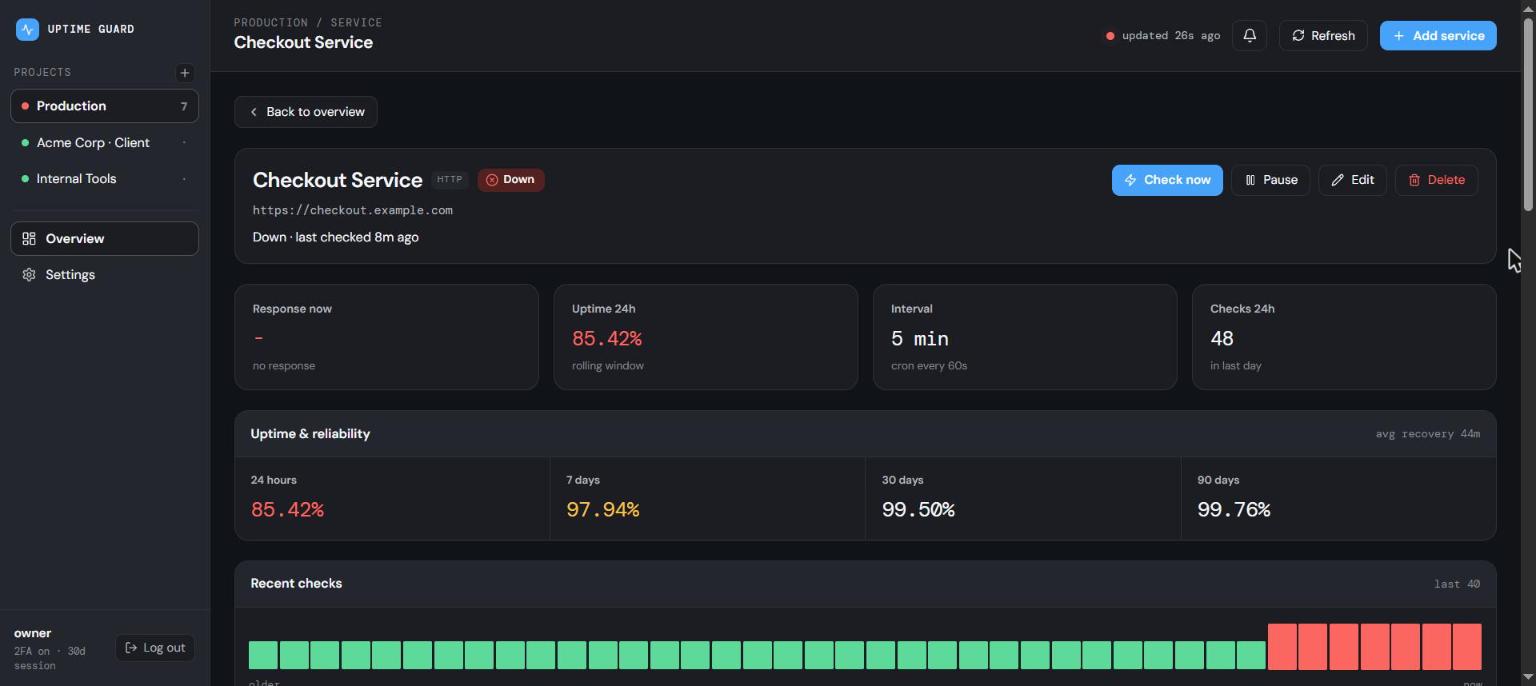
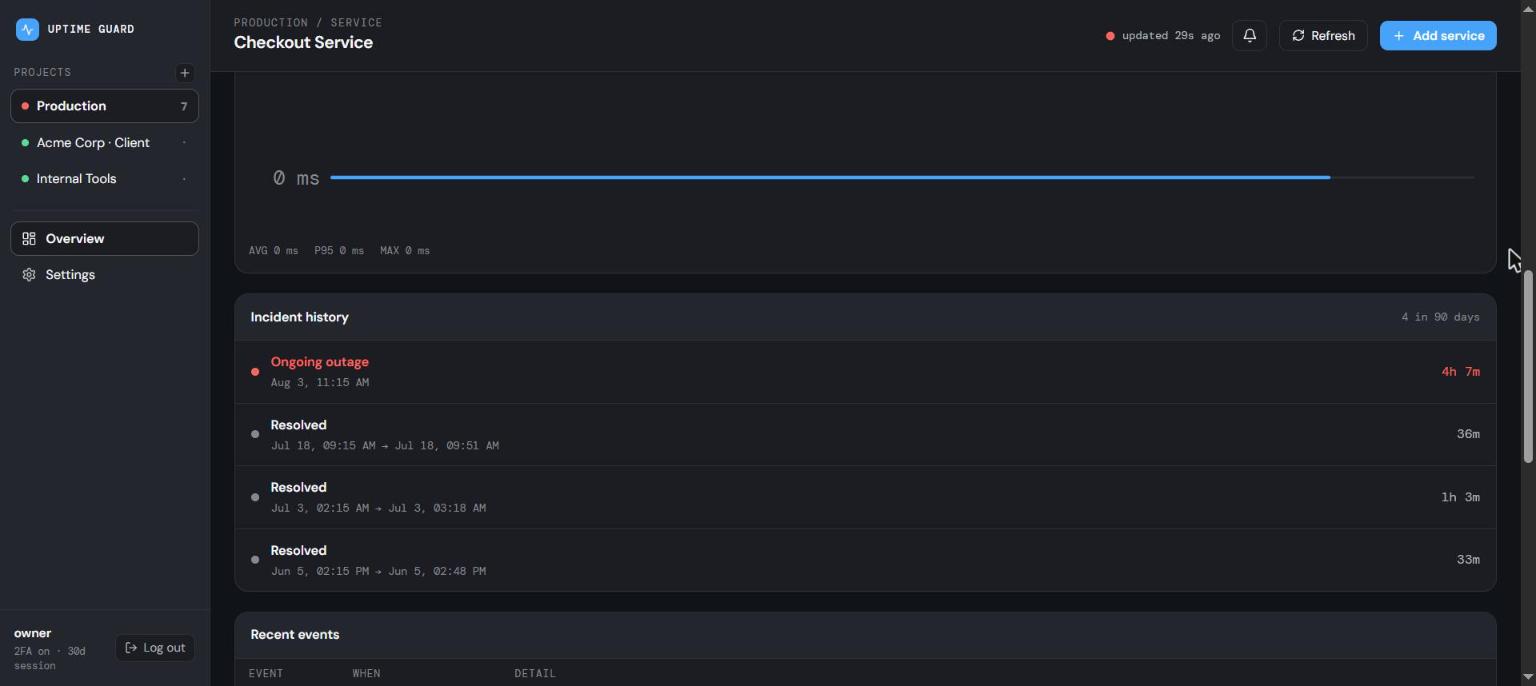
| **Real reliability data** | Per-service 24h / 7d / 30d / 90d uptime, incident history, and mean-time-to-recovery |
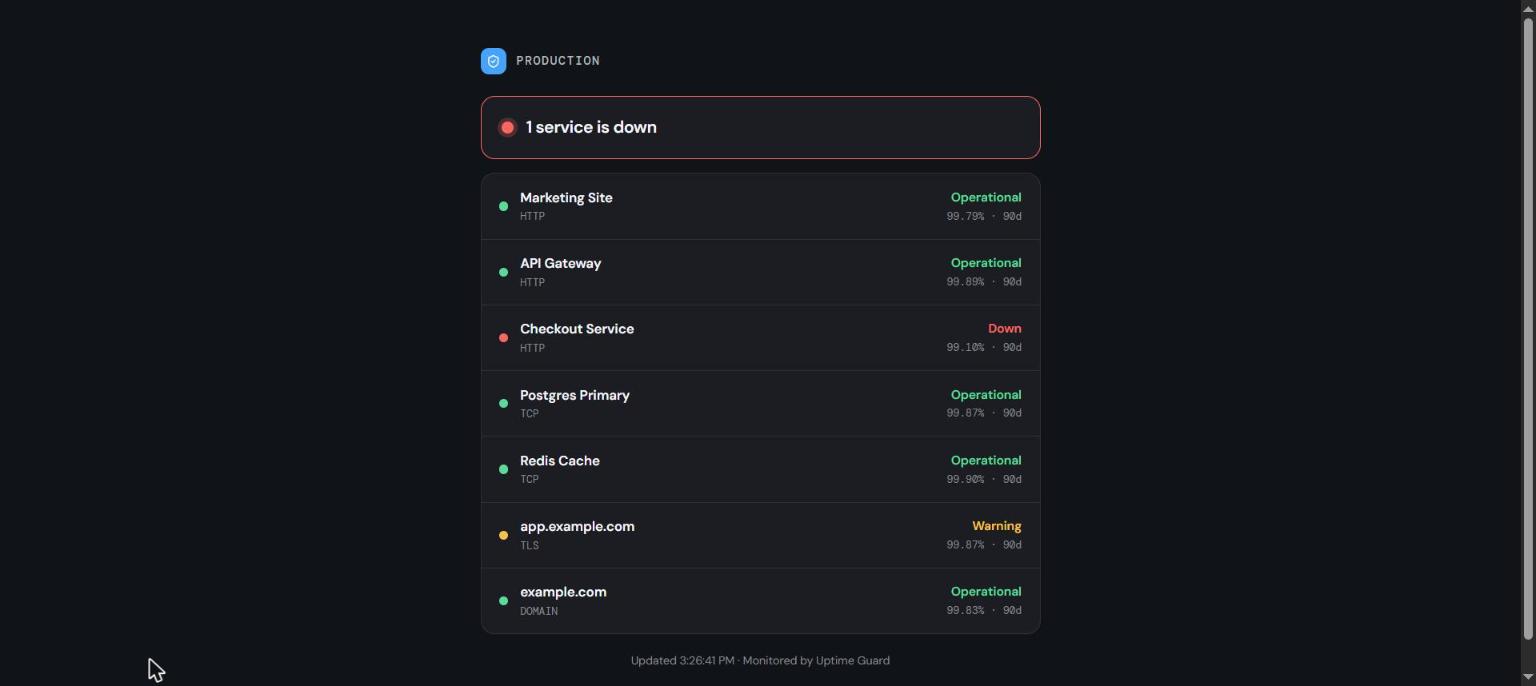
| **Public status pages** | Share a read-only page per project - no login, edge-cached, sanitized |
| **Installable PWA** | Add to your desktop/phone; push notifications work even when it's fully closed |
| **Locked down** | Password **+** TOTP login, rate-limiting, one-click session revocation |
| **Configure in-app** | Telegram bot/chat/thread and your authenticator are editable right in Settings |
| **Cloudflare-aware** | Detects CF-fronted hosts and shows a calm "CF Protected" state instead of false downs |
## Screenshots
| Service detail - SLA windows & MTTR | Incident history |
|:--:|:--:|
|
|
|
| **Public status page** - shareable, no login | |
|
| |
## Deploy in ~2 minutes
### Option A - one click
[](https://deploy.workers.cloudflare.com/?url=https://github.com/CalmRay-Solutions/uptime-guard)
Cloudflare provisions the D1 database, builds the dashboard, and deploys the Worker. The deploy log
ends with your dashboard URL in a banner you can't miss:
```
=============================================================
| DEPLOYED - OPEN YOUR DASHBOARD AT: |
| |
| >> https://uptime-guard.your-name.workers.dev |
| |
| First visit walks you through creating the owner account. |
=============================================================
```
Open it and the first-run wizard walks you through two steps: **set an owner password, then pair an
authenticator app.** Both are required, so the instance is never live with a single factor. No
secrets to set, no schema to run - the app initializes itself. (The banner comes from the `npm run deploy` script;
if the deploy step in the Cloudflare setup screen says `npx wrangler deploy`, change it to
`npm run deploy` to get it.)
### Option B - from your terminal
```bash
git clone https://github.com/CalmRay-Solutions/uptime-guard.git
cd uptime-guard/worker && npm install && npx wrangler login
# Create the database and paste the printed id into wrangler.toml
npx wrangler d1 create uptime-guard
# Build the dashboard + deploy the Worker in one command
# (prints your dashboard URL in a banner at the end)
cd .. && npm run deploy
```
Open the printed URL - the first visit shows a **"create your account"** wizard. Set a password,
scan the authenticator QR (keep the key it shows: it is your way back in if you lose the device),
then create a project and add your first monitor. Checks start within 60 seconds. The database
schema is created automatically, and the session secret is generated for you.
**Optional, all from the dashboard's Settings - never required:**
- **Re-pair two-factor auth** - scan a new QR to move TOTP to another device.
- **Telegram alerts** - paste a bot token + chat id (or set `TELEGRAM_BOT_TOKEN` / `TELEGRAM_CHAT_ID`).
- **Web Push** - add VAPID keys for desktop notifications.
**Lost your authenticator?** You own the database, so you can clear the pairing and sign in with the
password alone until you set up a new one:
```bash
npx wrangler d1 execute uptime-guard --remote --command "DELETE FROM settings WHERE key='totp_secret'"
```
## Architecture
```
ββββββββββββββββββββββββββ every 60s ββββββββββββββββββββ
β Cloudflare Worker β ββ scheduled() cron βββΆ β runs due checks β
β β’ REST API (/api/*) β β http/tcp/dns/tls β
β β’ serves the dashboard β βββ records results ββ β domain/heartbeat β
β β’ Telegram + Web Push β ββββββββββββββββββββ
βββββββββββββ¬βββββββββββββ
β binds
βββββββΌββββββ ββββββββββββββββββββββββββββββββ
β D1 (SQL) β β React + Vite dashboard (SPA) β
β projects β β served from the same Worker β
β services β β password + TOTP auth β
β checks β ββββββββββββββββββββββββββββββββ
β incidentsβ
β rollups β
βββββββββββββ
```
- **`worker/`** - the Cloudflare Worker: REST API, a `scheduled()` cron (per-minute checks + a daily
rollup/prune job), Telegram + Web Push, and it serves the built dashboard from the assets binding.
- **`dashboard/`** - a React + Vite SPA (hand-rolled CSS, embedded fonts, inline icons - no runtime
CDN). Talks to the Worker over the REST API with a signed session token.
## Monitor types
- **HTTP(S)** - fetch a URL, assert the status range, optionally a body keyword or a JSON field.
- **TCP Port** - open a raw socket to `host:port`. SSH, Postgres, SMTP, game servers, anything.
- **DNS record** - resolve A/AAAA/CNAME/MX/TXT/NS over DNS-over-HTTPS, optionally asserting the value.
- **TLS certificate** - parse the served cert's expiry and warn before it lapses. CF-fronted hosts
show a non-alerting **CF Protected** state.
- **Domain expiry** - registrar expiry via RDAP, warns before it lapses.
- **Heartbeat** - a dead-man's switch: your cron hits a unique `/ping/