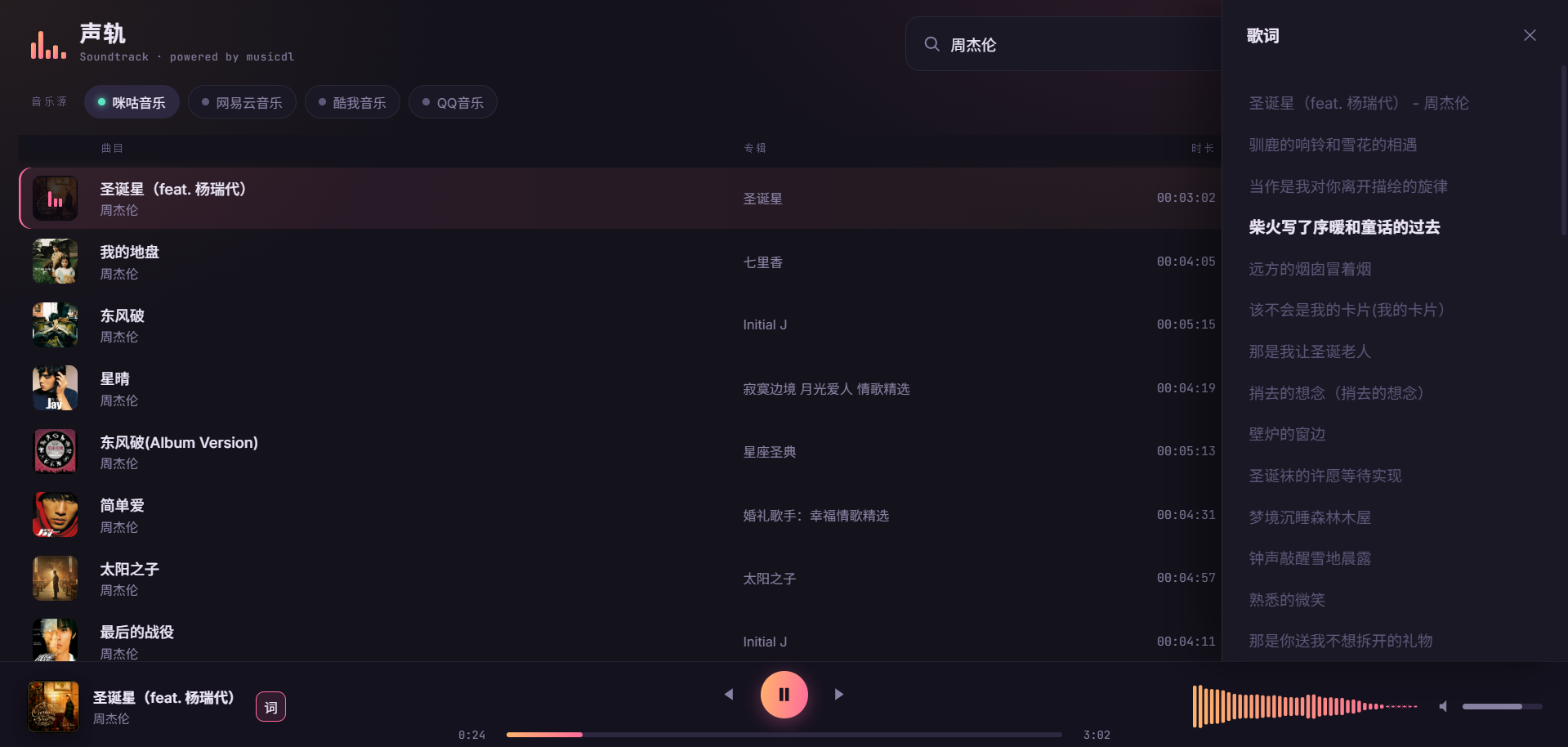
MusicSquare is a browser-based music playground — search, play, and download tracks directly in your browser.
⚠️ For learning and testing only: please respect copyright and the terms of each music platform.
学习收获更多有趣的内容, 欢迎关注微信公众号:Charles的皮卡丘
# 🎉 What's New
- 2026-10-16: Released musicdl v2.14.2 — performed monthly maintenance on common music clients and fixed broken API integrations in four affected clients.
- 2026-10-10: Released musicdl v2.14.1 — monthly maintenance of third-party music clients: fixed API issues on four platforms and replaced three discontinued ones with similar alternatives.
- 2026-09-23: Released musicdl v2.14.0 — fix several bugs in Apple Music, and refactor parts of the third-party parsing interfaces for Qobuz, Deezer, and TIDAL Music.
# 🎵 Introduction
A lightweight music downloader built entirely in pure Python, designed for simplicity, clarity, and ease of use.
It is suitable for personal listening workflows, collection management, and academic or educational purposes such as music information retrieval, data collection, and reproducible research.
With a clean codebase and minimal dependencies, the project is easy to use, extend, and study.
If you find this project useful, please consider giving it a ⭐ star to support ongoing development, help more people discover it, and stay updated with future improvements.
# ⚠️ Disclaimer
This repository is provided solely for educational and research purposes. Commercial use is prohibited.
The software only interacts with publicly accessible web endpoints and does not host, store, mirror, or distribute any copyrighted or proprietary content.
No executables are distributed with this repository. Redistribution, resale, or bundling of this software (or any derivative packaged distribution) without explicit permission is strictly prohibited.
Access to paid, subscription, or otherwise restricted content must be obtained through authorized channels (*e.g.*, purchase or subscription via the relevant service). Use of this software to circumvent paywalls, DRM, licensing restrictions, or other access controls is strictly prohibited.
If you are a copyright or rights holder and believe that this repository infringes your rights, please contact me with sufficient detail (*e.g.*, relevant URLs and proof of ownership), and I will promptly investigate and take appropriate action, which may include removal of the referenced material.
# 🎧 Supported Music Client
| Category | MusicClient (EN) | MusicClient (CN) | 🔎 Search | ⬇️ Download | Code Snippet |
| :-- | :-- | :-- | :--: | :--: | :-- |
| **Platforms in Greater China** | [BilibiliMusicClient](https://www.bilibili.com/audio/home/?type=9) | [Bilibili音乐](https://www.bilibili.com/audio/home/?type=9) | ✅ | ✅ | [bilibili.py](https://github.com/CharlesPikachu/musicdl/blob/master/musicdl/modules/sources/bilibili.py) |
| | [BodianMusicClient](https://bodian.kuwo.cn/) | [波点音乐](https://bodian.kuwo.cn/) | ✅ | ✅ | [bodian.py](https://github.com/CharlesPikachu/musicdl/blob/master/musicdl/modules/sources/bodian.py) |
| | [FiveSingMusicClient](https://5sing.kugou.com/index.html) | [5SING音乐](https://5sing.kugou.com/index.html) | ✅ | ✅ | [fivesing.py](https://github.com/CharlesPikachu/musicdl/blob/master/musicdl/modules/sources/fivesing.py) |
| | [KugouMusicClient](http://www.kugou.com/) | [酷狗音乐](http://www.kugou.com/) | ✅ | ✅ | [kugou.py](https://github.com/CharlesPikachu/musicdl/blob/master/musicdl/modules/sources/kugou.py) |
| | [KuwoMusicClient](http://www.kuwo.cn/) | [酷我音乐](http://www.kuwo.cn/) | ✅ | ✅ | [kuwo.py](https://github.com/CharlesPikachu/musicdl/blob/master/musicdl/modules/sources/kuwo.py) |
| | [MiguMusicClient](https://music.migu.cn/v5/#/musicLibrary) | [咪咕音乐](https://music.migu.cn/v5/#/musicLibrary) | ✅ | ✅ | [migu.py](https://github.com/CharlesPikachu/musicdl/blob/master/musicdl/modules/sources/migu.py) |
| | [MOOVMusicClient](https://moov.hk/) | [摩音符](https://moov.hk/) | ✅ | ✅ | [moov.py](https://github.com/CharlesPikachu/musicdl/blob/master/musicdl/modules/sources/moov.py) |
| | [NeteaseMusicClient](https://music.163.com/) | [网易云音乐](https://music.163.com/) | ✅ | ✅ | [netease.py](https://github.com/CharlesPikachu/musicdl/blob/master/musicdl/modules/sources/netease.py) |
| | [QianqianMusicClient](http://music.taihe.com/) | [千千音乐](http://music.taihe.com/) | ✅ | ✅ | [qianqian.py](https://github.com/CharlesPikachu/musicdl/blob/master/musicdl/modules/sources/qianqian.py) |
| | [QQMusicClient](https://y.qq.com/) | [QQ音乐](https://y.qq.com/) | ✅ | ✅ | [qq.py](https://github.com/CharlesPikachu/musicdl/blob/master/musicdl/modules/sources/qq.py) |
| | [SodaMusicClient](https://www.douyin.com/qishui/) | [汽水音乐](https://www.douyin.com/qishui/) | ✅ | ✅ | [soda.py](https://github.com/CharlesPikachu/musicdl/blob/master/musicdl/modules/sources/soda.py) |
| | [StreetVoiceMusicClient](https://www.streetvoice.cn/) | [街声](https://www.streetvoice.cn/) | ✅ | ✅ | [streetvoice.py](https://github.com/CharlesPikachu/musicdl/blob/master/musicdl/modules/sources/streetvoice.py) |
| **Global Streaming / Indie** | [AppleMusicClient](https://music.apple.com/) | [苹果音乐](https://music.apple.com/) | ✅ | ✅ | [apple.py](https://github.com/CharlesPikachu/musicdl/blob/master/musicdl/modules/sources/apple.py) |
| | [AudiusMusicClient](https://audius.co/) | [Audius音乐平台](https://audius.co/) | ✅ | ✅ | [audius.py](https://github.com/CharlesPikachu/musicdl/blob/master/musicdl/modules/sources/audius.py) |
| | [CCMixterMusicClient](https://ccmixter.org/) | [ccMixter (混音社区)](https://ccmixter.org/) | ✅ | ✅ | [ccmixter.py](https://github.com/CharlesPikachu/musicdl/blob/master/musicdl/modules/sources/ccmixter.py) |
| | [DeezerMusicClient](https://www.deezer.com/us/) | [Deezer (法国音乐平台)](https://www.deezer.com/us/) | ✅ | ✅ | [deezer.py](https://github.com/CharlesPikachu/musicdl/blob/master/musicdl/modules/sources/deezer.py) |
| | [FMAMusicClient](https://freemusicarchive.org/) | [FMA (自由音乐网)](https://freemusicarchive.org/) | ✅ | ✅ | [fma.py](https://github.com/CharlesPikachu/musicdl/blob/master/musicdl/modules/sources/fma.py) |
| | [JamendoMusicClient](https://www.jamendo.com/) | [简音乐 (欧美流行音乐)](https://www.jamendo.com/) | ✅ | ✅ | [jamendo.py](https://github.com/CharlesPikachu/musicdl/blob/master/musicdl/modules/sources/jamendo.py) |
| | [JooxMusicClient](https://www.joox.com/intl) | [JOOX (QQ音乐海外版)](https://www.joox.com/intl) | ✅ | ✅ | [joox.py](https://github.com/CharlesPikachu/musicdl/blob/master/musicdl/modules/sources/joox.py) |
| | [JioSaavnMusicClient](https://www.jiosaavn.com/) | [JioSaavn (印度语音乐)](https://www.jiosaavn.com/) | ✅ | ✅ | [jiosaavn.py](https://github.com/CharlesPikachu/musicdl/blob/master/musicdl/modules/sources/jiosaavn.py) |
| | [OpenGameArtMusicClient](https://opengameart.org/) | [开源游戏素材网](https://opengameart.org/) | ✅ | ✅ | [opengameart.py](https://github.com/CharlesPikachu/musicdl/blob/master/musicdl/modules/sources/opengameart.py) |
| | [QobuzMusicClient](https://play.qobuz.com/discover) | [Qobuz (提供CD质量的流媒体平台)](https://play.qobuz.com/discover) | ✅ | ✅ | [qobuz.py](https://github.com/CharlesPikachu/musicdl/blob/master/musicdl/modules/sources/qobuz.py) |
| | [SoundCloudMusicClient](https://soundcloud.com/discover) | [SoundCloud (声云)](https://soundcloud.com/discover) | ✅ | ✅ | [soundcloud.py](https://github.com/CharlesPikachu/musicdl/blob/master/musicdl/modules/sources/soundcloud.py) |
| | [SpotifyMusicClient](https://open.spotify.com/) | [Spotify (思播)](https://open.spotify.com/) | ✅ | ✅ | [spotify.py](https://github.com/CharlesPikachu/musicdl/blob/master/musicdl/modules/sources/spotify.py) |
| | [SunoMusicClient](https://suno.com/discover) | [Suno (AI音乐生成网站)](https://suno.com/discover) | ✅ | ✅ | [suno.py](https://github.com/CharlesPikachu/musicdl/blob/master/musicdl/modules/sources/suno.py) |
| | [TIDALMusicClient](https://tidal.com/) | [TIDAL (提供HiFi音质的流媒体平台)](https://tidal.com/) | ✅ | ✅ | [tidal.py](https://github.com/CharlesPikachu/musicdl/blob/master/musicdl/modules/sources/tidal.py) |
| | [WikimediaCommonsMusicClient](https://commons.wikimedia.org/) | [维基共享资源(音频)](https://commons.wikimedia.org/) | ✅ | ✅ | [wikimediacommons.py](https://github.com/CharlesPikachu/musicdl/blob/master/musicdl/modules/sources/wikimediacommons.py) |
| | [YouTubeMusicClient](https://music.youtube.com/) | [油管音乐](https://music.youtube.com/) | ✅ | ✅ | [youtube.py](https://github.com/CharlesPikachu/musicdl/blob/master/musicdl/modules/sources/youtube.py) |
| **Audio / Radio** | [ITunesMusicClient](https://www.apple.com/itunes/) | [苹果播客](https://www.apple.com/itunes/) | ✅ | ✅ | [itunes.py](https://github.com/CharlesPikachu/musicdl/blob/master/musicdl/modules/audiobooks/itunes.py) |
| | [LizhiMusicClient](https://www.lizhi.fm/) | [荔枝FM](https://www.lizhi.fm/) | ✅ | ✅ | [lizhi.py](https://github.com/CharlesPikachu/musicdl/blob/master/musicdl/modules/audiobooks/lizhi.py) |
| | [LRTSMusicClient](https://www.lrts.me/) | [懒人听书](https://www.lrts.me/) | ✅ | ✅ | [lrts.py](https://github.com/CharlesPikachu/musicdl/blob/master/musicdl/modules/audiobooks/lrts.py) |
| | [QingtingMusicClient](https://www.qtfm.cn/) | [蜻蜓FM](https://www.qtfm.cn/) | ✅ | ✅ | [qingting.py](https://github.com/CharlesPikachu/musicdl/blob/master/musicdl/modules/audiobooks/qingting.py) |
| | [XimalayaMusicClient](https://www.ximalaya.com/) | [喜马拉雅](https://www.ximalaya.com/) | ✅ | ✅ | [ximalaya.py](https://github.com/CharlesPikachu/musicdl/blob/master/musicdl/modules/audiobooks/ximalaya.py) |
| **Aggregators / Multi-Source Gateways** | [GDStudioMusicClient](https://music.gdstudio.xyz/) | [GD音乐台 (Spotify, Qobuz等10个音乐源)](https://music.gdstudio.xyz/) | ✅ | ✅ | [gdstudio.py](https://github.com/CharlesPikachu/musicdl/blob/master/musicdl/modules/common/gdstudio.py) |
| | [JBSouMusicClient](https://www.jbsou.cn/) | [煎饼搜 (QQ网易云酷我酷狗音乐源)](https://www.jbsou.cn/) | ✅ | ✅ | [jbsou.py](https://github.com/CharlesPikachu/musicdl/blob/master/musicdl/modules/common/jbsou.py) |
| | [MP3JuiceMusicClient](https://mp3juice.co/) | [MP3 Juice (SoundCloud+YouTube音乐源)](https://mp3juice.co/) | ✅ | ✅ | [mp3juice.py](https://github.com/CharlesPikachu/musicdl/blob/master/musicdl/modules/common/mp3juice.py) |
| | [MyFreeMP3MusicClient](https://www.myfreemp3.com.cn/) | [MyFreeMP3 (网易云+夸克音乐源)](https://www.myfreemp3.com.cn/) | ✅ | ✅ | [myfreemp3.py](https://github.com/CharlesPikachu/musicdl/blob/master/musicdl/modules/common/myfreemp3.py) |
| | [TuneHubMusicClient](https://tunehub.sayqz.com/docs) | [TuneHub音乐 (QQ网易云酷我音乐源)](https://tunehub.sayqz.com/docs) | ✅ | ✅ | [tunehub.py](https://github.com/CharlesPikachu/musicdl/blob/master/musicdl/modules/common/tunehub.py) |
| | [XiaoBaiMusicClient](https://music.90svip.cn/) | [小白音乐 (QQ网易云酷我酷狗音乐源)](https://music.90svip.cn/) | ✅ | ✅ | [xiaobai.py](https://github.com/CharlesPikachu/musicdl/blob/master/musicdl/modules/common/xiaobai.py) |
| **Unofficial Download Sites / Scrapers** | [BuguyyMusicClient](https://buguyy.top/) | [布谷音乐](https://buguyy.top/) | ✅ | ✅ | [buguyy.py](https://github.com/CharlesPikachu/musicdl/blob/master/musicdl/modules/thirdpartysites/buguyy.py) |
| | [FangpiMusicClient](https://www.fangpiw.com/) | [放屁音乐](https://www.fangpiw.com/) | ✅ | ✅ | [fangpi.py](https://github.com/CharlesPikachu/musicdl/blob/master/musicdl/modules/thirdpartysites/fangpi.py) |
| | [FiveSongMusicClient](https://www.5song.xyz/index.html) | [5Song无损音乐](https://www.5song.xyz/index.html) | ✅ | ✅ | [fivesong.py](https://github.com/CharlesPikachu/musicdl/blob/master/musicdl/modules/thirdpartysites/fivesong.py) |
| | [GequbaoMusicClient](https://www.gequbao.com/) | [歌曲宝](https://www.gequbao.com/) | ✅ | ✅ | [gequbao.py](https://github.com/CharlesPikachu/musicdl/blob/master/musicdl/modules/thirdpartysites/gequbao.py) |
| | [GequhaiMusicClient](https://www.gequhai.com/) | [歌曲海](https://www.gequhai.com/) | ✅ | ✅ | [gequhai.py](https://github.com/CharlesPikachu/musicdl/blob/master/musicdl/modules/thirdpartysites/gequhai.py) |
| | [GequkeMusicClient](https://www.gequke.com/) | [歌曲客](https://www.gequke.com/) | ✅ | ✅ | [gequke.py](https://github.com/CharlesPikachu/musicdl/blob/master/musicdl/modules/thirdpartysites/gequke.py) |
| | [HTQYYMusicClient](http://www.htqyy.com/) | [好听轻音乐网](http://www.htqyy.com/) | ✅ | ✅ | [htqyy.py](https://github.com/CharlesPikachu/musicdl/blob/master/musicdl/modules/thirdpartysites/htqyy.py) |
| | [HeishanMusicClient](https://www.163cn.cc/) | [黑山音乐](https://www.163cn.cc/) | ✅ | ✅ | [heishan.py](https://github.com/CharlesPikachu/musicdl/blob/master/musicdl/modules/thirdpartysites/heishan.py) |
| | [KKWSMusicClient](https://www.kkws.cc/) | [开开无损音乐](https://www.kkws.cc/) | ✅ | ✅ | [kkws.py](https://github.com/CharlesPikachu/musicdl/blob/master/musicdl/modules/thirdpartysites/kkws.py) |
| | [LeedodoMusicClient](https://music.leedodo.com/) | [乐多多轻音乐](https://music.leedodo.com/) | ✅ | ✅ | [leedodo.py](https://github.com/CharlesPikachu/musicdl/blob/master/musicdl/modules/thirdpartysites/leedodo.py) |
| | [MituMusicClient](https://www.qqmp3.vip/) | [米兔音乐](https://www.qqmp3.vip/) | ✅ | ✅ | [mitu.py](https://github.com/CharlesPikachu/musicdl/blob/master/musicdl/modules/thirdpartysites/mitu.py) |
| | [MGMP3MusicClient](https://www.mgmp3.top/) | [木瓜音乐](https://www.mgmp3.top/) | ✅ | ✅ | [mgmp3.py](https://github.com/CharlesPikachu/musicdl/blob/master/musicdl/modules/thirdpartysites/mgmp3.py) |
| | [SgogoMusicClient](https://www.sgogo.com/) | [搜歌网](https://www.sgogo.com/) | ✅ | ✅ | [sgogo.py](https://github.com/CharlesPikachu/musicdl/blob/master/musicdl/modules/thirdpartysites/sgogo.py) |
| | [TwoT58MusicClient](https://www.2t58.com/) | [爱听音乐网](https://www.2t58.com/) | ✅ | ✅ | [twot58.py](https://github.com/CharlesPikachu/musicdl/blob/master/musicdl/modules/thirdpartysites/twot58.py) |
| | [XiagebaMusicClient](https://xiageba.liumingye.cn/) | [下歌吧](https://xiageba.liumingye.cn/) | ✅ | ✅ | [xiageba.py](https://github.com/CharlesPikachu/musicdl/blob/master/musicdl/modules/thirdpartysites/xiageba.py) |
| | [XMFWAVMusicClient](https://www.xmfwav.com/) | [小蜜蜂音乐网](https://www.xmfwav.com/) | ✅ | ✅ | [xmfwav.py](https://github.com/CharlesPikachu/musicdl/blob/master/musicdl/modules/thirdpartysites/xmfwav.py) |
| | [YinyuedaoMusicClient](https://1mp3.top/) | [音乐岛](https://1mp3.top/) | ✅ | ✅ | [yinyuedao.py](https://github.com/CharlesPikachu/musicdl/blob/master/musicdl/modules/thirdpartysites/yinyuedao.py) |
| | [YinyuekuMusicClient](http://yinyueku.cn/) | [音乐库](http://yinyueku.cn/) | ✅ | ✅ | [yinyueku.py](https://github.com/CharlesPikachu/musicdl/blob/master/musicdl/modules/thirdpartysites/yinyueku.py) |
# 🧪 Playground
Here are some projects built on top of musicdl,
| Project (EN) | Project (CN) | WeChat Article | Project Location |
| :----: | :----: | :----: | :----: |
| Modern Web Music Player (Claude.ai) | 现代化Web音乐播放器 (Claude.ai) | [click](https://mp.weixin.qq.com/s/fN1ORyI6lzQFqxf6Zk1oIg) | [claudeai-modern-web-music-player](https://github.com/CharlesPikachu/musicdl/tree/master/examples/claudeai-modern-web-music-player) |
| Music downloader GUI | 音乐下载器GUI界面 | [click](https://mp.weixin.qq.com/s/fN1ORyI6lzQFqxf6Zk1oIg) | [musicdlgui](https://github.com/CharlesPikachu/musicdl/tree/master/examples/musicdlgui) |
| Singer lyrics analysis | 歌手歌词分析 | [click](https://mp.weixin.qq.com/s/I8Dy7CoM2ThnSpjoUaPtig) | [singerlyricsanalysis](https://github.com/CharlesPikachu/musicdl/tree/master/examples/singerlyricsanalysis) |
| Lyric-based song snippet retrieval | 歌词获取歌曲片段 | [click](https://mp.weixin.qq.com/s/Vmc1IhuhMJ6C5vBwBe43Pg) | [searchlyrics](https://github.com/CharlesPikachu/musicdl/tree/master/examples/searchlyrics) |
For example, the Modern Web Music Player (Claude.ai) looks/works like this,
# 📦 Install
You have three installation methods to choose from,
```sh
# from pip
pip install musicdl
# from github repo method-1
pip install git+https://github.com/CharlesPikachu/musicdl.git@master
# from github repo method-2
git clone https://github.com/CharlesPikachu/musicdl.git
cd musicdl
python setup.py install
```
Certain music clients supported by musicdl require extra CLI tools to function correctly, mainly to decrypt encrypted search and download requests, as well as protected audio files. These tools include:
- [FFmpeg](https://www.ffmpeg.org/) is a cross-platform command-line tool for processing audio and video. The official FFmpeg site provides source code and links to ready-to-use builds for different platforms.
Required By:
- [AppleMusicClient](https://music.apple.com/)
- [MOOVMusicClient](https://moov.hk/)
- [SoundCloudMusicClient](https://soundcloud.com/discover)
- [StreetVoiceMusicClient](https://www.streetvoice.cn/)
- [TIDALMusicClient](https://tidal.com/)
Install Guidance:
- Windows: Download a build from the [official site](https://ffmpeg.org/download.html), extract it, and add the "bin" directory to your `PATH`.
- macOS: `brew install ffmpeg`
- Ubuntu / Debian: `sudo apt install ffmpeg`
Verify that the installation was successful:
```bash
ffmpeg -version
```
If version information is shown, FFmpeg was installed successfully.
- [Node.js](https://nodejs.org/en) is a cross-platform JavaScript runtime used to run JavaScript outside the browser.
Required By:
- [YouTubeMusicClient](https://music.youtube.com/)
Install Guidance:
- Windows: Download and install it from the [official Node.js site](https://nodejs.org/en/download).
- macOS: Download and install it from the [official Node.js site](https://nodejs.org/en/download).
- Linux: Follow the installation guidance on the [official Node.js site](https://nodejs.org/en/download).
Verify that the installation was successful:
```bash
node -v
npm -v
```
If both commands print version information, Node.js was installed successfully.
- [N_m3u8DL-RE](https://github.com/nilaoda/N_m3u8DL-RE) is a cross-platform stream downloader for MPD, M3U8, and ISM.
Required By:
- [AppleMusicClient](https://music.apple.com/)
- [MOOVMusicClient](https://moov.hk/)
- [SoundCloudMusicClient](https://soundcloud.com/discover)
- [TIDALMusicClient](https://tidal.com/)
Install Guidance:
- Windows: Download a prebuilt binary from the [official Releases page](https://github.com/nilaoda/N_m3u8DL-RE/releases).
- macOS: Download a prebuilt binary from the [official Releases page](https://github.com/nilaoda/N_m3u8DL-RE/releases).
- Linux: Download a prebuilt binary from the [official Releases page](https://github.com/nilaoda/N_m3u8DL-RE/releases).
- Arch Linux: `yay -Syu n-m3u8dl-re-bin` or `yay -Syu n-m3u8dl-re-git`
Verify that the installation was successful:
```bash
N_m3u8DL-RE --version
```
If version information is shown, N_m3u8DL-RE was installed successfully.
- [Bento4](https://www.bento4.com/downloads/) is a full-featured MP4 and MPEG-DASH toolkit. In this setup, its mp4decrypt tool is required by amdecrypt and N_m3u8DL-RE.
Required By:
- [AppleMusicClient](https://music.apple.com/)
- [MOOVMusicClient](https://moov.hk/)
- [SoundCloudMusicClient](https://soundcloud.com/discover)
- [TIDALMusicClient](https://tidal.com/)
Install Guidance:
- Windows: Download the binaries from the [official Bento4 downloads page](https://www.bento4.com/downloads/).
- macOS: Download the binaries from the [official Bento4 downloads page](https://www.bento4.com/downloads/), or install with `brew install bento4`.
- Linux: Download the binaries from the [official Bento4 downloads page](https://www.bento4.com/downloads/).
Verify that the installation was successful:
```bash
mp4decrypt
```
If usage or version information is shown, Bento4 was installed successfully.
- [amdecrypt](https://github.com/CharlesPikachu/musicdl/releases/tag/clitools) is a command-line tool for decrypting Apple Music songs in conjunction with a wrapper server.
Required By:
- [AppleMusicClient](https://music.apple.com/)
Install Guidance:
- Prerequisite: Make sure [Bento4](https://www.bento4.com/downloads/) is installed first, and mp4decrypt is available in your `PATH`.
- Windows: Download the binary from the [musicdl clitools release](https://github.com/CharlesPikachu/musicdl/releases/tag/clitools), extract it, and add it to your `PATH`.
- macOS: Download the binary from the [musicdl clitools release](https://github.com/CharlesPikachu/musicdl/releases/tag/clitools), extract it, and add it to your `PATH`.
- Linux: Download the binary from the [musicdl clitools release](https://github.com/CharlesPikachu/musicdl/releases/tag/clitools), extract it, and add it to your `PATH`.
Verify that the installation was successful:
```bash
python -c "import shutil; print(shutil.which('amdecrypt'))"
```
If the command prints the full path of `amdecrypt` without an error, amdecrypt was installed successfully.
# 🚀 Quick Start
This guide explains the most common ways to use musicdl in both the command line and Python.
It is written for practical, day-to-day usage, so the focus is on the workflows most users need first: searching songs, choosing music sources, downloading playlists, saving files to custom folders, and passing cookies or request settings when needed.
#### Typical Usage
(1) Run Musicdl in Interactive Mode
The quickest way to verify that musicdl is installed correctly is to start the interactive terminal UI.
```python
from musicdl import musicdl
music_client = musicdl.MusicClient(
music_sources=['MiguMusicClient', 'NeteaseMusicClient', 'QQMusicClient', 'KuwoMusicClient', 'QianqianMusicClient']
)
music_client.startcmdui()
```
Equivalent command-line usage:
```bash
musicdl -m MiguMusicClient,NeteaseMusicClient,QQMusicClient,KuwoMusicClient,QianqianMusicClient
```
By default, musicdl uses five Mainland China sources for search and download:
```python
MiguMusicClient, NeteaseMusicClient, QQMusicClient, KuwoMusicClient, QianqianMusicClient
```
If you want overseas sources, specify them explicitly each time, for example:
```bash
musicdl -m QobuzMusicClient,JamendoMusicClient,YouTubeMusicClient
```
If you already know where a song is likely to be available, it is usually better to search a small number of sources:
```bash
musicdl -m NeteaseMusicClient,QQMusicClient
```
Interactive selection keys:
- `↑` / `↓`: move cursor
- `Space`: toggle selection
- `a`: select all
- `i`: invert selection
- `Enter`: confirm and download
- `Esc` or `q`: cancel selection
- `r`: restart the program
- `q` at the main prompt: exit
The demonstration is as follows:
(2) Search Directly from The Command Line
Use `-k` / `--keyword` when you already know the query text.
This still opens the selection UI before downloading.
```bash
musicdl -k "Jay Chou"
```
Use a specific set of sources if needed:
```bash
musicdl -k "Jay Chou" -m NeteaseMusicClient,QQMusicClient
```
(3) Parse and Download A Playlist
Use `-p` / `--playlist-url` to parse a supported playlist URL and download all recognized tracks.
```bash
musicdl -p "https://music.163.com/#/playlist?id=3039971654" -m NeteaseMusicClient
```
In Python:
```python
from musicdl import musicdl
music_client = musicdl.MusicClient(music_sources=['NeteaseMusicClient'])
song_infos = music_client.parseplaylist("https://music.163.com/#/playlist?id=7583298906")
music_client.download(song_infos=song_infos)
```
Note:
- `--keyword` and `--playlist-url` cannot be used at the same time.
#### CLI Help
You can always inspect the full command-line interface with:
```bash
musicdl --help
```
Show CLI help output
```bash
Usage: musicdl [OPTIONS]
Options:
--version Show the version and exit.
-k, --keyword TEXT The keywords for the music search. If left
empty, an interactive terminal will open
automatically.
-p, --playlist-url, --playlist_url TEXT
Given a playlist URL, e.g., "https://music.1
63.com/#/playlist?id=7583298906", musicdl
automatically parses the playlist and
downloads all tracks in it.
-m, --music-sources, --music_sources TEXT
The music search and download sources.
[default: MiguMusicClient,NeteaseMusicClient
,QQMusicClient,KuwoMusicClient,QianqianMusic
Client]
-i, --init-music-clients-cfg, --init_music_clients_cfg TEXT
Config such as `work_dir` for each music
client as a JSON string.
-r, --requests-overrides, --requests_overrides TEXT
Requests.get / Requests.post kwargs such as
`headers` and `proxies` for each music
client as a JSON string.
-c, --clients-threadings, --clients_threadings TEXT
Number of threads used for each music client
as a JSON string.
-s, --search-rules, --search_rules TEXT
Search rules for each music client as a JSON
string.
--help Show this message and exit.
```
#### Common Configuration
(1) Save Files to Custom Folders
Python:
```python
from musicdl import musicdl
init_music_clients_cfg = {
'MiguMusicClient': {'work_dir': 'migu'},
'NeteaseMusicClient': {'work_dir': 'netease'},
'QQMusicClient': {'work_dir': 'qq'},
}
music_client = musicdl.MusicClient(
music_sources=['MiguMusicClient', 'NeteaseMusicClient', 'QQMusicClient'],
init_music_clients_cfg=init_music_clients_cfg,
)
music_client.startcmdui()
```
Command line:
```bash
musicdl -m MiguMusicClient,NeteaseMusicClient,QQMusicClient \
-i '{"MiguMusicClient": {"work_dir": "migu"}, "NeteaseMusicClient": {"work_dir": "netease"}, "QQMusicClient": {"work_dir": "qq"}}'
```
(2) Pass Cookies for VIP or Logged-in Access
If a source works better when logged in, provide cookies from that platform's web session, *e.g.*, `QQMusicClient`:
```python
from musicdl import musicdl
your_vip_cookies_with_str_or_dict_format = ""
init_music_clients_cfg = {
'QQMusicClient': {
'default_search_cookies': your_vip_cookies_with_str_or_dict_format,
'default_download_cookies': your_vip_cookies_with_str_or_dict_format,
}
}
music_client = musicdl.MusicClient(
music_sources=['NeteaseMusicClient', 'QQMusicClient'],
init_music_clients_cfg=init_music_clients_cfg,
)
music_client.startcmdui()
```
Command line:
```bash
musicdl -m NeteaseMusicClient,QQMusicClient \
-i '{"QQMusicClient": {"default_search_cookies": "YOUR_COOKIES", "default_download_cookies": "YOUR_COOKIES"}}'
```
(3) Increase The Number of Search Results from One Source
```python
from musicdl import musicdl
init_music_clients_cfg = {
'QQMusicClient': {'search_size_per_source': 20}
}
music_client = musicdl.MusicClient(
music_sources=['NeteaseMusicClient', 'QQMusicClient'],
init_music_clients_cfg=init_music_clients_cfg,
)
music_client.startcmdui()
```
Equivalent command:
```bash
musicdl -m NeteaseMusicClient,QQMusicClient \
-i '{"QQMusicClient": {"search_size_per_source": 20}}'
```
(4) Use Free Proxies Automatically
If you want to use the [pyfreeproxy](https://github.com/CharlesPikachu/freeproxy) library to fetch free proxies automatically:
```python
from musicdl import musicdl
init_music_clients_cfg = {
'NeteaseMusicClient': {
'search_size_per_source': 1000,
'auto_set_proxies': True,
'freeproxy_settings': {
'proxy_sources': ["ProxyScrapeProxiedSession", "ProxylistProxiedSession"],
'init_proxied_session_cfg': {
'max_pages': 2,
'filter_rule': {
'country_code': ["CN"],
'anonymity': ["elite"],
'protocol': ["http", "https"],
},
},
'disable_print': True,
'max_tries': 20,
},
}
}
music_client = musicdl.MusicClient(
music_sources=['NeteaseMusicClient'],
init_music_clients_cfg=init_music_clients_cfg,
)
music_client.startcmdui()
```
Command line:
```bash
musicdl -m NeteaseMusicClient \
-i '{"NeteaseMusicClient": {"search_size_per_source": 1000, "auto_set_proxies": true, "freeproxy_settings": {"proxy_sources": ["ProxyScrapeProxiedSession", "ProxylistProxiedSession"], "init_proxied_session_cfg": {"max_pages": 2, "filter_rule": {"country_code": ["CN"], "anonymity": ["elite"], "protocol": ["http", "https"]}}, "disable_print": true, "max_tries": 20}}}'
```
(5) Override Request Settings Per Source
Use `requests_overrides` when you need to pass extra request options such as `proxies`, `timeout`, or `verify`.
```python
from musicdl import musicdl
requests_overrides = {
'NeteaseMusicClient': {
'timeout': (10, 30),
'verify': False,
'headers': {'User-Agent': 'Mozilla/5.0'},
}
}
music_client = musicdl.MusicClient(
music_sources=['NeteaseMusicClient'],
requests_overrides=requests_overrides,
)
search_results = music_client.search(keyword='tail ring')
music_client.download(song_infos=search_results)
```
Command line:
```bash
musicdl -k "tail ring" -m NeteaseMusicClient \
-r '{"NeteaseMusicClient": {"timeout": [10, 30], "verify": false, "headers": {"User-Agent": "Mozilla/5.0"}}}'
```
(6) Pass Source-Specific Search Rules
Use `search_rules` when a source supports extra search options.
Behavior is implementation-specific.
```python
from musicdl import musicdl
search_rules = {
'FiveSingMusicClient': {
'sort': 1,
'filter': 0,
'type': 0,
}
}
music_client = musicdl.MusicClient(
music_sources=['FiveSingMusicClient'],
search_rules=search_rules,
)
music_client.startcmdui()
```
Command line:
```bash
musicdl -m FiveSingMusicClient \
-s '{"FiveSingMusicClient": {"sort": 1, "filter": 0, "type": 0}}'
```
(7) Adjust Thread Counts Per Source
```python
from musicdl import musicdl
clients_threadings = {
'NeteaseMusicClient': 8,
'QQMusicClient': 4,
}
music_client = musicdl.MusicClient(
music_sources=['NeteaseMusicClient', 'QQMusicClient'],
clients_threadings=clients_threadings,
)
music_client.startcmdui()
```
Command line:
```bash
musicdl -m NeteaseMusicClient,QQMusicClient \
-c '{"NeteaseMusicClient": 8, "QQMusicClient": 4}'
```
#### Separate Search and Download
You can call `.search()` and `.download()` separately to inspect intermediate results or build custom workflows.
```python
from musicdl import musicdl
music_client = musicdl.MusicClient(music_sources=['NeteaseMusicClient'])
search_results = music_client.search(keyword='尾戒')
print(search_results)
song_infos = []
for song_infos_per_source in search_results.values():
song_infos.extend(song_infos_per_source)
music_client.download(song_infos=song_infos)
```
#### Secondary Development
You can also bypass the unified `MusicClient` and use a specific client directly.
For example:
```python
from musicdl.modules.sources import NeteaseMusicClient
netease_music_client = NeteaseMusicClient()
search_results = netease_music_client.search(keyword='那些年')
print(search_results)
netease_music_client.download(song_infos=search_results)
```
To inspect all registered client classes:
```python
from musicdl.modules import MusicClientBuilder
print(MusicClientBuilder.REGISTERED_MODULES)
```
#### Download Playlist Items
From musicdl v2.9.0 onward, support for playlist parsing and downloading is being added gradually, now including,
```python
AppleMusicClient, DeezerMusicClient, FiveSingMusicClient, JamendoMusicClient, JooxMusicClient,
KuwoMusicClient, KugouMusicClient, MiguMusicClient, NeteaseMusicClient, QQMusicClient,
QianqianMusicClient, QobuzMusicClient, SoundCloudMusicClient, StreetVoiceMusicClient, SodaMusicClient,
SpotifyMusicClient, TIDALMusicClient, FMAMusicClient, JioSaavnMusicClient, BodianMusicClient,
SunoMusicClient, MOOVMusicClient, AudiusMusicClient, CCMixterMusicClient,
```
You can download a supported playlist directly from the terminal:
```sh
# Parse and Download Apple Music Playlist
# >>> not use wrapper
musicdl -p "https://music.apple.com/cn/playlist/%E5%8D%81%E5%A4%A7%E4%B8%93%E8%BE%91/pl.u-mJy81mECzBL49zM" -m AppleMusicClient -i "{'AppleMusicClient': {'default_parse_cookies': your_vip_cookies_with_str_or_dict_format}}"
# >>> use wrapper
musicdl -p "https://music.apple.com/cn/playlist/%E5%8D%81%E5%A4%A7%E4%B8%93%E8%BE%91/pl.u-mJy81mECzBL49zM" -m AppleMusicClient -i "{'AppleMusicClient': {'use_wrapper': True, 'wrapper_account_url': 'http://127.0.0.1:30020/', 'wrapper_decrypt_ip': '127.0.0.1:10020'}}"
# Parse and Download Audius Music Playlist
musicdl -p "https://audius.co/audiusplaylists/playlist/audius-weekly-6044" -m AudiusMusicClient
# Parse and Download Bodian Music Playlist
musicdl -p "https://h5app.kuwo.cn/m/bodian/collection.html?uid=1798690&playlistId=1669719&source=5&ownerId=1798690" -m BodianMusicClient
# Parse and Download ccMixter Music Playlist
musicdl -p "https://ccmixter.org/playlist/browse/56358" -m CCMixterMusicClient
# Parse and Download Deezer Music Playlist
musicdl -p "https://www.deezer.com/us/playlist/4697225044" -m DeezerMusicClient
# Parse and Download 5SING Music Playlist
musicdl -p "https://5sing.kugou.com/yeluoluo/dj/631b3fa72418b11003089b8d.html" -m FiveSingMusicClient
# Parse and Download FMA Music Playlist
musicdl -p "https://freemusicarchive.org/member/Creative_Commons/cc-20th-anniversary-open-mix" -m FMAMusicClient -i "{'FMAMusicClient': {'default_parse_cookies': your_vip_cookies_with_str_or_dict_format}}"
# Parse and Download Jamendo Music Playlist
musicdl -p "https://www.jamendo.com/playlist/500544876/best-of-february-2020" -m JamendoMusicClient
# Parse and Download Joox Music Playlist
musicdl -p "https://www.joox.com/hk/playlist/MqgK_LYD3Sb3I9Iziq+8NA==" -m JooxMusicClient
# Parse and Download JioSaavn Music Playlist
musicdl -p "https://www.jiosaavn.com/featured/world-music-day-telugu/3sLj61YBHdI_" -m JioSaavnMusicClient
# Parse and Download Kuwo Music Playlist
musicdl -p "https://www.kuwo.cn/playlist_detail/2358858706" -m KuwoMusicClient
# Parse and Download Kugou Music Playlist
musicdl -p "https://www.kugou.com/yy/special/single/3280341.html" -m KugouMusicClient
# Parse and Download Migu Music Playlist
musicdl -p "https://music.migu.cn/v5/#/playlist?playlistId=228114498&playlistType=ordinary" -m MiguMusicClient
# Parse and Download MOOV Music Playlist
musicdl -p "https://moov.hk/?utm_source=ios&utm_medium=copylink&utm_campaign=sharing_UPL-6742190#/playlist/PP1000000965" -m MOOVMusicClient -i "{'MOOVMusicClient': {'default_parse_cookies': your_vip_cookies_with_str_or_dict_format}}"
# Parse and Download NetEase Music Playlist
musicdl -p "https://music.163.com/#/playlist?id=3039971654" -m NeteaseMusicClient
# Parse and Download QQ Music Playlist
musicdl -p "https://y.qq.com/n/ryqq_v2/playlist/8740590963" -m QQMusicClient
# Parse and Download QianQian Music Playlist
musicdl -p "https://music.91q.com/songlist/295893" -m QianqianMusicClient
# Parse and Download Qobuz Music Playlist
musicdl -p "https://open.qobuz.com/playlist/22318381" -m QobuzMusicClient
# Parse and Download StreetVoice Music Playlist
musicdl -p "https://www.streetvoice.cn/morgan22/playlists/436444/" -m StreetVoiceMusicClient
# Parse and Download SoundCloud Music Playlist
musicdl -p "https://soundcloud.com/pandadub/sets/the-lost-ship" -m SoundCloudMusicClient
# Parse and Download Soda Music Playlist
musicdl -p "https://qishui.douyin.com/s/iHFSgNKw/" -m SodaMusicClient
# Parse and Download Spotify Music Playlist
musicdl -p "https://open.spotify.com/playlist/37i9dQZF1E8NWHOpySOxQd" -m SpotifyMusicClient
# Parse and Download Suno Music Playlist
musicdl -p "https://suno.com/playlist/71f56f55-93a8-4c93-830d-6762853cc862" -m SunoMusicClient -i "{'SunoMusicClient': {'default_parse_cookies': your_vip_cookies_with_str_or_dict_format}}"
# Parse and Download TIDAL Music Playlist
musicdl -p "https://tidal.com/playlist/a94e7dce-da66-413d-81a5-990328afa3c9" -m TIDALMusicClient -i "{'TIDALMusicClient': {'default_parse_cookies': your_vip_cookies_with_str_or_dict_format}}"
```
Alternatively, in Python:
```python
from musicdl import musicdl
init_music_clients_cfg = {
'NeteaseMusicClient': {'default_parse_cookies': YOUR_VIP_COOKIES}
}
music_client = musicdl.MusicClient(
music_sources=['NeteaseMusicClient'],
init_music_clients_cfg=init_music_clients_cfg,
)
song_infos = music_client.parseplaylist("https://music.163.com/#/playlist?id=7583298906")
music_client.download(song_infos=song_infos)
```
#### WhisperLRC
On some music platforms, it is not possible to obtain lyric files directly, for example `XimalayaMusicClient`, `LizhiMusicClient`, `LRTSMusicClient`, `QingtingMusicClient` and `MituMusicClient`.
To handle this, musicdl provides a faster-whisper-based interface that can generate lyrics automatically.
Generate lyrics from a local file:
```python
from musicdl.modules import WhisperLRC
your_local_music_file_path = 'xxx.flac'
print(WhisperLRC(model_size_or_path='base').fromfilepath(your_local_music_file_path))
```
Available `model_size_or_path` values:
```python
tiny, tiny.en, base, base.en, small, small.en, distil-small.en, medium, medium.en, distil-medium.en, large-v1, large-v2, large-v3, large, distil-large-v2, distil-large-v3, large-v3-turbo, turbo
```
In general, larger models generate better lyrics but take longer to run.
Use the environment variable `ENABLE_WHISPERLRC=True` to toggle on-the-fly lyric generation for all music downloads.
For example:
```bash
export ENABLE_WHISPERLRC=True
```
This is usually *not recommended* for normal downloading workflows, because it can make one run take a very long time unless you keep `search_size_per_source=1` and use a very small Whisper model such as `tiny`.
You can also generate lyrics from a direct audio URL:
```python
from musicdl.modules import WhisperLRC
music_link = ''
print(WhisperLRC(model_size_or_path='base').fromurl(music_link))
```
#### Scenarios Where Quark Netdisk Login Cookies Are Required
Some websites share high-quality or lossless music through [Quark Netdisk](https://pan.quark.cn/) links, for example:
```python
MituMusicClient, GequbaoMusicClient, YinyuedaoMusicClient, BuguyyMusicClient
```
If you want to download high-quality or lossless files from these sources, provide the cookies from your logged-in Quark Netdisk web session.
```python
from musicdl import musicdl
init_music_clients_cfg = {
'YinyuedaoMusicClient': {'quark_parser_config': {'cookies': your_cookies_with_str_or_dict_format}},
'GequbaoMusicClient': {'quark_parser_config': {'cookies': your_cookies_with_str_or_dict_format}},
'MituMusicClient': {'quark_parser_config': {'cookies': your_cookies_with_str_or_dict_format}},
'BuguyyMusicClient': {'quark_parser_config': {'cookies': your_cookies_with_str_or_dict_format}},
}
music_client = musicdl.MusicClient(
music_sources=['MituMusicClient', 'YinyuedaoMusicClient', 'GequbaoMusicClient', 'BuguyyMusicClient'],
init_music_clients_cfg=init_music_clients_cfg,
)
music_client.startcmdui()
```
Please note:
- musicdl does not provide any speed-limit bypass for Quark Netdisk.
- If the cookies belong to a non-VIP Quark account, the download speed may be only a few hundred KB/s.
- Quark may first save the file into your own account before downloading it.
- If your Quark storage is insufficient, the download may fail.
#### Common Issues and Solutions (FAQ)
How to Parse New Kugou Web Playlist URLs?
If you have a new playlist link, for example,
`https://www.kugou.com/songlist/gcid_3zs9qlpmzdz003/`,
you need to manually extract the `special ID` via your browser.
1. Open the playlist link in your browser and make sure you are logged into Kugou Music.
2. Open Developer Tools (`F12`) and inspect the returned HTML page in the Network panel.
3. Search for the keyword `"specialid"`.
4. The number immediately after it is the special ID.
5. Construct a new URL in the form:
`https://www.kugou.com/yy/special/single/{YOUR_SPECIAL_ID}.html`
6. Use that new URL as the playlist input for musicdl.
Why is The Downloaded Apple Music Playlist Incomplete?
musicdl currently only supports parsing Apple Music playlists with a maximum of 300 tracks.
If your playlist exceeds this limit, split it into several smaller playlists and download them separately.
For more details, please refer to the [official documentation](https://musicdl.readthedocs.io/).
# ⭐ Recommended Projects
| Project | ⭐ Stars | 📦 Version | ⏱ Last Update | 🛠 Repository |
| ------------- | --------- | ----------- | ---------------- | -------- |
| 🎵 **Musicdl** 轻量级无损音乐下载器 | [](https://github.com/CharlesPikachu/musicdl) | [](https://pypi.org/project/musicdl) | [](https://github.com/CharlesPikachu/musicdl/commits/master) | [🛠 Repository](https://github.com/CharlesPikachu/musicdl) |
| 🎬 **Videodl** 轻量级高清无水印视频下载器 | [](https://github.com/CharlesPikachu/videodl) | [](https://pypi.org/project/videofetch) | [](https://github.com/CharlesPikachu/videodl/commits/master) | [🛠 Repository](https://github.com/CharlesPikachu/videodl) |
| 🖼️ **Imagedl** 轻量级海量图片搜索下载器 | [](https://github.com/CharlesPikachu/imagedl) | [](https://pypi.org/project/pyimagedl) | [](https://github.com/CharlesPikachu/imagedl/commits/main) | [🛠 Repository](https://github.com/CharlesPikachu/imagedl) |
| 🖼️ **Paperdl** 轻量级学术论文搜索下载器 | [](https://github.com/CharlesPikachu/paperdl) | [](https://pypi.org/project/paperdl) | [](https://github.com/CharlesPikachu/paperdl/commits/main) | [🛠 Repository](https://github.com/CharlesPikachu/paperdl) |
| 🌐 **FreeProxy** 全球海量高质量免费代理采集器 | [](https://github.com/CharlesPikachu/freeproxy) | [](https://pypi.org/project/pyfreeproxy) | [](https://github.com/CharlesPikachu/freeproxy/commits/master) | [🛠 Repository](https://github.com/CharlesPikachu/freeproxy) |
| 🌐 **MusicSquare** 简易音乐搜索下载和播放网页 | [](https://github.com/CharlesPikachu/musicsquare) | [](https://pypi.org/project/musicdl) | [](https://github.com/CharlesPikachu/musicsquare/commits/main) | [🛠 Repository](https://github.com/CharlesPikachu/musicsquare) |
| 🌐 **ZHIHU://VERSE** Zhihu CLI 驱动的交互式知乎实验场 | [](https://github.com/CharlesPikachu/zhihu-verse) | [](https://pypi.org/project/pyzhihu-cli) | [](https://github.com/CharlesPikachu/zhihu-verse/commits/main) | [🛠 Repository](https://github.com/CharlesPikachu/zhihu-verse) |
| 🌐 **FreeGPTHub** 真正免费的GPT统一接口 | [](https://github.com/CharlesPikachu/FreeGPTHub) | [](https://pypi.org/project/freegpthub) | [](https://github.com/CharlesPikachu/FreeGPTHub/commits/main) | [🛠 Repository](https://github.com/CharlesPikachu/FreeGPTHub) |
# 📚 Citation
If you use this project in your research, please cite the repository.
```
@misc{musicdl2020,
author = {Zhenchao Jin},
title = {Musicdl: A lightweight music downloader written in pure python},
year = {2020},
publisher = {GitHub},
journal = {GitHub repository},
howpublished = {\url{https://github.com/CharlesPikachu/musicdl}},
}
```
# 🌟 Star History
# ☕ Appreciation (赞赏 / 打赏)
| WeChat Appreciation QR Code (微信赞赏码) | Alipay Appreciation QR Code (支付宝赞赏码) |
| :--------: | :----------: |
| | |
# 📢 WeChat Official Account (微信公众号):
Charles的皮卡丘 (*Charles_pikachu*)














 |
|  |
# 📢 WeChat Official Account (微信公众号):
Charles的皮卡丘 (*Charles_pikachu*)

|
# 📢 WeChat Official Account (微信公众号):
Charles的皮卡丘 (*Charles_pikachu*)
