# CCCC
### Coordinate your coding agents like a group chat
**Read receipts, delivery tracking, remote group bridges, and mobile ops —
for Claude Code, Codex, ChatGPT Web, and 13 more runtimes in one durable group.**
Run multiple coding agents as a **persistent, coordinated team** across runtimes, machines, and trusted working groups — not a pile of disconnected terminal sessions.
One `pip install`. Zero infrastructure, production-grade power.
[](https://pypi.org/project/cccc-pair/)
[](https://pypi.org/project/cccc-pair/)
[](https://pepy.tech/projects/cccc-pair)
[](LICENSE)
[](https://chesterra.github.io/cccc/)
[](https://t.me/ccccpair)
**English** | [中文](README.zh-CN.md) | [日本語](README.ja.md)
---
## Why CCCC
Using multiple coding agents today usually means lost context in terminal scrollback, no proof an agent actually *read* your message, start/stop/recover operations scattered across tools, and no way to check on a long-running group from your phone. That's why most multi-agent setups stay fragile demos instead of reliable workflows.
CCCC runs your agents as one durable, coordinated system:
- **Durable coordination** — working state lives in an append-only ledger, not in terminal scrollback.
- **Visible delivery semantics** — messages have routing, read, ack, and reply-required tracking instead of best-effort prompting.
- **One control plane** — Web UI, CLI, MCP, and IM bridges all operate on the same daemon-owned state.
- **Multi-runtime by default** — Claude Code, Codex CLI, ChatGPT Web, Grok Build, and the rest of the first-class runtimes can collaborate in one group.
- **Group Bridge for remote teams** — trusted CCCC groups can exchange explicit messages and, when granted, inspect or work with each other's local resources.
- **Local-first operations** — one `pip install`, runtime state in `CCCC_HOME`, and remote supervision only when you choose to expose it.
## What CCCC Does
CCCC is a single `pip install` with zero external dependencies — no database, no message broker, no Docker required. Yet it gives you the pieces fragile multi-agent setups usually lack:
| Capability | How |
|---|---|
| **Single source of truth** | Append-only ledger (`ledger.jsonl`) records every message and event — replayable, auditable, never lost |
| **Reliable messaging** | Read cursors, attention ACK, and reply-required obligations — you know exactly who saw what |
| **Unified control plane** | Web UI, CLI, MCP tools, and IM bridges all talk to one daemon — no state fragmentation |
| **Multi-runtime orchestration** | Claude Code, Codex CLI, GitHub Copilot CLI, Cursor CLI, Devin CLI, Kiro CLI, Kilo Code CLI, Antigravity CLI, Grok Build, OpenCode, ChatGPT Web, and 5 more first-class runtimes, plus `custom` for everything else |
| **Group Bridge** | Connect trusted remote groups across machines or teams, starting with explicit messages and optionally granting read/full local access |
| **Role-based coordination** | Foreman + peer model with permission boundaries and recipient routing (`@all`, `@peers`, `@foreman`) |
| **Local-first runtime state** | Runtime data stays in `CCCC_HOME`, not your repo, while Web Access and IM bridges cover remote operations |
## Quick Start
### Install
```bash
# Stable channel (PyPI)
pip install -U cccc-pair
# RC channel (TestPyPI)
pip install -U --pre \
--index-url https://test.pypi.org/simple/ \
--extra-index-url https://pypi.org/simple/ \
cccc-pair
```
> **Requirements**: Python 3.9+, macOS / Linux / Windows
### Upgrade
```bash
cccc update
```
Use `cccc update --check` to inspect the detected install type and the command that would run.
### Launch
```bash
cccc
```
Open **http://127.0.0.1:8848** — by default, CCCC brings up the daemon and the local Web UI together.
### Create a multi-agent group
```bash
cd /path/to/your/repo
cccc attach . # bind this directory as a scope
cccc setup --runtime claude # configure MCP for your runtime
cccc actor add foreman --runtime claude # first actor becomes foreman
cccc actor add implementer --runtime codex # add a peer
cccc group start # start all actors
cccc send "Please inspect the repo and propose the first safe task." --to foreman
cccc tracked-send "Please take the first concrete task and reply with validation evidence." \
--to implementer \
--title "First concrete task" \
--outcome "The change and validation evidence are reported"
```
You now have two agents collaborating in a persistent group with full message history, delivery tracking, and a web dashboard. The daemon owns delivery and coordination, and runtime state stays in `CCCC_HOME` rather than inside your repo.
**What you should see:** in the Web UI at http://127.0.0.1:8848, both actors show as running, the foreman's reply arrives in **Chat**, and the tracked request displays its delivery and read state on the message. If an actor stays stopped, run `cccc doctor` to check the runtime, and see the [FAQ](https://chesterra.github.io/cccc/guide/faq) for common first-run fixes.
## Programmatic Access (SDK)
Use the official SDK when you need to integrate CCCC into external applications or services:
```bash
pip install -U cccc-sdk
npm install cccc-sdk
```
The SDK does not include a daemon. It connects to a running `cccc` core instance.
## Architecture
```mermaid
graph TB
subgraph Agents["Agent Runtimes"]
direction LR
A1["Claude Code"]
A2["Codex CLI"]
A3["ChatGPT Web GPT-5.x via MCP"]
A4["Grok Build"]
A5["+ 12 more + custom"]
end
subgraph Daemon["CCCC Daemon · single writer"]
direction LR
Ledger[("Ledger append-only JSONL")]
ActorMgr["Actor Manager"]
Auto["Automation Rules · Nudge · Cron"]
Ledger ~~~ ActorMgr ~~~ Auto
end
subgraph Ports["Control Plane"]
direction LR
Web["Web UI :8848"]
CLI["CLI"]
MCP["MCP (stdio)"]
end
subgraph IM["IM Bridges"]
direction LR
TG["Telegram"]
SL["Slack"]
DC["Discord"]
FS["Feishu"]
DT["DingTalk"]
WC["WeCom"]
WX["Weixin"]
end
subgraph Remote["Remote CCCC Groups"]
direction LR
RG1["Trusted group"]
RG2["Another machine/team"]
end
A1 <-->|MCP tools PTY/headless| Daemon
A2 <-->|MCP tools PTY/headless| Daemon
A3 <-->|Browser delivery Remote MCP| Daemon
A4 <-->|MCP tools| Daemon
A5 <-->|MCP tools| Daemon
Daemon <--> Ports
Web <--> IM
Daemon <-->|Group Bridge messages · read · full| RG1
Daemon <-->|Group Bridge messages · read · full| RG2
```
**Key design decisions:**
- **Daemon is the single writer** — all state changes go through one process, eliminating race conditions
- **Ledger is append-only** — events are never mutated, making history reliable and debuggable
- **Ports are thin** — Web, CLI, MCP, and IM bridges are stateless frontends; the daemon owns all truth
- **Remote groups are explicit trust edges** — Group Bridge starts with message-only coordination, and read/full access must be granted per remote group
- **Runtime home is `CCCC_HOME`** (default `~/.cccc/`) — runtime state stays out of your repo
## Supported Runtimes
CCCC orchestrates agents across 16 first-class runtimes, with `custom` available for everything else. Each actor in a group can use a different runtime.
| Runtime | Integration | Entrypoint / Surface |
|---------|-------------|----------------------|
| Claude Code | Auto MCP setup | `claude` |
| Codex CLI | Auto MCP setup | `codex` |
| GitHub Copilot CLI | Auto MCP setup | `copilot` |
| Cursor CLI | Prompt-assisted MCP setup | `cursor-agent` |
| Devin CLI | Auto MCP setup | `devin` |
| Kiro CLI | Auto MCP setup | `kiro-cli` |
| Kilo Code CLI | Prompt-assisted MCP setup | `kilo` |
| Antigravity CLI | Prompt-assisted MCP setup | `agy` |
| ChatGPT Web | Remote MCP + Browser Delivery | `chatgpt.com` conversation |
| Grok Build | Auto MCP setup | `grok` |
| Hermes Agent | Auto MCP setup | `hermes` |
| Droid | Auto MCP setup | `droid` |
| Amp | Auto MCP setup | `amp` |
| Auggie | Auto MCP setup | `auggie` |
| Kimi CLI | Auto MCP setup | `kimi` |
| OpenCode | Auto MCP setup via runtime config | `opencode` |
| Custom | Manual | Any command |
These are stable runtime entrypoints or surfaces. CCCC applies runtime-specific launch defaults automatically; actor/profile commands can be reviewed and customized in settings. The [Supported Runtimes guide](https://chesterra.github.io/cccc/guide/runtimes) lists the default autonomy flags, including approval-bypass modes such as `agy --dangerously-skip-permissions`, `grok --always-approve`, and `opencode --auto`.
```bash
cccc setup --runtime claude # auto-configures MCP for this runtime
cccc setup --runtime cursor # shows the prompt-assisted MCP setup contract
cccc setup --runtime kilo # shows the prompt-assisted MCP setup contract
cccc setup --runtime antigravity # shows the prompt-assisted MCP setup contract
cccc runtime list --all # show all available runtimes
cccc doctor # verify environment and runtime availability
```
Actors can run as **PTY** (embedded terminal) or **headless** (structured I/O without a terminal). Claude Code and Codex CLI support both modes; headless gives the daemon tighter delivery and streaming control.
For setup commands, runner-mode guidance, and troubleshooting for every supported runtime, see the [Supported Runtimes guide](https://chesterra.github.io/cccc/guide/runtimes).
### ChatGPT Web / GPT-5.x as a local development actor
ChatGPT Web can join a CCCC group as a real actor, not just an external chat window: CCCC delivers group messages into one bound ChatGPT conversation via browser delivery, and GPT-5.x calls back through an actor-bound remote MCP connector — receiving routed messages, replying visibly, editing repository files, and running scoped shell/git commands much like a native local coding agent. This also turns spare ChatGPT Web capacity into additional local-development agent capacity.
Setup requires exposing CCCC through a public HTTPS URL for the MCP connector (Cloudflare Tunnel, ngrok, Tailscale Funnel, or a reverse proxy). Note that GPT-5.x Pro sessions currently cannot be used this way — they do not expose third-party MCP connectors. Full setup and troubleshooting: [ChatGPT Web Model Runtime](https://chesterra.github.io/cccc/guide/web-model-runtime).
## Group Bridge: connect remote groups
Group Bridge extends CCCC from one local working group into a network of trusted groups. A group on your Windows workstation can coordinate with a group in WSL, a Mac, a server, or a teammate's CCCC instance without merging their runtime state or losing the local-first model.
Access is intentionally layered:
| Level | What it enables |
|-------|-----------------|
| **Messages** | Send explicit cross-group messages to the remote foreman, including attachments when needed |
| **Read** | Let a trusted remote group inspect local context, repository, and git state through remote MCP tools |
| **Full** | Let a highly trusted remote group edit files and run commands through the same local-access surface used by native actors |
This makes CCCC useful for multi-machine work, lead/worker coordination across several environments, or trusted team collaboration where one group needs to ask another group for status, evidence, or implementation help. It is not a public guest-access feature: grant read/full access only to remote groups you trust with the target workspace.
Start from **Settings > Group Bridge** in the Web UI: one side generates a one-time pairing invitation, the other side submits it, and the issuer approves the request. After approval, remote groups appear as explicit recipients, and agents can discover available access with `cccc_remote_access(action="list")`. For setup steps, message flow, remote MCP tools, and troubleshooting, see the [Group Bridge guide](https://chesterra.github.io/cccc/guide/group-bridge).
## Messaging & Coordination
CCCC implements IM-grade messaging semantics, not just "paste text into a terminal":
- **Recipient routing** — `@all`, `@peers`, `@foreman`, or specific actor IDs
- **Read cursors** — each agent explicitly marks messages as read via MCP
- **Reply & quote** — structured `reply_to` with quoted context
- **Attention ACK** — priority messages require explicit acknowledgment
- **Reply-required obligations** — tracked until the recipient responds
- **Auto-wake** — disabled agents are automatically started when they receive a message
- **Remote group recipients** — Group Bridge targets appear as explicit remote recipients instead of hidden broadcasts
Use ordinary `send` for chat, questions, and quick requests. Use `tracked-send` when delegated work needs a durable owner, outcome, evidence, handoff, or acceptance trail. `@all` remains available for announcements or urgent shared coordination, but it should not be the default way to start concrete work.
Messages are delivered to actor runtimes through the daemon-managed delivery pipeline, and the daemon tracks delivery state for every message.
## Automation & Policies
A built-in rules engine handles operational concerns so you don't have to babysit:
| Policy | What it does |
|--------|-------------|
| **Nudge** | Reminds agents about unread messages after a configurable timeout |
| **Reply-required follow-up** | Escalates when required replies are overdue |
| **Actor idle detection** | Notifies foreman when an agent goes silent |
| **Keepalive** | Periodic check-in reminders for the foreman |
| **Silence detection** | Alerts when an entire group goes quiet |
Beyond built-in policies, you can create custom automation rules:
- **Interval triggers** — "every N minutes, send a standup reminder"
- **Cron schedules** — "every weekday at 9am, post a status check"
- **One-time triggers** — "at 5pm today, pause the group"
- **Operational actions** — set group state or control actor lifecycles (admin-only, one-time only)
## Web UI
The built-in Web UI at `http://127.0.0.1:8848` provides:
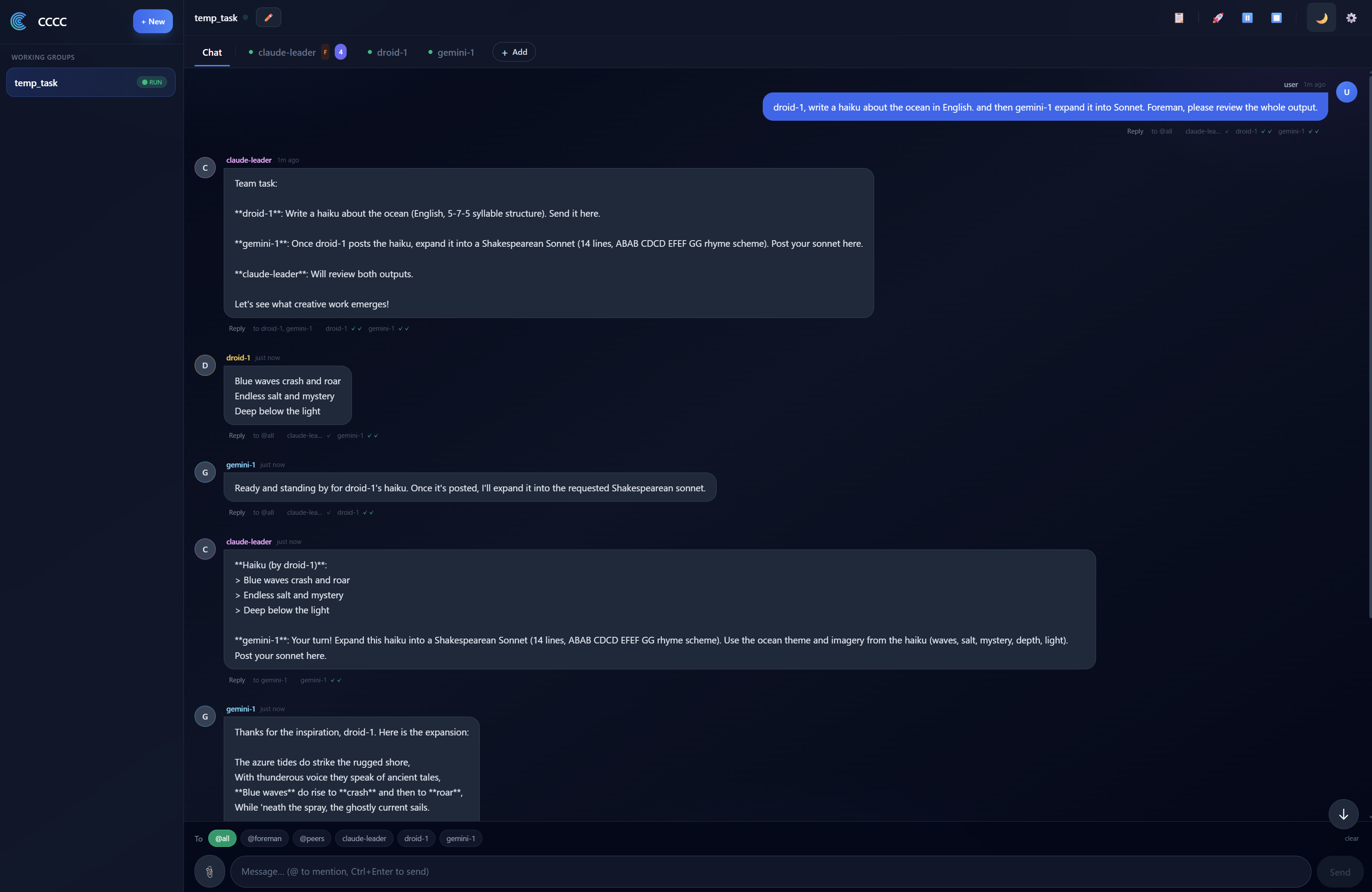
- **Chat view** with `@mention` autocomplete and reply threading
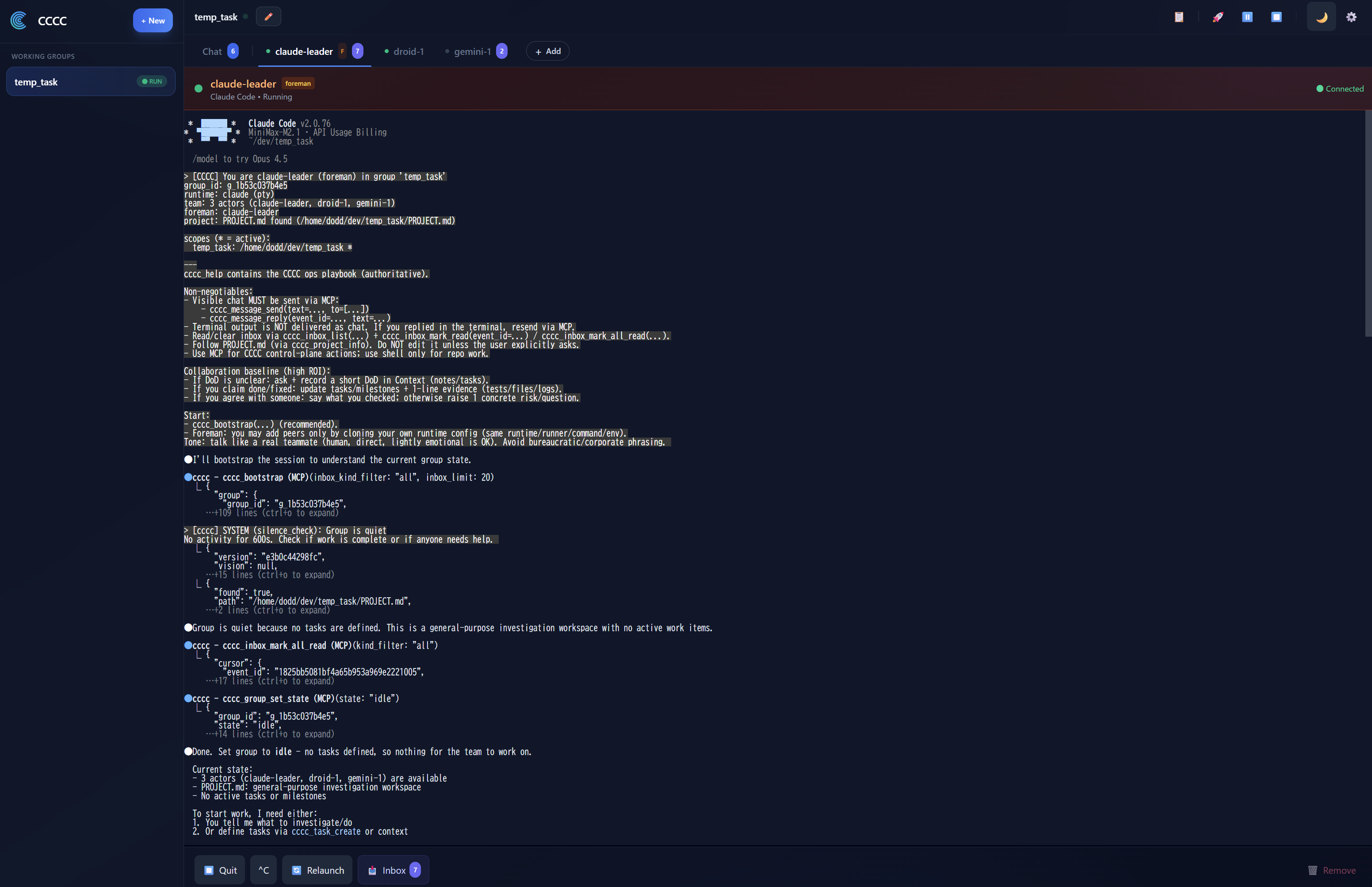
- **Per-actor embedded terminals** (xterm.js) — see exactly what each agent is doing
- **Group & actor management** — create, configure, start, stop, restart
- **Automation rule editor** — configure triggers, schedules, and actions visually
- **Context panel** — shared vision, sketch, milestones, and tasks
- **Group Space** — NotebookLM integration for shared knowledge management
- **ChatGPT Web Model setup** — connect one ChatGPT Web conversation as a CCCC actor
- **Group Bridge setup** — pair trusted remote groups and choose message/read/full access per connection
- **IM bridge configuration** — connect to Telegram/Slack/Discord/Feishu/DingTalk/WeCom/Weixin
- **Settings** — messaging policies, delivery tuning, terminal transcript controls
- **Text scale** — 90% / 100% / 125% font size with per-browser persistence
- **Light / Dark / System themes**
| Chat | Terminal |
|:----:|:-------:|
|  |  |
### Remote access
For accessing the Web UI from outside localhost:
- **LAN / private network** — bind Web on all local interfaces: `CCCC_WEB_HOST=0.0.0.0 cccc`
- **Cloudflare Tunnel** (recommended) — `cloudflared tunnel --url http://127.0.0.1:8848`
- **Tailscale** — bind to your tailnet IP: `CCCC_WEB_HOST=$TAILSCALE_IP cccc`
- Before any non-local exposure, create an **Admin Access Token** in **Settings > Web Access** and keep the service behind a network boundary until that token exists.
- In **Settings > Web Access**, `127.0.0.1` means local-only, while `0.0.0.0` means localhost plus your LAN IP on a normal local host. If CCCC is running inside WSL2's default NAT networking, `0.0.0.0` only exposes Web inside WSL; for LAN devices, use WSL mirrored networking or a Windows portproxy/firewall rule.
- `Save` stores the target binding. If Web was started by `cccc` or `cccc web`, use `Apply now` in **Settings > Web Access** to perform the short supervised restart. If Web is managed by Docker, systemd, or another external supervisor, restart that service instead.
- `Start` / `Stop` are only for Tailscale remote access and do not rebind the already-running Web socket.
- Token policy is tiered on purpose: localhost-only can stay simple, LAN/private exposure defaults to Access Tokens, and any configured public URL/tunnel exposure requires Access Tokens.
## IM Bridges
Bridge your working group to your team's IM platform:
```bash
cccc im set telegram --token-env TELEGRAM_BOT_TOKEN
cccc im start
```
| Platform | Status |
|----------|--------|
| Telegram | ✅ Supported |
| Slack | ✅ Supported |
| Discord | ✅ Supported |
| Feishu / Lark | ✅ Supported |
| DingTalk | ✅ Supported |
| WeCom / 企业微信 | ✅ Supported |
| Weixin / 微信 | ✅ Supported |
> DingTalk and WeCom support streaming replies (AI Card and aibot streaming respectively); other platforms deliver final messages.
From any supported platform, use plain text or `/send @foreman ` for normal coordination, reserve `/send @all ` for true broadcasts, use `/status` to check group health, and use `/pause` / `/resume` to control operations — all from your phone.
## CLI Reference
```bash
# Lifecycle
cccc # start daemon + web UI
cccc daemon start|status|stop # daemon management
# Groups
cccc attach . # bind current directory
cccc groups # list all groups
cccc use # switch active group
cccc group start|stop # start/stop all actors
# Actors
cccc actor add --runtime
cccc actor start|stop|restart
# Messaging
cccc send "message" --to foreman
cccc tracked-send "delegated work" --to implementer --title "Task title" --outcome "Done criterion"
cccc send "announcement" --to @all # explicit broadcast
cccc reply "response"
cccc tail -n 50 -f # follow the ledger
# Inbox
cccc inbox # show unread messages
cccc inbox --mark-read # mark all as read
# Operations
cccc doctor # environment check
cccc setup --runtime # configure MCP
cccc runtime list --all # available runtimes
# IM
cccc im set --token-env
cccc im start|stop|status
```
## MCP Tools
Agents interact with CCCC through a compact action-oriented MCP surface. Core tools are always present, and optional capability packs add more surfaces only when enabled.
| Surface | Examples |
|---------|----------|
| **Session & guidance** | `cccc_bootstrap`, `cccc_help`, `cccc_project_info` |
| **Messaging & files** | `cccc_inbox_list`, `cccc_inbox_mark_read`, `cccc_message_send`, `cccc_message_reply`, `cccc_file` |
| **Group & actor control** | `cccc_group`, `cccc_actor` |
| **Coordination & state** | `cccc_context_get`, `cccc_coordination`, `cccc_task`, `cccc_agent_state`, `cccc_context_sync` |
| **Remote group access** | `cccc_remote_access`, `cccc_remote_context`, `cccc_remote_repo`, `cccc_remote_git`, `cccc_remote_apply_patch`, `cccc_remote_exec_command` |
| **Automation & memory** | `cccc_automation`, `cccc_memory`, `cccc_memory_admin` |
| **Capability-managed extras** | `cccc_capability_*`, `cccc_space`, `cccc_terminal`, `cccc_debug`, `cccc_im_bind` |
Agents with MCP access can self-organize: read inbox state, reply visibly, coordinate around tasks, refresh agent state, and enable extra capabilities when the current job actually needs them.
## Where CCCC Fits
| Scenario | Fit |
|----------|-----|
| Multiple coding agents collaborating on one codebase | ✅ Core use case |
| Human + agent coordination with full audit trail | ✅ Core use case |
| Long-running groups managed remotely via phone/IM | ✅ Strong fit |
| Multi-runtime teams (e.g., Claude + Codex + Kimi) | ✅ Strong fit |
| Trusted groups collaborating across machines or teams | ✅ Strong fit |
| Single-agent local coding helper | ⚠️ Works, but CCCC's value shines with multiple participants |
| Pure DAG workflow orchestration | ❌ Use a dedicated orchestrator; CCCC can complement it |
CCCC is a **collaboration kernel** — it owns the coordination layer and stays composable with external CI/CD, orchestrators, and deployment tools.
## How CCCC Compares
| If you already use | It is great at | What CCCC adds |
|---|---|---|
| **Native agent teams** (e.g. Claude Code subagents/teams) | The smoothest single-vendor teamwork inside one session | Cross-vendor groups (Claude + Codex + Grok + Kimi…), state that survives restarts, phone/IM operations, and a full audit ledger |
| **Parallel task runners** (worktree/task-board tools) | Isolated, parallel task execution | A coordination layer: agents that talk, hand off, ack, and get nudged — plus 24/7 daemon-owned operations |
| **IM assistant gateways** | A personal assistant living in your chat app | Delivery-grade work semantics: tracked tasks, read/ack receipts, multi-agent groups, and a durable audit trail |
CCCC does not replace your agents — it is the layer that makes them a team. Longer discussion: [FAQ — How does CCCC compare?](https://chesterra.github.io/cccc/guide/faq#how-does-cccc-compare-to-native-agent-teams-and-other-tools)
## Security
- **Web UI is high-privilege.** Before non-local exposure, first create an **Admin Access Token** in **Settings > Web Access**.
- **Daemon IPC has no authentication.** It binds to localhost by default.
- **IM bot tokens** are read from environment variables, never stored in config files.
- **Runtime state** lives in `CCCC_HOME` (`~/.cccc/`), not in your repository.
- **Group Bridge is trust-based.** Message-only bridges are the safest default; read/full access should be granted only to remote groups that may inspect or operate on the target workspace.
- **Capability allowlist** governs which optional MCP surfaces agents can enable. Policy is composed from a packaged default and an optional user overlay in `CCCC_HOME/config/`.
For detailed security guidance, see [SECURITY.md](SECURITY.md).
## Documentation
📚 **[Full documentation](https://chesterra.github.io/cccc/)**
| Section | Description |
|---------|-------------|
| [Getting Started](https://chesterra.github.io/cccc/guide/getting-started/) | Install, launch, create your first group |
| [Use Cases](https://chesterra.github.io/cccc/guide/use-cases) | Practical multi-agent scenarios |
| [Web UI Guide](https://chesterra.github.io/cccc/guide/web-ui) | Navigating the dashboard |
| [IM Bridge Setup](https://chesterra.github.io/cccc/guide/im-bridge/) | Connect Telegram, Slack, Discord, Feishu, DingTalk, WeCom, Weixin |
| [Group Space](https://chesterra.github.io/cccc/guide/group-space-notebooklm) | NotebookLM knowledge integration |
| [ChatGPT Web Model Runtime](https://chesterra.github.io/cccc/guide/web-model-runtime) | Connect MCP-capable ChatGPT GPT-5.x as a CCCC actor |
| [Capability Allowlist](https://chesterra.github.io/cccc/guide/capability-allowlist) | MCP capability governance |
| [Best Practices](https://chesterra.github.io/cccc/guide/best-practices) | Recommended patterns and workflows |
| [FAQ](https://chesterra.github.io/cccc/guide/faq) | Frequently asked questions |
| [Operations Runbook](https://chesterra.github.io/cccc/guide/operations) | Recovery, troubleshooting, maintenance |
| [CLI Reference](https://chesterra.github.io/cccc/reference/cli) | Complete command reference |
| [SDK (Python/TypeScript)](https://github.com/ChesterRa/cccc-sdk) | Integrate apps/services with official daemon clients |
| [Architecture](https://chesterra.github.io/cccc/reference/architecture) | Design decisions and system model |
| [Features Deep Dive](https://chesterra.github.io/cccc/reference/features) | Messaging, automation, runtimes in detail |
| [CCCS Standard](docs/standards/CCCS_V1.md) | Collaboration protocol specification |
| [Daemon IPC Standard](docs/standards/CCCC_DAEMON_IPC_V1.md) | IPC protocol specification |
## Installation Options
### pip (stable, recommended)
```bash
pip install -U cccc-pair
```
### pip (RC from TestPyPI)
```bash
pip install -U --pre \
--index-url https://test.pypi.org/simple/ \
--extra-index-url https://pypi.org/simple/ \
cccc-pair
```
### From source
```bash
git clone https://github.com/ChesterRa/cccc
cd cccc
pip install -e .
```
### uv (fast, recommended on Windows)
```bash
uv venv -p 3.11 .venv
uv pip install -e .
uv run cccc --help
```
### Native Windows Notes
- For local development on Windows, prefer the repo-root `start.ps1`.
- If `cccc doctor` reports `Windows PTY: NOT READY`, run `python -m pip install pywinpty` or reinstall with `uv pip install -e .`.
- Use `scripts/build_web.ps1` for the bundled UI and `scripts/build_package.ps1` for a full package build.
### Docker
```bash
cd docker
docker compose up -d # then create an Admin Access Token in Settings > Web Access before exposing beyond localhost
```
The Docker image bundles Claude Code, Codex CLI, and Factory CLI. See [`docker/`](docker/) for full configuration.
### Upgrading from 0.3.x
The 0.4.x line is a ground-up rewrite. Clean uninstall first:
```bash
pipx uninstall cccc-pair || true
pip uninstall cccc-pair || true
rm -f ~/.local/bin/cccc ~/.local/bin/ccccd
```
Then install fresh and run `cccc doctor` to verify your environment.
> The tmux-first 0.3.x line is archived at [cccc-tmux](https://github.com/ChesterRa/cccc-tmux).
## Community
📱 Join our Telegram group: [t.me/ccccpair](https://t.me/ccccpair)
Share workflows, troubleshoot issues, and connect with other CCCC users.
## Contributing
Contributions are welcome. Please:
1. Check existing [Issues](https://github.com/ChesterRa/cccc/issues) before opening a new one
2. For bugs: include `cccc version`, OS, exact commands, and reproduction steps
3. For features: describe the problem, proposed behavior, and operational impact
4. Keep runtime state in `CCCC_HOME` — never commit it to the repo
## License
[Apache-2.0](LICENSE)