# Personal Media Hub
**English** · [繁體中文](README.zh-TW.md)
> Self-hosted photos, videos and file storage for your home network. Idle Android phones and old computers can join as **storage nodes** and keep encrypted extra copies of your files, and **Nextcloud** can use the same storage network.
Everything stays on machines you own. There are no cloud accounts, no CDNs and no third-party services. By default it serves only your LAN, and you do **not** need to (and should not) expose it to the public internet.
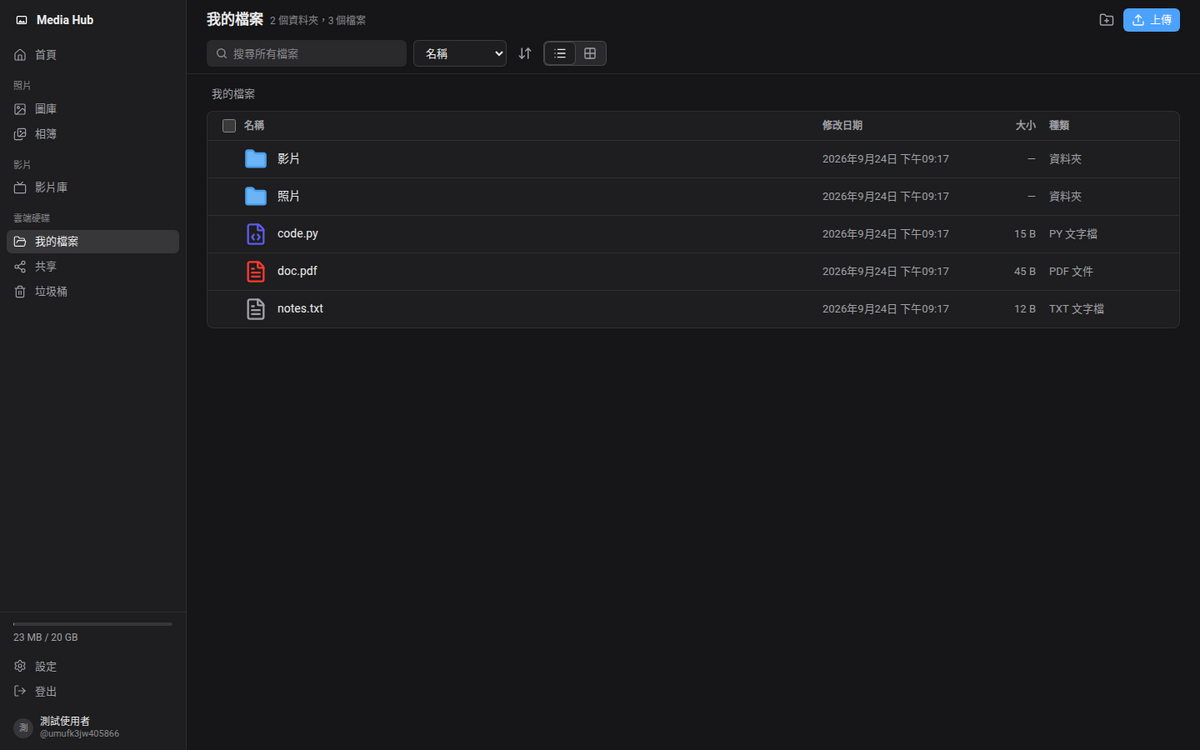
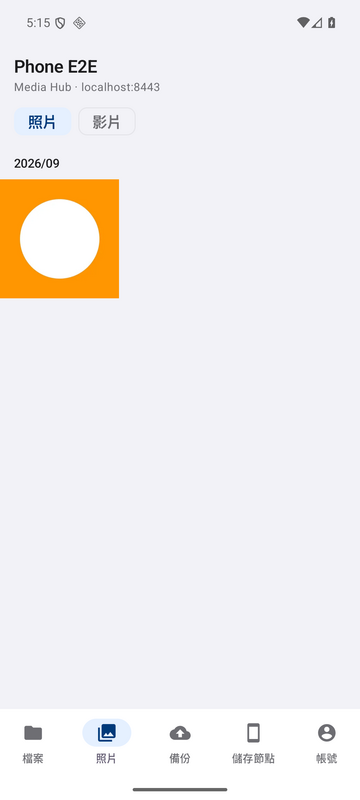
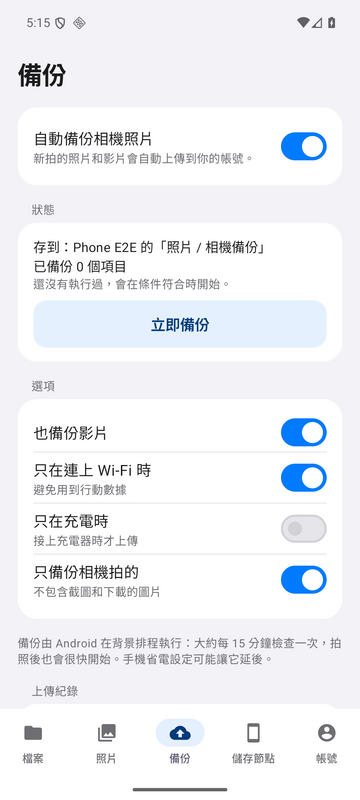
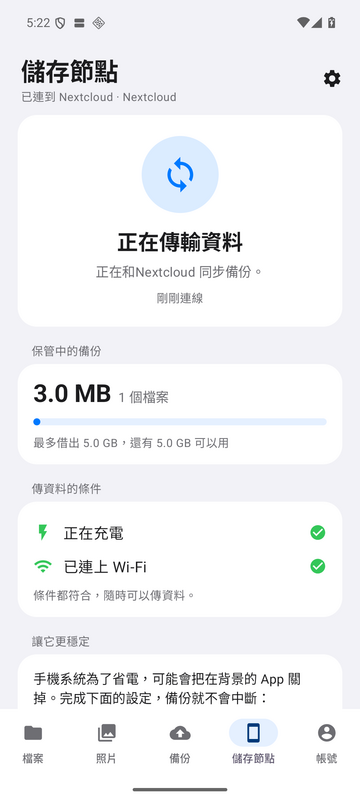
Screenshots are from the test environment (sample data). The UI is available in Traditional Chinese and English.
## Contents
- [Features](#features)
- [How it works](#how-it-works)
- [Nextcloud](#nextcloud)
- [Requirements](#requirements)
- [Quick start](#quick-start)
- [Adding storage nodes](#adding-storage-nodes)
- [Android app](#android-app)
- [Development](#development)
- [Testing](#testing)
- [Documentation](#documentation)
- [Security model](#security-model)
- [Limitations](#limitations)
- [License](#license)
## Features
### Web app (any browser: phone, tablet, desktop)
- **Photos**: a timeline by date taken, albums, favourites and sharing. Supports JPEG, PNG, WebP, GIF and HEIC.
- **Videos**: a video library. The background worker makes thumbnails and transcodes with FFmpeg, and the player supports seeking.
- **Drive**: folders, search, drag-and-drop upload, sharing with other users, and a trash with restore. Large files upload through [tus](https://tus.io/) and resume after an interruption.
- **Accounts**: invite-only sign-up, an admin console, sliding 30-day sessions and remote sign-out of devices.
- **Interface**: dark mode, and a Traditional Chinese or English UI chosen per account.
### Storage network
- Every file can have copies on several **nodes**: the server itself, Android phones and other computers. The server tracks where each copy lives and whether it is healthy (complete, under-replicated, temporarily unavailable, damaged).
- Nodes only ever receive **AES-256-GCM ciphertext**. Keys are wrapped by a master key that stays on the server.
- Nodes connect **out** to the server over HTTPS. No extra ports need to be opened on the server or on the nodes.
- Policies: how many copies to keep, how long a node may stay offline before its copies are rebuilt elsewhere, periodic integrity checks, and optional *local offload* (cold data kept only on nodes).
- **Safe removal**: a node that leaves first hands its data over to other nodes. Revoking a lost phone first shows which files exist *only* on that phone.
- A built-in **S3-compatible gateway** (SigV4) lets unmodified Nextcloud store its files on the storage network.
### Android app "Media Hub" (Android 8.0+)
- Sign in to **Media Hub and/or Nextcloud** accounts, including several at once, and browse files, photos and videos.
- Upload from the phone. Uploads run in the background and resume: tus for Media Hub, chunked upload v2 for Nextcloud.
- **Automatic camera backup**, with options for Wi-Fi only, charging only, camera photos only, and backing up only new photos or the whole library.
- **QR sign-in**: scan a code shown on the website, so no password is typed on the phone.
- Turn the phone into a **storage node**: lend part of its free space to hold encrypted copies.
### Nextcloud
- Run Nextcloud **on top of** the storage network, so all Nextcloud files get the same copies and encryption.
- The Nextcloud app **`android_storage_nodes`** (Nextcloud 33–35) lets a Nextcloud admin pair, monitor and remove phones from inside Nextcloud, and gives every user a private folder on the storage network.
- The Android app can also sign in to Nextcloud directly.
Details are in [Nextcloud](#nextcloud) below.
## How it works
```
Browser / Android app ──HTTPS──▶ Caddy (serves the SPA, reverse proxy, private CA certificates)
├─ /api ─────────▶ FastAPI "api" ─┬─ PostgreSQL 17 (metadata)
│ └─ storage volume (originals, thumbnails, transcodes)
├─ /node-api/v1 ◀─ storage nodes (Android phones, computer agent) connect in
└─ :9443 ─▶ Nextcloud (optional) ──S3──▶ "s3gw" S3 gateway ──▶ same blobs
"worker": thumbnails / FFmpeg jobs + storage-network replication, integrity checks
```
- **Blobs and files.** Each uploaded file is stored once as a *blob*. Web files, album entries and S3 objects (Nextcloud) are only references to blobs, so copying or renaming never moves data.
- **Writing.** A new blob is written to the server's disk first. The worker then encrypts a copy per remote node, with a per-blob data key, and queues it until the target number of copies is reached. The node downloads the ciphertext and reports its SHA-256, and the server marks the copy verified.
- **Reading.** Reads are served from the local disk. If the blob was offloaded, the server fetches it back from an online node and checks the GCM tag before serving it.
- **Integrity.** The server periodically sends challenge-based checks, `sha256(challenge ‖ ciphertext)`, so a node cannot fake having a copy.
- **Protocol.** Nodes speak a small JSON-over-HTTPS protocol ([NODE_PROTOCOL.md](docs/NODE_PROTOCOL.md)). They long-poll for tasks (store, retrieve, verify, delete) and stream data in 1 MiB chunks that resume after a disconnect.
| Directory | What's inside |
| --- | --- |
| `backend/` | Python 3.12, FastAPI, SQLAlchemy 2, Alembic, argon2. `app/` holds the API, worker and S3 gateway; `nodeagent/` is the storage node for computers (`mediahub-node.pyz`); `nodesim/` is a simulated node for tests |
| `frontend/` | React 19, TypeScript, Vite, Tailwind CSS v4, TanStack Query, i18next |
| `android/` | Kotlin + Jetpack Compose. `:core` is the node protocol engine, `:cloud` the Media Hub / Nextcloud clients, `:app` the app |
| `integrations/nextcloud/android_storage_nodes/` | The Nextcloud app (PHP + plain JS) |
| `deploy/` | Caddy image and config, Nextcloud container hooks |
| `scripts/` | Setup, backup/restore, builds, end-to-end tests |
| `docs/` | Full documentation (mostly Traditional Chinese) |
## Nextcloud
Nextcloud can connect in three ways. They can be combined, or you can use none of them.
### 1. Bundled Nextcloud stored on the storage network
`compose.nextcloud.yaml` runs Nextcloud 34 next to Media Hub, with the **S3 gateway as its primary object storage**. Every file uploaded to this Nextcloud becomes a blob in the storage network, so it gets encrypted copies on your phones and computers just like Media Hub files.
- It is served at `https://:9443`, a separate origin from Media Hub, so logins and cookies are not shared.
- Nextcloud, its database, Redis and the S3 gateway are only reachable inside the compose network. Only Caddy's port 9443 is published.
- Settings are applied on every start by `deploy/nextcloud/hooks/`: trusted domains, cron mode and a maintenance window.
- It is enabled by `COMPOSE_FILE=compose.yaml:compose.nextcloud.yaml` in `.env`, which is the default. Remove that line if you don't want Nextcloud.
- Primary object storage can only be chosen when Nextcloud is **installed**. Don't point an existing Nextcloud that already stores files on local disk at it.
Setup and upgrades: [DEPLOYMENT.md §5.1](docs/DEPLOYMENT.md). Proof of concept and results: [NEXTCLOUD_POC.md](docs/NEXTCLOUD_POC.md).
### 2. Nextcloud app `android_storage_nodes` (manage phones from Nextcloud)
For any Nextcloud **33, 34 or 35**, including the bundled one or one on another machine. Nextcloud core is not modified.
**Admins** get *Administration settings → Android storage nodes*:
- A **gateway connection** (URL, integration token, pinned certificate fingerprint), saved only after the gateway accepts the token over a certificate that matches the pin.
- **Add a phone**: a one-time QR code that the Android app scans.
- A **phone list**: online/offline, last seen, space used and lent, copies held, last error.
- **Remove safely** (migrate the data first), **revoke now** (for a lost phone, which first shows how many files exist only there), and delete.
- An overview of the pool: nodes online and file health.
**Users** get a **private folder in Files** (default name "Android storage") backed by their own bucket on the gateway, plus a personal page showing their usage and whether their files are fully replicated. This needs the bundled *External storage support* (`files_external`) app. Managing phones alone does not.
How it is isolated and secured:
- Each Nextcloud is a separate **integration client** on the gateway, with its own bearer token and its own S3 key.
- The S3 key is restricted to its own bucket prefix. It sees and manages **only the phones it paired**, not those paired from Media Hub or another Nextcloud.
- The token and S3 secret are stored **encrypted** in Nextcloud's app config and are never sent to the browser or written to the external-storage mount table.
- The gateway's CA is pinned and imported into Nextcloud's certificate store. Plain `http` is only accepted for a container name on the same network (e.g. `http://api:8000`).
- Admin actions require Nextcloud's password confirmation.
Install it:
```bash
# On the gateway (Media Hub server): create a client, copy the token and fingerprint it prints
docker compose exec api mediahub integration create --name "Home Nextcloud"
# (or: web UI → Storage network → Integrations; also: integration list | rotate | revoke)
# On Nextcloud: copy the app into custom_apps/ (or unpack the tarball from scripts/package-nextcloud-app.sh)
occ app:enable files_external # optional: only needed for the per-user folder
occ app:enable android_storage_nodes
```
Then open *Administration settings → Android storage nodes*, fill in the gateway, and click *Save and test*.
A Nextcloud on **another machine** also needs the S3 port. Add `compose.gateway.yaml` to `COMPOSE_FILE` and set `S3_DOMAIN` / `S3_HTTPS_PORT` (default 9445). It is opt-in, bound to `HUB_BIND` (your LAN) and uses the same private CA.
Full guide: [docs/nextcloud-integration/](docs/nextcloud-integration/README.md), including [architecture and design trade-offs](docs/nextcloud-integration/ARCHITECTURE.md), the [security design](docs/nextcloud-integration/SECURITY.md) and [test results](docs/nextcloud-integration/TESTING.md).
### 3. The Android app as a Nextcloud client
The Media Hub Android app can sign in to any Nextcloud. It supports Nextcloud's own Login Flow v2, the app-password QR code, or a password that is immediately exchanged for an app password and not stored. You can then browse files and photos, upload, and back up the camera to `Photos/Camera`.
### Which one do I need?
| Goal | Use |
| --- | --- |
| A Nextcloud whose files automatically get copies on your phones | **1** (bundled Nextcloud) |
| Pair and manage phones from the Nextcloud admin page | **2** (`android_storage_nodes`) |
| Give each Nextcloud user an extra folder that lives on the storage network | **2** + `files_external` |
| An existing Nextcloud on another machine that should use your phones | **2** + `compose.gateway.yaml` |
| Just browse and back up to Nextcloud from your phone | **3** |
One phone pairs with **one gateway** at a time. A single gateway can serve Media Hub and several Nextclouds together, so a phone only needs to be paired once.
## Requirements
- **Server:** Linux with Docker Engine and Docker Compose v2. The containers are capped at about 1 GiB of RAM for the API and 3 GiB for the media worker, and transcoding runs one job at a time at low priority. Keep enough disk for your originals plus thumbnails and transcodes.
- **Android app:** Android 8.0 (API 26) or newer. To build it, you need the Android SDK and your own signing key.
- **Computer node (optional):** Python 3.10+. Tested on Linux; macOS and Windows should work in the foreground but are untested.
- **Nextcloud app (optional):** Nextcloud 33, 34 or 35.
## Quick start
```bash
git clone https://github.com/Chihen-Tai/personal-media-hub.git && cd personal-media-hub
./scripts/init-env.sh # writes .env with random passwords and a random master key
docker compose up -d --build --wait # db, api, worker, caddy (+ Nextcloud unless you removed COMPOSE_FILE)
docker compose exec api mediahub create-admin --username # asks for the password
```
Open . The server only listens on `127.0.0.1` until you set up LAN access.
**LAN access (phones etc.).**
1. In `.env`, set `HUB_BIND` to the server's LAN IP and add `https://` to `HUB_SITES`.
2. Set `HUB_DEFAULT_SNI=` and `MEDIAHUB_PUBLIC_URL=https://`.
3. Run `docker compose up -d`.
4. Install the local root CA on your devices. The steps and a checker script (`scripts/check-lan.sh`) are in [DEPLOYMENT.md §3](docs/DEPLOYMENT.md).
**Before you store real data:**
- **Back up `MEDIAHUB_MASTER_KEY`** from `.env` somewhere safe. Without it, copies on remote nodes cannot be decrypted.
- Schedule backups with `./scripts/backup.sh [target dir]` (cron example in [OPERATIONS.md](docs/OPERATIONS.md)) and learn `./scripts/restore.sh `. Copies on phones are redundancy, **not** a backup.
Useful admin commands:
```bash
docker compose exec api mediahub create-invite [--role user|admin] [--days 7] # invitation code for a new user
docker compose exec api mediahub reset-password --username
docker compose exec api mediahub check [--fix] # consistency check of DB vs. storage
docker compose exec -u www-data nextcloud php occ # bundled Nextcloud
```
## Adding storage nodes
1. In the web app, go to *Storage network → Policy* and set **copies per file** to at least 2 (the server plus one node). Otherwise nodes stay empty.
2. Go to *Storage network → Add node*:
- **Android phone**: install the app (the APK can be downloaded from *Settings* on the website), tap *Start setup*, scan the QR code and choose how much space to lend (5 GB, 20 GB or all it can spare). The phone always keeps 10 % of its storage, between 2 and 10 GB, for itself. By default large transfers happen only while charging and on Wi-Fi.
- **Computer**: download `mediahub-node.pyz` and run the command shown, e.g. `python3 mediahub-node.pyz pair --capacity 100GB --name 'Study PC' --payload '<…>'`. On Linux, `install-service` runs it as a user service.
3. Watch the copies appear under *Storage network → Nodes*. Each node shows capacity, copies held, battery and charging state, and ongoing transfers.
To remove a node, use *Leave and migrate data* (or `leave --wait` on a computer). Data is copied elsewhere first, then the node wipes itself. For a lost device, use *Revoke now*. Retired and revoked nodes can be deleted from the list. The computer agent uninstalls cleanly with `uninstall`.
## Android app
The app has five tabs: **Files, Photos, Backup, Storage node, Account**. A phone that only lends space opens straight into the storage-node tab.
| | |
| --- | --- |
| Sign-in | Media Hub: scan the QR code under *Settings → Sign in on your phone* (valid 5 min, single use, pins the server certificate), or username and password. Nextcloud: Login Flow v2, the app-password QR code, or a password that is exchanged for an app password |
| Files | Folders, breadcrumbs, search, thumbnails; open with other apps, share, save to Downloads |
| Photos | Month-grouped grid with infinite scroll, a full-screen viewer with swipe and zoom, and video playback (Media3) over the same pinned connection |
| Upload / backup | WorkManager jobs that keep running after the app is closed, with progress in a notification. Camera backup checks every 15 min and also when new media appears |
| Storage node | Status, lent space, charging/Wi-Fi conditions, pause, and a checklist for battery-optimisation settings on OEM Android builds |
Account secrets are encrypted with an Android Keystore key, separate from the storage-node credential. TLS trusts **only** the pinned private CA.
**Building.** No APK is included in this repository. Create your own signing key and describe it in `~/.config/mediahub/android-release.env` (outside the repo). Then `./scripts/build-android.sh` produces `android/dist/mediahub-node.apk`, which the server offers for download. See [ANDROID_NODE_APP.md](docs/ANDROID_NODE_APP.md).
## Development
```bash
# Postgres for development on 127.0.0.1:55432 (use a separate project name, see note below)
docker compose -f compose.yaml -f compose.dev.yaml -p mediahub-dev up -d db
cd backend && uv sync
MEDIAHUB_DATABASE_URL=postgresql+psycopg://mediahub:@127.0.0.1:55432/mediahub \
MEDIAHUB_STORAGE_ROOT=../.devdata/storage MEDIAHUB_ENVIRONMENT=development MEDIAHUB_COOKIE_SECURE=false \
uv run sh -c "alembic upgrade head && uvicorn app.main:app --reload --port 8000"
cd frontend && npm install && npm run dev # http://localhost:5173, proxies /api → :8000
cd integrations/nextcloud/android_storage_nodes && npm install && npm run build # Nextcloud app JS + l10n
```
> On a machine that already runs the production stack, always pass `-p ` with `compose.dev.yaml`. Otherwise it recreates the production `db` container.
Conventions for contributors (and AI assistants) are in [CLAUDE.md](CLAUDE.md). Schema changes go through Alembic migrations in `backend/alembic/versions/`. UI strings are written in Traditional Chinese, with English in `frontend/src/i18n/en.json` generated by `build_en.py`.
## Testing
```bash
./scripts/test.sh # backend pytest in a container, against a separate mediahub_test database
cd frontend && npm run build # type check + build
python3 scripts/i18n_check.py # English translation complete, no untranslated Chinese
cd android && ./gradlew :core:test :cloud:test :app:lintDebug
```
End-to-end tests create users and files. **Run them only against a separate test stack** (e.g. `docker compose -p mediahub-e2e` on `127.0.0.1:8443`), never against production:
```bash
./scripts/make-test-media.sh # sample media → .devdata/testmedia
uv run --no-project --with httpx python scripts/e2e_api.py https://localhost:8443 .devdata/testmedia
uv run --no-project --with httpx python scripts/sim_e2e.py https://localhost:8443 .devdata/simnet
cd frontend && E2E_ADMIN_PASSWORD= npx playwright test
# Also: scripts/nextcloud_app_e2e.py (Nextcloud app on NC 33/34/35 containers),
# scripts/android_cloud_e2e.py (Android emulator only); usage is at the top of each file
```
What was tested, on which devices and versions, and what is still **unverified** is recorded in [TEST_REPORT.md](docs/TEST_REPORT.md).
## Documentation
The docs are in Traditional Chinese.
| Document | Contents |
| --- | --- |
| [ARCHITECTURE.md](docs/ARCHITECTURE.md) | Technology choices, data model, storage and security design |
| [DEPLOYMENT.md](docs/DEPLOYMENT.md) | Installation, LAN and HTTPS certificates, environment variables, Nextcloud deployment, updates |
| [USER_GUIDE.md](docs/USER_GUIDE.md) | End-user guide |
| [OPERATIONS.md](docs/OPERATIONS.md) | Backup, restore, consistency checks, logs, troubleshooting |
| [SECURITY.md](docs/SECURITY.md) | Threat model, controls, security tests |
| [ANDROID_NODE_APP.md](docs/ANDROID_NODE_APP.md) | Android app: usage, building, signing, test results, unverified items |
| [NODE_PROTOCOL.md](docs/NODE_PROTOCOL.md) | Storage node protocol v1 |
| [nextcloud-integration/](docs/nextcloud-integration/README.md) | Nextcloud integration: setup, architecture, security, testing |
| [NEXTCLOUD_POC.md](docs/NEXTCLOUD_POC.md) | Proof of concept: unmodified Nextcloud on the storage network via S3 |
| [PERFORMANCE.md](docs/PERFORMANCE.md) | Measurements and optimisations |
| [RESEARCH.md](docs/RESEARCH.md) | Survey of existing projects (Nextcloud, MeshHold, MinIO, Garage, …) and why this design |
| [TEST_REPORT.md](docs/TEST_REPORT.md) | Test results and acceptance report |
| [THIRD_PARTY_LICENSES.md](docs/THIRD_PARTY_LICENSES.md) | Third-party components and licences |
## Security model
- **LAN-only by design.** A private CA (Caddy) issues the certificates. The server binds to `127.0.0.1` until you choose a LAN address, and no inbound ports are needed on nodes.
- **No secrets in the code.** Passwords, the master key, node credentials, integration tokens and S3 keys are generated at deploy or pairing time. The server stores tokens only as hashes, and the phones keep theirs in the Android Keystore.
- **Encryption.** Remote nodes hold only AES-256-GCM ciphertext and never receive keys. The server itself can decrypt, so this is **encryption in transit and at rest on nodes, not end-to-end encryption**.
- **Authorization.** Every content route goes through one access layer, and missing and forbidden both return 404. Admins manage the system but have no access to users' content. Sensitive admin actions require re-entering the password. Non-GET API calls need a CSRF header.
- This is a personal project and has **not** had an independent security audit. Please report issues through GitHub issues.
## Limitations
- **Nodes add redundancy, not capacity.** New data is written to the server's disk first, and nodes hold extra copies. Only with *local offload* does cold data live only on nodes, and reading it then needs a node online.
- **Not a backup.** Accidental deletion, ransomware or a lost master key are not covered by replication. Keep independent backups.
- A phone pairs with one gateway at a time.
- Android may delay background work to save battery. The app uses a foreground service and WorkManager as Android allows, and shows which system settings help.
- After the gateway was unreachable, Nextcloud waits up to **10 minutes** before retrying the external-storage folder. This is Nextcloud core behaviour, and files are never deleted.
- The Nextcloud app is not yet published on the Nextcloud App Store.
## License
This project is licensed under the [GNU Affero General Public License v3.0 or later](LICENSE) (AGPL-3.0-or-later). That covers the backend, the frontend, the Android app and the Nextcloud app.
In short, you may use, modify and share it. If you distribute a modified version **or run it as a network service for others**, you must offer the corresponding source code under the same licence.
Third-party components and their licences are listed in [THIRD_PARTY_LICENSES.md](docs/THIRD_PARTY_LICENSES.md). The FFmpeg in the container image is a GPL build, so its terms apply if you distribute the image.