# CHIOTPField
CHIOTPField is a set of textfields that can be used for One-time passwords, SMS codes, PIN codes, etc. All fields support insertion of one-time codes from SMS.
Made with ❤️ by [Chili Labs](https://chililabs.io).
## Overview
 ## Requirements
* iOS 10.0+
* Swift 5
## Installation
### Manually
Just add the `Sources` folder to your project.
### CocoaPods
use [CocoaPods](https://cocoapods.org) with Podfile:
``` ruby
pod 'CHIOTPField', '~> 0.1'
# individual page control
pod 'CHIOTPField/One'
pod 'CHIOTPField/Two'
pod 'CHIOTPField/Three'
pod 'CHIOTPField/Four'
```
### Swift Package Manager
```swift
dependencies: [
.package(url: "https://github.com/ChiliLabs/CHIOTPField.git", .upToNextMajor(from: "0.1"))
]
```
## Usage
### 🎨 Storyboards
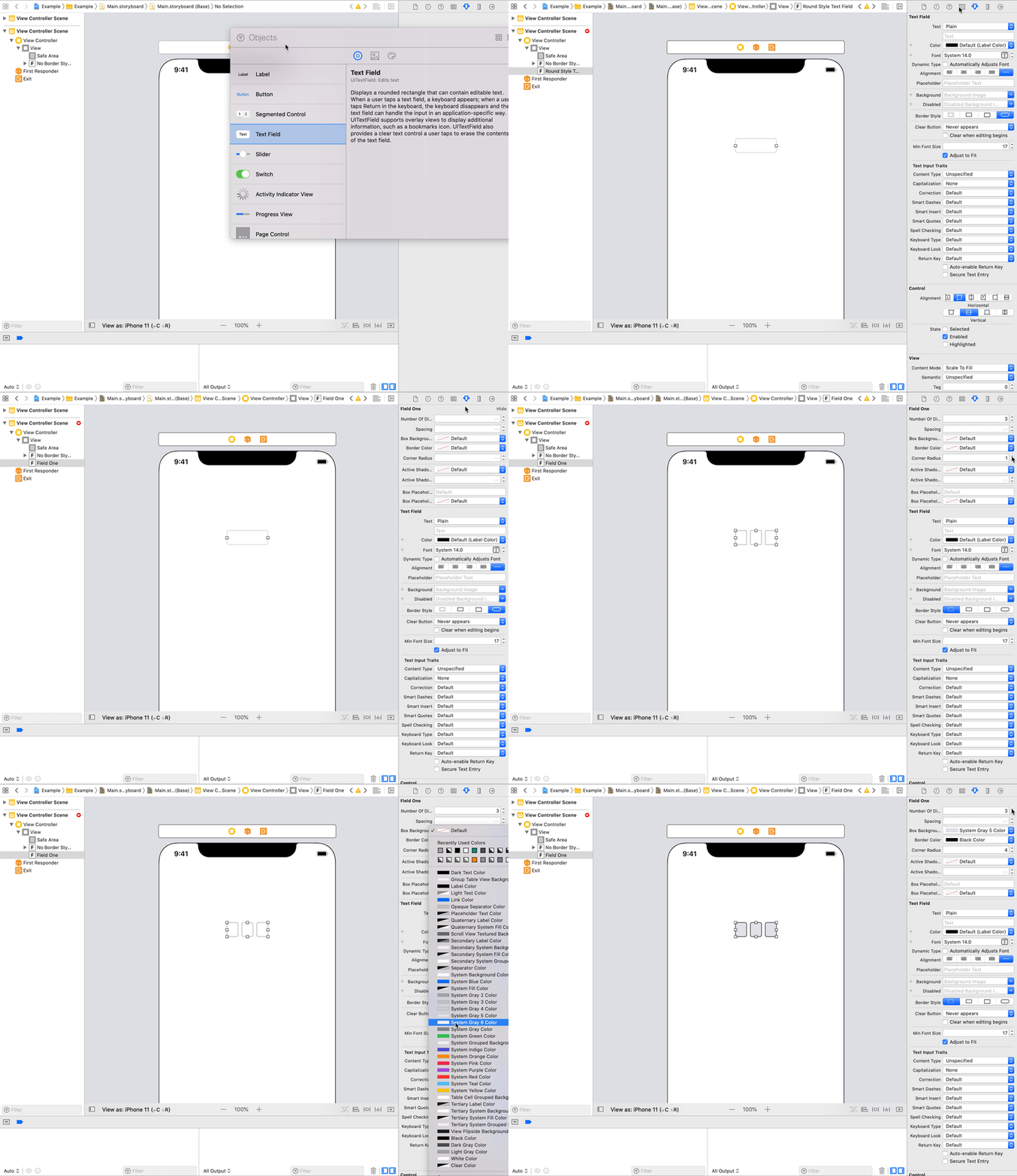
Just drop UITextField and set its class to be one of CHIOTPField.
## Requirements
* iOS 10.0+
* Swift 5
## Installation
### Manually
Just add the `Sources` folder to your project.
### CocoaPods
use [CocoaPods](https://cocoapods.org) with Podfile:
``` ruby
pod 'CHIOTPField', '~> 0.1'
# individual page control
pod 'CHIOTPField/One'
pod 'CHIOTPField/Two'
pod 'CHIOTPField/Three'
pod 'CHIOTPField/Four'
```
### Swift Package Manager
```swift
dependencies: [
.package(url: "https://github.com/ChiliLabs/CHIOTPField.git", .upToNextMajor(from: "0.1"))
]
```
## Usage
### 🎨 Storyboards
Just drop UITextField and set its class to be one of CHIOTPField.
 ### 💻 Code
``` swift
let field = CHIOTPFieldOne(frame: .init(x: 0, y: 0, width: 200, height: 60))
field.numberOfDigits = 4
field.cornerRadius = 4
```
### Text Color
Just change the text color for textfield as you normaly do.
### Caret color
Tint color is responsible for caret color. If you want to hide a caret, just set the color to clear.
## OTP Fields
### OTPFieldOne
### 💻 Code
``` swift
let field = CHIOTPFieldOne(frame: .init(x: 0, y: 0, width: 200, height: 60))
field.numberOfDigits = 4
field.cornerRadius = 4
```
### Text Color
Just change the text color for textfield as you normaly do.
### Caret color
Tint color is responsible for caret color. If you want to hide a caret, just set the color to clear.
## OTP Fields
### OTPFieldOne
 ``` swift
var numberOfDigits: Int // number of boxes for digits
var spacing: Int // spacing between digits
var boxBackgroundColor: UIColor // background color of the box in normal state
var borderColor: UIColor // border color of the box in normal state
var cornerRadius: CGFloat // corner radius of the box
var activeShadowColor: UIColor? // shadow color of the box in active state
var activeShadowOpacity: CGFloat // shadow opacity of the box in active state
var boxPlaceholder: String? // placeholder text
var boxPlaceholderColor: UIColor? // placeholder text color
```
### OTPFieldTwo
``` swift
var numberOfDigits: Int // number of boxes for digits
var spacing: Int // spacing between digits
var boxBackgroundColor: UIColor // background color of the box in normal state
var borderColor: UIColor // border color of the box in normal state
var cornerRadius: CGFloat // corner radius of the box
var activeShadowColor: UIColor? // shadow color of the box in active state
var activeShadowOpacity: CGFloat // shadow opacity of the box in active state
var boxPlaceholder: String? // placeholder text
var boxPlaceholderColor: UIColor? // placeholder text color
```
### OTPFieldTwo

 ``` swift
var numberOfDigits: Int // number of boxes for digits
var spacing: Int // spacing between digits
var cornerRadius: CGFloat // corner radius of the box
var boxBackgroundColor: UIColor // background color of the box in normal state
var activeBoxBackgroundColor: UIColor // background color of the box in active state
var filledBoxBackgroundColor: UIColor // background color of the box if a text is entered
var borderColor: UIColor // border color of the box in normal state
var activeBorderColor: UIColor? // border color of the box in active
var filledBorderColor: UIColor? // border color of the box if a text is entered
var boxPlaceholder: String? // placeholder text
var boxPlaceholderColor: UIColor? // placeholder text color
```
### OTPFieldThree
``` swift
var numberOfDigits: Int // number of boxes for digits
var spacing: Int // spacing between digits
var cornerRadius: CGFloat // corner radius of the box
var boxBackgroundColor: UIColor // background color of the box in normal state
var activeBoxBackgroundColor: UIColor // background color of the box in active state
var filledBoxBackgroundColor: UIColor // background color of the box if a text is entered
var borderColor: UIColor // border color of the box in normal state
var activeBorderColor: UIColor? // border color of the box in active
var filledBorderColor: UIColor? // border color of the box if a text is entered
var boxPlaceholder: String? // placeholder text
var boxPlaceholderColor: UIColor? // placeholder text color
```
### OTPFieldThree
 ``` swift
var numberOfDigits: Int // number of boxes for digits
var spacing: Int // spacing between digits
var boxBackgroundColor: UIColor // background color of the box in normal state
var borderHeight: CGFloat / /bottom border height
var borderCornerRadius: CGFloat // bottom border radius
var dotRadius: CGFloat // dot radius when text is entered
```
### OTPFieldFour
``` swift
var numberOfDigits: Int // number of boxes for digits
var spacing: Int // spacing between digits
var boxBackgroundColor: UIColor // background color of the box in normal state
var borderHeight: CGFloat / /bottom border height
var borderCornerRadius: CGFloat // bottom border radius
var dotRadius: CGFloat // dot radius when text is entered
```
### OTPFieldFour
 ``` swift
var numberOfDigits: Int // number of boxes for digits
var spacing: Int // spacing between digits
var boxBackgroundColor: UIColor // background color of the box in normal state
var borderHeight: CGFloat / /bottom border height
var borderColor: CGFloat // bottom border color
var cornerRadius: CGFloat // corner radius of the box
```
## License
CHIOTPField is released under the MIT license. See [LICENSE](./LICENSE) for details.
``` swift
var numberOfDigits: Int // number of boxes for digits
var spacing: Int // spacing between digits
var boxBackgroundColor: UIColor // background color of the box in normal state
var borderHeight: CGFloat / /bottom border height
var borderColor: CGFloat // bottom border color
var cornerRadius: CGFloat // corner radius of the box
```
## License
CHIOTPField is released under the MIT license. See [LICENSE](./LICENSE) for details.