# EffectMidi
[简体中文](./README.md) | English
## Description
This project is inspired by [Effect_Piano_light_controller](https://github.com/esun-z/Effect_Piano_light_controller). It controls external lighting effects for MIDI keyboards through a desktop application by reading MIDI keyboard inputs and controlling LED strip effects.
### Features
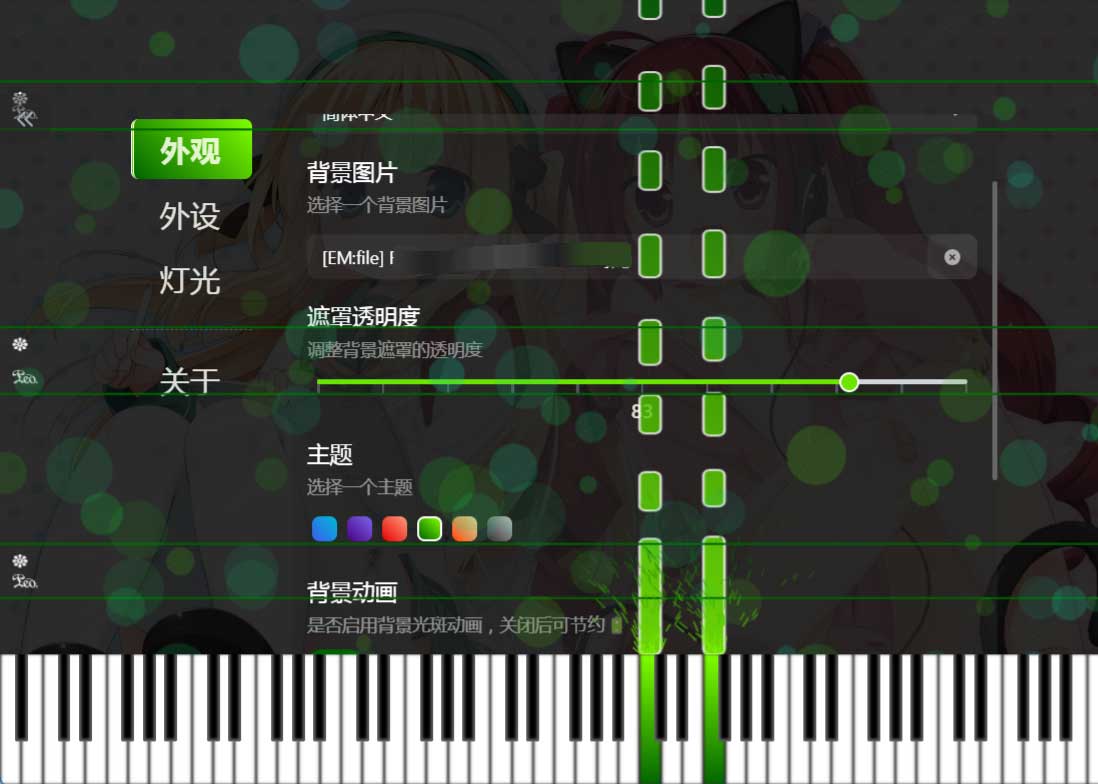
All configurations are saved to the `.effect-midi` directory in the user's `home` directory, for example, a common path would be `C:/Users/Administrator/.effect-midi`, or replace `Administrator` with your username.
The `effect-midi.db` database file is saved within this directory, and both portable and installed versions read configurations from it. It's a plain text SQLite database file that you can open with any database management tool to view the configurations.
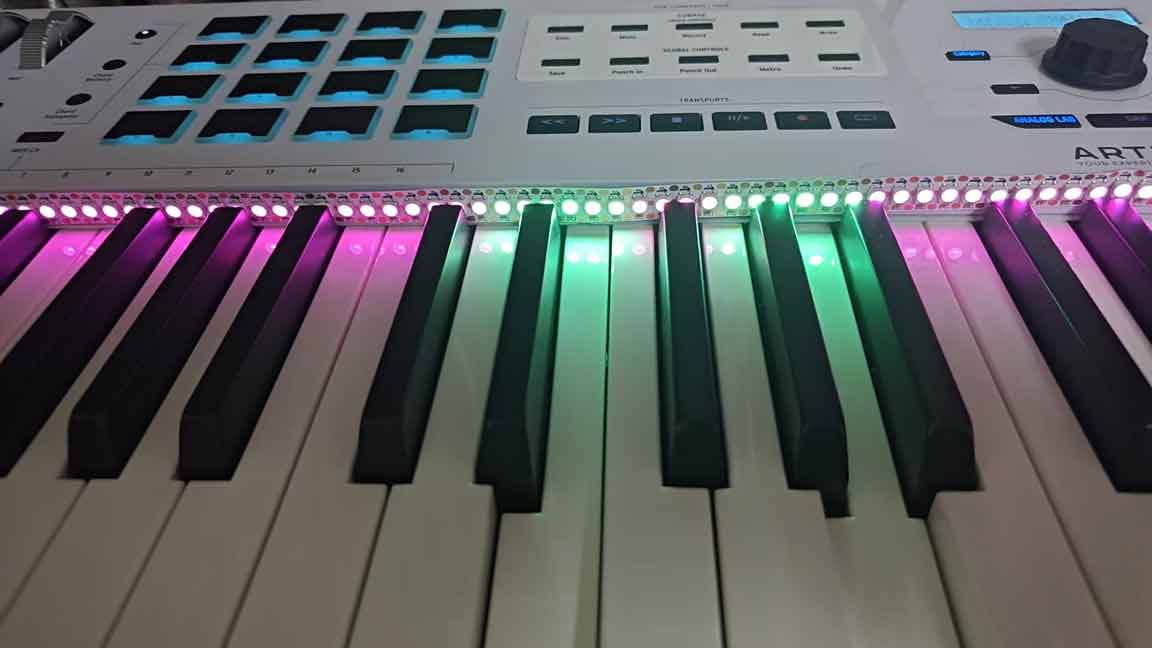
This program provides the following features:
+ **✨Interface Appearance Settings**: (Control side) Background image, color theme, background animation, click animation, note waterfall, language switching (currently supports Chinese and English)
+ **⚙️Device Connection**: Support for selecting active MIDI devices and serial port devices (serial port selection requires manual activation)
+ **🌈Effect Settings**: Support for setting LED strip background color, foreground color, endpoint light color, diffusion width, delay time
All components in the control interface except the bottom keyboard component can be collapsed (collapse button in the top-left corner). When collapsed, it provides a better view of the keyboard note waterfall.
[More feature introductions and project overview](https://mori.plus/archives/effect-midi-01)
[Video effects created using this project](https://www.bilibili.com/video/BV1D4ZFYqEaF/?share_source=copy_web&vd_source=a5261a3226919a8b0f0b47bb707e4e71)
[You can also use green screen images for post-editing](https://www.bilibili.com/video/BV17ATEzUEAj/?share_source=copy_web&vd_source=a5261a3226919a8b0f0b47bb707e4e71)
## Usage
### Hardware List
- **Development Board**:
- RP Pico/RP2040 series: Cost-effective, tested and passed, can use the complete functionality of the current project
- Arduino Uno R3: Does not support USB HID, requires using the `deprecated_serial` branch code for serial communication-based legacy compatibility. Actual testing shows poor user experience due to probabilistic serial data loss, causing frequent delays and losses
- Arduino Mega 2560: To be tested
- ESP32: To be tested, USB HID support has been confirmed, expected to use the complete functionality of the current project
- STM32: To be tested
- **WS2812B LED Strip**: The program is compatible with 144 LEDs/m specification (one key corresponds to two LEDs), requiring a total of 178 LED beads (2 endpoint LEDs + 88×2). Usually, you need to purchase a two-meter LED strip and cut off the excess LEDs
- **MIDI Keyboard**: 88-key MIDI keyboard, can be an electronic piano, MIDI keyboard, etc. (Currently, keyboards with fewer than 88 keys require code modification to adjust key mapping)
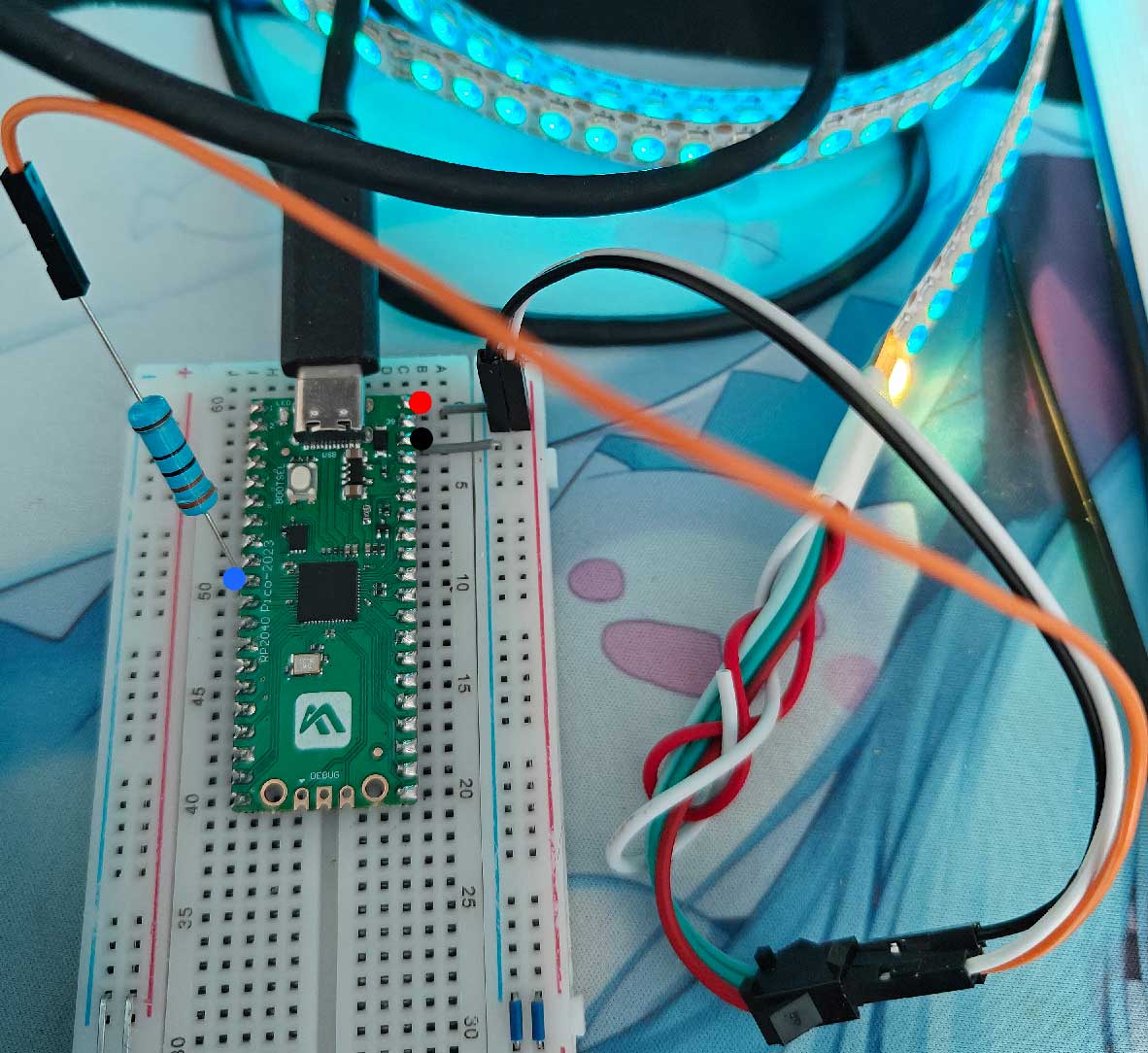
- **Wires**: The simplest solution requires 2 male-to-male dupont wires and 1 male-to-female dupont wire
- **330Ω Resistor**: Recommended range (220Ω-470Ω) helps protect components and increase signal stability; can work without it if unavailable, but not recommended
### Wiring Scheme
RP2040 series, additionally provides Fritzing project file (`doc/effect-midi.rp2040.fzz`):
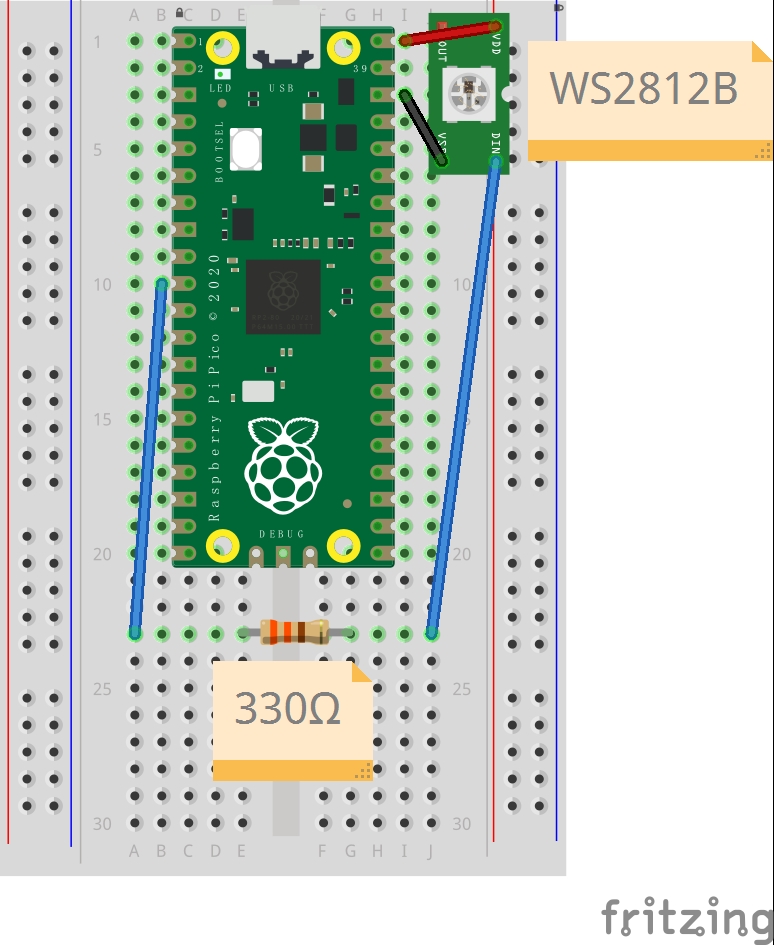
Since the development board is directly connected to the PC in this project's solution, external power supply is usually not needed.
If PC power supply is insufficient, you can use a 5V DC power supply.
### Program Flashing
1. Download the project code. [Releases](https://github.com/ChiruMori/EffectMidi/releases) provides Arduino project code that can be used after extraction
2. Use Arduino IDE to open the extracted `EffectMidi/EffectMidi.ino`. Note that the project code is not a single file; if copied to other directories, the directory structure must be maintained (complete files under the `EffectMidi` directory)
3. Install the corresponding development board manager (RP2040): Open Arduino IDE -> `File` -> `Preferences` -> `Additional Boards Manager URLs`, add the following URL: `https://github.com/earlephilhower/arduino-pico/releases/download/global/package_rp2040_index.json`
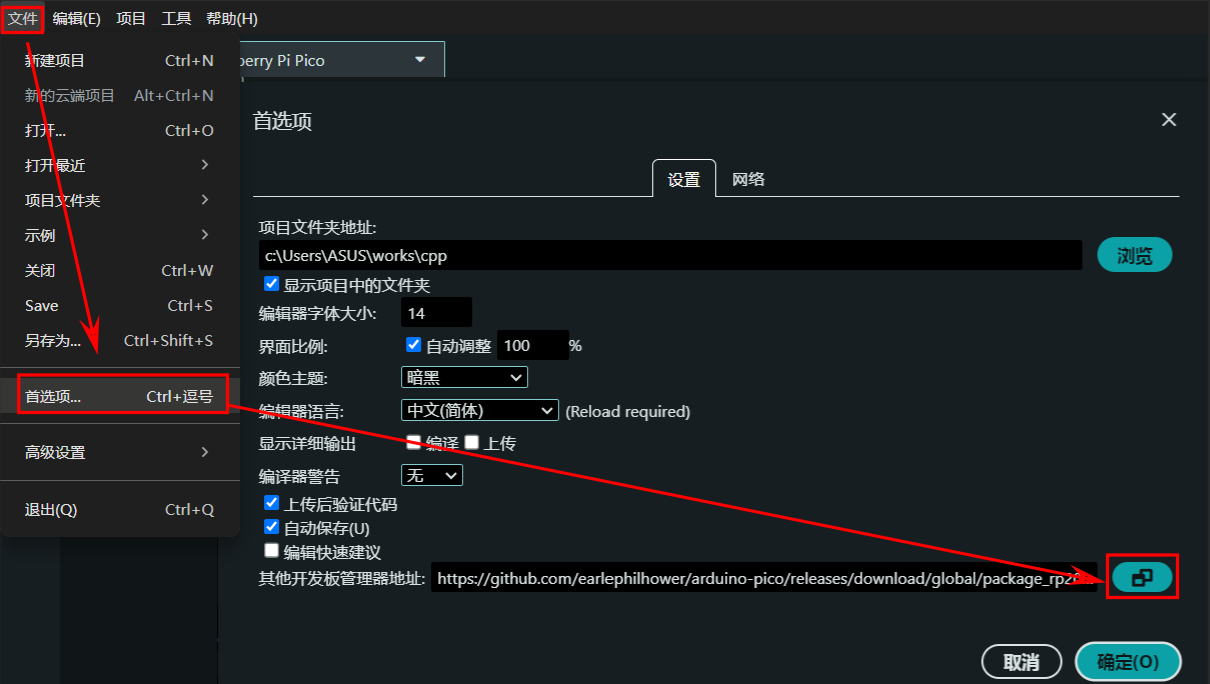
4. Click OK and wait for the download to complete
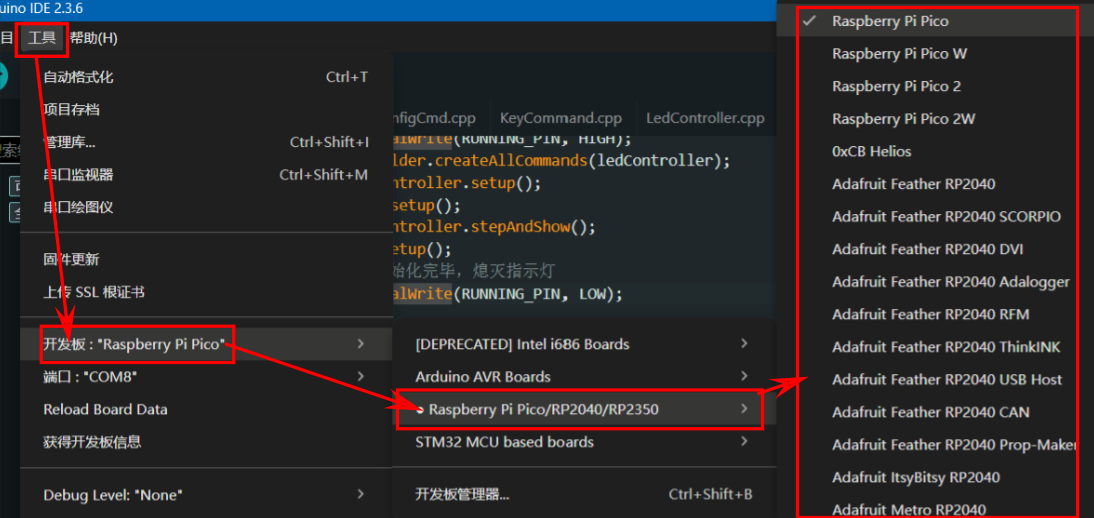
5. Select the board: `Tools` -> `Board` -> Select `Raspberry Pi Pico` -> corresponding model development board
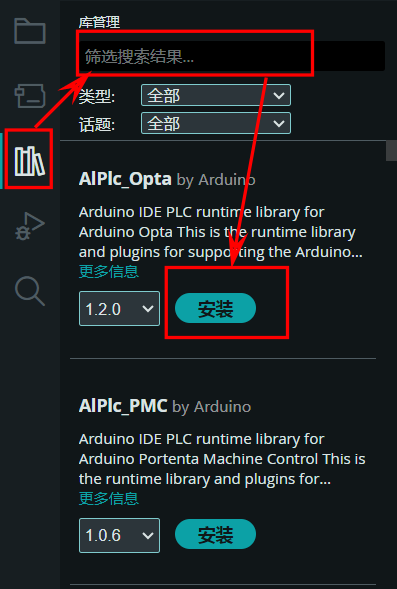
6. Install dependency libraries: `Tools` -> `Manage Libraries` -> Search for `FastLED` and `Adafruit TinyUSB Library` -> Install. If OLED display is needed (requires code modification, test use only, no actual functionality), search for `Adafruit SSD1306` and `Adafruit GFX Library` to install
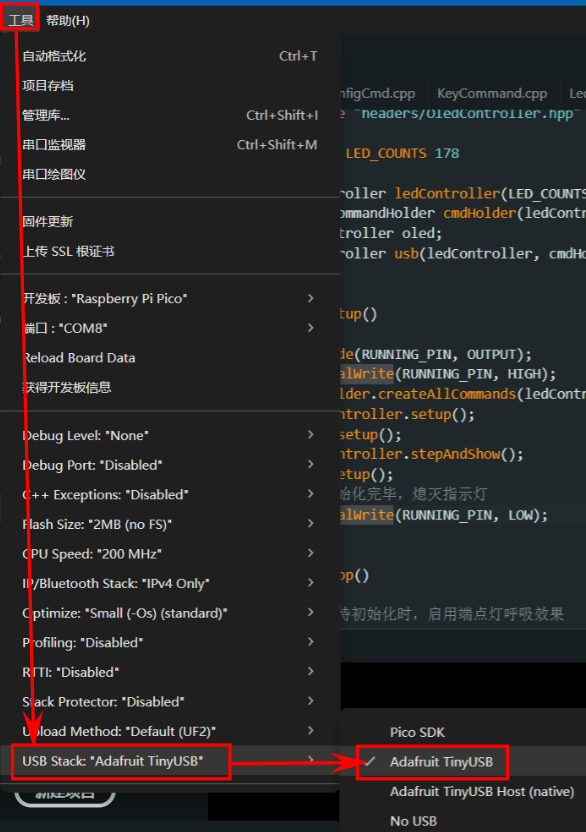
7. Select USB scheme: `Tools` -> `USB Stack` -> Select `Adafruit TinyUSB`
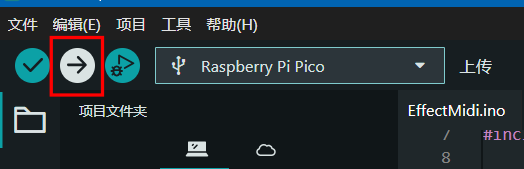
8. Compile and upload: Click the `Upload` button in the top-left corner. Note that if using RP2040, you need to hold the `BOOTSEL` button before powering on the development board during flashing to start the board in write mode
9. After flashing is complete, the development board program restarts. The endpoint LEDs slowly blink, indicating the program has started normally and is waiting for control side connection
### Control Program
Visit the [Releases](https://github.com/ChiruMori/EffectMidi/releases) page of this project to download the appropriate version. After extraction, run `EffectMidi.exe` and follow the prompts.
## Working Principle
### EffectMidi Main Program
1. Windows control side reads MIDI signals from MIDI input devices
2. Windows control side sends specified signals to the embedded side via USB serial port
3. Embedded side receives control signals and controls LED effects
## Development Environment
### Hardware Devices
Refer to [Hardware List](#hardware-list)
### PC Control Side
The project is built with [electron-vite](https://electron-vite.org/config/), recommended to use [Visual Studio Code](https://code.visualstudio.com/) editor (and suggest installing `Tailwind CSS IntelliSense`, `Prettier - Code formatter`, `EditorConfig for VS Code`, `stylus`).
In the development environment, after startup, you can open developer tools with `F12`.
- `pnpm install` install dependencies. If strange errors occur during this process, try pnpm 8.x.x version
- `pnpm dev` start development environment
- `pnpm build:win` package Windows version
- `pnpm build:mac` package macOS version
- `pnpm build:linux` package Linux version
### Development Board Side
Recommend using [Arduino IDE](https://www.arduino.cc/en/software), or your preferred IDE with development board flashing capabilities.
Depends on the following libraries:
- [FastLED](https://fastled.io/) - Required, used to control LED strips
- [Adafruit_TinyUSB](https://github.com/adafruit/Adafruit_TinyUSB_Arduino) - Required, used for USB communication. If this functionality is not needed, you may need to manually delete related code. After installation, you need to manually select `Adafruit TinyUSB` in `Arduino IDE` -> `Tools` -> `USB Stack`
- - -
In the development environment, you can activate debug information display by enabling `#define USE_OLED`, or completely delete related code from the source to free up some performance. Connection method:
+ `SDA` -> `SDA`(GP4)
+ `SCL` -> `SCL`(GP5)
+ `GND` -> `GND`
+ `VCC` -> `5V`
> Note: If using a development board with small memory (such as Arduino Uno R3), OLED may not work.
Dependent libraries:
- [Adafruit_GFX](https://github.com/adafruit/Adafruit-GFX-Library)
- [Adafruit_SSD1306](https://github.com/adafruit/Adafruit_SSD1306)
## Open Source Statement
This project uses the **[GNU GPL v3](LICENSE) license**, continuing the original project's open source license while reserving the right to change.
Code inherited from [Effect_Piano_light_controller](https://github.com/esun-z/Effect_Piano_light_controller) exists only in the `effect_piano_refactor` branch. The main branch code is a completely new implementation.
- - -
This project uses the following USB identifiers:
> If other devices use the same identifiers, those devices will also appear in this program's device list.
- **VID**: `0x1209` (Open source identifier assigned by [PID.org](https://pid.codes/1209/))
- **PID**: `0x0666` (Project custom identifier)



