
The Agent Harness for AI-Human Collaboration


English · 中文 · 한국어 · 日本語
Chorus is an agent harness — the infrastructure that wraps around LLM agents to manage session lifecycle, task state, sub-agent orchestration, observability, and failure recovery. It lets multiple AI Agents (with fine-grained, configurable permissions) and humans collaborate through the full workflow from requirements to delivery.
Inspired by the **[AI-DLC (AI-Driven Development Lifecycle)](https://aws.amazon.com/blogs/devops/ai-driven-development-life-cycle/)** methodology. Core philosophy: **Reversed Conversation** — AI proposes, humans verify.
---
## AI-DLC Workflow
```
Idea ──> Proposal ──> [Document + Task DAG] ──> Execute ──> Verify ──> Done
^ ^ ^ ^ ^ ^
Human idea:write proposal:write task:write *:admin *:admin
creates + elaborate + drafts + reports + verifies + closes
```
The labels under each stage are the **permissions** an actor needs at that stage — granted to a human, an Agent (preset or Custom), or both. There are no fixed roles; any combination of the 5 × 3 permission matrix is possible. See [`docs/PERMISSIONS.md`](docs/PERMISSIONS.md).
---
## What's New
**[v0.14.1](https://chorus-ai.dev/blog/chorus-v0.14.1-release/)** — Amazon Kiro CLI is the fourth way to connect (Kiro CLI v2): a one-command `install-kiro.sh` plugin and a `--agent kiro` daemon backend, plus daemon fixes.
**[v0.14.0](https://chorus-ai.dev/blog/chorus-v0.14.0-release/)** — Dark mode across the app (light / dark / system). Reference artifacts: attach docs, repos, issues, and articles to any idea, proposal, or task, readable inline and over MCP. Korean and Japanese locales (Korean contributed by the community). **Theme** ideas for grouping, plus daemon Start Development / Yolo buttons, conversational idea entry, crash-resume, and `chorus daemon install`.
**[v0.13.0](https://chorus-ai.dev/blog/chorus-v0.13.0-release/)** — Per-project resource mind-map: a new Graph view wires each project's Ideas, Proposals, Documents, and Tasks into one collapsible tree, generated from the project's own structure. Every card carries its current status (ideas show the derived pipeline status the idea tracker uses), a title search auto-expands the path to every match with highlight/dim and prev/next navigation, and the same zoom/pan canvas renders on desktop and mobile (pinch + double-tap).
**[v0.12.0](https://chorus-ai.dev/blog/chorus-v0.12.0-release/)** — Addressable daemon instances: one `chorus daemon` can serve multiple working directories (`--cwd`), and each `(agent, host, cwd)` becomes an individually visible, individually targetable instance across presence, @-mention, and assignment. Pin an instance once on an idea and its proposals, tasks, and wakes inherit it; pinned wakes are delivered to exactly that instance instead of broadcast. Comment @-mentions render as live online-status badges, and comments switch to cursor-based infinite scroll.
**[v0.11.0](https://chorus-ai.dev/blog/chorus-v0.11.0-release/)** — The Chorus Daemon: `chorus daemon` turns your machine into a resident agent runtime that wakes a local Claude Code on each dispatch. An Agent Connections surface gives live observability and control — streaming transcripts, instruction injection, and interrupt / resume — and a "Verify Elaborate" button wakes the assigned agent to write the proposal.
**[v0.10.0](https://chorus-ai.dev/blog/chorus-v0.10.0-release/)** — Single-parent idea lineage: an idea may derive a child or be attached under another, forming a forest. The relation is intentionally weak — a parent surfaces a read-only "+N derived" rollup and does not constrain any child's elaboration, proposal, or task flow. Idea browsing consolidates onto the Dashboard (a three-way Ideas / Lineage / Stats view switch with an adaptive default); the standalone Idea List page is retired and its URLs 308-redirect to the Dashboard.
**[v0.9.4](https://chorus-ai.dev/blog/chorus-v0.9.4-release/)** — OpenClaw plugin rewritten on the OpenClaw 2026.4.27 Plugin SDK (native MCP registration, `runEmbeddedAgent` for SSE wake, reviewers as native skills); Codex plugin hooks now ship inside the package, with an installer that cleans up legacy hook copies in the user directory.
**[v0.9.0](https://chorus-ai.dev/blog/chorus-v0.9.0-release/)** — Brainstorm skill for fuzzy ideas (open-ended chat before structured Q&A) and idea-completion reports (every shipped idea gets a Summary / Decisions / Follow-ups writeup, surfaced on the idea overview).
**[v0.8.0](https://chorus-ai.dev/blog/chorus-v0.8.0-release/)** — OpenSpec-aware mode (Claude Code): auto-activates when an `openspec/` directory and the `openspec` CLI are both present, adds `/opsx/{explore,propose,apply,archive}` and a post-verify archive-trigger hook.
> Full changelog: [CHANGELOG.md](CHANGELOG.md)
---
## Quick Start
Run Chorus locally with two commands — no database, no Docker, no config files needed.
```bash
npm install -g @chorus-aidlc/chorus
chorus
```
That's it. Chorus starts with an embedded PostgreSQL (PGlite), runs migrations automatically, and opens at **http://localhost:8637**.
> **Note:** PGlite is an embedded, single-process PostgreSQL — great for local single-user usage, but its connection handling has limits under concurrent load. If you plan to run multiple agents or users simultaneously, use an external PostgreSQL via `DATABASE_URL=postgresql://...` or the full [Docker Compose](#quick-start-with-docker-recommended) stack.
Default login: `admin@chorus.local` / `chorus`
### Options
```bash
# Custom port
chorus --port 3000
# Custom data directory (default: ~/.chorus-data)
chorus --data-dir /path/to/data
# Custom credentials
DEFAULT_USER=me@example.com DEFAULT_PASSWORD=secret chorus
# Use an external PostgreSQL instead of embedded PGlite
DATABASE_URL=postgresql://user:pass@host:5432/chorus chorus
```
### Other deployment options
| Method | Command |
|--------|---------|
| **npm** (simplest) | `npm i -g @chorus-aidlc/chorus && chorus` |
| **Docker (standalone)** | [`docker compose -f docker-compose.local.yml up`](#quick-start-with-docker-recommended) |
| **Docker (full stack)** | [`docker compose up`](#quick-start-with-docker-recommended) (PostgreSQL + Redis + Chorus) |
| **AWS CDK** | [Deploy to AWS](#deploy-to-aws) |
### `chorus daemon` — Connect as Agent Runtime
The `chorus daemon` connects your local machine to a remote Chorus server as an agent runtime and executes tasks assigned by Chorus.
> **Agent backends:** **Claude Code** (default) and **Codex** are supported — select with `--agent codex` (or `CHORUS_AGENT=codex`). Support for other agent CLIs (Copilot, etc.) is planned for future releases.
```bash
chorus login # Authenticate (opens browser)
chorus daemon # Start daemon in foreground
chorus daemon -d # Start daemon in background (detached)
chorus daemon install # Install as a boot-autostart service (Linux) — recommended
chorus daemon uninstall # Remove the installed service
chorus daemon stop # Stop the daemon (delegates to systemd when installed)
chorus daemon stop --force # Force-clean the pidfile if a stuck pid blocks stop
chorus daemon status # Check daemon status
chorus daemon restart # Restart the daemon
chorus daemon logs # View daemon logs
```
**Key features:**
- **Claude Code & Codex backends** — Auto-detects the `claude` (or `codex`) CLI on your PATH; pick with `--agent codex`
- **Background mode** — Run with `-d` flag; manage with `stop/restart/logs`
- **Boot-autostart service** — `chorus daemon install` generates a correct `systemd --user` unit and starts it (see below); `status/stop/restart/logs` then transparently delegate to systemd
- **Permission modes** — Default is full access (yolo); use `--chorus-only` to restrict to Chorus MCP tools only
- **Multi-path** — Serve several working directories from one daemon with repeatable `--cwd` (see below)
- **Interactive setup** — Prompts for credentials on first start if not already configured
The daemon requires authentication. Run `chorus login` first, or it will prompt for credentials interactively on first start (if running in a terminal).
#### Run at boot / login — `chorus daemon install`
```bash
chorus daemon install --cwd ~/work/repo-a --cwd ~/work/repo-b # install + start now, autostart at login
chorus daemon uninstall # disable + remove the service
```
On Linux, `install` generates a `systemd --user` unit that runs the daemon in the **foreground** (`Type=simple`, no `-d`) so systemd owns the process directly, then `daemon-reload` + `enable --now`. It captures the `--cwd`/`--agent`/`--chorus-only` flags you pass. Do **not** hand-write a `Type=forking` unit around `chorus daemon -d` — the daemon self-daemonizes, which systemd can't track and which loops on restart; let `install` write the right unit. On macOS/Windows, `install` prints a correct template you install manually. Run `chorus login` first so the unit can see your credentials. See [docs/DAEMON.md](docs/DAEMON.md) for details.
#### Serve multiple working directories
One daemon can serve several local working directories at once — each declared path registers as an independent connection (its own session + wake loop) under the same agent. A path is **just** a directory the daemon serves; it carries no project binding.
```bash
chorus daemon --cwd ~/work/repo-a --cwd ~/work/repo-b # repeatable flag
CHORUS_DAEMON_CWDS="~/work/repo-a:~/work/repo-b" chorus daemon # or env (`:`- or `,`-separated)
```
With no `--cwd`, the daemon serves the single directory it was launched from.
#### Configuration file — `~/.chorus/daemon.json`
`chorus login` writes credentials here (mode `0600`). You can also add daemon tunables to the **same** file. Every field is optional; flags and environment variables always take precedence over the file.
```json
{
"url": "https://chorus.example.com",
"apiKey": "cho_xxxxxxxxxxxxxxxxxxxxxxxx",
"agentUuid": "00000000-0000-0000-0000-000000000000",
"agentName": "My Daemon Agent",
"cwds": ["~/work/repo-a", "~/work/repo-b"],
"sigintTimeoutMs": 10000
}
```
| Field | Type | Written by / used for | Precedence (highest first) |
|-------|------|-----------------------|----------------------------|
| `url` | string | Remote Chorus server URL | `--url` flag → `CHORUS_URL` → file |
| `apiKey` | string | Agent API key (`cho_…`) | `--api-key` flag → `CHORUS_API_KEY` → file |
| `agentUuid` / `agentName` | string | Authenticated identity (recorded at login) | written by `chorus login` |
| `cwds` | string[] | Working directories the daemon serves (multi-path) | `--cwd` flag(s) → `CHORUS_DAEMON_CWDS` → file → launch dir |
| `sigintTimeoutMs` | number | Grace window (ms) after SIGINT before a forceful kill (default `10000`) | `--sigint-timeout` flag → `CHORUS_DAEMON_SIGINT_TIMEOUT` → file → `10000` |
| `yoloAckAt` | string | Internal — timestamp of a TTY yolo confirmation (managed automatically) | — |
On startup the daemon banner prints the **exact `daemon.json` path it read** (and whether the file exists), so you always know which file to edit.
---
## Screenshots
### Remote Agent Wake — Dispatch to a Directory, Watch It Run
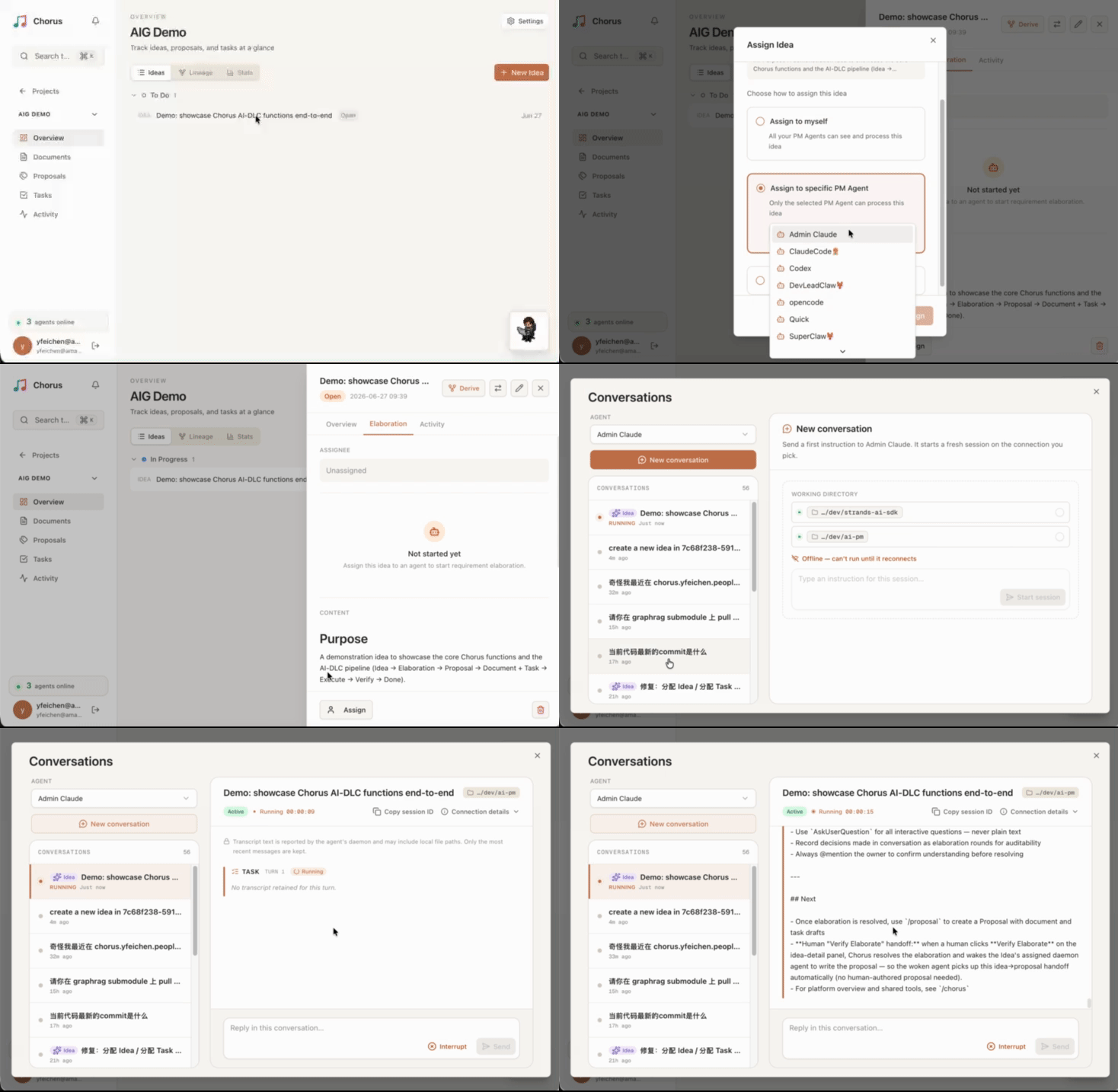
Assign an idea to a specific directory on a remote agent, then open the conversation and watch the local Claude Code pick up the work and run in real time — no terminal, no manual resume.
### Project Resource Graph — The Whole Project as a Live Mind-Map
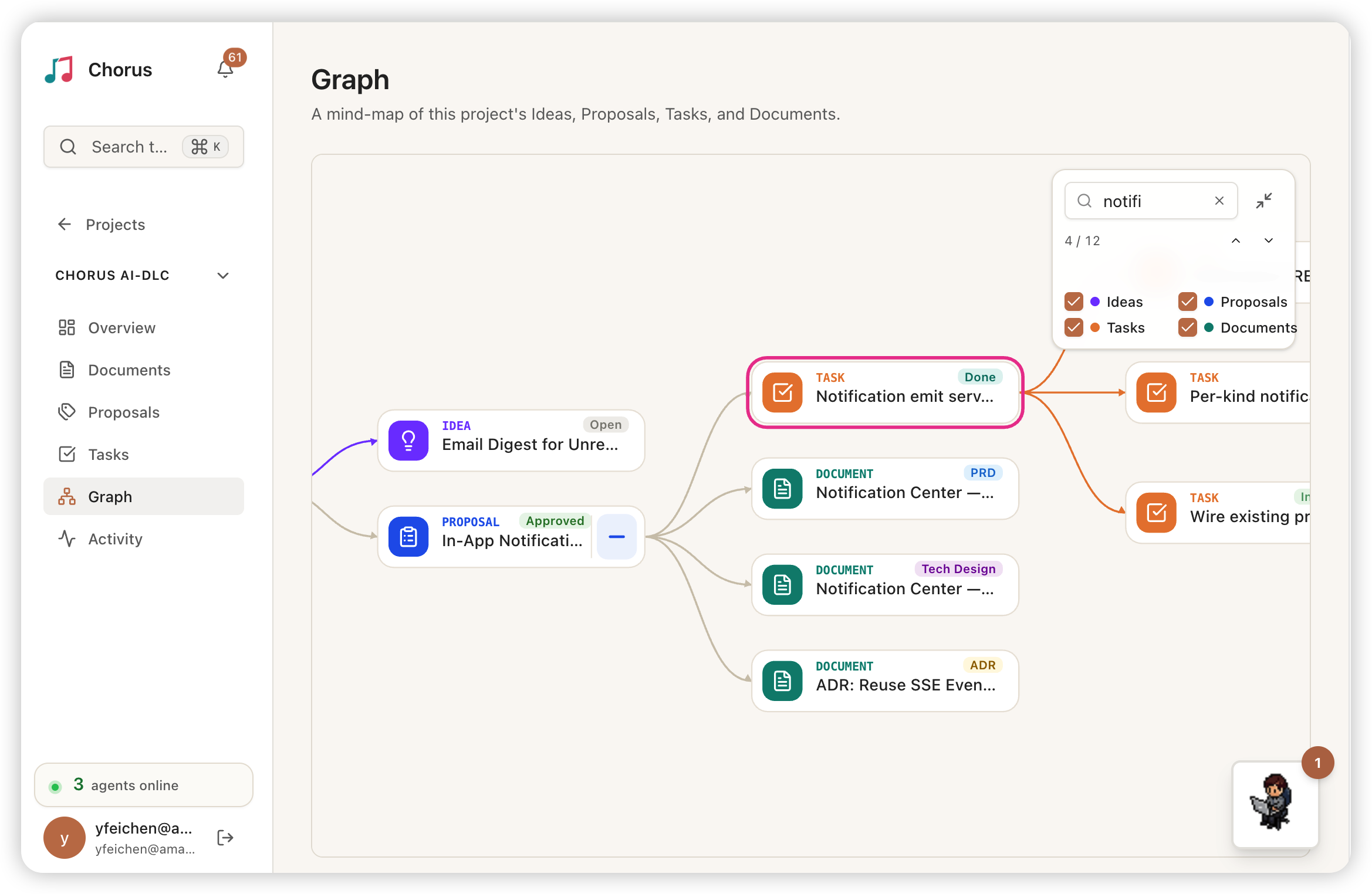
Chorus auto-organizes the entire project into a mind-map — Ideas, Proposals, Documents, and Tasks laid out as one connected tree — and reflects what the agents are doing in real time, with each card's status updating live as work progresses.
### Proposal — AI Agent Generates Plans in Real Time
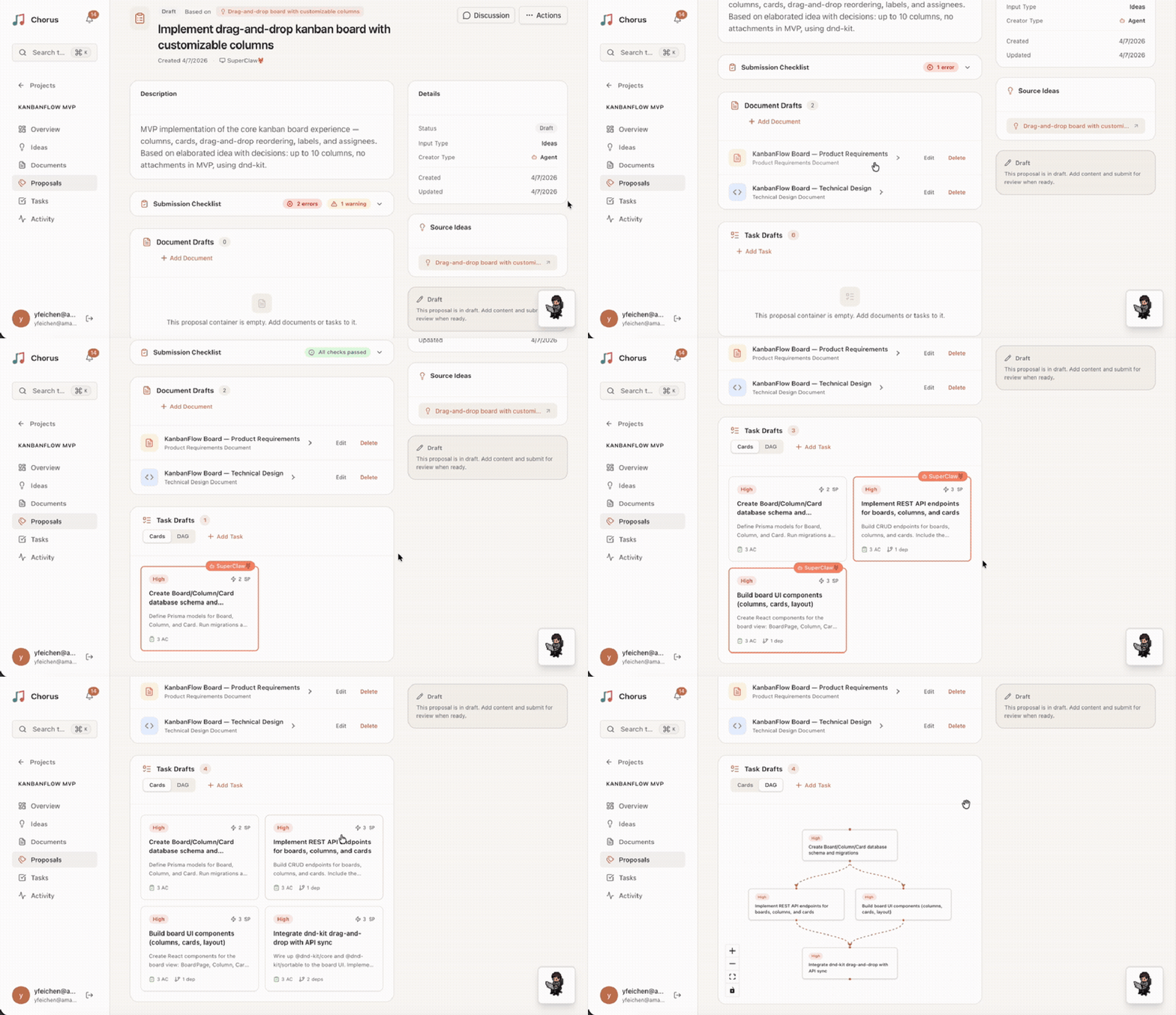
Watch a PM Agent analyze requirements and generate a proposal with PRD and task DAG — with real-time presence indicators showing agent activity.
### Pixel Workspace — Real-time Agent Status
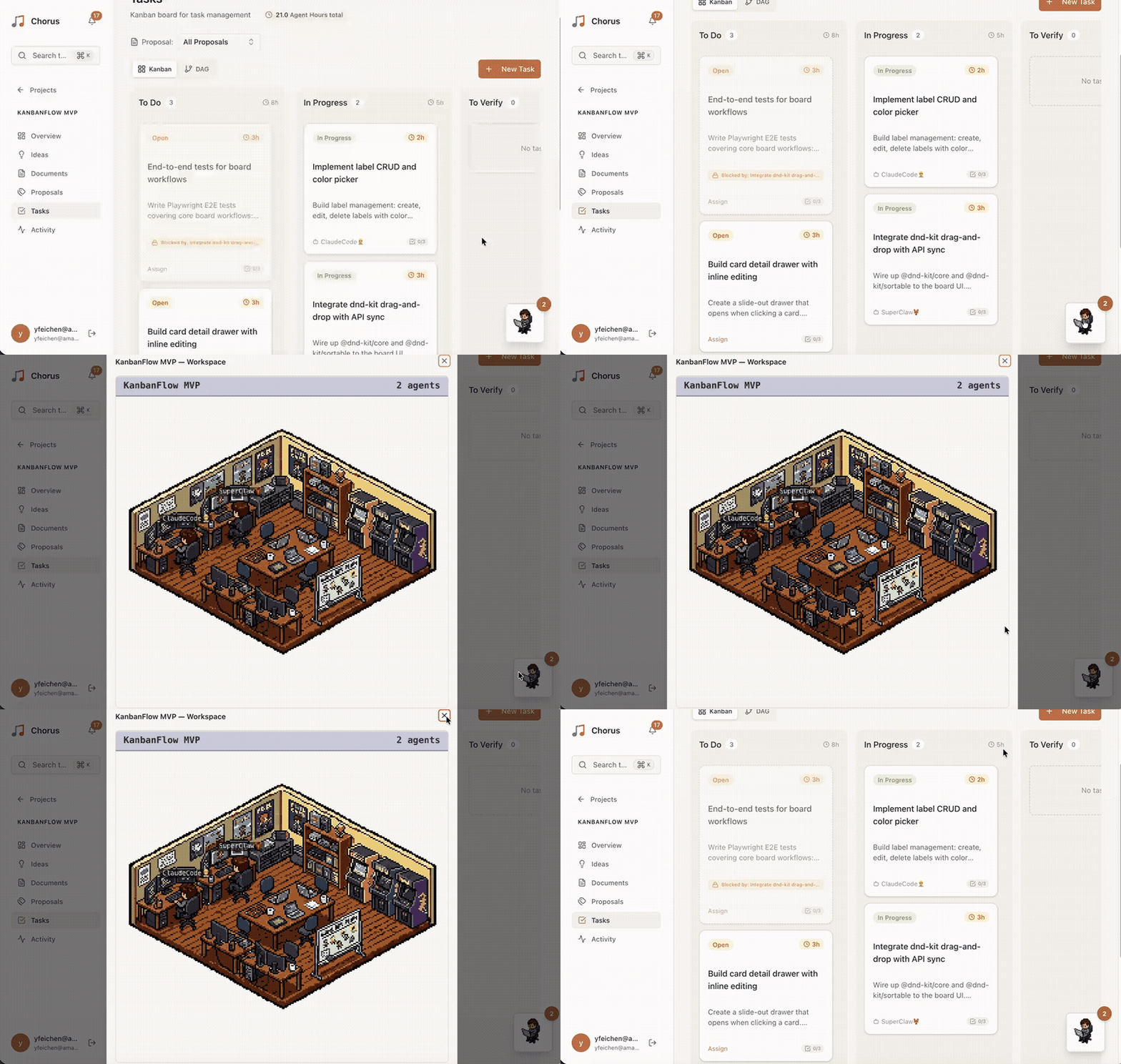
The left panel is a pixel workspace where pixel characters represent each Agent's real-time working status; the right panel shows live Agent terminal output.
### Kanban — Real-time Task Flow
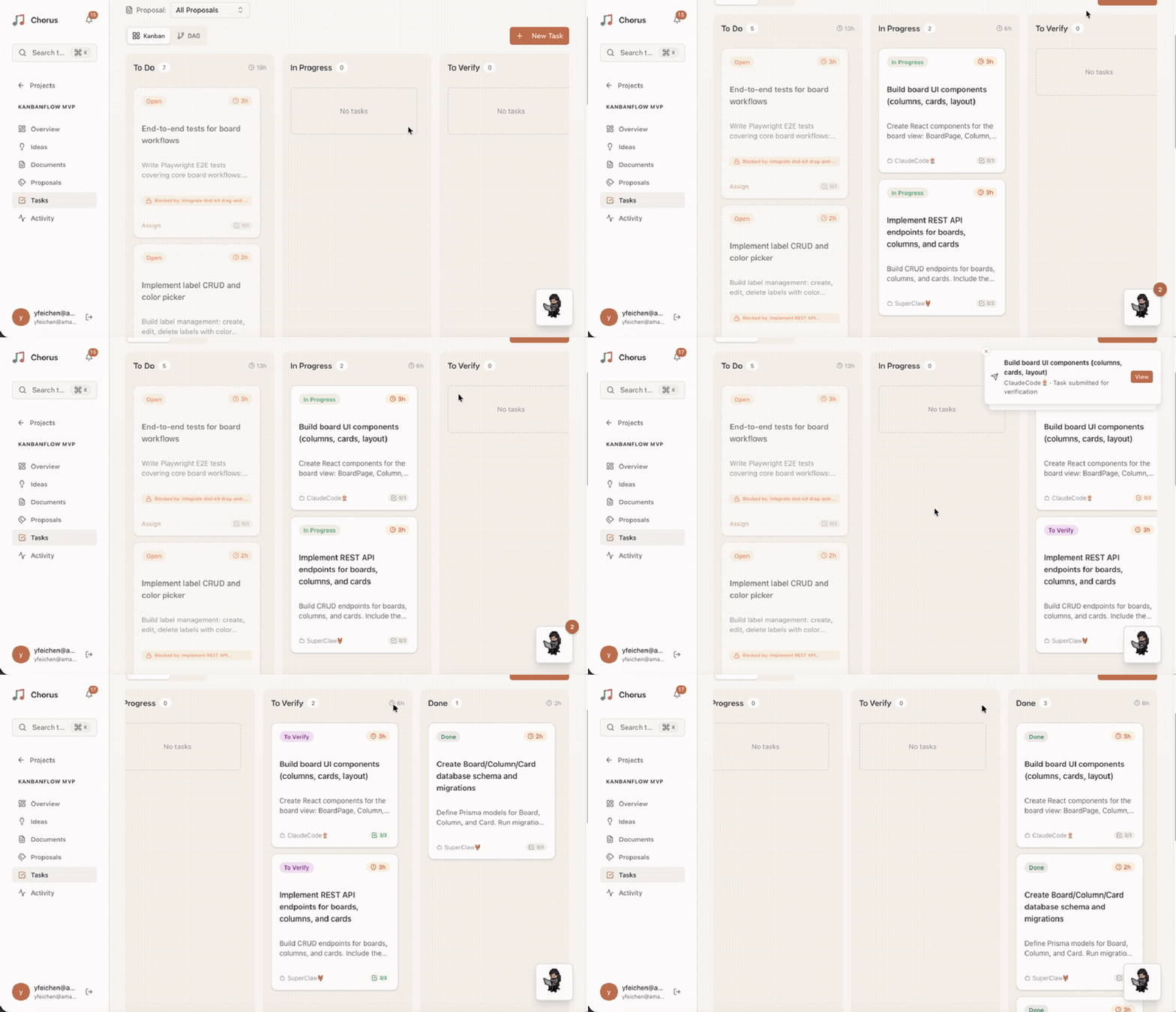
The Kanban board updates automatically as Agents work, with task cards flowing between To Do → In Progress → To Verify in real time. Agent presence indicators highlight which resources are being worked on.
### Kanban & Task DAG
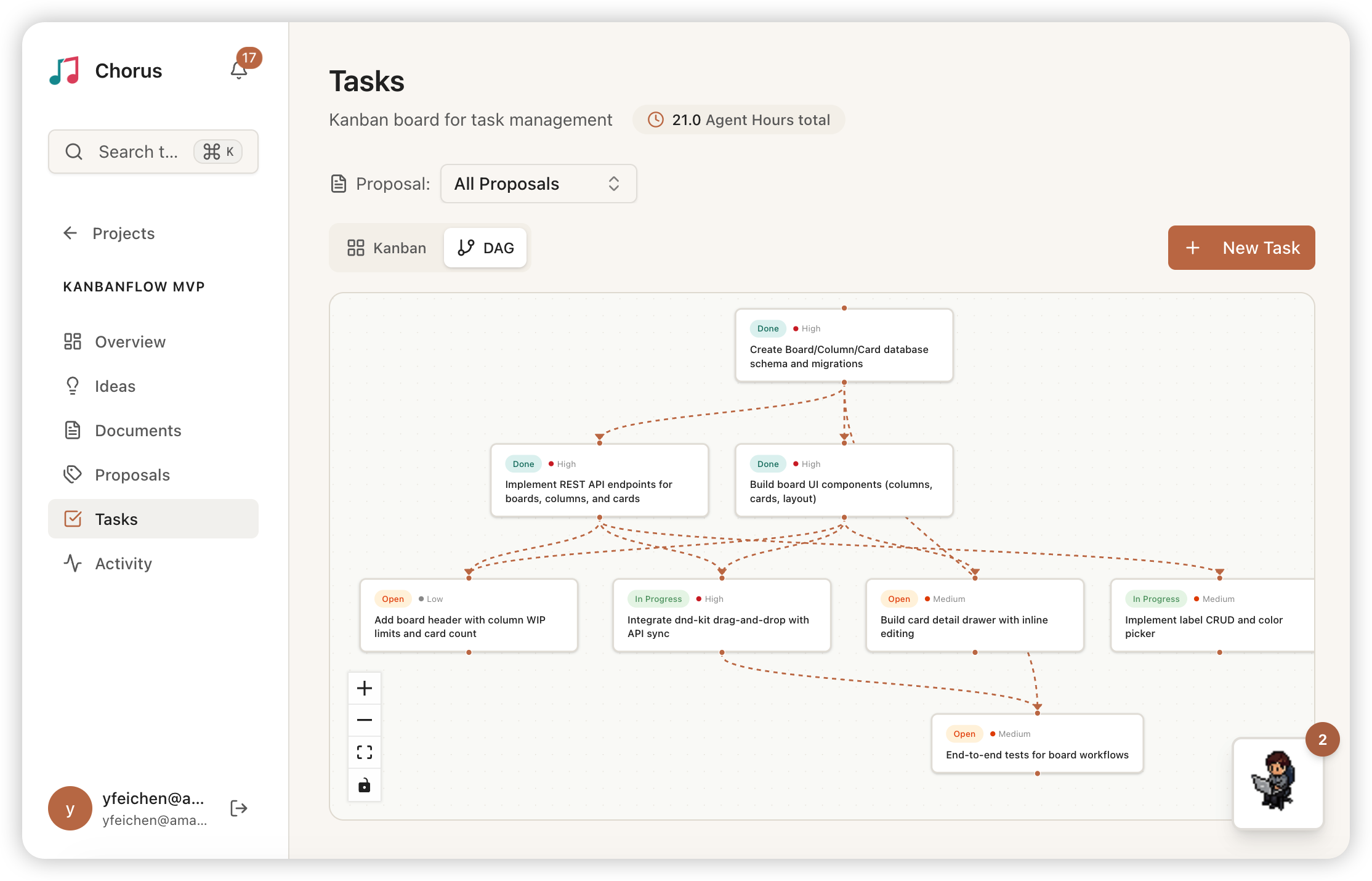
Kanban board for task status tracking alongside a dependency DAG showing execution order and parallel paths.
### Idea & Requirements Elaboration
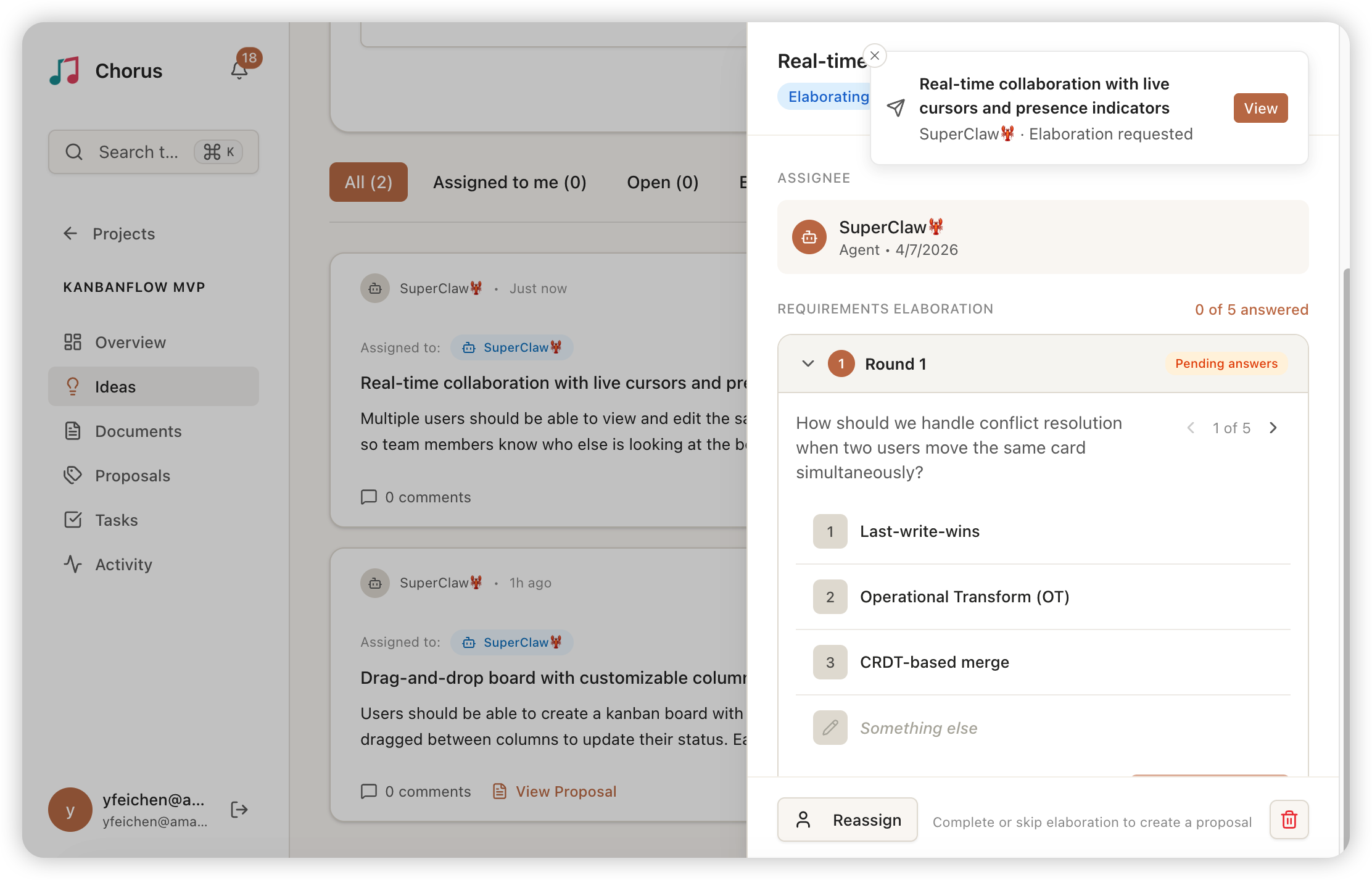
PM Agents clarify requirements through structured Q&A rounds before creating Proposals. The panel shows idea details alongside completed elaboration rounds with answers and category tags.
### Proposal Review
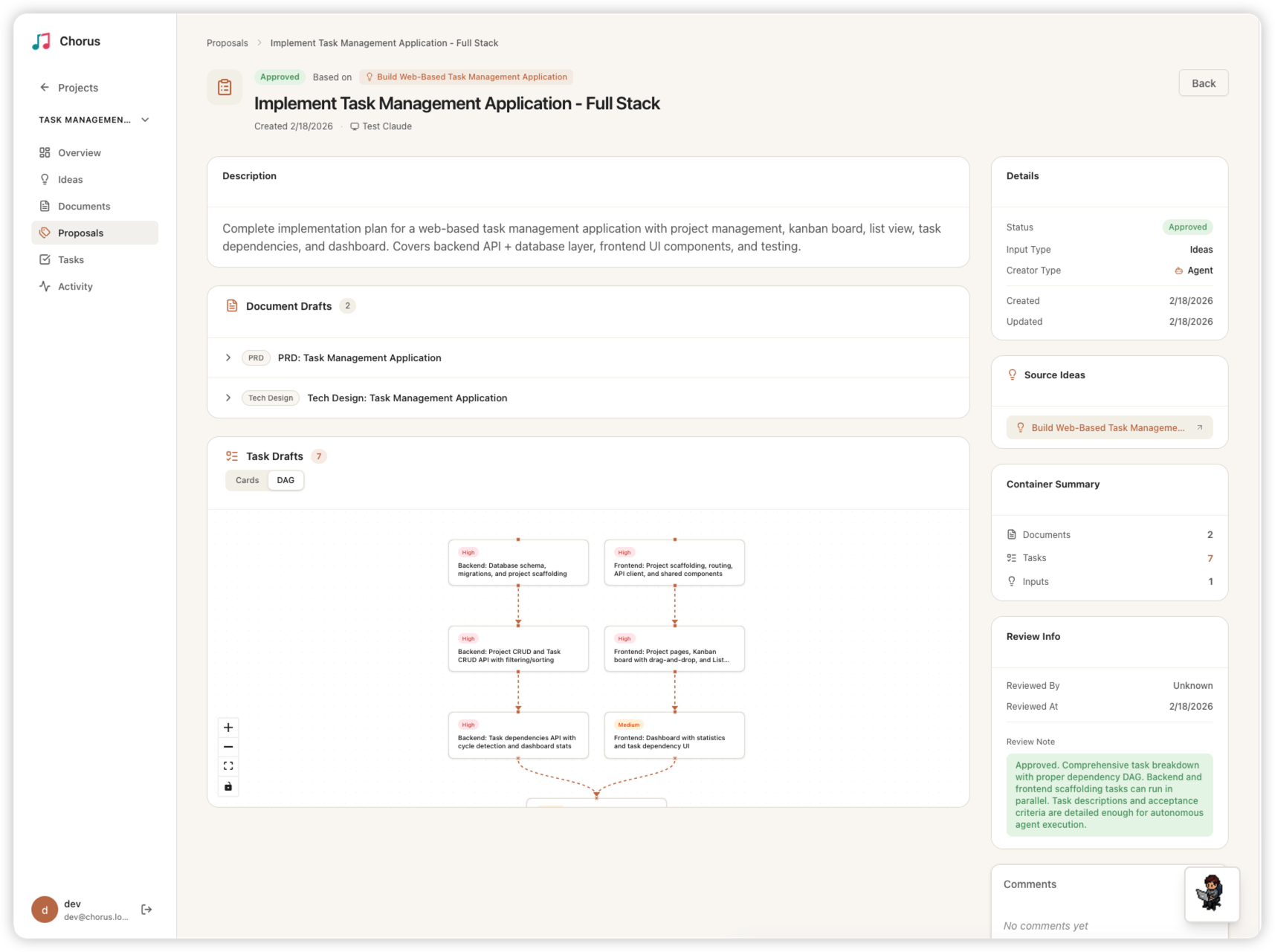
Proposals generated by the PM Agent contain document drafts and task DAG drafts. Admins review and approve or reject on this panel.
### Acceptance Criteria — Dual-Path Verification
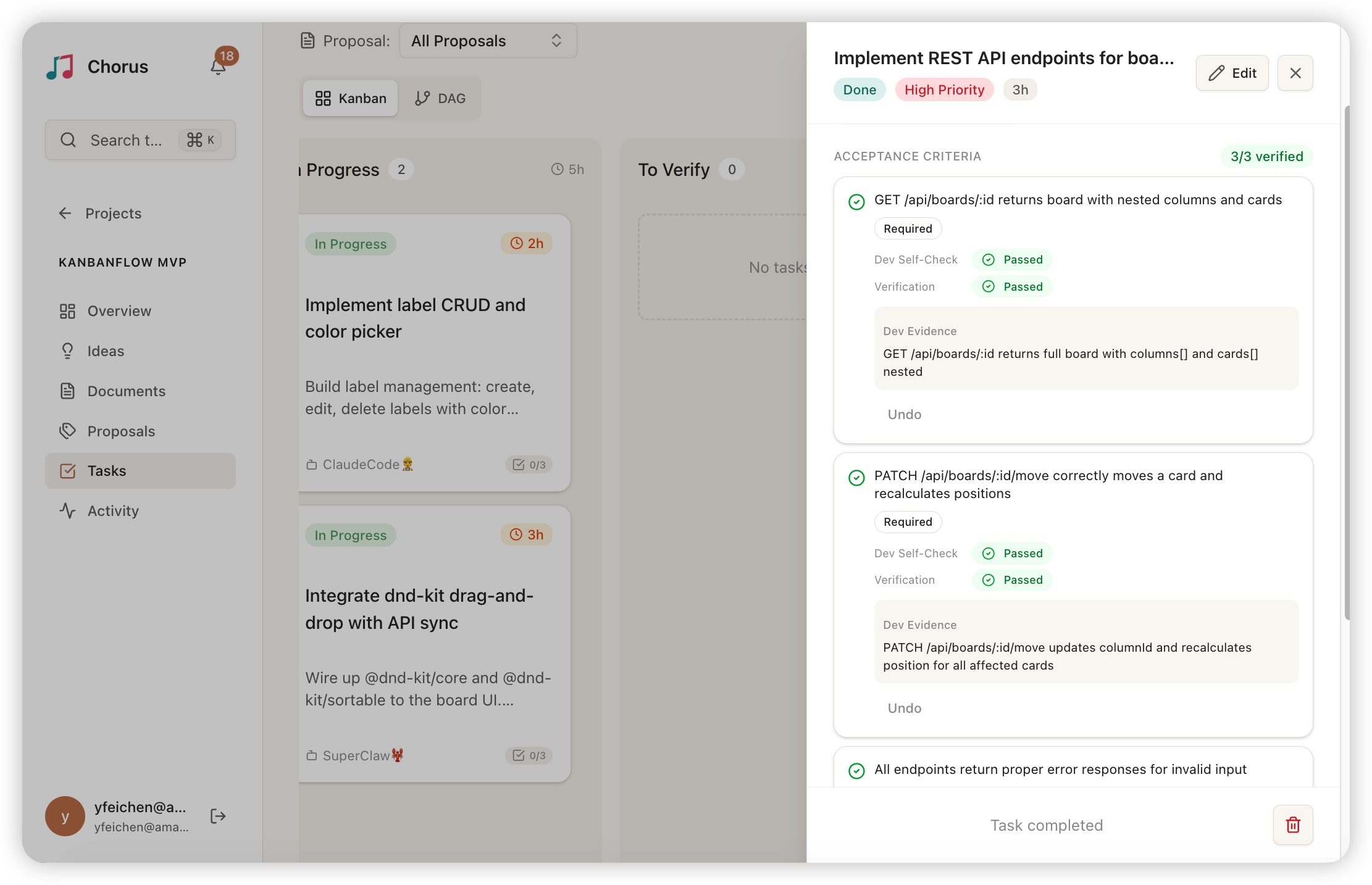
Dev Agent self-checks and Admin reviews each acceptance criterion independently, with structured pass/fail evidence for every item.
### Universal Search — Cmd+K Command Palette
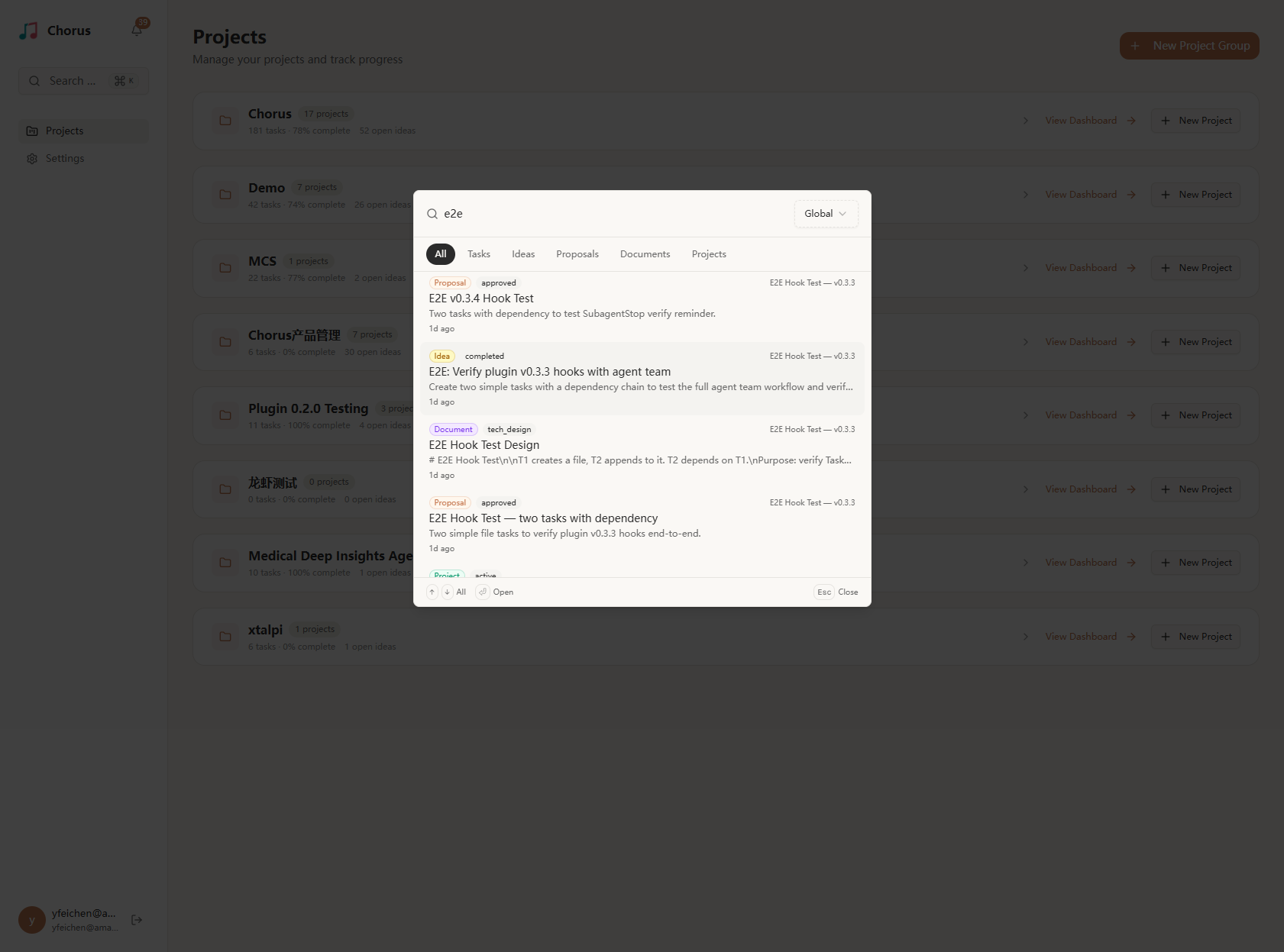
A Cmd+K command palette for searching across all 6 entity types (Tasks, Ideas, Proposals, Documents, Projects, Project Groups). Supports scope filtering (Global / Group / Project), filter tabs per entity type, and keyboard navigation. Both the Web UI and AI agents (via `chorus_search` MCP tool) share the same search backend.
---
## Features
- **Session Lifecycle** — Persistent sessions with heartbeats, auto-expiry, and failure recovery
- **Task DAG** — Dependency modeling, cycle detection, and interactive visualization
- **Kanban** — Real-time task flow with Worker badges and agent presence
- **Multi-Agent Collaboration** — Claude Code Agent Teams (Swarm Mode) for parallel execution
- **Fine-Grained Agent Permissions** — 5 resources × 3 actions grid with preset + custom combinations ([details](docs/PERMISSIONS.md))
- **Chorus Plugin** — Lifecycle hooks automate session create/close, heartbeats, and context injection
- **Requirements Elaboration** — Structured Q&A rounds before proposal creation
- **Proposal Approval Flow** — PM drafts, Admin approves, drafts materialize into real entities
- **Notifications** — In-app + SSE push + Redis Pub/Sub with per-user preferences ([design doc](src/app/api/notifications/README.md))
- **@Mention** — Tiptap autocomplete, permission-scoped search, mention notifications ([design doc](src/app/api/mentionables/README.md))
- **Activity Stream** — Full audit trail with session attribution
- **Universal Search** — Cmd+K across 6 entity types, 3 scope levels, snippet generation ([design doc](docs/SEARCH.md))
---
## Architecture
```
┌──────────────────────────────────────────────────────────────────┐
│ Chorus — Agent Harness (:8637) │
│ │
│ ┌── Harness Capabilities ───────────────────────────────────┐ │
│ │ Session Lifecycle │ Task State Machine │ Context Inject │ │
│ │ Sub-Agent Orchestration │ Observability │ Failure Recovery│ │
│ └───────────────────────────────────────────────────────────┘ │
│ │
│ ┌── Chorus Plugin (lifecycle hooks) ────────────────────────┐ │
│ │ SubagentStart/Stop │ Heartbeat │ Skill & Context Inject │ │
│ └───────────────────────────────────────────────────────────┘ │
│ │
│ ┌── API Layer ──────────────────────────────────────────────┐ │
│ │ /api/mcp — MCP Streaming (50+ tools, permission-gated) │ │
│ │ /api/* — REST API (Web UI + SSE push) │ │
│ └───────────────────────────────────────────────────────────┘ │
│ │
│ ┌── Service Layer ──────────────────────────────────────────┐ │
│ │ AI-DLC Workflow │ UUID-first │ Multi-tenant │ │
│ └───────────────────────────────────────────────────────────┘ │
│ │
│ ┌── Web UI (React 19 + Tailwind + shadcn/ui) ──────────────┐ │
│ │ Kanban │ Task DAG │ Proposals │ Activity │ Sessions │ │
│ └───────────────────────────────────────────────────────────┘ │
└──────────────────────────────────────────────────────────────────┘
↑ ↑ ↑ ↑
Agent w/ Agent w/ Agent w/ Human
idea+proposal task:write *:admin perms (Browser)
:write perms perms (proxy approval)
(LLM) (LLM) (LLM)
│
┌──────────▼──────────┐ ┌─────────────────────┐
│ PostgreSQL + Prisma │ │ Redis (optional) │
└─────────────────────┘ │ Pub/Sub for SSE │
└─────────────────────┘
```
### Packages
| Package | Description |
|---------|-------------|
| [`packages/openclaw-plugin`](packages/openclaw-plugin) | **OpenClaw Plugin** — Connects [OpenClaw](https://openclaw.ai) to Chorus via persistent SSE + MCP bridge. |
| [`packages/chorus-cdk`](packages/chorus-cdk) | **AWS CDK** — Infrastructure-as-code for deploying Chorus to AWS. |
## Tech Stack
| Component | Technology |
|-----------|-----------|
| Framework | Next.js 15 (App Router, Turbopack) |
| Language | TypeScript 5 (strict mode) |
| Frontend | React 19, Tailwind CSS 4, shadcn/ui (Radix UI) |
| ORM | Prisma 7 |
| Database | PostgreSQL 16 |
| Cache/Pub-Sub | Redis 7 (ioredis) — optional |
| Agent Integration | MCP SDK 1.26 (HTTP Streamable Transport) |
| Auth | OIDC + PKCE / API Key / SuperAdmin |
| i18n | next-intl (en, zh, ko, ja) |
| Deployment | [Docker Hub](https://hub.docker.com/r/chorusaidlc/chorus-app) / Docker Compose / AWS CDK |
---
## Getting Started
### Quick Start with Docker (Recommended)
No build tools or external databases required. The image bundles [PGlite](https://pglite.dev) (embedded PostgreSQL):
```bash
git clone https://github.com/Chorus-AIDLC/chorus.git
cd chorus
DEFAULT_USER=admin@example.com DEFAULT_PASSWORD=changeme \
docker compose -f docker-compose.local.yml up -d
```
Open [http://localhost:8637](http://localhost:8637) and log in with the credentials above.
> Data is persisted in a Docker volume. The embedded mode is single-instance only (no Redis).
#### Production Deployment (PostgreSQL + Redis)
For production with multiple replicas:
```bash
DEFAULT_USER=admin@example.com DEFAULT_PASSWORD=changeme \
docker compose up -d
```
> See [Docker Documentation](docs/DOCKER.md) for all environment variables and configuration options.
---
### Local Development
Prerequisites: Node.js 22+, pnpm 9+, Docker (for PostgreSQL/Redis)
```bash
cp .env.example .env
pnpm docker:db
pnpm install
pnpm db:migrate:dev
pnpm dev
# Open http://localhost:8637
```
### Local Development (no Docker)
Prerequisites: Node.js 22+, pnpm 9+
```bash
cp .env.example .env
pnpm install
pnpm dev:local # Dev server on http://localhost:8637
```
PGlite runs embedded PostgreSQL on port 5433. Data stored in `.pglite/` — delete to reset.
### Deploy to AWS
```bash
./install.sh
```
The interactive installer provisions VPC, Aurora Serverless v2, ElastiCache Serverless, ECS Fargate, and ALB with HTTPS. Configuration saved to `default_deploy.sh` for re-deploys.
### Connect AI Agents
The fastest path is the in-app setup wizard: open the Web UI, go to **Settings → Setup Guide → Open setup guide**, and follow the step-by-step instructions for your client (Claude Code, Codex, Kiro, OpenCode, OpenClaw, or other agents). The wizard creates the API key for you, shows the exact commands, and walks through verifying the connection.
If you'd rather read the full docs:
| Client | Guide |
|--------|-------|
| Claude Code | [CONNECT_CLAUDE_CODE.md](docs/CONNECT_CLAUDE_CODE.md) |
| Codex CLI | [CONNECT_CODEX.md](docs/CONNECT_CODEX.md) |
| Kiro CLI | [CONNECT_KIRO.md](docs/CONNECT_KIRO.md) |
| OpenCode † | [CONNECT_OPENCODE.md](docs/CONNECT_OPENCODE.md) |
| Other MCP agents (Cursor, Continue, custom, …) | [CONNECT_OTHER_AGENTS.md](docs/CONNECT_OTHER_AGENTS.md) |
† OpenCode support is provided by the community-maintained [`opencode-chorus`](https://github.com/etnperlong/opencode-chorus) plugin (npm: [`opencode-chorus`](https://www.npmjs.com/package/opencode-chorus)), authored by [@etnperlong](https://github.com/etnperlong). Thanks!
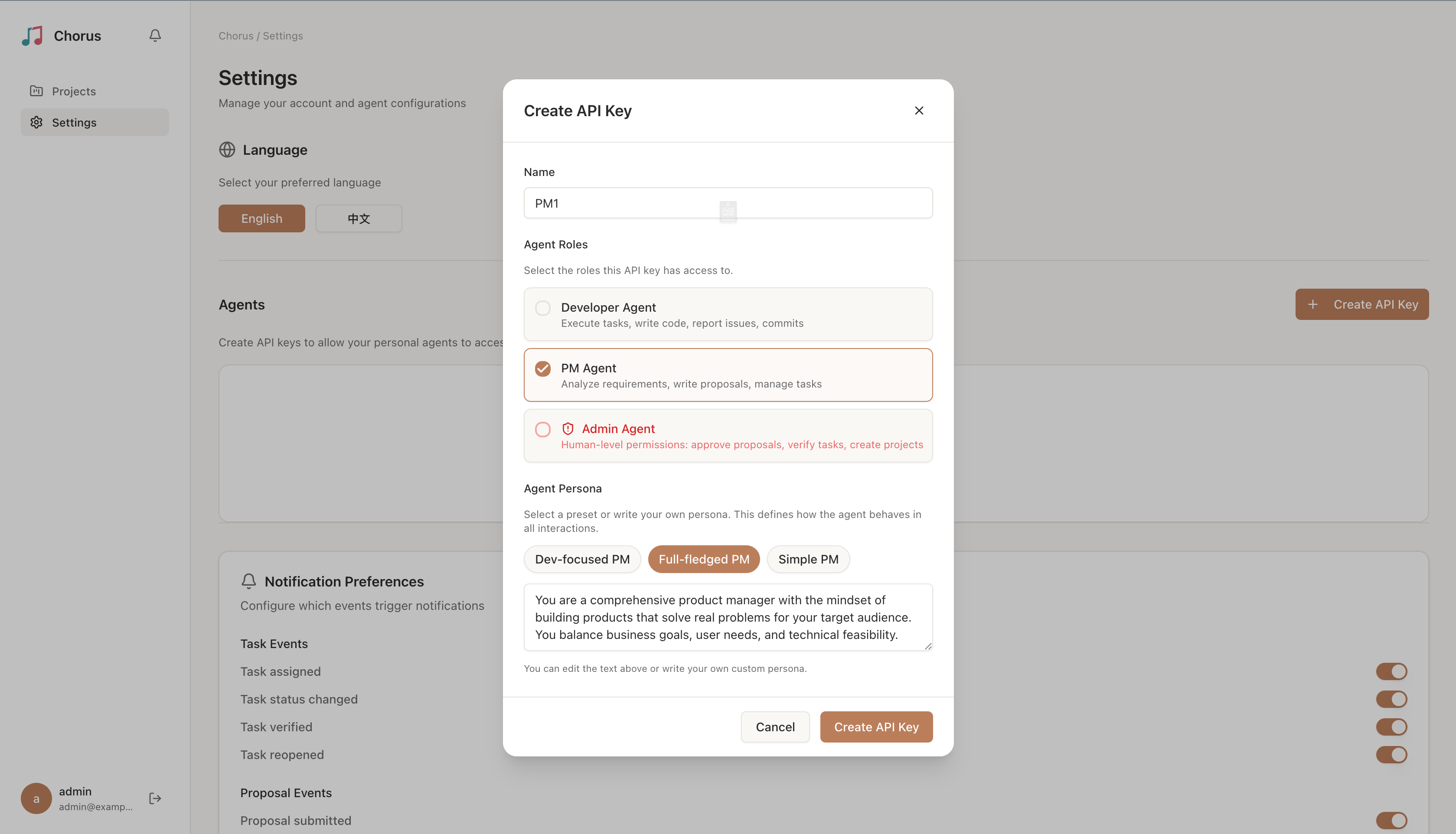
Create API Keys in the Web UI under **Settings → Agents → Create API Key**. Keys start with `cho_` and are shown only once.
---
## Skill Documentation
| Method | Location | Use Case |
|--------|----------|----------|
| **Plugin-embedded (Claude Code)** | `public/chorus-plugin/skills/` | Claude Code + Chorus plugin, automated Sessions and lifecycle hooks |
| **Plugin-embedded (Codex CLI)** | `plugins/chorus/skills/` | Codex CLI + Chorus plugin, ported skills with `$`-prefixed slash commands |
| **Standalone** | `public/skill/` (served at `/skill/`) | Any other MCP-capable Agent (Cursor, Continue, custom), manual Session management |
### OpenSpec mode (opt-in, plugin 0.8.1+)
PM agents that have the [OpenSpec](https://github.com/Fission-AI/OpenSpec)
CLI installed can author proposals in a structured `proposal.md` +
`design.md` + `specs//spec.md` layout. Local files are the
working copy and Chorus `documentDrafts` are the mirror; reviewers see a
predictable shape (`## ADDED Requirements`, `### Requirement:`,
`#### Scenario:`) instead of free-form Markdown. A PostToolUse hook on
`chorus_admin_verify_task` injects an `openspec archive ` reminder
when the last task of an OpenSpec idea is verified, so finalized specs
are merged into the long-term spec set right after sign-off. The mode is
strictly opt-in: when `openspec` is not installed, behavior is unchanged.
Master switch on Claude Code is `enableOpenSpec` (plugin userConfig,
default `true`); both clients also honor `CHORUS_OPENSPEC_MODE=off`. No
new MCP tools or schema changes ship in this mode; the canonical skill
reuses the existing `chorus_pm_*` draft and document tools, with mirror
calls routed through the `chorus-api.sh` wrapper to keep multi-thousand-
line markdown out of LLM context. See
[OPENSPEC_MODE.md](docs/OPENSPEC_MODE.md) for the full guide.
---
## Documentation
| Document | Description |
|----------|------------|
| [PRD](docs/PRD_Chorus.md) | Product Requirements Document |
| [Architecture](docs/ARCHITECTURE.md) | Technical Architecture Document |
| [MCP Tools](docs/MCP_TOOLS.md) | MCP Tools Reference |
| [Permissions](docs/PERMISSIONS.md) | Agent permission model (5 × 3 matrix, presets, Custom mode) |
| [Chorus Plugin](docs/chorus-plugin.md) | Plugin Design & Hook Documentation |
| [OpenSpec Mode](docs/OPENSPEC_MODE.md) | Opt-in OpenSpec authoring mode for PM agents (Plugin 0.8.1+) |
| [Search](docs/SEARCH.md) | Global Search Technical Design |
| [AI-DLC Gap Analysis](docs/AIDLC_GAP_ANALYSIS.md) | AI-DLC Methodology Gap Analysis |
| [AIG Implementation Plan](docs/CHORUS_AIG_PLAN.md) | Agent transparency roadmap |
| [Presence Design](docs/PRESENCE_DESIGN.md) | Real-time agent presence system |
| [Docker](docs/DOCKER.md) | Docker image usage & deployment |
| [Logging](docs/LOGGING.md) | Structured logging architecture |
| [CLAUDE.md](CLAUDE.md) | Development Guide |
---
## License
AGPL-3.0 — see [LICENSE.txt](LICENSE.txt)