
A self-hosted file sharing platform with a clean web interface, ShareX integration, and API access. Upload screenshots, files, and media — then instantly share them via short links. Full documentation is available at [sharely.christian.pizza/docs](https://sharely.christian.pizza/docs).
## Features
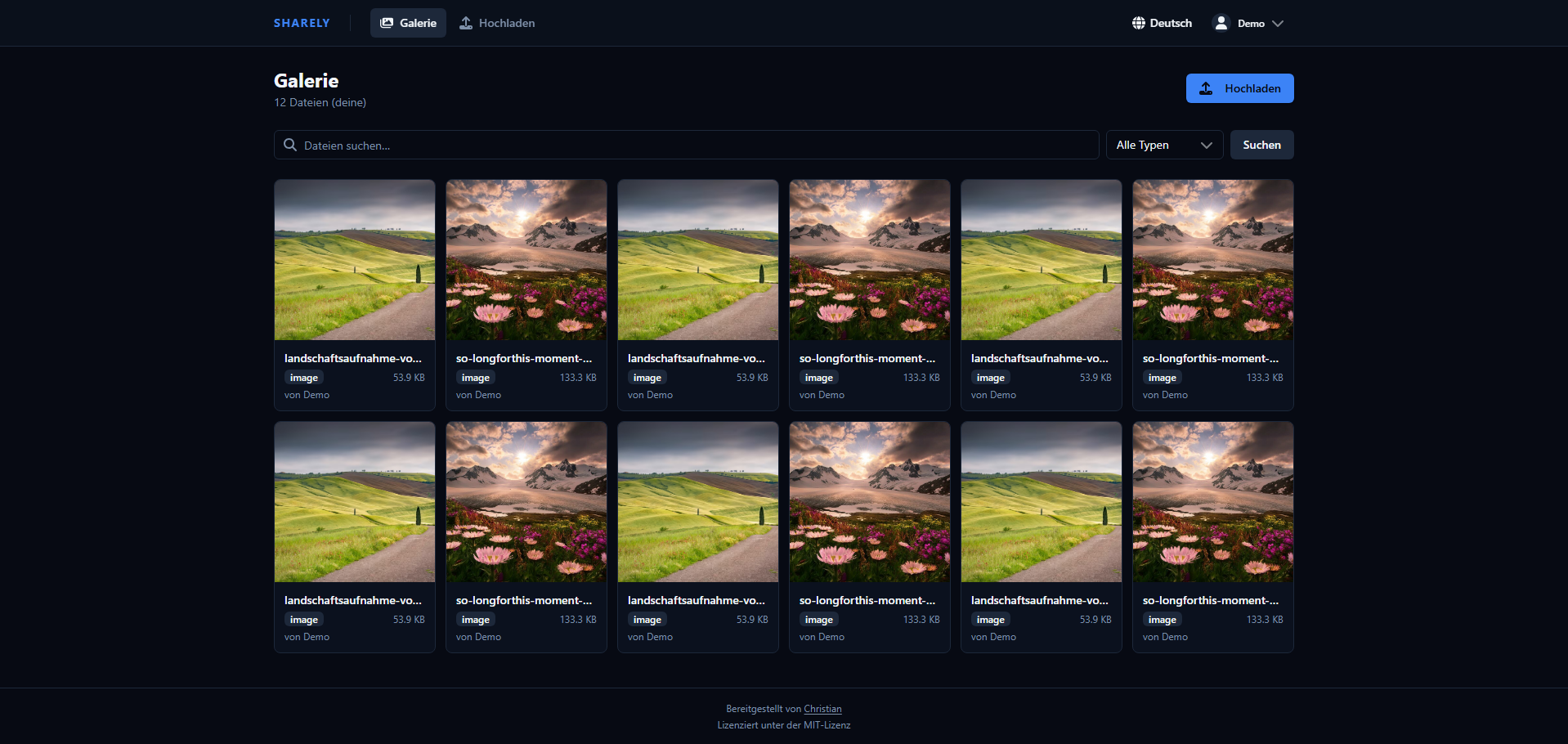
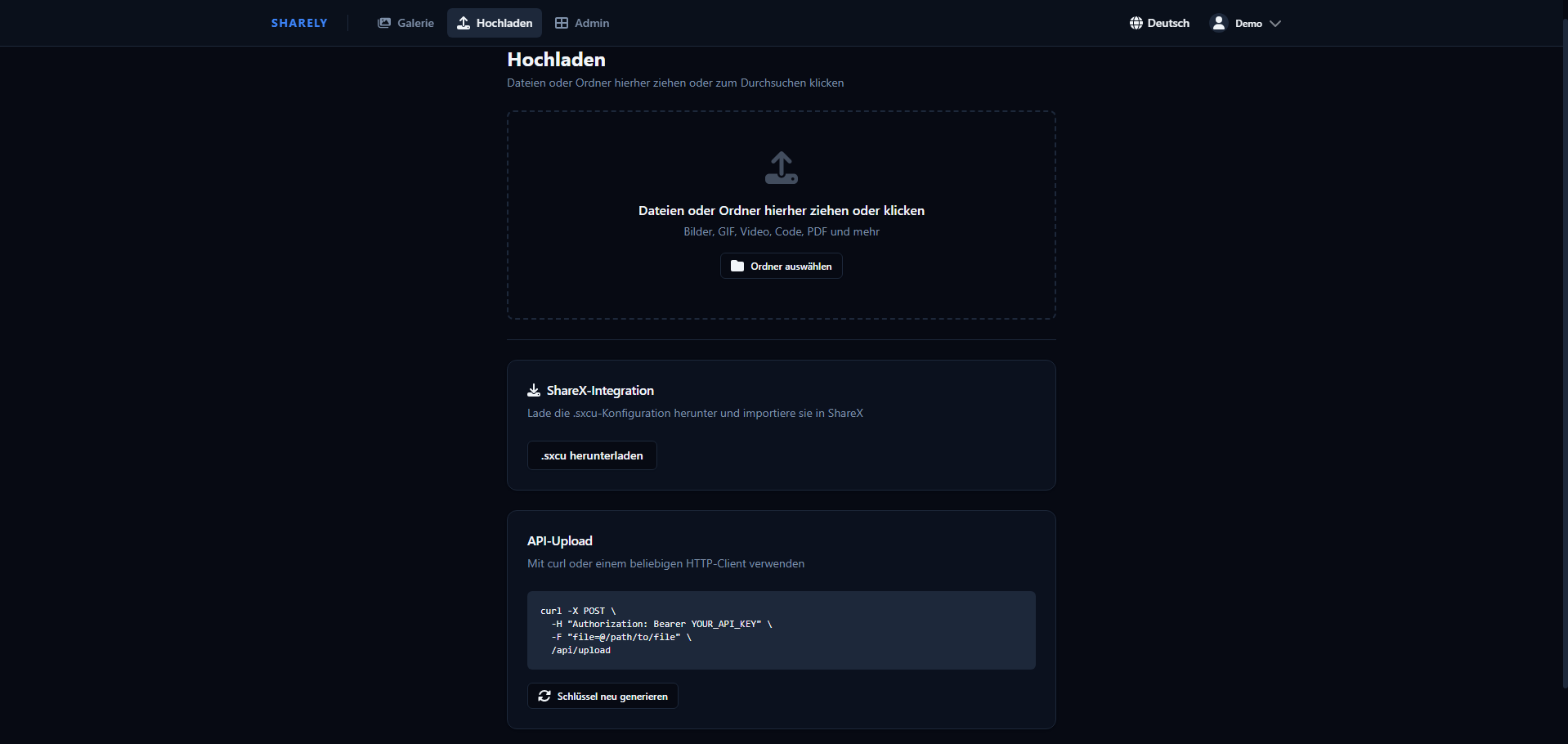
- **Web UI** — Drag-and-drop uploads, searchable gallery with type filters (images, video, audio, PDF, code), fully mobile-responsive
- **Chunked uploads** — Files up to 2 GB supported via parallel multi-part chunked upload (automatic, no client config needed)
- **ShareX integration** — One-click `.sxcu` config download for automatic screenshot uploads from Windows
- **API uploads** — Bearer token authentication, compatible with curl, wget, and any HTTP client
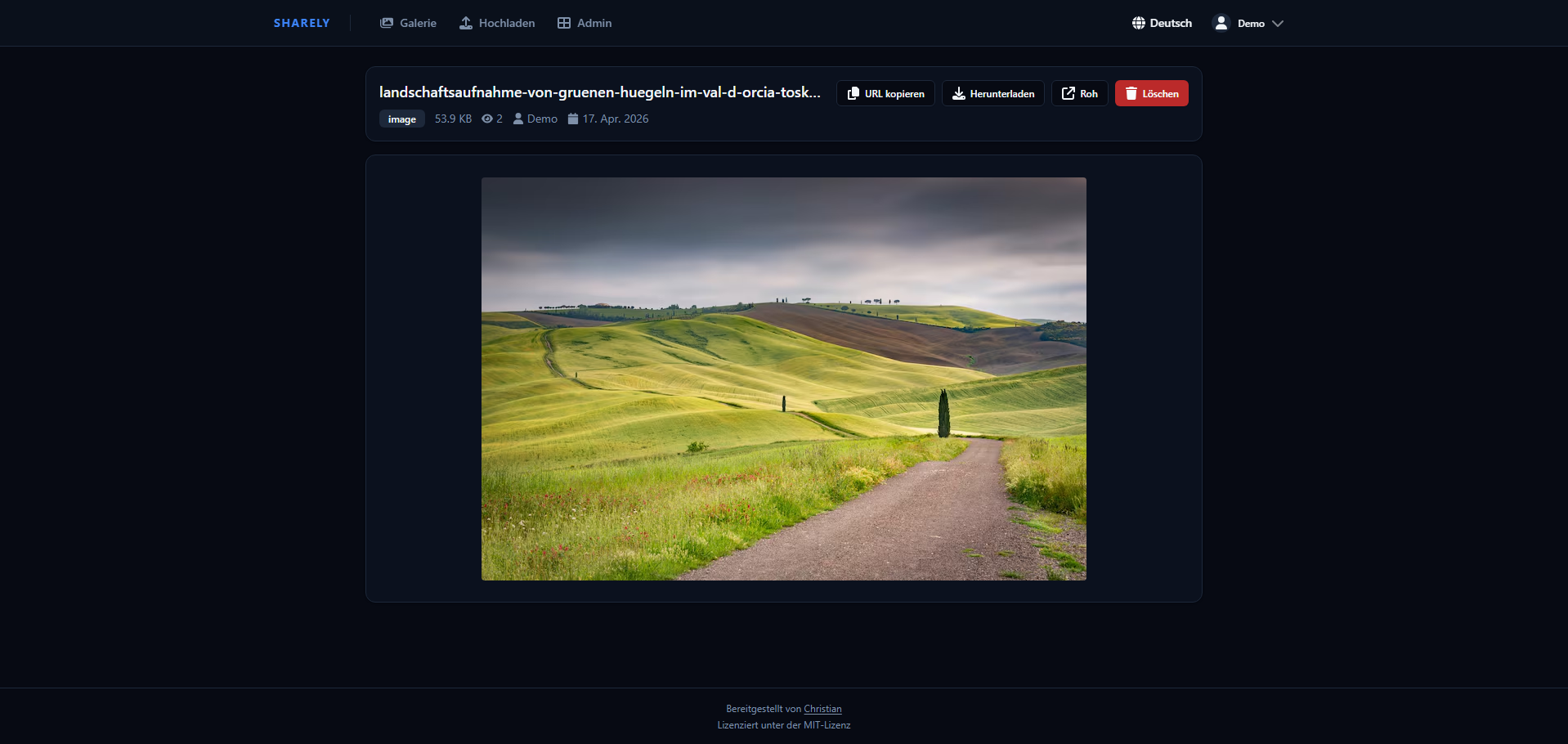
- **File viewing** — Images zoom inline, videos/audio stream with seek support (HTTP Range), PDFs render in-browser, code files syntax-highlighted
- **File download** — Force-download endpoint (`/f//download`) separate from the inline viewer
- **Embed modes** — Per-user toggle between *embed* (rich HTML page with Open Graph / Twitter Card metadata) and *raw* (direct file redirect for native social embeds); social media bots (Discord, Telegram, Twitter, etc.) are detected automatically
- **Share links** — Generate per-file share links (`/s/`) with optional password protection, expiry date, and download limit
- **QR codes** — Every share link and collection link can be shown as a QR code and downloaded as a PNG for quick mobile sharing
- **Collections** — Group files into named collections with optional password and expiry date, shareable via a single link; download the whole collection (or any multi-selection in the gallery) as a ZIP
- **Self-destructing uploads** — Give any file an expiry date and/or a maximum download count; once reached it becomes unavailable everywhere and is reclaimed by the cleanup job
- **Tags & descriptions** — Tag files for organisation (with a personal set of predefined tags) and add a free-text description; the gallery search matches file name, tags and description
- **Metadata stripping** — Optionally remove EXIF/GPS and other metadata from JPEG/PNG uploads site-wide (privacy)
- **Thumbnails** — Video and PDF files get auto-generated JPEG thumbnails (requires ffmpeg / ghostscript, bundled in the Docker image)
- **Avatars** — Users can upload a profile avatar (JPEG, PNG, GIF, WebP, max 2 MB)
- **Internationalization** — UI and email templates available in 8 languages: English, Deutsch, Français, Español, Italiano, Português, 日本語, 中文
- **Email verification & password reset** — Requires SMTP configuration; tokens expire after 24 h (verification) / 1 h (reset)
- **User management** — Role-based access control (admin/user), account activation/deactivation, custom folder names
- **Storage quotas** — Per-user storage limits with a configurable site-wide default; uploads are rejected once a user reaches their quota, and each user sees their own usage in Settings
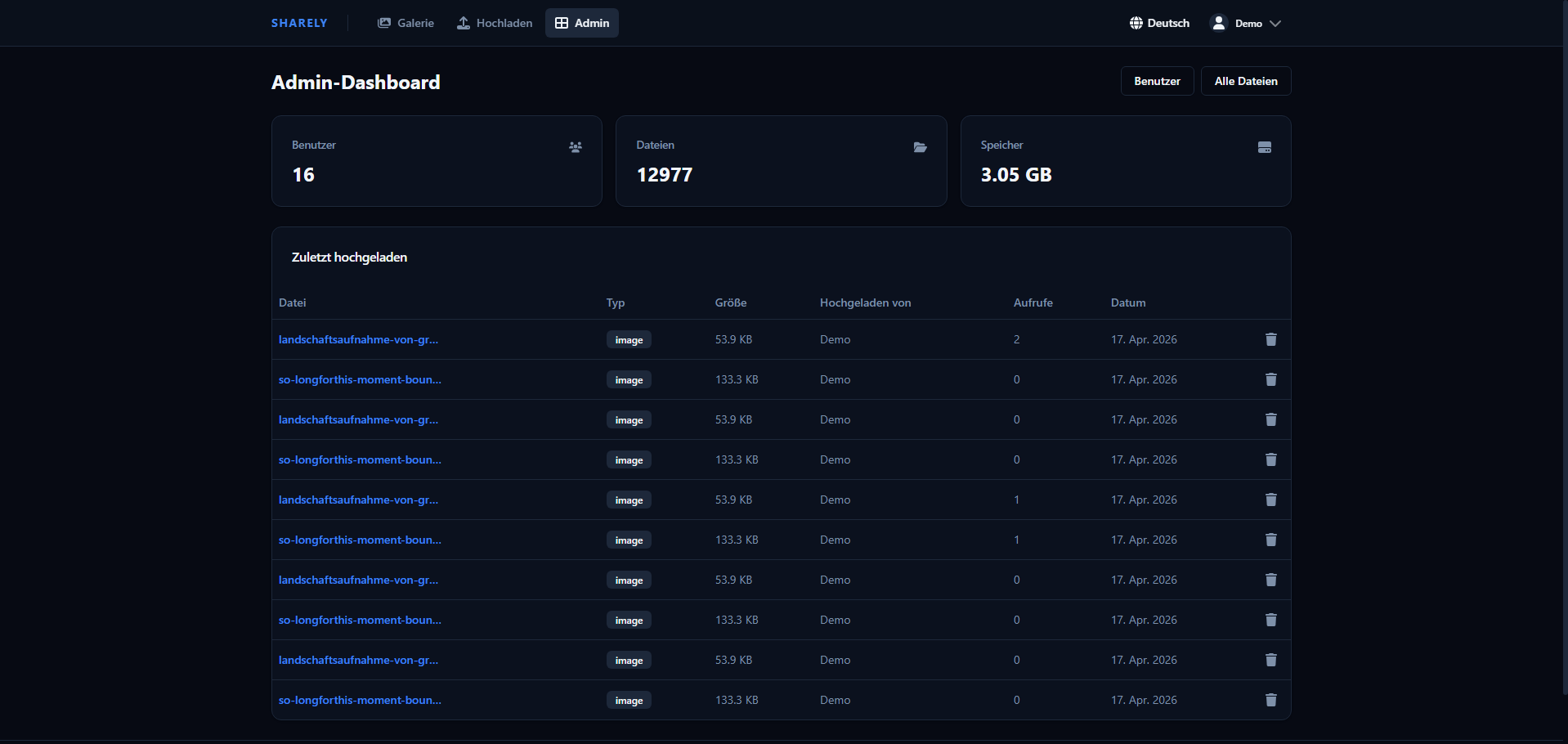
- **Admin dashboard** — Stats overview, manage all users and files, audit log with CSV export
- **Real-time UI** — WebSocket-powered live updates: file view counters, gallery refresh on upload/delete, admin stats and audit log stream in real time
- **XBackBone migration** — Import your existing XBackBone installation including files and metadata
- **Short links** — Every file gets a random 24-character short ID (e.g. `/f/3f9a…`); older 8-character IDs keep working
- **Delete tokens** — Each file carries a unique deletion token so ShareX (or any client) can delete files without a session
- **Security** — Dangerous file types (`.exe`, `.bat`, `.sh`, `.php`, `.ps1`, …) are blocked on upload; only passive media is shown inline, everything else is sent as a download; optional encryption at rest; token-protected first-run setup; sessions revalidated on every request; rate limiting on uploads, logins, password checks, account actions, ID lookups and WebSocket messages; security headers (CSP, HSTS, Referrer-Policy); access logs without full IPs or tokens
- **Docker-ready** — Single `docker compose up` gets you running
- **GDPR-ready** — Privacy policy & Terms of Service pages (configurable), data export (Art. 20), account deletion (Art. 17), audit log with 90-day auto-expiry, configurable file retention, API key hashing, and optional Cloudflare Analytics cookie consent out of the box
### Screenshots
| Gallery | File View |
|---|---|
|  |  |
| Upload | Admin Dashboard |
|---|---|
|  |  |
## Quick Start
### Docker (recommended)
**Requirements:** Docker and Docker Compose
```bash
git clone https://github.com/Christianoooooo/sharely.git
cd sharely
cp .env.example .env
```
Edit `.env` with your settings (see [Configuration](#configuration)), then:
```bash
docker compose up -d
```
The app is now running at `http://localhost:3000`. The setup page asks for a setup token, which the app prints to its log on first start (`docker compose logs app`); the account you create there is the admin.
### Local Development
**Requirements:** Node.js 22+ (24 recommended), MongoDB
```bash
# Backend
npm install
npm run dev
# Frontend (separate terminal)
cd client
npm install
npm run dev
```
- Backend: `http://localhost:3000`
- Frontend dev server: `http://localhost:5173`
## Configuration
Copy `.env.example` to `.env` and adjust the values:
| Variable | Default | Description |
|---|---|---|
| `PORT` | `3000` | Port the server listens on |
| `BIND_ADDRESS` | `127.0.0.1` | Host address the Docker port is published on. Keep loopback behind a reverse proxy; `0.0.0.0` only behind an external firewall or without a proxy (see "Cloudflare Tunnel / proxy in a container") |
| `TRUST_PROXY` | `1` | Number of trusted reverse-proxy hops (e.g. `2` for Cloudflare → nginx); must match your setup or client IPs/rate limits are wrong |
| `ENCRYPTION_KEY` | — | 32-byte key (`openssl rand -base64 32`). If set, new uploads and thumbnails are stored encrypted (see "Encryption at rest"). **Losing it makes encrypted files unreadable** |
| `INSTALL_TOKEN` | _(random, printed to the log)_ | Token required to complete the first-run setup |
| `MONGO_ROOT_PASSWORD` | — | MongoDB root password (required) |
| `MONGO_APP_USER` | `appuser` | MongoDB application user |
| `MONGO_APP_PASSWORD` | — | MongoDB application user password (required) |
| `MONGO_DB_NAME` | `sharely` | MongoDB database name |
| `SESSION_SECRET` | — | Secret for session encryption — use a long random string (required) |
| `BASE_URL` | `http://localhost:3000` | Public base URL for generated share links, no trailing slash |
| `SITE_NAME` | `sharely` | Site name shown in Open Graph embeds |
| `MAX_FILE_SIZE_MB` | `100` | Maximum upload file size in MB (chunked uploads can go up to 2 GB regardless) |
| `ALLOW_REGISTRATION` | `true` | Set to `false` to disable public sign-up (admin-only user creation) |
| `SMTP_HOST` | — | SMTP server hostname; leave blank to disable email features |
| `SMTP_PORT` | `587` | SMTP port |
| `SMTP_SECURE` | `false` | `true` for implicit TLS (port 465), `false` for STARTTLS (port 587) |
| `SMTP_USER` | — | SMTP authentication username |
| `SMTP_PASS` | — | SMTP authentication password |
| `SMTP_FROM` | _(SMTP_USER)_ | From address shown in outgoing emails |
| `LDAP_URL` | — | LDAP server URL (`ldaps://` recommended; `ldap://` sends passwords unencrypted); leave blank to disable LDAP login |
| `LDAP_BIND_DN` | — | DN of the service account used to search for users; blank for an anonymous bind |
| `LDAP_BIND_PASSWORD` | — | Password for `LDAP_BIND_DN` |
| `LDAP_SEARCH_BASE` | — | Base DN under which users are searched, e.g. `ou=people,dc=example,dc=com` |
| `LDAP_SEARCH_FILTER` | `(uid={{username}})` | Search filter; `{{username}}` is replaced with the (escaped) login name |
| `LDAP_ATTR_EMAIL` | `mail` | Directory attribute read as the user's email address |
| `LDAP_TLS_REJECT_UNAUTHORIZED` | `true` | Set to `false` to accept self-signed/untrusted `ldaps://` certificates |
| `UPDATE_ENABLED` | `false` | Enable one-click self-update from the admin panel (see [Automatic Updates](#automatic-updates)) |
| `UPDATE_CHANNEL` | `release` | How updates are detected: `release` (latest GitHub release tag) or `branch` (new commits on `UPDATE_BRANCH`) |
| `UPDATE_BRANCH` | `main` | Branch the updater pulls, and compares against in `branch` channel |
| `UPDATE_REPO` | `Christianoooooo/sharely` | GitHub repo checked for new releases |
| `COMPOSE_PROJECT_NAME` | `sharely` | Compose project name; must match between host and updater |
Generate a secure session secret:
```bash
openssl rand -hex 32
```
### SMTP / Email
When `SMTP_HOST` is set, sharely enables:
- **Email verification** — new accounts must verify their address before logging in; tokens expire after 24 hours
- **Email change confirmation** — a verification link is sent to the new address
- **Password reset** — "Forgot password" flow with a 1-hour reset token (rate-limited to 5 requests per hour)
Email subjects and body copy are translated into all 8 supported languages and sent in the user's chosen language.
If `SMTP_HOST` is left blank, all email-dependent features are hidden from the UI and registration proceeds without verification.
### LDAP / Directory login
When `LDAP_URL` is set, users can log in with their directory credentials. Authentication uses **search + bind**: the app binds with `LDAP_BIND_DN` (or anonymously), searches `LDAP_SEARCH_BASE` using `LDAP_SEARCH_FILTER`, and then re-binds as the found entry with the supplied password.
- **Local-first** — an existing local account always authenticates against its local password; the directory is only consulted for LDAP accounts and usernames with no local account.
- **Auto-provisioning** — on the first successful LDAP login a local user record is created (role `user`) so folders, quotas and sessions work as usual. The account is tied to the directory entry's DN, not to the typed name. The login name must follow the usual username rules (3–32 characters, letters, digits, `-`, `_`) and must not differ only in case from an existing account. Nothing is provisioned before the installation is complete. The email from `LDAP_ATTR_EMAIL` is adopted when available, and no MX check is performed on it.
- LDAP accounts have no usable local password: "change password" and "forgot password" do not apply to them, and other actions that ask for the password (change username or email, delete account) take the directory password. Promote an LDAP user to admin from the admin panel like any other account.
- Usernames that exist in the directory cannot be taken by self-registration or renaming.
- Removing or disabling a user in the directory blocks new logins only. Existing sessions and the API key keep working until you also deactivate the account in the admin panel.
If `LDAP_URL` is left blank, login behaves exactly as before.
## Automatic Updates
The admin panel (**Admin → Site Settings → Version & Updates**) always shows the installed version and whether an update is available.
**How "update available" is determined** depends on `UPDATE_CHANNEL`:
- `release` (default) — the installed version is compared against the latest **GitHub release tag**. Use this if you cut a release for each version.
- `branch` — the installed **commit** is compared against the tip of `UPDATE_BRANCH`. An update is available whenever there are new commits on the branch, so you don't need to create a release. The installed version/commit is reported by the updater container, so this channel needs the updater running.
Optionally, admins can apply updates with one click. This is handled by a dedicated `updater` container — the **only** component with Docker socket access. The web app never touches the socket: it just drops a request file into a shared volume, and the updater runs `git pull` + `docker compose build app thumbnailer` + `docker compose up -d app thumbnailer`.
> ⚠️ **Security note:** the updater mounts the Docker socket, which is equivalent to root on the host. Enable self-update only if you accept that trade-off. If the web app is compromised, the worst it can trigger is a rebuild from your configured branch — it cannot run arbitrary host commands.
To enable it:
1. Deploy from a **git checkout** (the default Quick Start does this) — the updater pulls into that checkout.
2. Set `UPDATE_ENABLED=true` in `.env`. Keep `COMPOSE_PROJECT_NAME` identical to the name used when you first ran compose (default `sharely`).
3. Start the stack **including** the updater (it lives behind the `updater` profile, so a plain `docker compose up` never starts the privileged container):
```bash
docker compose --profile updater up -d --build
```
When you click **Install update**, the app container is rebuilt and restarted; it is briefly unavailable. The page reports progress and reconnects automatically. Leave `UPDATE_ENABLED=false` (and omit the profile) to keep the panel notification-only.
> **Updating the updater itself:** the updater only rebuilds the `app` and `thumbnailer` containers, never itself. After changing anything under `updater/`, rebuild it once manually:
> `docker compose --profile updater up -d --build updater`
## API Usage
Get your API key from **Settings → API Key** in the web UI.
**Upload a file:**
```bash
curl -X POST https://your-domain.com/api/upload \
-H "Authorization: Bearer YOUR_API_KEY" \
-F "sharex=@/path/to/file.png"
```
The response contains the URL to the uploaded file and a `deletionUrl` that can be used to delete the file without a session (used automatically by ShareX).
**Delete a file:**
```bash
curl -X DELETE https://your-domain.com/api/delete/SHORT_ID \
-H "Authorization: Bearer YOUR_API_KEY"
```
**List your files:**
```bash
curl https://your-domain.com/api/gallery \
-H "Authorization: Bearer YOUR_API_KEY"
```
### Chunked Uploads
For large files the web UI automatically switches to chunked upload mode (files above ~250 MB). Chunks of 10–20 MB are uploaded in parallel (3–5 concurrent chunks). The API also exposes the chunked upload endpoints for programmatic use — see `/api/upload/chunk/init`, `/api/upload/chunk/:sessionId`, and `/api/upload/chunk/:sessionId/finalize`.
## ShareX Setup
1. Log in and go to **Upload**
2. Click **Download ShareX Config**
3. Open the downloaded `.sxcu` file — ShareX will import it automatically
4. Screenshots and uploads are now sent directly to your instance
ShareX receives a `deletionUrl` in the upload response and can delete files without re-authenticating.
## Share Links
Any file can have one or more share links generated from the file view. Each link is served at `/s/` and supports:
- **Password protection** — visitors must enter a password before accessing the file
- **Expiry date** — the link becomes invalid after the configured date
- **Download limit** — the link is disabled after N downloads (-1 = unlimited)
Share links are independent of the owner's account. Deleting a share link does not delete the underlying file.
## Collections
Collections group multiple files under a single shareable link. Create and manage them from the **Collections** page. Each collection supports:
- Custom name and description
- Optional password and expiry date
- Adding / removing individual files
Collections are served at `/c/` and respect the same password/expiry rules as share links.
## Tags
Files can be tagged for organisation and filtering. Tags are stored per file and are searchable in the gallery.
To speed up tagging, define a personal list of **predefined tags** under **Settings → Preferences → Tag Management**. These appear as one-click suggestions when tagging files.
## WebSocket API
The app maintains a persistent WebSocket connection (`/ws`) for all authenticated clients. The protocol uses a request/response pattern plus server-initiated broadcasts.
The handshake is rejected unless `Origin` matches `Host`. Session, role and account state are rechecked on every message and every 30 seconds, so logout, deactivation, password changes and demotion take effect on open connections. Messages are limited to 64 KiB and rate-limited per connection; each IP may hold up to 20 connections.
**Request format** (client → server):
```json
{ "id": "unique-request-id", "action": "action:name", "payload": {} }
```
**Response format** (server → client):
```json
{ "id": "unique-request-id", "data": {}, "error": null }
```
**Broadcast format** (server → relevant clients):
```json
{ "event": "event:name", "data": {} }
```
### Available Actions
| Action | Auth | Description |
|---|---|---|
| `site-settings:get` | — | Public site settings |
| `auth:me` | User | Current session user |
| `file:get` | User | File details (increments view count) |
| `file:list` | User | Own files (admins see all) |
| `file:delete` | User | Delete a file |
| `user:get-key` | User | API key prefix |
| `user:regen-key` | User | Regenerate API key |
| `user:change-password` | User | Change password |
| `user:change-username` | User | Change username |
| `user:change-email` | User | Change email (sends verification) |
| `user:change-language` | User | Set UI language |
| `user:change-embed-mode` | User | Toggle embed / raw mode |
| `user:resend-verification` | User | Re-send verification email |
| `user:export` | User | Export account data as JSON |
| `user:delete-account` | User | Delete account and all files |
| `admin:stats` | Admin | Dashboard statistics |
| `admin:settings:get` | Admin | Read site settings |
| `admin:settings:update` | Admin | Update site settings |
| `admin:users:list` | Admin | List all users |
| `admin:users:create` | Admin | Create user |
| `admin:users:toggle` | Admin | Activate / deactivate user |
| `admin:users:role` | Admin | Change user role |
| `admin:users:delete` | Admin | Delete user |
| `admin:users:regen-key` | Admin | Regenerate a user's API key |
| `admin:users:password` | Admin | Set a user's password |
| `admin:users:folder` | Admin | Change a user's folder name |
| `admin:files:list` | Admin | List all files |
| `admin:audit-log:list` | Admin | Paginated audit log |
### Broadcast Events
| Event | Recipients | Payload |
|---|---|---|
| `file:uploaded` | Uploader only | `{ shortId, uploaderId }` |
| `file:deleted` | Owner only | `{ shortId, uploaderId }` |
| `file:view` | Owner + admins | `{ shortId, views }` |
| `user:created` | Admins | `{ id, username, role }` |
| `user:deleted` | Admins | `{ id }` |
| `user:updated` | Admins | `{ id, …changed fields }` |
| `audit:log` | Admins | Full AuditLog object |
| `settings:updated` | Admins | Updated SiteSettings object |
| `stats:invalidate` | Admins | `{}` (trigger a stats re-fetch) |
## Reverse Proxy (Nginx example)
WebSocket support requires the `Upgrade` and `Connection` headers to be forwarded:
```nginx
server {
listen 443 ssl;
server_name files.example.com;
client_max_body_size 2100M;
location / {
proxy_pass http://localhost:3000;
proxy_set_header Host $host;
proxy_set_header X-Real-IP $remote_addr;
proxy_set_header X-Forwarded-For $proxy_add_x_forwarded_for;
proxy_set_header X-Forwarded-Proto $scheme;
# WebSocket support
proxy_http_version 1.1;
proxy_set_header Upgrade $http_upgrade;
proxy_set_header Connection "upgrade";
}
}
```
Make sure `BASE_URL` in `.env` matches your public domain.
> **Note on `client_max_body_size`:** Set this at least as large as your largest expected chunked segment plus some headroom. For 2 GB file support, `2100M` is a safe value.
## Cloudflare Tunnel / proxy in a container
By default Docker publishes the app port only on `127.0.0.1` (`BIND_ADDRESS`). A proxy running directly on the host, like the nginx example above, reaches it. A proxy or `cloudflared` running in its own container does not, and answers with **502 Bad Gateway**.
- **Recommended:** attach the proxy container to the sharely Docker network (`_default`, by default `sharely_default`) and point it to `http://app:3000`. No port needs to be published then:
```bash
docker network connect sharely_default
```
To keep this across restarts, declare the network as `external` in the proxy's compose file.
- **With an external firewall** that blocks port 3000 from the internet (e.g. Hetzner Cloud Firewall): set `BIND_ADDRESS=0.0.0.0` in `.env`. Do not do this without such a firewall: Docker bypasses host firewalls like `ufw`, and anyone reaching the port directly bypasses TLS and can spoof `X-Forwarded-For`, which defeats the rate limits.
The proxy must pass on the original `Host` header (WebSocket connections are rejected if `Origin` and `Host` differ) and `X-Forwarded-Proto` (needed for secure cookies and HSTS). Cloudflare Tunnel and the nginx example do this by default; do not set `httpHostHeader` in the tunnel configuration. After setting up, check that the audit log shows real client IPs; otherwise adjust `TRUST_PROXY`.
> **Upgrade note:** Earlier versions published port 3000 on all interfaces. If your proxy runs in a container, set `BIND_ADDRESS` or attach the network as described above before updating.
## Encryption at rest
With `ENCRYPTION_KEY` set, sharely encrypts every new upload and its thumbnail with AES-256-GCM before storing it (one key per file, derived from the master key). Files are decrypted on the fly when served, including Range requests and ZIP downloads.
- Generate the key once with `openssl rand -base64 32`, put it in `.env` and **back it up separately**: without it, encrypted files cannot be recovered. Changing or removing the key later is not supported.
- Existing files stay unencrypted until you run the migration (back up the `uploads` volume first): `docker compose exec app npm run migrate:encrypt`
- Not covered: pastes, file names and other metadata in MongoDB, avatars, and the process memory of the running server. While an upload is processed (chunk assembly, metadata stripping, thumbnail generation) it briefly exists unencrypted on disk.
- The admin setting for disk/volume encryption only declares volume encryption in the privacy policy and is independent of this.
## Thumbnails
Video and PDF files get a JPEG thumbnail automatically on upload. Thumbnails are stored in `uploads/.thumbnails/` and served at `/f//thumb`.
The Docker image includes `ffmpeg` (video) and `ghostscript` (PDF), so no extra setup is needed there. With Docker Compose they run in a separate `thumbnailer` container without network, secrets or access to stored uploads, so a malicious video or PDF that exploits one of these tools cannot reach the app's data. If that container is not running, thumbnails are skipped.
> **Upgrading from an older version:** run `docker compose up -d --build` once so the `thumbnailer` container is created. If you use the updater, also rebuild it once (`docker compose --profile updater up -d --build updater`); older updaters only recreate the `app` container.
For local development, install the tools manually:
```bash
# Debian / Ubuntu
sudo apt install ffmpeg ghostscript
# macOS
brew install ffmpeg ghostscript
```
If the tools are unavailable, thumbnail generation is silently skipped and the gallery shows a styled colour-coded placeholder instead.
### Backfilling existing uploads
To generate thumbnails for files that were uploaded before this feature was introduced, run the migration script once inside the container:
```bash
docker exec -it npm run migrate:thumbnails
```
Or locally:
```bash
npm run migrate:thumbnails
```
The script is idempotent — already-generated thumbnails are skipped.
## XBackBone Migration
If you're migrating from [XBackBone](https://github.com/SergiX44/XBackBone):
1. Log in as admin and go to **Admin → Import**
2. Provide the path to your XBackBone `database.db` file
3. Provide the path to your XBackBone `storage/` directory
4. Run a preview first, then confirm the import
Users are matched by username. Files without a matching user are assigned to a fallback user you specify. The import handles multiple XBackBone schema versions and searches storage subdirectories automatically. It is idempotent — re-running it skips already-imported files.
## End-to-End Tests
The project ships with a [Playwright](https://playwright.dev/) test suite covering the main user flows (upload, gallery, share links, tags, admin actions).
**Run tests (requires the app to be running):**
```bash
# Headless
npm run test:e2e
# Interactive UI mode
npm run test:e2e:ui
```
The global setup in `e2e/global-setup.js` creates the necessary test users automatically. Make sure `BASE_URL` in `.env` points to a running instance before executing the suite.
## Project Structure
```
sharely/
├── app.js # Express entry point
├── src/
│ ├── config/db.js # MongoDB connection
│ ├── models/ # Mongoose schemas (User, File, Paste, Collection, ShareLink, AuditLog, SiteSettings)
│ ├── middleware/ # Auth, upload handling, file block list, lookup rate limit
│ ├── jobs/
│ │ └── retentionCleanup.js # Scheduled file cleanup, stale chunk/plaintext leftovers
│ ├── utils/
│ │ ├── fileCrypto.js # Encryption at rest (AES-256-GCM, Range-capable)
│ │ ├── storeUpload.js # Encrypt uploads, thumbnail from plaintext copy
│ │ ├── mime.js # MIME normalization and inline whitelist
│ │ ├── deleteUserData.js # Complete account erasure
│ │ ├── setupToken.js # First-run setup token
│ │ ├── generateThumbnail.js # ffmpeg/ghostscript thumbnail generation
│ │ └── mailer.js # Nodemailer wrapper with i18n templates
│ ├── ws.js # WebSocket server (all WS actions & broadcasts)
│ └── routes/ # REST routes (auth, api, files, shares, collections, import, install)
├── client/ # React frontend (Vite + Tailwind)
│ └── src/
│ ├── i18n/ # i18next config + 8 locale JSON files
│ ├── hooks/
│ │ └── useWebSocket.js # React hook for WS connection & events
│ ├── pages/ # Upload, Gallery, FileView, Collections, Settings, Admin pages
│ └── components/ # UI components
├── e2e/ # Playwright end-to-end tests
├── scripts/
│ ├── setup-db.js
│ ├── migrate-uploads-to-user-folders.js
│ ├── generate-missing-thumbnails.js
│ └── encrypt-existing-files.js # encrypt files stored before ENCRYPTION_KEY was set
├── uploads/
│ ├── .thumbnails/ # auto-generated JPEG thumbnails
│ ├── .chunks/ # temporary chunked-upload segments
│ └── .avatars/ # user profile avatars
├── docker-compose.yml
└── .env.example
```
## Tech Stack
| Layer | Technology |
|---|---|
| Backend | Node.js, Express |
| Database | MongoDB (Mongoose) |
| Real-time | WebSocket (`ws`) |
| Email | Nodemailer |
| Frontend | React 18, React Router, Vite |
| Styling | Tailwind CSS, Radix UI |
| i18n | i18next |
| File uploads | Multer (standard) + chunked upload (custom) |
| Auth | express-session, bcryptjs |
| Container | Docker, Docker Compose |
## GDPR / Privacy
Sharely is designed with privacy in mind. The following features support GDPR compliance for operators in the EU:
| Feature | GDPR Article |
|---|---|
| Privacy Policy page (configurable via Admin Panel) | Art. 13/14 – Transparency |
| Terms of Service page (configurable via Admin Panel) | Art. 13/14 – Transparency |
| Data export (JSON download of account + file metadata with full URLs) | Art. 20 – Portability |
| Account deletion by the user or an admin (removes files, pastes, collections, share links and avatar; anonymizes the audit log) | Art. 17 – Right to erasure |
| Audit log (all access and admin actions, 90-day auto-expiry via MongoDB TTL) | Art. 5(2) – Accountability |
| Audit log CSV export for regulators | Art. 5(2) – Accountability |
| Configurable file retention (auto-delete after N days) | Art. 5(1)(e) – Storage limitation |
| API keys stored as SHA-256 hashes, never in plaintext | Art. 32 – Security |
| Passwords stored as bcrypt hashes (12 rounds) | Art. 32 – Security |
| Optional encryption of stored files and thumbnails (`ENCRYPTION_KEY`) | Art. 32 – Security |
| Encryption-at-rest documentation (operator self-declaration of volume encryption) | Art. 32 – Security |
| Access log with truncated IPs and redacted tokens | Art. 5(1)(c) – Data minimisation |
| Cookie consent notice for Cloudflare Analytics (optional) | Art. 13 – Transparency |
> **Note for operators:** GDPR compliance is ultimately the operator's responsibility. Before going live, fill in your operator details under **Admin → Site Settings** (name, address, contact email). Consider whether you need a Data Processing Agreement (DPA) with your hosting provider.
## License
MIT