# Open Source Tracker
A small, self-hosted board that shows what your team has contributed to open source. Add teammates by GitHub username, sync, and see everyone's merged pull requests — with pending PRs, issues and reviews shown alongside for context.
[](LICENSE)
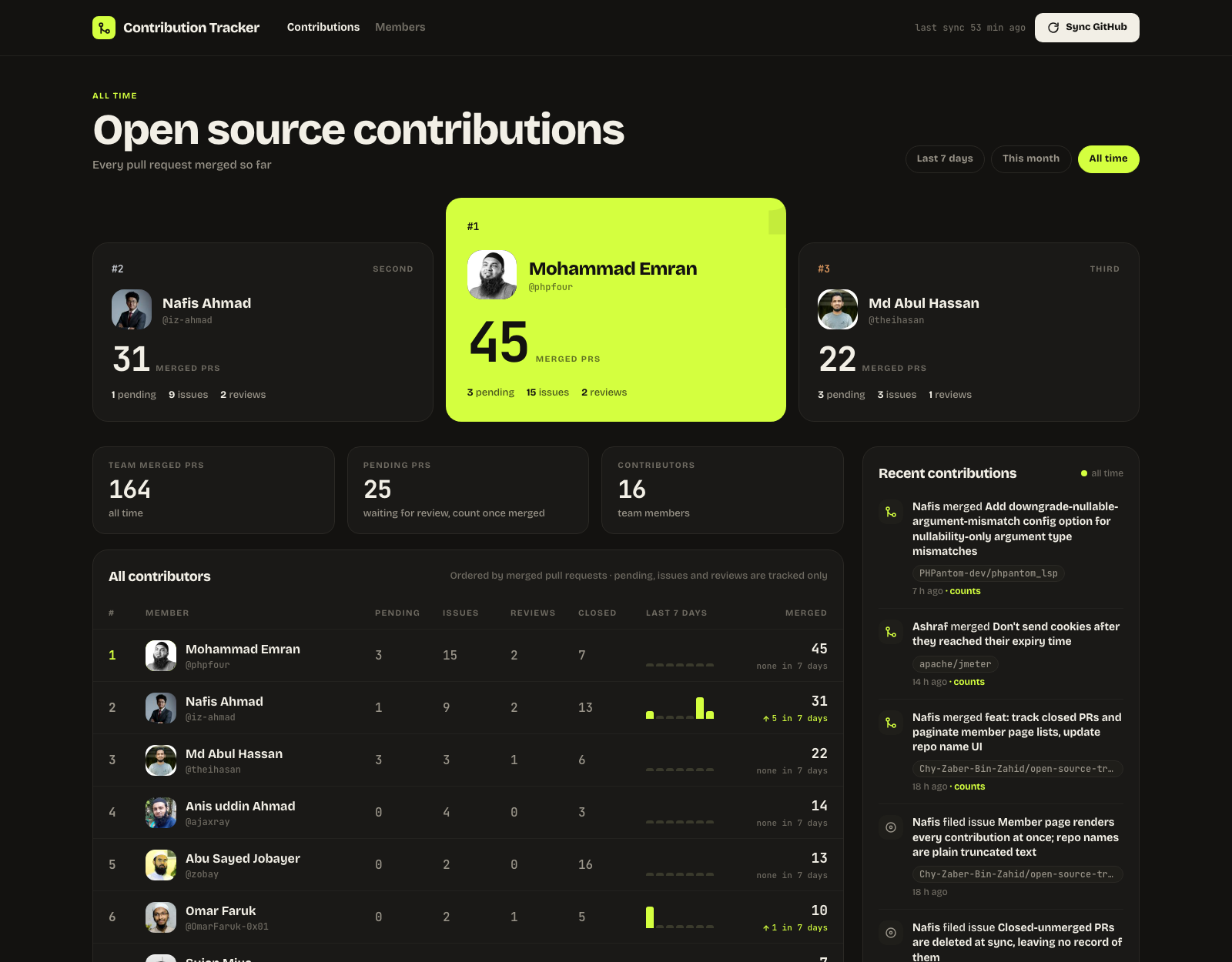
The board in real use — 16 teammates, 164 merged pull requests across 69 repositories, including laravel/framework, Laravel-Backpack/CRUD, bagisto/bagisto, microsoft/playwright, SeleniumHQ/selenium and apache/jmeter.
**Stack:** Next.js 16 (App Router, route handlers as the backend) · React 19 · Tailwind CSS 4 · PostgreSQL 16 · Docker Compose. No ORM, no auth layer, no external services beyond the GitHub API.
---
## What it does
- Pulls each member's public GitHub activity through the search API and stores it in Postgres.
- Orders members by **merged pull requests** for the last 7 days, this month, or all time.
- Shows a feed of recent contributions, per-member pages, and team totals.
- Syncs itself **every night at 2:00 AM** in your office timezone, or on demand from the header.
### It is a tracker, not a competition
There are no points, no medals and no streak hype anywhere in the interface. It is a plain, verifiable record of what the team merged.
**Only merged pull requests affect the ordering.** Pending PRs, issues and reviews are pulled in and displayed for context, but they never move anyone up the board.
Each pull request is a single entry: it appears as pending while open, becomes a merged PR when it merges, and is kept as a closed PR if it is closed without merging — closed PRs never affect the ordering.
Contributions to repositories a member owns themselves are ignored by default, so nobody's own side projects inflate the board. Set `INCLUDE_OWN_REPOS=true` to count them.
---
## Screens
### Per-member pages
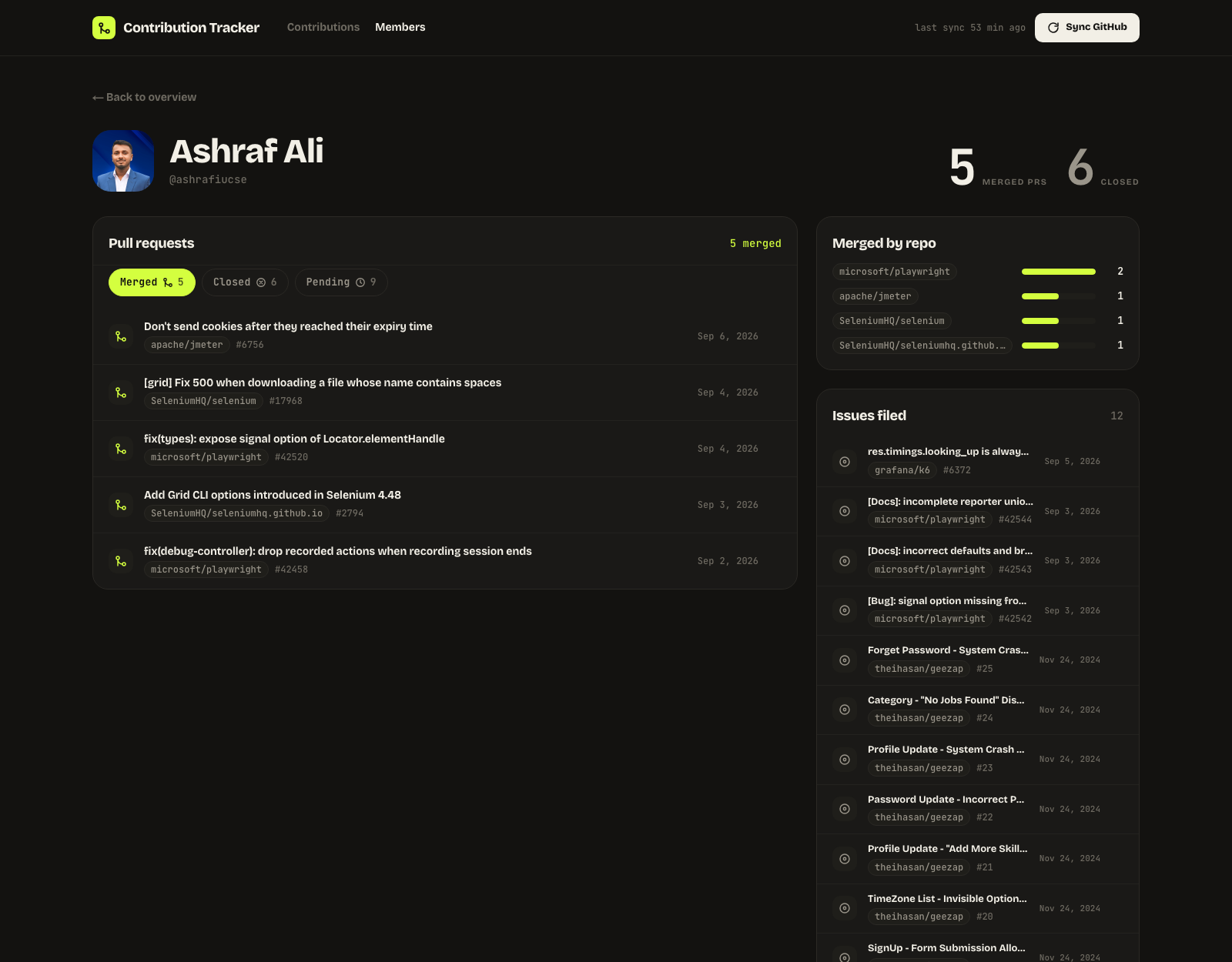
Every merged pull request a person has landed, which repositories they land in most, and the issues they have filed. Merged, pending and closed pull requests are tabbed, and long lists page in twenty at a time.
### Adding teammates
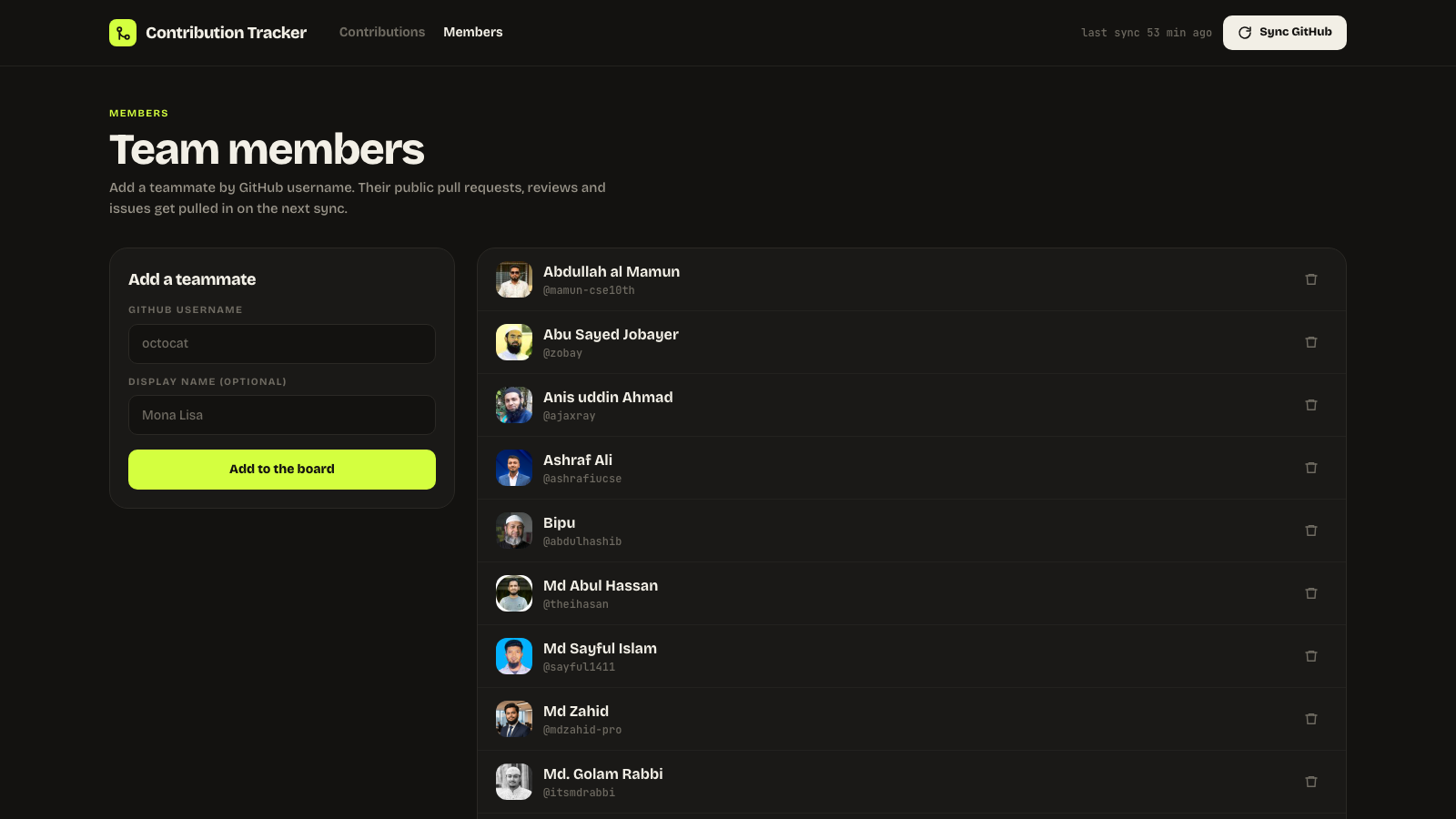
Add someone by GitHub username. Their public pull requests, reviews and issues are pulled in on the next sync.
---
## Quick start (Docker)
Everything — app, database and the background sync — comes up with one command.
```bash
git clone https://github.com/Chy-Zaber-Bin-Zahid/open-source-tracker.git
cd open-source-tracker
cp .env.example .env # add a GITHUB_TOKEN here, see below
docker compose up --build
```
Open , add your teammates on the **Members** page, and press **Sync GitHub**.
## Local development
Requires Node.js 20.9+ and Docker for Postgres.
```bash
cp .env.example .env
docker compose up -d db # Postgres on localhost:5439
npm install
npm run db:migrate
npm run db:seed # optional demo data, so the board isn't empty
npm run dev
```
| Command | What it does |
| --- | --- |
| `npm run dev` | Development server on port 3000 |
| `npm run build` / `npm start` | Production build and serve |
| `npm run lint` | ESLint |
| `npm run typecheck` | `tsc --noEmit` |
| `npm run db:migrate` | Apply `db/schema.sql` (idempotent, safe to re-run) |
| `npm run db:seed` | Insert demo members and contributions |
---
## Configuration
All settings live in `.env`. Copy `.env.example` to start.
| Variable | Default | What it controls |
| --- | --- | --- |
| `DATABASE_URL` | `postgres://arena:arena@localhost:5439/arena` | Postgres connection. Docker Compose sets this for the web container itself. |
| `GITHUB_TOKEN` | *(empty)* | GitHub personal access token. Strongly recommended — see below. |
| `SYNC_SINCE` | `2000-01-01` | Only pull contributions on or after this ISO date. |
| `INCLUDE_OWN_REPOS` | `false` | Set `true` to also count activity on repos the member owns. |
| `REQUIRED_ORG` | *(empty)* | GitHub orgs (can be single, or multiple comma-separated) new members must belong to — any one is enough. Syncs re-check and flag departures. Empty allows anyone. |
| `DB_PORT` | `5439` | Host port Postgres is published on. 5432 is often already taken. |
| `SYNC_HOUR` | `2` | Hour (0-23, in `APP_TZ`) the nightly sync runs. Docker Compose only — on Vercel the schedule lives in `vercel.json`, in UTC. |
| `CRON_SECRET` | *(empty)* | When set, `GET /api/sync` requires `Authorization: Bearer `, so a public deployment cannot be synced by anyone who finds the URL. |
| `APP_TZ` | `UTC` | IANA timezone that defines the "last 7 days" and "this month" boundaries, e.g. `Asia/Dhaka`. **Not** `TZ` — Vercel reserves that name. |
| `BURGER_ADMINS` | *(empty)* | Comma-separated GitHub logins allowed to mark burger parties done. Empty means nobody can. |
| `BURGER_PAYERS` | *(empty)* | GitHub logins of whoever pays for the burgers. They can mark parties done too, but have to get through three "are you sure, sir?" confirmations first. |
| `BURGER_SINCE` | `2026-08-25T13:03:18Z` | Only PRs merged at or after this ISO timestamp are on the burger page. The default is laravel/framework#61305. |
| `GITHUB_OAUTH_CLIENT_ID` | *(empty)* | GitHub OAuth App client ID, for Sign in with GitHub on the burger page. |
| `GITHUB_OAUTH_CLIENT_SECRET` | *(empty)* | That app's client secret. |
| `AUTH_SECRET` | *(empty)* | Signs the session cookie. Any long random string, e.g. `openssl rand -base64 32`. |
### Burger parties
The office buys burgers for every merged PR. `/burgers` lists each PR merged since `BURGER_SINCE` as **due** or **done**; a PR credited to two members is one burger. Anyone can view it. Marking a party done, or undoing a mark, needs Sign in with GitHub, and the signed-in login must be in `BURGER_ADMINS` or `BURGER_PAYERS`. Payers get a three-step confirmation, with GIFs from GIPHY, before their marks are saved; that part is only in the UI. The server checks this on every change, and editing the list takes effect on the next deploy.
To turn sign-in on, create an OAuth App at with the authorization callback URL `/api/auth/github/callback` (for local development, `http://localhost:3000/api/auth/github/callback`), then set `GITHUB_OAUTH_CLIENT_ID`, `GITHUB_OAUTH_CLIENT_SECRET` and `AUTH_SECRET`. No scopes are requested; the app only reads the public login and keeps nothing else.
### The GitHub token
Without a token the GitHub search API allows **10 requests per minute**, which makes a sync for even a handful of people take several minutes. With one you get 30 per minute.
Create a **classic** token at . Put it in `.env` as `GITHUB_TOKEN`.
Scopes:
- Tracking public contributions only: **no scopes needed**.
- Using `REQUIRED_ORG`: **`read:org` is required**, and the token's owner must be a member of the organisation.
That second point is easy to get wrong and fails quietly. `GET /orgs/{org}/members/{username}` only reveals **private** memberships to a token that has visibility into that org; otherwise GitHub redirects to the public-members endpoint and everyone whose membership is private comes back as "not a member". Registration then rejects them, and syncs flag them as having left. Most organisations have private membership by default — one of ours shows 2 public members out of 19.
A plain member's token with `read:org` is enough; you do not need to own the org. Use a classic token rather than a fine-grained one, since fine-grained tokens need an org owner to approve them.
`.env` is gitignored. Keep it that way — never commit a token.
---
## API
Route handlers under `app/api` are the entire backend.
| Method | Path | What it does |
| --- | --- | --- |
| `GET` | `/api/leaderboard?period=week\|month\|all` | Standings, sparklines and team stats |
| `GET` | `/api/contributions?period=&member=&limit=` | Contribution feed |
| `POST` | `/api/contributions` | Log a contribution manually |
| `GET` | `/api/members` | List members |
| `POST` | `/api/members` | Add a member by GitHub login |
| `DELETE` | `/api/members/:id` | Remove a member and all their contributions |
| `POST` | `/api/sync` | Pull the latest contributions from GitHub for everyone. Once GitHub sign-in is configured, only tracked members and burger admins may call it. At most once every 5 minutes for the whole site, counted from the end of the last run |
| `GET` | `/api/sync` | Same, for schedulers. Requires `Authorization: Bearer $CRON_SECRET` when that is set |
| `GET` | `/api/burgers` | Tracked merged PRs with their burger status and totals |
| `POST` | `/api/burgers` | `{ urls, done }` marks parties done or undoes them. Signed-in `BURGER_ADMINS` only |
| `GET` | `/api/auth/github` | Starts Sign in with GitHub; `/api/auth/github/callback` finishes it |
| `POST` | `/api/auth/logout` | Signs out |
---
## Project layout
```
app/ Next.js App Router
page.tsx The board (last 7 days / this month / all time)
loading.tsx Skeleton shown while the board's queries run
members/ Member list and per-member pages, each with a skeleton
burgers/ Burger parties: which merged PRs have had theirs
api/ Route handlers — the backend
components/ Presentational React components
member-lists.tsx Tabbed, paged contribution lists on a member page
SyncStatus.tsx The header's sync label, suspended on its own
lib/
db.ts pg connection pool
queries.ts Every SQL read the app performs
github.ts GitHub search API client and the sync routine
period.ts Rolling 7 days / month / all-time window maths
points.ts Per-type weights for the DB `points` column
format.ts Number and date formatting
rate-limit.ts In-memory limiter for the unauthenticated write routes
auth.ts Sign in with GitHub session cookie and the BURGER_ADMINS check
burgers.ts Burger party reads and writes
db/schema.sql The whole schema, idempotent
scripts/
migrate.mjs Applies db/schema.sql (runs on container start)
scheduler.mjs Nightly sync loop for self-hosted deployments
seed.mjs Demo data
vercel.json Nightly cron for Vercel deployments
design/ Design canvas source (main direction + two alternates)
```
### How syncing works
The tracker keeps itself up to date; the **Sync** button is only there for when you do not want to wait.
- **Docker Compose:** the `sync` service runs `scripts/scheduler.mjs`, which sleeps until `SYNC_HOUR` (default `2`) in `APP_TZ` and then calls the endpoint.
- **Vercel:** `vercel.json` registers a daily cron. Vercel cron expressions are **UTC**, and the checked-in `0 20 * * *` is 02:00 in `Asia/Dhaka`; if your `APP_TZ` differs, change that line to match. Set `CRON_SECRET` in the project's environment variables and Vercel will send it as a bearer token, which the endpoint then requires.
`POST /api/sync` walks every member and, for each, queries the GitHub search API for their merged PRs, open PRs, closed PRs, issues and reviews since `SYNC_SINCE`. Results are upserted with one row per pull request per member, so a PR that was pending last sync is updated in place when it merges or is closed. Each run is recorded in the `sync_runs` table.
### Database
Two tables and a log: `members`, `contributions`, `sync_runs`. There is no ORM and no migration tool — `db/schema.sql` is written to be idempotent and is reapplied in full on every container start by `scripts/migrate.mjs`. Schema changes must therefore use `IF NOT EXISTS` / `IF EXISTS` guards.
---
## Deploying
The `Dockerfile` produces a standalone Next.js image and runs migrations on start. `docker-compose.yml` wires it to Postgres and a scheduler container that triggers `/api/sync` nightly at 2:00 AM in `APP_TZ`.
### Migrations
There is no migration tool. `db/schema.sql` is written to be idempotent and reapplying it in full *is* the migration, so both deploy paths run it automatically:
| Where | When it runs | How |
| --- | --- | --- |
| Docker | Every container start, before the server boots | `CMD` runs `scripts/migrate.mjs` |
| Vercel | Every deploy, before `next build` | the `vercel-build` script |
Vercel runs `vercel-build` in preference to `build` when it exists, which is why the migration lives there and not in `build` — the Docker image is built without a database, so a migration in `build` would break `docker build`.
The whole schema is applied in one transaction guarded by a transaction-scoped advisory lock, so two deploys landing at once cannot half-apply it or collide on `CREATE TABLE IF NOT EXISTS` (which is not itself race-safe). The lock is transaction-scoped rather than session-scoped so that it still works through a transaction pooler such as PgBouncer or Neon's `-pooler` endpoint.
**This means `db/schema.sql` must stay transactional and additive.** No `CREATE INDEX CONCURRENTLY`, no `VACUUM`, and every statement guarded with `IF NOT EXISTS` / `IF EXISTS`. Preview deployments run against whatever `DATABASE_URL` they are given, so if previews share the production database, a destructive change would reach it before the code does.
To migrate by hand — a one-off fix, or a database the deploy cannot reach:
```bash
DATABASE_URL='postgres://...' npm run db:migrate
```
Use your database's **direct** endpoint for that, not a pooled one.
**Before you expose this anywhere:** the app has no authentication. Anyone who can reach it can add or remove members and trigger syncs. Run it on an internal network, or put an authenticating proxy in front of it. Also change the default `arena` / `arena` Postgres credentials. See [SECURITY.md](SECURITY.md).
---
## Design
The design canvas — the implemented dark board plus two alternate directions — lives in `design/*.dc.html`.
## Contributing
Contributions are welcome. Read [CONTRIBUTING.md](CONTRIBUTING.md) first; it covers the dev setup, the checks to run, and the four design principles the project is built on.
By participating you agree to the [Code of Conduct](CODE_OF_CONDUCT.md).
## License
[MIT](LICENSE) © Chy-Zaber-Bin-Zahid