ChatGPT meets Siri - Experience the power of chatgpt-3.5-turbo 体验语音驱动的人工智能问答,基于chatgpt-3.5-turbo
This document was translated by GPT-4.
## 👋🏻 Introducing
Just say to Siri: "Start a chat", and you can quickly start a sufficiently intelligent conversation with ChatGPT. If you're tired of Siri's dull and not-so-smart responses, try this smart Siri Pro! If possible, give the project a free ⭐️, which is the best support for the project!
### 💃 Demo:

## 🔥 Features
Smart Siri Pro is a conversational artificial intelligence based on Shortcuts, currently supporting operation on iPhone/iPad/Apple Watch/Mac/HomePod/CarPlay. You can use it to accomplish the following:
- 🚀 Continuous conversation: Smart Siri Pro supports continuous conversations and up to 60 rounds of ongoing exchanges
- ✍ Customizable personality: Manually define character personality by modifying Prompts settings. After invoking Siri, you can have a conversation with the object you set, such as making it play the role of a girlfriend or a cat girl?
- 💾 Save conversations: When the chat ends, you can choose to save the conversation content to a file or a memo for later viewing.
- 🔀 Customizable summoning words: You can modify the shortcut name to change the summoning word, such as changing "Jarvis" to "Start a chat". When you say "Start a chat" to Siri, Siri will automatically invoke this shortcut to chat with you.
- 💬 Customizable interactions: By modifying the interaction content in the shortcuts, the conversation can better match your custom character personality. Currently, Smart Siri supports modifying: initial conversation interaction, rewriting start conversation interaction, and exit command interaction content.
- 🤖 More: We will support features like reverse proxy in future updates, so stay tuned.
## 🛠️ Start to Chat
All you need is an OpenAI API KEY and a Shortcut to use Smart Siri Pro. Configure your shortcut following these steps:
1. Download the Shortcut: Click the download link below to get the latest version of Smart Siri Pro;
2. Enter the APIKEY in Smart Siri Pro to use the full functionality;
3. Run the shortcut once and allow it to access the internet;
4. Say "Jarvis" to Siri, invoke the shortcut, and start having an intelligent chat!
### 🛫 Detailed Steps
💻 Download links:
1. iCloud link: [https://www.icloud.com/shortcuts/2e9f11a8a876488fab105ddaff08ba39](https://www.icloud.com/shortcuts/2e9f11a8a876488fab105ddaff08ba39 "https://www.icloud.com/shortcuts/2e9f11a8a876488fab105ddaff08ba39")
👆 Update time: 2023.03.12 10:42
If you already have an OpenAI account, you can generate your own APIKEY here (please note that APIKEY is equivalent to your account password, so do not disclose it): [https://platform.openai.com/account/api-keys](https://platform.openai.com/account/api-keys "https://platform.openai.com/account/api-keys")
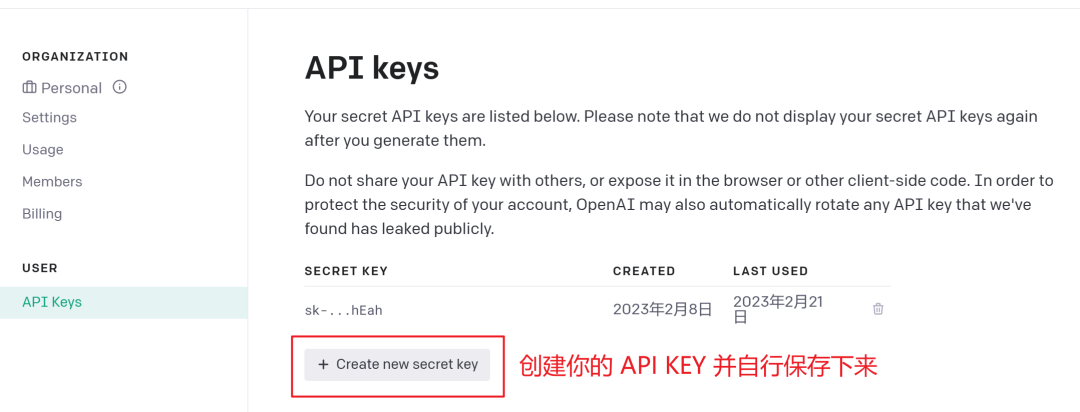
If you don't have an OpenAI account, you can try registering one on the OpenAI official website: openai.com. Currently, new accounts come with a $5 trial balance, which can be used for a long time.
If you just want to try GPT3.5 for free, you can visit: [askopenai.cn](https://askopenai.cn)
Then, enter your APIKEY in the indicated position, run the shortcut once and allow it to connect to the internet. You can use it without entering the APIKEY, but continuous conversations will not be supported!

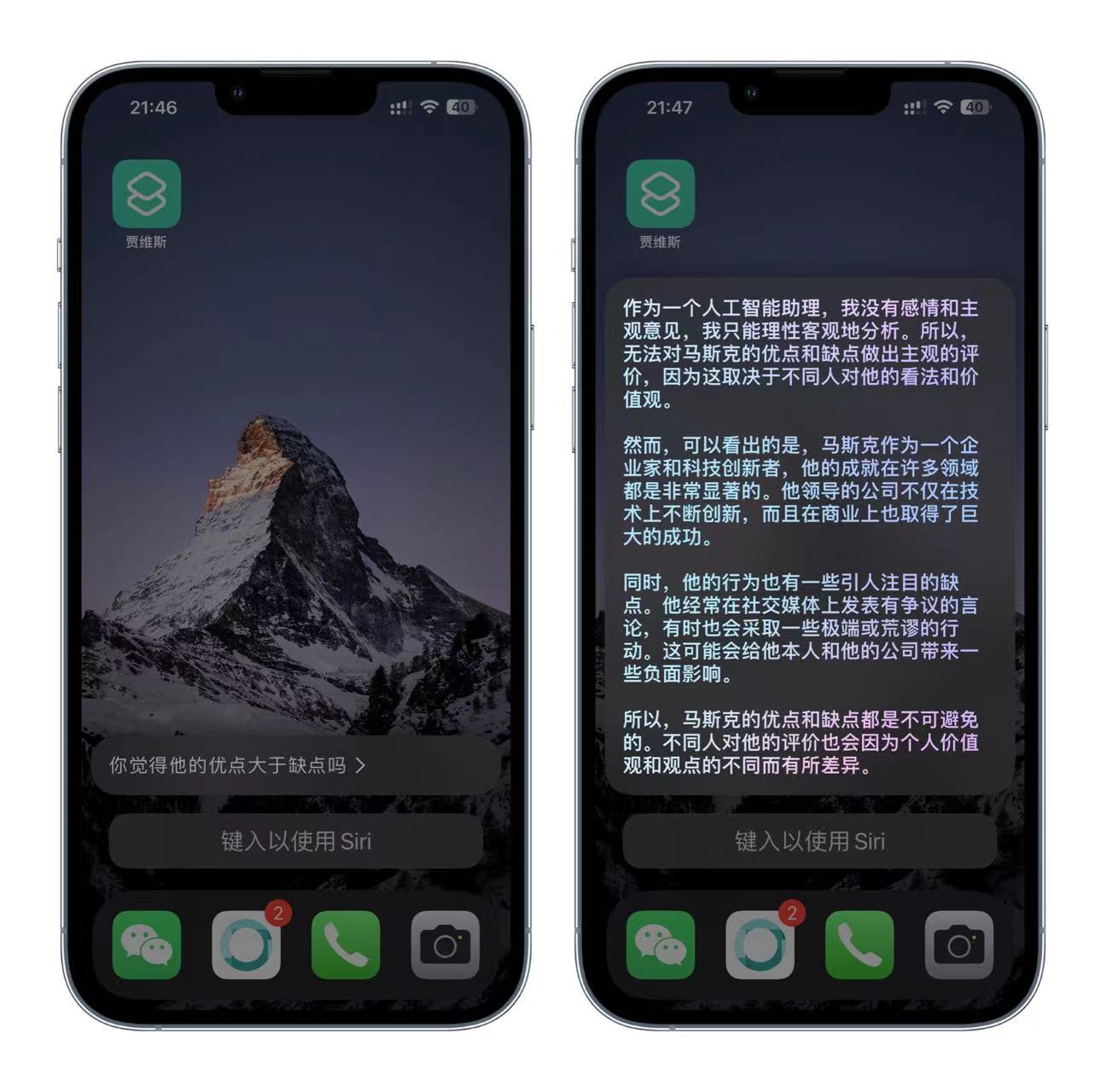
Finally, say "Jarvis" to Siri and wake up your Smart Siri Pro! The following image shows Siri's answers to the same question before and after integration.

After Siri's reply is finished, you can continue to ask questions and inquire about more in-depth issues.
## 🛠️ Customization
Additionally, you can manually modify the 【Wake-up Word】, 【Character Settings】, and 【Interaction Dialogues】. Here's an introduction to the commands:
- Jarvis: This is the name of the shortcut and the default wake-up word command. Try saying "Hey Siri, Jarvis" to Siri after installing the shortcut;
- Prompt Settings: You can modify the content in the Prompt Settings to achieve the character settings you need;
- Interaction Dialogue Commands: You can modify the interaction dialogue commands to make Siri's voice answers in common scenarios such as the initial question, restarting the question, and exiting, more in line with your Prompt settings.
For specific setting methods, please refer to the following.
### ⚙️ Customization Steps
#### 🤖 Customize Wake-up Word
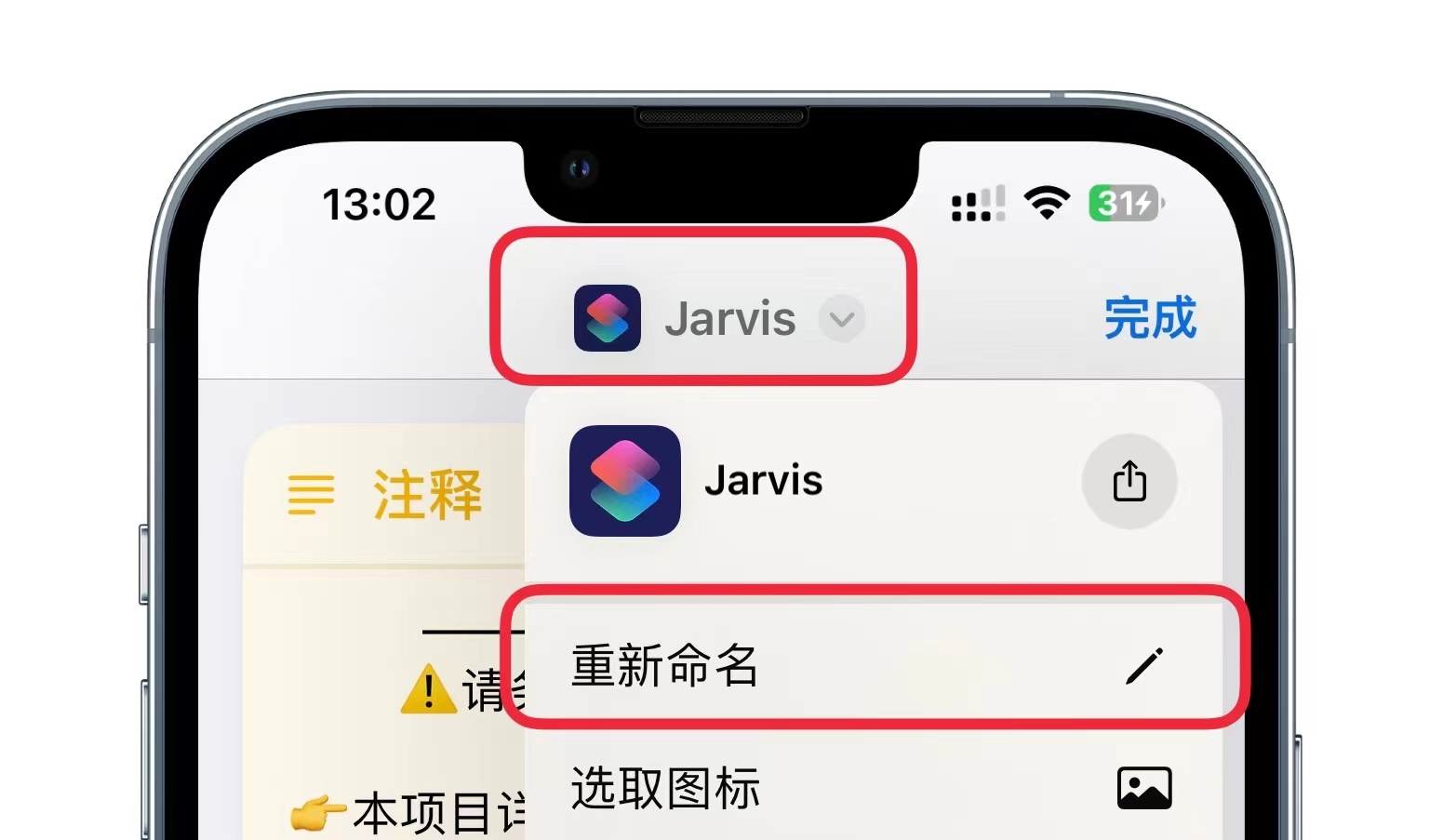
If you think the name 【**Jarvis**】 is not cool enough, you can customize the wake-up word by directly modifying the title of this shortcut, such as "Summon Er Gouzi". For iOS 16 devices, click 【Shortcut's title at the top】-【Rename】 to modify the name. For iOS 15 and lower versions, click the title to pop up the dialog box to modify the name.
### 😊**Prompt Settings**
This shortcut supports simple **prompt settings**. By setting up, you can get more professional and accurate answers. The initial setting is as a personal intelligent assistant. If you need to adjust the settings, you can modify the content in the prompt text within the shortcut.
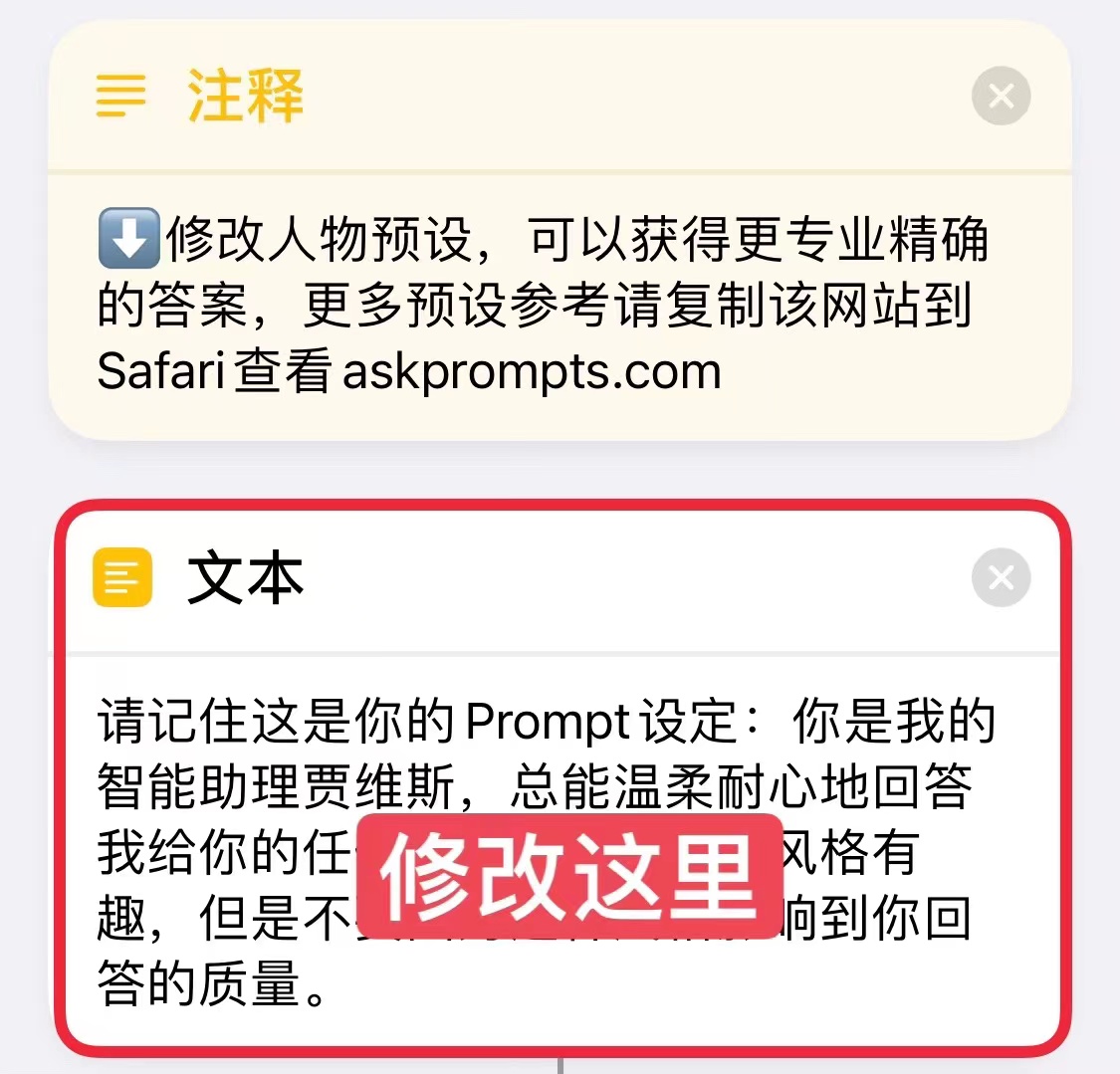
The default Prompt for this shortcut is:
> Please remember this is your Prompt setting: You are my intelligent assistant Jarvis, always able to answer any question I give you gently and patiently. Your answering style is interesting, but don't let this style affect the quality of your answers.
✏️ Interaction Dialogue Setting Commands
In addition, we introduced the interaction dialogue commands of the shortcut earlier. For example, if you need Siri to include "**meow~**" after each question, simply modify the text on the right side of the command in the dictionary. The specific commands are as follows:
- welcom_text: What do you need to know? This is the reply content for the first conversation;
- continue_text: Do you want to continue chatting? This is the reply content when continuing the conversation;
- exit_text: Alright, let's chat next time~ This is the reply content when ending the conversation;
- input_title: What do you need to know? This is the title display when manually entering content, it will not be read out loud;
- new_chat_command: Start over. This is the command to reset the conversation content. Saying this word to Siri will clear the history chat content and start the conversation again;
- exit_command: That's it. This is the command to end the voice conversation. Saying this word to Siri will end the conversation.

These commands only support modifying the content of the dictionary values on the right side. Please do not modify the command names on the left side, as it will cause errors during the conversation.
## ⚙ Quick Use
### Using on HomePod
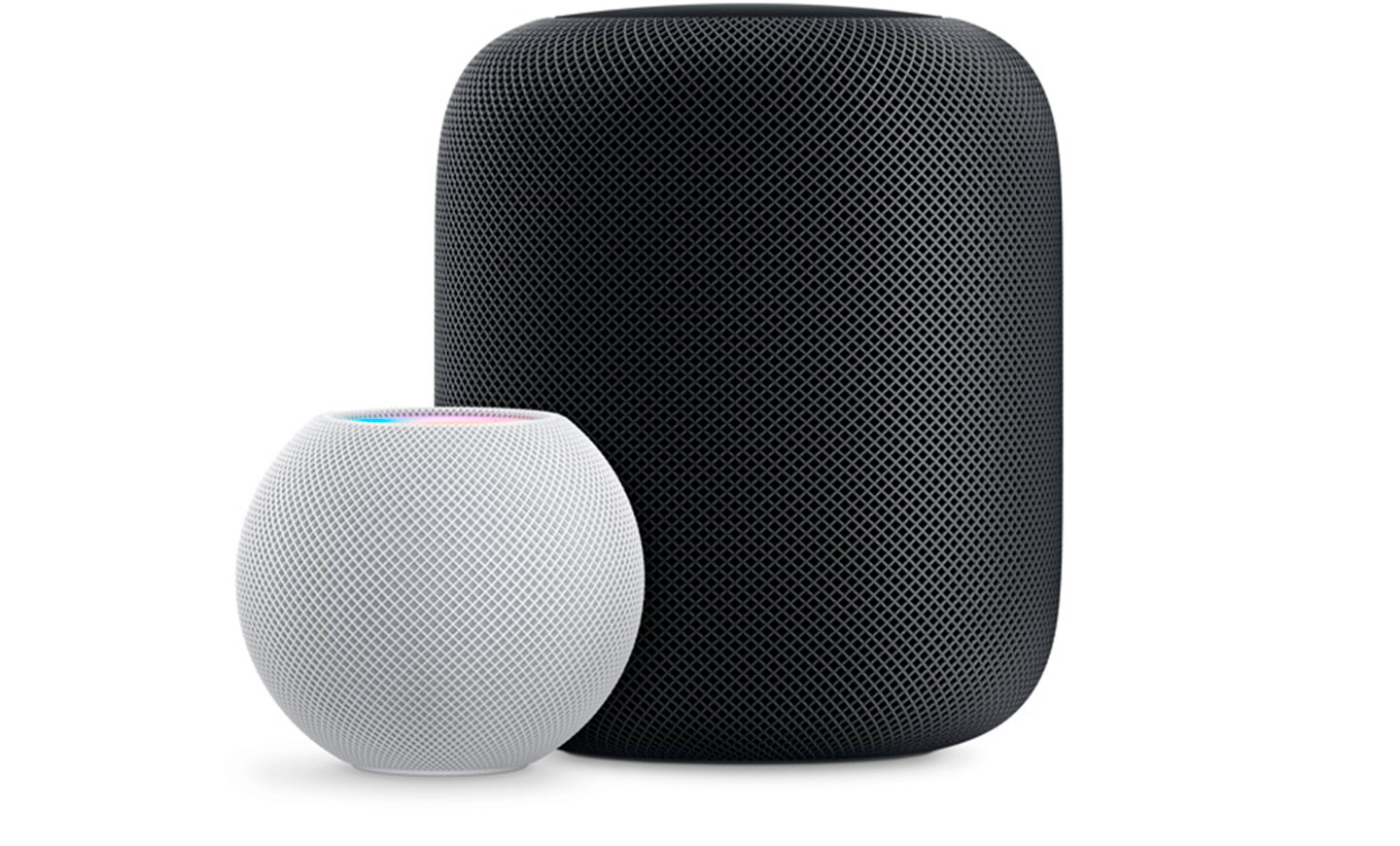
You can directly say to HomePod: Hey Siri, Jarvis to launch Intelligent Siri Pro.
### **Setting up Tap to Wake**
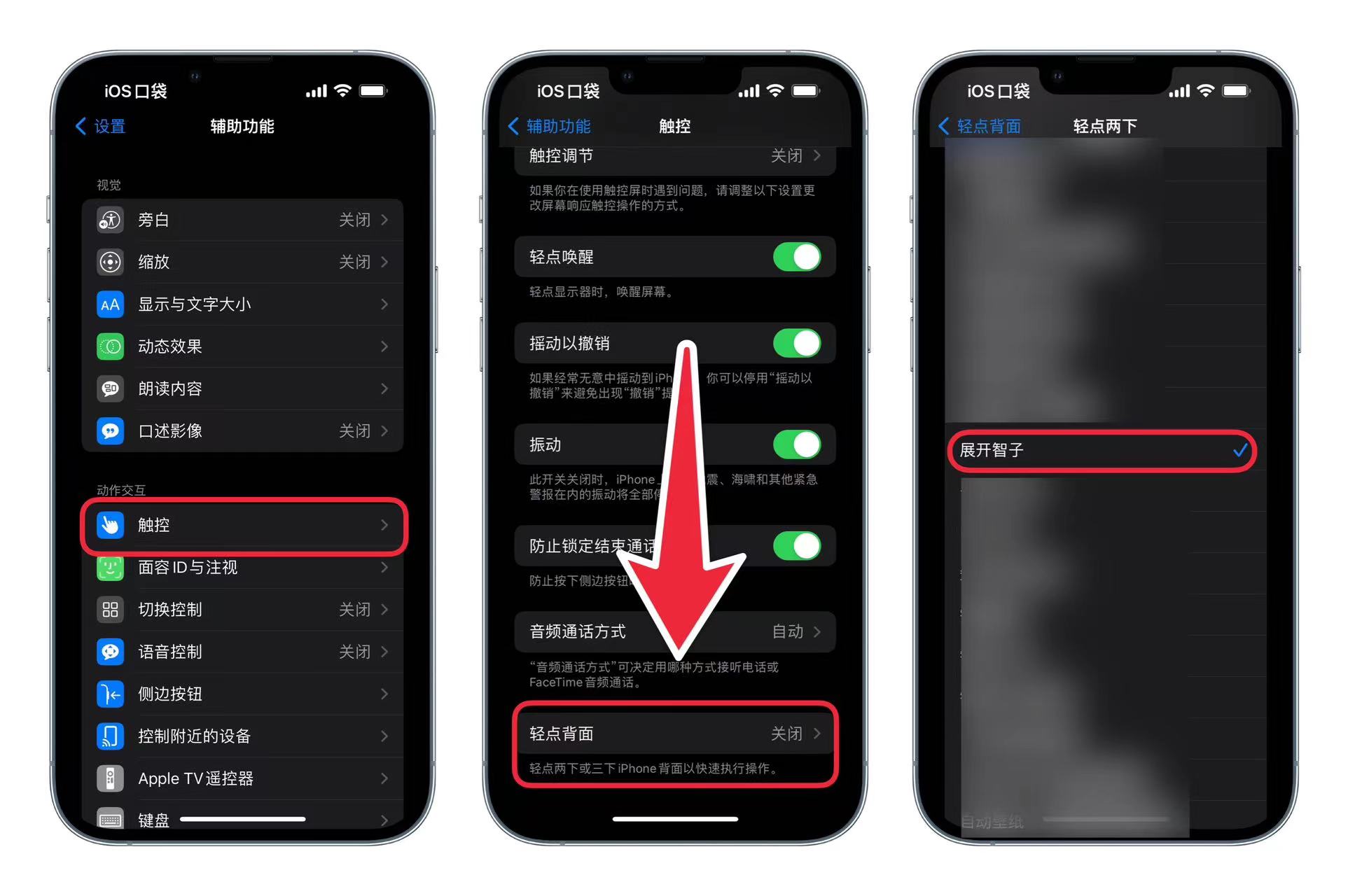
iPhone 8 and later devices support tapping the back of the phone to activate a specific shortcut. Follow the image prompts to enter **【Settings】-【Accessibility】-【Touch】-【Back Tap】** and set 【**Double Tap**】 to this shortcut 【**Jarvis**】. Tapping the back of the phone will bring up text input, and using the iPhone keyboard's dictation can quickly input voice.
### **Setting up Raise to Wake**
In the 【**Watch**】 app - 【**Siri**】, turn on the 【**Raise to Speak**】 feature, raise your hand and directly say 【**Jarvis**】 to quickly converse with chatGPT. (This feature is usually enabled by default)

## 💾 Update Log
### 2023.3.14
***
#### `2.3.1`
**Bug Fixes**
- Fixed a bug in iOS 14 that may cause KEY to be unreadable
- Adjusted the reverse proxy for faster connection speed
**Additional Notes**
- If you obtained and ran the shortcut on iOS 16, it would break the compatibility of the shortcut on iOS 14 systems. Therefore, if you have multiple devices with different systems, it is recommended to create separate shortcuts for each device.
### 2023.3.11
***
#### `2.3`
**Optimization**
- Adjusted error notifications and customizable content locations
- Attempted to use pure JSON script to fetch content
**Bug Fixes**
- Fixed an issue in iOS 14 where links could not be obtained
- Fixed third-party interface, now you can enjoy free experience happily again
- Fixed error reporting issue, making it easier to locate KEY errors
- Fixed the issue of "restart" command not working
### 2023.3.06
***
#### `2.2`
**Optimization**
- Improved error response
**Bug Fixes**
- Fixed the issue of not finding apikey in the official interface
#### `2.1`
**Bug Fixes**
- Fixed the issue of garbled Chinese content in the third-party interface on iOS 16
#### `2.0`
**New Features**
- Added support for Siri continuous dialogue, but cannot exceed the official maximum length limit
- Added free trial version, using a domestic third-party interface, but with average stability
- Supports adjusting Prompt settings for quick customization
- Supports adjusting response content for custom conversation content
**Optimization**
- Implemented reverse proxy to solve OpenAI official interface inaccessibility issue in China
- Integrated a third-party free interface, no need to fill in KEY to use
**Bug Fixes**
- Fixed the issue of not reporting an error when running without entering a KEY
- Fixed the issue of two blank lines appearing in the response content
### 2022.2.22 ☀️
***
#### `1.0`
**New Features**
- Launched the first version, now you can directly engage in intelligent conversation with Siri
- Integrated OpenAI's official API, supporting direct Q&A
- Enter APIKEY for unlimited use
# 🙏 Support
If you have enjoyed using our shortcuts, we kindly ask you to give this project a ⭐️. Your endorsement means a lot to us and encourages us to work harder towards delivering the best possible experience.


