# Codebuff & Freebuff
English | [简体中文](./README.zh-CN.md)
**[Codebuff](https://codebuff.com)** is an open-source AI coding assistant that edits your codebase through natural language instructions. **[Freebuff](https://www.npmjs.com/package/freebuff)** is the free, ad-supported version — no subscription, no credits, no configuration.
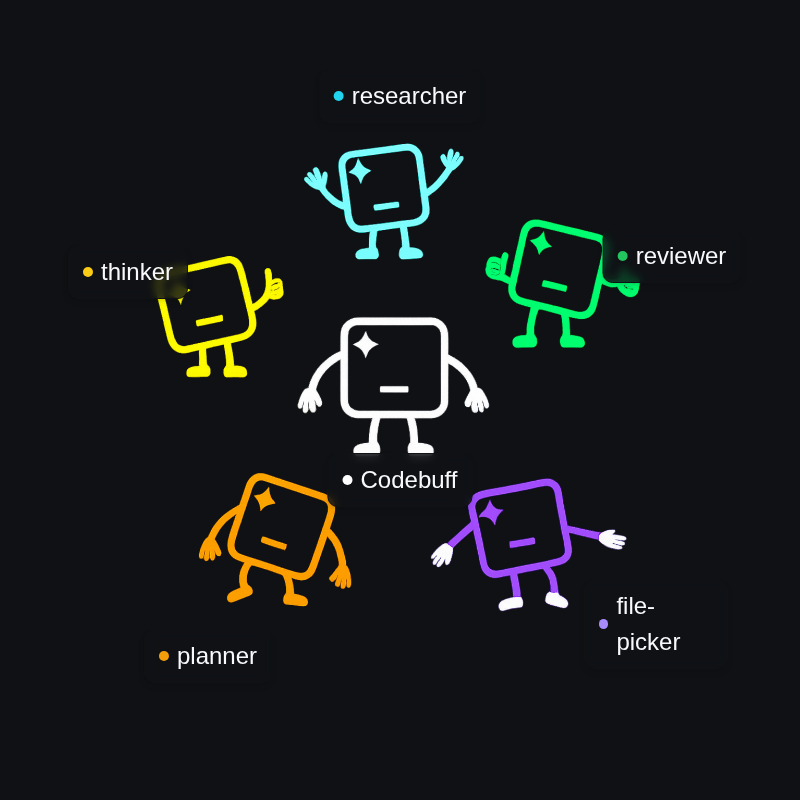
Instead of using one model for everything, Codebuff coordinates specialized agents that work together to understand your project and make precise changes.
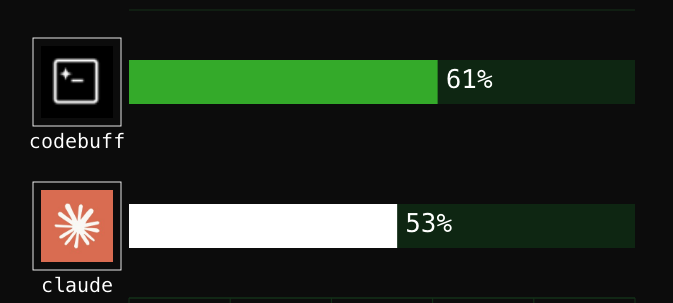
Codebuff beats Claude Code at 61% vs 53% on [our evals](evals/README.md) across 175+ coding tasks over multiple open-source repos that simulate real-world tasks.
## Freebuff: the free coding agent
**[Freebuff](https://www.npmjs.com/package/freebuff)** is the free, ad-supported version of Codebuff. No subscription. No credits. No configuration. Just install and start coding in your terminal.
### Install
```bash
npm install -g freebuff
```
### Usage
```bash
cd ~/my-project
freebuff
```
Then tell Freebuff what you want — it finds the right files, makes the changes, and runs your tests.
### Why Freebuff?
- **Best open-source models** — Powered by the strongest open-source models available, like DeepSeek, Kimi, and MiniMax — no proprietary lock-in.
- **Fast** — 5–10× speed up. Faster models plus context gathering in seconds rather than minutes.
- **Loaded** — Built-in web research, browser use, and more.
### Features
- **File mentions** — Use `@filename` to reference specific files
- **Agent mentions** — Use `@AgentName` to invoke specialized agents
- **Bash mode** — Run terminal commands with `!command` or `/bash`
- **Chat history** — Resume past conversations with `/history`
- **Knowledge files** — Add `knowledge.md` to your project for context
- **Themes** — Toggle light/dark mode with `/theme:toggle`
### Commands
| Command | Description |
| --------------- | -------------------------------- |
| `/help` | Show keyboard shortcuts and tips |
| `/new` | Start a new conversation |
| `/history` | Browse past conversations |
| `/bash` | Enter bash mode |
| `/init` | Create a starter knowledge.md |
| `/feedback` | Share feedback |
| `/theme:toggle` | Toggle light/dark mode |
| `/logout` | Sign out |
| `/exit` | Quit |
### FAQ
**How can it be free?** Freebuff is supported by text ads.
**What models do you use?** The best open-source models available. In full mode you can choose from DeepSeek V4 Pro, MiMo 2.5 Pro, Kimi K2.7 Code, DeepSeek V4 Flash, MiMo 2.5, and MiniMax M3. Limited mode uses DeepSeek V4 Flash and MiMo 2.5. Gemini 3.1 Flash Lite handles file finding and research.
**Which countries is Freebuff available in?** All countries. Freebuff runs in "full" mode in the US, Canada, UK, EU, and other select countries, and in "limited" mode everywhere else (or while using a VPN). See [freebuff.com](https://freebuff.com) for the full list.
**What is limited mode?** Limited mode lets you use Freebuff outside the full-access countries, or while using a VPN. It includes DeepSeek V4 Flash and MiMo 2.5, with 5 one-hour sessions per day.
**Are you training on my data?** No. We don't share your data with third parties that would train on it or use it for another purpose, unless you choose a model clearly labeled as "Collects data for training."
**What data do you store?** We don't store your codebase. We only collect minimal logs for debugging purposes.
---
The rest of this README covers **Codebuff**, the full platform Freebuff is built on — its multi-agent architecture, custom agents, and SDK.
## How it works
When you ask Codebuff to "add authentication to my API," it might invoke:
1. A **File Picker Agent** to scan your codebase to understand the architecture and find relevant files
2. A **Planner Agent** to plan which files need changes and in what order
3. An **Editor Agent** to make precise edits
4. A **Reviewer Agent** to validate changes
This multi-agent approach gives you better context understanding, more accurate edits, and fewer errors compared to single-model tools.
## CLI: Install and start coding
Install:
```bash
npm install -g codebuff
```
Run:
```bash
cd your-project
codebuff
```
Then just tell Codebuff what you want and it handles the rest:
- "Fix the SQL injection vulnerability in user registration"
- "Add rate limiting to all API endpoints"
- "Refactor the database connection code for better performance"
Codebuff will find the right files, makes changes across your codebase, and runs tests to make sure nothing breaks.
## Create custom agents
To get started building your own agents, start Codebuff and run the `/init` command:
```bash
codebuff
```
Then inside the CLI:
```
/init
```
This creates:
```
knowledge.md # Project context for Codebuff
.agents/
└── types/ # TypeScript type definitions
├── agent-definition.ts
├── tools.ts
└── util-types.ts
```
You can write agent definition files that give you maximum control over agent behavior.
Implement your workflows by specifying tools, which agents can be spawned, and prompts. We even have TypeScript generators for more programmatic control.
For example, here's a `git-committer` agent that creates git commits based on the current git state. Notice that it runs `git diff` and `git log` to analyze changes, but then hands control over to the LLM to craft a meaningful commit message and perform the actual commit.
```typescript
export default {
id: 'git-committer',
displayName: 'Git Committer',
model: 'openai/gpt-5-nano',
toolNames: ['read_files', 'run_terminal_command', 'end_turn'],
instructionsPrompt:
'You create meaningful git commits by analyzing changes, reading relevant files for context, and crafting clear commit messages that explain the "why" behind changes.',
async *handleSteps() {
// Analyze what changed
yield { tool: 'run_terminal_command', command: 'git diff' }
yield { tool: 'run_terminal_command', command: 'git log --oneline -5' }
// Stage files and create commit with good message
yield 'STEP_ALL'
},
}
```
## SDK: Run agents in production
Install the [SDK package](https://www.npmjs.com/package/@codebuff/sdk) -- note this is different than the CLI codebuff package.
```bash
npm install @codebuff/sdk
```
Import the client and run agents!
```typescript
import { CodebuffClient } from '@codebuff/sdk'
// 1. Initialize the client
const client = new CodebuffClient({
apiKey: 'your-api-key',
cwd: '/path/to/your/project',
onError: (error) => console.error('Codebuff error:', error.message),
})
// 2. Do a coding task...
const result = await client.run({
agent: 'base', // Codebuff's base coding agent
prompt: 'Add error handling to all API endpoints',
handleEvent: (event) => {
console.log('Progress', event)
},
})
// 3. Or, run a custom agent!
const myCustomAgent: AgentDefinition = {
id: 'greeter',
displayName: 'Greeter',
model: 'openai/gpt-5.1',
instructionsPrompt: 'Say hello!',
}
await client.run({
agent: 'greeter',
agentDefinitions: [myCustomAgent],
prompt: 'My name is Bob.',
customToolDefinitions: [], // Add custom tools too!
handleEvent: (event) => {
console.log('Progress', event)
},
})
```
Learn more about the SDK [here](https://www.npmjs.com/package/@codebuff/sdk).
## Why choose Codebuff
**Custom workflows**: TypeScript generators let you mix AI generation with programmatic control. Agents can spawn subagents, branch on conditions, and run multi-step processes.
**Any model on OpenRouter**: Unlike Claude Code which locks you into Anthropic's models, Codebuff supports any model available on [OpenRouter](https://openrouter.ai/models) - from Claude and GPT to specialized models like Qwen, DeepSeek, and others. Switch models for different tasks or use the latest releases without waiting for platform updates.
**Reuse any published agent**: Compose existing [published agents](https://www.codebuff.com/store) to get a leg up. Codebuff agents are the new MCP!
**SDK**: Build Codebuff into your applications. Create custom tools, integrate with CI/CD, or embed coding assistance into your products.
## Advanced Usage
### Custom Agent Workflows
Create your own agents with specialized workflows using the `/init` command:
```bash
codebuff
/init
```
This creates a custom agent structure in `.agents/` that you can customize.
## Contributing to Codebuff
We ❤️ contributions from the community - whether you're fixing bugs, tweaking our agents, or improving documentation.
**Want to contribute?** Check out our [Contributing Guide](./CONTRIBUTING.md) to get started.
### Running Tests
To run the test suite:
```bash
cd cli
bun test
```
**For interactive E2E testing**, install tmux:
```bash
# macOS
brew install tmux
# Ubuntu/Debian
sudo apt-get install tmux
# Windows (via WSL)
wsl --install
sudo apt-get install tmux
```
See [cli/src/__tests__/README.md](cli/src/__tests__/README.md) for comprehensive testing documentation.
Some ways you can help:
- 🐛 **Fix bugs** or add features
- 🤖 **Create specialized agents** and publish them to the Agent Store
- 📚 **Improve documentation** or write tutorials
- 💡 **Share ideas** in our [GitHub Issues](https://github.com/CodebuffAI/codebuff/issues)
## Get started
### Install
**CLI**: `npm install -g codebuff`
**SDK**: `npm install @codebuff/sdk`
**Freebuff (free)**: `npm install -g freebuff`
### Resources
**Documentation**: [codebuff.com/docs](https://codebuff.com/docs)
**Community**: [Discord](https://codebuff.com/discord)
**Issues & Ideas**: [GitHub Issues](https://github.com/CodebuffAI/codebuff/issues)
**Contributing**: [CONTRIBUTING.md](./CONTRIBUTING.md) - Start here to contribute!
**Support**: [support@codebuff.com](mailto:support@codebuff.com)
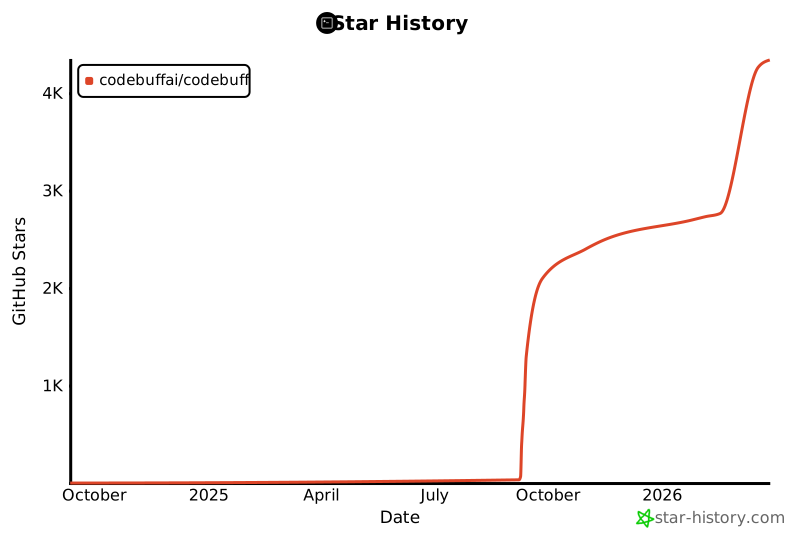
## Star History
[](https://www.star-history.com/#CodebuffAI/codebuff&Date)