[](http://mihaelisaev.com)


This lib is about network requests with blackjack, roulette and craps!
Using it you will be able to convert your massive API layer code into an awesome convenient controllers with easy and maintainable network requests!
Use Codable models for everything related to API requests:
- json payload
- url-encoded payload
- multipart payload
- plain and json response
- url query
- headers
Wondered? That's only little part of what you will get from this lib! 🍻
## Quick examples
### How to send GET request
```swift
APIRequest("endpoint").onSuccess { model in
//here's your decoded model!
//no need to check http.statusCode, I already did it for you! By default it's 200 OK
//of course you can choose which statusCode is equal to success (look at the `POST` and `DELETE` examples below)
}
```
### How to send POST request
```swift
APIRequest("endpoint", payload: payloadModel)
.method(.post)
.desiredStatusCode(.created) //201 CREATED
.onSuccess { model in
//here's your decoded model!
//success was determined by comparing desiredStatusCode with http.statusCode
}
```
### How to send DELETE request
```swift
APIRequest("endpoint")
.method(.delete)
.desiredStatusCode(.noContent) //204 NO CONTENT
.onSuccess { _ in
//here's empty successful response!
//success was determined by comparing desiredStatusCode with http.statusCode
}
```
### How to send several requests?
You're able to run up to 10 requests one-by-one!
```swift
API.employee.all()
.and(API.office.all())
.and(API.car.all())
.and(API.event.all())
.and(API.post.all())
.onError { error in
print(error.description)
}.onSuccess { employees, offices, cars, events, posts in
// do what you want with received results!!! 🍻
}
```
Or you can run unlimited amount of requests one-by-one or at the same time, if you need just a completion handler.
```swift
[API.employee.all(), API.office.all(), API.car.all()].flatten().onError {
print(error.description)
}.onSuccess {
print("flatten finished!")
}
```
to run them concurrently just add `.concurrent(by: 3)` to run by 3 at the same time
Of course you'll be able to send PUT and PATCH requests, send multipart codable structs with upload progress callback, catch errors, even redefine error descriptions for every endpoint. Wondered? 😃 Let's read the whole readme below! 🍻
## How to install
CodyFire is available through [CocoaPods](https://cocoapods.org) and SPM.
To install it, simply add the following line in your Podfile:
```ruby
pod 'CodyFire', '~> 1.15.4'
```
**Or you're looking for reactive code support? I have it! 🍺**
- for RxSwift https://github.com/MihaelIsaev/RxCodyFire
```ruby
pod 'RxCodyFire', '~> 1.1.0'
# no need to install `CodyFire` cause it's in dependencies
```
using this pod you should always import just `RxCodyFire` and every APIRequest will have `.observable`
- for ReactiveCocoa https://github.com/MihaelIsaev/ReactiveCodyFire
```ruby
pod 'ReactiveCodyFire', '~> 1.1.0'
# no need to install `CodyFire` cause it's in dependencies
```
using this pod you should always import just `ReactiveCodyFire` and every APIRequest will have `.signalProducer`
## How to setup
CodyFire automatically detects which environment you're on, so I suggest you to definitely use this awesome feature 👏
```swift
import CodyFire
@UIApplicationMain
class AppDelegate: UIResponder, UIApplicationDelegate {
func application(_ application: UIApplication, didFinishLaunchingWithOptions launchOptions: [UIApplication.LaunchOptionsKey : Any]? = nil) -> Bool {
let dev = CodyFireEnvironment(baseURL: "http://localhost:8080")
let testFlight = CodyFireEnvironment(baseURL: "https://stage.myapi.com")
let appStore = CodyFireEnvironment(baseURL: "https://api.myapi.com")
CodyFire.shared.configureEnvironments(dev: dev, testFlight: testFlight, appStore: appStore)
//Also if you want to be able to switch environments manually just uncomment the line below (read more about that)
//CodyFire.shared.setupEnvByProjectScheme()
return true
}
}
```
Isn't it cool? 😏
**Or you can set different Server URL for every APIRequest**
```swift
let server1 = ServerURL(base: "https://server1.com", path: "v1")
let server2 = ServerURL(base: "https://server2.com", path: "v1")
let server3 = ServerURL(base: "https://server3.com")
```
And then initialize your `APIRequest`s like this 🔥
```swift
APIRequest(server1, "endpoint", payload: payloadObject)
APIRequest(server2, "endpoint", payload: payloadObject)
APIRequest(server3, "endpoint", payload: payloadObject)
```
Or in some cases you even can do it like this 😏
```swift
APIRequest("endpoint", payload: payloadObject).serverURL(server1)
```
### Create your API controllers
I promise that this is API code architecture from your dreams which are come true!
#### Create an `API` folder and `API.swift` file inside it
```swift
class API {
typealias auth = AuthController
typealias task = TaskController
}
```
#### Create a folder named `Controllers` inside `API` folder, and create a folder for each controller
`API/Controllers/Auth/Auth.swift`
```swift
class AuthController {}
```
`API/Controllers/Task/Task.swift`
```swift
class TaskController {}
```
#### Create an extension file for each controller's endpoint
##### Auth login as simple POST request
`API/Controllers/Auth/Auth+Login.swift`
```swift
import CodyFire
extension AuthController {
struct LoginRequest: JSONPayload {
let email, password: String
init (email: String, password: String) {
self.email = email
self.password = password
}
}
struct LoginResponse: Codable {
var token: String
}
static func login(_ request: LoginRequest) -> APIRequest {
return APIRequest("login", payload: request).method(.post).addCustomError(.notFound, "User not found")
}
}
```
##### Auth login for Basic auth
`API/Controllers/Auth/Auth+Login.swift`
```swift
import CodyFire
extension AuthController {
struct LoginResponse: Codable {
var token: String
}
static func login(email: String, password: String) -> APIRequest {
return APIRequest("login").method(.post).basicAuth(email: email, password: password)
.addCustomError(.notFound, "User not found")
}
}
```
##### Task REST endpoints
###### Get task by id or a list of tasks by offset and limit
`API/Controllers/Task/Task+Get.swift`
```swift
import CodyFire
extension TaskController {
struct Task: Codable {
var id: UUID
var name: String
}
struct ListQuery: Codable {
var offset, limit: Int
init (offset: Int, limit: Int) {
self.offset = offset
self.limit = limit
}
}
static func get(_ query: ListQuery? = nil) -> APIRequest<[Task]> {
return APIRequest("task").query(query)
}
static func get(id: UUID) -> APIRequest {
return APIRequest("task/" + id.uuidString)
}
}
```
###### Create a task
`API/Controllers/Task/Task+Create.swift`
```swift
import CodyFire
extension TaskController {
struct CreateRequest: JSONPayload {
var name: String
init (name: String) {
self.name = name
}
}
static func create(_ request: CreateRequest) -> APIRequest {
return APIRequest("post", payload: request).method(.post).desiredStatusCode(.created)
}
}
```
###### Edit a task
`API/Controllers/Task/Task+Edit.swift`
```swift
import CodyFire
extension TaskController {
struct EditRequest: JSONPayload {
var name: String
init (name: String) {
self.name = name
}
}
static func create(id: UUID, request: EditRequest) -> APIRequest {
return APIRequest("post/" + id.uuidString, payload: request).method(.patch)
}
}
```
###### Delete a task
`API/Controllers/Task/Task+Delete.swift`
```swift
import CodyFire
extension TaskController {
static func delete(id: UUID) -> APIRequest {
return APIRequest("post/" + id.uuidString).method(.delete).desiredStatusCode(.noContent)
}
}
```
### Easily use your API endpoints!
###### Send login request
```swift
API.auth.login(email: "test@mail.com", password: "qwerty").onError { error in
switch error.code {
case .notFound: print("User not found")
default: print(error.description)
}
}.onSuccess { token in
print("Received auth token: "+ token)
}
```
###### Get a list of tasks
```swift
API.task.get().onError { error in
print(error.description)
}.onSuccess { tasks in
print("received \(tasks.count) tasks")
}
```
###### Create a task
```swift
API.task.create(TaskController.CreateRequest(name: "Install CodyFire")).onError { error in
print(error.description)
}.onSuccess { task in
print("just created new task: \(task)")
}
```
###### Delete a task
```swift
let taskId = UUID()
API.task.delete(id: taskId).onError { error in
print(error.description)
}.onSuccess { _ in
print("just removed task with id: \(taskId)")
}
```
### Multipart example
```swift
//declare a PostController
class PostController()
extension PostController {
struct CreateRequest: MultipartPayload {
var text: String
var tags: [String]
var images: [Attachment]
var video: Data
init (text: String, tags: [String], images: [Attachment], video: Data) {
self.text = text
self.tags = tags
self.images = images
self.video = video
}
}
struct PostResponse: Codable {
let id: UUID
let text: String
let tags: [String]
let linksToImages: [String]
let linkToVideo: String
}
static func create(_ request: CreateRequest) -> APIRequest {
return APIRequest("post", payload: request).method(.post)
}
}
//then somewhere send creation request!
let videoData = FileManager.default.contents(atPath: "/path/to/video.mp4")!
let imageAttachment = Attachment(data: UIImage(named: "cat")!.jpeg(.high)!,
fileName: "cat.jpg",
mimeType: .jpg)
let payload = PostController.CreateRequest(text: "CodyFire is awesome",
tags: ["codyfire", "awesome"],
images: [imageAttachment],
video: videoData)
API.post.create(payload).onProgress { progress in
print("tracking post uploading progress: \(progress)")
}.onError { error in
print(error.description)
}.onSuccess { createdPost in
print("just created post: \(createdPost)")
}
```
Easy right? 🎉
## Details
#### How to put `Authorization Bearer` token into every request?
For that we have a global headers wrapper, which is called for every request.
You need to declare it e.g. somewhere in AppDelegate.
There are two options
1. Use Codable model for headers (recommended)
```swift
CodyFire.shared.fillCodableHeaders = {
struct Headers: Codable {
var Authorization: String? //NOTE: nil values will be excluded
var anythingElse: String
}
return Headers(Authorization: nil, anythingElse: "hello")
}
```
2. Use [String: String] dictionary
```swift
CodyFire.shared.fillHeaders = {
guard let apiToken = LocalAuthStorage.savedToken else { return [:] }
return ["Authorization": "Bearer \(apiToken)"]
}
```
#### How to set a global `unauthorized` handler?
Again, somewhere in AppDelegate declare it like this
CodyFire.shared.unauthorizedHandler = {
//kick out user
}
#### Handle if network isn't available (e.g. wifi/lte turned off)
```swift
.onNetworkUnavailable {
print("unfortunately there're no internet connection!")
}
```
#### Run something right before request started (works only if network is available)
```swift
.onRequestStarted {
print("request started normally")
}
```
#### How to avoid log error for request
```swift
.avoidLogError()
```
#### How to set desired status code and what's that means?
Usually servers response with `200 OK` and CodyFire expect to receive `200 OK` to call `onSuccess` handler by default.
You may need to specify another code, e.g. `201 CREATED` for some POST requests.
```swift
.desiredStatusCode(.created)
```
or you even can set your custom code
```swift
.desiredStatusCode(.custom(777))
```
#### How to set some headers for a request?
```swift
.headers(["myHeader":"myValue"])
//or for basic auth
.basicAuth(email: "", password: "")
```
#### Supported HTTP methods
You may use: GET, POST, PUT, PATCH, DELETE, HEAD, TRACE, CONNECT, OPTIONS
#### How to switch environments through Xcode's run schemes?
It's really useful feature and I suggest to use it in every iOS project!
Create three schemes named: Development, TestFlight, AppStore like on the screenshot below
 TIP: Make sure that they're marked as `Shared` to have them in `git`
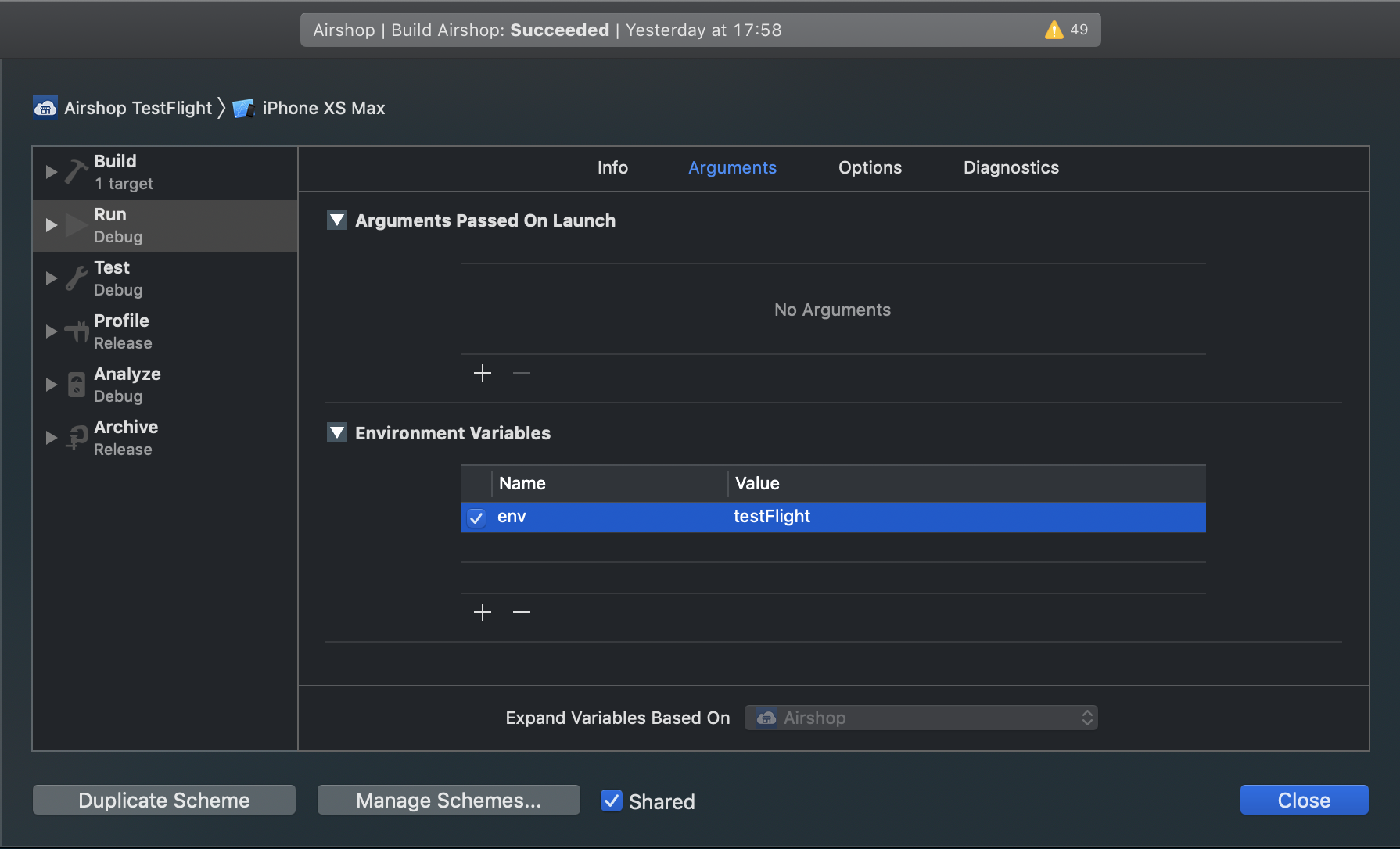
Then in every scheme in `Arguments` tab add `Environment variable` named `env` with one of those values: dev, testFlight, appStore.
Take a look at example below
TIP: Make sure that they're marked as `Shared` to have them in `git`
Then in every scheme in `Arguments` tab add `Environment variable` named `env` with one of those values: dev, testFlight, appStore.
Take a look at example below
 Then somewhere in AppDelegate.didFinishLaunchingWithOptions add
```swift
CodyFire.shared.setupEnvByProjectScheme()
```
All done, now you're able to easily switch environments!
#### How to execute request without onSuccess clojure?
Sometimes useful for DELETE or PATCH requests
```swift
APIRequest("endpoint").method(.delete).execute()
```
#### How to cancel request?
```swift
let request = APIRequest("").execute()
request.cancel()
```
and you're able to handle cancellation
```swift
.onCancellation {
print("request was cancelled :(")
}
```
#### What does custom error means?
You may define your own custom errors, globally or for each request.
`onError` block contains `NetworkError` object with `StatusCode` enum, an error description, and a raw response `Data`. Error description you could change to whatever you want for any error code.
By default there are already defined some good descriptions for common errors.
Let's take a look how we can use powerful `onError` block
```swift
.onError { error in
switch error.code {
case .notFound: print("It's not found :(")
case .internalServerError: print("Oooops... Something really went wrong...")
case .custom(let code): print("My non-standard-custom error happened: " + error.description)
case .unknown(let code): print("Totally unknown error happened: " + error.description)
default:
print("Another error happened: " + error.description)
if let raw = error.raw, let rawResponse = String(data: raw, encoding: .utf8) {
print("Raw response: " + rawResponse)
}
}
}
```
More than that!!! In your controller while declaring APIRequest you're able to add your own custom errors!!! 🙀
```swift
APIRequest("login")
.method(.post)
.basicAuth(email: "sam@mail.com", password: "qwerty")
.addError(.notFound, "User not found")
```
I believe that's really awesome and useful! Finally a lot of things may be declared in one place! 🎉
#### How to set response timeout?
```swift
.responseTimeout(30) //request timeout set for 30 seconds
```
and of course you're able to catch timeout
```swift
.onTimeout {
//timeout happened :(
}
```
#### How to add interactive additional timeout? (my favourite one 😄)
If you want to make sure that your request will take 2 or more seconds (to not be too fast 😅) you can do that
```swift
.additionalTimeout(2)
```
e.g. in case if your request will be executed in 0.5 seconds, `onSuccess` handler will be fired only in 1.5s after that
but in case if your request will take more than 2s then `onSuccess` handler will be fired immediatelly
#### How to declare payload model for `multipart` request
Your struct/class just should conform to `MultipartPayload` protocol
```swift
struct SomePayload: MultipartPayload {
let name: String
let names: [String]
let date: Date
let dates: [Dates]
let number: Double
let numbers: [Int]
let attachment: Data
let attachments: [Data]
let fileAttachment: Attachment
let fileAttachments: [Attachment]
}
```
#### Supported payload types
You may conform your struct/class to: `FormURLEncodedPayload`, `MultipartPayload`, and `JSONPayload`
#### How to declare payload model for `json` request
Your struct/class just should conform to `JSONPayload` protocol
```swift
struct SomePayload: JSONPayload {
let name: String
let names: [String]
let date: Date
let dates: [Dates]
let number: Double
let numbers: [Int]
}
```
#### How to declare payload model for `x-www-form-urlencoded` request
Your struct/class just should conform to `FormURLEncodedPayload` protocol
```swift
struct SomePayload: FormURLEncodedPayload {
let name: String
let names: [String]
let date: Date
let dates: [Dates]
let number: Double
let numbers: [Int]
}
```
#### How to declare url query params model
Your struct/class just should conform to `Codable` protocol
```swift
struct SomePayload: Codable {
let name: String
let names: [String]
let date: Date
let dates: [Dates]
let number: Double
let numbers: [Int]
}
```
#### How to set date decoding/encoding strategy
Our `DateCodingStrategy` support
- secondsSince1970
- millisecondsSince1970
- formatted(customDateFormatter: DateFormatter)
By default all the dates are in `yyyy-MM-dd'T'HH:mm:ss'Z'` format
You have interesting options here:
- you can set global date decoder/encoder
```swift
CodyFire.shared.dateEncodingStrategy = .secondsSince1970
let customDateFormatter = DateFormatter()
CodyFire.shared.dateDecodingStrategy = .formatted(customDateFormatter)
```
- you can set date decoder/encoder for request in your controller
```swift
APIRequest().dateDecodingStrategy(.millisecondsSince1970).dateEncodingStrategy(.secondsSince1970)
```
- or you even can use different date encoder/decoder for each payload type (highest priority)
```swift
struct SomePayload: JSONPayload, CustomDateEncodingStrategy, CustomDateDecodingStrategy {
var dateEncodingStrategy: DateCodingStrategy
var dateDecodingStrategy: DateCodingStrategy
}
```
#### How to enable/disable logging
e.g. in AppDelegate you may set logging mode
```swift
CodyFire.shared.logLevel = .debug
CodyFire.shared.logLevel = .error
CodyFire.shared.logLevel = .info
CodyFire.shared.logLevel = .off
```
and also you can set log handler
```swift
CodyFire.shared.logHandler = { level, text in
print("manually printing codyfire error: " + text)
}
```
by default for the AppStore the log level if `.off`
#### How you're detecting current environment?
It's easy
```swift
#if DEBUG
//DEV environment
#else
if Bundle.main.appStoreReceiptURL?.lastPathComponent == "sandboxReceipt" {
//TESTFLIGHT environment
} else {
//APPSTORE environment
}
#endif
```
### Chained requests
Run up to 10 requests one-by-one!
```swift
API.employee.all()
.and(API.office.all())
.and(API.car.all())
.and(API.event.all())
.and(API.post.all())
.onError { error in
print(error.description)
}.onSuccess { employees, offices, cars, events, posts in
// do what you want with received results!!! 🍻
}
```
`onRequestStarted, onNetworkUnavailable, onCancellation, onNotAuthorized, onTimeout also available!`
`//TBD: onProgress`
I believe it is awesome! Especially for whom who not familiar or don't like reactive programming 🙂
### Flatten
If you want to run several requests one-by-one or at the same time but with just completion handler you can do that with `.flatten()`
```swift
[API.employee.all(), API.office.all(), API.car.all()].flatten().onError {
print(error.description)
}.onSuccess {
print("flatten finished!")
}
```
to run them concurrently just add `.concurrent(by: 3)` to run by 3 at the same time
to skip errors also add `.avoidCancelOnError()`
to get progress add `.onProgress`
## Contribution
Please feel free to send pull requests and ask your questions in issues
Hope this lib will be really useful in your projects! Tell you friends about it! Please press STAR ⭐️ button!!!
## Author
Mike Isaev, isaev.mihael@gmail.com
Then somewhere in AppDelegate.didFinishLaunchingWithOptions add
```swift
CodyFire.shared.setupEnvByProjectScheme()
```
All done, now you're able to easily switch environments!
#### How to execute request without onSuccess clojure?
Sometimes useful for DELETE or PATCH requests
```swift
APIRequest("endpoint").method(.delete).execute()
```
#### How to cancel request?
```swift
let request = APIRequest("").execute()
request.cancel()
```
and you're able to handle cancellation
```swift
.onCancellation {
print("request was cancelled :(")
}
```
#### What does custom error means?
You may define your own custom errors, globally or for each request.
`onError` block contains `NetworkError` object with `StatusCode` enum, an error description, and a raw response `Data`. Error description you could change to whatever you want for any error code.
By default there are already defined some good descriptions for common errors.
Let's take a look how we can use powerful `onError` block
```swift
.onError { error in
switch error.code {
case .notFound: print("It's not found :(")
case .internalServerError: print("Oooops... Something really went wrong...")
case .custom(let code): print("My non-standard-custom error happened: " + error.description)
case .unknown(let code): print("Totally unknown error happened: " + error.description)
default:
print("Another error happened: " + error.description)
if let raw = error.raw, let rawResponse = String(data: raw, encoding: .utf8) {
print("Raw response: " + rawResponse)
}
}
}
```
More than that!!! In your controller while declaring APIRequest you're able to add your own custom errors!!! 🙀
```swift
APIRequest("login")
.method(.post)
.basicAuth(email: "sam@mail.com", password: "qwerty")
.addError(.notFound, "User not found")
```
I believe that's really awesome and useful! Finally a lot of things may be declared in one place! 🎉
#### How to set response timeout?
```swift
.responseTimeout(30) //request timeout set for 30 seconds
```
and of course you're able to catch timeout
```swift
.onTimeout {
//timeout happened :(
}
```
#### How to add interactive additional timeout? (my favourite one 😄)
If you want to make sure that your request will take 2 or more seconds (to not be too fast 😅) you can do that
```swift
.additionalTimeout(2)
```
e.g. in case if your request will be executed in 0.5 seconds, `onSuccess` handler will be fired only in 1.5s after that
but in case if your request will take more than 2s then `onSuccess` handler will be fired immediatelly
#### How to declare payload model for `multipart` request
Your struct/class just should conform to `MultipartPayload` protocol
```swift
struct SomePayload: MultipartPayload {
let name: String
let names: [String]
let date: Date
let dates: [Dates]
let number: Double
let numbers: [Int]
let attachment: Data
let attachments: [Data]
let fileAttachment: Attachment
let fileAttachments: [Attachment]
}
```
#### Supported payload types
You may conform your struct/class to: `FormURLEncodedPayload`, `MultipartPayload`, and `JSONPayload`
#### How to declare payload model for `json` request
Your struct/class just should conform to `JSONPayload` protocol
```swift
struct SomePayload: JSONPayload {
let name: String
let names: [String]
let date: Date
let dates: [Dates]
let number: Double
let numbers: [Int]
}
```
#### How to declare payload model for `x-www-form-urlencoded` request
Your struct/class just should conform to `FormURLEncodedPayload` protocol
```swift
struct SomePayload: FormURLEncodedPayload {
let name: String
let names: [String]
let date: Date
let dates: [Dates]
let number: Double
let numbers: [Int]
}
```
#### How to declare url query params model
Your struct/class just should conform to `Codable` protocol
```swift
struct SomePayload: Codable {
let name: String
let names: [String]
let date: Date
let dates: [Dates]
let number: Double
let numbers: [Int]
}
```
#### How to set date decoding/encoding strategy
Our `DateCodingStrategy` support
- secondsSince1970
- millisecondsSince1970
- formatted(customDateFormatter: DateFormatter)
By default all the dates are in `yyyy-MM-dd'T'HH:mm:ss'Z'` format
You have interesting options here:
- you can set global date decoder/encoder
```swift
CodyFire.shared.dateEncodingStrategy = .secondsSince1970
let customDateFormatter = DateFormatter()
CodyFire.shared.dateDecodingStrategy = .formatted(customDateFormatter)
```
- you can set date decoder/encoder for request in your controller
```swift
APIRequest().dateDecodingStrategy(.millisecondsSince1970).dateEncodingStrategy(.secondsSince1970)
```
- or you even can use different date encoder/decoder for each payload type (highest priority)
```swift
struct SomePayload: JSONPayload, CustomDateEncodingStrategy, CustomDateDecodingStrategy {
var dateEncodingStrategy: DateCodingStrategy
var dateDecodingStrategy: DateCodingStrategy
}
```
#### How to enable/disable logging
e.g. in AppDelegate you may set logging mode
```swift
CodyFire.shared.logLevel = .debug
CodyFire.shared.logLevel = .error
CodyFire.shared.logLevel = .info
CodyFire.shared.logLevel = .off
```
and also you can set log handler
```swift
CodyFire.shared.logHandler = { level, text in
print("manually printing codyfire error: " + text)
}
```
by default for the AppStore the log level if `.off`
#### How you're detecting current environment?
It's easy
```swift
#if DEBUG
//DEV environment
#else
if Bundle.main.appStoreReceiptURL?.lastPathComponent == "sandboxReceipt" {
//TESTFLIGHT environment
} else {
//APPSTORE environment
}
#endif
```
### Chained requests
Run up to 10 requests one-by-one!
```swift
API.employee.all()
.and(API.office.all())
.and(API.car.all())
.and(API.event.all())
.and(API.post.all())
.onError { error in
print(error.description)
}.onSuccess { employees, offices, cars, events, posts in
// do what you want with received results!!! 🍻
}
```
`onRequestStarted, onNetworkUnavailable, onCancellation, onNotAuthorized, onTimeout also available!`
`//TBD: onProgress`
I believe it is awesome! Especially for whom who not familiar or don't like reactive programming 🙂
### Flatten
If you want to run several requests one-by-one or at the same time but with just completion handler you can do that with `.flatten()`
```swift
[API.employee.all(), API.office.all(), API.car.all()].flatten().onError {
print(error.description)
}.onSuccess {
print("flatten finished!")
}
```
to run them concurrently just add `.concurrent(by: 3)` to run by 3 at the same time
to skip errors also add `.avoidCancelOnError()`
to get progress add `.onProgress`
## Contribution
Please feel free to send pull requests and ask your questions in issues
Hope this lib will be really useful in your projects! Tell you friends about it! Please press STAR ⭐️ button!!!
## Author
Mike Isaev, isaev.mihael@gmail.com