![](./public//imgs/bg2.png) GitHub Repo stars GitHub Downloads (all assets, all releases) GitHub Release AGPL 3.0 License GitHub contributors GitHub last commit arXiv:2507.04009 ConardLi%2Feasy-dataset | Trendshift **A powerful tool for creating fine-tuning datasets for Large Language Models** [简体中文](./README.zh-CN.md) | [English](./README.md) | [Türkçe](./README.tr.md) [Features](#features) • [Quick Start](#local-run) • [Documentation](https://docs.easy-dataset.com/ed/en) • [Contributing](#contributing) • [License](#license) If you like this project, please give it a Star⭐️, or buy the author a coffee => [Donate](./public/imgs/aw.jpg) ❤️!
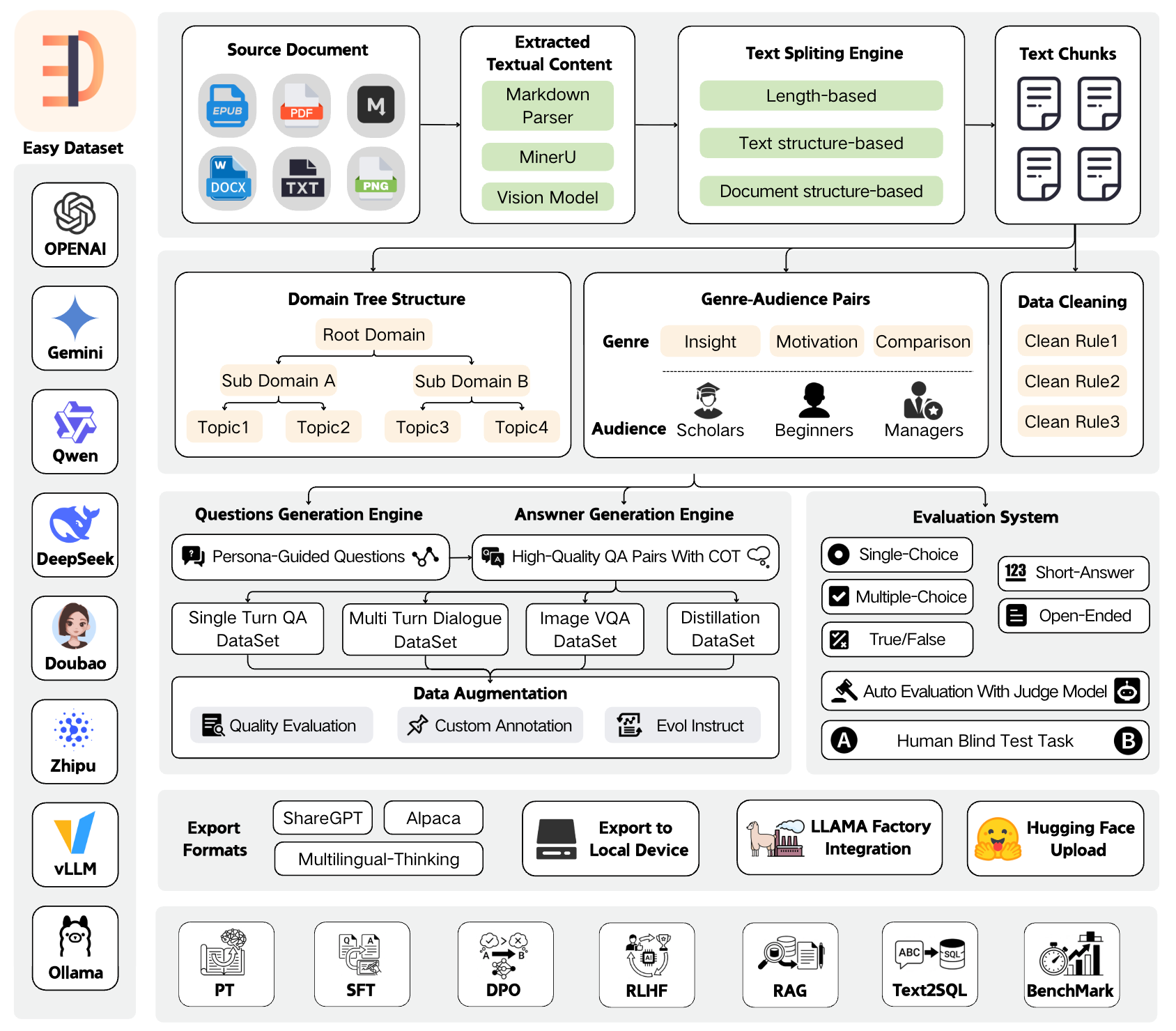
## Overview Easy Dataset is an application specifically designed for building large language model (LLM) datasets. It features an intuitive interface, along with built-in powerful document parsing tools, intelligent segmentation algorithms, data cleaning and augmentation capabilities. The application can convert domain-specific documents in various formats into high-quality structured datasets, which are applicable to scenarios such as model fine-tuning, retrieval-augmented generation (RAG), and model performance evaluation. ![](./public/imgs/arc3.png) ## News 🎉🎉 Easy Dataset Version 1.7.0 launches brand-new evaluation capabilities! You can effortlessly convert domain-specific documents into evaluation datasets (test sets) and automatically run multi-dimensional evaluation tasks. Additionally, it comes with a human blind test system, enabling you to easily meet needs such as vertical domain model evaluation, post-fine-tuning model performance assessment, and RAG recall rate evaluation. Tutorial: [https://www.bilibili.com/video/BV1CRrVB7Eb4/](https://www.bilibili.com/video/BV1CRrVB7Eb4/) ## Features ### 📄 Document Processing & Data Generation - **Intelligent Document Processing**: Supports PDF, Markdown, DOCX, TXT, EPUB and more formats with intelligent recognition - **Intelligent Text Splitting**: Multiple splitting algorithms (Markdown structure, recursive separators, fixed length, code-aware chunking), with customizable visual segmentation - **Intelligent Question Generation**: Auto-extract relevant questions from text segments, with question templates and batch generation - **Domain Label Tree**: Intelligently builds global domain label trees based on document structure, with auto-tagging capabilities - **Answer Generation**: Uses LLM API to generate comprehensive answers and Chain of Thought (COT), with AI optimization - **Data Cleaning**: Intelligent text cleaning to remove noise and improve data quality ### 🔄 Multiple Dataset Types - **Single-Turn QA Datasets**: Standard question-answer pairs for basic fine-tuning - **Multi-Turn Dialogue Datasets**: Customizable roles and scenarios for conversational format - **Image QA Datasets**: Generate visual QA data from images, with multiple import methods (directory, PDF, ZIP) - **Data Distillation**: Generate label trees and questions directly from domain topics without uploading documents ### 📊 Model Evaluation System - **Evaluation Datasets**: Generate true/false, single-choice, multiple-choice, short-answer, and open-ended questions - **Automated Model Evaluation**: Use Judge Model to automatically evaluate model answer quality with customizable scoring rules - **Human Blind Test (Arena)**: Double-blind comparison of two models' answers for unbiased evaluation - **AI Quality Assessment**: Automatic quality scoring and filtering of generated datasets ### 🛠️ Advanced Features - **Custom Prompts**: Project-level customization of all prompt templates (question generation, answer generation, data cleaning, etc.) - **GA Pair Generation**: Genre-Audience pair generation to enrich data diversity - **Task Management Center**: Background batch task processing with monitoring and interruption support - **Resource Monitoring Dashboard**: Token consumption statistics, API call tracking, model performance analysis - **Model Testing Playground**: Compare up to 3 models simultaneously ### 📤 Export & Integration - **Multiple Export Formats**: Alpaca, ShareGPT, Multilingual-Thinking formats with JSON/JSONL file types - **Balanced Export**: Configure export counts per tag for dataset balancing - **LLaMA Factory Integration**: One-click LLaMA Factory configuration file generation - **Hugging Face Upload**: Direct upload datasets to Hugging Face Hub ### 🤖 Model Support - **Wide Model Compatibility**: Compatible with all LLM APIs that follow the OpenAI format - **Multi-Provider Support**: OpenAI, MiniMax, Ollama (local models), Zhipu AI, Alibaba Bailian, OpenRouter, and more - **Vision Models**: Support Gemini, Claude, etc. for PDF parsing and image QA ### 🌐 User Experience - **User-Friendly Interface**: Modern, intuitive UI designed for both technical and non-technical users - **Multi-Language Support**: Complete Chinese, English, Turkish and Portuguese language support 🇹🇷 - **Dataset Square**: Discover and explore public dataset resources - **Desktop Clients**: Available for Windows, macOS, and Linux ## Quick Demo https://github.com/user-attachments/assets/6ddb1225-3d1b-4695-90cd-aa4cb01376a8 ## Local Run ### Download Client
Windows MacOS Linux

Setup.exe

Intel

M

AppImage
### Install with NPM 1. Clone the repository: ```bash git clone https://github.com/ConardLi/easy-dataset.git cd easy-dataset ``` 2. Install dependencies: ```bash npm install ``` 3. Start the development server: ```bash npm run build npm run start ``` 4. Open your browser and visit `http://localhost:1717` ### Using the Official Docker Image 1. Clone the repository: ```bash git clone https://github.com/ConardLi/easy-dataset.git cd easy-dataset ``` 2. Modify the `docker-compose.yml` file: ```yml services: easy-dataset: image: ghcr.io/conardli/easy-dataset container_name: easy-dataset ports: - '1717:1717' volumes: - ./local-db:/app/local-db - ./prisma:/app/prisma restart: unless-stopped ``` > **Note:** It is recommended to use the `local-db` and `prisma` folders in the current code repository directory as mount paths to maintain consistency with the database paths when starting via NPM. > **Note:** The database file will be automatically initialized on first startup, no need to manually run `npm run db:push`. 3. Start with docker-compose: ```bash docker-compose up -d ``` 4. Open a browser and visit `http://localhost:1717` ### Building with a Local Dockerfile If you want to build the image yourself, use the Dockerfile in the project root directory: 1. Clone the repository: ```bash git clone https://github.com/ConardLi/easy-dataset.git cd easy-dataset ``` 2. Build the Docker image: ```bash docker build -t easy-dataset . ``` 3. Run the container: ```bash docker run -d \ -p 1717:1717 \ -v ./local-db:/app/local-db \ -v ./prisma:/app/prisma \ --name easy-dataset \ easy-dataset ``` > **Note:** It is recommended to use the `local-db` and `prisma` folders in the current code repository directory as mount paths to maintain consistency with the database paths when starting via NPM. > **Note:** The database file will be automatically initialized on first startup, no need to manually run `npm run db:push`. 4. Open a browser and visit `http://localhost:1717` ## Documentation - View the demo video of this project: [Easy Dataset Demo Video](https://www.bilibili.com/video/BV1y8QpYGE57/) - For detailed documentation on all features and APIs, visit our [Documentation Site](https://docs.easy-dataset.com/ed/en) - View the paper of this project: [Easy Dataset: A Unified and Extensible Framework for Synthesizing LLM Fine-Tuning Data from Unstructured Documents](https://arxiv.org/abs/2507.04009v1) ## Community Practice - [Complete test set generation and model evaluation with Easy Dataset](https://www.bilibili.com/video/BV1CRrVB7Eb4/) - [Easy Dataset × LLaMA Factory: Enabling LLMs to Efficiently Learn Domain Knowledge](https://buaa-act.feishu.cn/wiki/GVzlwYcRFiR8OLkHbL6cQpYin7g) - [Easy Dataset Practical Guide: How to Build High-Quality Datasets?](https://www.bilibili.com/video/BV1MRMnz1EGW) - [Interpretation of Key Feature Updates in Easy Dataset](https://www.bilibili.com/video/BV1fyJhzHEb7/) - [Foundation Models Fine-tuning Datasets: Basic Knowledge Popularization](https://docs.easy-dataset.com/zhi-shi-ke-pu) ## Contributing We welcome contributions from the community! If you'd like to contribute to Easy Dataset, please follow these steps: 1. Fork the repository 2. Create a new branch (`git checkout -b feature/amazing-feature`) 3. Make your changes 4. Commit your changes (`git commit -m 'Add some amazing feature'`) 5. Push to the branch (`git push origin feature/amazing-feature`) 6. Open a Pull Request (submit to the DEV branch) Please ensure that tests are appropriately updated and adhere to the existing coding style. ## Join Discussion Group & Contact the Author https://docs.easy-dataset.com/geng-duo/lian-xi-wo-men ## License This project is licensed under the AGPL 3.0 License - see the [LICENSE](LICENSE) file for details. ## Citation If this work is helpful, please kindly cite as: ```bibtex @misc{miao2025easydataset, title={Easy Dataset: A Unified and Extensible Framework for Synthesizing LLM Fine-Tuning Data from Unstructured Documents}, author={Ziyang Miao and Qiyu Sun and Jingyuan Wang and Yuchen Gong and Yaowei Zheng and Shiqi Li and Richong Zhang}, year={2025}, eprint={2507.04009}, archivePrefix={arXiv}, primaryClass={cs.CL}, url={https://arxiv.org/abs/2507.04009} } ``` ## Star History [![Star History Chart](https://api.star-history.com/svg?repos=ConardLi/easy-dataset&type=Date)](https://www.star-history.com/#ConardLi/easy-dataset&Date)
Built with ❤️ by ConardLi • Follow me: WeChat Official AccountBilibiliJuejinZhihuYoutube