# Garden Skills **A curated collection of production-ready [Agent Skills](https://support.claude.com/en/articles/12512176-what-are-skills) for Claude Code, Cursor, Codex, and other AI coding agents.**
Web Video Presentation Skill
web-video-presentation
Web video / presentation
Web Design Skill
web-design-engineer
Design / frontend
GPT Image 2 Skill
gpt-image-2
Image generation / prompting
KB Retriever Skill
kb-retriever
Local knowledge retrieval
[![License: MIT](https://img.shields.io/github/license/ConardLi/web-design-skill?style=flat-square&color=blue)](./LICENSE) [![GitHub stars](https://img.shields.io/github/stars/ConardLi/web-design-skill?style=flat-square)](https://github.com/ConardLi/web-design-skill/stargazers) [![PRs welcome](https://img.shields.io/badge/PRs-welcome-brightgreen?style=flat-square)](#contributing) [![Skills count](https://img.shields.io/badge/skills-4-orange?style=flat-square)](#skills-gallery) [![Spec](https://img.shields.io/badge/spec-SKILL.md-black?style=flat-square)](https://agentskills.io) [English](./README.md) · [中文文档](./README.zh-CN.md)
--- ## Table of contents | Install | Guide | Project | Meta | |---|---|---|---| | [Install](#install)
[Claude Code plugin marketplace](#option-a--claude-code-plugin-marketplace)
[Manual copy](#option-b--manual-copy-into-your-project)
[Git submodule](#option-c--git-submodule) | [Compatibility](#compatibility)
[Anatomy of a Skill](#anatomy-of-a-skill) | [Repository layout](#repository-layout) | [Acknowledgments](#acknowledgments)
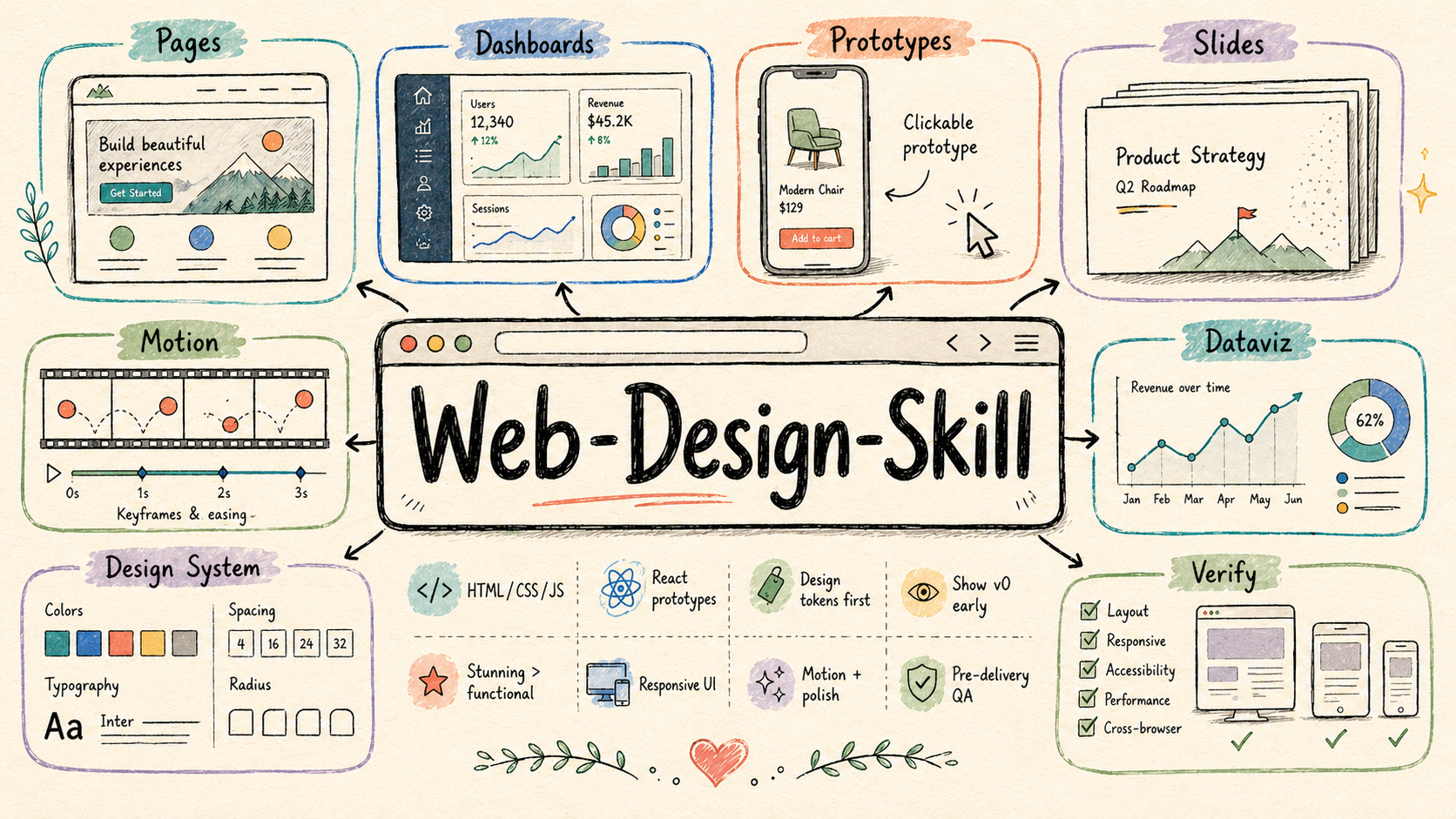
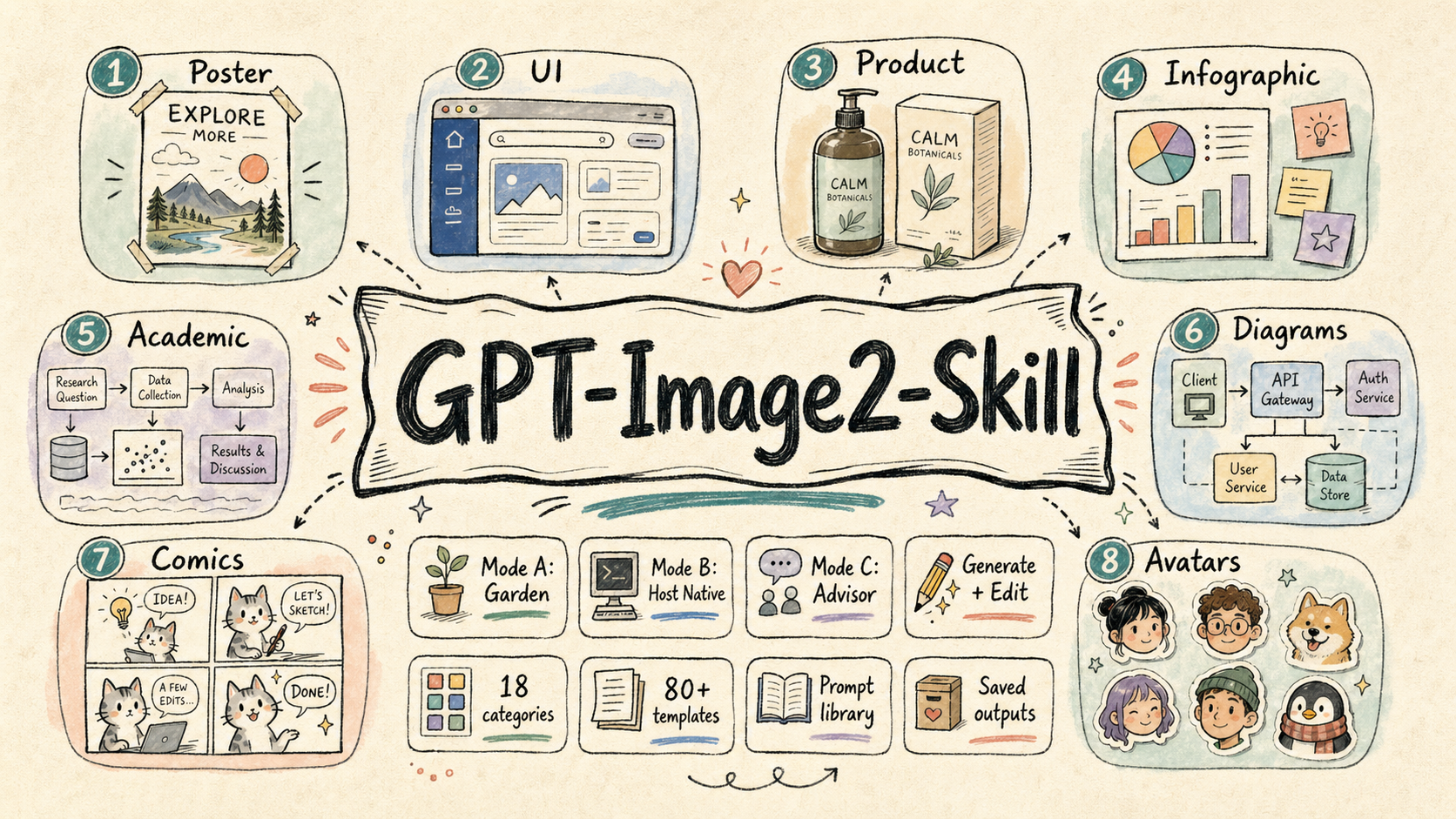
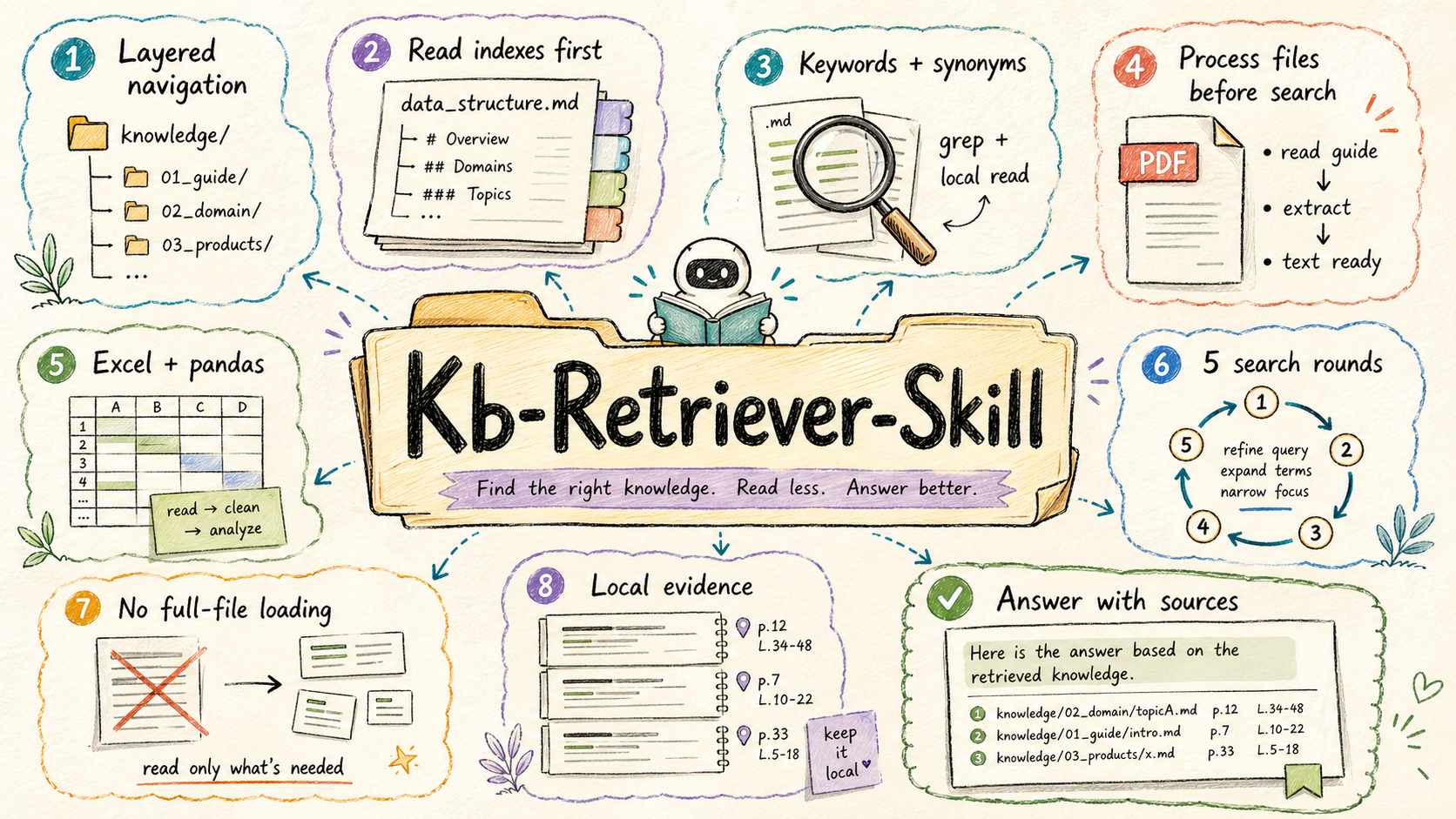
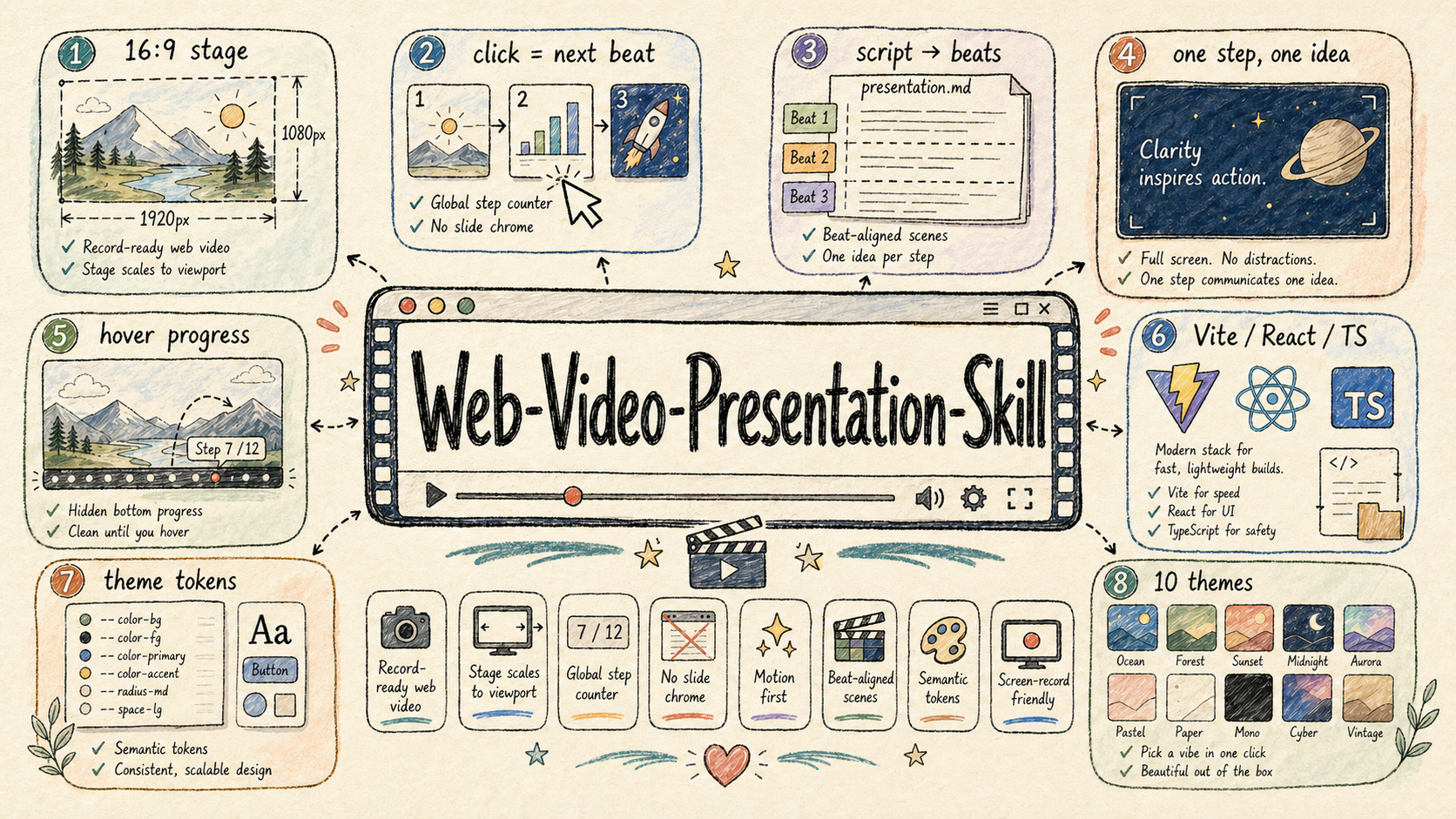
[License](#license) | --- ### [`web-video-presentation`](./skills/web-video-presentation) ![Web Video Presentation Skill](./dist/imgs/web-video-presentation-skill.png) **Category:** Web Video / Presentation Engineering **Best for:** turning scripts, articles, lessons, product demos, and talks into click-driven 16:9 web presentations that can be screen-recorded as cinematic videos. `web-video-presentation` builds record-ready Vite + React + TypeScript presentations that behave like video production surfaces. The workflow turns raw articles into narration scripts, maps script beats to full-screen scenes, pauses at required checkpoints, and can optionally synthesize narration audio after the visual outline is approved. Highlights: - Fixed 1920×1080 stage that scales to the viewport for stable screen recording - Click / keyboard driven `(chapter, step)` cursor, with one narration beat per visual step - Hard collaboration checkpoints for script, theme, outline, implementation mode, and optional audio - Hidden hover-only progress controls so the stage stays clean while recording - Theme-token architecture with multiple visual languages, from `paper-press` to `terminal-green` - Scaffolded Vite + React + TypeScript project with reusable stage primitives and recording guidance Links: [README](./skills/web-video-presentation/README.md) · [SKILL.md](./skills/web-video-presentation/SKILL.md) --- ### [`web-design-engineer`](./skills/web-design-engineer) ![Web Design Skill](./dist/imgs/web-design-skill.png) **Category:** Design / Frontend **Best for:** web pages, landing pages, dashboards, interactive prototypes, HTML slide decks, animations, UI mockups, data visualizations, and design-system explorations. `web-design-engineer` turns AI-generated web artifacts from merely functional into polished, deliberate, and visually memorable front-end work. It treats the agent as a design engineer: first understanding product context, then declaring a design system, showing an early v0, building the full experience, and verifying the result. Highlights: - Defines a six-step design workflow: requirements → context → design system → v0 → full build → verification - Pushes beyond generic AI UI patterns with an anti-cliché blocklist and stronger visual judgment - Covers HTML / CSS / JavaScript / React prototypes, with guidance for responsive layout, motion, and interaction polish - Includes practical implementation rules for inline React + Babel, CSS tokens, `oklch()` color work, container queries, and reduced-motion handling - Ships an advanced patterns reference for device frames, slide engines, animation timelines, dashboards, and other reusable web artifacts Links: [README](./skills/web-design-engineer/README.md) · [SKILL.md](./skills/web-design-engineer/SKILL.md) · [Website](./website/web-design-website) · [Demo](./demo/web-design-demo) --- ### [`gpt-image-2`](./skills/gpt-image-2) ![GPT Image 2 Skill](./dist/imgs/gpt-image-2-skill.png) **Category:** Image Generation / Prompt Engineering **Best for:** posters, UI mockups, product visuals, infographics, academic figures, technical diagrams, comics, avatars, storyboards, branding boards, and image-editing workflows. `gpt-image-2` is a focused image-generation skill for GPT Image 2 and OpenAI-compatible image APIs. It is designed to work across different agent environments: fully local Garden generation, host-native image-tool delegation, or prompt-only advisor mode when no image tool is available. Highlights: - Supports three runtime modes: **Mode A Garden local**, **Mode B host-native delegation**, and **Mode C advisor-only prompt writing** - Starts every task with mode detection so the skill does not silently choose the wrong execution path - Provides 18 visual categories and 80+ structured prompt templates under `references/` - Covers both image generation and image editing through dedicated workflows and scripts - Saves prompts and generated images under `garden-gpt-image-2/` in Garden mode for reuse, review, and versioning Links: [README](./skills/gpt-image-2/README.md) · [SKILL.md](./skills/gpt-image-2/SKILL.md) · [Website](./website/gpt-image2-website) --- ### [`kb-retriever`](./skills/kb-retriever) ![Kb Retriever Skill](./dist/imgs/kb-retriever-skill.png) **Category:** Retrieval / Local Knowledge Base **Best for:** answering questions from a local `knowledge/` directory, searching structured documentation, and extracting evidence from Markdown, text, PDF, and Excel files without flooding the agent context. `kb-retriever` is a local knowledge-base retriever built around careful, progressive search. Instead of loading whole files, it navigates hierarchical index files, narrows the candidate set, processes complex file types correctly, and answers with sources. Highlights: - Uses layered `data_structure.md` files to navigate the knowledge base before searching content - Enforces a **learn-before-process** rule for PDF and Excel files, using the included reference docs before extraction or analysis - Combines precise keyword search, local windowed reads, synonyms, and iterative refinement - Bounds retrieval to at most 5 search rounds so exploration stays controlled - Includes workflows for `grep`, `pdftotext`, `pdfplumber`, and `pandas`, with source-aware answer formatting Links: [README](./skills/kb-retriever/README.md) · [SKILL.md](./skills/kb-retriever/SKILL.md) --- ## Install ### Option A · Claude Code plugin marketplace The fastest path if you use [Claude Code](https://docs.anthropic.com/en/docs/claude-code): ```bash /plugin marketplace add ConardLi/garden-skills /plugin install presentation-skills@garden-skills /plugin install web-design-skills@garden-skills /plugin install knowledge-base-skills@garden-skills /plugin install image-generation-skills@garden-skills ``` Plugin packs are declared in [`.claude-plugin/marketplace.json`](./.claude-plugin/marketplace.json): | Plugin pack | Skills included | |---|---| | `presentation-skills` | `web-video-presentation` | | `web-design-skills` | `web-design-engineer` | | `knowledge-base-skills` | `kb-retriever` | | `image-generation-skills` | `gpt-image-2` | ### Option B · Manual copy into your project Each skill folder is self-contained — copy the one(s) you want into your project's skills directory: ```bash # Claude Code / Claude.ai cp -r skills/web-design-engineer your-project/.claude/skills/ # Cursor / generic agent cp -r skills/web-design-engineer your-project/.agents/skills/ ``` The agent will discover the skill the next time it scans the workspace. ### Option C · Git submodule If you want to track upstream updates inside a larger project: ```bash git submodule add https://github.com/ConardLi/web-design-skill.git vendor/garden-skills ln -s ../../vendor/garden-skills/skills/web-design-engineer .claude/skills/web-design-engineer ``` --- ## Compatibility | Agent / Runtime | Skill location | Status | |---|---|---| | **Claude Code** | `.claude/skills//` or via plugin marketplace | ✅ Tested | | **Claude.ai** (web) | Settings → Capabilities → Skills | ✅ Tested | | **Cursor** | `.agents/skills//` | ✅ Tested | | **Codex CLI** | `.codex/skills//` | ✅ Tested | | **Gemini CLI** | extension manifest | ✅ Tested | | **OpenCode** | `.opencode/skills//` | ✅ Tested | > The `SKILL.md` format is portable by design — if your agent supports skills, copy the folder into the directory it scans, and it should work. PRs welcome to extend this matrix. --- ## Anatomy of a Skill Every skill in this repo follows the same minimal shape: ```text / ├── SKILL.md ← required: YAML frontmatter + instructions for the agent ├── README.md ← English docs for humans (this is what GitHub renders) ├── README.zh-CN.md ← Chinese docs for humans ├── references/ ← optional: docs the agent loads on-demand ├── scripts/ ← optional: deterministic executable code └── assets/ ← optional: templates, fonts, icons used in outputs ``` Frontmatter is the contract that tells the agent *when* to use the skill: ```markdown --- name: my-skill description: A clear sentence about what this skill does and when to use it. The agent uses this to decide whether to load the skill. --- # My Skill Detailed instructions, examples, and constraints go here. ``` For the full spec, see [agentskills.io](https://agentskills.io) and the [official examples from Anthropic](https://github.com/anthropics/skills). --- ## Repository layout ```text . ├── skills/ ← all skills live here, one folder each │ ├── web-video-presentation/ │ │ ├── SKILL.md │ │ ├── README.md / README.zh-CN.md │ │ ├── references/ (principles, outline, themes, audio, recording) │ │ ├── scripts/scaffold.sh │ │ ├── templates/ │ │ └── themes/ │ │ │ ├── web-design-engineer/ │ │ ├── SKILL.md │ │ ├── README.md / README.zh-CN.md │ │ └── references/advanced-patterns.md │ │ │ ├── gpt-image-2/ │ │ ├── SKILL.md │ │ ├── README.md / README.zh-CN.md │ │ ├── references/ (18 categories, 70+ prompt templates) │ │ └── scripts/ (check-mode.js, generate.js, edit.js, shared.js) │ │ │ └── kb-retriever/ │ ├── SKILL.md │ ├── README.md / README.zh-CN.md │ ├── references/ (pdf_reading.md, excel_reading.md, excel_analysis.md) │ └── scripts/convert_pdf_to_images.py │ ├── .claude-plugin/ │ └── marketplace.json ← Claude Code plugin marketplace manifest │ ├── demo/ ← live, openable demos │ └── web-design-demo/ │ └── demo2/ ← side-by-side viewer for web-design-engineer │ ├── index.html │ ├── demo1.html / demo1-with-skill.html │ └── demo2-with-skill.html │ ├── dist/ ← shared reference assets │ ├── imgs/ ← README skill posters │ ├── prompt/ │ │ └── claude-design-system-prompt.md (original Claude Design system prompt) │ ├── website/ ← standalone showcase websites │ ├── gpt-image2-website/ ← GPT Image 2 skill website │ └── web-design-website/ ← web-design-engineer skill website │ ├── README.md / README.zh-CN.md ← collection index (this file) ├── LICENSE └── .gitignore ``` --- ## Acknowledgments This collection stands on the shoulders of: - **[Anthropic](https://www.anthropic.com)** for the [Agent Skills spec](https://agentskills.io) and the [`anthropics/skills`](https://github.com/anthropics/skills) reference repository. - **[Claude Design](https://www.anthropic.com/news/claude-design-anthropic-labs)** — the system prompt that inspired `web-design-engineer`. The original is preserved in [`dist/prompt/claude-design-system-prompt.md`](./dist/prompt/claude-design-system-prompt.md) for reference. - The broader OSS skill community — see [`travisvn/awesome-claude-skills`](https://github.com/travisvn/awesome-claude-skills) and [`obra/superpowers`](https://github.com/obra/superpowers) for further discovery. --- ## License [MIT](./LICENSE) © [ConardLi](https://github.com/ConardLi)