 · A CONEJA-CHIBI PRODUCTION ·




· A CONEJA-CHIBI PRODUCTION ·
 ## 🚀 Install
Want to try the editing Studio first? Open the
[browser edition](https://coneja-chibi.github.io/Hoplight/). It needs no install or account and
keeps work only in the current page. Export anything you want to keep before reloading or closing
the tab. Kit, provider connections, remote access, updates, and host-filesystem tools require the
installed app.
Download the latest build from [Releases](https://github.com/Coneja-Chibi/Hoplight/releases).
| Platform | Download | Run |
| --- | --- | --- |
| **Windows** | `Hoplight.exe` | Double-click it |
| **macOS** | `hoplight-cli-darwin-arm64` or `hoplight-cli-darwin-x64` | `chmod +x`, run it with `ui`, open the printed address |
| **Linux** | `hoplight-cli-linux-x64` or `hoplight-cli-linux-arm64` | `chmod +x`, run it with `ui`, open the printed address |
Windows may show a SmartScreen warning because the binary is unsigned. Releases include
`SHA256SUMS` if you want to verify the download. If the app starts without opening a window, install
[Microsoft WebView2](https://developer.microsoft.com/microsoft-edge/webview2/).
Your pieces live in `Documents/Hoplight Studio`. Updating or replacing the app does not replace
that folder.
### Run from source
You need [Bun](https://bun.sh) 1.3 or newer.
```bash
git clone https://github.com/Coneja-Chibi/Hoplight
cd Hoplight
bun install
bun run dev
```
The Studio binds to loopback. Open the local address it prints.
### Update
Hoplight does not update itself. Use **Settings > About > Check for updates**, then replace your
downloaded binary with the new release.
For a source checkout:
```bash
git pull
bun install
```
Restart Hoplight afterward. Your Studio library stays where it is.
### Bring in your work
Drop a card, book, preset, or archive into the Library. Hoplight detects the format, imports every
piece it can identify, and gives you a plain-language receipt.
Example commands:
```bash
bun run hoplight formats
bun run hoplight inspect samples/sillytavern/characters/Seraphina.png
bun run hoplight convert samples/sillytavern/characters/v3-full.json out.charx --to risu
```
## 🧠 The format problem
The ecosystem does not have one card format with different file extensions. It has related and
unrelated formats with different capabilities:
- SillyTavern uses raw JSON, embedded PNG data, and charx containers.
- RisuAI builds on CCv3 with its own modules and archive behavior.
- RoleCall and Agnai have native fields with no direct CCv3 slot.
- Lumiverse, Marinara, and Chub use different extension bags.
- Backyard has both legacy JSON and its own archive.
- NovelAI lorebooks are a separate family entirely.
A file opening in two apps does not mean those apps read the same fields. Copies also drift as soon
as you edit them independently.
Hoplight keeps one canonical piece and translates at the boundary:
| Platform-bound workflow | Hoplight |
| --- | --- |
| One copy per app | One master with many publish targets |
| Embedded lorebook welded into a card | Linked, separately editable pieces |
| Export losses discovered afterward | Coverage and readiness shown before export |
| Platform-owned storage | Plain files in a folder you control |
| Imported scripts trusted by default | Sealed data with explicit test benches |
### Why not use each platform's editor?
Platform editors are built to make content work inside that platform. That is their job. They
cannot reliably show another platform's view of the same piece.
Hoplight's editor lens can:
- dim or hide fields the selected target does not carry
- show native platform fields without turning the editor into a JSON dump
- use the same coverage declarations as export readiness
- keep linked characters, lorebooks, and media synchronized at publish time
If a platform disappears, you lose a publish target, not your source library.
## ⚙️ How it works
Every format maps to and from one canonical model. Adapters never convert directly into one another.
```text
SillyTavern ──┐ ┌── RisuAI
Backyard ─────┤ ├── RoleCall
Agnai ────────┤ canonical ├── Chub
Pygmalion ────┤ model ├── Lumiverse
NovelAI ──────┤ ├── Marinara
CCv3 ─────────┘ └── your Studio JSON
```
### Hub and spoke
Direct format-to-format conversion grows toward N². A canonical hub needs one adapter per format.
Adding a platform is a folder under `src/formats/`; the registry, CLI, Studio, and Press discover it.
Real fixtures and round-trip tests verify the adapter's claims.
### Escrow
Import does not discard data just because the canonical model lacks a first-class field for it.
Hoplight stores:
- the parsed source snapshot
- unmapped platform fields
- links to extracted pieces such as embedded lorebooks
Same-format exports obey the semantic Round-Trip Law. Formats with an explicit byte-level tier must
prove that stronger guarantee with fixtures. Cross-format exports report uncovered fields instead
of pretending every concept has an equivalent.
### Sealed scripts
Cards can carry Lua, macros, and regex rules. Hoplight treats them as data during import,
conversion, storage, and export.
Execution is user-invoked only inside the isolated Lua or regex test bench. There is no second
execution path hidden in an adapter or import hook.
## 🎞️ One card, start to finish
```text
Drop Seraphina.png into the Library
↓
Detection identifies a SillyTavern character card
↓
The receipt names the character, portrait, greeting, and embedded lorebook
↓
The original source and unmapped fields enter escrow
↓
The embedded lorebook becomes a linked, editable piece
↓
Open the character on the Workbench with the RisuAI lens
↓
Fields Risu cannot carry are visible before export
↓
Stage the character and include the linked lorebook
↓
The Press writes a charx bundle and an honest result report
```
The Studio copy remains the source of truth throughout.
## 🎭 The Studio
The Studio surfaces share one engine, one Studio folder, and one set of canonical entities.
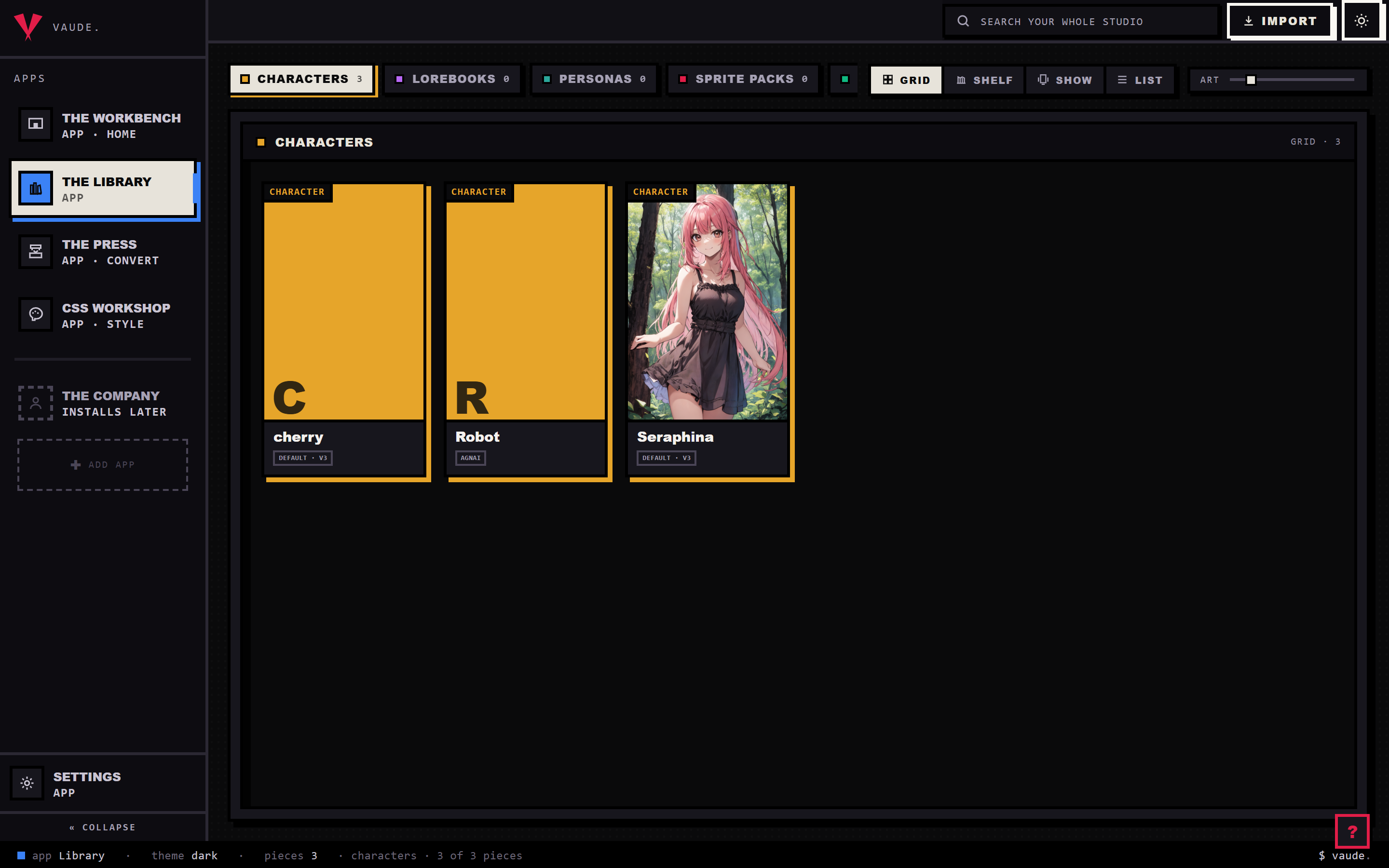
### 📚 Library
The Library handles import, organization, and batch selection.
- Decks separate characters, lorebooks, personas, packs, presets, and regex sets.
- Grid, showcase, list, and gallery views suit different kinds of work.
- Import receipts explain what arrived and where linked pieces came from.
- Multi-select can stage a batch for the Press.
- Shelf operations expose relevant verbs such as duplicate, merge, split, attach, and combine.
- Right-click menus come from one shared system rather than one-off controls.
The Library reads the disk. Counts and pieces reflect the Studio folder, not a second database.
## 🚀 Install
Want to try the editing Studio first? Open the
[browser edition](https://coneja-chibi.github.io/Hoplight/). It needs no install or account and
keeps work only in the current page. Export anything you want to keep before reloading or closing
the tab. Kit, provider connections, remote access, updates, and host-filesystem tools require the
installed app.
Download the latest build from [Releases](https://github.com/Coneja-Chibi/Hoplight/releases).
| Platform | Download | Run |
| --- | --- | --- |
| **Windows** | `Hoplight.exe` | Double-click it |
| **macOS** | `hoplight-cli-darwin-arm64` or `hoplight-cli-darwin-x64` | `chmod +x`, run it with `ui`, open the printed address |
| **Linux** | `hoplight-cli-linux-x64` or `hoplight-cli-linux-arm64` | `chmod +x`, run it with `ui`, open the printed address |
Windows may show a SmartScreen warning because the binary is unsigned. Releases include
`SHA256SUMS` if you want to verify the download. If the app starts without opening a window, install
[Microsoft WebView2](https://developer.microsoft.com/microsoft-edge/webview2/).
Your pieces live in `Documents/Hoplight Studio`. Updating or replacing the app does not replace
that folder.
### Run from source
You need [Bun](https://bun.sh) 1.3 or newer.
```bash
git clone https://github.com/Coneja-Chibi/Hoplight
cd Hoplight
bun install
bun run dev
```
The Studio binds to loopback. Open the local address it prints.
### Update
Hoplight does not update itself. Use **Settings > About > Check for updates**, then replace your
downloaded binary with the new release.
For a source checkout:
```bash
git pull
bun install
```
Restart Hoplight afterward. Your Studio library stays where it is.
### Bring in your work
Drop a card, book, preset, or archive into the Library. Hoplight detects the format, imports every
piece it can identify, and gives you a plain-language receipt.
Example commands:
```bash
bun run hoplight formats
bun run hoplight inspect samples/sillytavern/characters/Seraphina.png
bun run hoplight convert samples/sillytavern/characters/v3-full.json out.charx --to risu
```
## 🧠 The format problem
The ecosystem does not have one card format with different file extensions. It has related and
unrelated formats with different capabilities:
- SillyTavern uses raw JSON, embedded PNG data, and charx containers.
- RisuAI builds on CCv3 with its own modules and archive behavior.
- RoleCall and Agnai have native fields with no direct CCv3 slot.
- Lumiverse, Marinara, and Chub use different extension bags.
- Backyard has both legacy JSON and its own archive.
- NovelAI lorebooks are a separate family entirely.
A file opening in two apps does not mean those apps read the same fields. Copies also drift as soon
as you edit them independently.
Hoplight keeps one canonical piece and translates at the boundary:
| Platform-bound workflow | Hoplight |
| --- | --- |
| One copy per app | One master with many publish targets |
| Embedded lorebook welded into a card | Linked, separately editable pieces |
| Export losses discovered afterward | Coverage and readiness shown before export |
| Platform-owned storage | Plain files in a folder you control |
| Imported scripts trusted by default | Sealed data with explicit test benches |
### Why not use each platform's editor?
Platform editors are built to make content work inside that platform. That is their job. They
cannot reliably show another platform's view of the same piece.
Hoplight's editor lens can:
- dim or hide fields the selected target does not carry
- show native platform fields without turning the editor into a JSON dump
- use the same coverage declarations as export readiness
- keep linked characters, lorebooks, and media synchronized at publish time
If a platform disappears, you lose a publish target, not your source library.
## ⚙️ How it works
Every format maps to and from one canonical model. Adapters never convert directly into one another.
```text
SillyTavern ──┐ ┌── RisuAI
Backyard ─────┤ ├── RoleCall
Agnai ────────┤ canonical ├── Chub
Pygmalion ────┤ model ├── Lumiverse
NovelAI ──────┤ ├── Marinara
CCv3 ─────────┘ └── your Studio JSON
```
### Hub and spoke
Direct format-to-format conversion grows toward N². A canonical hub needs one adapter per format.
Adding a platform is a folder under `src/formats/`; the registry, CLI, Studio, and Press discover it.
Real fixtures and round-trip tests verify the adapter's claims.
### Escrow
Import does not discard data just because the canonical model lacks a first-class field for it.
Hoplight stores:
- the parsed source snapshot
- unmapped platform fields
- links to extracted pieces such as embedded lorebooks
Same-format exports obey the semantic Round-Trip Law. Formats with an explicit byte-level tier must
prove that stronger guarantee with fixtures. Cross-format exports report uncovered fields instead
of pretending every concept has an equivalent.
### Sealed scripts
Cards can carry Lua, macros, and regex rules. Hoplight treats them as data during import,
conversion, storage, and export.
Execution is user-invoked only inside the isolated Lua or regex test bench. There is no second
execution path hidden in an adapter or import hook.
## 🎞️ One card, start to finish
```text
Drop Seraphina.png into the Library
↓
Detection identifies a SillyTavern character card
↓
The receipt names the character, portrait, greeting, and embedded lorebook
↓
The original source and unmapped fields enter escrow
↓
The embedded lorebook becomes a linked, editable piece
↓
Open the character on the Workbench with the RisuAI lens
↓
Fields Risu cannot carry are visible before export
↓
Stage the character and include the linked lorebook
↓
The Press writes a charx bundle and an honest result report
```
The Studio copy remains the source of truth throughout.
## 🎭 The Studio
The Studio surfaces share one engine, one Studio folder, and one set of canonical entities.
### 📚 Library
The Library handles import, organization, and batch selection.
- Decks separate characters, lorebooks, personas, packs, presets, and regex sets.
- Grid, showcase, list, and gallery views suit different kinds of work.
- Import receipts explain what arrived and where linked pieces came from.
- Multi-select can stage a batch for the Press.
- Shelf operations expose relevant verbs such as duplicate, merge, split, attach, and combine.
- Right-click menus come from one shared system rather than one-off controls.
The Library reads the disk. Counts and pieces reflect the Studio folder, not a second database.