 # TinyConsole


 TinyConsole is a tiny log console to display information while using your iOS app and written in Swift.
## Usage
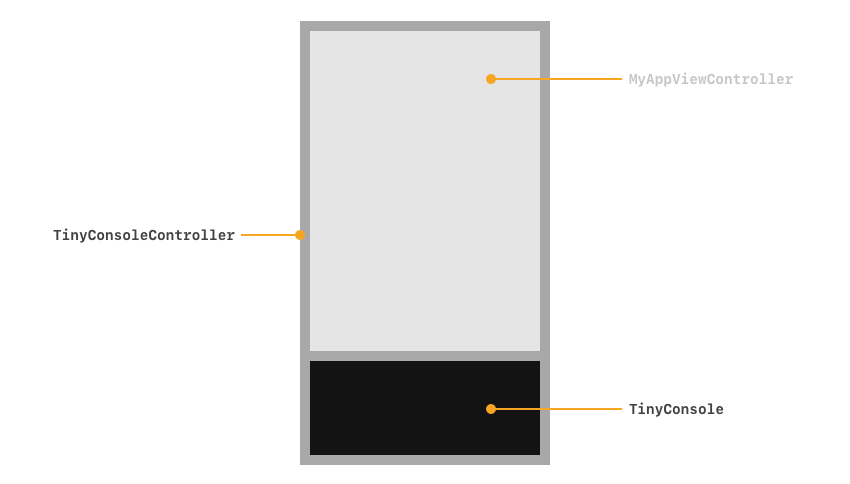
Wrap your Main ViewController inside of a `TinyConsoleController` like so:
```swift
TinyConsole.createViewController(rootViewController: MyMainViewController())
```
### Actions
#### Hide and Show
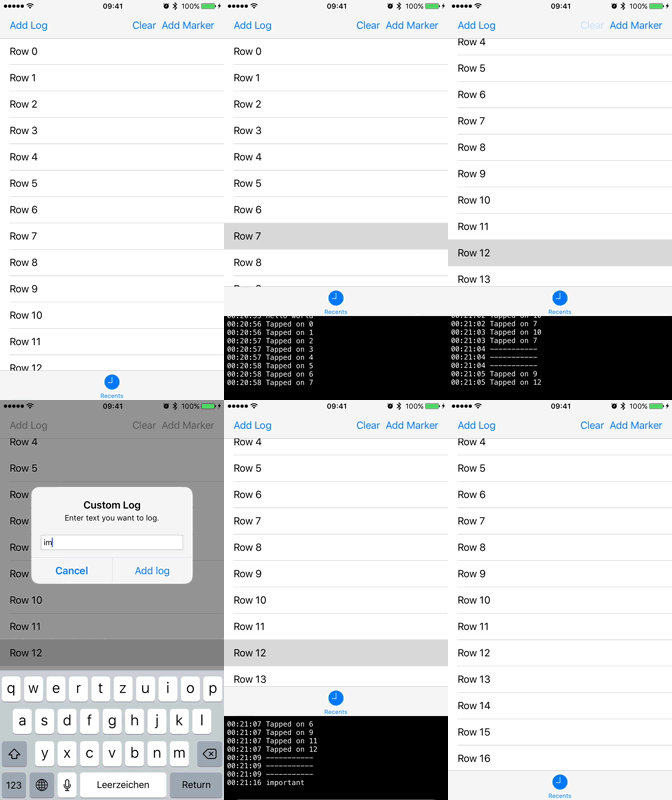
Shake your device to toggle the console.
If you’re using the Simulator, press ⌃ ctrl-⌘ cmd-z.
#### Console output
```swift
// Print message
TinyConsole.print("hello")
// Print messages any color you want
TinyConsole.print("green text", color: UIColor.green)
// Print a red error message
TinyConsole.error("something went wrong")
// Print a marker for orientation
TinyConsole.addLine()
// Clear console
TinyConsole.clear()
```
## Implementation Example
Instead of
```swift
func application(_ application: UIApplication, didFinishLaunchingWithOptions launchOptions: [UIApplication.LaunchOptionsKey: Any]?) -> Bool {
window = UIWindow(frame: UIScreen.main.bounds)
window?.rootViewController = MyMainViewController()
window?.makeKeyAndVisible()
return true
}
```
write
```swift
func application(_ application: UIApplication, didFinishLaunchingWithOptions launchOptions: [UIApplication.LaunchOptionsKey: Any]?) -> Bool {
window = UIWindow(frame: UIScreen.main.bounds)
window?.rootViewController = TinyConsole.createViewController(rootViewController: MyMainViewController())
window?.makeKeyAndVisible()
return true
}
```
alternatively, check out the example project included in this repository.
## Demo
TinyConsole is a tiny log console to display information while using your iOS app and written in Swift.
## Usage
Wrap your Main ViewController inside of a `TinyConsoleController` like so:
```swift
TinyConsole.createViewController(rootViewController: MyMainViewController())
```
### Actions
#### Hide and Show
Shake your device to toggle the console.
If you’re using the Simulator, press ⌃ ctrl-⌘ cmd-z.
#### Console output
```swift
// Print message
TinyConsole.print("hello")
// Print messages any color you want
TinyConsole.print("green text", color: UIColor.green)
// Print a red error message
TinyConsole.error("something went wrong")
// Print a marker for orientation
TinyConsole.addLine()
// Clear console
TinyConsole.clear()
```
## Implementation Example
Instead of
```swift
func application(_ application: UIApplication, didFinishLaunchingWithOptions launchOptions: [UIApplication.LaunchOptionsKey: Any]?) -> Bool {
window = UIWindow(frame: UIScreen.main.bounds)
window?.rootViewController = MyMainViewController()
window?.makeKeyAndVisible()
return true
}
```
write
```swift
func application(_ application: UIApplication, didFinishLaunchingWithOptions launchOptions: [UIApplication.LaunchOptionsKey: Any]?) -> Bool {
window = UIWindow(frame: UIScreen.main.bounds)
window?.rootViewController = TinyConsole.createViewController(rootViewController: MyMainViewController())
window?.makeKeyAndVisible()
return true
}
```
alternatively, check out the example project included in this repository.
## Demo
 ## Requirements
* Xcode 11
* Swift 5
* iOS 11 or greater
## Installation
### [Carthage](https://github.com/Carthage/Carthage)
Add this to your Cartfile:
```ruby
github "Cosmo/TinyConsole"
```
### Manually
Just drag the source files into your project.
## Hierarchy
## Requirements
* Xcode 11
* Swift 5
* iOS 11 or greater
## Installation
### [Carthage](https://github.com/Carthage/Carthage)
Add this to your Cartfile:
```ruby
github "Cosmo/TinyConsole"
```
### Manually
Just drag the source files into your project.
## Hierarchy
 ## Core Team
- [@Cosmo](https://github.com/Cosmo), Devran "Cosmo" Uenal
- [@mRs-](https://github.com/mRs-), Marius Landwehr
- [@ohitsdaniel](https://github.com/ohitsdaniel), Daniel Peter
## Thanks
Many thanks to [**the contributors**](https://github.com/Cosmo/TinyConsole/graphs/contributors) of this project.
## Contact
* Devran "Cosmo" Uenal
* Twitter: [@maccosmo](http://twitter.com/maccosmo)
* LinkedIn: [devranuenal](https://www.linkedin.com/in/devranuenal)
## Other Projects
* [BinaryKit](https://github.com/Cosmo/BinaryKit) — BinaryKit helps you to break down binary data into bits and bytes and easily access specific parts.
* [Clippy](https://github.com/Cosmo/Clippy) — Clippy from Microsoft Office is back and runs on macOS! Written in Swift.
* [GrammaticalNumber](https://github.com/Cosmo/GrammaticalNumber) — Turns singular words to the plural and vice-versa in Swift.
* [HackMan](https://github.com/Cosmo/HackMan) — Stop writing boilerplate code yourself. Let hackman do it for you via the command line.
* [ISO8859](https://github.com/Cosmo/ISO8859) — Convert ISO8859 1-16 Encoded Text to String in Swift. Supports iOS, tvOS, watchOS and macOS.
* [SpriteMap](https://github.com/Cosmo/SpriteMap) — SpriteMap helps you to extract sprites out of a sprite map. Written in Swift.
* [StringCase](https://github.com/Cosmo/StringCase) — Converts String to lowerCamelCase, UpperCamelCase and snake_case. Tested and written in Swift.
## License
TinyConsole is released under the [MIT License](http://www.opensource.org/licenses/MIT).
## Core Team
- [@Cosmo](https://github.com/Cosmo), Devran "Cosmo" Uenal
- [@mRs-](https://github.com/mRs-), Marius Landwehr
- [@ohitsdaniel](https://github.com/ohitsdaniel), Daniel Peter
## Thanks
Many thanks to [**the contributors**](https://github.com/Cosmo/TinyConsole/graphs/contributors) of this project.
## Contact
* Devran "Cosmo" Uenal
* Twitter: [@maccosmo](http://twitter.com/maccosmo)
* LinkedIn: [devranuenal](https://www.linkedin.com/in/devranuenal)
## Other Projects
* [BinaryKit](https://github.com/Cosmo/BinaryKit) — BinaryKit helps you to break down binary data into bits and bytes and easily access specific parts.
* [Clippy](https://github.com/Cosmo/Clippy) — Clippy from Microsoft Office is back and runs on macOS! Written in Swift.
* [GrammaticalNumber](https://github.com/Cosmo/GrammaticalNumber) — Turns singular words to the plural and vice-versa in Swift.
* [HackMan](https://github.com/Cosmo/HackMan) — Stop writing boilerplate code yourself. Let hackman do it for you via the command line.
* [ISO8859](https://github.com/Cosmo/ISO8859) — Convert ISO8859 1-16 Encoded Text to String in Swift. Supports iOS, tvOS, watchOS and macOS.
* [SpriteMap](https://github.com/Cosmo/SpriteMap) — SpriteMap helps you to extract sprites out of a sprite map. Written in Swift.
* [StringCase](https://github.com/Cosmo/StringCase) — Converts String to lowerCamelCase, UpperCamelCase and snake_case. Tested and written in Swift.
## License
TinyConsole is released under the [MIT License](http://www.opensource.org/licenses/MIT).