# UI Testing Guidelines
This document covers UI testing practices for Countly Server, including Cypress testing and handling test failures.
## Table of Contents
- [Running UI Tests](#running-ui-tests)
- [Data Test ID Attributes](#data-test-id-attributes)
- [Handling CI Test Failures](#handling-ci-test-failures)
- [Writing New Tests](#writing-new-tests)
---
## Running UI Tests
### Local Setup
1. **Configure Cypress**
```bash
# Rename config file
mv cypress.config.sample.js cypress.config.js
```
2. **Add credentials**
Create `ui-tests/cypress/fixtures/user.json`:
```json
{
"username": "your-username",
"password": "your-password"
}
```
3. **Update base URL**
In `cypress.config.js`, set the correct base URL:
```javascript
baseUrl: 'http://localhost:6001'
```
4. **Install dependencies**
```bash
npm install
npm install cypress --save-dev
```
5. **Run tests**
```bash
# Open Cypress Test Runner (interactive)
npx cypress open
# Run tests headlessly
npx cypress run
```
### CI Test Suites
Tests run automatically on PRs:
| Repository | Test Steps |
|------------|------------|
| countly-server | `ui-test-dashboard`, `ui-test-onboarding` |
| countly-enterprise-plugins | `ui-test` |
---
## Data Test ID Attributes
### Why Use Data Test IDs?
- **Reliability**: Don't break when CSS classes or structure changes
- **Clarity**: Self-documenting element purposes
- **Separation**: Testing concerns separate from styling
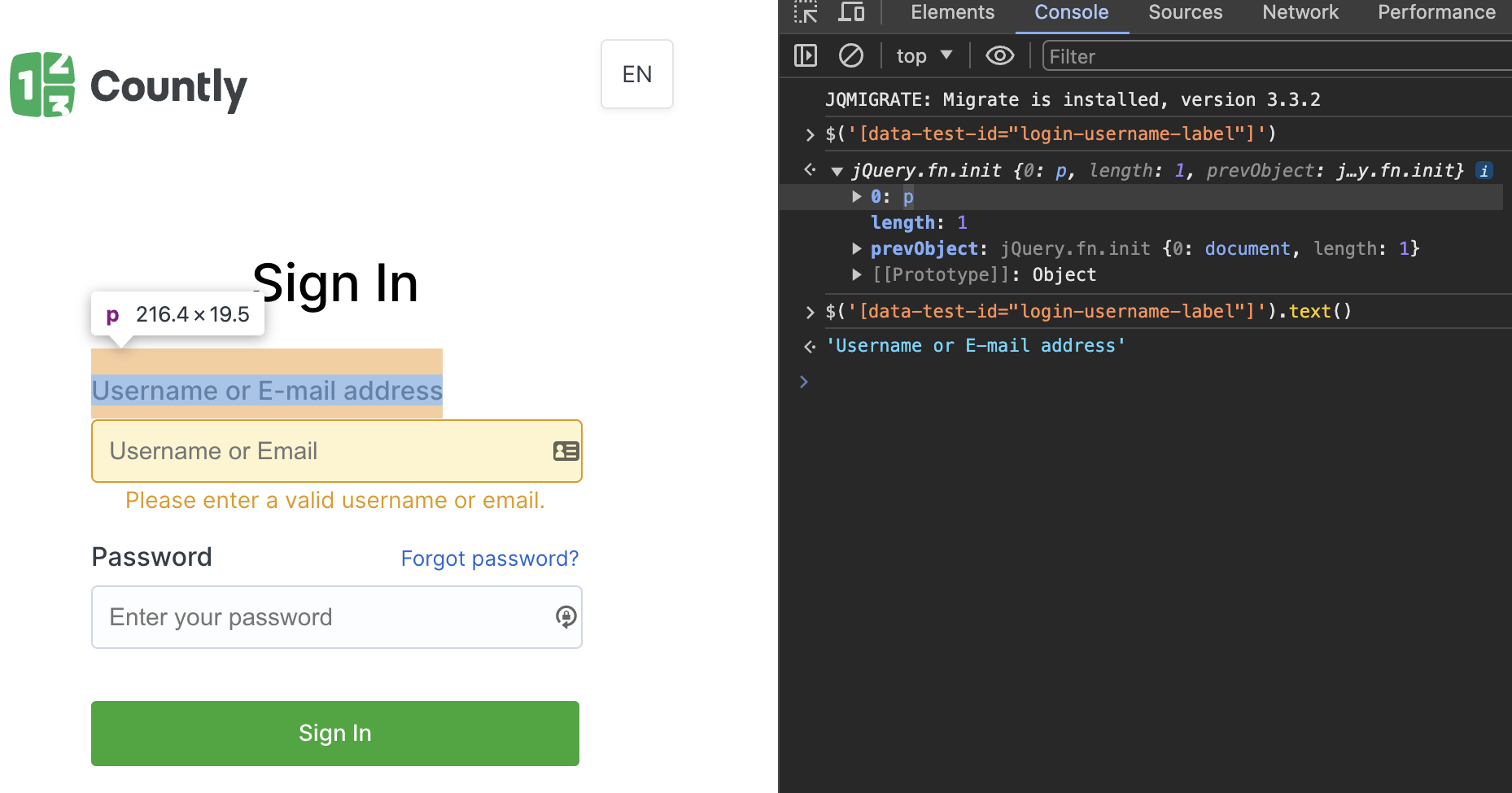
### Adding Test IDs
#### Static Test IDs
```html
{{ error }}
```
#### Dynamic Test IDs
```html
```
#### Component Props
Define test ID as a prop in reusable components:
```javascript
// Component definition
props: {
testId: {
type: String,
default: ''
}
}
```
```html
```
```html
```
### Naming Conventions
| Element Type | Pattern | Example |
|--------------|---------|---------|
| Buttons | `{action}-{context}-button` | `submit-form-button` |
| Inputs | `{field}-input` | `username-input` |
| Labels | `{field}-label` | `password-label` |
| Links | `{destination}-link` | `settings-link` |
| Tabs | `tab-{name}-link` | `tab-users-link` |
| Containers | `{content}-container` | `user-list-container` |
| Rows | `{type}-row-{id}` | `user-row-12345` |
| Modals | `{name}-modal` | `delete-confirm-modal` |
### After Adding Test IDs
If test IDs are added in JavaScript files (not templates), rebuild:
```bash
npx grunt dist-all
```
### Verifying Test IDs
Browser console:
```javascript
// Find element
$('[data-test-id="login-submit-button"]')
// List all test IDs
$$('[data-test-id]').map(el => el.getAttribute('data-test-id'))
```
---
## Handling CI Test Failures
### Step 1: Check CI Logs
Review error messages in the CI pipeline output. Common failure types:
| Error Type | Example | Solution |
|------------|---------|----------|
| Text mismatch | `expected "Save" to equal "Submit"` | Update expected text |
| Missing method | `TypeError: undefined is not a function` | Check method definition |
| Missing file | `Module not found` | Verify file paths |
| Missing element | `Timed out retrying: Expected to find element` | Check data-test-id exists |
| Element not visible | `element is not visible` | Check display conditions |
**Example error screenshots:**
Text mismatch:

Missing element:

### Step 2: Review Artifacts
Videos and screenshots are uploaded to Box tool for failed tests.
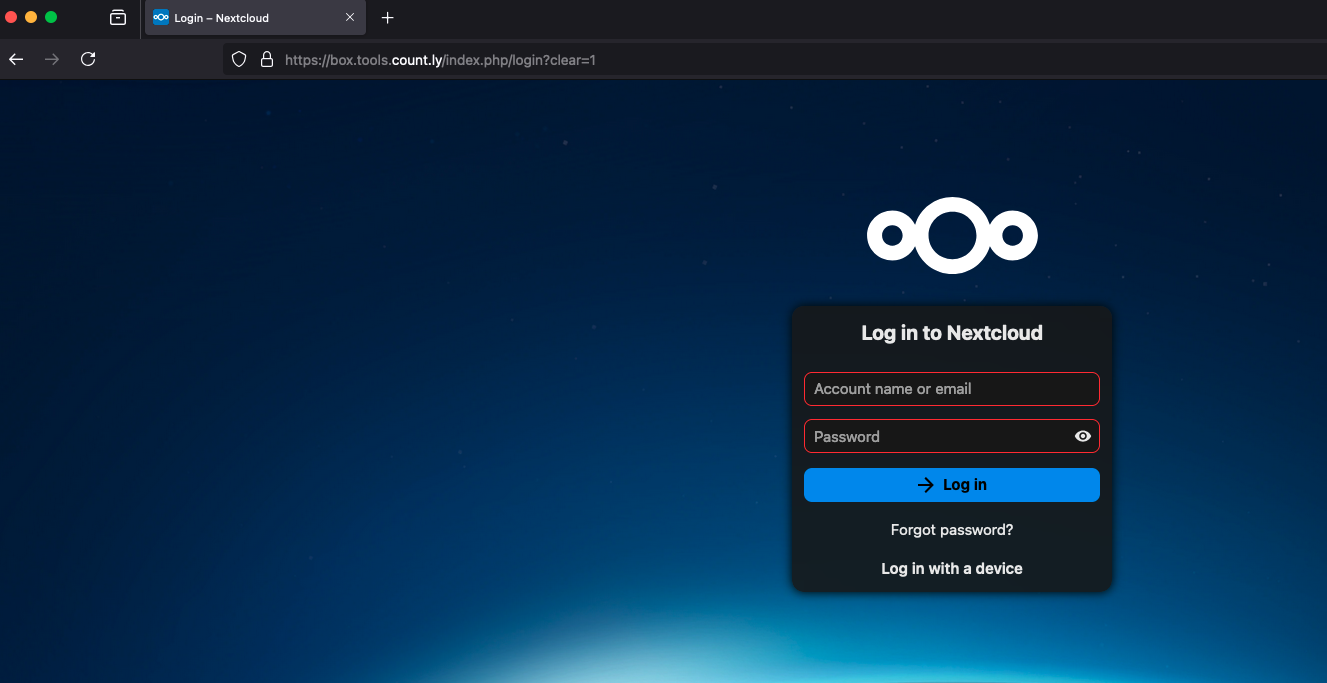
**Accessing artifacts:**
1. Log in to [Box](https://box.tools.count.ly)
2. Find file by format: `{date}-{time}_{repo}_{action-id}.zip`
- Example: `20250324-21.42_countly-server_CI#3379.zip`
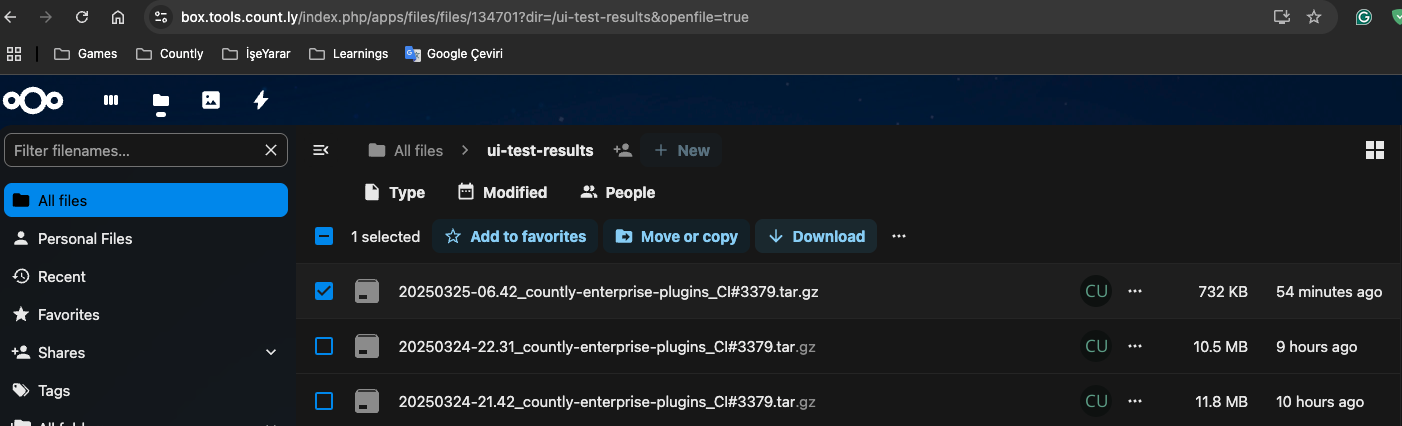
3. Download and review video/screenshots
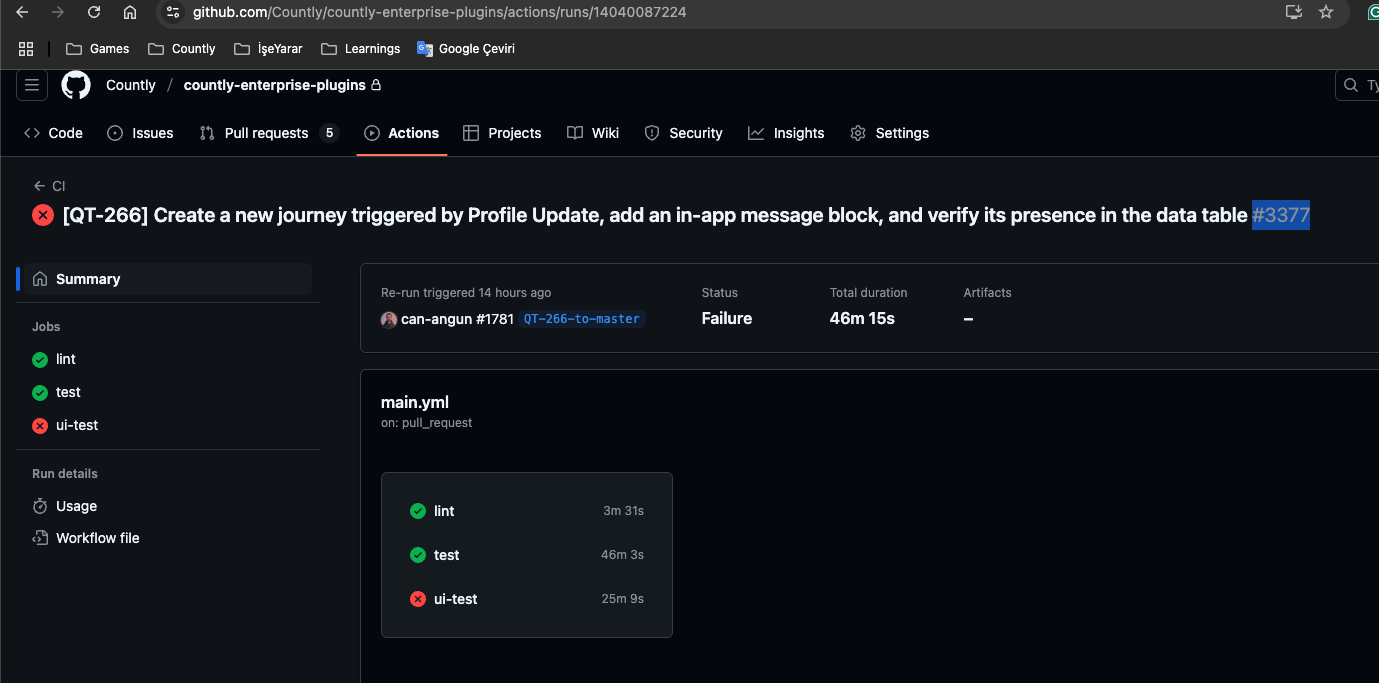
**Finding the action number:**
The action number is near the PR title in GitHub Actions.
### Step 3: Reproduce Locally
1. Pull the test code
2. Set up local environment (see [Running UI Tests](#running-ui-tests))
3. Run the specific failing test:
```bash
npx cypress run --spec "cypress/e2e/specific-test.cy.js"
```
### Step 4: Common Issues
#### Known Cypress Performance Issue
If you see this error:
```
The browser process unexpectedly closed
```
This is a [known Cypress issue](https://github.com/cypress-io/cypress/issues/27415). Try:
1. Re-run all jobs
2. If persistent, increase timeouts or investigate memory usage
#### Element Not Found
```javascript
// Check if element exists with longer timeout
cy.get('[data-test-id="my-element"]', { timeout: 10000 }).should('exist');
// Wait for loading to complete first
cy.get('[data-test-id="loading-spinner"]').should('not.exist');
cy.get('[data-test-id="my-element"]').click();
```
#### Element Not Visible
```javascript
// Force interaction on hidden elements (use sparingly)
cy.get('[data-test-id="hidden-button"]').click({ force: true });
// Better: Wait for visibility
cy.get('[data-test-id="my-element"]').should('be.visible').click();
```
### Step 5: Get Help
If the issue persists:
1. Share failure details in **#dev-team** Slack channel
2. Tag the QA team for investigation
3. Include:
- Link to failing CI run
- Screenshots/video from artifacts
- Steps to reproduce locally
---
## Writing New Tests
### Test Structure
```javascript
describe('Feature Name', () => {
beforeEach(() => {
// Login and navigate to feature
cy.login();
cy.visit('/dashboard#/myfeature');
});
it('should display the feature page', () => {
cy.get('[data-test-id="feature-title"]')
.should('be.visible')
.and('contain', 'My Feature');
});
it('should create a new item', () => {
cy.get('[data-test-id="create-button"]').click();
cy.get('[data-test-id="name-input"]').type('Test Item');
cy.get('[data-test-id="submit-button"]').click();
cy.get('[data-test-id="success-message"]')
.should('be.visible');
});
it('should delete an item', () => {
cy.get('[data-test-id="item-row-1"] [data-test-id="delete-button"]')
.click();
cy.get('[data-test-id="confirm-delete-button"]').click();
cy.get('[data-test-id="item-row-1"]')
.should('not.exist');
});
});
```
### Custom Commands
```javascript
// cypress/support/commands.js
Cypress.Commands.add('login', (username, password) => {
cy.fixture('user.json').then((user) => {
cy.visit('/login');
cy.get('[data-test-id="login-username"]').type(username || user.username);
cy.get('[data-test-id="login-password"]').type(password || user.password);
cy.get('[data-test-id="login-submit-button"]').click();
cy.url().should('include', '/dashboard');
});
});
Cypress.Commands.add('selectApp', (appName) => {
cy.get('[data-test-id="app-selector"]').click();
cy.get(`[data-test-id="app-option-${appName}"]`).click();
});
```
### Best Practices
1. **Use data-test-id selectors**
```javascript
// ✅ Good
cy.get('[data-test-id="submit-button"]')
// ❌ Avoid CSS selectors
cy.get('.btn-primary.submit')
```
2. **Wait for elements properly**
```javascript
// ✅ Good: Explicit wait for element
cy.get('[data-test-id="loading"]').should('not.exist');
cy.get('[data-test-id="data-table"]').should('be.visible');
// ❌ Avoid: Arbitrary waits
cy.wait(3000);
```
3. **Assert expected outcomes**
```javascript
// ✅ Good: Verify the action succeeded
cy.get('[data-test-id="success-toast"]').should('contain', 'Saved');
// ❌ Bad: No assertion
cy.get('[data-test-id="save-button"]').click();
// Test ends without verifying result
```
4. **Clean up test data**
```javascript
after(() => {
// Delete test data created during tests
cy.request('DELETE', '/api/test-cleanup');
});
```
5. **Use meaningful test descriptions**
```javascript
// ✅ Good
it('should display validation error when email format is invalid')
// ❌ Bad
it('test email')
```
---
## Test Configuration
### cypress.config.js
```javascript
const { defineConfig } = require('cypress');
module.exports = defineConfig({
e2e: {
baseUrl: 'http://localhost:6001',
viewportWidth: 1280,
viewportHeight: 720,
defaultCommandTimeout: 10000,
video: true,
screenshotOnRunFailure: true,
retries: {
runMode: 2, // Retry failed tests in CI
openMode: 0 // No retries in interactive mode
}
}
});
```
### Environment Variables
```javascript
// Access in tests
const apiKey = Cypress.env('API_KEY');
// Set via command line
npx cypress run --env API_KEY=abc123
// Or in cypress.config.js
env: {
API_KEY: 'your-key'
}
```