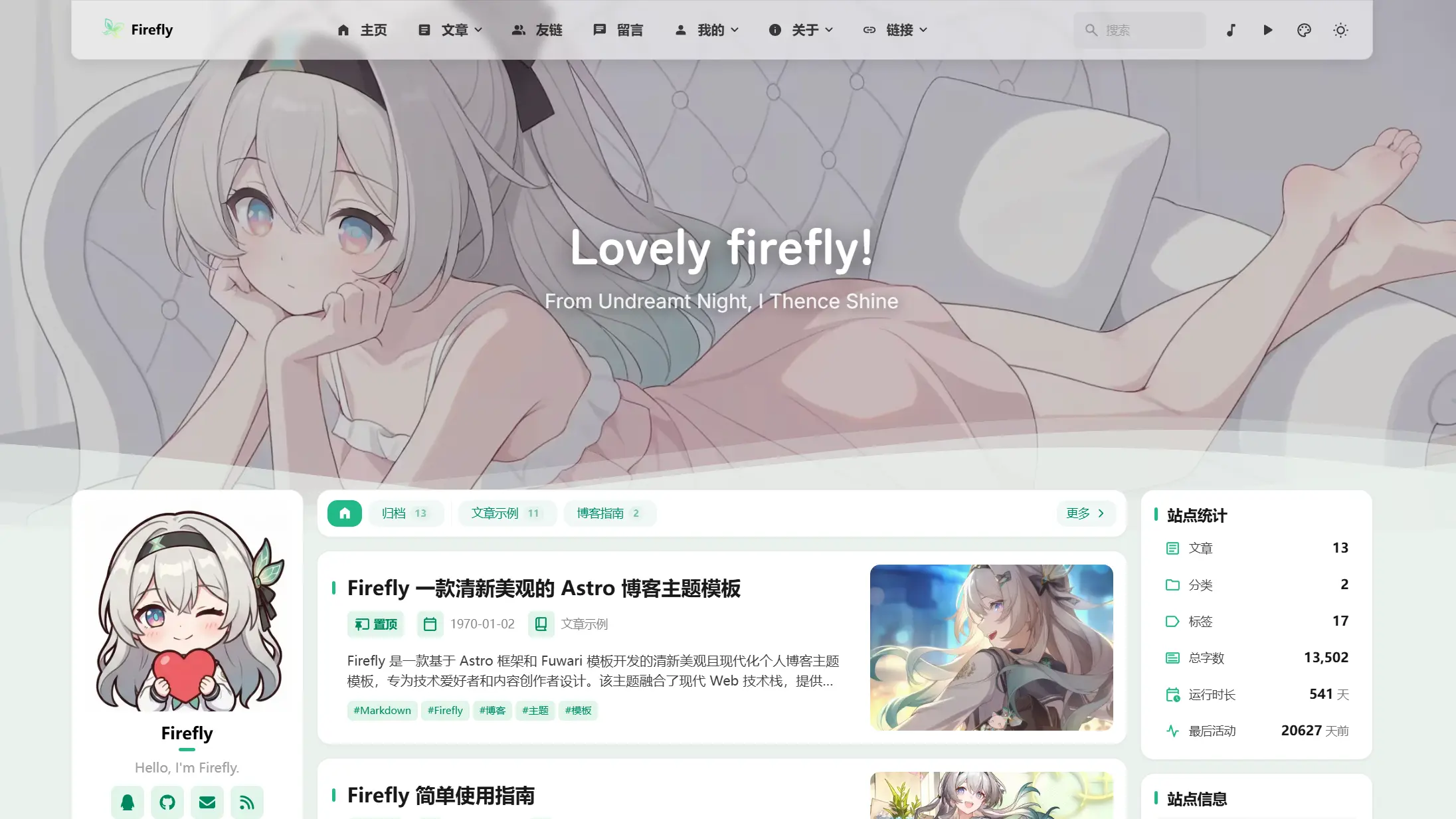
Banner Mode
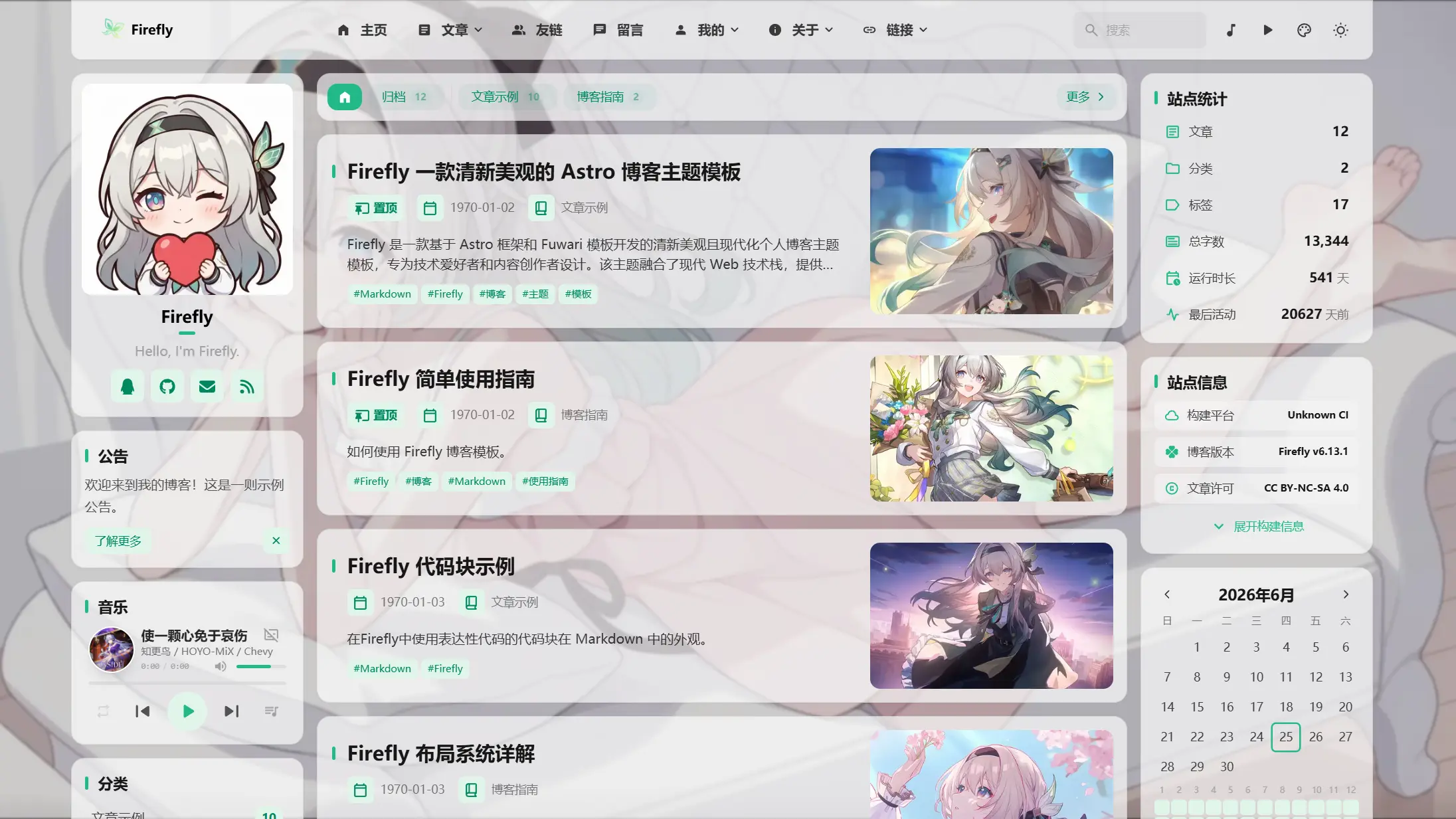
Overlay Mode
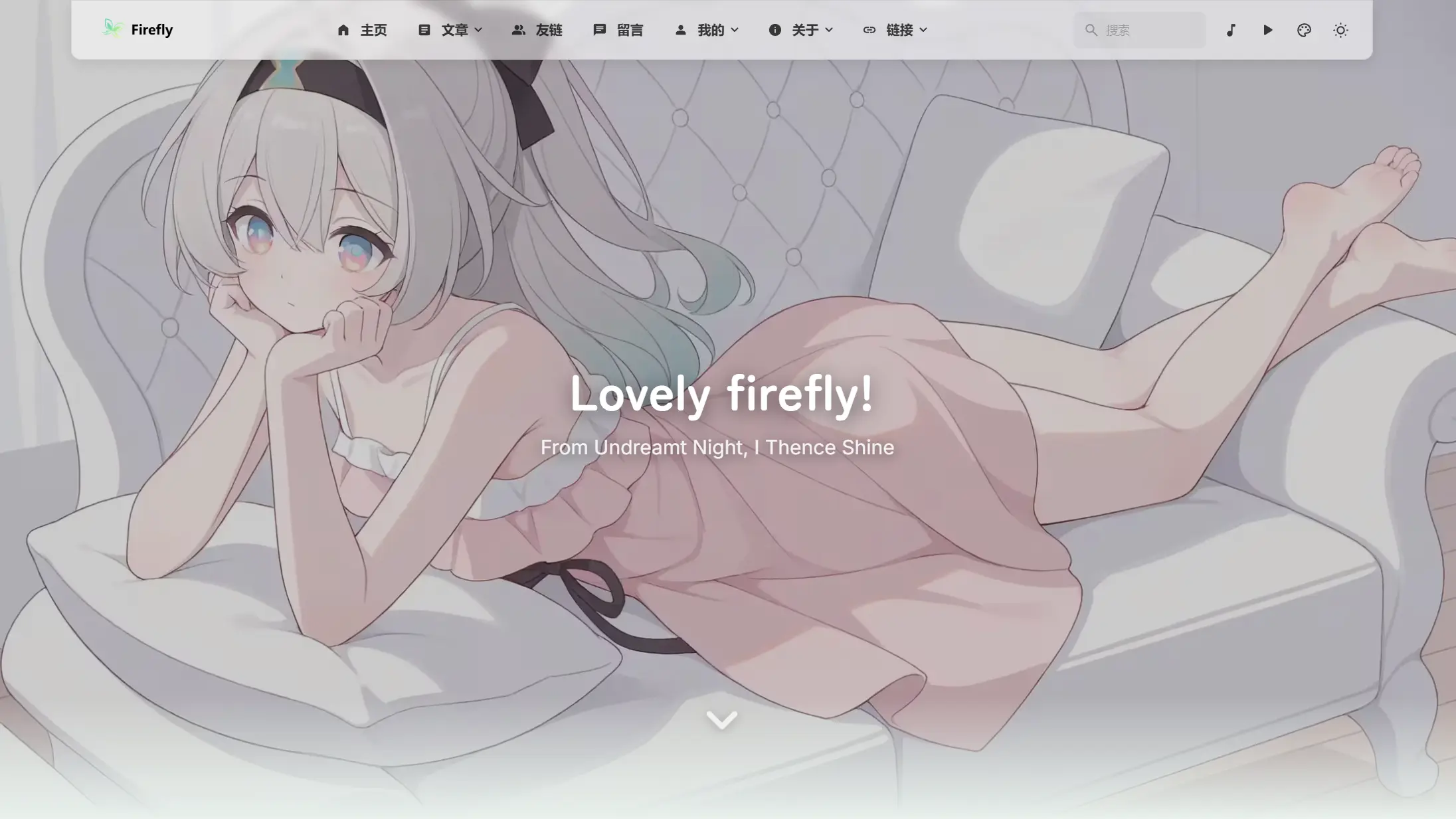
Fullscreen Wallpaper Mode
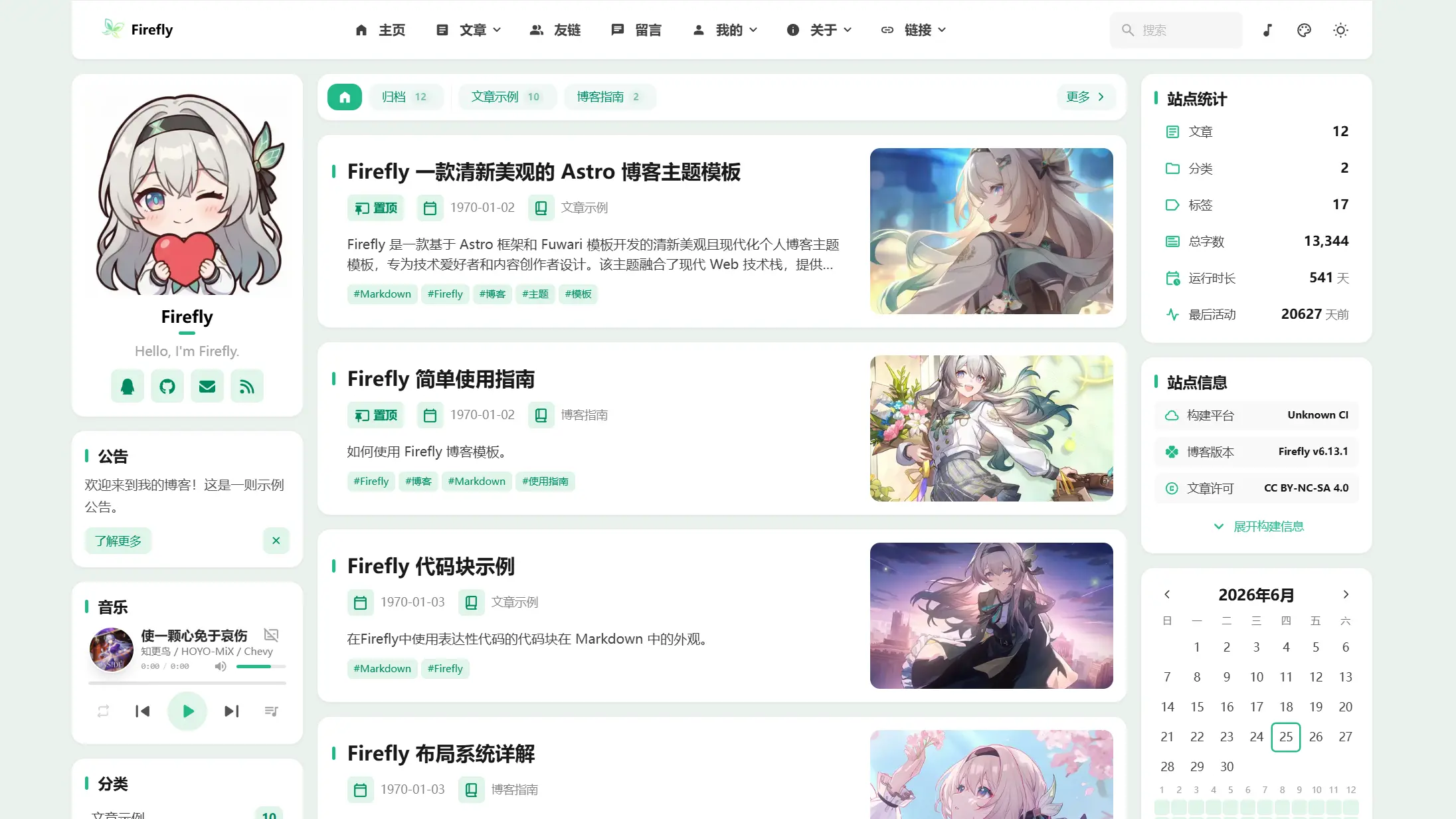
Solid Color Mode

|
Banner Mode |
||
Overlay Mode |
Fullscreen Wallpaper Mode |
Solid Color Mode |
 >[!TIP]
>
>Firefly is a fresh, beautiful, and modern personal blog theme template based on the Astro framework and the Fuwari template, designed for tech enthusiasts and content creators. It integrates a modern web tech stack, offering rich feature modules and a highly customizable interface so you can easily build a professional and visually appealing personal blog.
>
>**If you refer to or use Firefly component design and related code, please credit Firefly.**
>
>Firefly also preserves the original fuwari layout, which can be freely switched in the configuration file according to your preferences.
>
>**For more layout configurations and demos, please see: [Firefly Layout System Details](https://firefly.cuteleaf.cn/posts/guide/firefly-layout-system/)**
>
>Firefly supports i18n multilingual UI, but except for Simplified Chinese, other languages are AI-translated. If you find any errors, feel free to submit a [Pull Request](https://github.com/CuteLeaf/Firefly/pulls) to help improve them.
## ✨ Features
### Core Features
- [x] **Astro + Tailwind CSS** - Ultra-fast static site generation based on modern tech stack
- [x] **Smooth Animations** - Swup page transition animations for silky smooth browsing experience
- [x] **Responsive Design** - Perfect adaptation for desktop, tablet and mobile devices
- [x] **Multi-language Support** - i18n internationalization ui, supports Simplified Chinese, Traditional Chinese, English, Japanese, Russian, Korean
- [x] **Full-text Search** - Client-side search based on Pagefind, supports article content indexing.
### Personalization
- [x] **Dynamic Sidebar** - Supports single sidebar, dual sidebar configuration
- [x] **Article Layout** - Supports list (single column) and grid (multi-column/masonry) layout
- [x] **Font Management** - Custom font support with rich font selector
- [x] **Footer Configuration** - HTML content injection, fully customizable
- [x] **Light/Dark Mode** - Supports light/dark/system three modes
- [x] **Navbar Customization** - Logo, title, links fully customizable
- [x] **Wallpaper Mode Switching** - Banner wallpaper, fullscreen wallpaper, fullscreen transparent wallpaper, solid background
- [x] **Theme Color Customization** - 360° hue adjustment
If you have useful features and optimizations, please submit a [Pull Request](https://github.com/CuteLeaf/Firefly/pulls)
## 🚀 Quick Start
### Requirements
- Node.js ≥ 22
- pnpm ≥ 9
### Local Development
1. **Clone the repository:**
```bash
git clone https://github.com/Cuteleaf/Firefly.git
cd Firefly
```
**First [Fork](https://github.com/CuteLeaf/Firefly/fork) to your own repository then clone (recommended). Don't forget to Star before Fork!**
```bash
git clone https://github.com/you-github-name/Firefly.git
cd Firefly
```
3. **Install dependencies:**
```bash
# Install pnpm if not installed
npm install -g pnpm
# Install project dependencies
pnpm install
```
4. **Configure blog:**
- Edit configuration files in `src/config/` directory to customize blog settings
5. **Start development server:**
```bash
pnpm dev
```
Blog will be available at `http://localhost:4321`
### Platform Hosting Deployment
- **Refer to the [official guide](https://docs.astro.build/en/guides/deploy/) to deploy your blog to Vercel, Netlify, Cloudflare Pages, EdgeOne Pages, etc.**
- **Vercel**, **Netlify** and other major platforms auto-deploy, automatically selecting the appropriate adapter based on the environment.
Framework Preset: `Astro`
Root Directory: `./`
Output Directory: `dist`
Build Command: `pnpm run build`
Install Command: `pnpm install`
[](https://vercel.com/new/clone?repository-url=https://github.com/CuteLeaf/Firefly&project-name=Firefly&repository-name=Firefly)
[](https://app.netlify.com/start/deploy?repository=https://github.com/CuteLeaf/Firefly)
## 📖 Configuration
> 📚 **Detailed Configuration Documentation**: Check [Firefly Documentation](https://docs-firefly.cuteleaf.cn/) for complete configuration guide
### Setting Website Language
To set the default language for your blog, edit the `src/config/siteConfig.ts` file:
```typescript
// Define site language
const SITE_LANG = "zh_CN";
```
**Supported language codes:**
- `zh_CN` - Simplified Chinese
- `zh_TW` - Traditional Chinese
- `en` - English
- `ja` - Japanese
- `ru` - Russian
- `ko` - Korean
### Configuration File Structure
```
src/
├── config/
│ ├── index.ts # Configuration index file
│ ├── siteConfig.ts # Site basic configuration
│ ├── analyticsConfig.ts # Analytics configuration
│ ├── announcementConfig.ts # Announcement configuration
│ ├── backgroundWallpaper.ts # Background wallpaper configuration
│ ├── commentConfig.ts # Comment system configuration
│ ├── coverImageConfig.ts # Cover image configuration
│ ├── displaySettingsConfig.ts # Settings panel configuration
│ ├── dynamicConfig.ts # Moments page configuration
│ ├── effectsConfig.ts # Animation effects config (sakura, etc.)
│ ├── expressiveCodeConfig.ts # Code highlighting configuration
│ ├── fontConfig.ts # Font configuration
│ ├── footerConfig.ts # Footer configuration
│ ├── friendsConfig.ts # Friend links configuration
│ ├── galleryConfig.ts # Gallery configuration
│ ├── licenseConfig.ts # License configuration
│ ├── musicConfig.ts # Music player configuration
│ ├── navBarConfig.ts # Navbar configuration
│ ├── pioConfig.ts # Mascot configuration
│ ├── mermaidConfig.ts # Mermaid diagram configuration
│ ├── plantumlConfig.ts # PlantUML diagram configuration
│ ├── profileConfig.ts # User profile configuration
│ ├── sidebarConfig.ts # Sidebar layout configuration
│ └── sponsorConfig.ts # Sponsor configuration
```
## ⚙️ Article Frontmatter
```yaml
---
title: My First Blog Post
published: 2023-09-09
description: This is the first post of my new Astro blog.
image: ./cover.jpg # Or use "api" to enable random cover images
tags: [Foo, Bar]
category: Front-end
draft: false
lang: zh-CN # Only set when article language differs from site language in `siteConfig.ts`
pinned: false # Pin article
comment: true # Enable comments
---
```
## Moments
Moment files are stored in `src/content/dynamic/`, with one Markdown file per moment. Create one with:
```bash
pnpm new-d The weather is lovely today
```
`pnpm new-dynamic
>[!TIP]
>
>Firefly is a fresh, beautiful, and modern personal blog theme template based on the Astro framework and the Fuwari template, designed for tech enthusiasts and content creators. It integrates a modern web tech stack, offering rich feature modules and a highly customizable interface so you can easily build a professional and visually appealing personal blog.
>
>**If you refer to or use Firefly component design and related code, please credit Firefly.**
>
>Firefly also preserves the original fuwari layout, which can be freely switched in the configuration file according to your preferences.
>
>**For more layout configurations and demos, please see: [Firefly Layout System Details](https://firefly.cuteleaf.cn/posts/guide/firefly-layout-system/)**
>
>Firefly supports i18n multilingual UI, but except for Simplified Chinese, other languages are AI-translated. If you find any errors, feel free to submit a [Pull Request](https://github.com/CuteLeaf/Firefly/pulls) to help improve them.
## ✨ Features
### Core Features
- [x] **Astro + Tailwind CSS** - Ultra-fast static site generation based on modern tech stack
- [x] **Smooth Animations** - Swup page transition animations for silky smooth browsing experience
- [x] **Responsive Design** - Perfect adaptation for desktop, tablet and mobile devices
- [x] **Multi-language Support** - i18n internationalization ui, supports Simplified Chinese, Traditional Chinese, English, Japanese, Russian, Korean
- [x] **Full-text Search** - Client-side search based on Pagefind, supports article content indexing.
### Personalization
- [x] **Dynamic Sidebar** - Supports single sidebar, dual sidebar configuration
- [x] **Article Layout** - Supports list (single column) and grid (multi-column/masonry) layout
- [x] **Font Management** - Custom font support with rich font selector
- [x] **Footer Configuration** - HTML content injection, fully customizable
- [x] **Light/Dark Mode** - Supports light/dark/system three modes
- [x] **Navbar Customization** - Logo, title, links fully customizable
- [x] **Wallpaper Mode Switching** - Banner wallpaper, fullscreen wallpaper, fullscreen transparent wallpaper, solid background
- [x] **Theme Color Customization** - 360° hue adjustment
If you have useful features and optimizations, please submit a [Pull Request](https://github.com/CuteLeaf/Firefly/pulls)
## 🚀 Quick Start
### Requirements
- Node.js ≥ 22
- pnpm ≥ 9
### Local Development
1. **Clone the repository:**
```bash
git clone https://github.com/Cuteleaf/Firefly.git
cd Firefly
```
**First [Fork](https://github.com/CuteLeaf/Firefly/fork) to your own repository then clone (recommended). Don't forget to Star before Fork!**
```bash
git clone https://github.com/you-github-name/Firefly.git
cd Firefly
```
3. **Install dependencies:**
```bash
# Install pnpm if not installed
npm install -g pnpm
# Install project dependencies
pnpm install
```
4. **Configure blog:**
- Edit configuration files in `src/config/` directory to customize blog settings
5. **Start development server:**
```bash
pnpm dev
```
Blog will be available at `http://localhost:4321`
### Platform Hosting Deployment
- **Refer to the [official guide](https://docs.astro.build/en/guides/deploy/) to deploy your blog to Vercel, Netlify, Cloudflare Pages, EdgeOne Pages, etc.**
- **Vercel**, **Netlify** and other major platforms auto-deploy, automatically selecting the appropriate adapter based on the environment.
Framework Preset: `Astro`
Root Directory: `./`
Output Directory: `dist`
Build Command: `pnpm run build`
Install Command: `pnpm install`
[](https://vercel.com/new/clone?repository-url=https://github.com/CuteLeaf/Firefly&project-name=Firefly&repository-name=Firefly)
[](https://app.netlify.com/start/deploy?repository=https://github.com/CuteLeaf/Firefly)
## 📖 Configuration
> 📚 **Detailed Configuration Documentation**: Check [Firefly Documentation](https://docs-firefly.cuteleaf.cn/) for complete configuration guide
### Setting Website Language
To set the default language for your blog, edit the `src/config/siteConfig.ts` file:
```typescript
// Define site language
const SITE_LANG = "zh_CN";
```
**Supported language codes:**
- `zh_CN` - Simplified Chinese
- `zh_TW` - Traditional Chinese
- `en` - English
- `ja` - Japanese
- `ru` - Russian
- `ko` - Korean
### Configuration File Structure
```
src/
├── config/
│ ├── index.ts # Configuration index file
│ ├── siteConfig.ts # Site basic configuration
│ ├── analyticsConfig.ts # Analytics configuration
│ ├── announcementConfig.ts # Announcement configuration
│ ├── backgroundWallpaper.ts # Background wallpaper configuration
│ ├── commentConfig.ts # Comment system configuration
│ ├── coverImageConfig.ts # Cover image configuration
│ ├── displaySettingsConfig.ts # Settings panel configuration
│ ├── dynamicConfig.ts # Moments page configuration
│ ├── effectsConfig.ts # Animation effects config (sakura, etc.)
│ ├── expressiveCodeConfig.ts # Code highlighting configuration
│ ├── fontConfig.ts # Font configuration
│ ├── footerConfig.ts # Footer configuration
│ ├── friendsConfig.ts # Friend links configuration
│ ├── galleryConfig.ts # Gallery configuration
│ ├── licenseConfig.ts # License configuration
│ ├── musicConfig.ts # Music player configuration
│ ├── navBarConfig.ts # Navbar configuration
│ ├── pioConfig.ts # Mascot configuration
│ ├── mermaidConfig.ts # Mermaid diagram configuration
│ ├── plantumlConfig.ts # PlantUML diagram configuration
│ ├── profileConfig.ts # User profile configuration
│ ├── sidebarConfig.ts # Sidebar layout configuration
│ └── sponsorConfig.ts # Sponsor configuration
```
## ⚙️ Article Frontmatter
```yaml
---
title: My First Blog Post
published: 2023-09-09
description: This is the first post of my new Astro blog.
image: ./cover.jpg # Or use "api" to enable random cover images
tags: [Foo, Bar]
category: Front-end
draft: false
lang: zh-CN # Only set when article language differs from site language in `siteConfig.ts`
pinned: false # Pin article
comment: true # Enable comments
---
```
## Moments
Moment files are stored in `src/content/dynamic/`, with one Markdown file per moment. Create one with:
```bash
pnpm new-d The weather is lovely today
```
`pnpm new-dynamic