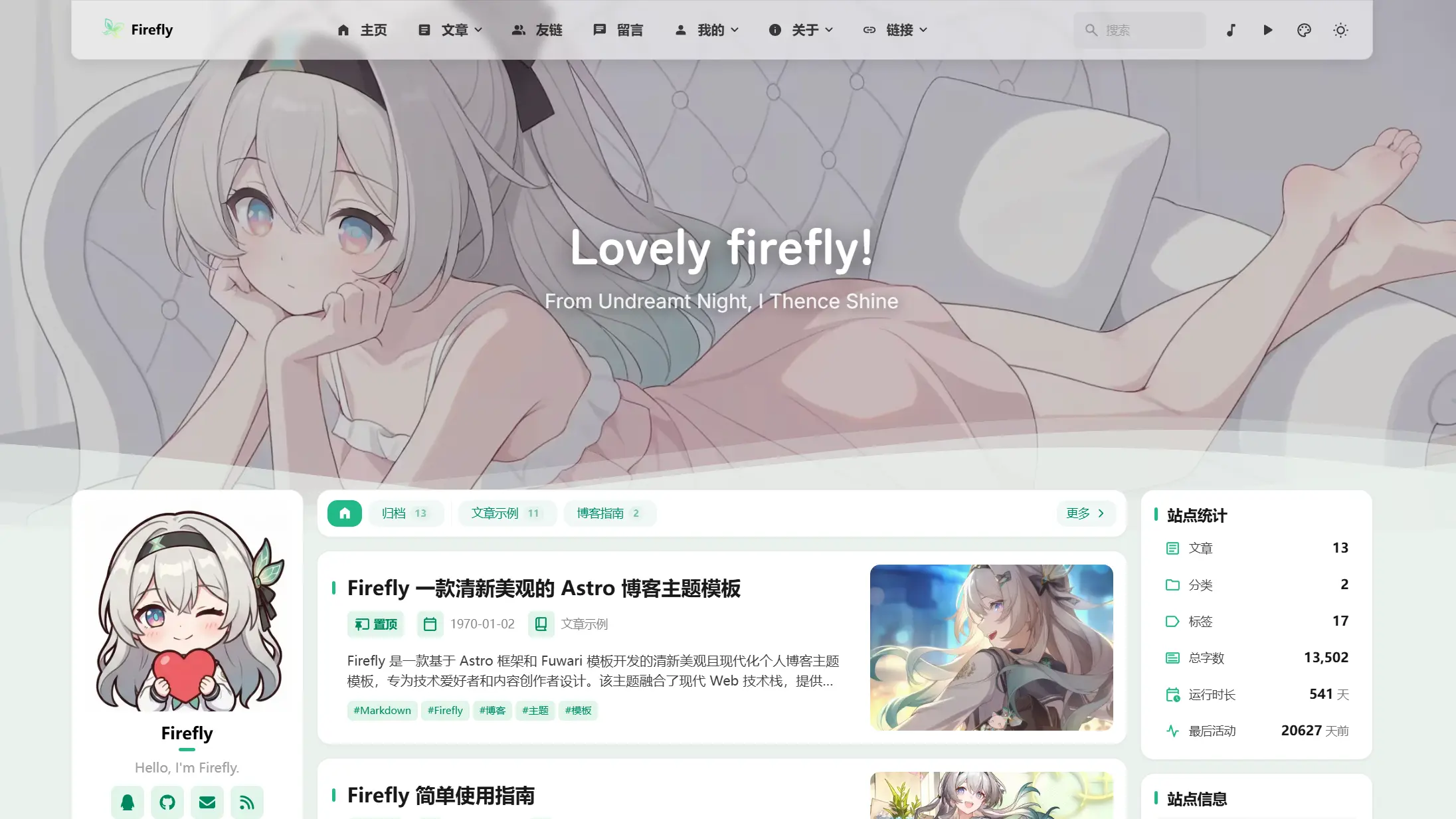
バナーモード
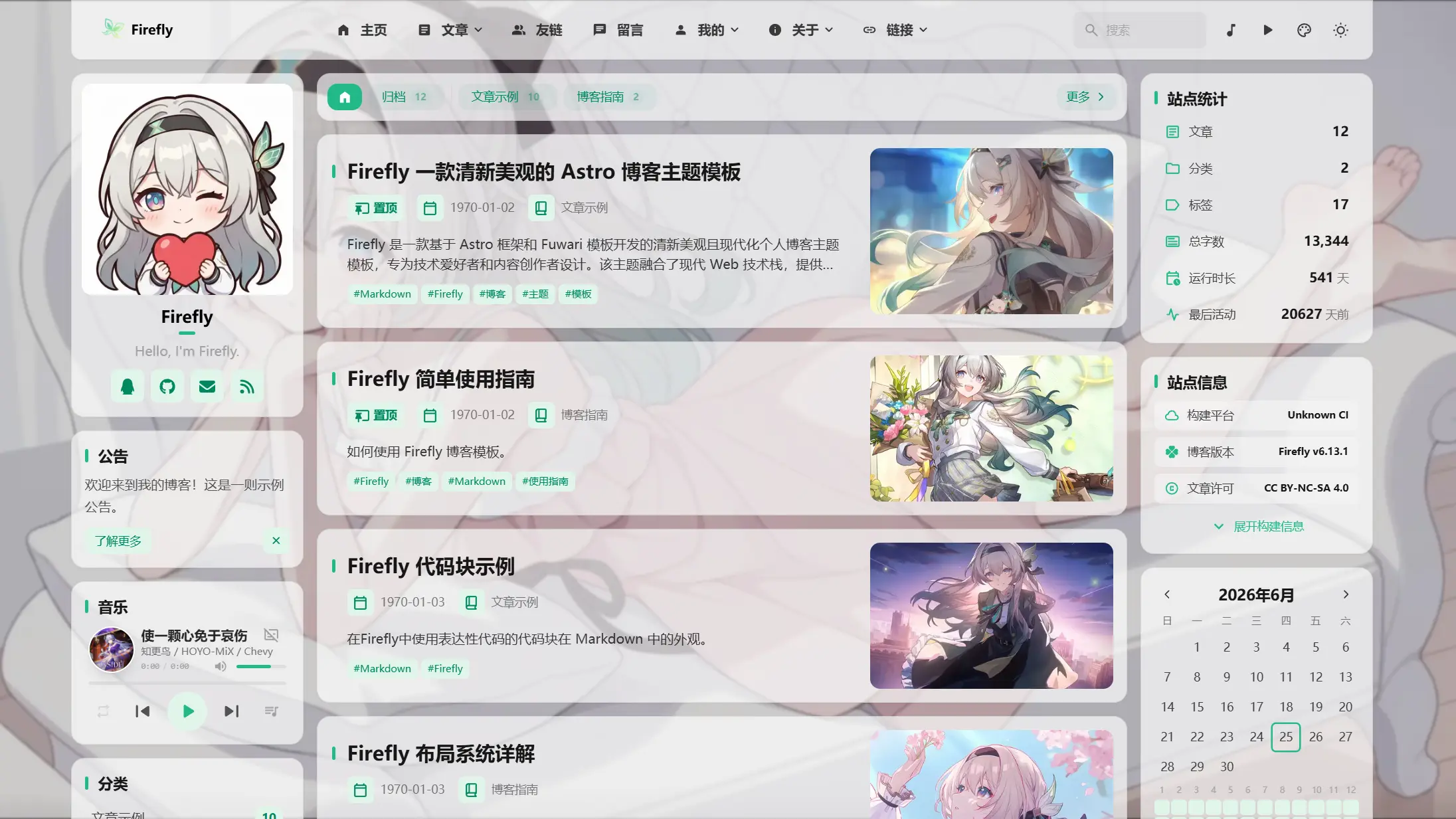
オーバーレイモード
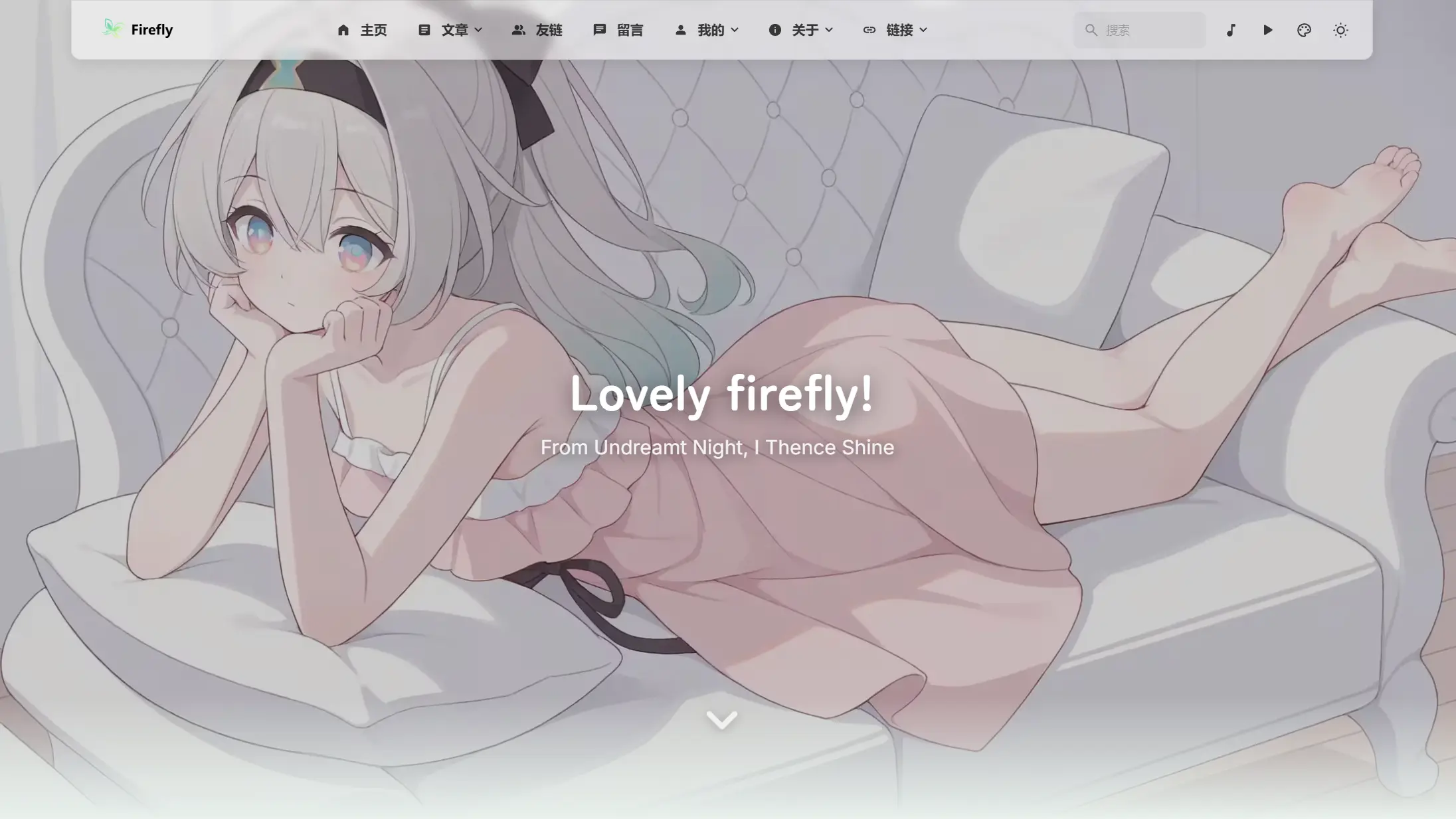
全画面壁紙モード
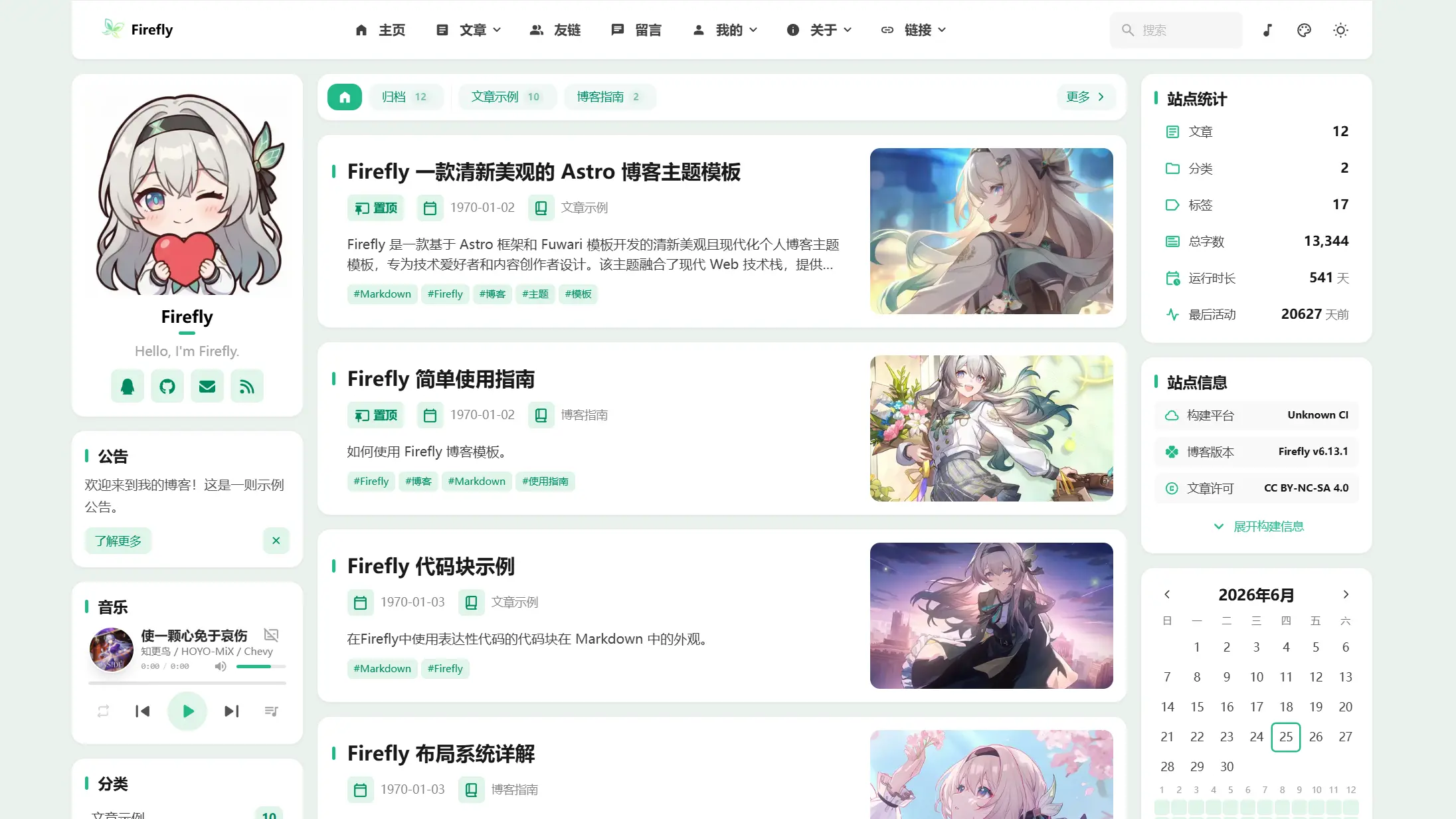
ソリッドカラーモード

|
バナーモード |
||
オーバーレイモード |
全画面壁紙モード |
ソリッドカラーモード |
 >[!TIP]
>
>Firefly は、Astro フレームワークと Fuwari テンプレートをベースに開発された、清新で美しくモダンな個人ブログテーマテンプレートです。技術愛好家やコンテンツクリエイター向けに設計されており、モダンな Web 技術スタックを統合し、豊富な機能モジュールと高いカスタマイズ性を備えたインターフェースで、プロフェッショナルで美しい個人ブログを手軽に構築できます。
>
>**Firefly コンポーネント設計や関連コードを参考または利用する場合は、出典として Firefly を明記してください。**
>
>Firefly はオリジナルの fuwari レイアウトも保持しており、設定ファイルで好みに応じて自由に切り替えられます。
>
>**レイアウト設定とデモの詳細については、[Firefly レイアウトシステム詳解](https://firefly.cuteleaf.cn/posts/guide/firefly-layout-system/)をご覧ください**
>
>Firefly は i18n の多言語 UI をサポートしていますが、簡体字中国語以外の言語は AI 翻訳です。誤りがある場合は、[Pull Request](https://github.com/CuteLeaf/Firefly/pulls) の提出を歓迎します。
## ✨ 機能
### コア機能
- [x] **Astro + Tailwind CSS** - モダンな技術スタックベースの超高速静的サイト生成
- [x] **スムーズなアニメーション** - Swup ページトランジションアニメーションで滑らかなブラウジング体験
- [x] **レスポンシブデザイン** - デスクトップ、タブレット、モバイルデバイスに完璧に対応
- [x] **多言語サポート** - i18n 国際化UI、簡体字中国語、繁体字中国語、英語、日本語、ロシア語、韓国語をサポート
- [x] **全文検索** - Pagefind ベースのクライアントサイド検索、記事コンテンツのインデックスをサポート
### パーソナライゼーション
- [x] **動的サイドバー** - シングルサイドバー、デュアルサイドバー設定をサポート
- [x] **記事レイアウト** - リスト(単列)、グリッド(多列/メーソンリー)レイアウトをサポート
- [x] **フォント管理** - カスタムフォントをサポート、豊富なフォントセレクター
- [x] **フッター設定** - HTMLコンテンツ注入、完全カスタマイズ可能
- [x] **ライト/ダークモード** - ライト/ダーク/システム追従の3モードをサポート
- [x] **ナビゲーションバーのカスタマイズ** - ロゴ、タイトル、リンクを完全カスタマイズ
- [x] **壁紙モード切り替え** - バナー壁紙、フルスクリーン壁紙、フルスクリーン透明壁紙、単色背景
- [x] **テーマカラーのカスタマイズ** - 360° 色相調整
便利な機能や最適化があれば、[Pull Request](https://github.com/CuteLeaf/Firefly/pulls)を提出してください
## 🚀 クイックスタート
### 環境要件
- Node.js ≥ 22
- pnpm ≥ 9
### ローカル開発
1. **リポジトリのクローン:**
```bash
git clone https://github.com/Cuteleaf/Firefly.git
cd Firefly
```
**まず自分のリポジトリに[Fork](https://github.com/CuteLeaf/Firefly/fork)してからクローン(推奨)。クローンする前に Star をクリックするのを忘れずに!**
```bash
git clone https://github.com/you-github-name/Firefly.git
cd Firefly
```
3. **依存関係のインストール:**
```bash
# pnpmがインストールされていない場合、まずインストール
npm install -g pnpm
# プロジェクトの依存関係をインストール
pnpm install
```
4. **ブログの設定:**
- `src/config/`ディレクトリ内の設定ファイルを編集してブログをカスタマイズ
5. **開発サーバーの起動:**
```bash
pnpm dev
```
ブログは`http://localhost:4321`で利用可能になります
### プラットフォームホスティングデプロイ
- **[公式ガイド](https://docs.astro.build/ja/guides/deploy/)を参照して、Vercel、Netlify、Cloudflare Pages、EdgeOne Pages などにブログをデプロイしてください。**
- **Vercel**、**Netlify** などの主要プラットフォームは自動デプロイに対応し、環境に応じて適切なアダプターが自動的に選択されます。
フレームワークプリセット: `Astro`
ルートディレクトリ: `./`
出力ディレクトリ: `dist`
ビルドコマンド: `pnpm run build`
インストールコマンド: `pnpm install`
[](https://vercel.com/new/clone?repository-url=https://github.com/CuteLeaf/Firefly&project-name=Firefly&repository-name=Firefly)
[](https://app.netlify.com/start/deploy?repository=https://github.com/CuteLeaf/Firefly)
## 📖 設定説明
> 📚 **詳細な設定ドキュメント**:[Fireflyドキュメント](https://docs-firefly.cuteleaf.cn/)で完全な設定ガイドを確認してください
### ウェブサイトの言語設定
ブログのデフォルト言語を設定するには、`src/config/siteConfig.ts`ファイルを編集します:
```typescript
// サイト言語を定義
const SITE_LANG = "zh_CN";
```
**サポートされている言語コード:**
- `zh_CN` - 簡体字中国語
- `zh_TW` - 繁体字中国語
- `en` - 英語
- `ja` - 日本語
- `ru` - ロシア語
- `ko` - 韓国語
### 設定ファイル構造
```
src/
├── config/
│ ├── index.ts # 設定インデックスファイル
│ ├── siteConfig.ts # サイト基本設定
│ ├── analyticsConfig.ts # アナリティクス設定
│ ├── announcementConfig.ts # お知らせ設定
│ ├── backgroundWallpaper.ts # 背景壁紙設定
│ ├── commentConfig.ts # コメントシステム設定
│ ├── coverImageConfig.ts # カバー画像設定
│ ├── displaySettingsConfig.ts # パネル構成の設定
│ ├── dynamicConfig.ts # モーメントページ設定
│ ├── effectsConfig.ts # アニメーションエフェクト設定(桜など)
│ ├── expressiveCodeConfig.ts # コードハイライト設定
│ ├── fontConfig.ts # フォント設定
│ ├── footerConfig.ts # フッター設定
│ ├── friendsConfig.ts # 友人リンク設定
│ ├── galleryConfig.ts # ギャラリー設定
│ ├── licenseConfig.ts # ライセンス設定
│ ├── musicConfig.ts # 音楽プレーヤー設定
│ ├── navBarConfig.ts # ナビゲーションバー設定
│ ├── pioConfig.ts # マスコット設定
│ ├── mermaidConfig.ts # Mermaid 図表設定
│ ├── plantumlConfig.ts # PlantUML 図表設定
│ ├── profileConfig.ts # ユーザープロフィール設定
│ ├── sidebarConfig.ts # サイドバーレイアウト設定
│ └── sponsorConfig.ts # スポンサー設定
```
## ⚙️ 記事のFrontmatter
```yaml
---
title: My First Blog Post
published: 2023-09-09
description: This is the first post of my new Astro blog.
image: ./cover.jpg # または「api」を使用してランダムカバー画像を有効化
tags: [Foo, Bar]
category: Front-end
draft: false
lang: zh-CN # 記事の言語が `siteConfig.ts` のサイト言語と異なる場合のみ設定
pinned: false # 記事を固定
comment: true # コメントを有効化
---
```
## モーメント
モーメントは `src/content/dynamic/` に保存され、1つの Markdown ファイルが1件のモーメントに対応します。次のコマンドで作成できます:
```bash
pnpm new-d 今日はとても良い天気です
```
`pnpm new-dynamic
>[!TIP]
>
>Firefly は、Astro フレームワークと Fuwari テンプレートをベースに開発された、清新で美しくモダンな個人ブログテーマテンプレートです。技術愛好家やコンテンツクリエイター向けに設計されており、モダンな Web 技術スタックを統合し、豊富な機能モジュールと高いカスタマイズ性を備えたインターフェースで、プロフェッショナルで美しい個人ブログを手軽に構築できます。
>
>**Firefly コンポーネント設計や関連コードを参考または利用する場合は、出典として Firefly を明記してください。**
>
>Firefly はオリジナルの fuwari レイアウトも保持しており、設定ファイルで好みに応じて自由に切り替えられます。
>
>**レイアウト設定とデモの詳細については、[Firefly レイアウトシステム詳解](https://firefly.cuteleaf.cn/posts/guide/firefly-layout-system/)をご覧ください**
>
>Firefly は i18n の多言語 UI をサポートしていますが、簡体字中国語以外の言語は AI 翻訳です。誤りがある場合は、[Pull Request](https://github.com/CuteLeaf/Firefly/pulls) の提出を歓迎します。
## ✨ 機能
### コア機能
- [x] **Astro + Tailwind CSS** - モダンな技術スタックベースの超高速静的サイト生成
- [x] **スムーズなアニメーション** - Swup ページトランジションアニメーションで滑らかなブラウジング体験
- [x] **レスポンシブデザイン** - デスクトップ、タブレット、モバイルデバイスに完璧に対応
- [x] **多言語サポート** - i18n 国際化UI、簡体字中国語、繁体字中国語、英語、日本語、ロシア語、韓国語をサポート
- [x] **全文検索** - Pagefind ベースのクライアントサイド検索、記事コンテンツのインデックスをサポート
### パーソナライゼーション
- [x] **動的サイドバー** - シングルサイドバー、デュアルサイドバー設定をサポート
- [x] **記事レイアウト** - リスト(単列)、グリッド(多列/メーソンリー)レイアウトをサポート
- [x] **フォント管理** - カスタムフォントをサポート、豊富なフォントセレクター
- [x] **フッター設定** - HTMLコンテンツ注入、完全カスタマイズ可能
- [x] **ライト/ダークモード** - ライト/ダーク/システム追従の3モードをサポート
- [x] **ナビゲーションバーのカスタマイズ** - ロゴ、タイトル、リンクを完全カスタマイズ
- [x] **壁紙モード切り替え** - バナー壁紙、フルスクリーン壁紙、フルスクリーン透明壁紙、単色背景
- [x] **テーマカラーのカスタマイズ** - 360° 色相調整
便利な機能や最適化があれば、[Pull Request](https://github.com/CuteLeaf/Firefly/pulls)を提出してください
## 🚀 クイックスタート
### 環境要件
- Node.js ≥ 22
- pnpm ≥ 9
### ローカル開発
1. **リポジトリのクローン:**
```bash
git clone https://github.com/Cuteleaf/Firefly.git
cd Firefly
```
**まず自分のリポジトリに[Fork](https://github.com/CuteLeaf/Firefly/fork)してからクローン(推奨)。クローンする前に Star をクリックするのを忘れずに!**
```bash
git clone https://github.com/you-github-name/Firefly.git
cd Firefly
```
3. **依存関係のインストール:**
```bash
# pnpmがインストールされていない場合、まずインストール
npm install -g pnpm
# プロジェクトの依存関係をインストール
pnpm install
```
4. **ブログの設定:**
- `src/config/`ディレクトリ内の設定ファイルを編集してブログをカスタマイズ
5. **開発サーバーの起動:**
```bash
pnpm dev
```
ブログは`http://localhost:4321`で利用可能になります
### プラットフォームホスティングデプロイ
- **[公式ガイド](https://docs.astro.build/ja/guides/deploy/)を参照して、Vercel、Netlify、Cloudflare Pages、EdgeOne Pages などにブログをデプロイしてください。**
- **Vercel**、**Netlify** などの主要プラットフォームは自動デプロイに対応し、環境に応じて適切なアダプターが自動的に選択されます。
フレームワークプリセット: `Astro`
ルートディレクトリ: `./`
出力ディレクトリ: `dist`
ビルドコマンド: `pnpm run build`
インストールコマンド: `pnpm install`
[](https://vercel.com/new/clone?repository-url=https://github.com/CuteLeaf/Firefly&project-name=Firefly&repository-name=Firefly)
[](https://app.netlify.com/start/deploy?repository=https://github.com/CuteLeaf/Firefly)
## 📖 設定説明
> 📚 **詳細な設定ドキュメント**:[Fireflyドキュメント](https://docs-firefly.cuteleaf.cn/)で完全な設定ガイドを確認してください
### ウェブサイトの言語設定
ブログのデフォルト言語を設定するには、`src/config/siteConfig.ts`ファイルを編集します:
```typescript
// サイト言語を定義
const SITE_LANG = "zh_CN";
```
**サポートされている言語コード:**
- `zh_CN` - 簡体字中国語
- `zh_TW` - 繁体字中国語
- `en` - 英語
- `ja` - 日本語
- `ru` - ロシア語
- `ko` - 韓国語
### 設定ファイル構造
```
src/
├── config/
│ ├── index.ts # 設定インデックスファイル
│ ├── siteConfig.ts # サイト基本設定
│ ├── analyticsConfig.ts # アナリティクス設定
│ ├── announcementConfig.ts # お知らせ設定
│ ├── backgroundWallpaper.ts # 背景壁紙設定
│ ├── commentConfig.ts # コメントシステム設定
│ ├── coverImageConfig.ts # カバー画像設定
│ ├── displaySettingsConfig.ts # パネル構成の設定
│ ├── dynamicConfig.ts # モーメントページ設定
│ ├── effectsConfig.ts # アニメーションエフェクト設定(桜など)
│ ├── expressiveCodeConfig.ts # コードハイライト設定
│ ├── fontConfig.ts # フォント設定
│ ├── footerConfig.ts # フッター設定
│ ├── friendsConfig.ts # 友人リンク設定
│ ├── galleryConfig.ts # ギャラリー設定
│ ├── licenseConfig.ts # ライセンス設定
│ ├── musicConfig.ts # 音楽プレーヤー設定
│ ├── navBarConfig.ts # ナビゲーションバー設定
│ ├── pioConfig.ts # マスコット設定
│ ├── mermaidConfig.ts # Mermaid 図表設定
│ ├── plantumlConfig.ts # PlantUML 図表設定
│ ├── profileConfig.ts # ユーザープロフィール設定
│ ├── sidebarConfig.ts # サイドバーレイアウト設定
│ └── sponsorConfig.ts # スポンサー設定
```
## ⚙️ 記事のFrontmatter
```yaml
---
title: My First Blog Post
published: 2023-09-09
description: This is the first post of my new Astro blog.
image: ./cover.jpg # または「api」を使用してランダムカバー画像を有効化
tags: [Foo, Bar]
category: Front-end
draft: false
lang: zh-CN # 記事の言語が `siteConfig.ts` のサイト言語と異なる場合のみ設定
pinned: false # 記事を固定
comment: true # コメントを有効化
---
```
## モーメント
モーメントは `src/content/dynamic/` に保存され、1つの Markdown ファイルが1件のモーメントに対応します。次のコマンドで作成できます:
```bash
pnpm new-d 今日はとても良い天気です
```
`pnpm new-dynamic