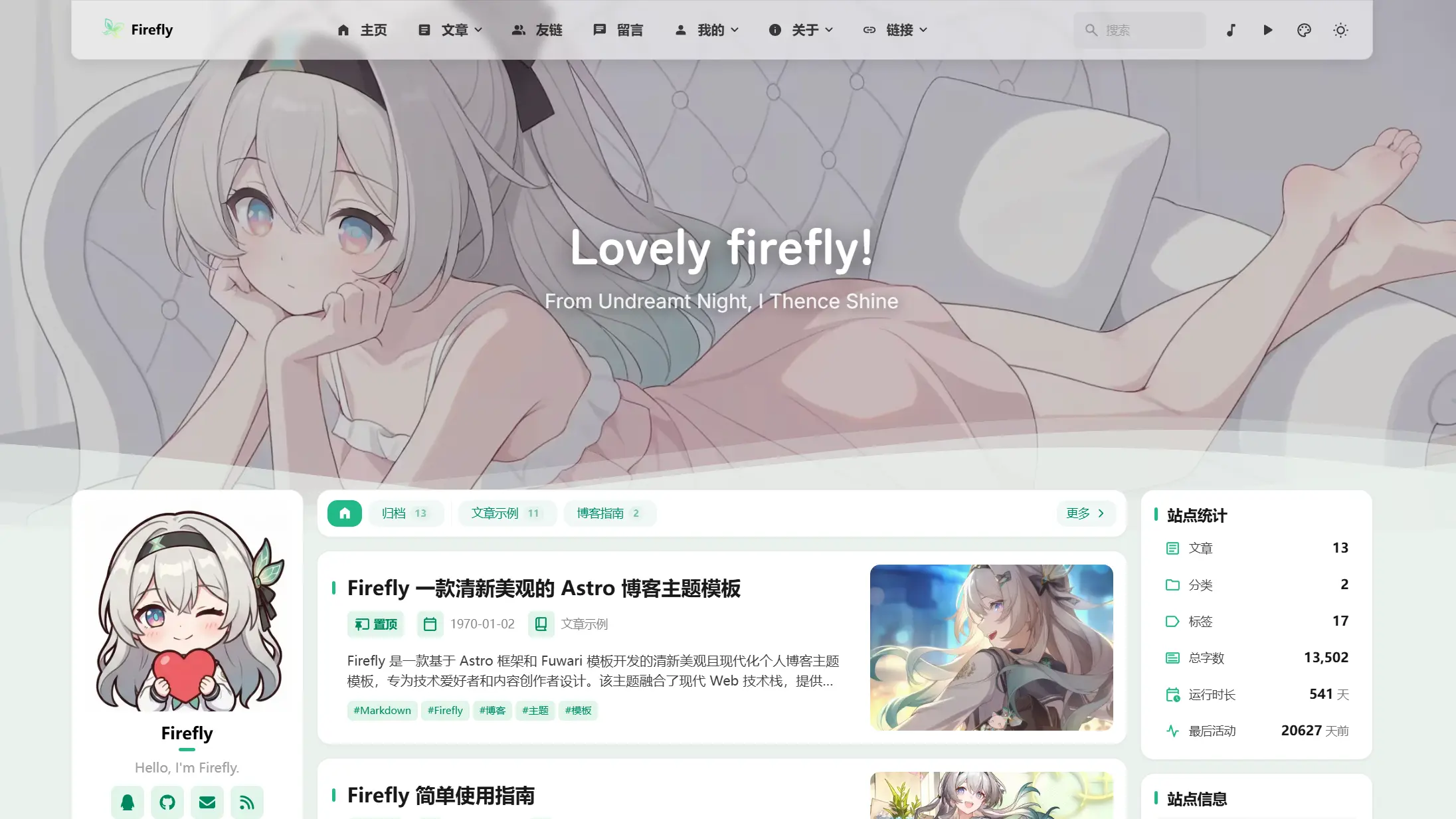
橫幅模式
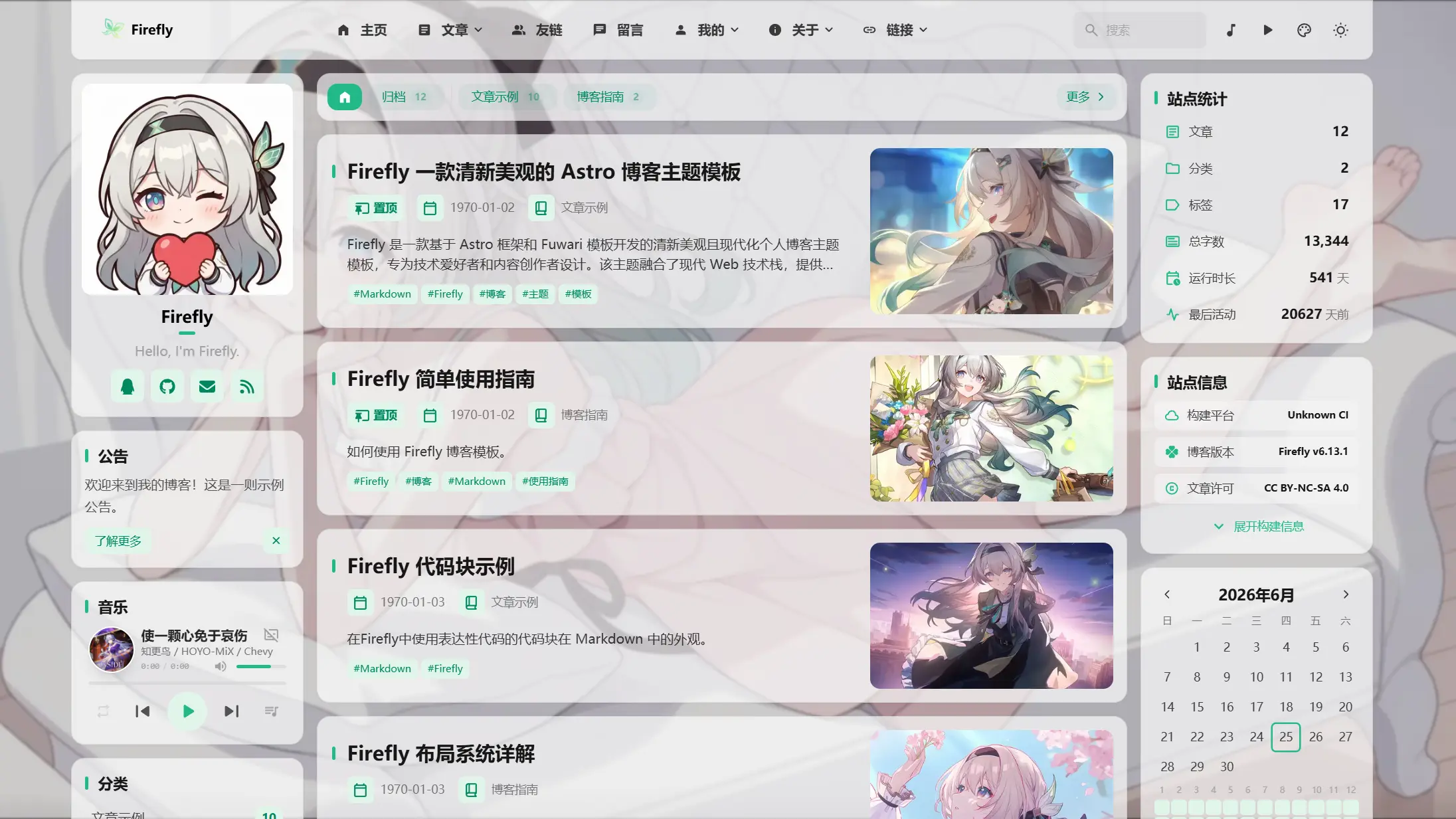
透明模式
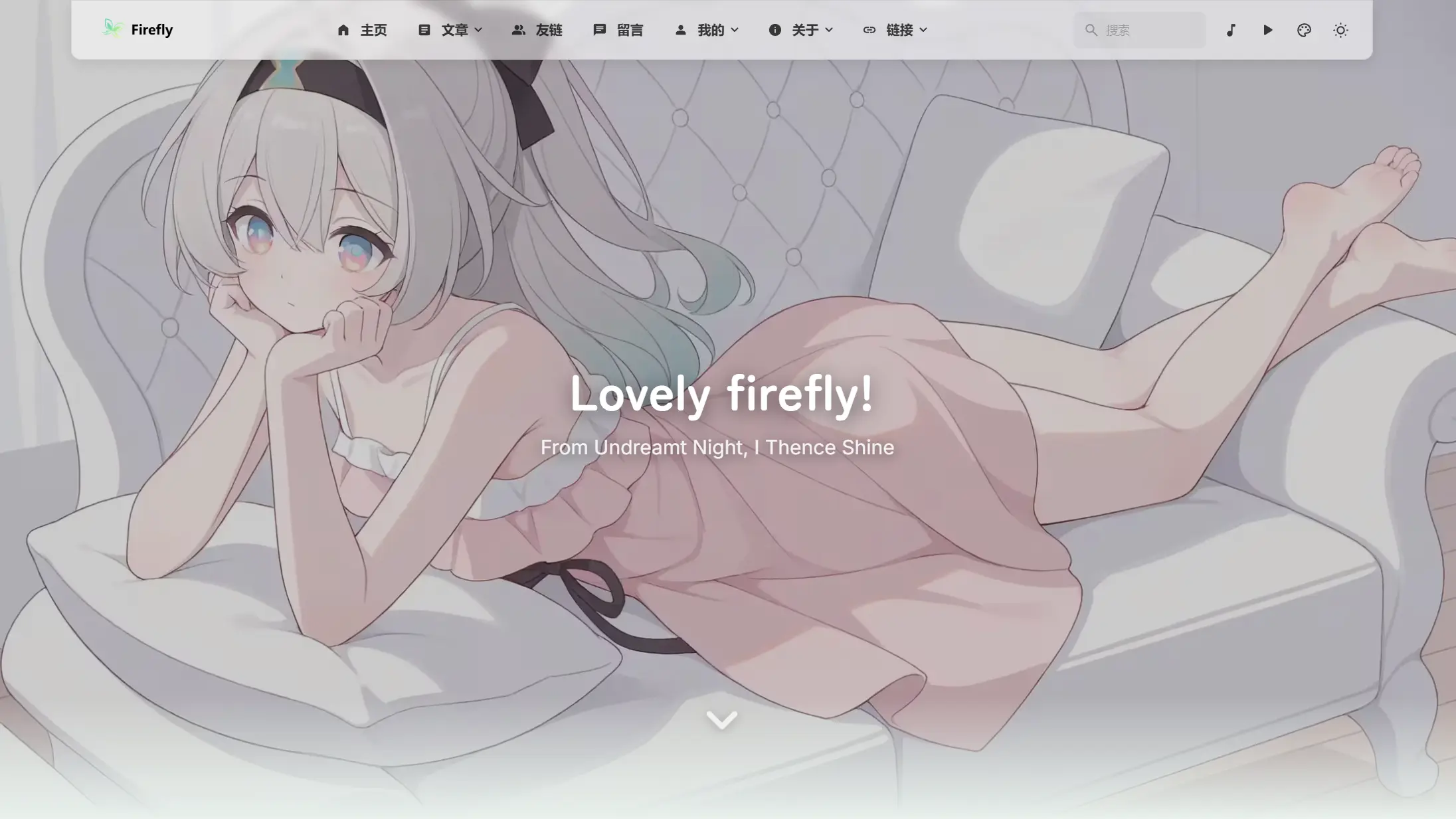
全螢幕桌布模式
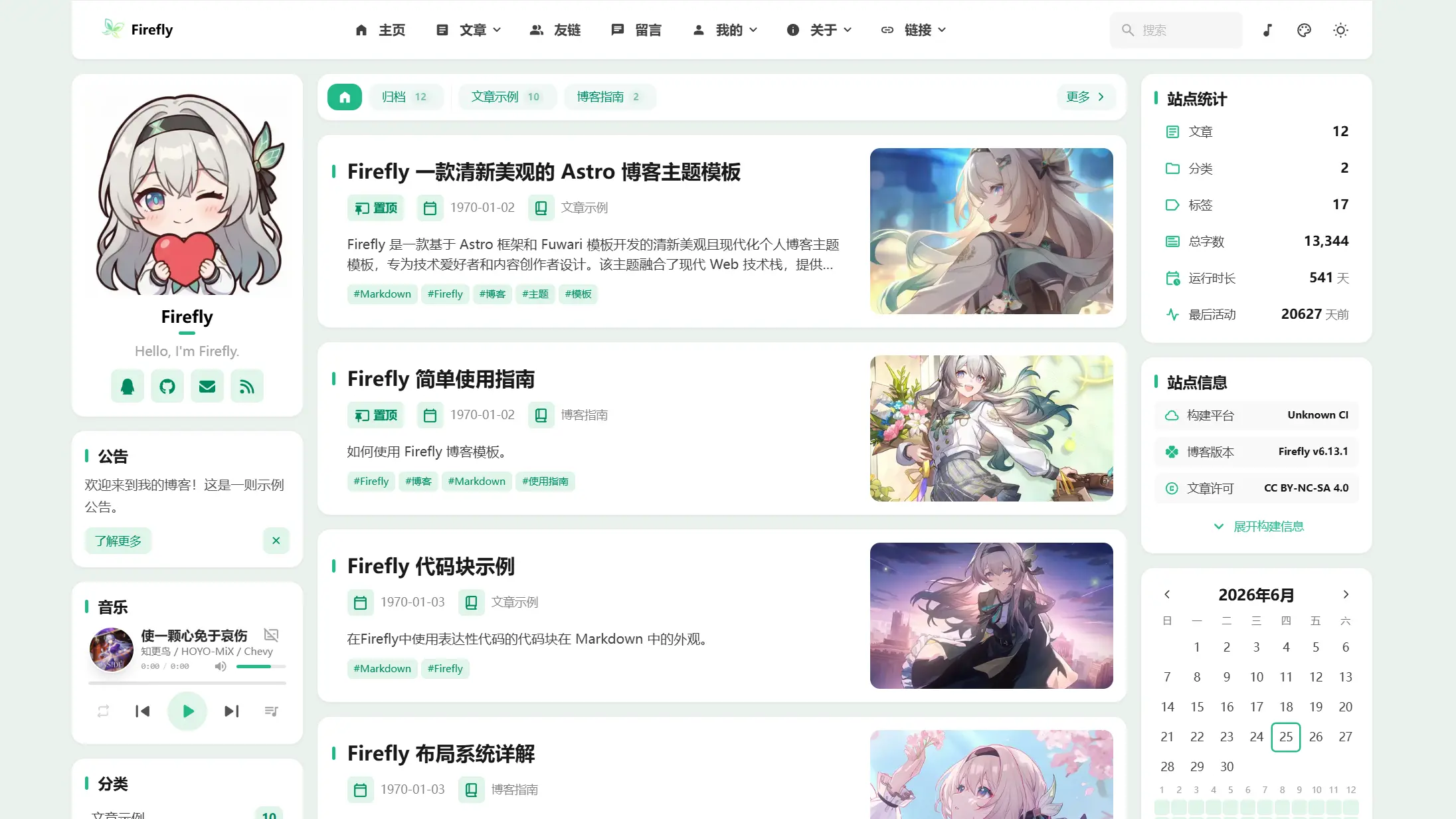
純色模式

|
橫幅模式 |
||
透明模式 |
全螢幕桌布模式 |
純色模式 |
 >[!TIP]
>
>Firefly 是一款基於 Astro 框架和 Fuwari 模板開發的清新美觀且現代化個人部落格主題模板,專為技術愛好者和內容創作者設計。該主題融合了現代 Web 技術棧,提供了豐富的功能模組和高度可自訂的介面,讓您能夠輕鬆打造出專業且美觀的個人部落格網站。
>
>**如果你參考或使用了 Firefly 元件設計和相關程式碼,請註明來自 Firefly。**
>
>Firefly 也保留了原版 fuwari 的版面,可根據自己的喜好在配置檔案中自由切換。
>
>**更多版面配置及示範請查看:[Firefly 版面配置系統詳解](https://firefly.cuteleaf.cn/posts/guide/firefly-layout-system/)**
>
>Firefly 支援 i18n 多語言 UI,但除了簡體中文,其他語言均為 AI 翻譯轉換,如有錯誤,歡迎提交 [Pull Request](https://github.com/CuteLeaf/Firefly/pulls) 修正。
## ✨ 功能特性
### 核心功能
- [x] **Astro + Tailwind CSS** - 基於現代技術堆疊的超快靜態站點生成
- [x] **流暢動畫** - Swup 頁面過渡動畫,提供絲滑的瀏覽體驗
- [x] **響應式設計** - 完美適配桌面端、平板和行動裝置
- [x] **多語言支援** - i18n 國際化UI,支援簡體中文、繁體中文、英文、日文、俄語、韓文
- [x] **全文搜尋** - 基於 Pagefind 的客戶端搜尋,支援文章內容索引。
### 個性化
- [x] **動態側邊欄** - 支援配置單側邊欄、雙側邊欄
- [x] **文章版面配置** - 支援配置(單列)列表、網格(多列/瀑布流)版面配置
- [x] **字型管理** - 支援自訂字型,豐富的字型選擇器
- [x] **頁尾配置** - HTML 內容注入,完全自訂
- [x] **亮暗色模式** - 支援亮色/暗色/跟隨系統三種模式
- [x] **導覽列自訂** - Logo、標題、連結全面自訂
- [x] **桌布模式切換** - 橫幅桌布、全螢幕桌布、全螢幕透明桌布、純色背景
- [x] **主題色自訂** - 360° 色相調節
如果你有好用的功能和優化,請提交 [Pull Request](https://github.com/CuteLeaf/Firefly/pulls)
## 🚀 快速開始
### 環境要求
- Node.js ≥ 22
- pnpm ≥ 9
### 本地開發部署
1. **克隆儲存庫:**
```bash
git clone https://github.com/Cuteleaf/Firefly.git
cd Firefly
```
**先 [Fork](https://github.com/CuteLeaf/Firefly/fork) 到自己儲存庫再克隆(推薦),記得先點 Star 再 Fork 哦!**
```bash
git clone https://github.com/you-github-name/Firefly.git
cd Firefly
```
3. **安裝依賴:**
```bash
# 如果沒有安裝 pnpm,先安裝
npm install -g pnpm
# 安裝專案依賴
pnpm install
```
4. **配置部落格:**
- 編輯 `src/config/` 目錄下的配置檔案自訂部落格設定
5. **啟動開發伺服器:**
```bash
pnpm dev
```
部落格將在 `http://localhost:4321` 可用
### 社區教程
Cloudflare Workers 部署:[【不用服务器,无需备案,零成本搭建一个自己的个人博客】](https://www.bilibili.com/video/BV1hX9XBKEhm)
### 平台託管部署
- **參考[官方指南](https://docs.astro.build/zh-cn/guides/deploy/)將部落格部署至 Vercel, Netlify, Cloudflare Pages, EdgeOne Pages 等。**
- **Vercel**、**Netlify** 等主流平台自動部署,會根據環境自動選擇適配器。
框架預設: `Astro`
根目錄: `./`
輸出目錄: `dist`
建置命令: `pnpm run build`
安裝命令: `pnpm install`
[](https://vercel.com/new/clone?repository-url=https://github.com/CuteLeaf/Firefly&project-name=Firefly&repository-name=Firefly)
[](https://app.netlify.com/start/deploy?repository=https://github.com/CuteLeaf/Firefly)
## 📖 配置說明
> 📚 **詳細配置文檔**: 查看 [Firefly使用文檔](https://docs-firefly.cuteleaf.cn/) 獲取完整的配置指南
### 設定網站語言
要設定部落格的預設語言,請編輯 `src/config/siteConfig.ts` 檔案:
```typescript
// 定義站點語言
const SITE_LANG = "zh_CN";
```
**支援的語言代碼:**
- `zh_CN` - 簡體中文
- `zh_TW` - 繁體中文
- `en` - 英文
- `ja` - 日文
- `ru` - 俄文
- `ko` - 韓文
### 配置檔案結構
```
src/
├── config/
│ ├── index.ts # 配置索引檔案
│ ├── siteConfig.ts # 站點基礎配置
│ ├── analyticsConfig.ts # 統計分析配置
│ ├── announcementConfig.ts # 公告配置
│ ├── backgroundWallpaper.ts # 背景桌布配置
│ ├── commentConfig.ts # 留言系統配置
│ ├── coverImageConfig.ts # 封面圖配置
│ ├── displaySettingsConfig.ts # 設置面板配置
│ ├── dynamicConfig.ts # 動態頁面配置
│ ├── effectsConfig.ts # 動畫特效配置(櫻花等)
│ ├── expressiveCodeConfig.ts # 程式碼高亮配置
│ ├── fontConfig.ts # 字型配置
│ ├── footerConfig.ts # 頁尾配置
│ ├── friendsConfig.ts # 友鏈配置
│ ├── galleryConfig.ts # 相簿配置
│ ├── licenseConfig.ts # 授權配置
│ ├── musicConfig.ts # 音樂播放器配置
│ ├── navBarConfig.ts # 導覽列配置
│ ├── pioConfig.ts # 看板娘配置
│ ├── mermaidConfig.ts # Mermaid 圖表配置
│ ├── plantumlConfig.ts # PlantUML 圖表配置
│ ├── profileConfig.ts # 使用者資料配置
│ ├── sidebarConfig.ts # 側邊欄版面配置
│ └── sponsorConfig.ts # 打賞配置
```
## ⚙️ 文章 Frontmatter
```yaml
---
title: My First Blog Post
published: 2023-09-09
description: This is the first post of my new Astro blog.
image: ./cover.jpg # 或使用 "api" 來啟用隨機封面圖
tags: [Foo, Bar]
category: Front-end
draft: false
lang: zh-CN # 僅當文章語言與 `siteConfig.ts` 中的網站語言不同時需要設定
pinned: false # 置頂
comment: true # 是否允許留言
---
```
## 動態
動態檔案存放於 `src/content/dynamic/`,每個 Markdown 檔案代表一則動態。可使用快捷命令建立:
```bash
pnpm new-d 今天天氣真不錯
```
`pnpm new-dynamic
>[!TIP]
>
>Firefly 是一款基於 Astro 框架和 Fuwari 模板開發的清新美觀且現代化個人部落格主題模板,專為技術愛好者和內容創作者設計。該主題融合了現代 Web 技術棧,提供了豐富的功能模組和高度可自訂的介面,讓您能夠輕鬆打造出專業且美觀的個人部落格網站。
>
>**如果你參考或使用了 Firefly 元件設計和相關程式碼,請註明來自 Firefly。**
>
>Firefly 也保留了原版 fuwari 的版面,可根據自己的喜好在配置檔案中自由切換。
>
>**更多版面配置及示範請查看:[Firefly 版面配置系統詳解](https://firefly.cuteleaf.cn/posts/guide/firefly-layout-system/)**
>
>Firefly 支援 i18n 多語言 UI,但除了簡體中文,其他語言均為 AI 翻譯轉換,如有錯誤,歡迎提交 [Pull Request](https://github.com/CuteLeaf/Firefly/pulls) 修正。
## ✨ 功能特性
### 核心功能
- [x] **Astro + Tailwind CSS** - 基於現代技術堆疊的超快靜態站點生成
- [x] **流暢動畫** - Swup 頁面過渡動畫,提供絲滑的瀏覽體驗
- [x] **響應式設計** - 完美適配桌面端、平板和行動裝置
- [x] **多語言支援** - i18n 國際化UI,支援簡體中文、繁體中文、英文、日文、俄語、韓文
- [x] **全文搜尋** - 基於 Pagefind 的客戶端搜尋,支援文章內容索引。
### 個性化
- [x] **動態側邊欄** - 支援配置單側邊欄、雙側邊欄
- [x] **文章版面配置** - 支援配置(單列)列表、網格(多列/瀑布流)版面配置
- [x] **字型管理** - 支援自訂字型,豐富的字型選擇器
- [x] **頁尾配置** - HTML 內容注入,完全自訂
- [x] **亮暗色模式** - 支援亮色/暗色/跟隨系統三種模式
- [x] **導覽列自訂** - Logo、標題、連結全面自訂
- [x] **桌布模式切換** - 橫幅桌布、全螢幕桌布、全螢幕透明桌布、純色背景
- [x] **主題色自訂** - 360° 色相調節
如果你有好用的功能和優化,請提交 [Pull Request](https://github.com/CuteLeaf/Firefly/pulls)
## 🚀 快速開始
### 環境要求
- Node.js ≥ 22
- pnpm ≥ 9
### 本地開發部署
1. **克隆儲存庫:**
```bash
git clone https://github.com/Cuteleaf/Firefly.git
cd Firefly
```
**先 [Fork](https://github.com/CuteLeaf/Firefly/fork) 到自己儲存庫再克隆(推薦),記得先點 Star 再 Fork 哦!**
```bash
git clone https://github.com/you-github-name/Firefly.git
cd Firefly
```
3. **安裝依賴:**
```bash
# 如果沒有安裝 pnpm,先安裝
npm install -g pnpm
# 安裝專案依賴
pnpm install
```
4. **配置部落格:**
- 編輯 `src/config/` 目錄下的配置檔案自訂部落格設定
5. **啟動開發伺服器:**
```bash
pnpm dev
```
部落格將在 `http://localhost:4321` 可用
### 社區教程
Cloudflare Workers 部署:[【不用服务器,无需备案,零成本搭建一个自己的个人博客】](https://www.bilibili.com/video/BV1hX9XBKEhm)
### 平台託管部署
- **參考[官方指南](https://docs.astro.build/zh-cn/guides/deploy/)將部落格部署至 Vercel, Netlify, Cloudflare Pages, EdgeOne Pages 等。**
- **Vercel**、**Netlify** 等主流平台自動部署,會根據環境自動選擇適配器。
框架預設: `Astro`
根目錄: `./`
輸出目錄: `dist`
建置命令: `pnpm run build`
安裝命令: `pnpm install`
[](https://vercel.com/new/clone?repository-url=https://github.com/CuteLeaf/Firefly&project-name=Firefly&repository-name=Firefly)
[](https://app.netlify.com/start/deploy?repository=https://github.com/CuteLeaf/Firefly)
## 📖 配置說明
> 📚 **詳細配置文檔**: 查看 [Firefly使用文檔](https://docs-firefly.cuteleaf.cn/) 獲取完整的配置指南
### 設定網站語言
要設定部落格的預設語言,請編輯 `src/config/siteConfig.ts` 檔案:
```typescript
// 定義站點語言
const SITE_LANG = "zh_CN";
```
**支援的語言代碼:**
- `zh_CN` - 簡體中文
- `zh_TW` - 繁體中文
- `en` - 英文
- `ja` - 日文
- `ru` - 俄文
- `ko` - 韓文
### 配置檔案結構
```
src/
├── config/
│ ├── index.ts # 配置索引檔案
│ ├── siteConfig.ts # 站點基礎配置
│ ├── analyticsConfig.ts # 統計分析配置
│ ├── announcementConfig.ts # 公告配置
│ ├── backgroundWallpaper.ts # 背景桌布配置
│ ├── commentConfig.ts # 留言系統配置
│ ├── coverImageConfig.ts # 封面圖配置
│ ├── displaySettingsConfig.ts # 設置面板配置
│ ├── dynamicConfig.ts # 動態頁面配置
│ ├── effectsConfig.ts # 動畫特效配置(櫻花等)
│ ├── expressiveCodeConfig.ts # 程式碼高亮配置
│ ├── fontConfig.ts # 字型配置
│ ├── footerConfig.ts # 頁尾配置
│ ├── friendsConfig.ts # 友鏈配置
│ ├── galleryConfig.ts # 相簿配置
│ ├── licenseConfig.ts # 授權配置
│ ├── musicConfig.ts # 音樂播放器配置
│ ├── navBarConfig.ts # 導覽列配置
│ ├── pioConfig.ts # 看板娘配置
│ ├── mermaidConfig.ts # Mermaid 圖表配置
│ ├── plantumlConfig.ts # PlantUML 圖表配置
│ ├── profileConfig.ts # 使用者資料配置
│ ├── sidebarConfig.ts # 側邊欄版面配置
│ └── sponsorConfig.ts # 打賞配置
```
## ⚙️ 文章 Frontmatter
```yaml
---
title: My First Blog Post
published: 2023-09-09
description: This is the first post of my new Astro blog.
image: ./cover.jpg # 或使用 "api" 來啟用隨機封面圖
tags: [Foo, Bar]
category: Front-end
draft: false
lang: zh-CN # 僅當文章語言與 `siteConfig.ts` 中的網站語言不同時需要設定
pinned: false # 置頂
comment: true # 是否允許留言
---
```
## 動態
動態檔案存放於 `src/content/dynamic/`,每個 Markdown 檔案代表一則動態。可使用快捷命令建立:
```bash
pnpm new-d 今天天氣真不錯
```
`pnpm new-dynamic