# Peckish 🍜
**Feeling peckish? Just ask.** An AI ordering agent for DoorDash — it searches,
compares real totals (fees included), builds the cart, and *you* approve every
order. Built on [Claude](https://platform.claude.com) and DoorDash's official
[`dd-cli`](https://github.com/doordash-oss/doordash-cli).
One tool layer, three surfaces:
| Surface | Start | Best for |
|---|---|---|
| **Terminal chat** | `peckish` | Living in the terminal |
| **Local web app** | `peckish-web` → http://localhost:4747 | Consumer-friendly UI: store cards, live quote, Stop button, order modal |
| **MCP server** | `claude mcp add peckish -- npx -y peckish-mcp`, or the double-click [`.mcpb`](https://github.com/CydVilla/peckish/releases/latest) | Claude Desktop / Claude Code users — **no API key needed**; your Claude subscription powers the model |
**Which one is for me?**
- **Comfortable with a terminal?** → Terminal chat. Fastest, most informative.
- **Want something that feels like an app?** → Local web app. Cards, live
quote, a proper Place-order button.
- **Already use Claude Desktop or Claude Code?** → MCP server. No API key,
no separate chat window — Claude itself becomes your ordering agent, and
order confirmation appears as a native dialog.
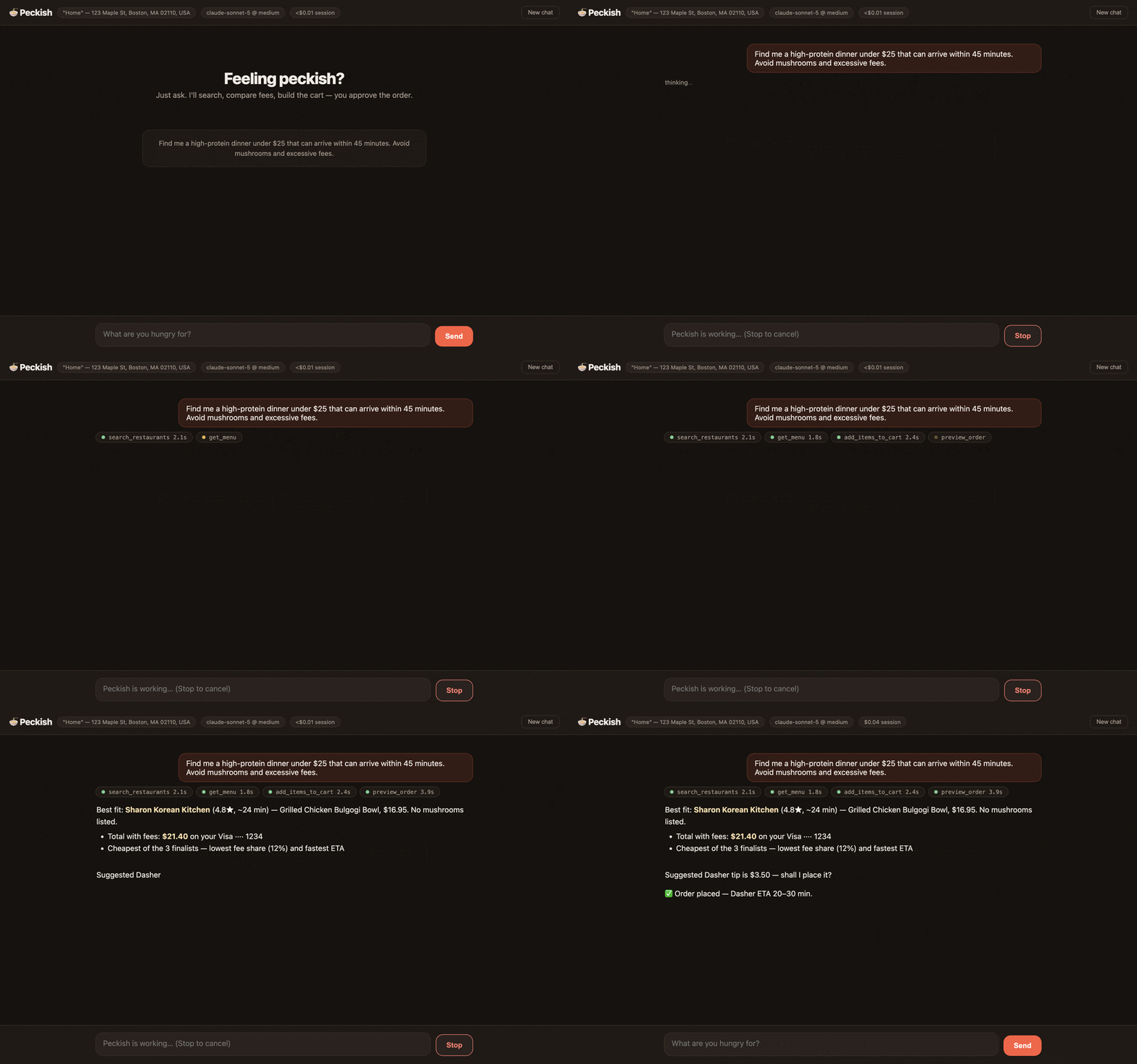
Scripted demo of the web app — store, prices and card are fictional;
the interface and the approval gate are the real ones.
**[peckish on the web →](https://cydvilla.github.io/peckish/)**
**Updates:** every release ships with full notes, all artifacts, and a
`SHA256SUMS.txt` on [Releases](https://github.com/CydVilla/peckish/releases) —
see [CHANGELOG.md](CHANGELOG.md) for the history. Watch the repo (Releases
only) to get notified.
Install in one line — no git clone:
```sh
npm install -g peckish
```
**Prefer an app?** Download the
[Mac app (.dmg)](https://github.com/CydVilla/peckish/releases/latest) —
guided setup, no terminal at any step. See [Mac app](#mac-app) below.
Everything runs on your own machine either way, because dd-cli holds your
DoorDash session there — a Mac (Apple Silicon) or Linux x86_64, including
containers and cloud sandboxes: see
[Linux, containers and headless hosts](#linux-containers-and-headless-hosts).
```
you › Find me a high-protein dinner under $25 that can arrive within 45
minutes. Avoid mushrooms and excessive fees.
⚙ search_restaurants {"query":"grilled chicken bowls","limit":8} ✓ 2.1s
⚙ get_menu {"store_id":"35406455","filter":"chicken"} ✓ 1.8s
⚙ list_carts {"store_id":"35406455"} ✓ 1.2s
⚙ add_items_to_cart {…} ✓ 2.4s
⚙ preview_order {"cart_uuid":"…"} ✓ 3.9s
Best fit: Sharon Korean Kitchen (4.8★, ~24 min) — Grilled Chicken Bulgogi
Bowl, $16.95. No mushrooms listed. Total with fees: $21.40 on your Visa
ending 1234. Suggested Dasher tip is $3.50 — that, another amount, or none?
~$0.04 turn · $0.04 session
```
---
## Get started (user guide)
### 1. Prerequisites
- **A Mac with Apple Silicon** (M1–M4) **or Linux x86_64** — the two platforms
dd-cli publishes builds for. Peckish is local-first: whichever machine you
run it on is the backend on every surface, because that's where dd-cli holds
your DoorDash session.
- **Node.js 20+** — `node --version` to check; install from nodejs.org or brew.
- **DoorDash CLI access** (currently waitlist-gated by DoorDash). Peckish
requires **dd-cli ≥ 0.2.1** — on Linux, **≥ 0.2.2**, the first release
with Linux builds — and targets **≥ 0.2.6**, the current release. Older
binaries still order fine; Peckish reads `dd-cli --version` at startup and
turns off only what that build can't do (see
[dd-cli versions](#dd-cli-versions)). Download the release from
[doordash-oss/doordash-cli](https://github.com/doordash-oss/doordash-cli/releases),
**verify the SHA256 checksum against the published value**, then:
```sh
# macOS (Apple Silicon)
tar -xzf dd-cli-v*-darwin-arm64.tar.gz && cd dd-cli-v*-darwin-arm64
# Linux (x86_64)
tar -xzf dd-cli-v*-linux-amd64.tar.gz && cd dd-cli-v*-linux-amd64
bash install.sh # both platforms — installs to ~/.local/bin/dd-cli
dd-cli login # sign in to DoorDash in your browser
```
No browser on that machine (container, VM, cloud sandbox)? See
[Linux, containers and headless hosts](#linux-containers-and-headless-hosts).
- **An Anthropic API key** for the terminal/web surfaces
([console.anthropic.com](https://console.anthropic.com)) — *or skip the key
entirely and use the MCP surface with your Claude subscription (step 4).*
### 2. Install Peckish
```sh
npm install -g peckish
```
That's it — you now have three commands: `peckish` (terminal chat),
`peckish-web` (web app), and `peckish-mcp` (MCP server).
Or install from source (contributors)
```sh
git clone https://github.com/CydVilla/peckish.git
cd peckish
npm install
npm test # optional: 25 unit tests, no network needed
npm run dev # terminal chat (or: npm run web / npm run mcp)
```
### 3. Run it — terminal or web
```sh
export ANTHROPIC_API_KEY=sk-ant-… # from console.anthropic.com
peckish # terminal chat
peckish-web # web app → open http://localhost:4747
```
On boot Peckish verifies your DoorDash sign-in, shows your default delivery
address, and flags any open carts you forgot about. If sign-in is missing or
expired, Peckish offers to fix it for you: the terminal asks before launching
`dd-cli login` (which opens your browser), the web app shows a sign-in card,
and mid-conversation the agent can offer the same assist on any surface — you
approve, sign in in the browser, and it picks up where it left off. On a
machine with no browser, Peckish skips that offer and tells you how to inject
a token instead — see below.
### 4. Or run it inside Claude — no API key
Claude itself becomes the ordering agent, and your Claude subscription pays for
the model. Pick whichever fits your client:
**Claude Code** — one line:
```sh
claude mcp add peckish -- npx -y peckish-mcp
```
**Claude Desktop** — download `peckish-0.2.2.mcpb` from
[Releases](https://github.com/CydVilla/peckish/releases/latest) and
double-click it. Claude Desktop installs it like a browser extension: no
terminal, no Node install, no JSON editing.
Or configure Claude Desktop by hand
Add to `~/Library/Application Support/Claude/claude_desktop_config.json`:
```json
{
"mcpServers": {
"peckish": {
"command": "npx",
"args": ["-y", "peckish-mcp"]
}
}
}
```
If dd-cli isn't at `~/.local/bin/dd-cli`, add
`"env": { "DD_CLI_PATH": "/your/path/to/dd-cli" }` — desktop apps don't
inherit your shell `PATH`.
Peckish is also listed in the [MCP Registry](https://registry.modelcontextprotocol.io)
as `io.github.CydVilla/peckish`, so clients that browse the registry can find
it directly.
Restart Claude Desktop and ask it to find you dinner. Order confirmation
appears as a native dialog; clients that can't render dialogs can browse and
build carts but **cannot place orders** (fail closed).
### 5. Everyday use
Things to say:
- *"Find me a high-protein dinner under $25 that can arrive within 45 minutes. Avoid mushrooms and excessive fees."*
- *"Compare the real totals at the top two — fees included."*
- *"Reorder my usual from Sharon Korean."*
- *"What did I spend on delivery last month?"*
- *"Is this place actually good?"* (checks web reviews)
- *"Never mushrooms, ever."* → saved permanently; applied automatically next time
- *"Get me milk, eggs, and a pound of ground beef from Whole Foods."*
**Placing an order** always ends with an explicit confirmation *you* perform —
typing `yes` in the terminal, clicking **Place order** in the web modal, or
approving the dialog in Claude Desktop. Before that, Peckish must show you the
itemized quote, confirm the tip, and name the card being charged. Decline
anything and it backs off.
**Controls & housekeeping**
| Where | What |
|---|---|
| Terminal | `/prefs` saved preferences · `/cost` session spend · `/reset` new conversation · `/quit` · **Ctrl+C stops a running turn** |
| Web | **Stop** button cancels a turn · **New chat** resets · header chip shows session cost · click the **address chip** to switch your delivery address (editing an address's text happens on doordash.com — Peckish picks it up automatically) |
| Both | Preferences live in `~/.peckish/preferences.json`; a full audit log of every tool call and confirmation is written to `~/.peckish/logs/*.jsonl` |
**Cost:** defaults are tuned for low spend at decent quality — `claude-sonnet-5`
at medium effort, prompt caching on the system prefix and conversation tail,
and server-side context editing that prunes stale menu payloads in long
sessions. The cost meter shows the approximate spend per turn and per session.
Max quality: `DD_AGENT_MODEL=claude-opus-4-8 DD_AGENT_EFFORT=high`. (On MCP,
the client chooses and pays for the model.)
**Troubleshooting**
| Symptom | Fix |
|---|---|
| `DoorDash sign-in is missing or expired` | Accept the built-in sign-in assist (it runs `dd-cli login` for you), or run it in a terminal yourself |
| The same, on a headless Linux box | There's no browser to sign in with: `dd-cli export-token` on a machine that has one, then `DD_CLI_ACCESS_TOKEN=…` here ([details](#linux-containers-and-headless-hosts)) |
| Auth errors right after upgrading dd-cli | New CLI versions can need fresh scopes — sign in again (assist, `dd-cli login`, or a fresh `export-token`) |
| `Anthropic authentication failed` | `export ANTHROPIC_API_KEY=…` in the same shell, restart |
| `dd-cli binary not found` | Install dd-cli (step 1) or set `DD_CLI_PATH=/path/to/dd-cli` |
| `no dd-cli build` for your machine | dd-cli ships macOS arm64 and Linux x86_64 only — Intel Macs and Linux arm64 can't run Peckish |
| Web app port in use | `PECKISH_PORT=5757 peckish-web` |
| A turn ran away | Ctrl+C (terminal) / Stop (web) — history rolls back cleanly |
Env vars: `DD_AGENT_MODEL` (default `claude-sonnet-5`), `DD_AGENT_EFFORT`
(`low`–`max`, default `medium`), `DD_CLI_PATH`, `PECKISH_PORT` (default `4747`),
`DD_CLI_ACCESS_TOKEN` (read by dd-cli itself — browserless sign-in).
---
## Mac app
A double-clickable app for people who never want to see a terminal:
download `Peckish-x.y.z-arm64.dmg` from
[Releases](https://github.com/CydVilla/peckish/releases/latest), drag
**Peckish** to Applications, and open it.
**First launch (Gatekeeper):** the app is ad-hoc signed but not notarized (no
paid Apple Developer ID), so macOS won't open it on a plain double-click the
first time. **Right-click the app → "Open" → "Open"** (or approve it under
System Settings → Privacy & Security). Only needed once.
> If macOS instead says **"Peckish is damaged and can't be opened"**, you have
> a build from before this was fixed, or the download quarantine got confused.
> Clear it once and it opens normally:
> ```sh
> xattr -cr /Applications/Peckish.app
> ```
First-run setup happens in the app — three buttons, no terminal:
1. **DoorDash CLI** — one-click guided install (downloads the official
release, verifies its SHA256 checksum before running anything). If you
don't have dd-cli access yet, there's a waitlist link.
2. **Sign in to DoorDash** — opens your browser; the app detects when
you're done. Your sign-in lives in the macOS keychain.
3. **Anthropic API key** — paste it once; it's stored encrypted with
Electron `safeStorage` (keychain-backed), never in plain text.
Then **Open Peckish** — same web app, same order-confirmation modal, same
safety gates; the app is just a shell that runs the local server for you on
a random localhost-only port. Requires Apple Silicon; Node.js is **not**
required (the app bundles its own runtime).
Building it yourself: `cd desktop && npm install && npm run dist` →
`desktop/dist/Peckish-*.dmg`.
The `.dmg` is the one Mac-only surface. The terminal, web and MCP surfaces all
run on Linux too:
---
## Linux, containers and headless hosts
dd-cli **v0.2.2** added Linux (amd64) builds, so all three Peckish surfaces run
on Linux x86_64 unchanged — same tools, same order gate, same audit log.
Install dd-cli from the same release page (asset
`dd-cli-v-linux-amd64.tar.gz`, verify its SHA256, `bash install.sh`),
then `npm install -g peckish`. If you put the binary somewhere other than
`~/.local/bin/dd-cli`, set `DD_CLI_PATH` — Peckish also checks
`/usr/local/bin/dd-cli` and your `PATH`.
**With a desktop session** (`DISPLAY` or `WAYLAND_DISPLAY` set), nothing
changes: `dd-cli login` opens your browser and the built-in sign-in assist
works exactly as it does on a Mac.
**Without one** — a container, a VM, a cloud sandbox, SSH with no forwarding —
the browser flow cannot complete, so Peckish stops offering it (no spawned
login that hangs forever, no "run `dd-cli login`" advice that can't work) and
points at the token path instead:
```sh
# 1. on a machine that HAS a browser (dd-cli ≥ 0.2.2)
dd-cli export-token
# 2. in the environment that runs Peckish
export DD_CLI_ACCESS_TOKEN=''
peckish # or peckish-web / peckish-mcp
```
dd-cli picks the token up from the environment Peckish passes down, so every
surface authenticates without a keychain or a browser.
- **That token is live access to your DoorDash account** — it can place real
orders. Treat it like a password: keep it in your runtime's secret store, not
in an image layer, a `docker run -e` in your shell history, or a committed
`.env`. Mint a fresh one with `dd-cli export-token` when it expires.
- **The order gate does not change.** Placing an order still needs your
explicit approval on the surface you're using (typed `yes`, the web modal, or
the MCP dialog) — headless means no browser, not unattended ordering.
- **`peckish-web` in a container** binds `127.0.0.1` *inside the container* by
design, so a published port (`-p 4747:4747`) can't reach it. Run the
container with `--network host` (Linux), or use the terminal or MCP surface,
which need no port at all.
- **Not supported:** Linux arm64 and Intel Macs — dd-cli publishes no build for
either, and Peckish says so explicitly instead of failing obscurely.
---
## What it does
- **Search → menus → cart → preview → confirm → submit**, with the real
fee/ETA quote (`order preview`) driving every recommendation.
- **Comparison shopping**: builds carts at up to 3 finalists, compares true
totals + fee share + ETA, recommends one, deletes the losers.
- **Fee tactics**: promo scanning with consent, pickup-vs-delivery comparison,
DoorDash credits surfaced, DashPass status shown.
- **Memory**: dietary rules and habits persist across sessions and surfaces.
- **History**: "my usual" from order frequency, honest spend breakdowns from
receipts, reorders with silent-drop detection.
- **Web reviews** via Claude's server-side web search (never used for prices —
dd-cli is the only source of truth for ordering data).
- **Group carts** (new in 0.4.0): "start a group order for the team, $25 each" —
creates a shareable cart link, optional per-person spend limit, host reviews
and submits when everyone's in.
- **Guest sub-carts** (new): order for people who have no DoorDash account at
all — "add a veggie burrito for Luke Wulf" puts their items in their own
sub-cart of your group cart. They never sign in, never install anything.
Name them the same way each time and their items stay together; ask "who's
ordered?" to see who is tracked. The per-guest credential DoorDash issues is
held by Peckish and never shown to you or the model — see
[Guest sub-carts](#guest-sub-carts).
- **Express delivery** (new): asks for Priority when you want it fastest —
offered per-cart, priced into the quote before you approve.
- **Credits control** (new): DoorDash credits apply by default; say "don't use
my credits" to opt out for an order.
- **Enterprise chains** (new): Domino's, Sweetgreen, Dave's Hot Chicken and
other big chains are now orderable (dd-cli ≥ 0.2.1).
- **Search filters** (new): "somewhere cheap that can be here in 30 minutes"
narrows server-side — DashPass-only, price tier, max ETA, search radius —
instead of pulling 30 results and sifting.
- **Promo-aware menus** (new): menus and item details carry the store's live
promotions and which items qualify, priced against the delivery address, so
a deal gets offered while you're still choosing rather than at checkout.
- **Pickup at a glance** (new): search results say per store whether pickup is
available now, schedulable, or opens later — useful when the fees annoy you.
- **Schedule ahead** (new): a store that's closed now is offered as "opens at
6, I can schedule it" instead of being dropped from the results.
- **Weight-priced items** (new): deli, butcher and produce items take a decimal
quantity in their own unit, and Peckish tells you the total is an estimate
because the charge follows the actual weight.
- **Address lookup** (new): deliver somewhere that isn't saved yet — Peckish
resolves the address, has you pick the exact match, and asks before saving it
(it becomes your account default).
- **Live order tracking** (new): "where's my food?" answers from the full
lifecycle — placement, progress, current ETA, late trend, cancellation
reason — not just "did it go through".
- Work benefits (company budgets + expense codes), scheduled delivery,
pickup, groceries/retail/pets/alcohol, group order history.
## Guest sub-carts
A DoorDash group cart holds items for two kinds of people, and they work
differently:
- **Participants** have their own DoorDash account. They open the group cart
link and add their own items under their own identity. Peckish joins one on
your behalf with the link itself.
- **Guests** have no account and never touch DoorDash. The host's account adds
on their behalf, into a sub-cart tagged with their name. This is what makes
"just tell me what everyone wants" work for a team where only one person has
the CLI.
DoorDash issues a per-guest token on that guest's first add. It is a bearer
credential for their sub-cart, it is returned exactly once — `cart show` never
echoes it and there is no endpoint to fetch it again — and dd-cli's own
guidance is to keep it server-side and out of logs.
So Peckish keeps it. Tokens are stored in `~/.peckish/guests.json` (mode
`0600`) keyed by cart and guest name, stripped out of every tool result before
the model sees one, and therefore never written to the session audit log, which
records a preview of every result. The model works purely in names: it says
"Luke Wulf" and Peckish supplies the right credential. There is no way for the
assistant to read, request or repeat a token, which is the point.
Two consequences worth knowing:
- **Spelling matters.** "Luke Wulf" and "Luke Wolf" are two guests with two
sub-carts. Peckish ignores case and extra spaces, nothing more.
- **The file matters.** Delete it mid-cart and the affected guests' continuity
is gone — the only recovery is starting them again under the same name,
which forks their line items. Peckish drops a cart's guests once its order is
submitted or the cart is deleted, and prunes anything older than 30 days.
## dd-cli versions
dd-cli is a separate binary on its own release cadence, and every release since
0.2.2 has added flags. Peckish probes `dd-cli --version` once per process and
degrades instead of breaking:
| dd-cli | What it unlocks in Peckish |
|---|---|
| ≥ 0.2.1 | Baseline: `--intent` on every command, enterprise chains |
| ≥ 0.2.2 | Linux builds, `export-token` headless sign-in |
| ≥ 0.2.3 | `find_address` / `add_address`, full order-status lifecycle, group orders in history |
| ≥ 0.2.4 | Promotions on menus and item details, searching from a saved `address_id` |
| ≥ 0.2.5 | Search filters, per-store pickup availability, schedule-ahead windows, weight-priced items |
| ≥ 0.2.6 | Paying on a chosen card, DoubleDash, cross-retailer price comparison, Meal Manager calendars, saving an address without making it default |
Two scripts keep this honest:
```sh
node scripts/verify-dd-cli.mjs # what YOUR dd-cli actually accepts
node scripts/check-dd-cli-release.mjs # is a newer dd-cli out?
```
`verify-dd-cli.mjs` runs the commands Peckish runs against your real,
signed-in binary and reports which flags it accepts and what field names the
responses carry. It is read-only — no carts, no saved addresses, no orders.
Run it after a dd-cli upgrade, or when something Peckish sends comes back
rejected — [docs/dd-cli-verification.md](docs/dd-cli-verification.md) is the
checklist for acting on what it reports. `check-dd-cli-release.mjs` runs weekly in CI and files an issue when
dd-cli publishes a release newer than the one Peckish targets.
Behaviour Peckish applies *on its own* — like pricing menus against your saved
address so promo eligibility is right — stays off until the version check
confirms the binary supports it. A flag the model asked for explicitly is
always passed through, so an old binary answers with its own error naming the
flag rather than Peckish silently ignoring the request. The detected version
goes into the session context, so the assistant knows what it can offer and
suggests an upgrade only when you ask for something the binary can't do.
## Architecture
```
terminal REPL local web app MCP client (Claude Desktop…)
src/index.ts src/web.ts + public/ src/mcp.ts
└────────────┬─────────┘ │ (client's model reasons;
↓ │ server instructions guide it)
Claude agent loop, streaming │
src/agent.ts · claude-sonnet-5 · strict tools │
· adaptive thinking · context editing │
· prompt caching · web_search · cost meter │
└───────────────┬─────────────────┘
↓
38 typed tools — src/tools.ts (strict: true)
↓
sanitizing wrapper — src/ddcli.ts
↓
dd-cli --json-output → DoorDash
```
## Safety model
Placing an order **always requires an explicit human approval rendered by the
surface, not by the model**:
| Surface | The gate |
|---|---|
| Terminal | Type `yes` at a prompt |
| Web | "Place order" modal (declines automatically after 5 min) |
| MCP | Client elicitation dialog; clients without elicitation **cannot place orders** (fail closed) |
Also on every surface:
- **Strict tool schemas** — the API guarantees tool arguments validate before
any handler runs (no malformed-argument class).
- **Abortable turns** — Ctrl+C / Stop rolls history back to the turn start.
- **Audit log** — every tool call, argument set, duration, confirmation
outcome, and submit result in `~/.peckish/logs/*.jsonl`.
- Tip confirmed + card named before any submit ask; submit never auto-retries
(not idempotent); success reported only after `order status` confirms.
- Merchant text treated as data (widget/assistant-instruction fields stripped);
read-only CLI calls retry once on transient errors, mutations never do.
- Web server is localhost-only (Host + Origin checks).
## What Peckish shares with DoorDash
dd-cli ≥ 0.2.1 requires an `--intent` note on every command, which DoorDash
says it may review for research and product improvement. DoorDash's documented
format asks for your **verbatim prompt** — but food prompts routinely contain
dietary, health, and religious signals, which DoorDash's own guidance says to
avoid. So Peckish defaults to privacy:
- **What is sent:** a one-line goal summary authored by the model at generic
altitude (e.g. `Summary: Help the user order dinner`), plus an explicit
`user prompt/purpose: "(not shared — Peckish privacy default)"` marker.
- **What is never sent by default:** your verbatim words, dietary rules,
budgets, names, saved preferences, or conversation content.
- **Opt in to the full format:** set `PECKISH_INTENT_VERBATIM=1` and the
intent will include your opening request verbatim, as DoorDash's docs ask.
Independent of intent, DoorDash necessarily sees the API traffic itself
(searches, carts, orders) — that's inherent to ordering.
## Repo map
| File | What it is |
|---|---|
| `src/index.ts` | Terminal REPL surface (abort, cost lines, /cost) |
| `src/web.ts` + `public/index.html` | Web surface: SSE streaming, cards, Stop, confirm modal, Origin guard |
| `src/mcp.ts` | MCP stdio server: 38 tools + session context, instructions, elicitation gates |
| `src/agent.ts` | System prompt + streaming tool loop (beta: context editing; web_search; usage) |
| `src/tools.ts` | Tool schemas (strictified) + handlers; menu trimming/filtering |
| `src/ddcli.ts` | `execFile` wrapper: envelope parsing, UI-field stripping, error mapping, bounded read-only retry |
| `src/platform.ts` | Supported dd-cli targets + whether sign-in can use a browser here or needs an injected token |
| `src/confirm.ts` | Pluggable confirmation gates (fail closed) |
| `src/costs.ts` / `src/logger.ts` | Cost accounting · JSONL audit log |
| `src/prefs.ts` | Preference persistence (`~/.peckish/`) |
| `tests/unit.test.ts` | 108 unit tests (`npm test`), no network needed |
| `desktop/` | Electron shell for the Mac app (.dmg): onboarding + server launcher, no agent logic |
| `packages/mcp/` | The `peckish-mcp` npm package — a launcher so `npx -y peckish-mcp` starts the MCP server |
| `extension/` | Claude Desktop extension (`.mcpb`): manifest + vendored server. `node build-manifest.mjs && mcpb pack . peckish.mcpb` |
| `server.json` | MCP Registry metadata (`io.github.cydvilla/peckish`) |
## Releasing
Everything ships from one tag. `.github/workflows/release.yml` publishes both
npm packages, registers the MCP Registry entry, builds the `.mcpb` and the
`.dmg`, and attaches both to the GitHub release:
```sh
npm version patch # or edit the versions by hand
git push && git push --tags
```
Every publish step is **skip-if-already-published**, so re-running a tag after a
failure is safe. `.github/workflows/ci.yml` runs typecheck, tests, a metadata
consistency check, and a real MCP handshake on every push.
`scripts/check-consistency.mjs` guards the metadata that spans files and drifts
silently — the registry namespace casing, matching `server.json` name and
`mcpName`, the 100-character registry description cap, and the extension's
advertised tool list. Run it locally before tagging.
One-time setup for the automation
**npm** — either configure
[trusted publishing](https://docs.npmjs.com/trusted-publishers) on npmjs.com for
both `peckish` and `peckish-mcp` (provider: GitHub Actions, repo
`CydVilla/peckish`, workflow `release.yml`) so no secret is needed, **or** add an
`NPM_TOKEN` repository secret using a granular access token with "bypass 2FA"
enabled.
**MCP Registry** — nothing to configure. The workflow authenticates with
`mcp-publisher login github-oidc`, and GitHub's OIDC token proves the repo owner
is `CydVilla`, which grants the `io.github.CydVilla/*` namespace.
**Mac app signing** — the `.dmg` is built unsigned. Notarized builds would need
an Apple Developer ID plus `CSC_LINK`/`CSC_KEY_PASSWORD` and notarization
secrets.
## Notes & limitations
- Local-first by design: hosted delivery (SMS bots, voice) would require
DoorDash's partner API — your own machine is the backend here.
- One open cart per store (DoorDash rule) — Peckish collision-checks and asks.
- `payment-method list` sees cards only; wallet defaults (Apple Pay etc.) are
confirmed generically or via the browser checkout URL.
- Age-restricted items can't be submitted by an agent — checkout URL fallback.
- Popularity data is deliberately unused (per dd-cli guidance); web reviews
fill that gap with attribution.
- Cost figures are close estimates from token usage at list prices.