[![Swift Version][swift-image]][swift-url]
[](http://cocoadocs.org/docsets/MiniTabBar)

[](https://twitter.com/dylan36032)
# MiniTabBar
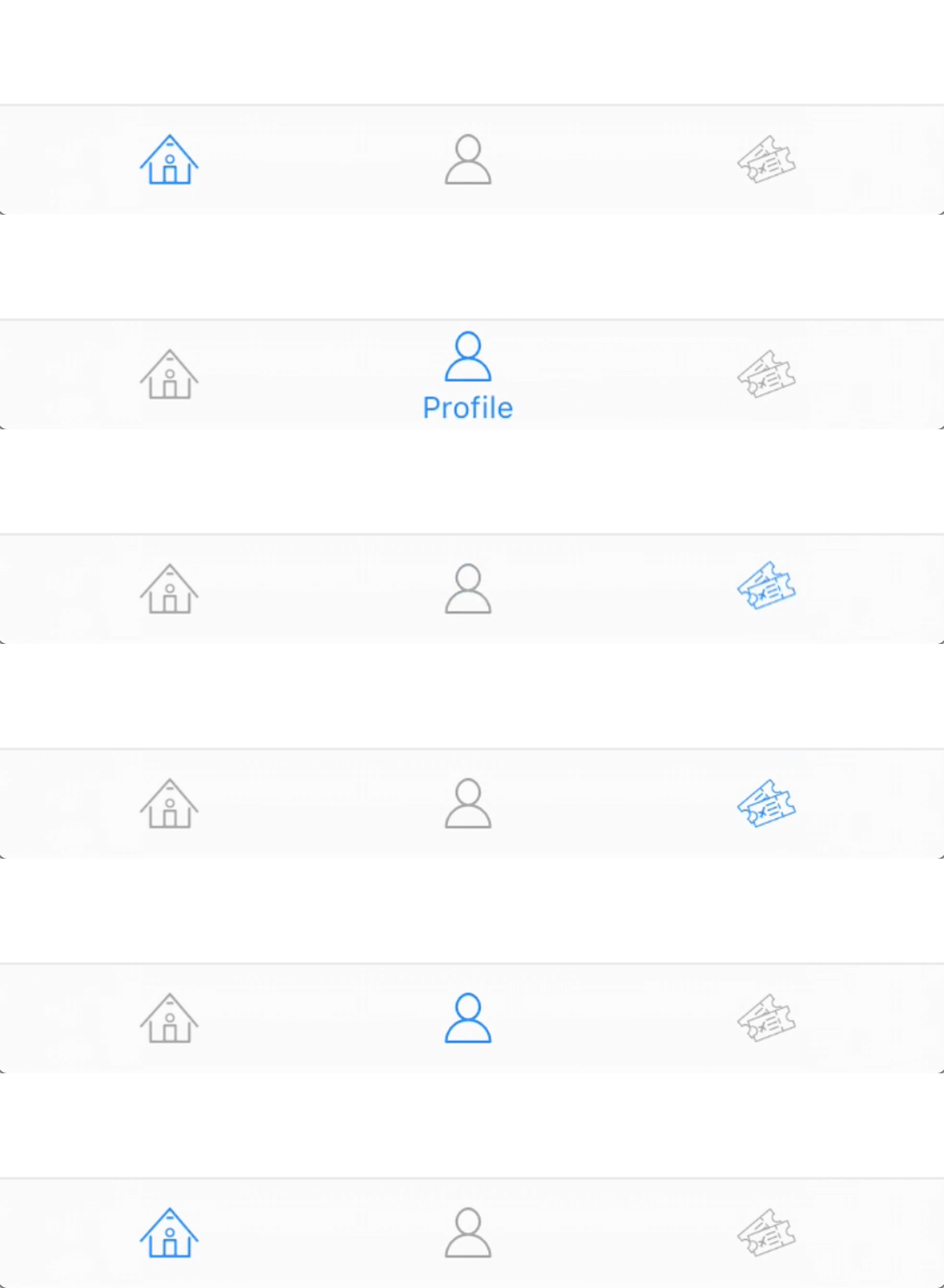
A clean simple alternative to the UITabBar. Only shows the title when being tapped on. Gives the app a way cleaner look :)
 ## Requirements
- iOS 10.0+
- Xcode 8
## Installation
#### CocoaPods:
You can use [CocoaPods](http://cocoapods.org/) to install `MiniTabBar` by adding it to your `Podfile`:
```ruby
pod 'MiniTabBar'
```
#### Manually
Drag and drop `MiniTabBar.swift` and `MiniTabBarItemView.swift` into your project.
## Usage
```swift
// First create some tab bar items:
// Icons should be a template image with the size 26 x 20 dp
var items = [MiniTabBarItem]()
items.append(MiniTabBarItem(title: "Tab Name", icon: ))
//...
// Create a MiniTabBar instance and add it as a regular subview:
let tabBar = MiniTabBar(items: items)
tabBar.translatesAutoresizingMaskIntoConstraints = false
tabBar.delegate = self
self.view.addSubview(tabBar)
let constraints = [
tabBar.bottomAnchor.constraint(equalTo: view.layoutMarginsGuide.bottomAnchor),
tabBar.widthAnchor.constraint(equalTo: view.widthAnchor),
tabBar.heightAnchor.constraint(equalToConstant: 44),
]
NSLayoutConstraint.activate(constraints)
// Delegate protocol:
func tabSelected(_ index: Int) {
print("Selected tab: ", index)
}
```
## Costumization
Here are some ways to customize the look of the MiniTabBar:
```swift
// Change the tint colour of an item (title & icon):
tabBar.tintColor = UIColor.red
// Change the font of the title label:
tabBar.font = UIFont.systemFont(ofSize: 10)
// Select an item programmatically:
tabBar.selectItem(2, animated: false)
// Change the background & key line of the tab bar:
tabBar.backgroundColor = UIColor.black
tabBar.backgroundBlurEnabled = false
tabBar.keyLine.isHidden = true
```
### Custom View
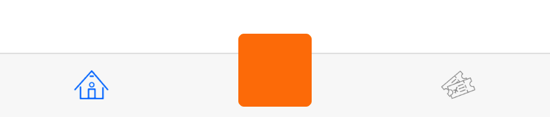
It's also possible to have a custom view that doesn't act like a tab. For example a (+) button in the middle.
## Requirements
- iOS 10.0+
- Xcode 8
## Installation
#### CocoaPods:
You can use [CocoaPods](http://cocoapods.org/) to install `MiniTabBar` by adding it to your `Podfile`:
```ruby
pod 'MiniTabBar'
```
#### Manually
Drag and drop `MiniTabBar.swift` and `MiniTabBarItemView.swift` into your project.
## Usage
```swift
// First create some tab bar items:
// Icons should be a template image with the size 26 x 20 dp
var items = [MiniTabBarItem]()
items.append(MiniTabBarItem(title: "Tab Name", icon: ))
//...
// Create a MiniTabBar instance and add it as a regular subview:
let tabBar = MiniTabBar(items: items)
tabBar.translatesAutoresizingMaskIntoConstraints = false
tabBar.delegate = self
self.view.addSubview(tabBar)
let constraints = [
tabBar.bottomAnchor.constraint(equalTo: view.layoutMarginsGuide.bottomAnchor),
tabBar.widthAnchor.constraint(equalTo: view.widthAnchor),
tabBar.heightAnchor.constraint(equalToConstant: 44),
]
NSLayoutConstraint.activate(constraints)
// Delegate protocol:
func tabSelected(_ index: Int) {
print("Selected tab: ", index)
}
```
## Costumization
Here are some ways to customize the look of the MiniTabBar:
```swift
// Change the tint colour of an item (title & icon):
tabBar.tintColor = UIColor.red
// Change the font of the title label:
tabBar.font = UIFont.systemFont(ofSize: 10)
// Select an item programmatically:
tabBar.selectItem(2, animated: false)
// Change the background & key line of the tab bar:
tabBar.backgroundColor = UIColor.black
tabBar.backgroundBlurEnabled = false
tabBar.keyLine.isHidden = true
```
### Custom View
It's also possible to have a custom view that doesn't act like a tab. For example a (+) button in the middle.
 ```swift
let customButton = UIButton()
customButton.backgroundColor = UIColor.orange
customButton.frame.size = CGSize(width: 50, height: 50)
let customItem = MiniTabBarItem(customView: customButton,
offset: UIOffset(horizontal: 0,
vertical: -10))
customItem.selectable = false
items.append(customItem)
```
[swift-image]:https://img.shields.io/badge/swift-3.0-orange.svg
[swift-url]: https://swift.org/
```swift
let customButton = UIButton()
customButton.backgroundColor = UIColor.orange
customButton.frame.size = CGSize(width: 50, height: 50)
let customItem = MiniTabBarItem(customView: customButton,
offset: UIOffset(horizontal: 0,
vertical: -10))
customItem.selectable = false
items.append(customItem)
```
[swift-image]:https://img.shields.io/badge/swift-3.0-orange.svg
[swift-url]: https://swift.org/