# MCP Apple Notes
[](https://glama.ai/mcp/servers/Dan8Oren/mcp-apple-notes)
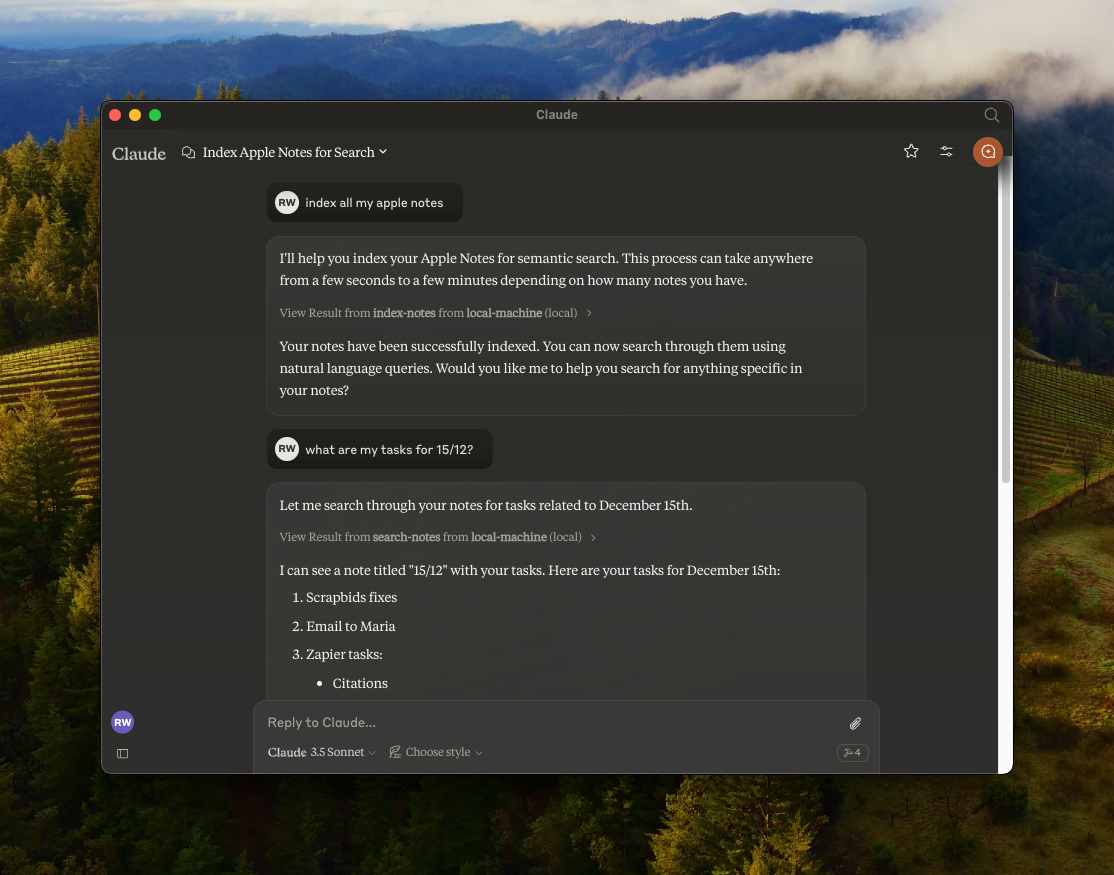
A [Model Context Protocol (MCP)](https://modelcontextprotocol.io/) server that enables semantic search and RAG (Retrieval Augmented Generation) over your Apple Notes. Works with any MCP-compatible client — Claude Desktop, Cursor, Windsurf, Cline, and others.
## Features
- 🔍 Semantic search over Apple Notes using [`all-MiniLM-L6-v2`](https://huggingface.co/sentence-transformers/all-MiniLM-L6-v2) on-device embeddings model
- 📝 Full-text search capabilities
- 📂 Folder support — list folders, browse by folder, filter search by folder
- 📊 Vector storage using [LanceDB](https://lancedb.github.io/lancedb/)
- 🤖 Works with any MCP-compatible client (Claude, Cursor, Windsurf, Cline, etc.)
- 🍎 Native Apple Notes integration via JXA
- 🔒 Optional [read-only mode](#read-only-mode) for safe exploration
- 🏃♂️ Fully local execution — no API keys needed
## Security & Transparency
Because this server interacts with your **private Apple Notes**, it is designed with absolute transparency in mind. It runs 100% locally on your Mac.
- **No Cloud, No Telemetry** — No API keys, no data leaving your machine.
- **Native Apple JXA** — Uses Apple's official [JavaScript for Automation](https://developer.apple.com/library/archive/releasenotes/InterapplicationCommunication/RN-JavaScriptForAutomation/) scripting bridge.
- **Embeddings on-device** — The [`all-MiniLM-L6-v2`](https://huggingface.co/sentence-transformers/all-MiniLM-L6-v2) model runs locally via [`@huggingface/transformers`](https://github.com/huggingface/transformers.js).
- **Verifiable** — You are highly encouraged to read every line of code (especially [`index.ts`](./index.ts)) before it ever touches your notes.
- **GitHub releases** include SHA-256 checksums so you can verify downloaded artifacts.
## Installation & Setup
Choose the installation method that fits your workflow.
---
### Method 1: Install from source (recommended)
By cloning the repository locally, you can inspect the source code and know exactly what is executing on your machine.
**Prerequisites:** [Node.js](https://nodejs.org) (v18+) or [Bun](https://bun.sh/docs/installation)
Using Bun?
```bash
git clone https://github.com/Dan8Oren/mcp-apple-notes && cd mcp-apple-notes && bun install
```
```json
{
"mcpServers": {
"apple-notes": {
"command": "bun",
"args": ["run", "/path/to/mcp-apple-notes/index.ts"]
}
}
}
```
### Using NPM:
```bash
git clone https://github.com/Dan8Oren/mcp-apple-notes && cd mcp-apple-notes && npm install
```
Then add the server to your MCP client config. Replace `/path/to/mcp-apple-notes` with where you cloned the repo:
```json
{
"mcpServers": {
"apple-notes": {
"command": "npx",
"args": ["tsx", "/path/to/mcp-apple-notes/index.ts"]
}
}
}
```
> **Tip:** Want to try it without risk? Enable [read-only mode](#read-only-mode) to block all write operations while you explore. \
> `"env": { "MCP_APPLE_NOTES_READ_ONLY": "1" }`
---
### Method 2: Quick start via npx
If you prefer a **zero-setup** approach and trust the published npm package, you can simply add this directly to your MCP config:
```json
{
"mcpServers": {
"apple-notes": {
"command": "npx",
"args": ["-y", "@dan8oren/mcp-apple-notes"]
}
}
}
```
---
After setup, restart your client and ask your AI assistant to **"index my notes"** to get started.
### Per-client instructions
Claude Desktop
1. Open **Settings → Developer → Edit Config**
2. Paste your chosen JSON config into `claude_desktop_config.json`
3. Restart Claude Desktop
Logs:
```bash
tail -n 50 -f ~/Library/Logs/Claude/mcp-server-apple-notes.log
```
Claude Code
```bash
# npm version:
claude mcp add apple-notes npx -- -y @dan8oren/mcp-apple-notes
# or from source:
claude mcp add apple-notes npx -- tsx /path/to/mcp-apple-notes/index.ts
```
Cursor
Add the JSON config to `~/.cursor/mcp.json` (global) or `.cursor/mcp.json` in your project root.
Windsurf
Add the JSON config to `~/.windsurf/mcp.json`.
## Available Tools
| Tool | Description |
| ---------------- | ---------------------------------------------------------------------------------------------------------------------------------------------------------------------------------------------------------------------------------------- |
| `index-notes` | Index all notes for semantic search. Run this first |
| `list-folders` | List all Apple Notes folders with full paths and note counts |
| `list-notes` | List notes with metadata. Optional `path` filter, `includeContent` flag, and `contentPreviewChars` (HTML-stripped per-note preview truncated to N chars — one fast call, avoids the response token cap when listing many notes' content) |
| `search-notes` | Semantic + full-text search with optional path filter and limit |
| `get-note` | Get full content by noteId or title. Returns candidates on ambiguity |
| `create-note` | Create a new note with markdown content, optionally in a folder |
| `edit-note` | Edit title and/or content (markdown) of an existing note |
| `append-to-note` | Append markdown content to an existing note |
| `move-note` | Move a note to a different folder |
| `delete-note` | Delete a note (moves to Recently Deleted) |
## Verify Before You Trust
Every Apple Notes operation is a [JXA](https://developer.apple.com/library/archive/releasenotes/InterapplicationCommunication/RN-JavaScriptForAutomation/) call you can inspect in [`index.ts`](./index.ts). No network requests, no background syncing — just local scripting bridge calls.
### Read-only mode
Want a safety net? Enable read-only mode to block all write operations — only search, list, and read tools will be available:
```json
{
"mcpServers": {
"apple-notes": {
"command": "npx",
"args": ["-y", "@dan8oren/mcp-apple-notes"],
"env": { "MCP_APPLE_NOTES_READ_ONLY": "1" }
}
}
}
```
When enabled, only these tools are available: `index-notes`, `list-folders`, `list-notes`, `search-notes`, `get-note`.
### Verbose mode
Enable verbose logging to see every JXA call before it executes (logged to stderr):
**CLI flag** — add `--verbose` to your MCP client config args:
```json
{
"mcpServers": {
"apple-notes": {
"command": "npx",
"args": ["--verbose", "-y", "@dan8oren/mcp-apple-notes"]
}
}
}
```
**Environment variable** — for clients that support `env`:
```json
{
"mcpServers": {
"apple-notes": {
"command": "npx",
"args": ["-y", "@dan8oren/mcp-apple-notes"],
"env": { "MCP_APPLE_NOTES_VERBOSE": "1" }
}
}
}
```
### JXA operations reference
| Operation | Type | What it does |
| -------------------- | ----------- | -------------------------------------------- |
| `getNotes` | Read | Lists all notes (id, title, folder path) |
| `getFolders` | Read | Lists all folders with paths and note counts |
| `getNotesByPath` | Read | Gets notes in a specific folder |
| `getNoteDetailsById` | Read | Gets full content of one note by ID |
| `createNote` | Write | Creates a new note with title and content |
| `appendToNote` | Write | Appends HTML content to an existing note |
| `editNote` | Write | Updates title and/or content of a note |
| `moveNote` | Write | Moves a note to a different folder |
| `deleteNote` | Destructive | Moves a note to Recently Deleted |
All operations go through Apple's JXA scripting bridge (`Application('Notes')`). No direct file system access, no network calls. The `delete` operation is non-permanent — notes go to Recently Deleted and can be recovered within 30 days.
## Response Shape
Tool responses are JSON objects in a consistent envelope:
- Success: `{ "ok": true, "data": ... }`
- Error: `{ "ok": false, "error": { "type": "...", "message": "..." } }`
Most note-oriented responses now include the stable Apple Notes `id` so clients can track notes safely across renames and moves.
## Community & Support
Bug reports, ideas, questions, and showcases all have a home — please use the channel that fits:
- 🐛 **Found a bug?** → [Open an issue](https://github.com/Dan8Oren/mcp-apple-notes/issues/new/choose)
- 💡 **Have a feature idea?** → [Start a thread in Ideas](https://github.com/Dan8Oren/mcp-apple-notes/discussions/categories/ideas)
- ❓ **Need help with setup or integration?** → [Ask in Q&A](https://github.com/Dan8Oren/mcp-apple-notes/discussions/categories/q-a)
- 🛠 **Built something cool with it?** → [Share in Show and tell](https://github.com/Dan8Oren/mcp-apple-notes/discussions/categories/show-and-tell)
- 📣 **Watch for updates** → [Announcements](https://github.com/Dan8Oren/mcp-apple-notes/discussions/categories/announcements)
PRs are welcome. For non-trivial changes, please open an issue or discussion first so we can align on direction before you invest time.
## Acknowledgments
Originally based on [RafalWilinski/mcp-apple-notes](https://github.com/RafalWilinski/mcp-apple-notes).