




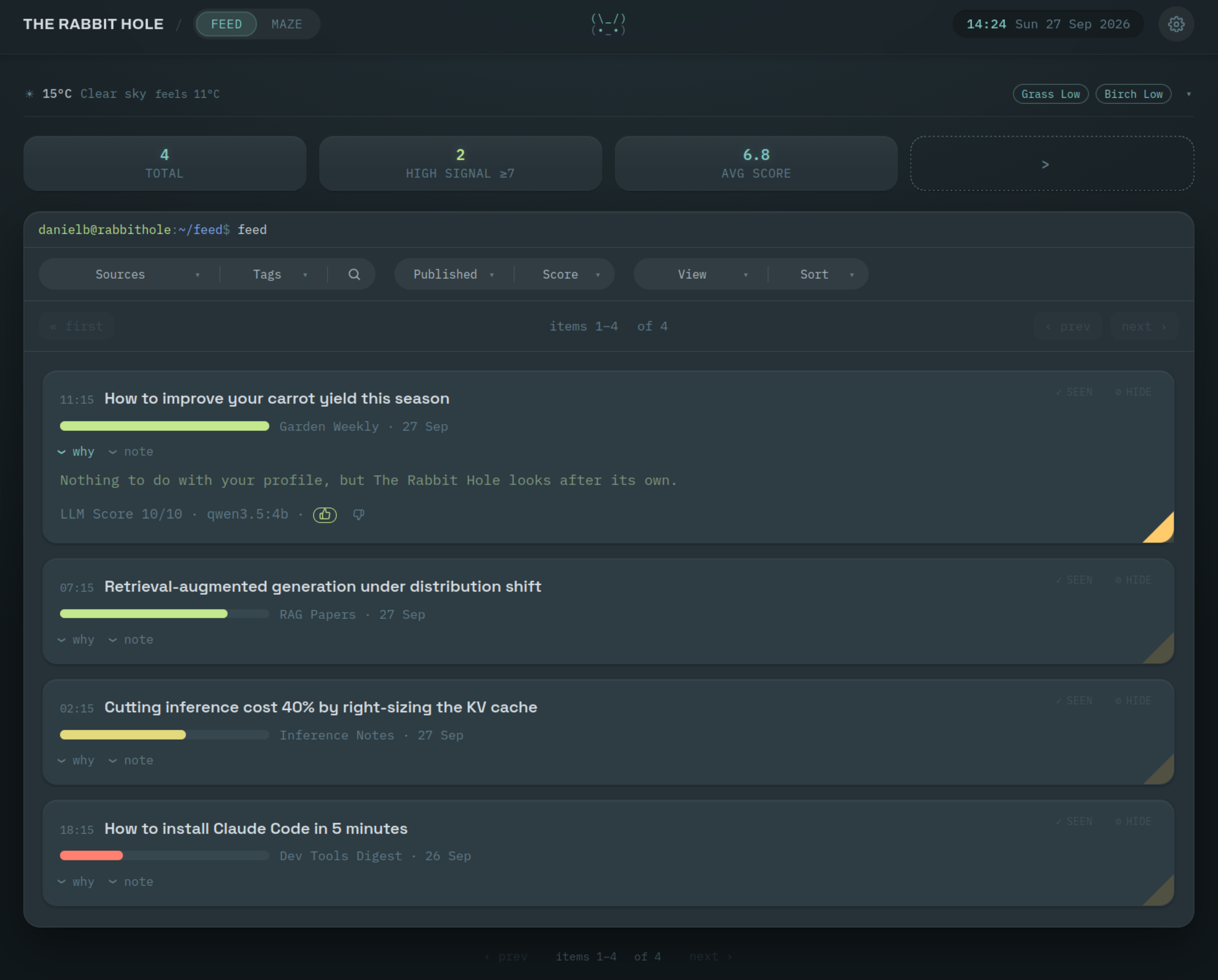
**The Rabbit Hole** finds what is worth your reading time. You describe your interests in plain
words; it pulls new items from the sources you follow (RSS/Atom feeds, arXiv, Crossref and
Semantic Scholar) and ranks each one against that profile, with a one-line reason for its score.
What you get is a reading list ranked by what you actually care about.
Open it in your browser. The **Feed** page is the day's reading ranked. The **Maze** page is
where you put down tasks or todos, throw ideas at the board before they get away, and keep an
eye on the weather.
It runs on your own machine: one binary with the UI inside it, no dependency hell, and state in
a local SQLite file in your user data folder, or in Postgres, enabling one store to serve more than one machine.
Scoring runs on a local model, any OpenAI-compatible endpoint, or a built-in keyword scorer that
needs no model at all.
> **Status:** 0.x. Usable day to day, but the settings format and the HTTP API can still change
> between releases. Anything breaking is called out in the release notes.
## What it reads
| Source | Type | Example URL |
|---|---|---|
| RSS / Atom feeds | `rss` | `https://next.redhat.com/feed/` |
| arXiv | `academic` | `https://arxiv.org/search?q=agentic+coding` |
| Crossref | `academic` | `https://api.crossref.org/works?q=llm&publisher=ACM` |
| Semantic Scholar | `academic` | `https://www.semanticscholar.org/search?q=code+agents&min_citations=5` |
| Blogs and news sites without a feed | planned | |
An academic source is a saved search: the URL's host picks the provider and its query says what
to look for. See [docs/configuration.md](docs/configuration.md#academic-sources).
## Requirements
- A scorer, one of:
- [Ollama](https://ollama.com) running locally (the default)
- OpenAI or any OpenAI-compatible gateway
- a [vLLM](https://docs.vllm.ai) server
- nothing, with the built-in `heuristic` scorer
- optionally, Postgres (14 or newer) in place of the SQLite file, if one store has to serve more
than one machine
- Go 1.26+, only to build from source
## Install
### Release binary
Linux or macOS:
```bash
curl -fsSL https://raw.githubusercontent.com/DanielBlei/rabbithole/main/scripts/install.sh | sh
```
It verifies the download and installs the latest release binary to `~/.local/bin`. It writes no
config: you configure it in the UI (the gear, Settings), and a bare `rabbithole serve` runs on the
defaults. Archives are also on the [Releases page](https://github.com/DanielBlei/rabbithole/releases).
For a container, systemd unit or other headless install that keeps its settings in a file, import
that file explicitly before starting:
```bash
rabbithole config import config.yaml
rabbithole serve
```
If `config.yaml` has a `store:` block, it locates the store only for the import; it is not saved.
Set `RABBITHOLE_DB` (and `RABBITHOLE_DB_PASSWORD` for Postgres), or pass the same `--db` to both
commands. The deprecated `--config` flag still works for existing setups.
### From source
```bash
git clone https://github.com/DanielBlei/rabbithole.git
cd rabbithole
make build
```
`go install github.com/DanielBlei/rabbithole@latest` gives the same binary. No config file is
needed; [docs/examples/](docs/examples) has an example sources list, a settings reference and prompts.
## Quickstart
```bash
ollama pull qwen3.5:4b # the default model
rabbithole serve # or `make serve` in a checkout
```
The first start asks `Create a new SQLite store at ...? [Y/n]`; answer `Y`, then open
.
Add sources before the first ingest: use the **Sources** page, or download the example list and
import it (in a checkout, `make sources` does this):
```bash
curl -fsSLO https://raw.githubusercontent.com/DanielBlei/rabbithole/main/docs/examples/feeds.yaml
rabbithole sources import feeds.yaml
```
Then hit ingest. The first run fetches the feeds and scores them, which takes a while on a local
model; after that the page fills in.
That ranks against the immutable built-in **Default** profile. Open
**Settings → Profiles** to create or duplicate one for your own interests; the next ingest
uses it immediately. Existing scores stay historical until you explicitly choose
**Rescore recent items**, which recomputes the last seven days from stored article data.
Add your own sources from the **Sources** page: an RSS or Atom URL, or pick **academic** for
an arXiv, Crossref or Semantic Scholar search. For the full setup, see
**[docs/quickstart.md](docs/quickstart.md)**.
The first visit asks who can open it: create an account, or leave it open with no login.
`serve` binds to loopback only; read [docs/auth.md](docs/auth.md)
and [SECURITY.md](SECURITY.md) before exposing it to anything else.
## Documentation
- [docs/quickstart.md](docs/quickstart.md): the same steps with the details filled in
- [docs/configuration.md](docs/configuration.md): every setting, the store, secrets, and importing and exporting config
- [docs/cli.md](docs/cli.md): the `serve`, `ingest`, `config`, `sources`, `store`, `items` and `auth` commands
- [docs/api.md](docs/api.md): a small read-and-mark JSON API
- [docs/auth.md](docs/auth.md): the login, sessions, HTTPS, and resetting a forgotten password
- [docs/architecture.md](docs/architecture.md): how the pieces fit together, and the roadmap
- [docs/evals.md](docs/evals.md): checking whether the model actually agrees with your profile
(`eval benchmark` and `eval audit`)
- [docs/troubleshooting.md](docs/troubleshooting.md): scores that make no sense, thinking that
will not switch off, and other inference and secrets problems
- [docs/store.md](docs/store.md): database internals for operators and contributors: engines,
schema, upgrades
## Getting help
Questions, or something not behaving? Open an issue. Security reports go privately through
[SECURITY.md](SECURITY.md) instead.
## Contributing
Ideas and patches are welcome. For anything beyond a small fix, open an issue first, so we
can agree the approach before you spend an evening on it. See [CONTRIBUTING.md](CONTRIBUTING.md).
## Acknowledgements
Weather and pollen data by [Open-Meteo](https://open-meteo.com).
The fonts are open source and come bundled with the app, so it looks the same offline. Their
licences sit next to them in [internal/web/static/fonts](internal/web/static/fonts).
## License
Licensed under the [Apache License, Version 2.0](LICENSE). The bundled fonts keep their own
licences, linked above.