# Riona AI Agent
[Website](https://www.agentriona.xyz) | [Roadmap](ROADMAP.md) | [Twitter](https://twitter.com/david_patrick01) | [Contact](mailto:davidchuksdev@gmail.com)

Riona AI Agent is an AI-powered social automation platform for Instagram and X/Twitter. It combines browser automation, AI-generated content, account workflows, scheduling, engagement actions, and training inputs so you can run a social media operator from one codebase.
## Overview
Riona is built to automate social activity while keeping control surfaces explicit. The project includes:
- Instagram automation for login, posting, liking, commenting, messaging, and follower scraping
- X/Twitter support in progress for publishing and engagement workflows
- AI content generation using Gemini for captions and comments
- Training inputs from YouTube, audio, files, and websites
- API endpoints, health checks, dashboards, cooldowns, summaries, and logging
- A separate reCAPTCHA ML subproject under `riona-recaptcha-model/`
## Quick Links
- Live website: `https://www.agentriona.xyz`
- Project roadmap: `ROADMAP.md`
If you'd like to support the project, see the private donations file maintained locally.
## Training Inputs
Before running automation, you can shape the agent with:
- YouTube video URLs
- Audio files
- Portfolio or website links
- Documents and text files including PDF, DOC, DOCX, and TXT
## Feature Summary
- Instagram automation with cookies, relogin handling, posting, scheduling, and interactions
- AI-generated captions and comments with schema-guided responses
- Multi-account and profile-based operation support
- MongoDB-backed state, summaries, and rate-limiting controls
- Simple dashboard for runtime health and latest activity
- Logging, environment validation, and utility scripts for operations
## Planned Expansion
- Complete X/Twitter workflow coverage
- GitHub automation
- Additional analytics, reporting, and compliance controls
## Installation
1. **Clone the repository**:
```sh
git clone https://github.com/david-patrick-chuks/riona-ai-agent.git
cd riona-ai-agent
```
2. **Install dependencies**:
```sh
npm install
```
3. **Set up environment variables**:
Rename the `.env.example` file to `.env` in the root directory and add your Instagram credentials. Refer to the `.env.example` file for the required variables.
```dotenv # Instagram credentials
IGusername=your_instagram_username
IGpassword=your_instagram_password
Xusername= #Twitter username
Xpassword= #Twitter password
MONGODB_URI= #MongoDB URI
MONGODB_REQUIRED=false
# Gemini API keys (set only the ones you use)
GEMINI_API_KEY=your_primary_gemini_api_key
GEMINI_API_KEY_1=your_gemini_api_key_1
GEMINI_API_KEY_2=your_gemini_api_key_2
# Optional: locale-specific ad/sponsored markers (comma-separated)
IG_AD_MARKERS=sponsored,paid partnership,paid partnership with
IG_AD_BUTTON_MARKERS=learn more,shop now,sign up,install now,get offer,subscribe,book now
# Optional: run Instagram agent loop automatically
IG_AGENT_ENABLED=false
IG_AGENT_INTERVAL_MS=30000
# Optional: daily limit for IG actions (likes/comments). 0 = unlimited
IG_DAILY_MAX_ACTIONS=0
# Optional: logging backend ("winston" or "console")
LOGGER=console
```
## MongoDB Setup (Using Docker)
1. **Install Docker**:
If you don't have Docker installed, download and install it from the [official website](https://www.docker.com/products/docker-desktop/)
2. **Run MongoDB using Docker Container**:
**Option 1:**
```sh
docker run -d -p 27017:27017 --name instagram-ai-mongodb mongodb/mongodb-community-server:latest
```
**Option 2:**
```sh
docker run -d -p 27017:27017 --name instagram-ai-mongodb -v mongodb_data:/data/db mongodb/mongodb-community-server:latest
```
(Option 2: use this if you want to have like a permanent storage in you so your data won't be lost or remove if you stop or remove your Docker container)
3. **Modify the MONGODB_URI in the .env file**:
```dotenv
MONGODB_URI=mongodb://localhost:27017/instagram-ai-agent
```
4. **Verify the connection**:
Open a new terminal and run the following command:
```sh
docker ps
```
You should see the MongoDB container running.
Docker Commands (Additional Info):
- To stop the MongoDB container:
```sh
docker stop instagram-ai-mongodb
```
- To start the MongoDB container:
```sh
docker start instagram-ai-mongodb
```
- To remove the MongoDB container:
```sh
docker rm instagram-ai-mongodb
```
- To remove the MongoDB container and its data:
```sh
docker rm -v instagram-ai-mongodb
```
## Usage
1. **Run the agent**:
```sh
npm start
```
Note: The specific platform (Instagram, Twitter) and actions performed by the agent are typically configured through environment variables in the `.env` file, or by selections made if the application prompts for choices at runtime.
2. **Log in and trigger interactions via API**:
```sh
curl -X POST http://localhost:3000/api/login \
-H "Content-Type: application/json" \
-d '{"username":"YOUR_IG_USERNAME","password":"YOUR_IG_PASSWORD"}'
```
```sh
curl -X POST http://localhost:3000/api/interact \
-H "Content-Type: application/json" \
--cookie "token=YOUR_JWT_TOKEN"
```
3. **Optional: auto-run the Instagram agent loop**
Set `IG_AGENT_ENABLED=true` in `.env` to run the interaction loop continuously.
4. **Post a photo (by URL)**
```sh
curl -X POST http://localhost:3000/api/post-photo \\
-H "Content-Type: application/json" \\
--cookie "token=YOUR_JWT_TOKEN" \\
-d '{"imageUrl":"https://example.com/photo.jpg","caption":"Hello IG!"}'
```
5. **Post a photo (file upload)**
```sh
curl -X POST http://localhost:3000/api/post-photo-file \\
-H "Content-Type: multipart/form-data" \\
--cookie "token=YOUR_JWT_TOKEN" \\
-F "image=@/path/to/photo.jpg" \\
-F "caption=Hello IG!"
```
6. **Schedule a photo post**
```sh
curl -X POST http://localhost:3000/api/schedule-post \\
-H "Content-Type: application/json" \\
--cookie "token=YOUR_JWT_TOKEN" \\
-d '{"imageUrl":"https://example.com/photo.jpg","caption":"Scheduled post","cronTime":"0 9 * * *"}'
```
## Dashboard
Open `http://localhost:3000/dashboard` for live status and the last IG run summary.
## Development
- Run tests: `npm test`
- Lint: `npm run lint`
- Format: `npm run format`
- Env check: `npm run check:env`
- Setup check: `npm run setup`
## Guides
- `Guides/Instagram-Bot.md`
- `Guides/Operations.md`
- `Guides/API.md`
- `Guides/Env.md`
- `Guides/Testing.md`
- `Guides/CI.md`
- `Guides/FAQ.md`
- `Guides/Logging.md`
- `Guides/Scripts.md`
- `Guides/Training.md`
## reCAPTCHA Model
This repo now includes the reCAPTCHA model under `riona-recaptcha-model/` and is run via root scripts:
- `npm run recaptcha:dev`
- `npm run recaptcha:train`
- `npm run recaptcha:collect`
- `npm run recaptcha:build`
- `npm run recaptcha:serve`
## IG Run Profiles
Set `IG_RUN_PROFILE` to tune behavior:
- `safe`: slower, fewer actions
- `standard`: balanced (default)
- `aggressive`: faster, higher limits
Overrides:
- `IG_DAILY_MAX_ACTIONS`
- `IG_MAX_POSTS_PER_RUN`
- `IG_ACTION_DELAY_MIN_MS`
- `IG_ACTION_DELAY_MAX_MS`
- `IG_AGENT_INTERVAL_MS`
## Cooldown Mode
If IG triggers a challenge or login error, the agent will enter cooldown and skip interactions.
Configure via:
- `IG_COOLDOWN_MINUTES`
Manual trigger:
```
POST /api/cooldown { "minutes": 60 }
```
## Comment Filters
Use allow/deny lists and a simple sentiment gate:
- `IG_COMMENT_ALLOWLIST`
- `IG_COMMENT_DENYLIST`
- `IG_COMMENT_SENTIMENT` = `any | positive | neutral`
## Multi-Account Support
Create `src/config/accounts.json` (not committed) based on `src/config/accounts.example.json`.
Then pass `account` in `/api/login` to select which account to use.
## Project Policies
- `CONTRIBUTING.md`
- `CODE_OF_CONDUCT.md`
- `SECURITY.md`
- `LICENSE`
## Project Structure
- **src/client**: Contains the main logic for interacting with social media platforms like Instagram.
- **src/config**: Configuration files, including the logger setup.
- **src/utils**: Utility functions for handling errors, cookies, data saving, etc.
- **src/Agent**: Contains the AI agent logic and training scripts.
- **src/Agent/training**: Training scripts for the AI agent.
- **src/Agent/schema**: Schema definitions for AI-generated content and database models.
- **src/test**: Contains test data and scripts, such as example tweets.
## Logging
The project uses a custom logger to log information, warnings, and errors. Logs are saved in the [logs](http://_vscodecontentref_/3) directory.
## Error Handling
Process-level error handlers are set up to catch unhandled promise rejections, uncaught exceptions, and process warnings. Errors are logged using the custom logger.
## Contributing
Contributions are welcome! Please fork the repository and submit a pull request with your changes.
## License
This project is licensed under the MIT License. See the LICENSE file for details.
## Stargazers
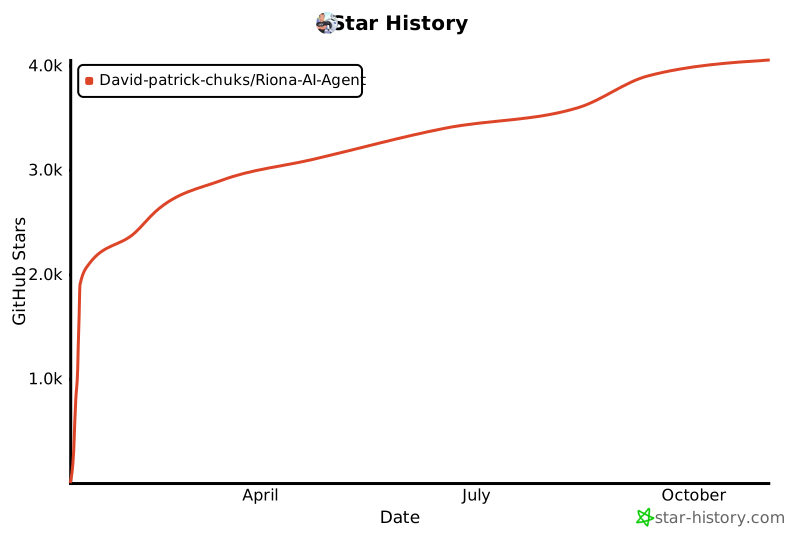
Thank you to all our supporters!
[](https://www.star-history.com/#David-patrick-chuks/Riona-AI-Agent&Date)
##
Built with ❤️ by David Patrick
## Community & Contact
- GitHub Discussions: use the Discussions tab for Q&A
- Issues: bug reports and feature requests
- Twitter: @david_patrick01
- Email: davidchuksdev@gmail.com
Real-time chat is not set up yet. If you want a Discord server, open a discussion and we can spin it up based on interest.