   
A lightweight analytics abstraction library for tracking page views, custom events, & identify visitors.
Designed to work with any [third-party analytics tool](https://getanalytics.io/plugins/) or your own backend.
[Read the docs](https://getanalytics.io/) or view the [live demo app](https://analytics-demo.netlify.app)
## Table of Contents
  
A lightweight analytics abstraction library for tracking page views, custom events, & identify visitors.
Designed to work with any [third-party analytics tool](https://getanalytics.io/plugins/) or your own backend.
[Read the docs](https://getanalytics.io/) or view the [live demo app](https://analytics-demo.netlify.app)
## Table of Contents
Click to expand
- [Features](#features)
- [Why](#why)
- [Install 📦](#install)
- [Usage](#usage)
- [Demo](#demo)
- [API](#api)
- [Configuration](#configuration)
- [analytics.identify](#analyticsidentify)
- [analytics.track](#analyticstrack)
- [analytics.page](#analyticspage)
- [analytics.user](#analyticsuser)
- [analytics.reset](#analyticsreset)
- [analytics.ready](#analyticsready)
- [analytics.on](#analyticson)
- [analytics.once](#analyticsonce)
- [analytics.getState](#analyticsgetstate)
- [analytics.storage](#analyticsstorage)
- [analytics.storage.getItem](#analyticsstoragegetitem)
- [analytics.storage.setItem](#analyticsstoragesetitem)
- [analytics.storage.removeItem](#analyticsstorageremoveitem)
- [analytics.plugins](#analyticsplugins)
- [analytics.plugins.enable](#analyticspluginsenable)
- [analytics.plugins.disable](#analyticspluginsdisable)
- [Events](#events)
- [Analytic plugins](#analytic-plugins)
- [Community Plugins](#community-plugins)
- [Creating analytics plugins](#creating-analytics-plugins)
- [React to any event](#react-to-any-event)
- [Custom methods](#custom-methods)
- [Plugin Naming Conventions](#plugin-naming-conventions)
- [Debugging analytics](#debugging-analytics)
- [TypeScript support](#typescript-support)
- [Contributing](#contributing)
- [Setup & Install dependencies](#setup--install-dependencies)
- [Development](#development)
- [Support](#support)
## Features
- [x] [Extendable](#analytic-plugins) - Bring your own third-party tool & plugins
- [x] Test & debug analytics integrations with time travel & offline mode
- [x] Add functionality/modify tracking calls with baked in lifecycle hooks
- [x] Isomorphic. Works in browser & on server
- [x] Queues events to send when analytic libraries are loaded
- [x] Conditionally load third party scripts
- [x] Works offline
- [x] [TypeScript support](https://getanalytics.io/tutorials/typesafe-analytics/)
## Why
Companies frequently change analytics requirements based on evolving needs. This results in a lot of complexity, maintenance, & extra code when adding/removing analytic services to a site or application.
This library aims to solves that with a simple pluggable abstraction layer.
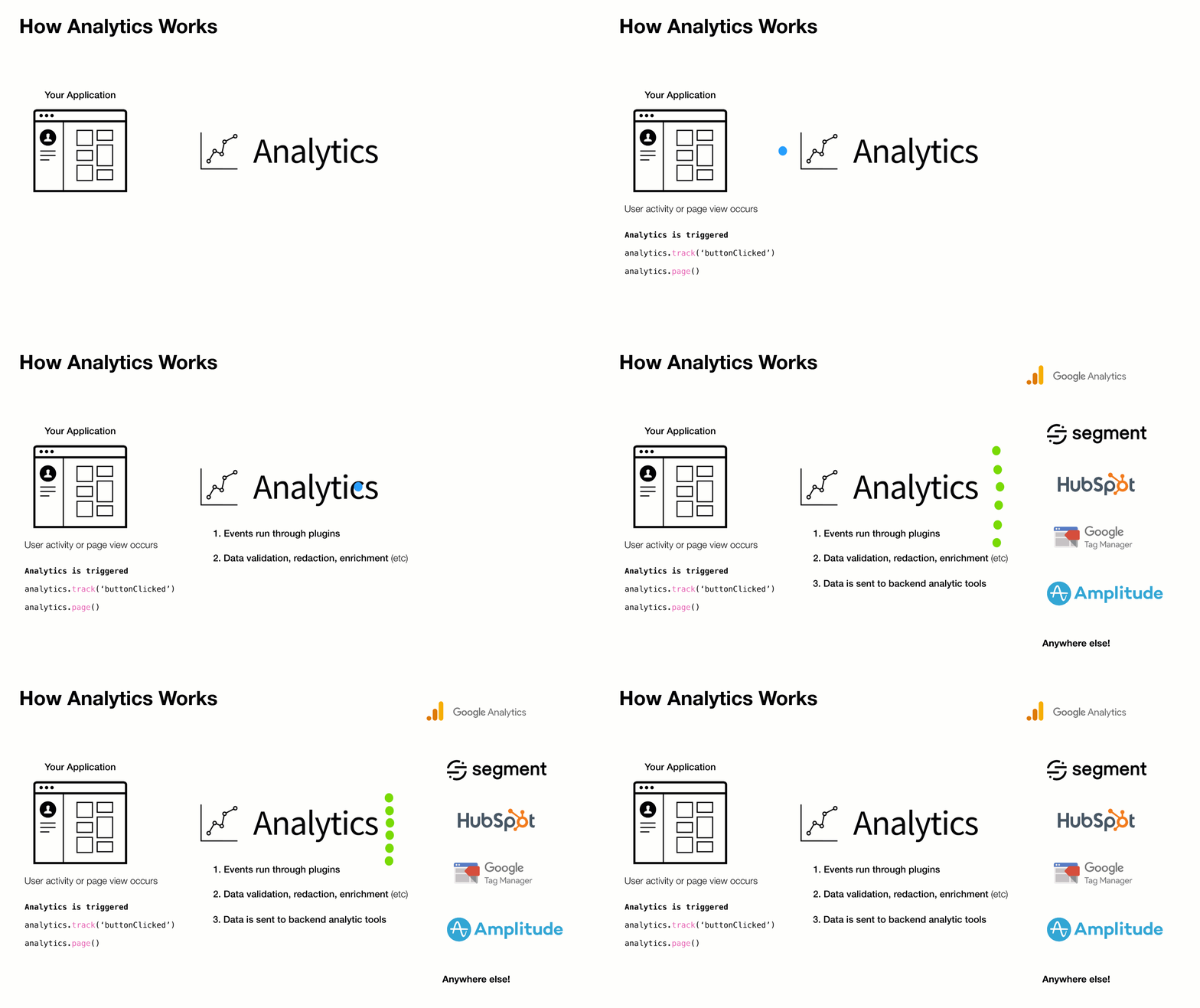
**Driving philosophy:**
- You should never be locked into an analytics tool
- DX is paramount. Adding & removing analytic tools from your application should be easy
- Respecting visitor privacy settings & allowing for opt-out mechanisms is crucial
- A pluggable API makes adding new business requests easy
To add or remove an analytics provider, adjust the `plugins` you load into `analytics` during initialization.
## Install 📦
This module is distributed via [npm](https://npmjs.com/package/analytics), which is bundled with [node](https://nodejs.org/) and should be installed as one of your project's dependencies.
```bash
npm install analytics --save
```
Or using [yarn](https://yarnpkg.com/):
```bash
yarn add analytics
```
Or using [pnpm](https://pnpm.io/):
```bash
pnpm add analytics
```
Or using [bun](https://bun.sh/):
```bash
bun add analytics
```
Or as a script tag:
```html
```
## Usage
```js
import Analytics from 'analytics'
import googleAnalytics from '@analytics/google-analytics'
import customerIo from '@analytics/customerio'
/* Initialize analytics */
const analytics = Analytics({
app: 'my-app-name',
version: 100,
plugins: [
googleAnalytics({
measurementIds: ['G-XXXXXXXX'],
}),
customerIo({
siteId: '123-xyz'
})
]
})
/* Track a page view */
analytics.page()
/* Track a custom event */
analytics.track('userPurchase', {
price: 20,
item: 'pink socks'
})
/* Identify a visitor */
analytics.identify('user-id-xyz', {
firstName: 'bill',
lastName: 'murray',
email: 'da-coolest@aol.com'
})
```
Node.js usage
For ES6/7 javascript you can `import Analytics from 'analytics'` for normal node.js usage you can import like so:
```js
const { Analytics } = require('analytics')
// or const Analytics = require('analytics').default
const googleAnalytics = require('@analytics/google-analytics')
const customerIo = require('@analytics/customerio')
const analytics = Analytics({
app: 'my-app-name',
version: 100,
plugins: [
googleAnalytics({
measurementIds: ['G-XXXXXXXX'],
}),
customerIo({
siteId: '123-xyz'
})
]
})
/* Track a page view */
analytics.page()
/* Track a custom event */
analytics.track('userPurchase', {
price: 20,
item: 'pink socks'
})
/* Identify a visitor */
analytics.identify('user-id-xyz', {
firstName: 'bill',
lastName: 'murray',
email: 'da-coolest@aol.com'
})
```
Browser usage
When importing global `analytics` into your project from a CDN, the library exposes via a global `_analytics` variable.
Call `_analytics.init` to create an analytics instance.
```html
```
## Demo
See [Analytics Demo](https://analytics-demo.netlify.app/) for a site example.
## API
The core `analytics` API is exposed once the library is initialized with [configuration](#configuration).
Typical usage:
1. Initialize with [configuration](#configuration)
2. Export the analytics instance with third-party providers (Google Analytics, HubSpot, etc)
3. Use [`page`](#analyticspage), [`identify`](#analyticsidentify), [`track`](#analyticstrack) in your app
4. [Plugin custom business logic](#creating-analytics-plugins)
### Configuration
Analytics library configuration
After the library is initialized with config, the core API is exposed & ready for use in the application.
**Arguments**
- **config** object - analytics core config
- **[config.app]** (optional) string - Name of site / app
- **[config.version]** (optional) string|number - Version of your app
- **[config.debug]** (optional) boolean - Should analytics run in debug mode
- **[config.plugins]** (optional) Array.<AnalyticsPlugin> - Array of analytics plugins
**Example**
```js
import Analytics from 'analytics'
import pluginABC from 'analytics-plugin-abc'
import pluginXYZ from 'analytics-plugin-xyz'
// initialize analytics
const analytics = Analytics({
app: 'my-awesome-app',
plugins: [
pluginABC,
pluginXYZ
]
})
```
### analytics.identify
Identify a user. This will trigger `identify` calls in any installed plugins and will set user data in localStorage
**Arguments**
- **userId** String - Unique ID of user
- **[traits]** (optional) Object - Object of user traits
- **[options]** (optional) Object - Options to pass to identify call
- **[callback]** (optional) Function - Callback function after identify completes
**Example**
```js
// Basic user id identify
analytics.identify('xyz-123')
// Identify with additional traits
analytics.identify('xyz-123', {
name: 'steve',
company: 'hello-clicky'
})
// Fire callback with 2nd or 3rd argument
analytics.identify('xyz-123', () => {
console.log('do this after identify')
})
// Disable sending user data to specific analytic tools
analytics.identify('xyz-123', {}, {
plugins: {
// disable sending this identify call to segment
segment: false
}
})
// Send user data to only to specific analytic tools
analytics.identify('xyz-123', {}, {
plugins: {
// disable this specific identify in all plugins except customerio
all: false,
customerio: true
}
})
```
### analytics.track
Track an analytics event. This will trigger `track` calls in any installed plugins
**Arguments**
- **eventName** String - Event name
- **[payload]** (optional) Object - Event payload
- **[options]** (optional) Object - Event options
- **[callback]** (optional) Function - Callback to fire after tracking completes
**Example**
```js
// Basic event tracking
analytics.track('buttonClicked')
// Event tracking with payload
analytics.track('itemPurchased', {
price: 11,
sku: '1234'
})
// Fire callback with 2nd or 3rd argument
analytics.track('newsletterSubscribed', () => {
console.log('do this after track')
})
// Disable sending this event to specific analytic tools
analytics.track('cartAbandoned', {
items: ['xyz', 'abc']
}, {
plugins: {
// disable track event for segment
segment: false
}
})
// Send event to only to specific analytic tools
analytics.track('customerIoOnlyEventExample', {
price: 11,
sku: '1234'
}, {
plugins: {
// disable this specific track call all plugins except customerio
all: false,
customerio: true
}
})
```
### analytics.page
Trigger page view. This will trigger `page` calls in any installed plugins
**Arguments**
- **[data]** (optional) PageData - Page data overrides.
- **[options]** (optional) Object - Page tracking options
- **[callback]** (optional) Function - Callback to fire after page view call completes
**Example**
```js
// Basic page tracking
analytics.page()
// Page tracking with page data overrides
analytics.page({
url: 'https://google.com'
})
// Fire callback with 1st, 2nd or 3rd argument
analytics.page(() => {
console.log('do this after page')
})
// Disable sending this pageview to specific analytic tools
analytics.page({}, {
plugins: {
// disable page tracking event for segment
segment: false
}
})
// Send pageview to only to specific analytic tools
analytics.page({}, {
plugins: {
// disable this specific page in all plugins except customerio
all: false,
customerio: true
}
})
```
### analytics.user
Get user data
**Arguments**
- **[key]** (optional) string - dot.prop.path of user data. Example: 'traits.company.name'
**Example**
```js
// Get all user data
const userData = analytics.user()
// Get user id
const userId = analytics.user('userId')
// Get user company name
const companyName = analytics.user('traits.company.name')
```
### analytics.reset
Clear all information about the visitor & reset analytic state.
**Arguments**
- **[callback]** (optional) Function - Handler to run after reset
**Example**
```js
// Reset current visitor
analytics.reset()
```
### analytics.ready
Fire callback on analytics ready event
**Arguments**
- **callback** Function - function to trigger when all providers have loaded
**Example**
```js
analytics.ready((payload) => {
console.log('all plugins have loaded or were skipped', payload);
})
```
### analytics.on
Attach an event handler function for analytics lifecycle events.
**Arguments**
- **name** String - Name of event to listen to
- **callback** Function - function to fire on event
**Example**
```js
// Fire function when 'track' calls happen
analytics.on('track', ({ payload }) => {
console.log('track call just happened. Do stuff')
})
// Remove listener before it is called
const removeListener = analytics.on('track', ({ payload }) => {
console.log('This will never get called')
})
// cleanup .on listener
removeListener()
```
### analytics.once
Attach a handler function to an event and only trigger it once.
**Arguments**
- **name** String - Name of event to listen to
- **callback** Function - function to fire on event
**Example**
```js
// Fire function only once per 'track'
analytics.once('track', ({ payload }) => {
console.log('This is only triggered once when analytics.track() fires')
})
// Remove listener before it is called
const listener = analytics.once('track', ({ payload }) => {
console.log('This will never get called b/c listener() is called')
})
// cleanup .once listener before it fires
listener()
```
### analytics.getState
Get data about user, activity, or context. Access sub-keys of state with `dot.prop` syntax.
**Arguments**
- **[key]** (optional) string - dot.prop.path value of state
**Example**
```js
// Get the current state of analytics
analytics.getState()
// Get a subpath of state
analytics.getState('context.offline')
```
### analytics.storage
Storage utilities for persisting data.
These methods will allow you to save data in localStorage, cookies, or to the window.
**Example**
```js
// Pull storage off analytics instance
const { storage } = analytics
// Get value
storage.getItem('storage_key')
// Set value
storage.setItem('storage_key', 'value')
// Remove value
storage.removeItem('storage_key')
```
### analytics.storage.getItem
Get value from storage
**Arguments**
- **key** String - storage key
- **[options]** (optional) Object - storage options
**Example**
```js
analytics.storage.getItem('storage_key')
```
### analytics.storage.setItem
Set storage value
**Arguments**
- **key** String - storage key
- **value** any - storage value
- **[options]** (optional) Object - storage options
**Example**
```js
analytics.storage.setItem('storage_key', 'value')
```
### analytics.storage.removeItem
Remove storage value
**Arguments**
- **key** String - storage key
- **[options]** (optional) Object - storage options
**Example**
```js
analytics.storage.removeItem('storage_key')
```
### analytics.plugins
Async Management methods for plugins.
This is also where [custom methods](https://bit.ly/329vFXy) are loaded into the instance.
**Example**
```js
// Enable a plugin by namespace
analytics.plugins.enable('keenio')
// Disable a plugin by namespace
analytics.plugins.disable('google-analytics')
```
### analytics.plugins.enable
Enable analytics plugin
**Arguments**
- **plugins** string|Array.<string> - name of plugins(s) to disable
- **[callback]** (optional) Function - callback after enable runs
**Example**
```js
analytics.plugins.enable('google-analytics').then(() => {
console.log('do stuff')
})
// Enable multiple plugins at once
analytics.plugins.enable(['google-analytics', 'segment']).then(() => {
console.log('do stuff')
})
```
### analytics.plugins.disable
Disable analytics plugin
**Arguments**
- **plugins** string|Array.<string> - name of integration(s) to disable
- **[callback]** (optional) Function - callback after disable runs
**Example**
```js
analytics.plugins.disable('google').then(() => {
console.log('do stuff')
})
analytics.plugins.disable(['google', 'segment']).then(() => {
console.log('do stuff')
})
```
## Events
The `analytics` library comes with a large variety of event listeners that can be used to fire custom functionality when a specific lifecycle event occurs.
These listeners can be fired using `analytics.on` & `analytics.once`
```js
const eventName = 'pageEnd'
analytics.on(eventName, ({ payload }) => {
console.log('payload', payload)
})
```
Below is a list of the current available events
| Event | Description |
|:------|:-------|
| **`bootstrap`** | Fires when analytics library starts up.
This is the first event fired. '.on/once' listeners are not allowed on bootstrap
Plugins can attach logic to this event |
| **`params`** | Fires when analytics parses URL parameters |
| **`campaign`** | Fires if params contain "utm" parameters |
| **`initializeStart`** | Fires before 'initialize', allows for plugins to cancel loading of other plugins |
| **`initialize`** | Fires when analytics loads plugins |
| **`initializeEnd`** | Fires after initialize, allows for plugins to run logic after initialization methods run |
| **`ready`** | Fires when all analytic providers are fully loaded. This waits for 'initialize' and 'loaded' to return true |
| **`resetStart`** | Fires if analytic.reset() is called.
Use this event to cancel reset based on a specific condition |
| **`reset`** | Fires if analytic.reset() is called.
Use this event to run custom cleanup logic (if needed) |
| **`resetEnd`** | Fires after analytic.reset() is called.
Use this event to run a callback after user data is reset |
| **`pageStart`** | Fires before 'page' events fire.
This allows for dynamic page view cancellation based on current state of user or options passed in. |
| **`page`** | Core analytics hook for page views.
If your plugin or integration tracks page views, this is the event to fire on. |
| **`pageEnd`** | Fires after all registered 'page' methods fire. |
| **`pageAborted`** | Fires if 'page' call is cancelled by a plugin |
| **`trackStart`** | Called before the 'track' events fires.
This allows for dynamic page view cancellation based on current state of user or options passed in. |
| **`track`** | Core analytics hook for event tracking.
If your plugin or integration tracks custom events, this is the event to fire on. |
| **`trackEnd`** | Fires after all registered 'track' events fire from plugins. |
| **`trackAborted`** | Fires if 'track' call is cancelled by a plugin |
| **`identifyStart`** | Called before the 'identify' events fires.
This allows for dynamic page view cancellation based on current state of user or options passed in. |
| **`identify`** | Core analytics hook for user identification.
If your plugin or integration identifies users or user traits, this is the event to fire on. |
| **`identifyEnd`** | Fires after all registered 'identify' events fire from plugins. |
| **`identifyAborted`** | Fires if 'track' call is cancelled by a plugin |
| **`userIdChanged`** | Fires when a user id is updated |
| **`registerPlugins`** | Fires when analytics is registering plugins |
| **`enablePlugin`** | Fires when 'analytics.plugins.enable()' is called |
| **`disablePlugin`** | Fires when 'analytics.plugins.disable()' is called |
| **`online`** | Fires when browser network goes online.
This fires only when coming back online from an offline state. |
| **`offline`** | Fires when browser network goes offline. |
| **`setItemStart`** | Fires when analytics.storage.setItem is initialized.
This event gives plugins the ability to intercept keys & values and alter them before they are persisted. |
| **`setItem`** | Fires when analytics.storage.setItem is called.
This event gives plugins the ability to intercept keys & values and alter them before they are persisted. |
| **`setItemEnd`** | Fires when setItem storage is complete. |
| **`setItemAborted`** | Fires when setItem storage is cancelled by a plugin. |
| **`removeItemStart`** | Fires when analytics.storage.removeItem is initialized.
This event gives plugins the ability to intercept removeItem calls and abort / alter them. |
| **`removeItem`** | Fires when analytics.storage.removeItem is called.
This event gives plugins the ability to intercept removeItem calls and abort / alter them. |
| **`removeItemEnd`** | Fires when removeItem storage is complete. |
| **`removeItemAborted`** | Fires when removeItem storage is cancelled by a plugin. |
## Analytic plugins
The `analytics` has a robust plugin system. Here is a list of currently available plugins:
| Plugin | Stats | Version |
|:---------------------------|:---------------:|:-----------:|
| **[@analytics/activity-utils](https://github.com/DavidWells/analytics/tree/master/packages/analytics-util-activity)**
User activity listener utilities |  | **0.2.2** |
| **[@analytics/amplitude](https://github.com/DavidWells/analytics/tree/master/packages/analytics-plugin-amplitude)**
| **0.2.2** |
| **[@analytics/amplitude](https://github.com/DavidWells/analytics/tree/master/packages/analytics-plugin-amplitude)**
Amplitude integration for 'analytics' module |  | **0.1.3** |
| **[@analytics/aws-pinpoint](https://github.com/DavidWells/analytics/tree/master/packages/analytics-plugin-aws-pinpoint)**
| **0.1.3** |
| **[@analytics/aws-pinpoint](https://github.com/DavidWells/analytics/tree/master/packages/analytics-plugin-aws-pinpoint)**
AWS Pinpoint integration for 'analytics' module |  | **0.7.15** |
| **[@analytics/churn-zero](https://github.com/DavidWells/analytics/tree/master/packages/analytics-plugin-churn-zero)**
| **0.7.15** |
| **[@analytics/churn-zero](https://github.com/DavidWells/analytics/tree/master/packages/analytics-plugin-churn-zero)**
Churnzero integration for 'analytics' module for browser & node |  | **0.0.2** |
| **[@analytics/cookie-utils](https://github.com/DavidWells/analytics/tree/master/packages/analytics-util-storage-cookie)**
| **0.0.2** |
| **[@analytics/cookie-utils](https://github.com/DavidWells/analytics/tree/master/packages/analytics-util-storage-cookie)**
Tiny cookie utility library |  | **0.2.14** |
| **[@analytics/core](https://github.com/DavidWells/analytics/tree/master/packages/analytics-core)**
| **0.2.14** |
| **[@analytics/core](https://github.com/DavidWells/analytics/tree/master/packages/analytics-core)**
Lightweight analytics library for tracking events, page views, & identifying users. Works with any third party analytics provider via an extendable plugin system. |  | **0.13.2** |
| **[@analytics/countly](https://github.com/DavidWells/analytics/tree/master/packages/analytics-plugin-countly)**
| **0.13.2** |
| **[@analytics/countly](https://github.com/DavidWells/analytics/tree/master/packages/analytics-plugin-countly)**
Countly plugin for 'analytics' module |  | **0.21.12** |
| **[@analytics/crazy-egg](https://github.com/DavidWells/analytics/tree/master/packages/analytics-plugin-crazy-egg)**
| **0.21.12** |
| **[@analytics/crazy-egg](https://github.com/DavidWells/analytics/tree/master/packages/analytics-plugin-crazy-egg)**
Crazy Egg integration for 'analytics' module |  | **0.1.3** |
| **[@analytics/custify](https://github.com/DavidWells/analytics/tree/master/packages/analytics-plugin-custify)**
| **0.1.3** |
| **[@analytics/custify](https://github.com/DavidWells/analytics/tree/master/packages/analytics-plugin-custify)**
Custify integration for 'analytics' module for browser & node |  | **0.0.2** |
| **[@analytics/customerio](https://github.com/DavidWells/analytics/tree/master/packages/analytics-plugin-customerio)**
| **0.0.2** |
| **[@analytics/customerio](https://github.com/DavidWells/analytics/tree/master/packages/analytics-plugin-customerio)**
Customer.io integration for 'analytics' module |  | **0.2.2** |
| **[@analytics/form-utils](https://github.com/DavidWells/analytics/tree/master/packages/analytics-util-forms)**
| **0.2.2** |
| **[@analytics/form-utils](https://github.com/DavidWells/analytics/tree/master/packages/analytics-util-forms)**
Form utility library for managing HTML form submissions & values |  | **0.3.15** |
| **[@analytics/fullstory](https://github.com/DavidWells/analytics/tree/master/packages/analytics-plugin-fullstory)**
| **0.3.15** |
| **[@analytics/fullstory](https://github.com/DavidWells/analytics/tree/master/packages/analytics-plugin-fullstory)**
Unofficial FullStory plugin for 'analytics' module |  | **0.2.7** |
| **[@analytics/global-storage-utils](https://github.com/DavidWells/analytics/tree/master/packages/analytics-util-storage-global)**
| **0.2.7** |
| **[@analytics/global-storage-utils](https://github.com/DavidWells/analytics/tree/master/packages/analytics-util-storage-global)**
Tiny global storage utility library |  | **0.1.9** |
| **[@analytics/google-analytics](https://github.com/DavidWells/analytics/tree/master/packages/analytics-plugin-google-analytics)**
| **0.1.9** |
| **[@analytics/google-analytics](https://github.com/DavidWells/analytics/tree/master/packages/analytics-plugin-google-analytics)**
Google analytics v4 plugin for 'analytics' module |  | **1.1.0** |
| **[@analytics/google-tag-manager](https://github.com/DavidWells/analytics/tree/master/packages/analytics-plugin-google-tag-manager)**
| **1.1.0** |
| **[@analytics/google-tag-manager](https://github.com/DavidWells/analytics/tree/master/packages/analytics-plugin-google-tag-manager)**
Google tag manager plugin for 'analytics' module |  | **0.6.0** |
| **[@analytics/google-analytics-v3](https://github.com/DavidWells/analytics/tree/master/packages/analytics-plugin-google-analytics-v3)**
| **0.6.0** |
| **[@analytics/google-analytics-v3](https://github.com/DavidWells/analytics/tree/master/packages/analytics-plugin-google-analytics-v3)**
Google analytics v3 plugin for 'analytics' module |  | **0.7.0** |
| **[@analytics/gosquared](https://github.com/DavidWells/analytics/tree/master/packages/analytics-plugin-gosquared)**
| **0.7.0** |
| **[@analytics/gosquared](https://github.com/DavidWells/analytics/tree/master/packages/analytics-plugin-gosquared)**
GoSquared integration for 'analytics' module |  | **0.1.3** |
| **[@analytics/hubspot](https://github.com/DavidWells/analytics/tree/master/packages/analytics-plugin-hubspot)**
| **0.1.3** |
| **[@analytics/hubspot](https://github.com/DavidWells/analytics/tree/master/packages/analytics-plugin-hubspot)**
HubSpot plugin for 'analytics' module |  | **0.5.1** |
| **[@analytics/intercom](https://github.com/DavidWells/analytics/tree/master/packages/analytics-plugin-intercom)**
| **0.5.1** |
| **[@analytics/intercom](https://github.com/DavidWells/analytics/tree/master/packages/analytics-plugin-intercom)**
Intercom integration for 'analytics' module for browser & node |  | **1.0.2** |
| **[@analytics/listener-utils](https://github.com/DavidWells/analytics/tree/master/packages/analytics-util-listener)**
| **1.0.2** |
| **[@analytics/listener-utils](https://github.com/DavidWells/analytics/tree/master/packages/analytics-util-listener)**
Backward compatible event listener library for attaching & detaching event handlers |  | **0.4.2** |
| **[@analytics/localstorage-utils](https://github.com/DavidWells/analytics/tree/master/packages/analytics-util-storage-local)**
| **0.4.2** |
| **[@analytics/localstorage-utils](https://github.com/DavidWells/analytics/tree/master/packages/analytics-util-storage-local)**
Tiny LocalStorage utility library |  | **0.1.12** |
| **[@analytics/mixpanel](https://github.com/DavidWells/analytics/tree/master/packages/analytics-plugin-mixpanel)**
| **0.1.12** |
| **[@analytics/mixpanel](https://github.com/DavidWells/analytics/tree/master/packages/analytics-plugin-mixpanel)**
Mixpanel plugin for 'analytics' module |  | **0.4.0** |
| **[@analytics/original-source-plugin](https://github.com/DavidWells/analytics/tree/master/packages/analytics-plugin-original-source)**
| **0.4.0** |
| **[@analytics/original-source-plugin](https://github.com/DavidWells/analytics/tree/master/packages/analytics-plugin-original-source)**
Save original referral source of visitor plugin for 'analytics' pkg |  | **1.0.15** |
| **[@analytics/ownstats](https://github.com/DavidWells/analytics/tree/master/packages/analytics-plugin-ownstats)**
| **1.0.15** |
| **[@analytics/ownstats](https://github.com/DavidWells/analytics/tree/master/packages/analytics-plugin-ownstats)**
Ownstats integration for 'analytics' module for browser & node |  | **0.1.2** |
| **[@analytics/perfumejs](https://github.com/DavidWells/analytics/tree/master/packages/analytics-plugin-perfumejs)**
| **0.1.2** |
| **[@analytics/perfumejs](https://github.com/DavidWells/analytics/tree/master/packages/analytics-plugin-perfumejs)**
Send browser performance metrics to third-party analytics providers |  | **0.2.1** |
| **[@analytics/queue-utils](https://github.com/DavidWells/analytics/tree/master/packages/analytics-util-queue)**
| **0.2.1** |
| **[@analytics/queue-utils](https://github.com/DavidWells/analytics/tree/master/packages/analytics-util-queue)**
Dependency free queue processor |  | **0.1.3** |
| **[@analytics/redact-utils](https://github.com/DavidWells/analytics/tree/master/packages/analytics-util-redact)**
| **0.1.3** |
| **[@analytics/redact-utils](https://github.com/DavidWells/analytics/tree/master/packages/analytics-util-redact)**
Utility library for redacting event data |  | **0.1.5** |
| **[@analytics/remote-storage-utils](https://github.com/DavidWells/analytics/tree/master/packages/analytics-util-storage-remote)**
| **0.1.5** |
| **[@analytics/remote-storage-utils](https://github.com/DavidWells/analytics/tree/master/packages/analytics-util-storage-remote)**
Storage utilities for cross domain localStorage access, with permissions |  | **0.4.24** |
| **[@analytics/router-utils](https://github.com/DavidWells/analytics/tree/master/packages/analytics-util-router)**
| **0.4.24** |
| **[@analytics/router-utils](https://github.com/DavidWells/analytics/tree/master/packages/analytics-util-router)**
Route change utilities for single page apps |  | **0.1.1** |
| **[@analytics/scroll-utils](https://github.com/DavidWells/analytics/tree/master/packages/analytics-util-scroll)**
| **0.1.1** |
| **[@analytics/scroll-utils](https://github.com/DavidWells/analytics/tree/master/packages/analytics-util-scroll)**
Scroll utility library to fire events on scroll |  | **0.1.26** |
| **[@analytics/segment](https://github.com/DavidWells/analytics/tree/master/packages/analytics-plugin-segment)**
| **0.1.26** |
| **[@analytics/segment](https://github.com/DavidWells/analytics/tree/master/packages/analytics-plugin-segment)**
Segment integration for 'analytics' module for browser & node |  | **2.1.0** |
| **[@analytics/session-storage-utils](https://github.com/DavidWells/analytics/tree/master/packages/analytics-util-storage-session)**
| **2.1.0** |
| **[@analytics/session-storage-utils](https://github.com/DavidWells/analytics/tree/master/packages/analytics-util-storage-session)**
Tiny SessionStorage utility library |  | **0.0.9** |
| **[@analytics/session-utils](https://github.com/DavidWells/analytics/tree/master/packages/analytics-util-session)**
| **0.0.9** |
| **[@analytics/session-utils](https://github.com/DavidWells/analytics/tree/master/packages/analytics-util-session)**
Tiny session utility library |  | **0.2.4** |
| **[@analytics/simple-analytics](https://github.com/DavidWells/analytics/tree/master/packages/analytics-plugin-simple-analytics)**
| **0.2.4** |
| **[@analytics/simple-analytics](https://github.com/DavidWells/analytics/tree/master/packages/analytics-plugin-simple-analytics)**
Simple analytics plugin for 'analytics' module for browser |  | **0.4.1** |
| **[@analytics/snowplow](https://github.com/DavidWells/analytics/tree/master/packages/analytics-plugin-snowplow)**
| **0.4.1** |
| **[@analytics/snowplow](https://github.com/DavidWells/analytics/tree/master/packages/analytics-plugin-snowplow)**
Snowplow integration for 'analytics' module for browser & node |  | **0.3.3** |
| **[@analytics/storage-utils](https://github.com/DavidWells/analytics/tree/master/packages/analytics-util-storage)**
| **0.3.3** |
| **[@analytics/storage-utils](https://github.com/DavidWells/analytics/tree/master/packages/analytics-util-storage)**
Storage utility with fallbacks |  | **0.4.4** |
| **[@analytics/type-utils](https://github.com/DavidWells/analytics/tree/master/packages/analytics-util-types)**
| **0.4.4** |
| **[@analytics/type-utils](https://github.com/DavidWells/analytics/tree/master/packages/analytics-util-types)**
Tiny runtime type checking utils |  | **0.6.4** |
| **[@analytics/url-utils](https://github.com/DavidWells/analytics/tree/master/packages/analytics-util-url)**
| **0.6.4** |
| **[@analytics/url-utils](https://github.com/DavidWells/analytics/tree/master/packages/analytics-util-url)**
Url utils |  | **0.2.5** |
| **[@analytics/visitor-source](https://github.com/DavidWells/analytics/tree/master/packages/analytics-util-visitor-source)**
| **0.2.5** |
| **[@analytics/visitor-source](https://github.com/DavidWells/analytics/tree/master/packages/analytics-util-visitor-source)**
Get visitor source |  | **0.0.9** |
| **[analytics-cli](https://github.com/DavidWells/analytics/tree/master/packages/analytics-cli)**
| **0.0.9** |
| **[analytics-cli](https://github.com/DavidWells/analytics/tree/master/packages/analytics-cli)**
CLI for `analytics` pkg |  | **0.0.5** |
| **[analytics-plugin-do-not-track](https://github.com/DavidWells/analytics/tree/master/packages/analytics-plugin-do-not-track)**
| **0.0.5** |
| **[analytics-plugin-do-not-track](https://github.com/DavidWells/analytics/tree/master/packages/analytics-plugin-do-not-track)**
Disable tracking for opted out visitors plugin for 'analytics' module |  | **0.1.5** |
| **[analytics-plugin-event-validation](https://github.com/DavidWells/analytics/tree/master/packages/analytics-plugin-event-validation)**
| **0.1.5** |
| **[analytics-plugin-event-validation](https://github.com/DavidWells/analytics/tree/master/packages/analytics-plugin-event-validation)**
Event validation plugin for analytics |  | **0.1.2** |
| **[gatsby-plugin-analytics](https://github.com/DavidWells/analytics/tree/master/packages/gatsby-plugin-analytics)**
| **0.1.2** |
| **[gatsby-plugin-analytics](https://github.com/DavidWells/analytics/tree/master/packages/gatsby-plugin-analytics)**
Easily add analytics to your Gatsby site |  | **0.2.0** |
| **[analytics-plugin-lifecycle-example](https://github.com/DavidWells/analytics/tree/master/packages/analytics-plugin-lifecycle-example)**
| **0.2.0** |
| **[analytics-plugin-lifecycle-example](https://github.com/DavidWells/analytics/tree/master/packages/analytics-plugin-lifecycle-example)**
Example plugin with lifecycle methods for 'analytics' module |  | **0.1.2** |
| **[analytics-plugin-tab-events](https://github.com/DavidWells/analytics/tree/master/packages/analytics-plugin-tab-events)**
| **0.1.2** |
| **[analytics-plugin-tab-events](https://github.com/DavidWells/analytics/tree/master/packages/analytics-plugin-tab-events)**
Expose tab visibility events plugin for 'analytics' module |  | **0.2.1** |
| **[use-analytics](https://github.com/DavidWells/analytics/tree/master/packages/use-analytics)**
| **0.2.1** |
| **[use-analytics](https://github.com/DavidWells/analytics/tree/master/packages/use-analytics)**
Analytics hooks for React |  | **1.1.0** |
| **[analytics-util-params](https://github.com/DavidWells/analytics/tree/master/packages/analytics-util-params)**
| **1.1.0** |
| **[analytics-util-params](https://github.com/DavidWells/analytics/tree/master/packages/analytics-util-params)**
Url Parameter helper functions |  | **0.2.0** |
| **[analytics-utils](https://github.com/DavidWells/analytics/tree/master/packages/analytics-utils)**
| **0.2.0** |
| **[analytics-utils](https://github.com/DavidWells/analytics/tree/master/packages/analytics-utils)**
Analytics utility functions used by 'analytics' module |  | **1.1.1** |
| **[analytics-plugin-window-events](https://github.com/DavidWells/analytics/tree/master/packages/analytics-plugin-window-events)**
| **1.1.1** |
| **[analytics-plugin-window-events](https://github.com/DavidWells/analytics/tree/master/packages/analytics-plugin-window-events)**
Expose window events plugin for 'analytics' module |  | **0.0.7** |
## Community Plugins
Below are plugins created outside of this repo:
- [ActiveCampaign](https://github.com/deevus/analytics-plugin-activecampaign) Adds Analytics support for ActiveCampaign
- [analytics-fetch](https://www.npmjs.com/package/@standardorg/analytics-fetch) Integration with the browser's fetch API for analytics
- [Conscia](https://www.npmjs.com/package/analytics-plugin-conscia) Adds Analytics support for conscia.ai
- [Facebook tracking pixel](https://github.com/DavidWells/analytics/issues/54#issuecomment-735413632) Send data to Facebook Tracking pixel
- [Indicative](https://www.npmjs.com/package/analytics-plugin-indicative) Adds Analytics support for Indicative
- [LinkedIn Pixel](https://www.npmjs.com/package/analytics-plugin-linkedin) Adds Analytics support for Linkedin tracking pixel
- [Logrocket](https://www.npmjs.com/package/analytics-plugin-logrocket) Adds Analytics support for LogRocket
- [mailmodo](https://www.npmjs.com/package/analytics-plugin-mailmodo) Adds Analytics support for mailmodo
- [Pirsch Analytics](https://www.npmjs.com/package/analytics-plugin-pirsch) Adds Analytics support for Pirsch Analytics
- [Planhat](https://www.npmjs.com/package/analytics-plugin-planhat) Adds Analytics support for Planhat
- [Plausible](https://www.npmjs.com/package/analytics-plugin-plausible) Adds Analytics support for Plausible
- [PostHog](https://www.npmjs.com/package/@metro-fs/analytics-plugin-posthog) Adds Analytics support for PostHog by @metro-fs
- [PostHog](https://www.npmjs.com/package/analytics-plugin-posthog) Adds Analytics support for PostHog by deevus
- [ProfitWell](https://github.com/deevus/analytics-plugin-profitwell) Adds Analytics support for ProfitWell
- [Reddit Pixel](https://www.npmjs.com/package/analytics-plugin-reddit-pixel) Adds Analytics support for Reddit Pixel
- [RudderStack](https://www.npmjs.com/package/begrowth-analytics-rudderstack) Adds Analytics support for RudderStack
- [Splitbee](https://www.npmjs.com/package/analytics-plugin-splitbee) Adds Analytics support for Splitbee
- [Tapfiliate](https://github.com/deevus/analytics-plugin-tapfiliate) Adds Analytics support for Tapfiliate
- [Yandex](https://github.com/pechischev/analytics-yandex-metric-plugin) Send data to Yandex metrica
- [Yandex Metrika](https://www.npmjs.com/package/@hexlet/analytics-plugin-yandex-metrika) Adds Analytics support for Yandex Metrika
- [Add a plugin link](https://github.com/DavidWells/analytics/blob/master/external-plugins.json)
Additional examples
- [Using AWS Lambda, API Gateway & analytics](https://blog.mikecoughlin.com/own-your-event-tracking/)
- [Using analytics to make amundsen.io pluggable](https://github.com/amundsen-io/amundsenfrontendlibrary/blob/e91c0ab9d8a39b302a71c535145a20e24326ee21/docs/application_config.md#analytics)
## Creating analytics plugins
The library is designed to work with any third-party analytics tool.
Plugins are just plain javascript objects that expose methods for `analytics` to register and call.
Here is a quick example of a plugin:
```js
// plugin-example.js
export default function pluginExample(userConfig) {
// return object for analytics to use
return {
/* All plugins require a name */
name: 'my-example-plugin',
/* Everything else below this is optional depending on your plugin requirements */
config: {
whatEver: userConfig.whatEver,
elseYouNeed: userConfig.elseYouNeed
},
initialize: ({ config }) => {
// load provider script to page
},
page: ({ payload }) => {
// call provider specific page tracking
},
track: ({ payload }) => {
// call provider specific event tracking
},
identify: ({ payload }) => {
// call provider specific user identify method
},
loaded: () => {
// return boolean so analytics knows when it can send data to third-party
return !!window.myPluginLoaded
}
}
}
```
`name` is required for all plugins. All other methods are optional.
If you don't need to hook into `page` tracking, just omit the `page` key from your plugin object.
To use a plugin, import it and pass it into the `plugins` array when you bootstrap `analytics`.
```js
import Analytics from 'analytics'
import pluginExample from './plugin-example.js'
const analytics = Analytics({
app: 'my-app-name',
plugins: [
pluginExample({
whatEver: 'hello',
elseYouNeed: 'there'
}),
...otherPlugins
]
})
```
### React to any event
Plugins can react to any event flowing through the `analytics` library.
For example, if you wanted to trigger custom logic when `analytics` bootstraps, you can attach a function handler to the `bootstrap` event.
For a full list of core events, checkout [`events.js`](https://github.com/DavidWells/analytics/blob/master/packages/analytics-core/src/events.js).
```js
// Example Plugin plugin.js
export default function myPlugin(userConfig) {
return {
/* Name is a required field for plugins */
name: 'my-plugin',
/* Bootstrap runs when analytics starts */
bootstrap: ({ payload, config, instance }) => {
// Do whatever on `bootstrap` event
},
pageStart: ({ payload, config, instance }) => {
// Fire custom logic before analytics.page() calls
},
pageEnd: ({ payload, config, instance }) => {
// Fire custom logic after analytics.page() calls
},
trackStart: ({ payload, config, instance }) => {
// Fire custom logic before analytics.track() calls
},
'track:customerio': ({ payload, config, instance }) => {
// Fire custom logic before customer.io plugin runs.
// Here you can customize the data sent to individual analytics providers
},
trackEnd: ({ payload, config, instance }) => {
// Fire custom logic after analytics.track() calls
},
// ... hook into other events
}
}
```
Using this plugin is the same as any other.
```js
import Analytics from 'analytics'
import customerIoPlugin from '@analytics/customerio'
import myPlugin from './plugin.js'
const analytics = Analytics({
app: 'my-app-name',
plugins: [
// include myPlugin
myPlugin(),
customerIoPlugin({
trackingId: '1234'
})
...otherPlugins
]
})
```
### Custom methods
Analytics plugins can provide their own custom functionality via the `methods` key.
```js
import Analytics from 'analytics'
// Example plugin with custom methods
const pluginOne = {
name: 'one',
// ... page, track, etc
// Custom functions to expose to analytics instance
methods: {
myCustomThing(one, two, three) {
const analyticsInstance = this.instance
console.log('Use full analytics instance', analyticsInstance)
},
otherCustomThing: (one, two, ...args) => {
// Arrow functions break this.instance context.
// The instance is instead injected as last arg
const analyticsInstance = args[args.length - 1]
console.log('Use full analytics instance', analyticsInstance)
},
// Async function examples
async fireCustomThing(one, two, three) {
const { track } = this.instance
track('customThing')
return 'data'
},
triggerSpecial: async (argOne, argTwo, ...args) => {
// Arrow functions break this.instance context.
// The instance is instead injected as last arg
const analyticsInstance = args[args.length - 1]
return argOne + argTwo
}
}
}
// Example plugin with custom methods
const pluginTwo = {
name: 'two',
page: () => { console.log('page view fired') }
// Custom functions to expose to analytics instance
methods: {
cookieBanner(one, two, three) {
const analyticsInstance = this.instance
console.log('Use full analytics instance', analyticsInstance)
const cookieSettings = analyticsInstance.storage.getItem('preferences-set')
if (!cookieSettings) {
// Show cookie settings
}
},
}
}
// Initialize analytics instance with plugins
const analytics = Analytics({
app: 'your-app-name',
plugins: [
pluginOne,
pluginTwo
]
})
// Using custom methods in your code
analytics.plugins.one.myCustomThing()
analytics.plugins.two.cookieBanner()
```
## Plugin Naming Conventions
Plugins should follow this naming convention before being published to npm
```bash
analytics-plugin-{your-plugin-name}
```
E.g. An analytics plugin that does `awesome-stuff` should be named
```bash
npm install analytics-plugin-awesome-stuff
```
Then submit to the [list above](#analytic-plugins)
## Debugging analytics
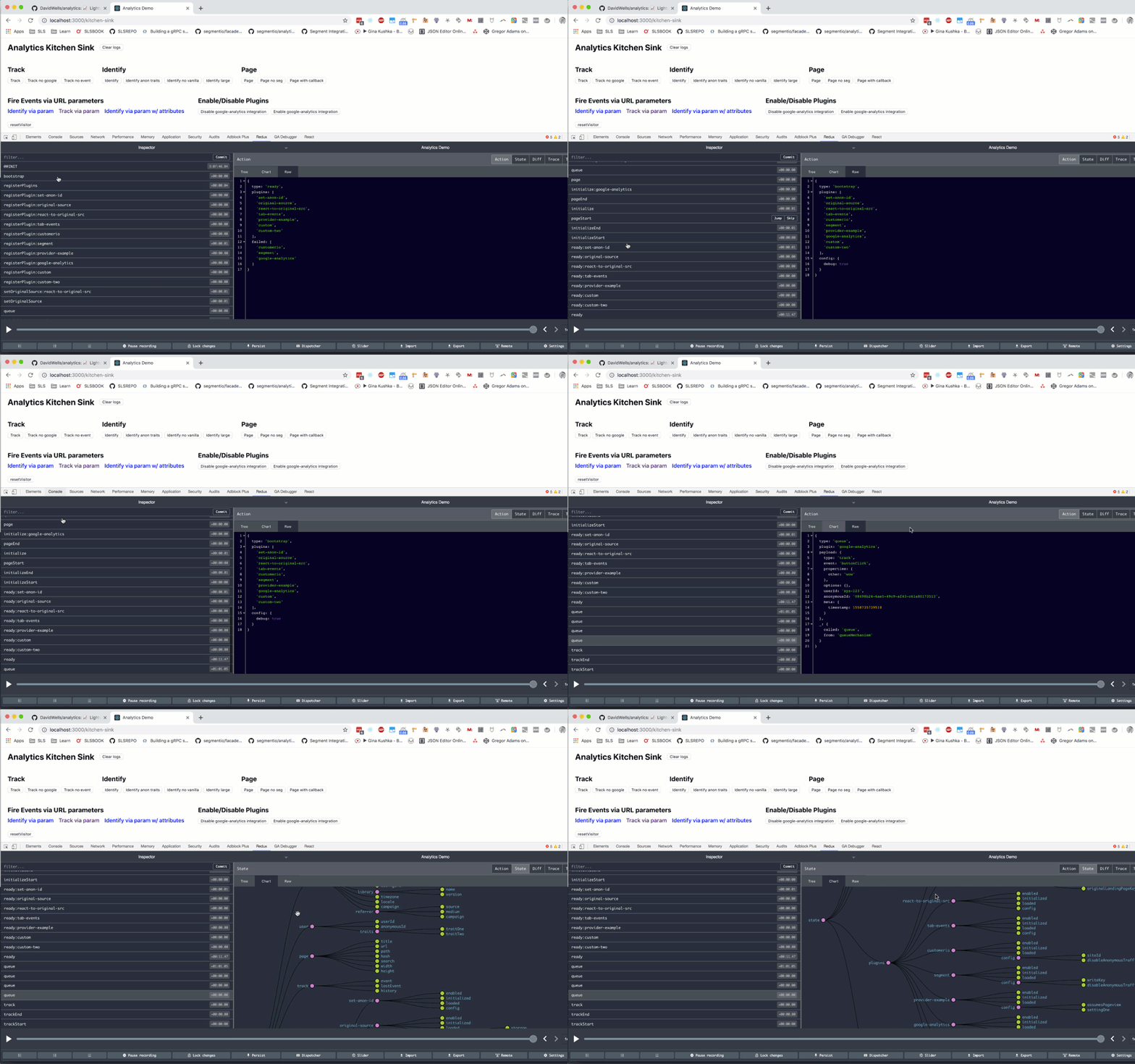
During development, you can turn on `debug` mode. This will connect the dev tools for you to see the analytics events passing through your application visually.
```js
import Analytics from 'analytics'
const analytics = Analytics({
app: 'my-app',
debug: true
})
```
## TypeScript support
Types for analytics and plugins are generated from [JSDoc blocks](https://jsdoc.app/) in the code base via the [tsd-jsdoc](https://www.npmjs.com/package/tsd-jsdoc) package.
We are always looking to improve type support & improve the DX of users. If you see something that can be improved let us know in an issue!
## Contributing
Contributions are always welcome, no matter how large or small. Before contributing, please read the [code of conduct](CODE_OF_CONDUCT.md).
## Setup & Install dependencies
Clone the repo and run
```sh
$ git clone https://github.com/davidwells/analytics
$ cd analytics
$ npm install && npm run setup
```
The above command will set up all the packages and their dependencies.
## Development
You can watch and rebuild packages with the `npm run watch` command.
```sh
npm run watch
```
While watch mode is activated, you can work against the demo site in examples to test out your changes on a live application.
## Support
If you find this project helpful, please consider [sponsoring the development](https://github.com/sponsors/DavidWells) to help maintain and improve it.
| **0.0.7** |
## Community Plugins
Below are plugins created outside of this repo:
- [ActiveCampaign](https://github.com/deevus/analytics-plugin-activecampaign) Adds Analytics support for ActiveCampaign
- [analytics-fetch](https://www.npmjs.com/package/@standardorg/analytics-fetch) Integration with the browser's fetch API for analytics
- [Conscia](https://www.npmjs.com/package/analytics-plugin-conscia) Adds Analytics support for conscia.ai
- [Facebook tracking pixel](https://github.com/DavidWells/analytics/issues/54#issuecomment-735413632) Send data to Facebook Tracking pixel
- [Indicative](https://www.npmjs.com/package/analytics-plugin-indicative) Adds Analytics support for Indicative
- [LinkedIn Pixel](https://www.npmjs.com/package/analytics-plugin-linkedin) Adds Analytics support for Linkedin tracking pixel
- [Logrocket](https://www.npmjs.com/package/analytics-plugin-logrocket) Adds Analytics support for LogRocket
- [mailmodo](https://www.npmjs.com/package/analytics-plugin-mailmodo) Adds Analytics support for mailmodo
- [Pirsch Analytics](https://www.npmjs.com/package/analytics-plugin-pirsch) Adds Analytics support for Pirsch Analytics
- [Planhat](https://www.npmjs.com/package/analytics-plugin-planhat) Adds Analytics support for Planhat
- [Plausible](https://www.npmjs.com/package/analytics-plugin-plausible) Adds Analytics support for Plausible
- [PostHog](https://www.npmjs.com/package/@metro-fs/analytics-plugin-posthog) Adds Analytics support for PostHog by @metro-fs
- [PostHog](https://www.npmjs.com/package/analytics-plugin-posthog) Adds Analytics support for PostHog by deevus
- [ProfitWell](https://github.com/deevus/analytics-plugin-profitwell) Adds Analytics support for ProfitWell
- [Reddit Pixel](https://www.npmjs.com/package/analytics-plugin-reddit-pixel) Adds Analytics support for Reddit Pixel
- [RudderStack](https://www.npmjs.com/package/begrowth-analytics-rudderstack) Adds Analytics support for RudderStack
- [Splitbee](https://www.npmjs.com/package/analytics-plugin-splitbee) Adds Analytics support for Splitbee
- [Tapfiliate](https://github.com/deevus/analytics-plugin-tapfiliate) Adds Analytics support for Tapfiliate
- [Yandex](https://github.com/pechischev/analytics-yandex-metric-plugin) Send data to Yandex metrica
- [Yandex Metrika](https://www.npmjs.com/package/@hexlet/analytics-plugin-yandex-metrika) Adds Analytics support for Yandex Metrika
- [Add a plugin link](https://github.com/DavidWells/analytics/blob/master/external-plugins.json)
Additional examples
- [Using AWS Lambda, API Gateway & analytics](https://blog.mikecoughlin.com/own-your-event-tracking/)
- [Using analytics to make amundsen.io pluggable](https://github.com/amundsen-io/amundsenfrontendlibrary/blob/e91c0ab9d8a39b302a71c535145a20e24326ee21/docs/application_config.md#analytics)
## Creating analytics plugins
The library is designed to work with any third-party analytics tool.
Plugins are just plain javascript objects that expose methods for `analytics` to register and call.
Here is a quick example of a plugin:
```js
// plugin-example.js
export default function pluginExample(userConfig) {
// return object for analytics to use
return {
/* All plugins require a name */
name: 'my-example-plugin',
/* Everything else below this is optional depending on your plugin requirements */
config: {
whatEver: userConfig.whatEver,
elseYouNeed: userConfig.elseYouNeed
},
initialize: ({ config }) => {
// load provider script to page
},
page: ({ payload }) => {
// call provider specific page tracking
},
track: ({ payload }) => {
// call provider specific event tracking
},
identify: ({ payload }) => {
// call provider specific user identify method
},
loaded: () => {
// return boolean so analytics knows when it can send data to third-party
return !!window.myPluginLoaded
}
}
}
```
`name` is required for all plugins. All other methods are optional.
If you don't need to hook into `page` tracking, just omit the `page` key from your plugin object.
To use a plugin, import it and pass it into the `plugins` array when you bootstrap `analytics`.
```js
import Analytics from 'analytics'
import pluginExample from './plugin-example.js'
const analytics = Analytics({
app: 'my-app-name',
plugins: [
pluginExample({
whatEver: 'hello',
elseYouNeed: 'there'
}),
...otherPlugins
]
})
```
### React to any event
Plugins can react to any event flowing through the `analytics` library.
For example, if you wanted to trigger custom logic when `analytics` bootstraps, you can attach a function handler to the `bootstrap` event.
For a full list of core events, checkout [`events.js`](https://github.com/DavidWells/analytics/blob/master/packages/analytics-core/src/events.js).
```js
// Example Plugin plugin.js
export default function myPlugin(userConfig) {
return {
/* Name is a required field for plugins */
name: 'my-plugin',
/* Bootstrap runs when analytics starts */
bootstrap: ({ payload, config, instance }) => {
// Do whatever on `bootstrap` event
},
pageStart: ({ payload, config, instance }) => {
// Fire custom logic before analytics.page() calls
},
pageEnd: ({ payload, config, instance }) => {
// Fire custom logic after analytics.page() calls
},
trackStart: ({ payload, config, instance }) => {
// Fire custom logic before analytics.track() calls
},
'track:customerio': ({ payload, config, instance }) => {
// Fire custom logic before customer.io plugin runs.
// Here you can customize the data sent to individual analytics providers
},
trackEnd: ({ payload, config, instance }) => {
// Fire custom logic after analytics.track() calls
},
// ... hook into other events
}
}
```
Using this plugin is the same as any other.
```js
import Analytics from 'analytics'
import customerIoPlugin from '@analytics/customerio'
import myPlugin from './plugin.js'
const analytics = Analytics({
app: 'my-app-name',
plugins: [
// include myPlugin
myPlugin(),
customerIoPlugin({
trackingId: '1234'
})
...otherPlugins
]
})
```
### Custom methods
Analytics plugins can provide their own custom functionality via the `methods` key.
```js
import Analytics from 'analytics'
// Example plugin with custom methods
const pluginOne = {
name: 'one',
// ... page, track, etc
// Custom functions to expose to analytics instance
methods: {
myCustomThing(one, two, three) {
const analyticsInstance = this.instance
console.log('Use full analytics instance', analyticsInstance)
},
otherCustomThing: (one, two, ...args) => {
// Arrow functions break this.instance context.
// The instance is instead injected as last arg
const analyticsInstance = args[args.length - 1]
console.log('Use full analytics instance', analyticsInstance)
},
// Async function examples
async fireCustomThing(one, two, three) {
const { track } = this.instance
track('customThing')
return 'data'
},
triggerSpecial: async (argOne, argTwo, ...args) => {
// Arrow functions break this.instance context.
// The instance is instead injected as last arg
const analyticsInstance = args[args.length - 1]
return argOne + argTwo
}
}
}
// Example plugin with custom methods
const pluginTwo = {
name: 'two',
page: () => { console.log('page view fired') }
// Custom functions to expose to analytics instance
methods: {
cookieBanner(one, two, three) {
const analyticsInstance = this.instance
console.log('Use full analytics instance', analyticsInstance)
const cookieSettings = analyticsInstance.storage.getItem('preferences-set')
if (!cookieSettings) {
// Show cookie settings
}
},
}
}
// Initialize analytics instance with plugins
const analytics = Analytics({
app: 'your-app-name',
plugins: [
pluginOne,
pluginTwo
]
})
// Using custom methods in your code
analytics.plugins.one.myCustomThing()
analytics.plugins.two.cookieBanner()
```
## Plugin Naming Conventions
Plugins should follow this naming convention before being published to npm
```bash
analytics-plugin-{your-plugin-name}
```
E.g. An analytics plugin that does `awesome-stuff` should be named
```bash
npm install analytics-plugin-awesome-stuff
```
Then submit to the [list above](#analytic-plugins)
## Debugging analytics
During development, you can turn on `debug` mode. This will connect the dev tools for you to see the analytics events passing through your application visually.

```js
import Analytics from 'analytics'
const analytics = Analytics({
app: 'my-app',
debug: true
})
```
## TypeScript support
Types for analytics and plugins are generated from [JSDoc blocks](https://jsdoc.app/) in the code base via the [tsd-jsdoc](https://www.npmjs.com/package/tsd-jsdoc) package.
We are always looking to improve type support & improve the DX of users. If you see something that can be improved let us know in an issue!
## Contributing
Contributions are always welcome, no matter how large or small. Before contributing, please read the [code of conduct](CODE_OF_CONDUCT.md).
## Setup & Install dependencies
Clone the repo and run
```sh
$ git clone https://github.com/davidwells/analytics
$ cd analytics
$ npm install && npm run setup
```
The above command will set up all the packages and their dependencies.
## Development
You can watch and rebuild packages with the `npm run watch` command.
```sh
npm run watch
```
While watch mode is activated, you can work against the demo site in examples to test out your changes on a live application.
## Support
If you find this project helpful, please consider [sponsoring the development](https://github.com/sponsors/DavidWells) to help maintain and improve it.