 ## ✨ Highlights
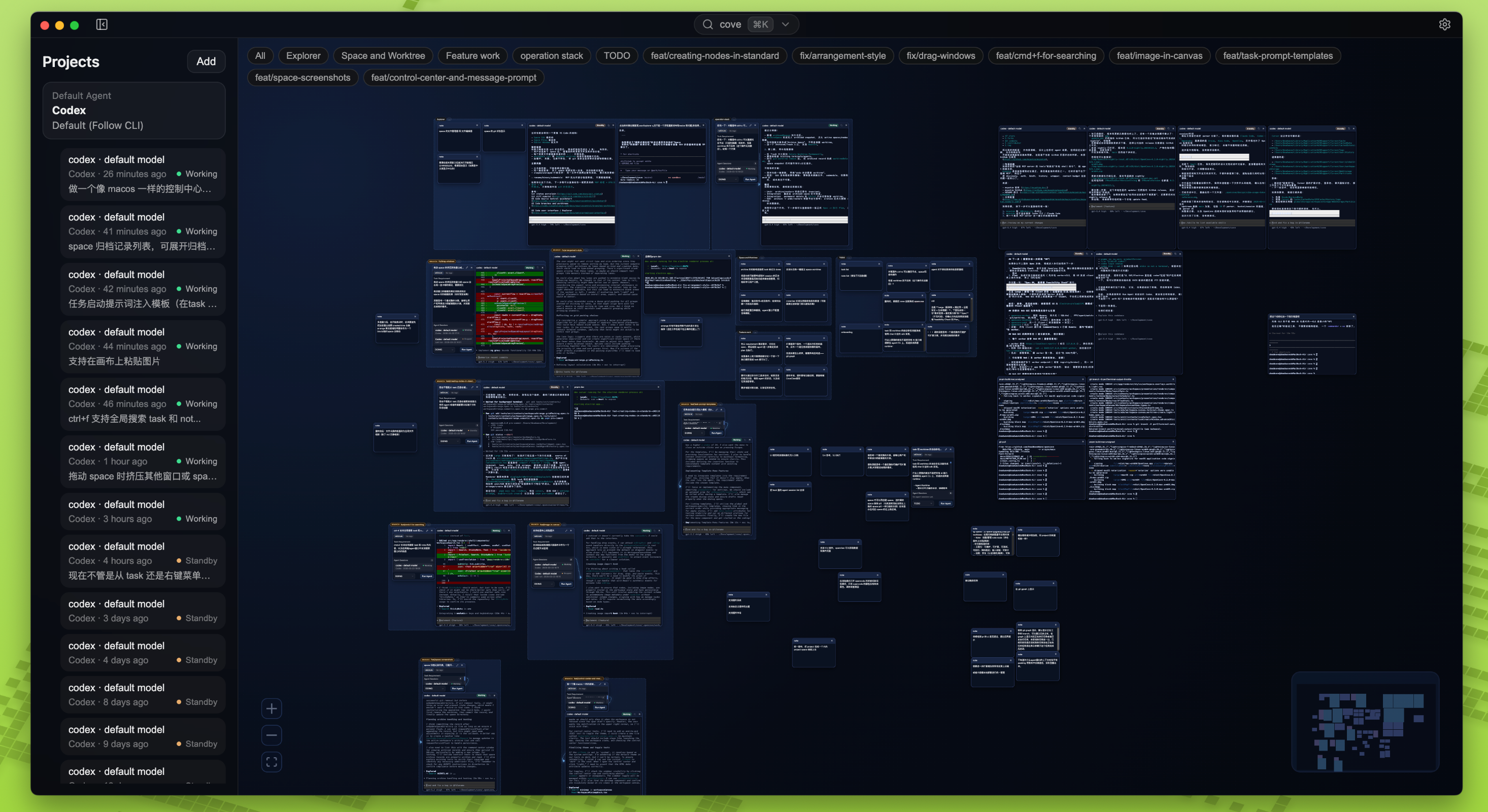
- **🌌 Infinite spatial canvas**: Arrange terminals, notes, tasks, and agent sessions the way you actually think.
- **🤖 Built for CLI agents**: Optimized for `Claude Code`, `Codex`, and similar terminal-native agent workflows.
- **🧠 Context stays visible**: Planning, execution, and results live together instead of getting buried in linear chat history.
- **💾 Persistent workspaces**: Restore your viewport, layout, terminal output, and agent state after restarts.
- **🗂️ Space archives**: Snapshot and revisit previous workspace states when you need to jump back into old contexts.
- **🖼️ Rich media and smart layouts**: Paste images, multi-select nodes, use label colors, and tidy messy boards quickly.
- **🔍 Global search and control center**: Search across the canvas and terminal output, then manage active sessions from one place.
- **🗂️ Workspace isolation**: Separate projects cleanly with directories and git worktrees.
## 💡 Why OpenCove?
OpenCove is designed around a simple idea: **agent workflows are easier to reason about when context is spatial, not hidden**.
| Pain Point (Traditional) | The OpenCove Workspace |
| :--- | :--- |
| **Linear amnesia**: context disappears into long chat histories. | **Spatial context**: important tasks, notes, and execution stay visible on the canvas. |
| **Single-pane bottlenecks**: tabs and split panes force constant context switching. | **Parallel execution**: compare and monitor multiple agents without losing your place. |
| **Opaque automation**: background agent work feels like a black box. | **Transparent actions**: terminals and side effects stay visible while work is happening. |
## 🚀 Getting Started
*OpenCove is currently in Alpha. We recommend it for early adopters and power users who want to explore spatial AI workflows.*
### Download
Prebuilt binaries are available on the [GitHub Releases](https://github.com/DeadWaveWave/opencove/releases) page.
At the moment, most public builds are **nightly / prerelease builds**, which means:
- You get the newest features first
- You should expect rough edges
- Feedback and bug reports are especially valuable
Downloads are available for macOS, Windows, and Linux.
> **⚠️ macOS note**
> Current macOS builds are **not signed or notarized** with an Apple Developer ID. If Gatekeeper blocks the app, run this in your terminal:
> ```bash
> xattr -dr com.apple.quarantine /Applications/OpenCove.app
> ```
### CLI and Server Install
You now have two supported ways to install the `opencove` CLI:
- From the Desktop app: open **Settings → Worker → CLI** and click **Install CLI**.
- Without Desktop: use a GitHub Release that includes standalone runtime bundles
(`opencove-server-*`) plus release-specific installer assets such as
`opencove-install-v
## ✨ Highlights
- **🌌 Infinite spatial canvas**: Arrange terminals, notes, tasks, and agent sessions the way you actually think.
- **🤖 Built for CLI agents**: Optimized for `Claude Code`, `Codex`, and similar terminal-native agent workflows.
- **🧠 Context stays visible**: Planning, execution, and results live together instead of getting buried in linear chat history.
- **💾 Persistent workspaces**: Restore your viewport, layout, terminal output, and agent state after restarts.
- **🗂️ Space archives**: Snapshot and revisit previous workspace states when you need to jump back into old contexts.
- **🖼️ Rich media and smart layouts**: Paste images, multi-select nodes, use label colors, and tidy messy boards quickly.
- **🔍 Global search and control center**: Search across the canvas and terminal output, then manage active sessions from one place.
- **🗂️ Workspace isolation**: Separate projects cleanly with directories and git worktrees.
## 💡 Why OpenCove?
OpenCove is designed around a simple idea: **agent workflows are easier to reason about when context is spatial, not hidden**.
| Pain Point (Traditional) | The OpenCove Workspace |
| :--- | :--- |
| **Linear amnesia**: context disappears into long chat histories. | **Spatial context**: important tasks, notes, and execution stay visible on the canvas. |
| **Single-pane bottlenecks**: tabs and split panes force constant context switching. | **Parallel execution**: compare and monitor multiple agents without losing your place. |
| **Opaque automation**: background agent work feels like a black box. | **Transparent actions**: terminals and side effects stay visible while work is happening. |
## 🚀 Getting Started
*OpenCove is currently in Alpha. We recommend it for early adopters and power users who want to explore spatial AI workflows.*
### Download
Prebuilt binaries are available on the [GitHub Releases](https://github.com/DeadWaveWave/opencove/releases) page.
At the moment, most public builds are **nightly / prerelease builds**, which means:
- You get the newest features first
- You should expect rough edges
- Feedback and bug reports are especially valuable
Downloads are available for macOS, Windows, and Linux.
> **⚠️ macOS note**
> Current macOS builds are **not signed or notarized** with an Apple Developer ID. If Gatekeeper blocks the app, run this in your terminal:
> ```bash
> xattr -dr com.apple.quarantine /Applications/OpenCove.app
> ```
### CLI and Server Install
You now have two supported ways to install the `opencove` CLI:
- From the Desktop app: open **Settings → Worker → CLI** and click **Install CLI**.
- Without Desktop: use a GitHub Release that includes standalone runtime bundles
(`opencove-server-*`) plus release-specific installer assets such as
`opencove-install-v
Redefining dev environments for the modern web.
Built with ❤️ by the OpenCove Team.