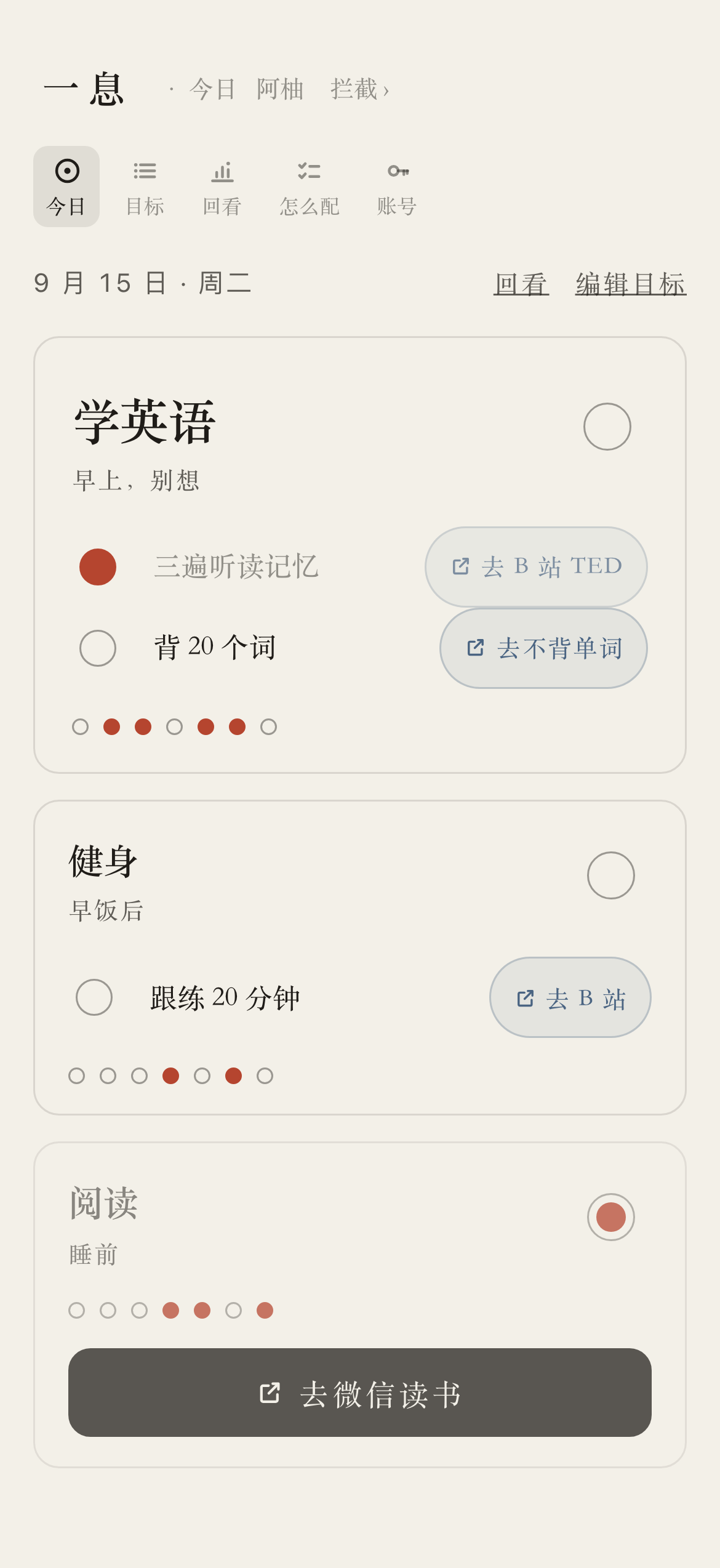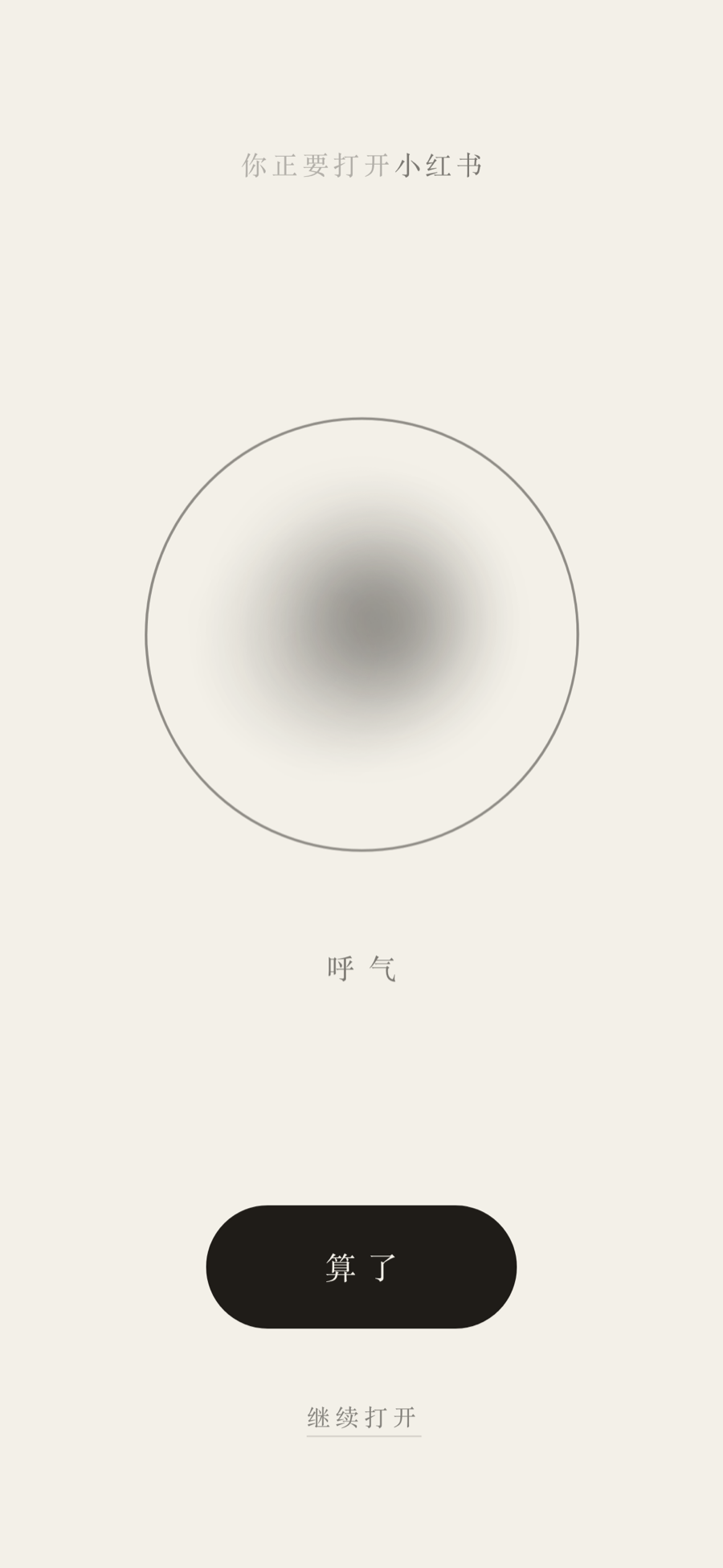
English | [简体中文](README.zh-CN.md) # yixi (一息) 一息 does two things, sharing one account. **Breathe** (拦): before a distracting app opens, your phone shows a page that asks you to breathe for ten seconds, then offers 「算了」 first and 「继续打开」 second, and keeps the receipt. **Today** (引): your top few goals for the coming weeks — three by default, as many as nine if you want — on one page you open every morning, each with its sub-tasks for today, seven dots for the last seven days, and a button that jumps straight into the app where the work happens — B 站 for a workout, 微信读书 for a book. Either half is useful on its own. One Cloudflare Worker and one D1 database, running entirely on Cloudflare's free tier. On the interception side it is a self-hosted stand-in for [One Sec](https://one-sec.app/), built as a web page instead of an iPhone app.
The breathing page in light mode: an ink blot on paper, 「算了」 as a filled pill, 「继续打开」 as a small underlined link 「算了」 is a filled pill, 「继续打开」 a small underlined link — the asymmetry is deliberate. Before a distracting app opens, the phone jumps to a page that counts ten seconds out, offers the way out first and the way in second, and keeps the receipt either way. **[Breathe →](docs/breathe.md)** /today in light mode: three goal cards on paper, the first a large card carrying the goal and today's sub-tasks, each with its own check circle and jump chip, plus seven dots; a card with no sub-tasks shows a wide jump button instead Three goals, the first one large. No streak number anywhere. The few things that matter for the coming weeks on one page you open every morning — each with its sub-tasks for today, seven dots for the last seven days, and one button into the app where the work happens. **[Today →](docs/today.md)**

Try it now →
An open instance, free, nothing to deploy. Or run your own in fifteen minutes.

**Who this is for:** anyone who wants a nudge rather than a wall. It is friction, not enforcement — the automation is one toggle away from off, on purpose. A third face, Surf (渡): when an urge shows up, tap it, and it walks you through ten minutes. The open instance is the quickest way in. If you would rather not keep a minute-by-minute log of your worst impulses on someone else's server, deploy your own in fifteen minutes; it is the same code either way. ## Known limits Three that apply to the whole product. The per-face lists are in [docs/breathe.md](docs/breathe.md#known-limits) and [docs/today.md](docs/today.md#known-limits), and both are worth reading before you deploy. - **The UI is bilingual (Chinese and English).** Switch it from the footer on the landing, login and register pages, from the language section on `/account`, or by adding `?lang=en` / `?lang=zh` to any page; Chinese is the default whenever nothing else says otherwise. Every page is translated, the long Shortcut walkthrough at `/setup` included; the iOS labels it quotes are the ones English iOS prints. - **From mainland China, use the Pages hostname.** See [Why it deploys twice](#why-it-deploys-twice). `pages.dev` is a shared suffix and clean today is not clean forever — your own domain is the only durable answer. - **This is a nudge, not a blocker.** Anyone can disable the automation in two taps. That is by design — the whole system fails open — and it means the tool only works for someone who wants it to. ## Pages | Route | Who | What | | --- | --- | --- | | `/` | anyone | landing page, links to register / sign in | | `/gate?app=&k=` | gate token | the decision endpoint the Shortcut calls; answers `pass` or a URL | | `/b?s=` | sid | the breathing page | | `POST /resolve` | sid | records proceed / abandon, opens the grace window | | `/register` `/login` `/claim` `/recover` | anyone | sign up, sign in, bind an old token, reset a password with a token | | `/today` | you | the one page to open every morning: your top goals, today's sub-tasks, a seven-day dot strip | | `/today/goals` | you | add, edit, reorder and archive goals — everything `/today` shows but does not let you change | | `/today/review` | you | looking back: today's ratio, a 30-day strip, every goal's own dot strip and check-in rate, this week's sub-task check-ins | | `/today/setup` | you | add `/today` to the home screen, a Shortcut, or a timed automation that opens it on its own | | `/goals` | you | kept as a 307 to `/today/goals` (preserves method/body), so old links and bookmarks still land somewhere useful | | `/review` | you | today, the last seven days, which app costs you most | | `/settings` | you | which apps to intercept, and how long | | `GET /api/candidates` | you | JSON: type an app name, get candidate URL schemes with sources. Fetched by the URL scheme field on `/settings` and `/today/goals`; not a page | | `/lookup` `/probe` | — | kept as 302s to `/settings`. Both were pages once; finding and testing a scheme is now part of the field that needs it, so old links and bookmarks still land somewhere useful | | `/setup` | you | the Shortcut walkthrough, with your own host and token filled in | | `/surf` | you | the Surf (渡) ten-minute flow: put the phone down, let it pass, then decide again. Nothing on it asks you anything | | `/surf/review` | you | Surf's 30-day look-back: urge counts, the passed/opened ratio, and what time of day they come. Also the entry point for the 渡 face | | `/surf/setup` | you | pick your scene, once | | `/account` | you | read your gate token back, change your password, sign out | | `/mock?v=1\|2` | anyone | the two candidate visual skins, side by side | | `/admin` | owner | mint a token for someone offline; see per-user attempt counts | | `/manifest.webmanifest` `/icon.png` | anyone | the home-screen files — public and cacheable, nothing per-user in either | | `/robots.txt` | anyone | crawl the front door, nothing else | Anything else is a 404. There is no detail endpoint under `/admin` to guess at — see [SECURITY.md](SECURITY.md). Each face carries its own nav — 「今日」 for `/today` and behind it, 「拦截」 for the breathing pages and behind them, 「渡」 for `/surf` and behind it — with a small link to each of the others, and all three share the same login. ## Why it deploys twice One codebase, two Cloudflare deployments, sharing one D1 database: | Deployment | Config | Job | | --- | --- | --- | | **Pages** | `pages/wrangler.toml` | the hostname people actually open | | **Worker** | `wrangler.toml` | one daily trigger — cleanup at noon Shanghai, the `goal_days` snapshot at 00:00 | This is worth reading even if you are nowhere near China, because it is a real and reusable piece of operational knowledge about Cloudflare's shared hostnames. **`*.workers.dev` is DNS-poisoned inside mainland China.** Measured, not assumed: a `*.workers.dev` hostname resolves to three mutually different addresses from the three big domestic public resolvers (223.5.5.5, 119.29.29.29, 114.114.114.114), none of them matching what the rest of the world sees. That is the signature of domain-level interference, not of Cloudflare being blocked — `cloudflare.com` and `*.pages.dev` resolve byte-for-byte identically inside and outside. The shared `workers.dev` suffix is being singled out. `*.pages.dev` is currently clean, so Pages gets the human-facing hostname. Same edge, same runtime, same code, same database; only the hostname differs. `pages/functions/[[path]].ts` is one line that forwards every request into the same Worker `fetch` handler. **The Worker deployment stays because Pages has no Cron Triggers.** Both daily ticks are fired by Cloudflare itself, so neither cares that its own hostname is unreachable from China. Two things to know before copying this pattern: - Cloudflare's own tooling recommends Workers over Pages for new projects. Deploying to Pages here is going *against* that advice, purely to get a usable hostname. - **If you have your own domain, do that instead.** Attach it to the Worker as a Custom Domain and both problems disappear at once — you get a clean hostname *and* Cron Triggers, and the entire `pages/` directory can be deleted. `pages.dev` is a shared suffix too; clean today is not a guarantee. Also worth knowing: `wrangler pages deploy` does not accept a `-c` config path, which is why the Pages config has to live in its own directory rather than sharing the Worker's `wrangler.toml`. **When updating an existing install, deploy the Worker and Pages in the same sitting** — in between, the Pages hostname keeps serving the old build, and a sub-task check made there is written to the retired `done_at` column and never shown by the new code. ## Deploy your own (~15 min) Prerequisites: a Cloudflare account and Node 18+. ### 1. Install and sign in ```bash cd yixi npm install npx wrangler login ``` ### 2. Create the D1 database ```bash npx wrangler d1 create yixi ``` Put the returned `database_id` into **both** `wrangler.toml` and `pages/wrangler.toml`. Both files must point at the same database — that is what makes the two deployments one app. (The `database_name` must stay `yixi`, or change it in both files and in `package.json`'s scripts.) ### 3. Generate the secrets — and keep a copy ```bash openssl rand -base64 48 # this is your TOKEN_KEY openssl rand -base64 48 # this is your COOKIE_SECRET ``` Do not pipe these straight into `wrangler secret put`. You need to type the *same* `TOKEN_KEY` into two deployments, and there is no way to read a Cloudflare secret back out. > ### ⚠️ Lose `TOKEN_KEY` and nobody can ever read their gate token again. > > `TOKEN_KEY` is the AES-GCM key that the gate tokens are sealed under so a signed-in person can look their own token up. It is never written to D1 — a stolen database on its own opens nothing. > > Interception keeps working without it: `/gate` verifies against a SHA-256 hash and never touches the ciphertext. What breaks is recovery. Anyone who forgot their token can no longer read it back, which also means they can no longer set up a new phone, and `/recover` (reset a password using the token) becomes unusable for them. There is no reset path and no way to re-derive it. **Save it in a password manager before you continue.** Then set them on the Worker: ```bash npx wrangler secret put TOKEN_KEY # paste the first value npx wrangler secret put COOKIE_SECRET # paste the second value ``` `COOKIE_SECRET` is legacy. Browser sessions used to be a signed cookie; they are now rows in `sessions_web` and the cookie carries only an opaque id, so nothing signs anything any more. No code reads it. It is documented here because existing deployments still have it set and because dropping a secret is a nuisance — a fresh deployment can leave it out. ### 4. Apply the schema and deploy the Worker ```bash npm run deploy # applies migrations against the remote D1, then deploys ``` Migrations only need to run once; the Pages deployment shares the same database. **Always deploy with `npm run deploy`, never a bare `wrangler deploy`** — it is the migrations-then-deploy order that keeps the two in step. The current Worker needs `0006_user_locale.sql`, `0008_today_goals.sql` and `0011_surf_scene.sql` in particular: `/gate` reads `users.locale`, `users.today_goals`, `users.surf_scene` and `users.surf_line` on its way to knowing who you are, so a Worker deployed against a database without those columns stops intercepting anything. ### 5. Deploy Pages ```bash cd pages npx wrangler pages project create yixi-app --production-branch main # TOKEN_KEY must be byte-for-byte the SAME value as the Worker's, or Pages # cannot open tokens that were sealed on the Worker side (and vice versa). npx wrangler pages secret put TOKEN_KEY --project-name yixi-app npx wrangler pages secret put COOKIE_SECRET --project-name yixi-app npx wrangler pages deploy --branch main --project-name yixi-app ``` You get a `https://.pages.dev`. Note that `*.pages.dev` subdomains are globally unique — if the name is taken, Cloudflare appends a suffix, and that suffixed hostname is the one to use everywhere below. ### 6. Turn on the bot check (optional, and skipping it is supported) Registration is open to anyone who finds the URL, and since this repository is public, the URL is too. The per-IP throttle in `src/ratelimit.ts` holds one address to 5 sign-ups an hour; it does nothing about a script spread over a few hundred addresses. [Cloudflare Turnstile](https://developers.cloudflare.com/turnstile/) closes that gap, on `/register` and nowhere else. 1. Cloudflare dashboard → **Turnstile** → **Add widget**. Widget mode **Managed**. 2. Under hostnames, add **both** deployments — `.pages.dev` *and* `..workers.dev` — because both of them serve `/register`. Add `localhost` too if you want the challenge to appear in `npm run dev`. 3. Copy the two values it hands you: a **site key** (public — it is rendered into the page) and a **secret key** (never leaves the server). 4. Set both on both deployments: ```bash # Worker npx wrangler secret put TURNSTILE_SITE_KEY # paste the site key npx wrangler secret put TURNSTILE_SECRET # paste the secret key # Pages — the same two values cd pages npx wrangler pages secret put TURNSTILE_SITE_KEY --project-name yixi-app npx wrangler pages secret put TURNSTILE_SECRET --project-name yixi-app ``` `TURNSTILE_SITE_KEY` is public, so it could equally be a `[vars]` entry in `wrangler.toml`. It is a secret here only so the two values travel together and cannot get half-deployed. **Leaving this out is a supported configuration, not a broken one.** With either value missing, no widget renders, nothing is verified, and `/register` behaves exactly as it did before this existed — which is what lets `npm run dev` and a first deploy work with no Cloudflare widget at all. The price is worth saying out loud: no keys means no bot protection beyond the per-IP throttle. Same fail-open judgment as everywhere else in this product — see [SECURITY.md](SECURITY.md). Two more things worth knowing: - **This is the only place the "zero external requests" rule is broken.** The widget script loads from `challenges.cloudflare.com`, which is the single origin the CSP allows — on `/register`, and only while the keys are set. Every other page keeps `default-src 'none'` with no exceptions. See the comment above `TURNSTILE_ORIGIN` in `src/ui/layout.ts`. - **The challenge needs JavaScript.** With a widget configured, a browser with JavaScript off cannot sign up. The form says so. ### 7. Register, then make yourself owner Open `https:///register` and sign up with an email and a password. That is all a normal user ever needs; registration is open (behind the Turnstile challenge, if you set one up in step 6). Owner is a separate thing, and there is deliberately no UI to grant it. If you want `/admin` (minting tokens for people offline), flip the flag directly: ```bash npx wrangler d1 execute yixi --remote --command \ "UPDATE users SET is_owner = 1 WHERE email = 'you@example.com';" ``` `/admin` is entirely optional. Since registration is open, it supports issuing tokens and viewing aggregate onboarding conversion. See [measurement definitions](docs/onboarding.md). ### 8. Set up your first app 1. `/settings` — add an app. The **app key** (e.g. `xhs`) is the string you will retype inside the iOS automation, and it must match exactly. Lowercase letters, digits, `-` and `_` only. 2. In the same form, the **URL scheme** field carries everything you need for it: a worked example above the box, a **试跳** button beside it, and a folded 「不知道填什么?按 App 名字找」 that lists candidates inline, each labelled with where it came from. **None of them is verified.** 3. Do this on the iPhone. Tap **试跳** on a candidate — only the one that actually opens the app counts. Then 「用这个」 writes it into the box and you save. Your half-filled form survives the jump. 4. `/setup` — the Shortcut walkthrough, with your real host and token already pasted into the lines you need. ## Stack | | | | --- | --- | | Runtime | Cloudflare Workers (also deployed as a Pages Function) | | Storage | Cloudflare D1 (SQLite) | | Language | TypeScript, strict, no runtime dependencies | | Rendering | server-side HTML, inline CSS/JS, zero external requests (CSP-enforced) — one exception: the Turnstile widget on `/register`, only when configured | | Crypto | WebCrypto only — PBKDF2-SHA256 passwords, AES-GCM token sealing | | Client | iOS Shortcuts + Safari | | Tests | 843 tests over 36 files (Vitest + `@cloudflare/vitest-pool-workers`) | | Cost | fits inside Cloudflare's free tier | ## Project layout ``` src/index.ts route table, three auth shapes, the twice-daily cron src/gate.ts /gate and /resolve — the only machine-facing routes src/auth.ts ?k= token, cookie session, constant-time compares src/account.ts register / login / claim / recover; the closed recovery loop src/crypto.ts PBKDF2 passwords, AES-GCM token sealing, random hex src/db.ts every D1 statement in the app, and nothing else src/stats.ts /review aggregation; the grace_pass exclusion lives here src/urges.ts D1 helpers for the urges table, plus the pure aggregation /surf/review reads off them src/surfscenes.ts the five 渡 scenes: opening line and three body exits each, and how a stored scene resolves src/snapshot.ts the goal_days snapshot: what /today showed, what got done src/ratelimit.ts per-IP fixed-window throttle for the open endpoints src/turnstile.ts the optional /register challenge, and its fail-open rules src/scheme.ts the URL-scheme denylist — one authority, three call sites src/schemes.ts frozen snapshot of two public scheme collections (60 apps) src/types.ts Env, User, event kinds, the shared constants src/dates.ts 'YYYY-MM-DD' arithmetic shared by /today and /today/goals src/ui/*.ts one module per page, all server-rendered src/ui/schemefield.ts the URL-scheme picker field shared by /settings and /today/goals src/ui/breathing.ts the breathing orb shared by /b and /surf: markup, CSS and timing src/ui/pwa.ts the home-screen manifest and icon — public, no per-user data src/ui/today.ts /today — the morning page: goals, today's sub-tasks, seven-day dots src/ui/goals.ts /today/goals — add, edit, reorder and archive goals src/ui/progress.ts /today/review — looking back: the 30-day strip, per-goal check-in rate src/ui/todaysetup.ts /today/setup — home screen, Shortcut and timed-automation walkthrough src/ui/surf.ts /surf — the ten-minute urge-surfing flow, one document, four steps, no questions src/ui/surfreview.ts /surf/review — the 30-day look-back over recorded urges src/ui/surfsetup.ts /surf/setup — pick the scene once, plus the home-screen and Shortcut entry points src/api/admin.ts the owner's ticket window, and the privacy line migrations/*.sql D1 schema, eleven migrations scripts/icon.mjs regenerates the base64 PNG baked into src/ui/pwa.ts pages/ Pages entry point (one line) + its own wrangler.toml shortcut/README.md why the Shortcut is shaped the way it is docs/architecture.md request lifecycle, tables, accounting semantics ``` ## Development ```bash npm test # vitest run — the full suite npm run typecheck # tsc --noEmit (src) + tsc -p test --noEmit npm run dev # wrangler dev — local server npm run migrate:local # apply migrations to the local D1 npm run deploy # remote migrations, then deploy the Worker ``` Before changing anything, read [CONTRIBUTING.md](CONTRIBUTING.md). It is short, and every rule in it comes from something that actually broke. ## Docs - [docs/breathe.md](docs/breathe.md) — the Shortcut, the grace window, the fail-open rule, interception limits - [docs/today.md](docs/today.md) — the goal model, `/today` and the pages behind it, snapshots, the home screen - [SECURITY.md](SECURITY.md) — threat model, the token-storage trade-off, self-hosting caveats - [CONTRIBUTING.md](CONTRIBUTING.md) — the five constraints that must not be refactored away - [docs/architecture.md](docs/architecture.md) — request lifecycle, D1 tables, accounting semantics - [shortcut/README.md](shortcut/README.md) — the reasoning behind the Shortcut's shape (Chinese) The author runs an open instance at ****. Sign up there and you can be breathing before your apps in about ten minutes, with nothing to deploy. **What the operator can and cannot see.** Your records are yours: the admin page returns a per-account count of how many times you were stopped, plus cohort-wide onboarding counts — no timestamps, no app names, no give-up rate, not even your email address. That is enforced in the SQL rather than in the template, and a test fails if it ever regresses. But be clear-eyed about the shape of the guarantee: whoever runs an instance holds its database, and a database can be queried directly. That is true of this instance and of every other self-hosted service you sign up for. So: use the shared one if you want to try it without work, and run your own if you would rather that sentence not apply to you. Deploying takes about fifteen minutes and the instructions are above. ## License [MIT](LICENSE) ### Public guides The homepage links to `/guides/iphone-shortcuts` and `/compare/one-sec`. Both are server-rendered, bilingual, available without an account, and listed with `/` in `/sitemap.xml`. Language selection follows the existing cookie and `Accept-Language` behavior; these are not separate language URLs. The personal `/setup` guide remains authenticated and excluded from indexing. Comparison sources were checked on 2026-09-18.