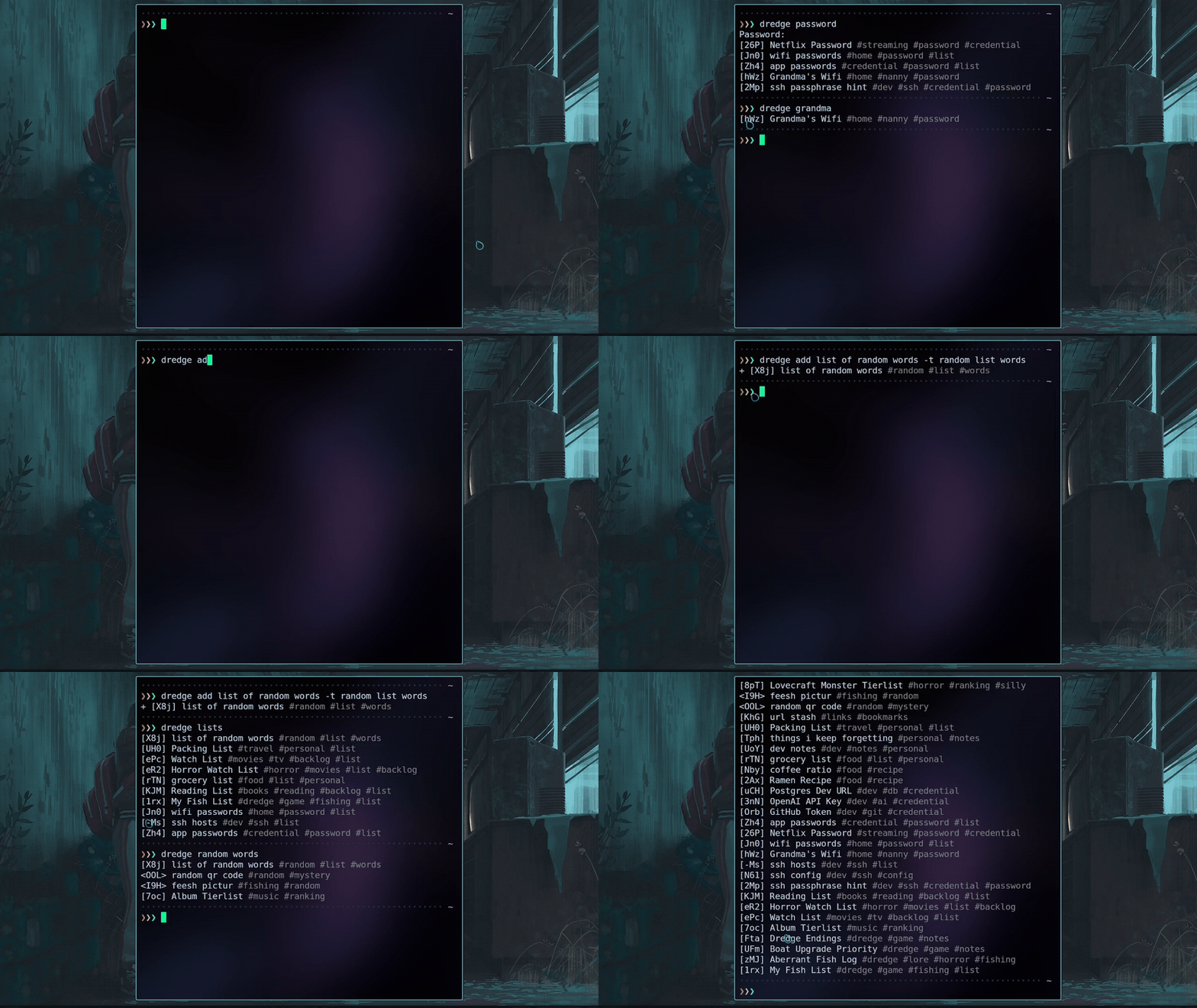
> This is NOT a password manager. NOT a notes app. And definetely NOT a deep-sea benthic abberant specimen taxonomic provenance registry. But it does the first two better than either. Just kidding (not really).
[](https://goreportcard.com/report/github.com/DeprecatedLuar/dredge)
[](https://oosmetrics.com/repo/DeprecatedLuar/dredge-cargo)
[](https://go.dev)
[Install](#install) • [Quick Start](#quick-start) • [Features](#features) • [The Link Command](#link) • [Commands](#commands) • [How It Works](#how-it-works) • [Security](#security) • [Why](#why)
Search, don't organize. **_Notes, configs, keys, secrets_** — five seconds from your terminal.
---
> *"Do not bother me with common clutter."* — The Fishmonger
```bash
go install github.com/DeprecatedLuar/dredge-cargo/cmd/dredge@latest
```
[other install options ↓](#install)
---
 The cool features you've never seen before
- **Encrypted storage** — Clone the repo and get absolute cryptic gibberish. You can't even tell what's in the repo without the password. (I used AES-256-GCM + Argon2id)
- **Instant search** — I made a custom fuzzy search algorithm because I'm lazy and want the right entry among 300 others in millisecond without having to think about it.
- **Store anything** — notes, scripts, dotfiles, images, zip archives. If it's a file and it exists it can be stored in dredge.
- **Live file linking** — Cool feature, symlink any item to a system path so you can read and edit directly or through dredge. Any changes sync both ways with the repo.
- **Git-backed** — private repo you own. So just `git clone` it and you have your data.
- **Session password** — One prompt per terminal session. After that, you can use passwordless untill you kill the terminal. (read the security session to understand better)
- **Trash + undo** — deleted items go to trash. So just use `dredge undo` if you delete accidentally.
---
 What to store in dredge?
I won't judge you. Annoying API keys that show only once, SSH config, AI prompts, passwords, literal shell scripts you can execute, email templates?, dotfiles (weird but will work fine), zip archives, movie list, lists of URLs for quick access...
Even a _legal_ copy of Chainsaw Man chapter 2 in Japanese. (I may or not have that one specifically)
---
 Install
 
### Go
```bash
go install github.com/DeprecatedLuar/dredge-cargo/cmd/dredge@latest
```
Make sure `$GOPATH/bin` (usually `~/go/bin`) is in your `PATH`.
### Universal
```bash
curl -sSL https://raw.githubusercontent.com/DeprecatedLuar/the-satellite/main/satellite.sh | bash -s -- install DeprecatedLuar/dredge-cargo:dredge
```
Other Install Methods
**Manual Install**
1. Download binary for your OS from [releases](https://github.com/DeprecatedLuar/dredge-cargo/releases)
2. Make executable: `chmod +x dredge-*`
3. Move to PATH: `mv dredge-* ~/.local/bin/dredge`
---
**From Source**
```bash
git clone https://github.com/DeprecatedLuar/dredge-cargo
cd dredge-cargo
go build -o dredge ./cmd/dredge
mv dredge ~/.local/bin/
```
---
 Quick start
```bash
# Initialize with an existing git remote
dredge init yourusername/vault # GitHub shorthand
# or: dredge init git@gitlab.com:you/vault.git
# Add your first item
dredge add "OpenAI Key" -c "sk-..." -t keys api #opens the editor without -c flag
# Search for it
dredge search openai
# Push to git
dredge push
```
Usage
```bash
# Add anything
dredge add My SSH Config -t ssh dotfiles --import ~/.ssh/config
dredge add "Master Architect Prompt" --import prompt.md -t ai prompts
dredge add "Watchlist" -c "Dune 2, Oppenheimer..." -t lists
dredge add "project-backup" --import project.tar.gz # binary files too :D
# Search — just type whatever you remember
dredge search prompt
dredge search aws key
dredge search ssh
# View, edit, remove
dredge view
dredge edit
dredge rm
dredge undo # brought it back
# Search results are numbered — just type the number to view
dredge search ssh # shows: 1. [xKP] SSH Config 2. [mNq] SSH Key
dredge 1 # views it directly
# Git sync
dredge push
dredge pull
dredge sync # pull + push
```
---
 How it works
> *"I can't imagine what's down there in the deep."* — The Lighthouse Keeper
Okay so to summarize:
I settled on using two main crypto technologies Argon2id and of course AES-256 more specifically the GCM variant.
Argon2id because it is THE reccomendation from RFC 9106 and the 2015 PHC winner. That's it
The GCM variant of AES because it makes all encrypted data impossible to tamper with due to fingerprinting. That's it too
For now I'm storing everything as encrypted files in `~/.local/share/dredge/`. That directory is also a git repository (at leat for now). So `dredge push` commits and pushes everything for backup stuff. Each item is a standalone encrypted blob with a random 3-character ID. I decided that no filenames should be exposed so even if someone can see your stuff they have no idea what thy are looking at.
### The encryption pipeline
```
Your password
+ 16-byte random salt ← the salt is stored in .dredge-key
→ Argon2id (64 MB memory · 4 threads · 1 iteration)
→ 32-byte master key (salt + password = the real key)
Master key + item content (TOML: title, tags, content)
→ AES-256-GCM with a fresh random 12-byte nonce per operation
→ [12B nonce][ciphertext + 16B auth tag]
→ written to disk as items/xKP (random ID, no extension)
```
So your entire vault shares the same derived key (this means if you lose your key you lose your data, please don't lose your key). Every item uses the same key, each with its own random nonce. If you encrypt the same content twice produces completely different ciphertext basically.
### What lives where
```
~/.local/share/dredge/ ← the vault (git repo)
├── .git/
├── .gitignore ← excludes .spawned/ and links.json
├── .dredge-key ← salt + encrypted verification string
├── items/
│ ├── xKP ← encrypted item
│ ├── mNq ← encrypted item
│ └── ...
├── .spawned/ ← plaintext copies of linked items
└── links.json ← symlink manifest
```
So all your encrypted files and `.dredge-key` are stored on the git repo, all the plain text files (the one you decided to make readable by the system) will never be tracked. so do whatever you want wit it.
### Session model
After your first command in a terminal, the derived 32-byte key is cached at `$XDG_RUNTIME_DIR/dredge/$PPID/.key` (root access only)
All the following dredge commands in the SAME terminal use the cached key. Which means you won't be password prompted anymore. Each terminal gets its own isolated directory based on the parent PID. So the key is evaporated from disk once the teminal dies.
Deeper technical details
**Key derivation — Argon2id:** RFC 9106 recommended parameters (64 MB memory, 4 threads, 1 iteration). The salt in `.dredge-key` is not supposed to be a secret it just ensures brute-forcing your password is _very_ expensive even with the file. Your password is what keeps you safe so you know what to do.
**Cipher — AES-256-GCM:** Basically fingerprints every encryption. You get both confidentiality and integrity. Tampering ciphertext won't decrypt to garbage, decryption will fail and scream for help.
**Password verification:** `.dredge-key` contains the string `dredge-vault-v1` encrypted with your master key. On each new session, dredge decrypts this to verify if the password is correct. So if you dont get `dredge-vault-v1` out of it the password is wrong, so it fails in ~100ms rather than discovering a wrong password mid-operation.
**What's cached:** The session file stores the derived 32-byte key (password + salt), not the password itself (I'm not that stupid). So even if someone reads `.key` during an active session, they cannot recover your password from it.
---
 Security
> *"Better to come back with a small catch than to not come back at all."* — The Fishmonger
### Threat model (I made this section with AI but its right)
**Someone clones your private git repo:**
They get encrypted blobs and `.dredge-key`. The salt is not secret — its purpose is to make precomputation attacks impractical. Without your password, the items are opaque binary data. Argon2id makes offline brute-force expensive. Use a strong password.
**Someone has access to your running session:**
The derived key lives in `$XDG_RUNTIME_DIR/dredge/$PPID/.key` for the duration of that terminal session. Each terminal gets its own isolated directory — close the terminal, the key is gone. That path is user-scoped (mode 700) and RAM-backed. An attacker with read access to your session directory can decrypt your vault. Treat it like any sensitive credential in your home directory. If someone has root on your machine, your dredge key is the least of your concerns.
**Someone has physical access to your offline machine:**
Items on disk are encrypted. The session key is in RAM-backed storage and does not survive a reboot. Linked items (`.spawned/`) are plaintext on disk — see below.
### Where plaintext exists
| Location | When | Lifetime |
|----------|------|---------|
| RAM only | Every view, search, or edit | Freed when command exits |
| `$XDG_RUNTIME_DIR/dredge/$PPID/edit-*.txt` | During `dredge edit` only | Deleted after editor closes |
| `~/.local/share/dredge/.spawned/` | After `dredge link` | Until you run `dredge unlink` |
The spawned file is the only persistent plaintext on disk, and it only exists because you explicitly linked an item to a system path. Everything else is in-memory only.
### Caveats
- **`--password` / `DREDGE_PASSWORD`:** Passing your password inline exposes it in shell history and `ps` output. Env vars can leak to child processes. Avoid both in shared environments.
- **`--vault` / `DREDGE_VAULT`:** Override the active vault for a single command without persisting the change. Useful for scripting across multiple vaults.
- **Linked items:** A linked item's plaintext lives at the symlink target (e.g. `~/.ssh/config`). It is not git-tracked, but it is on disk in plaintext.
 The link command
Link any stored item to a path on your filesystem:
```bash
dredge link ~/.ssh/config
```
This command will make a symlink at `~/.ssh/config` pointing to a plaintext copy dredge manages (the file gets exposed to disk so you can use it). You can edit the file directly or through `dredge edit` or whatever you feel like, all changes sync back to the encrypted store automatically.
**Auto-repair:** If you rename a symlink (e.g., `mv ~/.ssh/config ~/.ssh/config-backup`), dredge detects and tracks the new path automatically. Deleted symlinks are cleaned up on session start.
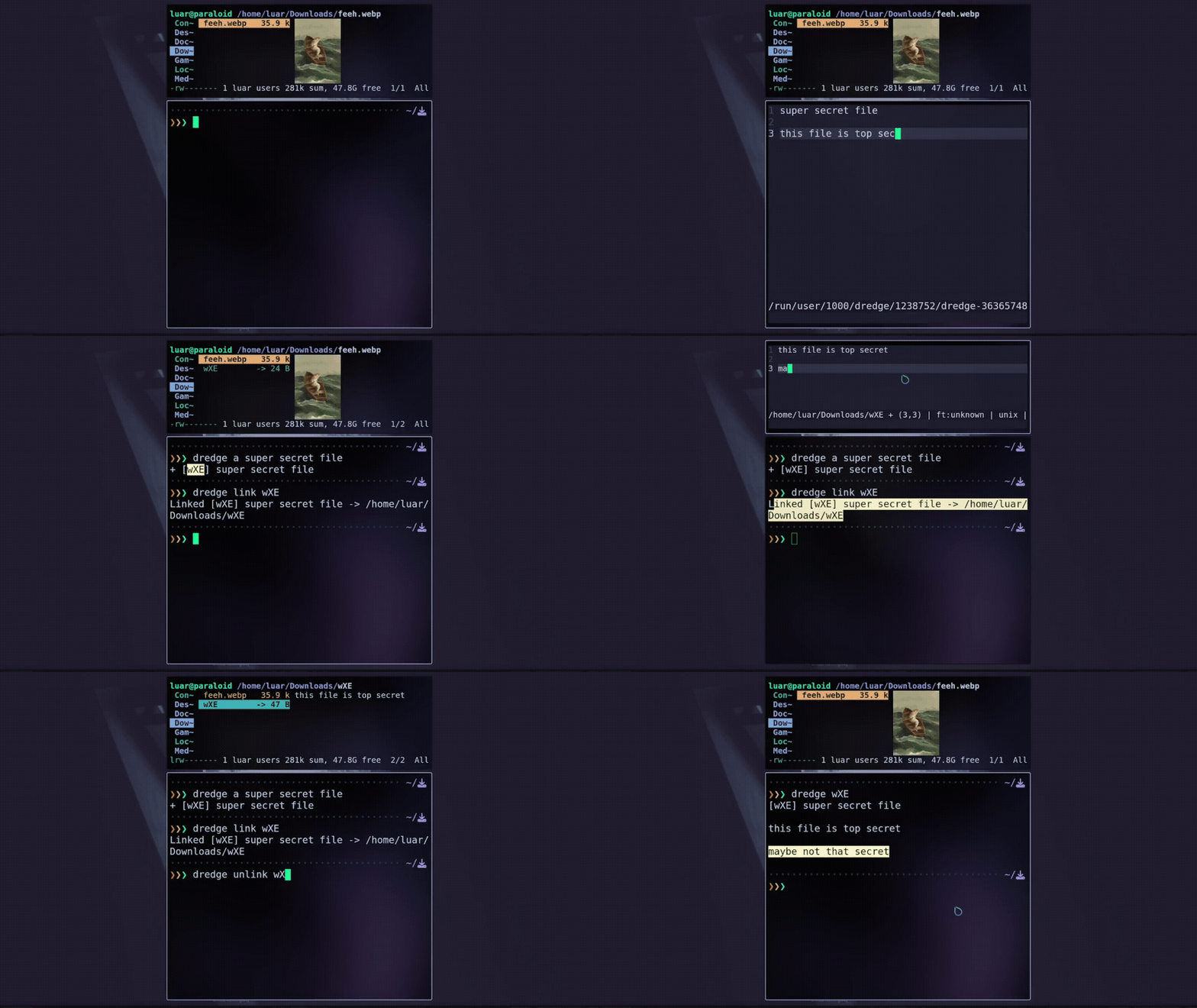
On a new machine:
```bash
git clone git@github.com:you/vault.git ~/.local/share/dredge
dredge link ~/.ssh/config
# same SSH config, same keys, every machine git tracked for any update
```
This is _actually_ the reason I built dredge. My SSH config is identical on every machine, but I couldn't just slap them inside my dotfiles.
---
 All commands
| Command | Description | Example |
|:--------|:------------|:--------|
| `add` / `a` / `new` / `+` | Add an item (opens editor if no -c flag) | `dredge add "OpenAI Key" -c "sk-..." -t keys` |
| `search` / `s` | Search items | `dredge search aws key` |
| `list` / `ls` | List all items | `dredge ls` |
| `view` / `v` | View an item | `dredge view xKP` or `dredge 1` |
| `cat` / `c` | Output raw content (for piping) | `dredge cat xKP \| bash` |
| `edit` / `e` | Edit an item | `dredge edit xKP` |
| `rm` | Remove (goes to trash) | `dredge rm 1 2 3` |
| `undo` | Restore last removed item | `dredge undo` |
| `link` / `ln` | Link item to a system path | `dredge link xKP ~/.ssh/config` |
| `unlink` | Remove a link | `dredge unlink xKP` |
| `mv` / `rename` | Rename item ID | `dredge mv xKP abc` |
| `export` | Export a file item to disk | `dredge export xKP ./output/` |
| `copy` / `cp` | Copy item content to clipboard | `dredge copy xKP` |
| `lock` | Lock the vault (clears session key) | `dredge lock` |
| `init` / `use` | Initialize or activate a vault | `dredge init ~/vaults/work` |
| `push` / `pull` / `sync` | Git sync (auto-commits changes) | `dredge sync` |
| `drop` | Discard uncommitted changes | `dredge drop xKP` or `dredge drop --all` |
| `status` | Show pending changes | `dredge status` |
| `passwd` | Change vault password | `dredge passwd` |
| `update` | Update to latest version | `dredge update` |
### Git sync (by wlad031)
Git sync uses plain `git` and works with any remote (GitHub/GitLab/Gitea/etc).
`dredge init` accepts an optional git remote. If you omit it, dredge initializes a local-only git repo (no remote).
**Auto-commit behavior:** Both `push` and `pull` automatically commit any uncommitted changes before syncing. This prevents "dirty working tree" errors and keeps the git workflow transparent. If you need to discard local changes to prioritize the remote version, use `dredge drop`.
Accepted remote formats:
```bash
# GitHub shorthand (expanded to https://github.com//.git)
dredge init owner/repo
# HTTPS
dredge init https://github.com/owner/repo.git
dredge init https://gitlab.com/group/repo.git
# SSH (scp-like)
dredge init git@github.com:owner/repo.git
dredge init git@gitlab.com:group/repo.git
# SSH URL
dredge init ssh://git@github.com/owner/repo.git
# Local path remote (advanced)
dredge init /srv/git/dredge-vault.git
```
- Dredge does not create remote repositories for you.
- If `origin` is not configured, `dredge push`/`pull`/`sync` will error with guidance.
- If you already have a git remote set, `dredge init` will not overwrite it.
---
 Why
Why
 > *"I am a collector — of many things; art and artifacts, treasures and truths... and curios that occupy the periphery of desire."* — The Collector
The mental overhead of saving something and not knowing where to find it when you need it.
I got pissed of having important things (and non-important too just things in general) scattered everywhere, I would have to access an email acc I made 6 years ago because it was linked a random service I urgently had to access for no reason whatsoever... Anyways, I realized that a lot of tools despite having their gimmics they all overlap on a very important aspect which is storing information, so I made a tool that specializes on _that_ specific overlap and leaves the tools to do what they are best at.
I'm lazy so I wanted something that just works and reads my mind, takes no effort to add an entry nor retrieve it from the knowledge base.
I downloaded [jrnl](https://jrnl.sh) once and I really liked the idea but hated the execution due to some weird parameters, it literally had no item separation and a search that matched *everything*. Dredge is what I actually wanted. (so yeah, pretty much a personal tool)
---
> *"I am a collector — of many things; art and artifacts, treasures and truths... and curios that occupy the periphery of desire."* — The Collector
The mental overhead of saving something and not knowing where to find it when you need it.
I got pissed of having important things (and non-important too just things in general) scattered everywhere, I would have to access an email acc I made 6 years ago because it was linked a random service I urgently had to access for no reason whatsoever... Anyways, I realized that a lot of tools despite having their gimmics they all overlap on a very important aspect which is storing information, so I made a tool that specializes on _that_ specific overlap and leaves the tools to do what they are best at.
I'm lazy so I wanted something that just works and reads my mind, takes no effort to add an entry nor retrieve it from the knowledge base.
I downloaded [jrnl](https://jrnl.sh) once and I really liked the idea but hated the execution due to some weird parameters, it literally had no item separation and a search that matched *everything*. Dredge is what I actually wanted. (so yeah, pretty much a personal tool)
---
 Contributors
Big thanks to you guys who contributed to dredge:
---
Made with
by Luar