# [](https://health.ch3nyang.top)
🌏 [Live Demo](https://health.ch3nyang.top) | 📖 [简体中文](README_CN.md)
## Introduction
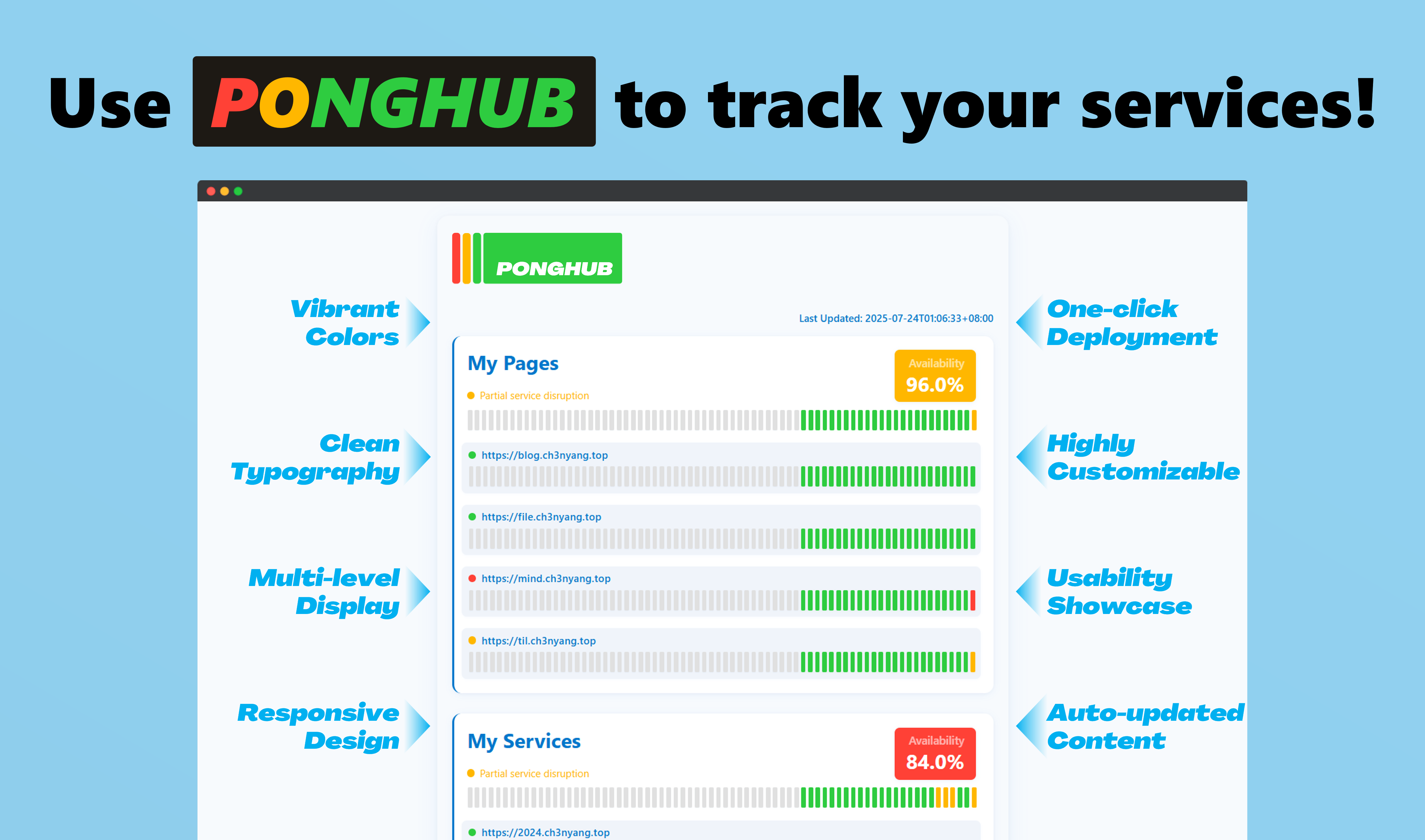
PongHub is an open-source service status monitoring website designed to help users track and verify service availability. It supports:
- **🕵️ Zero-intrusion Monitoring** - Full-featured monitoring without code changes
- **🚀 One-click Deployment** - Automatically built with GitHub Actions, deployed to GitHub Pages
- **🌐 Cross-platform Support** - Compatible with public services like OpenAI and private deployments
- **🔍 Multi-port Detection** - Monitor multiple ports for a single service
- **🤖 Intelligent Response Validation** - Precise matching of status codes and regex validation of response bodies
- **🛠️ Custom Request Engine** - Flexible configuration of request headers/bodies, timeouts, and retry strategies
- **🔒 SSL Certificate Monitoring** - Automatic detection of SSL certificate expiration and notifications
- **📊 Real-time Status Display** - Intuitive service response time and status records
- **⚠️ Exception Alert Notifications** - Exception alert notifications using GitHub Actions
## Quick Start
1. Star and Fork [PongHub](https://github.com/WCY-dt/ponghub)
2. Modify the [`config.yaml`](config.yaml) file in the root directory to configure your service checks.
3. Modify the [`CNAME`](CNAME) file in the root directory to set your custom domain name.
> If you do not need a custom domain, you can delete the `CNAME` file.
4. Commit and push your changes to your repository. GitHub Actions will automatically run and deploy to GitHub Pages and require no intervention.
> [!TIP]
> By default, GitHub Actions runs every 30 minutes. If you need to change the frequency, modify the `cron` expression in the [`.github/workflows/deploy.yml`](.github/workflows/deploy.yml) file.
>
> Please do not set the frequency too high to avoid triggering GitHub's rate limits.
> [!IMPORTANT]
> If GitHub Actions does not trigger automatically, you can manually trigger it once.
>
> Please ensure that GitHub Pages is enabled and that you have granted notification permissions for GitHub Actions.
## Configuration Guide
### Basic Configuration
The `config.yaml` file follows this format:
| Field | Type | Description | Required | Notes |
|-------------------------------------|---------|----------------------------------------------------------|----------|---------------------------------------------------|
| `display_num` | Integer | Number of services displayed on the homepage | ✖️ | Default is 72 services |
| `timeout` | Integer | Timeout for each request in seconds | ✖️ | Units are seconds, default is 5 seconds |
| `max_retry_times` | Integer | Number of retries on request failure | ✖️ | Default is 2 retries |
| `max_log_days` | Integer | Number of days to retain logs | ✖️ | Default is 3 days |
| `cert_notify_days` | Integer | Days before SSL certificate expiration to notify | ✖️ | Default is 7 days |
| `services` | Array | List of services to monitor | ✔️ | |
| `services.name` | String | Name of the service | ✔️ | |
| `services.endpoints` | Array | List of endpoints to check for the service | ✔️ | |
| `services.endpoints.url` | String | URL to request | ✔️ | |
| `services.endpoints.method` | String | HTTP method for the request | ✖️ | Supports `GET`/`POST`/`PUT`, default is `GET` |
| `services.endpoints.headers` | Object | Request headers | ✖️ | Key-value pairs, supports custom headers |
| `services.endpoints.body` | String | Request body content | ✖️ | Used only for `POST`/`PUT` requests |
| `services.endpoints.status_code` | Integer | Expected HTTP status code in response (default is `200`) | ✖️ | Default is `200` |
| `services.endpoints.response_regex` | String | Regex to match the response body content | ✖️ | |
| `notifications` | Object | Notification configuration | ✖️ | See [Custom Notifications](#custom-notifications) |
Here is an example configuration file:
```yaml
display_num: 72
timeout: 5
max_retry_times: 2
max_log_days: 3
cert_notify_days: 7
services:
- name: "GitHub API"
endpoints:
- url: "https://api.github.com"
- url: "https://api.github.com/repos/wcy-dt/ponghub"
method: "GET"
headers:
Content-Type: application/json
Authorization: Bearer your_token
status_code: 200
response_regex: "full_name"
- name: "Example Website"
endpoints:
- url: "https://example.com/health"
response_regex: "status"
- url: "https://example.com/status"
method: "POST"
body: '{"key": "value"}'
```
### Special Parameters
ponghub now supports powerful parameterized configuration functionality, allowing the use of various types of dynamic variables in configuration files. These variables are generated and resolved in real-time during program execution.
Click to expand and view supported parameter types
#### 📅 Date and Time Parameters
Use `{{%format}}` format to define date and time parameters:
- `{{%Y-%m-%d}}` - Current date, format: 2006-01-02 (e.g., 2025-09-22)
- `{{%H:%M:%S}}` - Current time, format: 15:04:05 (e.g., 17:30:45)
- `{{%s}}` - Unix timestamp (e.g., 1727859600)
- `{{%Y}}` - Current year (e.g., 2025)
- `{{%m}}` - Current month, format: 01-12
- `{{%d}}` - Current date, format: 01-31
- `{{%H}}` - Current hour, format: 00-23
- `{{%M}}` - Current minute, format: 00-59
- `{{%S}}` - Current second, format: 00-59
- `{{%B}}` - Full month name (e.g., September)
- `{{%b}}` - Short month name (e.g., Sep)
- `{{%A}}` - Full weekday name (e.g., Monday)
- `{{%a}}` - Short weekday name (e.g., Mon)
#### 🎲 Random Number Parameters
- `{{rand}}` - Generate random number in range 0-1000000
- `{{rand_int}}` - Generate large range random integer
- `{{rand(min,max)}}` - Generate random number in specified range
- Example: `{{rand(1,100)}}` - Generate random number between 1-100
- Example: `{{rand(1000,9999)}}` - Generate 4-digit random number
#### 🔤 Random String Parameters
- `{{rand_str}}` - Generate 8-character random string (letters + numbers)
- `{{rand_str(length)}}` - Generate random string of specified length
- Example: `{{rand_str(16)}}` - Generate 16-character random string
- `{{rand_str_secure}}` - Generate 16-character cryptographically secure random string
- `{{rand_hex(length)}}` - Generate hexadecimal random string of specified length
- Example: `{{rand_hex(8)}}` - Generate 8-character hexadecimal string
- Example: `{{rand_hex(32)}}` - Generate 32-character hexadecimal string
#### 🆔 UUID Parameters
- `{{uuid}}` - Generate standard UUID (with hyphens)
- Example: `bf3655f7-8a93-4822-a458-2913a6fe4722`
- `{{uuid_short}}` - Generate short UUID (without hyphens)
- Example: `14d44b7334014484bb81b015fb2401bf`
#### 🌍 Environment Variable Parameters
- `{{env(variable_name)}}` - Read environment variable value
- Example: `{{env(API_KEY)}}` - Read API_KEY environment variable
- Example: `{{env(VERSION)}}` - Read VERSION environment variable
- Returns empty string if environment variable doesn't exist
Environment variables can be set through GitHub Actions Repository Secrets
#### 📊 Sequence and Hash Parameters
- `{{seq}}` - Time-based sequence number (6 digits)
- `{{seq_daily}}` - Daily sequence number (seconds since midnight)
- `{{hash_short}}` - Short hash value (6-character hexadecimal)
- `{{hash_md5_like}}` - MD5-style long hash value (32-character hexadecimal)
#### 🌐 Network and System Information Parameters
- `{{local_ip}}` - Get system local IP address
- `{{hostname}}` - Get system hostname
- `{{user_agent}}` - Generate random User-Agent string
- `{{http_method}}` - Generate random HTTP method (GET, POST, PUT, DELETE, etc.)
#### 🔐 Encoding and Decoding Parameters
- `{{base64(content)}}` - Base64 encode the provided content
- Example: `{{base64(hello world)}}` - Encode "hello world" to Base64
- `{{url_encode(content)}}` - URL encode the provided content
- Example: `{{url_encode(hello world)}}` - URL encode "hello world"
- `{{json_escape(content)}}` - JSON escape the provided content
- Example: `{{json_escape("test")}}` - Escape quotes and special characters for JSON
#### 🔢 Mathematical Operation Parameters
- `{{add(a,b)}}` - Add two numbers
- Example: `{{add(10,5)}}` - Returns 15
- `{{sub(a,b)}}` - Subtract two numbers
- Example: `{{sub(10,5)}}` - Returns 5
- `{{mul(a,b)}}` - Multiply two numbers
- Example: `{{mul(10,5)}}` - Returns 50
- `{{div(a,b)}}` - Divide two numbers
- Example: `{{div(10,5)}}` - Returns 2
#### 📝 Text Processing Parameters
- `{{upper(text)}}` - Convert text to uppercase
- Example: `{{upper(hello)}}` - Returns "HELLO"
- `{{lower(text)}}` - Convert text to lowercase
- Example: `{{lower(HELLO)}}` - Returns "hello"
- `{{reverse(text)}}` - Reverse text
- Example: `{{reverse(hello)}}` - Returns "olleh"
- `{{substr(text,start,length)}}` - Extract substring from text
- Example: `{{substr(hello world,0,5)}}` - Returns "hello"
#### 🎨 Color Generation Parameters
- `{{color_hex}}` - Generate random hexadecimal color code
- Example: `#FF5733`
- `{{color_rgb}}` - Generate random RGB color value
- Example: `rgb(255, 87, 51)`
- `{{color_hsl}}` - Generate random HSL color value
- Example: `hsl(120, 50%, 75%)`
#### 📁 File and MIME Type Parameters
- `{{mime_type}}` - Generate random MIME type
- Example: `application/json`, `image/png`, `text/html`
- `{{file_ext}}` - Generate random file extension
- Example: `.jpg`, `.pdf`, `.txt`
#### 👤 Fake Data Generation Parameters
- `{{fake_email}}` - Generate realistic fake email address
- Example: `john.smith@example.com`
- `{{fake_phone}}` - Generate fake phone number
- Example: `+1-555-0123`
- `{{fake_name}}` - Generate fake person name
- Example: `John Smith`
- `{{fake_domain}}` - Generate fake domain name
- Example: `example-site.com`
#### ⏰ Time Calculation Parameters
- `{{time_add(duration)}}` - Add specified duration to current time
- Example: `{{time_add(1h)}}` - Add 1 hour to current time
- Example: `{{time_add(30m)}}` - Add 30 minutes to current time
- Supported units: s (seconds), m (minutes), h (hours), d (days)
- `{{time_sub(duration)}}` - Subtract specified duration from current time
- Example: `{{time_sub(1d)}}` - Subtract 1 day from current time
- Example: `{{time_sub(2h30m)}}` - Subtract 2 hours 30 minutes from current time
Here is an example configuration file:
```yaml
services:
- name: "Parameterized Service"
endpoints:
- url: "https://api.example.com/data?date={{%Y-%m-%d}}&rand={{rand(1,100)}}"
- url: "https://api.example.com/submit"
method: "POST"
headers:
Content-Type: application/json
X-Request-ID: "{{uuid}}"
body: '{"session_id": "{{rand_str(16)}}", "timestamp": "{{%s}}"}'
```
### Custom Notifications
PongHub now supports multiple notification methods. When services have issues or certificates are about to expire, alerts can be sent through multiple channels.
Click to expand and view supported notification types
PongHub supports the following notification methods:
- **Default Notification** - Notification through GitHub Actions workflow failure
- **Email Notification** - Send emails via SMTP with advanced security options
- **Custom Webhook** - Send to any HTTP endpoint with advanced configuration
To use, add a `notifications` configuration block in your `config.yaml` file:
```yaml
notifications:
enabled: true # Enable notification functionality
methods: # Notification methods to enable
- email
- webhook
# Specific configuration for each notification method...
```
#### ⚙️ Default Notification
By default, PongHub will send notifications when GitHub Actions workflows fail.
Default notification is automatically enabled when:
- No `notifications` field is configured
- `notifications.enabled: true` but no `methods` specified or only non-email/webhook methods are specified
- Explicitly configured `methods: ["default"]`
If `notifications` is configured with `email` or `webhook` methods, default notification is disabled by default unless explicitly enabled in `notifications.default.enabled`.
#### 📧 Email Notification
```yaml
email:
smtp_host: "smtp.gmail.com" # SMTP server host
smtp_port: 587 # SMTP port, default is 587
from: "alerts@yourdomain.com" # Sender email address
to: # Recipient email addresses
- "admin@yourdomain.com"
- "ops@yourdomain.com"
subject: "PongHub Service Alert" # Email subject (optional)
use_tls: true # Use TLS encryption (optional)
use_starttls: true # Use STARTTLS (optional)
skip_verify: false # Skip TLS certificate verification (optional)
timeout: 30 # Connection timeout in seconds (optional)
username: "" # SMTP username (optional, uses env var if empty)
password: "" # SMTP password (optional, uses env var if empty)
template: "" # Custom email template path (optional)
is_html: true # Send as HTML email (optional)
```
Required environment variables:
- `SMTP_USERNAME` - SMTP username
- `SMTP_PASSWORD` - SMTP password
#### 🔗 Custom Webhook Configuration
```yaml
webhook:
url: "https://your-webhook-endpoint.com/notify" # Leave empty to read from environment variables
method: "POST" # HTTP method (optional, default POST)
headers: # Custom request headers (optional)
Content-Type: "application/json"
Authorization: "Bearer {{env(API_TOKEN)}}" # Supports Special Parameters
X-Request-ID: "{{uuid}}" # Dynamic request ID using Special Parameters
# Authentication options (all fields support Special Parameters)
auth_type: "bearer" # Authentication type: bearer, basic, apikey (optional)
auth_token: "{{env(WEBHOOK_TOKEN)}}" # Bearer token with environment variable (optional)
auth_username: "user-{{rand(1000,9999)}}" # Basic auth username with dynamic suffix (optional)
auth_password: "{{env(AUTH_PASSWORD)}}" # Basic auth password from environment (optional)
auth_header: "X-API-Key" # Custom header name for API key (optional)
# Request configuration
timeout: 30 # Request timeout in seconds (optional, default 30)
retries: 3 # Number of retry attempts (optional, default 0)
skip_tls_verify: false # Skip TLS certificate verification (optional)
# Advanced payload customization with Special Parameters support
custom_payload: # Custom request payload (optional)
template: |
{
"alert": "{{.Title}}",
"details": "{{.Message}}",
"timestamp": "{{%Y-%m-%d %H:%M:%S}}",
"request_id": "{{uuid}}",
"environment": "{{env(ENVIRONMENT)}}",
"random_id": "{{rand(10000,99999)}}"
}
content_type: "application/json" # Content type for the payload (optional)
fields: # Additional fields with Special Parameters support (optional)
environment: "prod-{{rand(100,999)}}"
session_id: "{{uuid_short}}"
build_number: "{{env(BUILD_NUMBER)}}"
timestamp_unix: "{{%s}}"
include_title: true # Include title in additional fields (optional)
include_message: true # Include message in additional fields (optional)
title_field: "alert_title" # Custom field name for title (optional)
message_field: "alert_message" # Custom field name for message (optional)
```
**Special Parameters Support in Webhooks:**
Webhook configurations now fully support Special Parameters in the following fields:
- **URL**: `url: "https://hooks.example.com/{{env(HOOK_ID)}}"`
- **Headers**: All header values can use Special Parameters
- **Authentication**: All auth fields support dynamic values
- **Templates**: Both Go template syntax (`{{.Title}}`) and Special Parameters (`{{uuid}}`) work together
- **Custom Fields**: All custom payload fields support Special Parameters
**Template Syntax Compatibility:**
The webhook template system supports both syntaxes seamlessly:
- **Go Template Syntax**: `{{.Title}}`, `{{.Message}}` - Access notification data
- **Special Parameters**: `{{uuid}}`, `{{%Y-%m-%d}}`, `{{env(VAR)}}` - Dynamic values
Example combining both syntaxes:
```yaml
custom_payload:
template: |
{
"service_alert": "{{.Title}}",
"description": "{{.Message}}",
"alert_id": "{{uuid_short}}",
"timestamp": "{{%Y-%m-%d %H:%M:%S}}",
"environment": "{{env(DEPLOY_ENV)}}",
"correlation_id": "{{rand_str(12)}}"
}
fields:
datacenter: "{{env(DATACENTER)}}"
version: "{{env(APP_VERSION)}}"
```
Required environment variables:
- `WEBHOOK_URL` - Custom Webhook URL (if `url` field is empty)
- Any environment variables referenced in Special Parameters (e.g., `API_TOKEN`, `ENVIRONMENT`)
All required environment variables can be set through GitHub Actions Repository Secrets.
Here is a complete example configuration file with notifications:
```yaml
display_num: 72
timeout: 5
max_retry_times: 2
max_log_days: 3
cert_notify_days: 7
services:
- name: "Example Service"
endpoints:
- url: "https://example.com/health"
notifications:
enabled: true
methods:
- email
email:
smtp_host: "smtp.gmail.com"
smtp_port: 587
from: "alerts@yourdomain.com"
to:
- "admin@yourdomain.com"
- "ops@yourdomain.com"
subject: "🚨 PongHub Service Alert"
use_starttls: true
is_html: true
```
## Local Development
This project uses Makefile for local development and testing. You can run the project locally using the following command:
```bash
make run
```
The project has some test cases that can be run with the following command:
```bash
make test
```
## Disclaimer
[PongHub](https://github.com/WCY-dt/ponghub) is for personal learning and research only. We are not responsible for the usage behavior or results of the program. Please do not use it for commercial purposes or illegal activities.

Made with ❤️ by the PongHub Team