ddns-updater
qmcgaw/ddns-updater
https://hub.docker.com/r/qmcgaw/ddns-updater/
bridge
sh
false
https://forums.unraid.net/topic/111725-support-diamondprecisioncomputing-all-images-and-files/?tab=comments#comment-1021532
https://github.com/qdm12/ddns-updater
# Lightweight universal DDNS Updater with Docker and web UI
Light container updating DNS A and/or AAAA records periodically for multiple DNS providers
## Features
- Updates periodically A records for different DNS providers:
- Aliyun
- AllInkl
- Cloudflare
- DD24
- DDNSS.de
- DigitalOcean
- DonDominio
- DNSOMatic
- DNSPod
- Dreamhost
- DuckDNS
- DynDNS
- Dynu
- EasyDNS
- FreeDNS
- Gandi
- GCP
- GoDaddy
- Google
- He.net
- Infomaniak
- INWX
- Linode
- LuaDNS
- Name.com
- Namecheap
- Netcup
- NoIP
- Njalla
- OpenDNS
- OVH
- Porkbun
- Selfhost.de
- Servercow.de
- Spdynid
- Strato.de
- Variomedia.de
- Zoneedit
- **Want more?** [Create an issue for it](https://github.com/qdm12/ddns-updater/issues/new/choose)!
- Web User interface
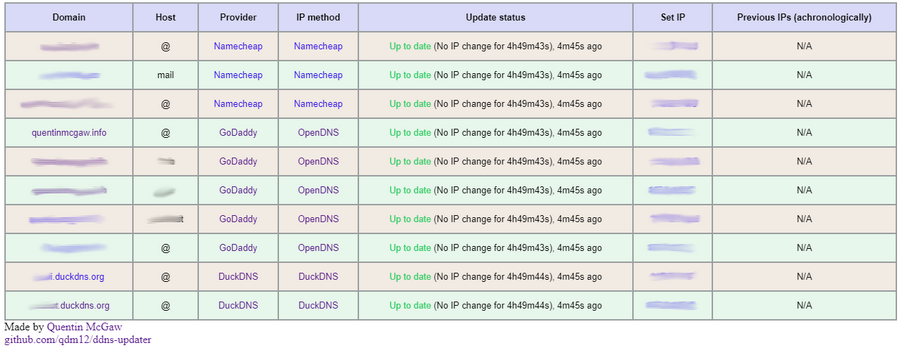
- 11MB Docker image based on a Go static binary in a Scratch Docker image
- Persistence with a JSON file *updates.json* to store old IP addresses with change times for each record
- Docker healthcheck verifying the DNS resolution of your domains
- Highly configurable
- Send notifications with [**Shoutrrr**](https://containrrr.dev/shoutrrr/0.7/services/overview/) using `SHOUTRRR_ADDRESSES`
- Compatible with `amd64`, `386`, `arm64`, `armv7`, `armv6`, `s390x`, `ppc64le`, `riscv64` CPU architectures.
## Setup
The program reads the configuration from a JSON object, either from a file or from an environment variable.
1. Create a directory of your choice, say *data* with a file named **config.json** inside:
```sh
mkdir mkdir /mnt/user/appdata/ddns-updater
touch /mnt/user/appdata/ddns-updater/config.json
# Owned by user ID of Docker container (1000)
chown -R 1000 /mnt/user/appdata/ddns-updater
# all access (for creating json database file data/updates.json)
chmod 700 /mnt/user/appdata/ddns-updater
# read access only
chmod 400 /mnt/user/appdata/ddns-updater/config.json
```
If you want to use another user ID, [build the image yourself](#build-the-image) with `--build-arg UID={your-uid}`. You could also just run the container as root with `--user="0"` but this is not advised security wise.
1. Write a JSON configuration in *data/config.json*, for example:
```json
{
"settings": [
{
"provider": "namecheap",
"domain": "example.com",
"host": "@",
"password": "e5322165c1d74692bfa6d807100c0310"
}
]
}
```
You can find more information in the [configuration section](#configuration) to customize it.
1. Run the container with
```sh
docker run -d -p 8000:8000/tcp -v "$(pwd)"/data:/updater/data qmcgaw/ddns-updater
```
1. If you use IPv6, you might need to set `-e IPV6_PREFIX=/64` (`/64` is your prefix, depending on your ISP)
1. (Optional) You can also set your JSON configuration as a single environment variable line (i.e. `{"settings": [{"provider": "namecheap", ...}]}`), which takes precedence over config.json. Note however that if you don't bind mount the `/updater/data` directory, there won't be a persistent database file `/updater/updates.json` but it will still work.
### Next steps
You can also use [docker-compose.yml](https://github.com/qdm12/ddns-updater/blob/master/docker-compose.yml) with:
```sh
docker-compose up -d
```
You can update the image with `docker pull qmcgaw/ddns-updater`. Other [Docker image tags are available](https://hub.docker.com/repository/docker/qmcgaw/ddns-updater/tags).
### GHCR
Images are also added to the Github Container Registry. To use the GHCR container replace `qmcgaw/ddns-updater` to `ghcr.io/qdm12/ddns-updater`, further details are available [here](https://github.com/qdm12/ddns-updater/pkgs/container/ddns-updater)
## Configuration
Start by having the following content in *config.json*, or in your `CONFIG` environment variable:
```json
{
"settings": [
{
"provider": "",
},
{
"provider": "",
}
]
}
```
For each setting, you need to fill in parameters.
Check the documentation for your DNS provider:
- [Aliyun](https://github.com/qdm12/ddns-updater/blob/master/docs/aliyun.md)
- [Cloudflare](https://github.com/qdm12/ddns-updater/blob/master/docs/cloudflare.md)
- [DDNSS.de](https://github.com/qdm12/ddns-updater/blob/master/docs/ddnss.de.md)
- [DigitalOcean](https://github.com/qdm12/ddns-updater/blob/master/docs/digitalocean.md)
- [DD24](https://github.com/qdm12/ddns-updater/blob/master/docs/domaindiscount24.md)
- [DonDominio](https://github.com/qdm12/ddns-updater/blob/master/docs/dondominio.md)
- [DNSOMatic](https://github.com/qdm12/ddns-updater/blob/master/docs/dnsomatic.md)
- [DNSPod](https://github.com/qdm12/ddns-updater/blob/master/docs/dnspod.md)
- [Dreamhost](https://github.com/qdm12/ddns-updater/blob/master/docs/dreamhost.md)
- [DuckDNS](https://github.com/qdm12/ddns-updater/blob/master/docs/duckdns.md)
- [DynDNS](https://github.com/qdm12/ddns-updater/blob/master/docs/dyndns.md)
- [Dynu](https://github.com/qdm12/ddns-updater/blob/master/docs/dynu.md)
- [DynV6](https://github.com/qdm12/ddns-updater/blob/master/docs/dynv6.md)
- [EasyDNS](https://github.com/qdm12/ddns-updater/blob/master/docs/easydns.md)
- [FreeDNS](https://github.com/qdm12/ddns-updater/blob/master/docs/freedns.md)
- [Gandi](https://github.com/qdm12/ddns-updater/blob/master/docs/gandi.md)
- [GCP](https://github.com/qdm12/ddns-updater/blob/master/docs/gcp.md)
- [GoDaddy](https://github.com/qdm12/ddns-updater/blob/master/docs/godaddy.md)
- [Google](https://github.com/qdm12/ddns-updater/blob/master/docs/google.md)
- [He.net](https://github.com/qdm12/ddns-updater/blob/master/docs/he.net.md)
- [Infomaniak](https://github.com/qdm12/ddns-updater/blob/master/docs/infomaniak.md)
- [INWX](https://github.com/qdm12/ddns-updater/blob/master/docs/inwx.md)
- [Linode](https://github.com/qdm12/ddns-updater/blob/master/docs/linode.md)
- [LuaDNS](https://github.com/qdm12/ddns-updater/blob/master/docs/luadns.md)
- [Name.com](https://github.com/qdm12/ddns-updater/blob/master/docs/name.com.md)
- [Namecheap](https://github.com/qdm12/ddns-updater/blob/master/docs/namecheap.md)
- [Netcup](https://github.com/qdm12/ddns-updater/blob/master/docs/netcup.md)
- [NoIP](https://github.com/qdm12/ddns-updater/blob/master/docs/noip.md)
- [Njalla](https://github.com/qdm12/ddns-updater/blob/master/docs/njalla.md)
- [OpenDNS](https://github.com/qdm12/ddns-updater/blob/master/docs/opendns.md)
- [OVH](https://github.com/qdm12/ddns-updater/blob/master/docs/ovh.md)
- [Porkbun](https://github.com/qdm12/ddns-updater/blob/master/docs/porkbun.md)
- [Selfhost.de](https://github.com/qdm12/ddns-updater/blob/master/docs/selfhost.de.md)
- [Servercow.de](https://github.com/qdm12/ddns-updater/blob/master/docs/servercow.md)
- [Spdyn](https://github.com/qdm12/ddns-updater/blob/master/docs/spdyn.md)
- [Strato.de](https://github.com/qdm12/ddns-updater/blob/master/docs/strato.md)
- [Variomedia.de](https://github.com/qdm12/ddns-updater/blob/master/docs/variomedia.md)
- [Zoneedit](https://github.com/qdm12/ddns-updater/blob/master/docs/zoneedit.md)
Note that:
- you can specify multiple hosts for the same domain using a comma separated list. For example with `"host": "@,subdomain1,subdomain2",`.
### Environment variables
| Environment variable | Default | Description |
| --- | --- | --- |
| `CONFIG` | | One line JSON object containing the entire config (takes precendence over config.json file) if specified |
| `PERIOD` | `5m` | Default period of IP address check, following [this format](https://golang.org/pkg/time/#ParseDuration) |
| `IPV6_PREFIX` | `/128` | IPv6 prefix used to mask your public IPv6 address and your record IPv6 address. Ranges from `/0` to `/128` depending on your ISP. |
| `PUBLICIP_FETCHERS` | `all` | Comma separated fetcher types to obtain the public IP address from `http` and `dns` |
| `PUBLICIP_HTTP_PROVIDERS` | `all` | Comma separated providers to obtain the public IP address (ipv4 or ipv6). See the [Public IP section](#public-ip) |
| `PUBLICIPV4_HTTP_PROVIDERS` | `all` | Comma separated providers to obtain the public IPv4 address only. See the [Public IP section](#public-ip) |
| `PUBLICIPV6_HTTP_PROVIDERS` | `all` | Comma separated providers to obtain the public IPv6 address only. See the [Public IP section](#public-ip) |
| `PUBLICIP_DNS_PROVIDERS` | `all` | Comma separated providers to obtain the public IP address (IPv4 and/or IPv6). See the [Public IP section](#public-ip) |
| `PUBLICIP_DNS_TIMEOUT` | `3s` | Public IP DNS query timeout |
| `UPDATE_COOLDOWN_PERIOD` | `5m` | Duration to cooldown between updates for each record. This is useful to avoid being rate limited or banned. |
| `HTTP_TIMEOUT` | `10s` | Timeout for all HTTP requests |
| `LISTENING_PORT` | `8000` | Internal TCP listening port for the web UI |
| `ROOT_URL` | `/` | URL path to append to all paths to the webUI (i.e. `/ddns` for accessing `https://example.com/ddns` through a proxy) |
| `HEALTH_SERVER_ADDRESS` | `127.0.0.1:9999` | Health server listening address |
| `DATADIR` | `/updater/data` | Directory to read and write data files from internally |
| `BACKUP_PERIOD` | `0` | Set to a period (i.e. `72h15m`) to enable zip backups of data/config.json and data/updates.json in a zip file |
| `BACKUP_DIRECTORY` | `/updater/data` | Directory to write backup zip files to if `BACKUP_PERIOD` is not `0`. |
| `RESOLVER_ADDRESS` | Your network DNS | A plaintext DNS address to use, such as `1.1.1.1:53`. This is useful for split dns, see [#389](https://github.com/qdm12/ddns-updater/issues/389) |
| `LOG_LEVEL` | `info` | Level of logging, `debug`, `info`, `warning` or `error` |
| `LOG_CALLER` | `hidden` | Show caller per log line, `hidden` or `short` |
| `SHOUTRRR_ADDRESSES` | | (optional) Comma separated list of [Shoutrrr addresses](https://containrrr.dev/shoutrrr/services/overview/) (notification services) |
| `TZ` | | Timezone to have accurate times, i.e. `America/Montreal` |
#### Public IP
By default, all public IP fetching types are used and cycled (over DNS and over HTTPs).
On top of that, for each fetching method, all echo services available are cycled on each request.
This allows you not to be blocked for making too many requests.
You can otherwise customize it with the following:
- `PUBLICIP_HTTP_PROVIDERS` gets your public IPv4 or IPv6 address. It can be one or more of the following:
- `ifconfig` using [https://ifconfig.io/ip](https://ifconfig.io/ip)
- `ipinfo` using [https://ipinfo.io/ip](https://ipinfo.io/ip)
- `google` using [https://domains.google.com/checkip](https://domains.google.com/checkip)
- You can also specify an HTTPS URL such as `https://ipinfo.io/ip`
- `PUBLICIPV4_HTTP_PROVIDERS` gets your public IPv4 address only. It can be one or more of the following:
- `ipify` using [https://api.ipify.org](https://api.ipify.org)
- `noip` using [http://ip1.dynupdate.no-ip.com](http://ip1.dynupdate.no-ip.com)
- You can also specify an HTTPS URL such as `https://ipinfo.io/ip`
- `PUBLICIPV6_HTTP_PROVIDERS` gets your public IPv6 address only. It can be one or more of the following:
- `ipify` using [https://api6.ipify.org](https://api6.ipify.org)
- `noip` using [http://ip1.dynupdate6.no-ip.com](http://ip1.dynupdate6.no-ip.com)
- You can also specify an HTTPS URL such as `https://ipinfo.io/ip`
- `PUBLICIP_DNS_PROVIDERS` gets your public IPv4 address only or IPv6 address only or one of them (see #136). It can be one or more of the following:
- `cloudflare`
- `opendns`
### Host firewall
If you have a host firewall in place, this container needs the following ports:
- TCP 443 outbound for outbound HTTPS
- UDP 53 outbound for outbound DNS resolution
- TCP 8000 inbound (or other) for the WebUI
## Architecture
At program start and every period (5 minutes by default):
1. Fetch your public IP address
1. For each record:
1. DNS resolve it to obtain its current IP address(es)
- If the resolution fails, update the record with your public IP address by calling the DNS provider API and finish
1. Check if your public IP address is within the resolved IP addresses
- Yes: skip the update
- No: update the record with your public IP address by calling the DNS provider API
We do DNS resolution every period so it detects a change made to the record manually, for example on the DNS provider web UI
As DNS resolutions are essentially free and without rate limiting, these are great to avoid getting banned for too many requests.
### Special case: Cloudflare
For Cloudflare records with the `proxied` option, the following is done.
At program start and every period (5 minutes by default), for each record:
1. Fetch your public IP address
1. For each record:
1. Check the last IP address (persisted in `updates.json`) for that record
- If it doesn't exist, update the record with your public IP address by calling the DNS provider API and finish
1. Check if your public IP address matches the last IP address you updated the record with
- Yes: skip the update
- No: update the record with your public IP address by calling the DNS provider API
This is the only way as doing a DNS resolution on the record will give the IP address of a Cloudflare server instead of your server.
This has the disadvantage that if the record is changed manually, the program will not detect it.
We could do an API call to get the record IP address every period, but that would get you banned especially with a low period duration.
## Testing
- The automated healthcheck verifies all your records are up to date [using DNS lookups](https://github.com/qdm12/ddns-updater/blob/master/internal/healthcheck/healthcheck.go#L15)
- You can also manually check, by:
1. Going to your DNS management webpage
1. Setting your record to `127.0.0.1`
1. Run the container
1. Refresh the DNS management webpage and verify the update happened
## Build the image
You can build the image yourself with:
```sh
docker build -t qmcgaw/ddns-updater https://github.com/qdm12/ddns-updater.git
```
You can use optional build arguments with `--build-arg KEY=VALUE` from the table below:
| Build argument | Default | Description |
| --- | --- | --- |
| `UID` | `1000` | User ID running the container |
| `GID` | `1000` | User group ID running the container |
| `VERSION` | `unknown` | Version of the program and Docker image |
| `CREATED` | `an unknown date` | Build date of the program and Docker image |
| `COMMIT` | `unknown` | Commit hash of the program and Docker image |
## Development and contributing
- [Contribute with code](https://github.com/qdm12/ddns-updater/blob/master/docs/contributing.md)
- [Github workflows to know what's building](https://github.com/qdm12/ddns-updater/actions)
- [List of issues and feature requests](https://github.com/qdm12/ddns-updater/issues)
- [Kanban board](https://github.com/qdm12/ddns-updater/projects/1)
## License
This repository is under an [MIT license](https://github.com/qdm12/ddns-updater/master/license)
## Used in external projects
- [Starttoaster/docker-traefik](https://github.com/Starttoaster/docker-traefik#home-networks-extra-credit-dynamic-dns)
## Support
Sponsor me on [Github](https://github.com/sponsors/qdm12) or donate to [paypal.me/qmcgaw](https://www.paypal.me/qmcgaw)
[](https://github.com/sponsors/qdm12)
[](https://www.paypal.me/qmcgaw)
Many thanks to J. Famiglietti for supporting me financially
Tools: Network:DNS
http://[IP]:[PORT:8000]
https://raw.githubusercontent.com/DiamondPrecisionComputing/unraid-templates/master/templates/ddns-updater.xml
https://raw.githubusercontent.com/DiamondPrecisionComputing/unraid-templates/master/templates/img/ddnsgopher.png
This app and docker were generously made by qmcgaw. If you like the project please consider making a donation toward his efforts and check out the MANY other projects he has created on GitHub.
https://www.paypal.me/qmcgaw
Lightweight universal DDNS Updater with Docker and web UI
2021-10-06
###v2.5.0
###Features
- New providers
- Aliyun (#252, #253)
- all-inkl.com (#309)
- dynu.com (#285)
- GCP (#337, #405)
- inwx (#379, #473)
- Porkbun (#217)
- Servercow (#224)
- Shoutrrr library update to v0.7.0
- Cloudflare: create record if it does not exist (#477)
- DNSPod: log entire JSON response on error
- Dreamhost: allow to specify a custom host
- Specify resolver address with the RESOLVER_ADDRESS environment variable
- Specify resolver timeout with the RESOLVER_TIMEOUT environment variable
- Retry getting IP address up to 3 times
- Use github.com/breml/rootcerts v0.2.11 for TLS certs
- Add destination to notification errors
- Add GHCR registry image (#259)
- pkg/publicip/info package (#189)
- pkg/publicip: do not use providers banning us
###Fixes
- Cloudflare:
- key -> userServiceKey variable name (#462)
- fix service key regex
- dd24:
- API call and fix (#236)
- Handle non-empty responses
- ddnss.de add dual_stack parameter (#270, thanks @quantum-byte)
- DNSOMatic:
- allow email addresses as user field
- remove password regex check
- DNSPod add IPv6 record ID finder
- FreeDNS fix no ip change messages decoding
- Linode fix error decoding and set name field when creating record
- LuaDNS match configured host instead of first record (#249)
- Namecheap XML decoding error & allow empty IP field in response
- OVH:
- fix signature in api mode
- support nochg responses
- Spdyn response handling for good and nochg
- SHOUTRRR_ADDRESSES case sensitivity fixed
- Write JSON file from CONFIG variable
- DNS public IP fetching timeout fixed
- Better error messages for JSON decoding errors
- Shoutrrr validation error wrapping
###v2.4.1
###Fixes
- Fix: SHOUTRRR_ADDRESSES case sensitivity
###v2.4.0
###Features
- Support for domaindiscount24.com (#207)
- Support Shoutrrr addresses
- PUBLICIP_DNS_TIMEOUT variable
###Fixes
- Wildcard hosts (#214)
- Keep multi-dots wildcard host structure in display strings
- Use a function BuildURLQueryHostname for API calls to send the correct wildcard hostname
- Send the wildcard character in API calls
- Fix behavior for wildcard hosts for: cloudflare, ddnss.de, digitalocean, dnsomatic, dreamhost, dyn, dynv6, google, informaniak, njalla, noip, opendns, ovh, selfhost.de, spdyn, strato and variomedia
- Healthcheck query to 127.0.0.1:port instead of for example 0.0.0.0:port
- DATADIR defaults to /updater/data
- Server listens on all interfaces (IPv4 and IPv6) instead of just 0.0.0.0
- Context dependent DNS resolutions (to exit the program promptly)
- Larger default timeout of 3s for DNS query of public IP
###v2.3.0
- HTTP and DNS Public IP fetching options
- Njalla support
- SPDyn support
- Variomedia support
- Allow to run without settings
- debug log level
- HEALTH_SERVER_ADDRESS to change the internal health server listening address
- Request URL and body debug logs for each provider
- Read CONFIG environment variable with case sensitivity
- Dreamhost: create record before removing outdated one
- ipversion display
- ROOT_URL behavior when served outside of root (bug introduced with go-chi)
- IPV6_PREFIX support to avoid unneeded updates when using IPV6
- Use embed for static UI
- Upgrade linting setup with Golangci-lint to v1.40.1
/mnt/user/appdata/ddns-updater
all
all
all
all
all
3s
5m
10s
/updater/data/backup
0
info
hidden
/
127.0.0.1:9999