# Start Here
This is a guide for developers that have **little to no experience** using behavior trees or those seeking to **refrensh** their knowledge, it should get you started with general behavior tree concepts and terminology.
# What is a Behavior Tree?
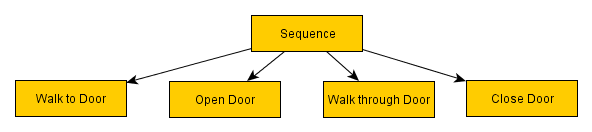
A behavior tree is a hierarchical node-based tree that controls the decision making of an entity. Behavior trees are used in fields such as robotics but their most common use is in video games. Nodes are organized in a Tree structure similar to how Godot itself organizes nodes in the scene and their parent/child relationship.\
The tree begins at the root node, evaluating each child node down the tree until it reaches a leaf node that has no further children and represents a single task such as moving the agent from point A to B or checking if a condition is true. How this flow (known as a Tick) reaches a certain node is determined by each node along the way and by the status of each child node. The status is simply a way for a node to inform its parent that it has succeeded/failed to do its task.
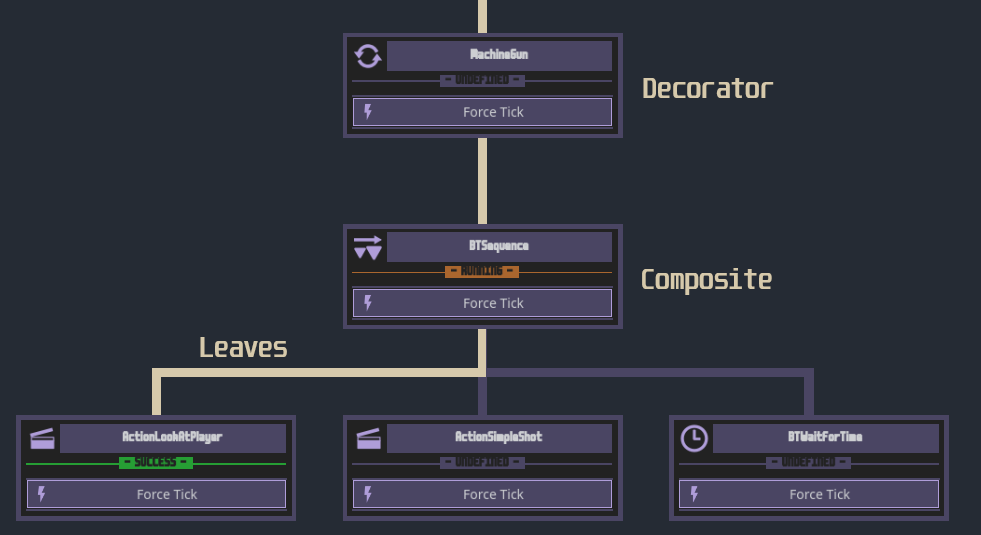
 Typically, behavior tree nodes are categorized into 3 types:
- Leaf Nodes: Nodes at the end of branches, they can't have any further children and their role is to execute an action like shooting a gun or check a condition like "Is the target in range?".
- Decorator Nodes: Branch nodes that take a single leaf node and do something with its status, a common example is an Inverter, which takes the result of its child and inverts it (success->failure, failure->success).
- Composite Nodes: Branch nodes that can have multiple children and are responsible for determining the order of execution, they control the decision making aspect of a behavior tree. An example is the Sequence composite, which runs its children nodes in a sequence (is agent hungry? -> look for food -> eat food).\
We will go through each category and each node in more details later.
Typically, behavior tree nodes are categorized into 3 types:
- Leaf Nodes: Nodes at the end of branches, they can't have any further children and their role is to execute an action like shooting a gun or check a condition like "Is the target in range?".
- Decorator Nodes: Branch nodes that take a single leaf node and do something with its status, a common example is an Inverter, which takes the result of its child and inverts it (success->failure, failure->success).
- Composite Nodes: Branch nodes that can have multiple children and are responsible for determining the order of execution, they control the decision making aspect of a behavior tree. An example is the Sequence composite, which runs its children nodes in a sequence (is agent hungry? -> look for food -> eat food).\
We will go through each category and each node in more details later.
 Behavior trees gained attention after their use in Halo 2's AI system which was an improvement from Finite State Machines that were commonly used at the time, and have gained significant attention in gaming over the years to become the most common approach to game AI.
# Why Use a Behavior Tree?
## Advantages
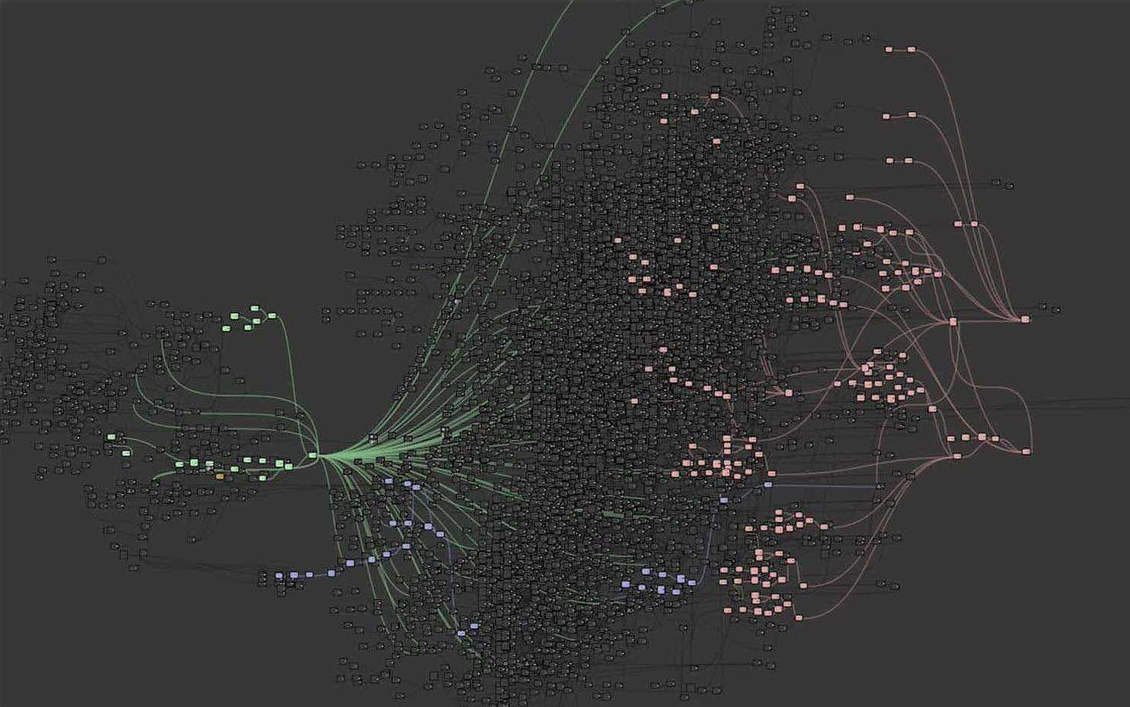
The main reason for the popularity of behavior trees is their high flexibility. A behavior tree is modular in a sense that complex behaviors can arrise from combinations of simple tasks\
(example of a behavior tree from Tom Clancy's The Division).
Behavior trees gained attention after their use in Halo 2's AI system which was an improvement from Finite State Machines that were commonly used at the time, and have gained significant attention in gaming over the years to become the most common approach to game AI.
# Why Use a Behavior Tree?
## Advantages
The main reason for the popularity of behavior trees is their high flexibility. A behavior tree is modular in a sense that complex behaviors can arrise from combinations of simple tasks\
(example of a behavior tree from Tom Clancy's The Division).
 Behavior tree logic can be separated into sub-trees reducing dependency and minimizing potential for bugs, this also means that behavior trees are easier to maintain and debug even as they grow in complexity overtime.\
Nodes in behavior trees can be reused in multiple situations, this not only applies to individual nodes but to sub-trees, a combat decision branch for example can be reused across multiple enemy types, or a navigation sub-tree can be used in different places in the same tree.
## Finite State Machines
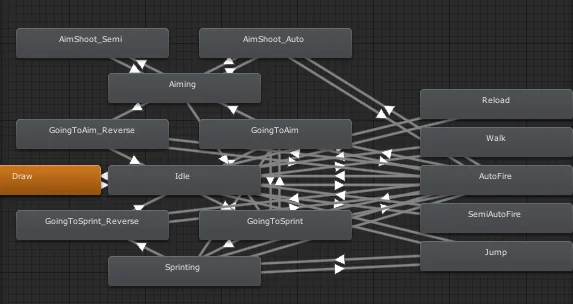
If you have implemented AI in your games before, you've likely used a Finite State Machine. FSM is an approach that uses a number of states and conditions for how to transition from one state to another, FSMs are generally simple and easy to implement, they are great for non-complex behaviors but they have some drawbacks.\
The most problematic is that a FSM doesn't scale well. As it becomes more complex, managing all states and transitions can get messy, leading to tight coupling and code duplication in what's known as State Machine Spaghetti.
Behavior tree logic can be separated into sub-trees reducing dependency and minimizing potential for bugs, this also means that behavior trees are easier to maintain and debug even as they grow in complexity overtime.\
Nodes in behavior trees can be reused in multiple situations, this not only applies to individual nodes but to sub-trees, a combat decision branch for example can be reused across multiple enemy types, or a navigation sub-tree can be used in different places in the same tree.
## Finite State Machines
If you have implemented AI in your games before, you've likely used a Finite State Machine. FSM is an approach that uses a number of states and conditions for how to transition from one state to another, FSMs are generally simple and easy to implement, they are great for non-complex behaviors but they have some drawbacks.\
The most problematic is that a FSM doesn't scale well. As it becomes more complex, managing all states and transitions can get messy, leading to tight coupling and code duplication in what's known as State Machine Spaghetti.
 FSMs also lack support for parallel execution.
This isn't to say that Finite State Machines are inherently bad. They are perfect for simple implementations and small to medium scoped projects, like transitioning between few simple states. They are easy to setup and require less overhead, so for non-complex AI, prototyping or game jams for example, a FSM might be the better option.
Note that there are other approaches to AI implementations like GOAP (Goal-Oriented Action Planning), Utility AI, or even hybrids of different techniques and custom solutions. For the sake of this guide, and also my limited knowledge on other techniques, we will not discuss them.
# Addon Documentation
Now that you hopefully have an understanding of the basics you can explore the addon and its features [here](<(2) using addon.md>).
# Resources
https://www.gamedeveloper.com/programming/behavior-trees-for-ai-how-they-work
https://robohub.org/introduction-to-behavior-trees/
https://en.wikipedia.org/wiki/Behavior_tree_(artificial_intelligence,_robotics_and_control)
https://www.youtube.com/channel/UCov_51F0betb6hJ6Gumxg3Q
https://nodecanvas.paradoxnotion.com/documentation/?section=bt-nodes-reference
https://www.gamedeveloper.com/programming/behavior-trees-for-ai-how-they-work
https://github.com/bitbrain/beehave
https://github.com/draghan/behavior_tree
https://dev.epicgames.com/documentation/en-us/unreal-engine/behavior-tree-in-unreal-engine---quick-start-guide?application_version=5.2
https://www.behaviortree.dev/docs/
https://www.gameaipro.com/GameAIPro/GameAIPro_Chapter06_The_Behavior_Tree_Starter_Kit.pdf
https://github.com/aigamedev/btsk
FSMs also lack support for parallel execution.
This isn't to say that Finite State Machines are inherently bad. They are perfect for simple implementations and small to medium scoped projects, like transitioning between few simple states. They are easy to setup and require less overhead, so for non-complex AI, prototyping or game jams for example, a FSM might be the better option.
Note that there are other approaches to AI implementations like GOAP (Goal-Oriented Action Planning), Utility AI, or even hybrids of different techniques and custom solutions. For the sake of this guide, and also my limited knowledge on other techniques, we will not discuss them.
# Addon Documentation
Now that you hopefully have an understanding of the basics you can explore the addon and its features [here](<(2) using addon.md>).
# Resources
https://www.gamedeveloper.com/programming/behavior-trees-for-ai-how-they-work
https://robohub.org/introduction-to-behavior-trees/
https://en.wikipedia.org/wiki/Behavior_tree_(artificial_intelligence,_robotics_and_control)
https://www.youtube.com/channel/UCov_51F0betb6hJ6Gumxg3Q
https://nodecanvas.paradoxnotion.com/documentation/?section=bt-nodes-reference
https://www.gamedeveloper.com/programming/behavior-trees-for-ai-how-they-work
https://github.com/bitbrain/beehave
https://github.com/draghan/behavior_tree
https://dev.epicgames.com/documentation/en-us/unreal-engine/behavior-tree-in-unreal-engine---quick-start-guide?application_version=5.2
https://www.behaviortree.dev/docs/
https://www.gameaipro.com/GameAIPro/GameAIPro_Chapter06_The_Behavior_Tree_Starter_Kit.pdf
https://github.com/aigamedev/btsk