# Rui
Rui is a memory-efficient agent runtime.
Build applications that run multiple agents without starting a separate runtime process for each one.
Give agents work, connect your tools, and collect their results through a TypeScript client.
**100 waiting agents.
2.5 MB of private memory.**
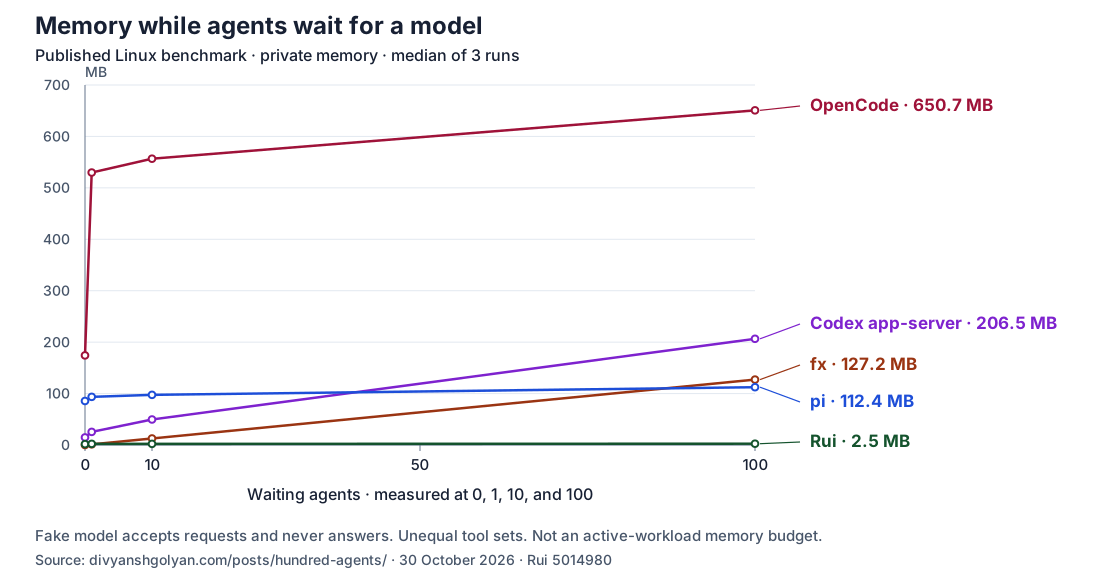
Source: the [published Linux model-wait benchmark](https://divyanshgolyan.com/posts/hundred-agents/) at [Rui revision 5014980](https://github.com/DivyanshGolyan/rui/commit/50149807908283e044e3573f1b251d6a2f21e854).
See the [data and method](docs/waiting-agent-memory.md) for measurement scope and versions.
## Get started with TypeScript
[Follow the TypeScript quickstart](docs/integrating-rui.md) to run a Session and read its answer.
The client launches a child Host:
```ts
import { Rui } from "rui";
const rui = await Rui.connect({
database: "./app-rui-store",
provider: {
baseUrl: "https://api.openai.com/v1",
key: process.env.OPENAI_API_KEY!,
},
});
```
Use Node.js 22.6+ and matching client and binary tarballs from [GitHub releases](https://github.com/DivyanshGolyan/rui/releases).
A TypeScript Host uses an OpenAI-compatible Responses API key, not the terminal's ChatGPT sign-in.
Provider usage may incur charges.
## How it works
Your application talks over a local socket to one shared Host that runs the Sessions.
The Host shares networking and execution capacity and saves conversation state in SQLite or MySQL.
Connect built-in tools or MCP servers, coordinate agents, and follow their activity through the client.
See the [Host guide](docs/host.md) for capacity and lifecycle.
## Try it in your terminal
The standalone binary supports Apple Silicon macOS 15+ and x86-64 Linux with glibc 2.34+.
ARM64 Linux and Intel macOS builds are experimental.
```sh
curl -fsSL https://github.com/DivyanshGolyan/rui/releases/latest/download/install.sh | sh
```
The installer checks SHA-256 and installs in `~/.local/bin`.
Follow its `PATH` instructions if your shell cannot find `rui`.
See [upgrade and activation](docs/host.md#upgrade-and-activation) before updating saved work.
Enable Codex device code authorization in ChatGPT security settings, or ask your workspace admin to allow it.
Then run `rui auth login codex`, follow the printed link, and keep the code private.
Run `rui` in your project directory.
For API-key setup instead, see the [Host guide](docs/host.md#run-in-the-foreground).
Bash runs with your full privileges, without a sandbox, and defaults to running without approval (`bypass`).
[Approval settings](docs/using-rui.md#approve-bash-commands) apply per Session and do not automatically propagate to agents it starts.
See the [terminal guide](docs/using-rui.md) or [scripting guide](docs/scripting.md) for your next step.
## Documentation
Rui is in development.
- [TypeScript integration](docs/integrating-rui.md), [terminal guide](docs/using-rui.md), and [scripting guide](docs/scripting.md).
- [Agent coordination](docs/scripting.md#agents-calling-rui) to start investigators and collect their reports.
- [Skills](docs/using-rui.md#skills) and [archive controls](docs/using-rui.md#archive-sessions).
- [Development and source builds](docs/development.md), including contribution setup and provider-free examples.
- [Architecture](ARCHITECTURE.md), [Verification](VERIFICATION.md), and [Research](research/README.md).
- [Store format reset](docs/store-reset.md), [contributing rules](AGENTS.md), and [third-party notices](THIRD_PARTY_NOTICES.md).