 [](https://www.webcomponents.org/element/@doubletrade/lit-datatable)
# lit-datatable
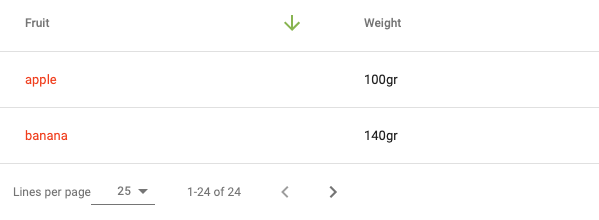
`lit-datatable` is a material design implementation of a data table.
## Roadmap
Add some helpers.
## Install
```
npm install @doubletrade/lit-datatable
```
## Launch demo
```
npm install
npm run build
npm run serve
```
## Lint
```
npm run lint:javascript
```
## Data
```js
// Data from api
const data = [
{ fruit: 'apple', color: 'green', weight: '100gr' },
{ fruit: 'banana', color: 'yellow', weight: '140gr' }
];
// Conf to set order of column and visibility (can be dynamically)
const conf = [
{ property: 'fruit', header: 'Fruit', hidden: false },
{ property: 'color', header: 'Color', hidden: true },
{ property: 'weight', header: 'Weight', hidden: false }
];
```
## Simple example
```html
```
## Simple example with sticky header
```html
```
## With HTML header
Use native html from lit-html to render a custom header.
Header can use value from data and property from conf.
```js
const headerOfFruit = (value, property) => html`${value}
`;
```
```html
```
## With HTML data
As header, use native html from lit-html to render a custom body.
```js
const bodyOfFruit = (value, property) => html`${value}
`;
```
```html
```
## With HTML data and footer
A footer is available to catch size and page changed in order to relaunch the request to the backend.
```html
```
## With HTML data and sorter
A default sorter is available, set a header column without html and type `sort`.
The sort must be of the following form : `property,direction`, ex: `fruit,asc`.
```html
```
## With HTML data and custom sorter
You can use a specific sorter is available in helpers.
```js
const sort = key => (value, property) => html`
${value}
`;
```
```html
```
## Custom style on a td
```html
```
## With HTML data and filter
```html
```
## With HTML data, sort and filter
```html
```
## With HTML data and choices filter
```html
```
## With HTML data and choices filter with value filtering
```html
```
## With HTML data and date filter
The format of startDate and endDate is a timestamp.
```html
```
---
[](https://saucelabs.com)