## Vector Score

[](https://bundlephobia.com/package/vector-score)

[](https://github.com/DrakeB1234/VectorScore)
A lightweight, SVG-based TypeScript library for rendering simple musical notation, rhythms, and guitar chords. This project aims to provide a simple to use renderer for web-based musical apps.
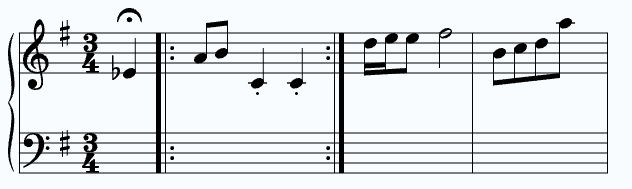 ## Table of Contents
- [Features](#features)
- [Install](#install)
- [Core Classes](#standard-staff)
- [Standard Staff](#standard-staff)
- [Guitar Chord](#guitar-chord)
- [String Syntax](#string-syntax)
- [General Syntax](#general-values-durations-articulations-)
- [Note Syntax](#note-string-syntax)
- [Chord Syntax](#chord-string-syntax)
- [Rest Syntax](#rest-string-syntax)
- [Beam Syntax](#beam-string-syntax)
- [Creating Custom UI](#creating-custom-ui)
- [Migration from 1.3.1 to 2.0](#migrating-from-131)
- [Resources](#resources)
## Features
**Rendering Standard Musical Notation**
- Supports grand, treble, bass, and alto clefs.
- Easy to add notes and provides justifying alignment functions.
- Notes can be drawn with accidentals, dotted durations, and articultations.
- Beamed notes are supported, with option for notes or chords.
**Render and Display Guitar Chords**
- Write explicitly which string, fret, and optionally finger to display on the diagram.
- Supports barre chords.
- Label each string below diagram, useful for showing tuning of chord.
**Extra Classes**
- Dedicated staff for rhythm exercises with customizable time signatures and bar handling.
- Staff made to allow for 'endless' style of notes.
## Install
```bash
npm install vector-score
```
## Standard Staff
### Initializing Staff
Example of initializing a StandardStaff class and applying options. Options object can be skipped and default values will be used for staff.
```ts
import { StandardStaff } from "vector-score";
const containerRoot = document.getElementById("root") as HTMLElement;
const staff = new StandardStaff(containerRoot, {
// default: 300
width: 400,
// default: 1
scale: 1.2,
// default: 16
noteStartX: 40,
// default: 20
paddingTop: 40,
// default: 20
paddingBottom: 40,
// default: grand
staffType: "treble",
// default: true
svgAutoFill: true,
// optional
keySignature: "D",
// optional
timeSignature: {
topNumber: 4,
bottomNumber: 4,
},
});
```
### Drawing elements
StandardStaff has multiple types of elements to draw, such as _**notes, chords, rests, beams, and barlines**_.
Read more about [string syntax](#string-syntax)
Drawing elements using **string syntax**
```ts
...
staff.drawNote("C4q");
// Every draw method has optional options object for which staff to draw to and a list of classes to apply to that element
staff.drawNote("A3h.(staccato)", { staff: "bottom", classes: ["wrong-note"]});
staff.drawChord("[C4,E4,G4]q");
staff.drawRest("Rw");
staff.drawBeam("C4e-[D4,F4]e-G4e");
staff.drawBarline("|:");
```
Drawing batch of elements using **string sytnax**; Each element in string is separated by a space. Options are not required, but if applie will apply to _all_ elements in string.
```ts
...
staff.drawBatchElements("C4w | [C4,E4,G4]q(marcato) Rh B4q(accent) | C4e-[D4,F4]e-G4e-C4e |]", { staff: "bottom", classes: ["my-notes"] })
```
Drawing elements using **config functions** (more granular control over element parameters).
```ts
import { ..., noteConfig } from "vector-score";
...
// Not every property is required
staff.drawNote(noteConfig({
letter: "C",
octave: 4,
duration: "s",
accidental: "#",
// Optional
isDotted: true,
// Optional
articulation: "tenuto"
}));
// Most basic note config
const reusableNoteConfig = noteConfig({ letter: "C", octave: 4, duration: "q"});
// Chord notes *DONT* contain duration per note, instead duration is defined top level of chord object.
const resuableChordConfig = chordConfig({
notes: [
{
letter: "D",
octave: 4,
},
{
letter: "F",
octave: 4,
},
],
duration: "q",
// Optional
articulation: "staccato",
// Optional
isDotted: undefined
});
staff.drawChord(resuableChordConfig);
staff.drawRest(restConfig({
duration: "q",
// Optional
isDotted: false
}));
staff.drawBarline(barlineConfig("repeat-end"));
staff.drawBeam(beamConfig({
entries: [
noteConfig({ letter: "C", octave: 4, duration: "e"}),
chordConfig({
notes: [
{ letter: "D", octave: 4 }
],
duration: "e",
}),
noteConfig({ letter: "G", octave: 4, duration: "e"})
]
}));
staff.justifyNotes();
```
Drawing batch of elements using **config functions**. Using configs instead of strings gives options to each individual element in list.
```ts
// Refer to section above for the actual options available in config functions.
// Options here are applied per desired element, options are NOT REQUIRED.
staff.drawBatchElements([
{
config: noteConfig({ letter: "C", octave: 4, duration: "q" }),
options: { staff: "top", classes: ["my-note"] },
},
{
config: chordConfig({
notes: [
{
letter: "D",
octave: 4,
},
{
letter: "F",
octave: 4,
},
],
duration: "q",
}),
options: { staff: "bottom" },
},
{
config: restConfig({
duration: "t",
}),
},
// { config: beamConfig(...) },
{ config: barlineConfig("repeat-end") },
]);
staff.justifyNotes();
// With options being passed as the second parameter instead of per config entry, its values will be applied to each element drawn.
// staff.drawBatchElements([...], options: { staff: "top", classes: ["my-note"]});
```
## Guitar Chord
### Initializing Class
Example of initializing a GuitarChord class and applying options. Options object can be skipped and default values will be used instead.
```ts
import { GuitarChord } from "vector-score";
const containerRoot = document.getElementById("root") as HTMLElement;
const guitarDiagram = new GuitarChord(containerRoot, {
// default: 1
scale: 1,
// default: 6
stringCount: 6,
// default: 5
fretCount: 5,
// optional
stringLabels: ["E", "A", "D", "G", "B", "E"],
// default: 2
inlineChordsAmount: 3,
// default: true
centerChords: false,
// default: true
svgAutoFill: true,
// Best to leave undefined in options object, inlineChordsAmount handles width automatically
// width: undefined;
});
```
### Drawing Chords
Drawing a D major chord
```ts
...
// Options for frets are x: muted, 0: open, 1-z: absolute fret number (alpha-numeric)
// Alpha numeric is used for fret numbers past '9', for example '10' == 'a' AND '11' == 'b';
const frets = "xx0232";
const fingers = "000132";
guitarDiagram.addChord(frets, fingers, {
label: "D Major"
});
```
Drawing a F major chord (with a barre on first fret)
```ts
import {..., determineBarreOptions } from "vector-score";
...
const frets = "133211";
const fingers = "134211";
// Used to automatically determine the options for a barre (which F major has a barre on 1st fret)
// The last parameter of the helper is an array of frets where each barre (multiple values mean multiple barres) should lay.
const barreDef = determineBarreOptions(frets, fingers, [1]);
guitarDiagram.addChord(frets, fingers, {
label: "F Major",
barres: barreDef
});
```
Drawing a Cm7 chord (barres and example of alpha numeric fret numbers)
```ts
import {..., determineBarreOptions } from "vector-score";
...
// The 'a' value in fret refers to the number '10', which is the value of 'a' in alpha-numeric value.
const frets = "8a8888";
const fingers = "131111";
// Barre on the 8th fret
const barreDef = determineBarreOptions(frets, fingers, [8]);
guitarDiagram.addChord(frets, fingers, {
label: "Cm7",
barres: barreDef
});
```
## String Syntax
### General Values (durations, articulations, ...)
Duration string values
- `w | h | q | e | s | t` - These are shorthands used in string syntax. Values are as follows: `whole, half, quarter, eighth, sixteenth, and 32nd` notes.
Articulation string values
- `staccato | accent | marcato | tenuto | fermata` - Values respond to the actual name of articulation. String syntax has one of these values **surrounded by parenthesis**, i.e. `(fermata)`.
Accidental string values
- `# | b | n | ## | bb` - Shorthands for types of accidentals. Values are as follows: `sharp, flat, natural, double sharp, double flat`.
Octave range
- `0-9` - Only octaves within this range are accepted.
Barline string values
- `single | double | repeat-end | repeat-start | end`.
### Note String Syntax
- example: `C4q` - Minimum required values; _a C quarter note on 4th octave_.
- example: `C#4h.(staccato)` - All note properties defined; _a staccato, C sharp note, dotted-half-note duration, on the 4th octave_.
### Chord String Syntax
Notes within the brackets do NOT contain durations.
- example: `[C4,E4,G4]q` - Minimum required values; _a C major chord of quarter note duration_
- example: `[D4,F#4,A4]e.(marcato)` - All chord properties defined; _a marcato D major chord of dotted-eighth-note duration_.
### Rest String Syntax
Must start with `r` (case-insensitive).
- example: `Rq` - Minimum required values; _a quarter rest_
- example: `Rh.` - All rest properties defined; _a dotted-half rest_.
### Beam String Syntax
Will NOT accept note durations of `w | h | q`;
- example: `C4e-[E4,G4]e-C4e` - Minimum required values.
- example: `C#4s.(tenuto)-[E#4,G#4]e(tenuto)-C#4s.(tenuto)` - All properties defined.
## Creating Custom UI
Classes such as `StandardStaff` and `RhythmStaff` provide useful methods for being able to render custom UI elements onto its publicly accesible UILayer nodes.
Displaying a 'bar' over a note in `StandardStaff` core class.
```ts
import { StandardStaff } from "vector-score";
const staff = new StandardStaff(rootElementRef, ...options);
// Drawing some notes on the staff
staff.drawBatchElements("C4q | C4s-F4s-D5e [C4,E4,G4]q");
// Creating a SVG element for the UI
const noteBar = document.createElementNS("http://www.w3.org/2000/svg", "rect");
const noteBarWidth = 24;
noteBar.setAttribute("width", "24"); // Around double notehead glpyh width
noteBar.setAttribute("height", "100");
noteBar.setAttribute("fill", "#00ff0077");
// Gets ALL positional data (includes individual notes in beamed groups, ignores barlines by default)
const positionalData = staff.getAllPositionData();
// This targets the third element, which in this case is the 'F4s' note in the beam group
const targetData = positionalData[2];
// Move UI element to target position (subtract half of UI element width, as x data is centered)
noteBar.setAttribute("x", (targetData.x - noteBarWidth / 2).toString());
noteBar.setAttribute("y", "-20");
// Finally, append new UI element to the staff's UI layer
staff.uiLayer.appendChild(noteBar);
```
Displaying a 'bar' over a rhythm note in `RhythmStaff` core class.
```ts
import { RhythmStaff } from "vector-score";
const staff = new RhythmStaff(node);
// Drawing measures
staff.drawMeasure([
{ type: "beam", durations: "eee" },
{ type: "note", duration: "q." },
{ type: "rest", duration: "q" },
]);
staff.drawMeasure([
{ type: "note", duration: "q." },
{ type: "beam", durations: "eee" },
{ type: "rest", duration: "q" },
]);
// Creating a SVG element for the UI
const uiBar = document.createElementNS("http://www.w3.org/2000/svg", "rect");
const uiBarWidth = 20;
uiBar.setAttribute("width", uiBarWidth.toString());
uiBar.setAttribute("height", "100");
uiBar.setAttribute("fill", "#00ff0077");
// Gets next X position relative to time: 0 is the index, 4 is the beat number (4 = quarter, 8 = eighths...)
// Returns -1 for invalid states (out of bounds etc..)
const x = staff.getBeatCoordinateX(0, 4);
if (x === -1) return;
uiBar.setAttribute("x", (x - uiBarWidth / 2).toString());
uiBar.setAttribute("y", "-50");
// Append new UI element to the staff's UI layer
staff.uiLayer.appendChild(uiBar);
```
## Migrating from 1.3.1
| 1.x | 2.0 |
| ------------------------------------------------------------------------------- | ---------------------------------------------------------------------------------------------------------------------- |
| `import { MusicStaff }` | `import { StandardStaff }` |
| `drawNote(['C4q', 'D4q'])` (string or array) | `drawNote("C4q")`, one note per call, returns the entry index. Use `drawBatchElements` for many. |
| `drawChord(['C4w','E4w','G4w'])` (durations inside the strings) | `drawChord("[C4,E4,G4]w")` |
| `changeNoteByIndex(note, index)` / `changeChordByIndex(notes, index)` | `replaceByIndex(index, config)` with `noteConfig(...)` / `chordConfig(...)` (index comes first) |
| `spaceAbove` / `spaceBelow` (staff-line spaces) | `paddingTop` / `paddingBottom` (pixels; one staff space is 10px) |
| `staffColor` / `staffBackgroundColor` | Removed. Drawing uses `currentColor`, so set CSS `color` / `background`, or target the `.vs-*` classes |
| RhythmStaff `barsCount` | `maxMeasures` (new: `bottomNumber`, `padding`; removed: `currentBeatUIColor`) |
| RhythmStaff `drawNote(['q','q'])`, `drawRest(['h'])`, `drawBeamedNotes('e', 4)` | `drawMeasure([{ type: "note", duration: "q" }, { type: "rest", duration: "h" }, { type: "beam", durations: "eeee" }])` |
| `incrementCurrentBeatUI()` / `resetCurrentBeatUI()` | Removed. Position your own element with `getBeatCoordinateX()` in `uiLayer` |
| RhythmStaff `clearAllNotes()` | `clear()` |
| ScrollingStaff `queueNotes(["C4w", ["C4w","E4w","G4w"]])` | `queueNotes([noteConfig({}: NoteInput), chordConfig({}: ChordInput)])` |
| ScrollingStaff `clearAllNote()` | `clearAllNotes()` |
| CSS `.vs-scrolling-notes-layer > g.vs-note-wrapper` | `.vs-scrolling-notes-layer > g` (groups are now `vs-note`, `vs-chord`, `vs-rest`, `vs-beam`) |
New in 2.0: Leland font glyphs, more accurate notation, rests, beams, barlines, dotted notes, 32nd notes, articulations, time signatures, key signatures, grand-staff brace.
## Resources
VectorScore utilizes a modified, svg-ified, version of the [**Leland Font**](https://github.com/MuseScoreFonts/Leland/tree/main), A SMuFL-compliant OpenType music font used by Musescore. Previous versions of VectorScore utilized the [Bravura Font](https://github.com/steinbergmedia/bravura).
VectorScore is heavily insipired by [**VexFlow**](https://github.com/0xfe/vexflow), a full musical notation web renderer.
[**Musescore**](https://musescore.org/en)'s studio application was used heavily as a reference, mainly for matching musical notation.
