# DroidKaigi 2019 official Android app [](https://circleci.com/gh/DroidKaigi/conference-app-2019)
[DroidKaigi 2019](https://droidkaigi.jp/2019/en/) is a conference tailored for developers on 7th and 8th February 2019.
You can install the prodution app via  .
And also, you can try the binary under development built on master branch through [
.
And also, you can try the binary under development built on master branch through [ ](https://dply.me/t6sc7f#install)
NOTE: Google Play Protect will show a warning dialog on some of devices when installing the current apk. The detailed specification of Google Play Protect is not public so we cannot address this matter. Please ignore the dialog for now. If you cannot install this apk without any error message, please disable Google Play Protect from Google Play Store's menus. Sorry for the inconvenience.
# Features
| top | timetable | search |
|---|---|---|
|  |  |  |
* View conference schedule and details of each session
* Set notification for upcoming sessions on your preference
* Search sessions and speakers and topics
* Show Information Feed
# Contributing
We always welcome any and all contributions! See [CONTRIBUTING.md](CONTRIBUTING.md) for more information
We would be happy if you ran the command below before sending pull requests to install git hooks. Thanks.
```
./scripts/git/install.bash
```
## Requirements
- Android Studio 3.4 Beta 3 and higher. You can download it from [this page](https://developer.android.com/studio/archive?hl=en).
- Android Studio Kotlin Plugin v1.3.20-release-Studio
**Check out following status.**
* Use recent version of Android Studio Kotlin Plugin
`Preferences` > `Languages & Frameworks` > `Kotlin Updates`
Older versions of the Kotlin plugin may cause build failures.
If you still have a trouble after upgrading the plugin, please try using AndroidStudio 3.4 instead.
* Disable Instant Run
`Preferences` > `Build, Execution, Deployment` > `Instant Run` > Uncheck `Enable Instant Run`
# Development Environment
### Multi module project
We separate the modules for each feature.

You can check [generated module dependency diagram](project.dot.png)
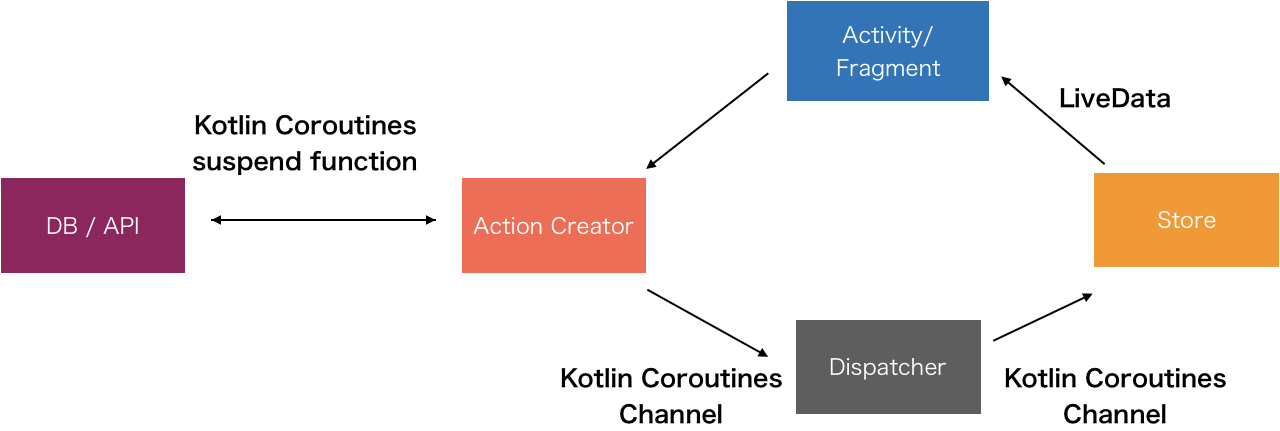
## Unidirectional data flow(Flux-based) Architecture
Unidirectional data flow(Flux-based) Architecture with `Kotlin Coroutines` and `AndroidX` Libraries(`LiveData`, `ViewModel`, `Room`) `DataBinding`, `Dagger` and `AssistedInject`, `Firebase` etc.
# Kotlin Multiplatform Project
You can check the [iOS application](https://itunes.apple.com/us/app/droidkaigi-2019/id1450771424).
The API and Model parts are shared as `Kotlin Multiplatform`, written in `Kotlin`, and the other part is written in `Swift`.
You can check [How to build for iOS Application](https://github.com/DroidKaigi/conference-app-2019/blob/master/frontend/ios/README.md)
## Groupie
By using `Groupie` you can simplify the implementation around RecyclerView.
```kotlin
class SpeakerItem @AssistedInject constructor(
@Assisted val speaker: Speaker, // Inject by AssistedInject
val navController: NavController // Inject by Dagger
) : BindableItem() {
@AssistedInject.Factory
interface Factory {
fun create(
speaker: Speaker
): SpeakerItem
}
override fun getLayout(): Int = R.layout.item_speaker
override fun bind(itemBinding: ItemSpeakerBinding, position: Int) {
itemBinding.speakerText.text = speaker.name
...
}
}
```
We use `AssistedInject` for creating item.
```kotlin
@Inject lateinit var speakerItemFactory: SpeakerItem.Factory
...
val speakerItems = session
.speakers
.map { speakerItemFactory.create(it) }
groupAdapter.update(speakerItems)
```
# Architecture
Unidirectional data flow(Flux-based) Architecture with Kotlin Coroutines and AndroidX Libraries(LiveData, ViewModel, Room) DataBinding, dependency injection, Firebase etc.

## Activity/Fragment -> Action Creator

Fragments just call Action Creator's method.
```kotlin
class SessionPagesFragment : DaggerFragment() {
@Inject lateinit var announcementActionCreator: AnnouncementActionCreator
override fun onActivityCreated(savedInstanceState: Bundle?) {
...
announcementActionCreator.load()
}
```
## Action Creator <-> DB / API and Action Creator -> dispatcher

Action Creator fetches data from DB / API with `Kotlin Coroutines suspend function`. And Action Creator dispatches data loaded action and loading state changed actions.
```kotlin
class AnnouncementActionCreator @Inject constructor(
override val dispatcher: Dispatcher,
val firestore: Firestore,
@PageScope val lifecycle: Lifecycle
) : CoroutineScope by lifecycle.coroutineScope,
ErrorHandler {
fun load() = launch {
try {
dispatcher.dispatch(Action.AnnouncementLoadingStateChanged(LoadingState.LOADING))
// fetch announcement by Kotlin Coroutines suspend function
dispatcher.dispatch(Action.AnnouncementLoaded(firestore.getAnnouncements()))
dispatcher.dispatch(Action.AnnouncementLoadingStateChanged(LoadingState.LOADED))
} catch (e: Exception) {
onError(e)
dispatcher.dispatch(Action.AnnouncementLoadingStateChanged(LoadingState.INITIALIZED))
}
}
}
```
Actions are just data holder class.
```kotlin
sealed class Action {
...
class AnnouncementLoadingStateChanged(val loadingState: LoadingState) : Action()
class AnnouncementLoaded(val announcements: List) : Action()
...
}
```
## Dispatcher -> Store

Store subscribe dispatcher's action with `Kotlin Coroutines channel` and transform it to AndroidX `LiveData`.
This store is a `ViewModel`. But if the store is used by the whole application(ex: UserStore), you can change the store to a singleton.
```kotlin
class AnnouncementStore @Inject constructor(
dispatcher: Dispatcher
) : Store() {
val loadingState: LiveData = dispatcher
.subscribe()
.map { it.loadingState }
.toLiveData(this, LoadingState.LOADING)
val announcements: LiveData> = dispatcher
.subscribe()
.map { it.announcements }
.toLiveData(this, listOf())
}
```
## Store -> Activity/Fragment
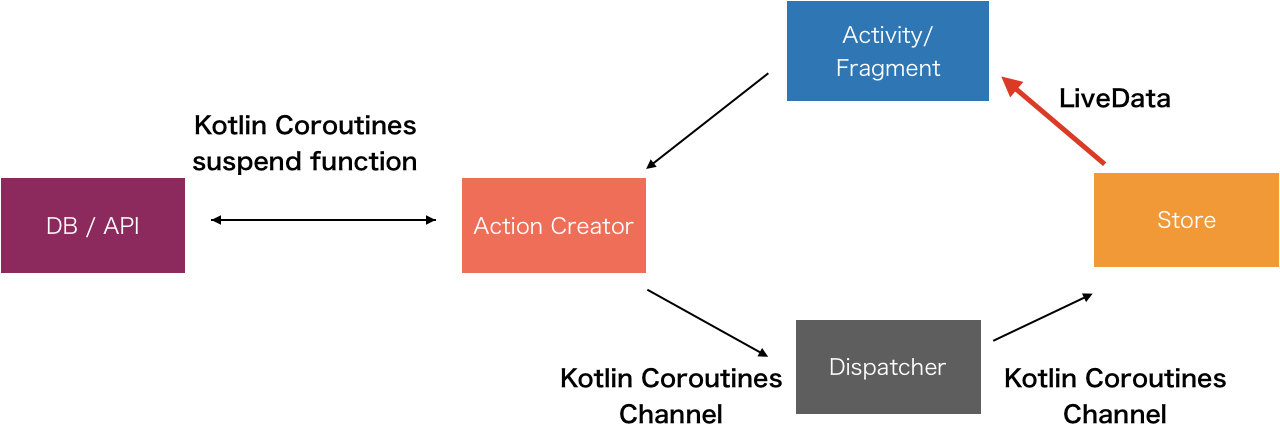
In the fragment, we can observe Store's `LiveData`. You can display the UI with `LiveData`.
```kotlin
override fun onActivityCreated(savedInstanceState: Bundle?) {
...
announcementStore.loadingState.changed(viewLifecycleOwner) {
// apply loading state for progress bar
progressTimeLatch.loading = it == LoadingState.LOADING
}
announcementStore.announcements.changed(viewLifecycleOwner) { announcements ->
// we can show UI with announcements
}
...
```
## Thanks
Thank you for contributing!
* Contributors
* [GitHub : Contributors](https://github.com/DroidKaigi/conference-app-2019/graphs/contributors)
* Designer
* [Chihokotaro / Chihoko Watanabe](https://twitter.com/chihokotaro)
* [mutoatu / Atsushi Muto](https://mutoatu.com/)
* App Distribution
* DeployGate (https://deploygate.com)
## Credit
This project uses some modern Android libraries and source codes.
### Android
* [Android Jetpack](https://developer.android.com/jetpack/) (Google)
* Foundation
* AppCompat
* Android KTX
* Mutidex
* Test
* Architecture
* Data Binding
* Lifecycles
* LiveData
* Navigation
* UI
* Emoji
* Fragment
* Transition
* ConstraintLayout
* RecyclerView
* ...
* [Kotlin](https://kotlinlang.org/) (Jetbrains)
* Stdlib
* Coroutines
* Serialization
* [Firebase](https://firebase.google.com/) (Google)
* Authentication
* Cloud Firestore
* [Dagger 2](https://google.github.io/dagger/)
* Core (Google)
* AndroidSupport (Google)
* [AssistedInject](https://github.com/square/AssistedInject) (Square)
* [Material Components for Android](https://github.com/material-components/material-components-android) (Google)
* [Ktor](https://ktor.io/) (Jetbrains)
* Android Client
* Json
* [OkHttp](http://square.github.io/okhttp/) (Square)
* Client
* LoggingInterceptor
* [livedata-ktx](https://github.com/Shopify/livedata-ktx) (Shopify)
* [LeakCanary](https://github.com/square/leakcanary) (Square)
* [Stetho](http://facebook.github.io/stetho/) (Facebook)
* [Hyperion-Android](https://github.com/willowtreeapps/Hyperion-Android) (WillowTree)
* [Groupie](https://github.com/lisawray/groupie) (lisawray)
* [KLOCK](https://korlibs.soywiz.com/klock/) (soywiz)
* [MockK](http://mockk.io) (oleksiyp)
* [Injected ViewModel Provider](https://github.com/evant/injectedvmprovider) (evant)
* [Google I/O 2018](https://github.com/google/iosched) (Google)
* [Picasso](http://square.github.io/picasso/) (Square)
* [TimetableLayout](https://github.com/MoyuruAizawa/TimetableLayout) (MoyuruAizawa)
### iOS
* Kotlin/Native
* MaterialComponents
* ReactiveX/RxSwift
* SnapKit/SnapKit
* onevcat/Kingfisher
* SwiftLint
* LicensePlist
* XLPagerTabStrip
](https://dply.me/t6sc7f#install)
NOTE: Google Play Protect will show a warning dialog on some of devices when installing the current apk. The detailed specification of Google Play Protect is not public so we cannot address this matter. Please ignore the dialog for now. If you cannot install this apk without any error message, please disable Google Play Protect from Google Play Store's menus. Sorry for the inconvenience.
# Features
| top | timetable | search |
|---|---|---|
|  |  |  |
* View conference schedule and details of each session
* Set notification for upcoming sessions on your preference
* Search sessions and speakers and topics
* Show Information Feed
# Contributing
We always welcome any and all contributions! See [CONTRIBUTING.md](CONTRIBUTING.md) for more information
We would be happy if you ran the command below before sending pull requests to install git hooks. Thanks.
```
./scripts/git/install.bash
```
## Requirements
- Android Studio 3.4 Beta 3 and higher. You can download it from [this page](https://developer.android.com/studio/archive?hl=en).
- Android Studio Kotlin Plugin v1.3.20-release-Studio
**Check out following status.**
* Use recent version of Android Studio Kotlin Plugin
`Preferences` > `Languages & Frameworks` > `Kotlin Updates`
Older versions of the Kotlin plugin may cause build failures.
If you still have a trouble after upgrading the plugin, please try using AndroidStudio 3.4 instead.
* Disable Instant Run
`Preferences` > `Build, Execution, Deployment` > `Instant Run` > Uncheck `Enable Instant Run`
# Development Environment
### Multi module project
We separate the modules for each feature.

You can check [generated module dependency diagram](project.dot.png)
## Unidirectional data flow(Flux-based) Architecture
Unidirectional data flow(Flux-based) Architecture with `Kotlin Coroutines` and `AndroidX` Libraries(`LiveData`, `ViewModel`, `Room`) `DataBinding`, `Dagger` and `AssistedInject`, `Firebase` etc.

# Kotlin Multiplatform Project
You can check the [iOS application](https://itunes.apple.com/us/app/droidkaigi-2019/id1450771424).
The API and Model parts are shared as `Kotlin Multiplatform`, written in `Kotlin`, and the other part is written in `Swift`.
You can check [How to build for iOS Application](https://github.com/DroidKaigi/conference-app-2019/blob/master/frontend/ios/README.md)
## Groupie
By using `Groupie` you can simplify the implementation around RecyclerView.
```kotlin
class SpeakerItem @AssistedInject constructor(
@Assisted val speaker: Speaker, // Inject by AssistedInject
val navController: NavController // Inject by Dagger
) : BindableItem() {
@AssistedInject.Factory
interface Factory {
fun create(
speaker: Speaker
): SpeakerItem
}
override fun getLayout(): Int = R.layout.item_speaker
override fun bind(itemBinding: ItemSpeakerBinding, position: Int) {
itemBinding.speakerText.text = speaker.name
...
}
}
```
We use `AssistedInject` for creating item.
```kotlin
@Inject lateinit var speakerItemFactory: SpeakerItem.Factory
...
val speakerItems = session
.speakers
.map { speakerItemFactory.create(it) }
groupAdapter.update(speakerItems)
```
# Architecture
Unidirectional data flow(Flux-based) Architecture with Kotlin Coroutines and AndroidX Libraries(LiveData, ViewModel, Room) DataBinding, dependency injection, Firebase etc.

## Activity/Fragment -> Action Creator

Fragments just call Action Creator's method.
```kotlin
class SessionPagesFragment : DaggerFragment() {
@Inject lateinit var announcementActionCreator: AnnouncementActionCreator
override fun onActivityCreated(savedInstanceState: Bundle?) {
...
announcementActionCreator.load()
}
```
## Action Creator <-> DB / API and Action Creator -> dispatcher

Action Creator fetches data from DB / API with `Kotlin Coroutines suspend function`. And Action Creator dispatches data loaded action and loading state changed actions.
```kotlin
class AnnouncementActionCreator @Inject constructor(
override val dispatcher: Dispatcher,
val firestore: Firestore,
@PageScope val lifecycle: Lifecycle
) : CoroutineScope by lifecycle.coroutineScope,
ErrorHandler {
fun load() = launch {
try {
dispatcher.dispatch(Action.AnnouncementLoadingStateChanged(LoadingState.LOADING))
// fetch announcement by Kotlin Coroutines suspend function
dispatcher.dispatch(Action.AnnouncementLoaded(firestore.getAnnouncements()))
dispatcher.dispatch(Action.AnnouncementLoadingStateChanged(LoadingState.LOADED))
} catch (e: Exception) {
onError(e)
dispatcher.dispatch(Action.AnnouncementLoadingStateChanged(LoadingState.INITIALIZED))
}
}
}
```
Actions are just data holder class.
```kotlin
sealed class Action {
...
class AnnouncementLoadingStateChanged(val loadingState: LoadingState) : Action()
class AnnouncementLoaded(val announcements: List) : Action()
...
}
```
## Dispatcher -> Store

Store subscribe dispatcher's action with `Kotlin Coroutines channel` and transform it to AndroidX `LiveData`.
This store is a `ViewModel`. But if the store is used by the whole application(ex: UserStore), you can change the store to a singleton.
```kotlin
class AnnouncementStore @Inject constructor(
dispatcher: Dispatcher
) : Store() {
val loadingState: LiveData = dispatcher
.subscribe()
.map { it.loadingState }
.toLiveData(this, LoadingState.LOADING)
val announcements: LiveData> = dispatcher
.subscribe()
.map { it.announcements }
.toLiveData(this, listOf())
}
```
## Store -> Activity/Fragment

In the fragment, we can observe Store's `LiveData`. You can display the UI with `LiveData`.
```kotlin
override fun onActivityCreated(savedInstanceState: Bundle?) {
...
announcementStore.loadingState.changed(viewLifecycleOwner) {
// apply loading state for progress bar
progressTimeLatch.loading = it == LoadingState.LOADING
}
announcementStore.announcements.changed(viewLifecycleOwner) { announcements ->
// we can show UI with announcements
}
...
```
## Thanks
Thank you for contributing!
* Contributors
* [GitHub : Contributors](https://github.com/DroidKaigi/conference-app-2019/graphs/contributors)
* Designer
* [Chihokotaro / Chihoko Watanabe](https://twitter.com/chihokotaro)
* [mutoatu / Atsushi Muto](https://mutoatu.com/)
* App Distribution
* DeployGate (https://deploygate.com)
## Credit
This project uses some modern Android libraries and source codes.
### Android
* [Android Jetpack](https://developer.android.com/jetpack/) (Google)
* Foundation
* AppCompat
* Android KTX
* Mutidex
* Test
* Architecture
* Data Binding
* Lifecycles
* LiveData
* Navigation
* UI
* Emoji
* Fragment
* Transition
* ConstraintLayout
* RecyclerView
* ...
* [Kotlin](https://kotlinlang.org/) (Jetbrains)
* Stdlib
* Coroutines
* Serialization
* [Firebase](https://firebase.google.com/) (Google)
* Authentication
* Cloud Firestore
* [Dagger 2](https://google.github.io/dagger/)
* Core (Google)
* AndroidSupport (Google)
* [AssistedInject](https://github.com/square/AssistedInject) (Square)
* [Material Components for Android](https://github.com/material-components/material-components-android) (Google)
* [Ktor](https://ktor.io/) (Jetbrains)
* Android Client
* Json
* [OkHttp](http://square.github.io/okhttp/) (Square)
* Client
* LoggingInterceptor
* [livedata-ktx](https://github.com/Shopify/livedata-ktx) (Shopify)
* [LeakCanary](https://github.com/square/leakcanary) (Square)
* [Stetho](http://facebook.github.io/stetho/) (Facebook)
* [Hyperion-Android](https://github.com/willowtreeapps/Hyperion-Android) (WillowTree)
* [Groupie](https://github.com/lisawray/groupie) (lisawray)
* [KLOCK](https://korlibs.soywiz.com/klock/) (soywiz)
* [MockK](http://mockk.io) (oleksiyp)
* [Injected ViewModel Provider](https://github.com/evant/injectedvmprovider) (evant)
* [Google I/O 2018](https://github.com/google/iosched) (Google)
* [Picasso](http://square.github.io/picasso/) (Square)
* [TimetableLayout](https://github.com/MoyuruAizawa/TimetableLayout) (MoyuruAizawa)
### iOS
* Kotlin/Native
* MaterialComponents
* ReactiveX/RxSwift
* SnapKit/SnapKit
* onevcat/Kingfisher
* SwiftLint
* LicensePlist
* XLPagerTabStrip