# DroidKaigi 2020 official Android app
[](https://github.com/DroidKaigi/conference-app-2020/actions?query=workflow%3A%22On+release+branch%22)
The [DroidKaigi 2020](https://droidkaigi.jp/2020/) event has been canceled and development is inactive, but we'd love to hear from you if you have any improvements.
You can install the production app via Get it on Google Play.
[ ](https://play.google.com/store/apps/details?id=io.github.droidkaigi.confsched2020)
And also, you can try the binary under development built on master branch through Try it on your device via DeployGate
[
](https://play.google.com/store/apps/details?id=io.github.droidkaigi.confsched2020)
And also, you can try the binary under development built on master branch through Try it on your device via DeployGate
[ ](https://dply.me/qo28h3#install)
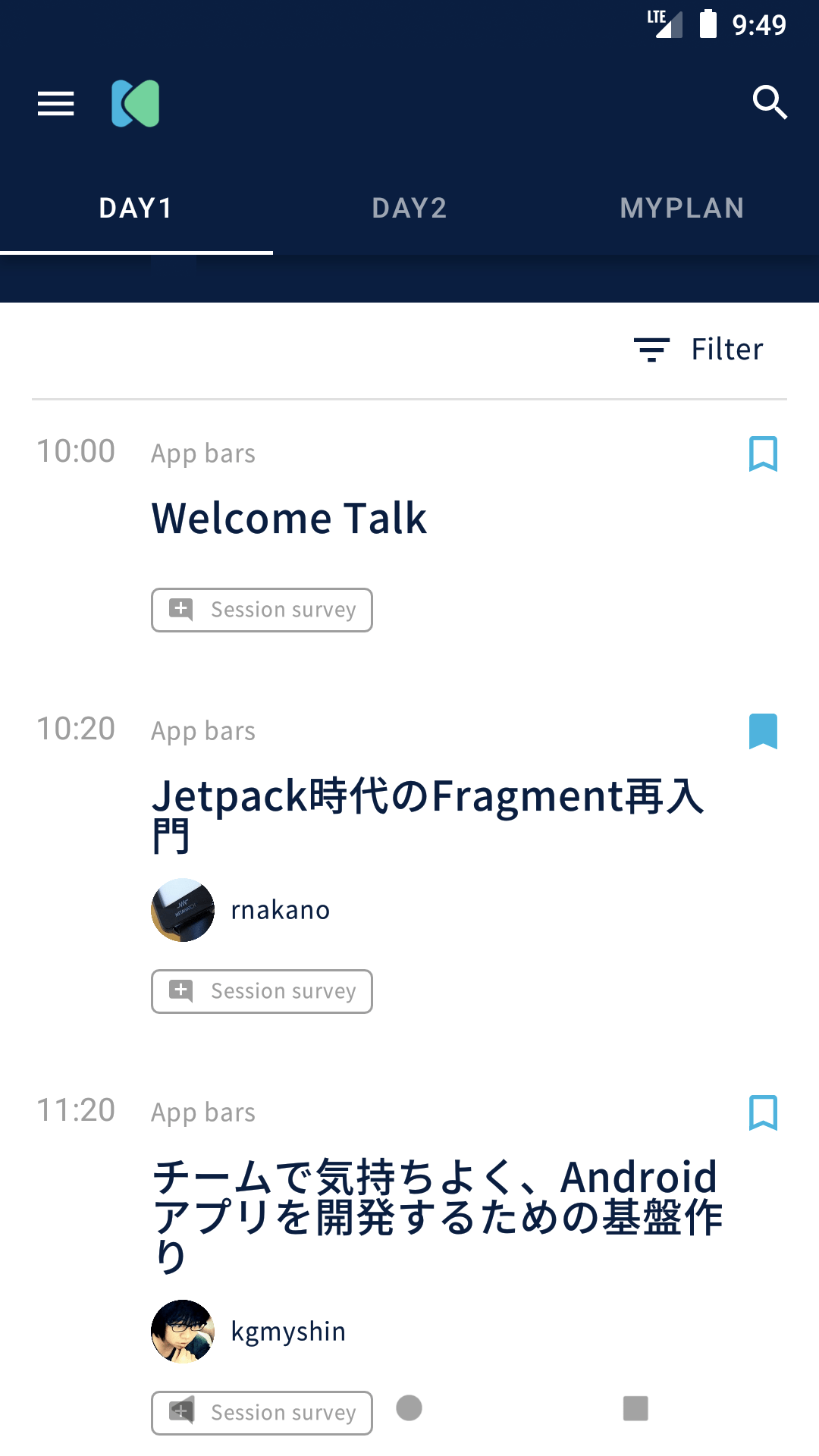
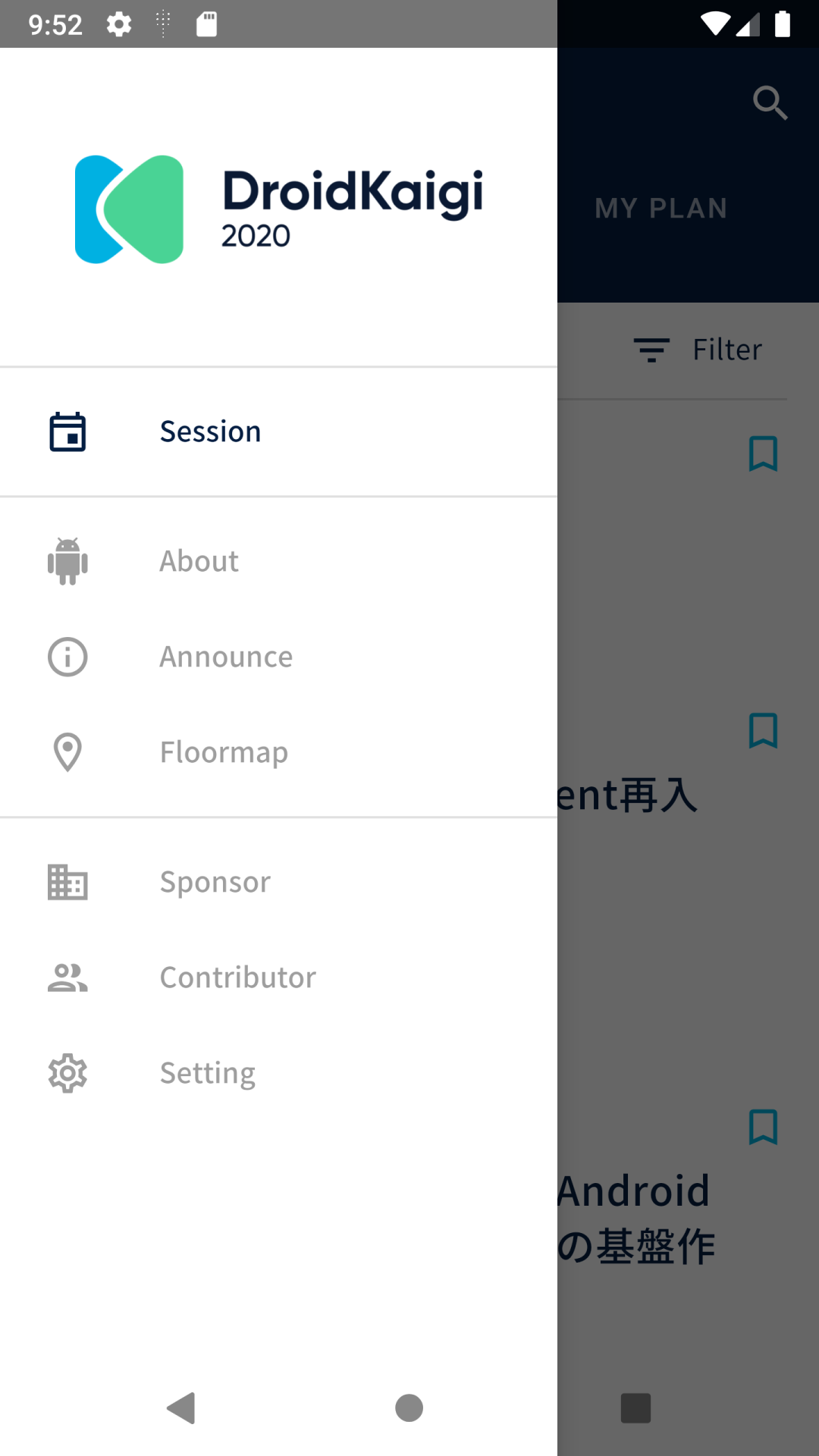
# Features
| top | drawer | |
|---|---|---|
|
](https://dply.me/qo28h3#install)
# Features
| top | drawer | |
|---|---|---|
|  |
|  | |
# Contributing
We always welcome any and all contributions! See [CONTRIBUTING.md](CONTRIBUTING.md) for more information
For Japanese speakers, please see [CONTRIBUTING.ja.md](CONTRIBUTING.ja.md)
## Requirements
Android Studio 3.6 and higher. You can download it from [this page](https://developer.android.com/studio/preview).
# Development Environment
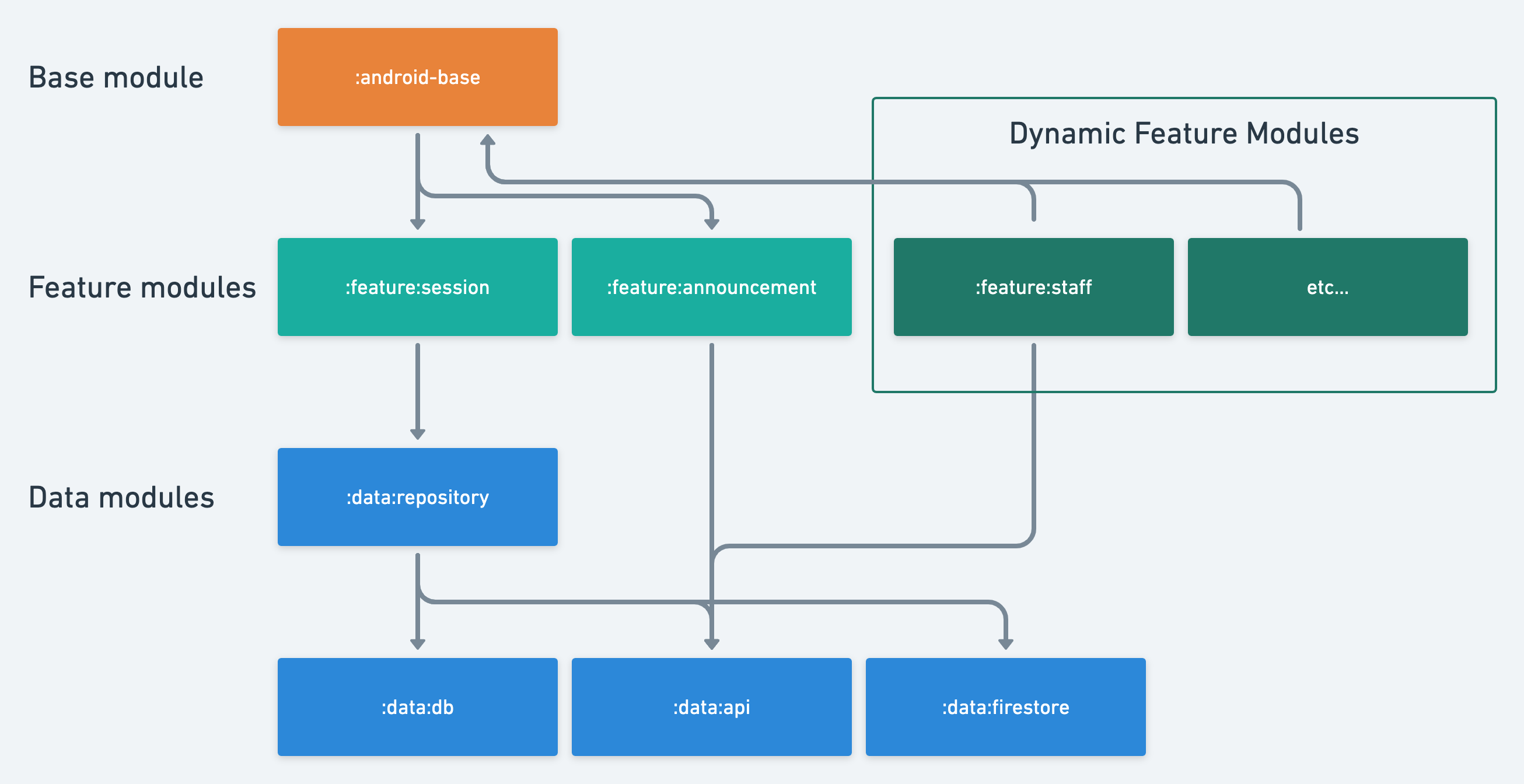
## Multi module project
We separate the modules for each feature. We use the Dynamic feature modules for additional features.
| |
# Contributing
We always welcome any and all contributions! See [CONTRIBUTING.md](CONTRIBUTING.md) for more information
For Japanese speakers, please see [CONTRIBUTING.ja.md](CONTRIBUTING.ja.md)
## Requirements
Android Studio 3.6 and higher. You can download it from [this page](https://developer.android.com/studio/preview).
# Development Environment
## Multi module project
We separate the modules for each feature. We use the Dynamic feature modules for additional features.
 ## Kotlin Multiplatform Project
This app uses Kotlin Multiplatoform to share API and model classes (such as Session and Room classes) between Android and iOS.
# Architecture
This app uses an AndroidJetpack(AAC) based architecture using AAC(LiveData, ViewModel, Room), Kotlin, Kotlin Coroutines Flow, DataBinding, Dagger, Firebase.
## Kotlin Multiplatform Project
This app uses Kotlin Multiplatoform to share API and model classes (such as Session and Room classes) between Android and iOS.
# Architecture
This app uses an AndroidJetpack(AAC) based architecture using AAC(LiveData, ViewModel, Room), Kotlin, Kotlin Coroutines Flow, DataBinding, Dagger, Firebase.
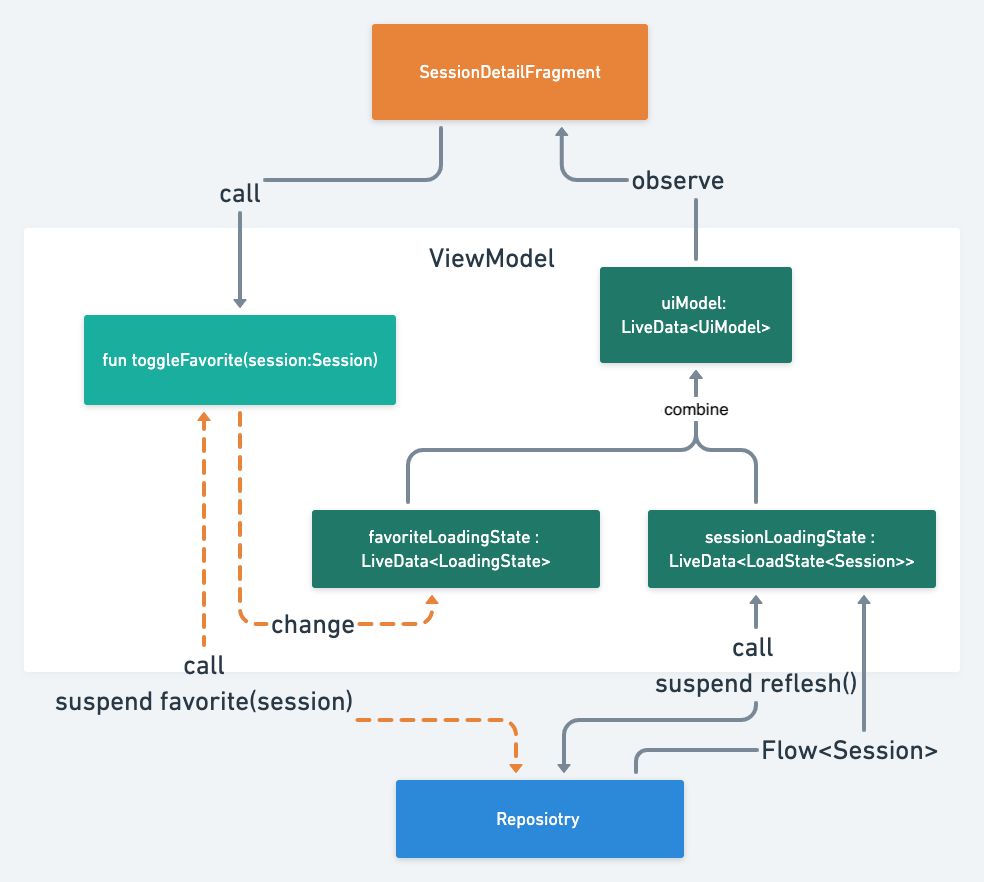
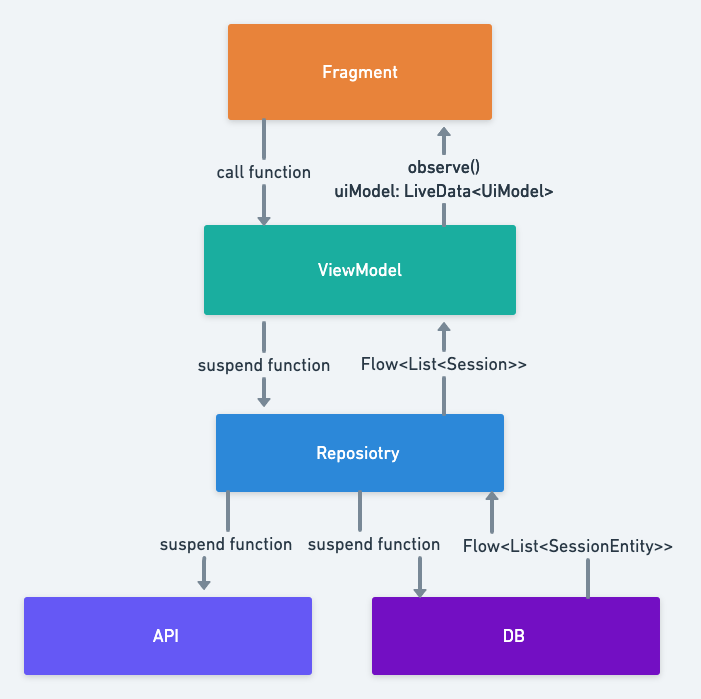 It is designed to be a unidirectional data flow within the ViewModel.
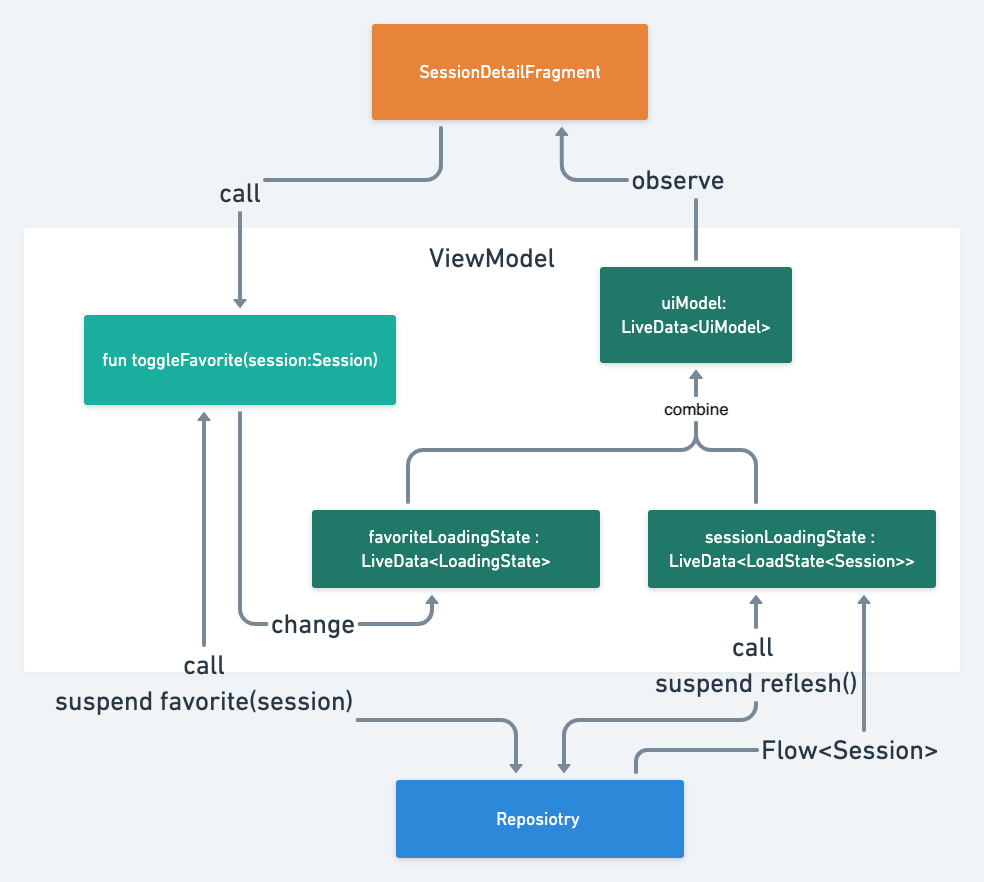 ## Fragment
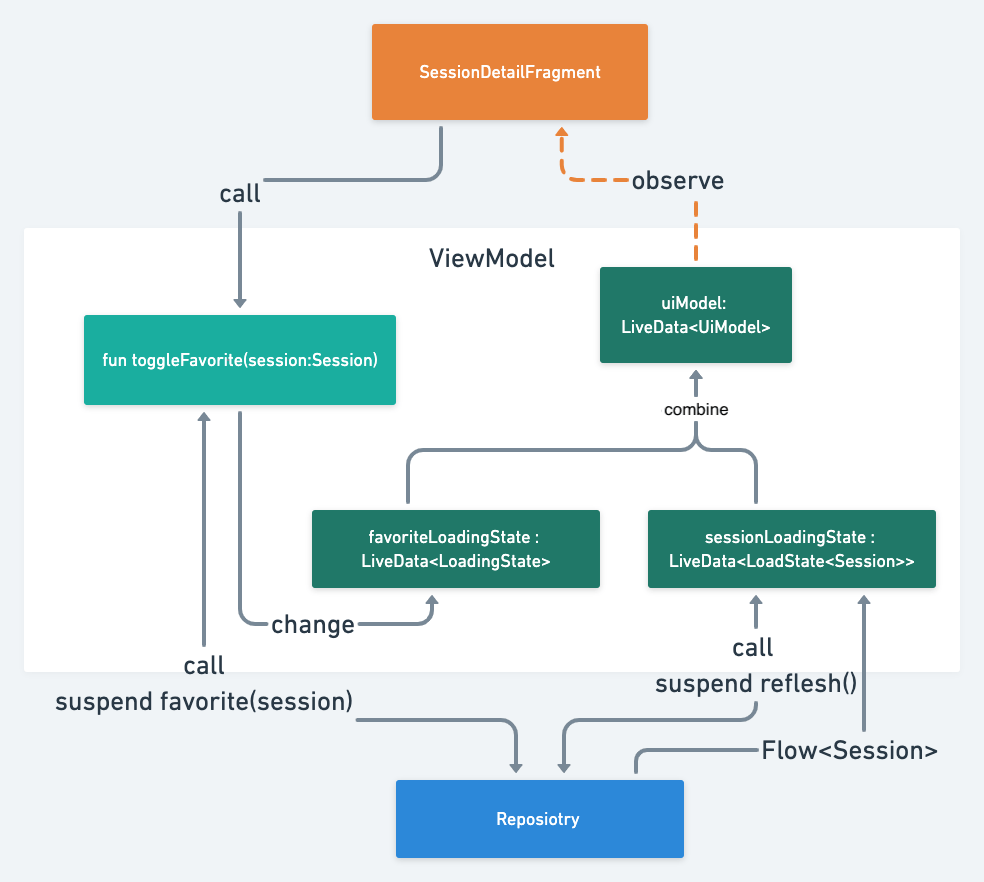 Just observe() the `LiveData` of the ViewModel.
```kotlin
@Inject lateinit var sessionDetailViewModelFactory: SessionDetailViewModel.Factory
private val sessionDetailViewModel by assistedViewModels {
sessionDetailViewModelFactory.create(navArgs.sessionId)
}
override fun onViewCreated(view: View, savedInstanceState: Bundle?) {
super.onViewCreated(view, savedInstanceState)
...
sessionDetailViewModel.uiModel
.observe(viewLifecycleOwner) { uiModel: SessionDetailViewModel.UiModel ->
...
progressTimeLatch.loading = uiModel.isLoading
uiModel.session
?.let { session -> setupSessionViews(session) }
}
}
```
## ViewModel
Just observe() the `LiveData` of the ViewModel.
```kotlin
@Inject lateinit var sessionDetailViewModelFactory: SessionDetailViewModel.Factory
private val sessionDetailViewModel by assistedViewModels {
sessionDetailViewModelFactory.create(navArgs.sessionId)
}
override fun onViewCreated(view: View, savedInstanceState: Bundle?) {
super.onViewCreated(view, savedInstanceState)
...
sessionDetailViewModel.uiModel
.observe(viewLifecycleOwner) { uiModel: SessionDetailViewModel.UiModel ->
...
progressTimeLatch.loading = uiModel.isLoading
uiModel.session
?.let { session -> setupSessionViews(session) }
}
}
```
## ViewModel
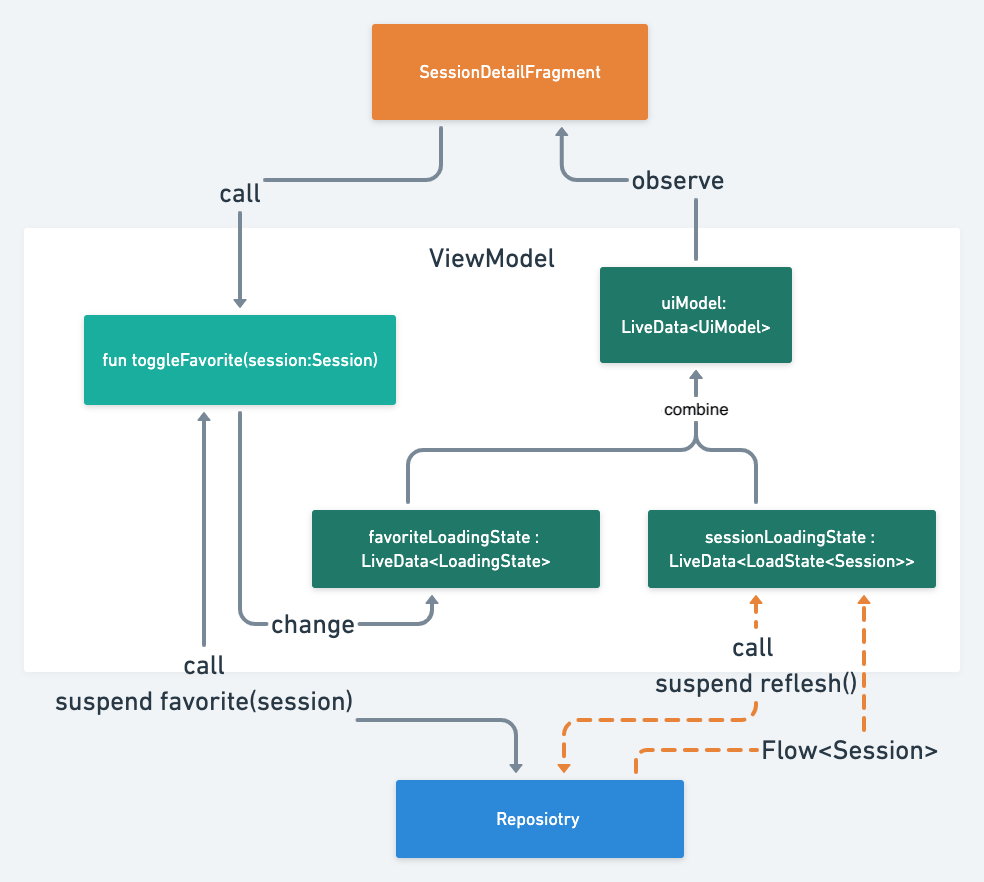 The [LiveData Kotlin Coroutines builder](https://developer.android.com/topic/libraries/architecture/coroutines#livedata) runs when LiveData becomes active.
And observe the data of the Coroutiens Flow of the repository.
The LiveData becomes LoadState.Loading before the Coroutiens Flow is executed by Flow.toLoadingState(), and becomes LoadState.Loaded when finished.
```kotlin
class SessionsViewModel @Inject constructor(
val sessionRepository: SessionRepository
) : ViewModel() {
...
private val sessionLoadState: LiveData> = liveData {
emitSource(
sessionRepository.sessionContents()
.toLoadingState()
.asLiveData()
)
sessionRepository.refresh()
}
```
The [LiveData Kotlin Coroutines builder](https://developer.android.com/topic/libraries/architecture/coroutines#livedata) runs when LiveData becomes active.
And observe the data of the Coroutiens Flow of the repository.
The LiveData becomes LoadState.Loading before the Coroutiens Flow is executed by Flow.toLoadingState(), and becomes LoadState.Loaded when finished.
```kotlin
class SessionsViewModel @Inject constructor(
val sessionRepository: SessionRepository
) : ViewModel() {
...
private val sessionLoadState: LiveData> = liveData {
emitSource(
sessionRepository.sessionContents()
.toLoadingState()
.asLiveData()
)
sessionRepository.refresh()
}
```
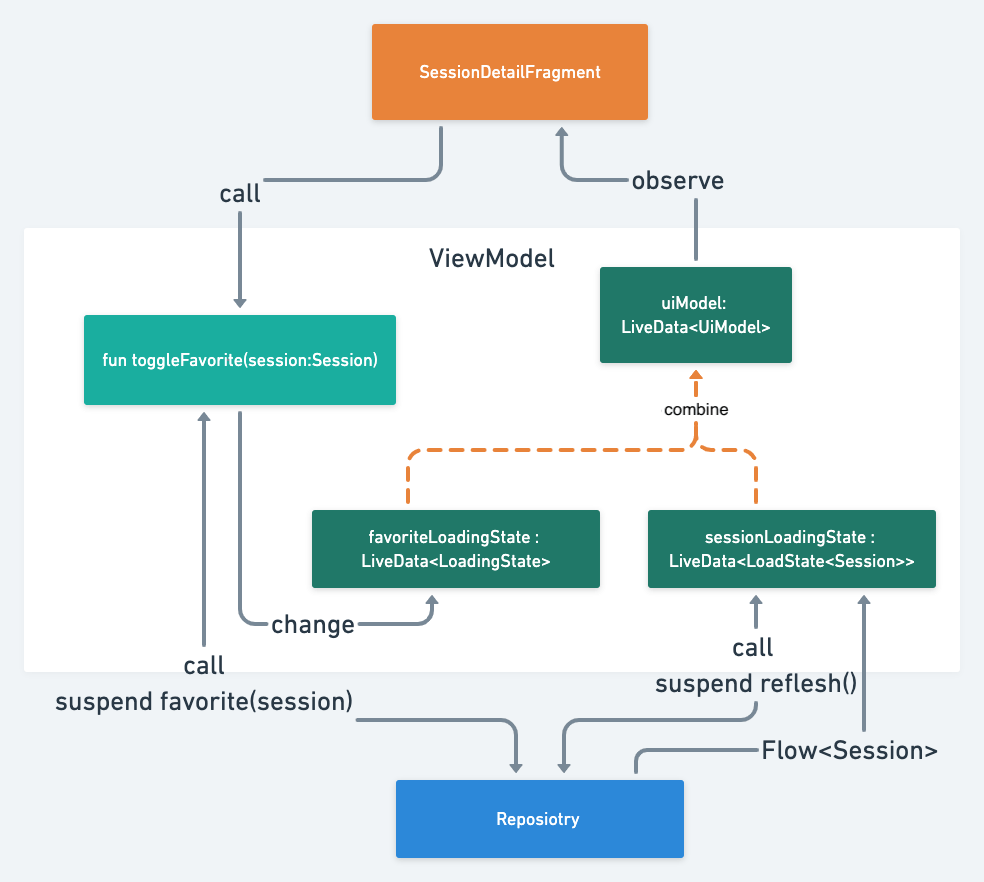 Construct UiModel LiveData from some such LiveData.
The `combine` method works like RxJava's combineLatest.
You can make the loading state of the screen from multiple LiveData states like `sessionLoadState.isLoading || favoriteState.isLoading`.
```kotlin
class SessionDetailViewModel @AssistedInject constructor(
@Assisted private val sessionId: SessionId,
private val sessionRepository: SessionRepository
) : ViewModel() {
...
val uiModel: LiveData = combine(
initialValue = UiModel.EMPTY,
liveData1 = sessionLoadStateLiveData,
liveData2 = favoriteLoadingStateLiveData
) { current: UiModel,
sessionLoadState: LoadState,
favoriteState: LoadingState ->
// You can create loading state by multiple LiveData
val isLoading = sessionLoadState.isLoading || favoriteState.isLoading
UiModel(
isLoading = isLoading,
error = sessionLoadState
.getErrorIfExists()
.toAppError()
?: favoriteState
.getErrorIfExists()
.toAppError()
,
session = sessionLoadState.value
)
}
```
Run Coroutines with `viewModelScope` when data changes, such as adding a session to Favorites.
Because we do not want to end the process of adding a session to favorites with the back button, we use WorkManager to do the processing.
Construct UiModel LiveData from some such LiveData.
The `combine` method works like RxJava's combineLatest.
You can make the loading state of the screen from multiple LiveData states like `sessionLoadState.isLoading || favoriteState.isLoading`.
```kotlin
class SessionDetailViewModel @AssistedInject constructor(
@Assisted private val sessionId: SessionId,
private val sessionRepository: SessionRepository
) : ViewModel() {
...
val uiModel: LiveData = combine(
initialValue = UiModel.EMPTY,
liveData1 = sessionLoadStateLiveData,
liveData2 = favoriteLoadingStateLiveData
) { current: UiModel,
sessionLoadState: LoadState,
favoriteState: LoadingState ->
// You can create loading state by multiple LiveData
val isLoading = sessionLoadState.isLoading || favoriteState.isLoading
UiModel(
isLoading = isLoading,
error = sessionLoadState
.getErrorIfExists()
.toAppError()
?: favoriteState
.getErrorIfExists()
.toAppError()
,
session = sessionLoadState.value
)
}
```
Run Coroutines with `viewModelScope` when data changes, such as adding a session to Favorites.
Because we do not want to end the process of adding a session to favorites with the back button, we use WorkManager to do the processing.
 ```kotlin
class SessionDetailViewModel @AssistedInject constructor(
@Assisted private val sessionId: SessionId,
private val sessionRepository: SessionRepository
) : ViewModel() {
..
private var favoriteLoadingStateLiveData: MutableLiveData = MutableLiveData(LoadingState.Loaded)
...
fun favorite(session: Session) {
viewModelScope.launch {
favoriteLoadingStateLiveData.value = LoadingState.Loading
try {
sessionRepository.toggleFavoriteWithWorker(session.id)
favoriteLoadingStateLiveData.value = LoadingState.Loaded
} catch (e: Exception) {
favoriteLoadingStateLiveData.value = LoadingState.Error(e)
}
}
}
```
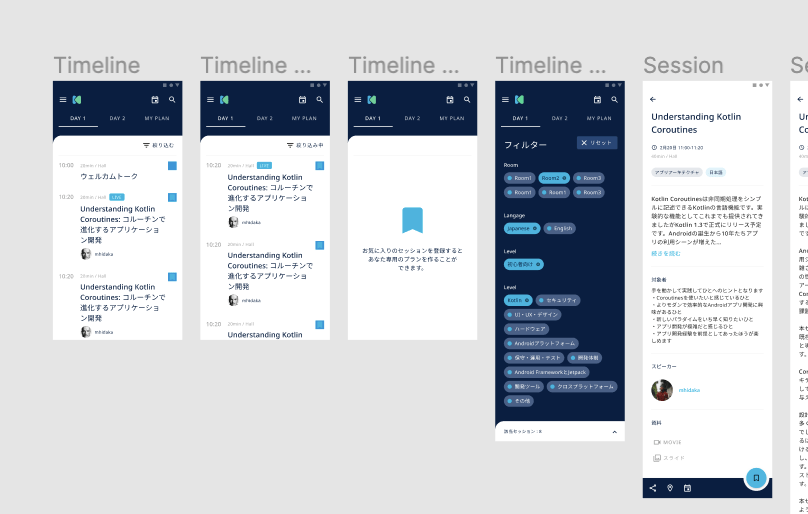
## Design
* DroidKaigi 2020 Design Kit
https://www.figma.com/file/RPPQQRys8IubNShKan8c2Z/DroidKaigi-2020-Design-Kit?node-id=0%3A2347
* App
https://www.figma.com/file/4r9becvhDy3GfXaXex8E8d/App
```kotlin
class SessionDetailViewModel @AssistedInject constructor(
@Assisted private val sessionId: SessionId,
private val sessionRepository: SessionRepository
) : ViewModel() {
..
private var favoriteLoadingStateLiveData: MutableLiveData = MutableLiveData(LoadingState.Loaded)
...
fun favorite(session: Session) {
viewModelScope.launch {
favoriteLoadingStateLiveData.value = LoadingState.Loading
try {
sessionRepository.toggleFavoriteWithWorker(session.id)
favoriteLoadingStateLiveData.value = LoadingState.Loaded
} catch (e: Exception) {
favoriteLoadingStateLiveData.value = LoadingState.Error(e)
}
}
}
```
## Design
* DroidKaigi 2020 Design Kit
https://www.figma.com/file/RPPQQRys8IubNShKan8c2Z/DroidKaigi-2020-Design-Kit?node-id=0%3A2347
* App
https://www.figma.com/file/4r9becvhDy3GfXaXex8E8d/App
 ## Thanks
Thank you for contributing!
* Contributors
* [GitHub : Contributors](https://github.com/DroidKaigi/conference-app-2020/graphs/contributors)
* Designer
* [Chihokotaro / Chihoko Watanabe](https://twitter.com/chihokotaro)
## Credit
This project uses some modern Android libraries and source codes.
### Android
* [Android Jetpack](https://developer.android.com/jetpack/) (Google)
* Foundation
* AppCompat
* Android KTX
* Multidex
* Test
* Architecture
* Data Binding
* Lifecycles
* LiveData
* Navigation
* UI
* Emoji
* Fragment
* Transition
* ConstraintLayout
* RecyclerView
* ...
* [Kotlin](https://kotlinlang.org/) (JetBrains)
* Stdlib
* Coroutines
* Coroutines Flow
* Serialization
* [Firebase](https://firebase.google.com/) (Google)
* Authentication
* Cloud Firestore
* [Dagger 2](https://google.github.io/dagger/)
* Core (Google)
* AndroidSupport (Google)
* [AssistedInject](https://github.com/square/AssistedInject) (Square)
* [Material Components for Android](https://github.com/material-components/material-components-android) (Google)
* [Ktor](https://ktor.io/) (JetBrains)
* Android Client
* Json
* [OkHttp](http://square.github.io/okhttp/) (Square)
* Client
* LoggingInterceptor
* [Coil](https://github.com/coil-kt/coil) (Coil Contributors)
* [LeakCanary](https://github.com/square/leakcanary) (Square)
* [Stetho](http://facebook.github.io/stetho/) (Facebook)
* [Hyperion-Android](https://github.com/willowtreeapps/Hyperion-Android) (WillowTree)
* [Groupie](https://github.com/lisawray/groupie) (lisawray)
* [KLOCK](https://korlibs.soywiz.com/klock/) (soywiz)
* [MockK](http://mockk.io) (oleksiyp)
* [Injected ViewModel Provider](https://github.com/evant/injectedvmprovider) (evant)
* [Google I/O 2018](https://github.com/google/iosched) (Google)
* [TimetableLayout](https://github.com/MoyuruAizawa/TimetableLayout) (MoyuruAizawa)
* [Android Architecture Components samples](https://github.com/android/architecture-components-samples) (Google)
* [AutoClearedValue](https://github.com/android/architecture-components-samples/blob/9826b59956eb93c9e627bdf16a19a1c8bc28ce14/GithubBrowserSample/app/src/main/java/com/android/example/github/util/AutoClearedValue.kt)
* [Android Animation Samples Repository](https://github.com/android/animation-samples) (Google)
* [Motion](https://github.com/android/animation-samples/tree/master/Motion)
* [Store4](https://github.com/dropbox/Store) (Dropbox)
### iOS
* [Mint](https://github.com/yonaskolb/Mint)
* [XcodeGen](https://github.com/yonaskolb/XcodeGen)
* [material-components-ios](https://github.com/material-components/material-components-ios)
* [RxSwift](https://github.com/ReactiveX/RxSwift)
* [GNU Make](https://www.gnu.org/software/make/)
* [Material](https://github.com/CosmicMind/Material)
* [Nuke](https://github.com/kean/Nuke)
* [SwiftGen](https://github.com/SwiftGen/SwiftGen)
* [RealmSwift](https://github.com/realm/realm-cocoa)
* [SnapshotTesting](https://github.com/pointfreeco/swift-snapshot-testing)
* [RxRealm](https://github.com/RxSwiftCommunity/RxRealm)
## Thanks
Thank you for contributing!
* Contributors
* [GitHub : Contributors](https://github.com/DroidKaigi/conference-app-2020/graphs/contributors)
* Designer
* [Chihokotaro / Chihoko Watanabe](https://twitter.com/chihokotaro)
## Credit
This project uses some modern Android libraries and source codes.
### Android
* [Android Jetpack](https://developer.android.com/jetpack/) (Google)
* Foundation
* AppCompat
* Android KTX
* Multidex
* Test
* Architecture
* Data Binding
* Lifecycles
* LiveData
* Navigation
* UI
* Emoji
* Fragment
* Transition
* ConstraintLayout
* RecyclerView
* ...
* [Kotlin](https://kotlinlang.org/) (JetBrains)
* Stdlib
* Coroutines
* Coroutines Flow
* Serialization
* [Firebase](https://firebase.google.com/) (Google)
* Authentication
* Cloud Firestore
* [Dagger 2](https://google.github.io/dagger/)
* Core (Google)
* AndroidSupport (Google)
* [AssistedInject](https://github.com/square/AssistedInject) (Square)
* [Material Components for Android](https://github.com/material-components/material-components-android) (Google)
* [Ktor](https://ktor.io/) (JetBrains)
* Android Client
* Json
* [OkHttp](http://square.github.io/okhttp/) (Square)
* Client
* LoggingInterceptor
* [Coil](https://github.com/coil-kt/coil) (Coil Contributors)
* [LeakCanary](https://github.com/square/leakcanary) (Square)
* [Stetho](http://facebook.github.io/stetho/) (Facebook)
* [Hyperion-Android](https://github.com/willowtreeapps/Hyperion-Android) (WillowTree)
* [Groupie](https://github.com/lisawray/groupie) (lisawray)
* [KLOCK](https://korlibs.soywiz.com/klock/) (soywiz)
* [MockK](http://mockk.io) (oleksiyp)
* [Injected ViewModel Provider](https://github.com/evant/injectedvmprovider) (evant)
* [Google I/O 2018](https://github.com/google/iosched) (Google)
* [TimetableLayout](https://github.com/MoyuruAizawa/TimetableLayout) (MoyuruAizawa)
* [Android Architecture Components samples](https://github.com/android/architecture-components-samples) (Google)
* [AutoClearedValue](https://github.com/android/architecture-components-samples/blob/9826b59956eb93c9e627bdf16a19a1c8bc28ce14/GithubBrowserSample/app/src/main/java/com/android/example/github/util/AutoClearedValue.kt)
* [Android Animation Samples Repository](https://github.com/android/animation-samples) (Google)
* [Motion](https://github.com/android/animation-samples/tree/master/Motion)
* [Store4](https://github.com/dropbox/Store) (Dropbox)
### iOS
* [Mint](https://github.com/yonaskolb/Mint)
* [XcodeGen](https://github.com/yonaskolb/XcodeGen)
* [material-components-ios](https://github.com/material-components/material-components-ios)
* [RxSwift](https://github.com/ReactiveX/RxSwift)
* [GNU Make](https://www.gnu.org/software/make/)
* [Material](https://github.com/CosmicMind/Material)
* [Nuke](https://github.com/kean/Nuke)
* [SwiftGen](https://github.com/SwiftGen/SwiftGen)
* [RealmSwift](https://github.com/realm/realm-cocoa)
* [SnapshotTesting](https://github.com/pointfreeco/swift-snapshot-testing)
* [RxRealm](https://github.com/RxSwiftCommunity/RxRealm)