# Pin Action
> 简体中文
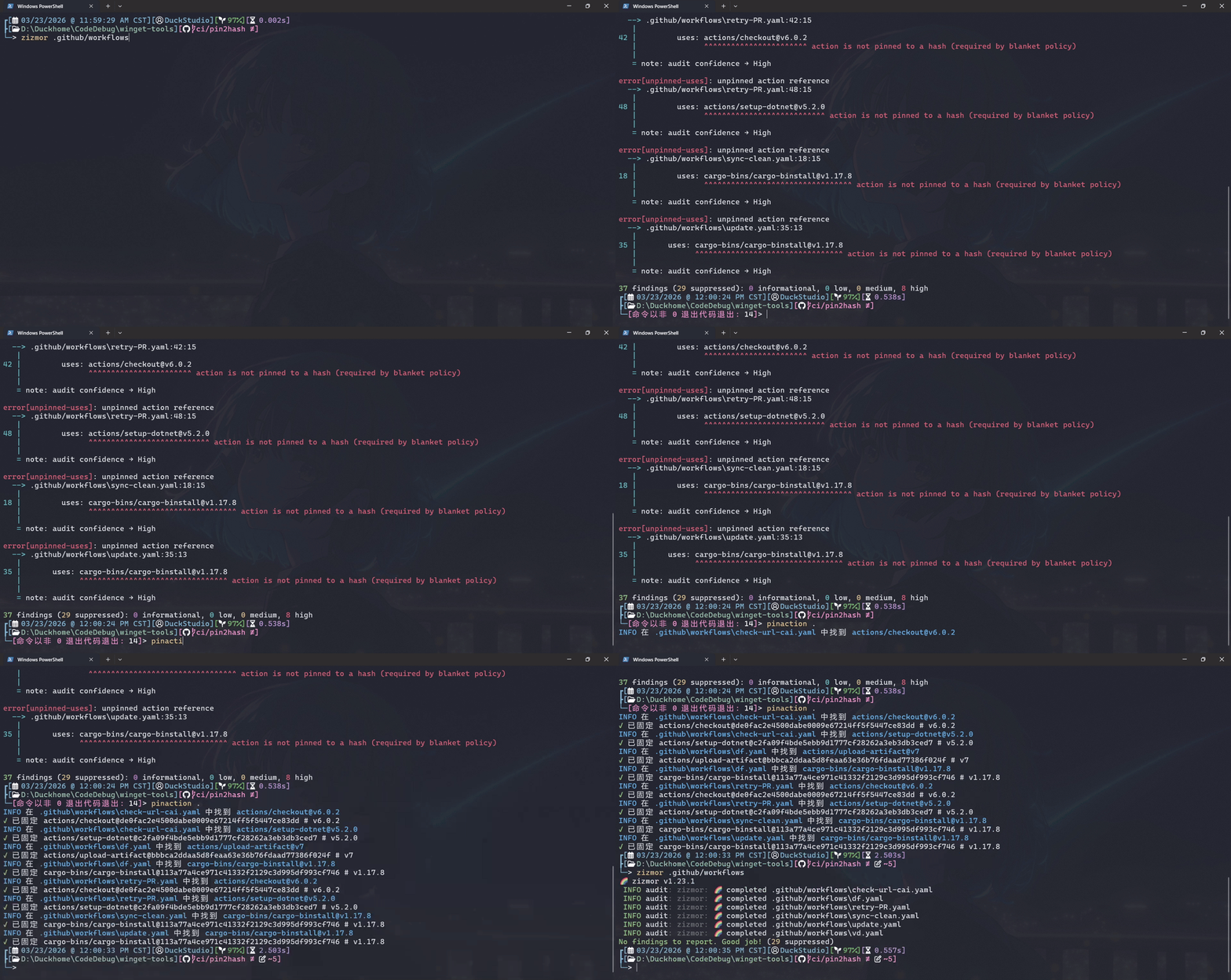
Pin workflow dependency versions to full-length hashes.
## Install
### Windows
[When the pull request for new version is published](https://github.com/microsoft/winget-pkgs/issues?q=type%3Apr%20author%3ADuckDuckStudio%20%22DuckStudio.PinAction%22), you can install it via winget:
```shell
winget install --id DuckStudio.PinAction -s winget -e
```
Linux
### Linux
> I use [WSL2 Ubuntu](https://ubuntu.com/desktop/wsl) + [fish shell](https://fishshell.com/) + [bash](http://www.gnu.org/software/bash).
> You can use ANY editor you like, not just limited to [nano](https://www.nano-editor.org/).
> Before continuing, please [install the .NET 10 SDK](https://learn.microsoft.com/zh-cn/dotnet/core/install/linux).
#### Clone repository
```shell
git clone https://github.com/DuckDuckStudio/PinAction.git # Add the "-b " parameter to specify the version
cd PinAction/
```
#### Compiles Pin Action
> [!TIP]
> You DON'T necessarily have to strictly follow the examples given here; you can refer to the [`dotnet publish` command documentation](https://learn.microsoft.com/zh-cn/dotnet/core/tools/dotnet-publish) to combine new command.
The example here uses the Release build configuration, specifying the target operating system as Linux, single file, and self-contained runtime.
```shell
dotnet publish PinAction --configuration Release --os linux -p:PublishSingleFile=true --self-contained
# For those who like to use lowercase ...
mv "PinAction/bin/Release/net10.0/linux-x64/publish/PinAction" "PinAction/bin/Release/net10.0/linux-x64/publish/pinaction"
```
#### Add to PATH
> Please replace the path in the code with the path to your actual publish folder.
For fish:
```shell
nano ~/.config/fish/config.fish
# Add the following code
# set -gx PATH "/path/to/repo/PinAction/PinAction/bin/Release/net10.0/linux-x64/publish/" $PATH
```
For bash:
```bash
nano ~/.bashrc
# Add the following code
# export PATH="/path/to/repo/PinAction/PinAction/bin/Release/net10.0/linux-x64/publish/:$PATH"
```
Then use the `source` command to reload the configuration.
#### Add fish shell auto-completion
> `complete` command documentation: https://fishshell.com/docs/current/cmds/complete.html
```shell
touch ~/.config/fish/completions/pinaction.fish
nano ~/.config/fish/completions/pinaction.fish
```
Add the following content:
> [!NOTE]
> If you changed the command to all lowercase earlier, please also change the command here to lowercase.
```shell
# DuckStudio.PinAction
# https://github.com/DuckDuckStudio/PinAction/blob/main/README.zh-CN.md
# General Commands (use "--xxx" style, for other aliases see "pinaction --help")
complete -c PinAction -l help -d "显示帮助信息"
complete -c PinAction -l version -d "显示版本号"
complete -c PinAction -l license -d "显示许可信息"
```
## Usage
```shell
pinaction ""
```
You can pass multiple files or directories at once.
For directories, it will recursively look for `.yaml` or `.yml` files within.
Run `pinaction --help` for more help information.
## Q & A
### Does it support using a GitHub Token?
I think it will when I learned how to read and store the Token in C#.
Currently it doesn't, but you can hardcode it in the source code.
### Can it skip some workflows?
Please modify the code, there are an example in the code.
### Why we need pin the version to the full-length hash?
This is [a practice recommended by GitHub](https://docs.github.com/en/actions/reference/security/secure-use#using-third-party-actions), and is [considered mandatory](https://github.blog/changelog/2025-08-15-github-actions-policy-now-supports-blocking-and-sha-pinning-actions/) in some projects.
If your workflow dependency do not have [Immutable releases](https://docs.github.com/en/code-security/concepts/supply-chain-security/immutable-releases) enabled, your workflow may be affected if an upstream dependency modifies the same version again.
Pinning the version to the full-length hash ensures your workflow always uses the same code, even if the upstream dependency modifies the same version.
### What is the "full-length hash"?
It is the Git commit hash corresponding to the specified workflow version (tag).
### How does this program replace the content?
I took the easy route — instead of parsing YAML, I simply split lines containing `uses:` and applied regex after a few `.Split()` operations.
For details, see the `PinActionHash` method in the source code.
### Why doesn't it have an icon?
Because I can't draw. After an hour of thinking, [我已急哭](https://baike.baidu.com/item/你已急哭).
## License
This program is licensed under the [MIT License](https://github.com/DuckDuckStudio/PinAction/blob/main/LICENSE.txt).
### Dependencies
This program would not have been possible without these projects.
Thank you to the open-source community!
| Package | License |
|-----|-----|
| [Octokit](https://www.nuget.org/packages/Octokit/) | MIT License |
| [DuckStudio.CatFood](https://www.nuget.org/packages/DuckStudio.CatFood) | Apache License 2.0 |
| [Spectre.Console](https://www.nuget.org/packages/Spectre.Console/) | MIT License |
For the license files related to these dependencies, please see [NOTICE.md](https://github.com/DuckDuckStudio/PinAction/blob/main/NOTICE.md).