Ekko Studio
中文
A local-first AI workspace for multi-agent chat, coding, and visual workflows.
Available as a desktop app and self-hosted web console, with support for
Hermes Agent, Ekko Agent, Claude Code, Codex, Pi, Grok, OpenCode, and DeepSeek Harness (DSH).
Bring conversations, group collaboration, voice, files, and devices together in one place.
Download Ekko Studio Desktop
·
Documentation
·
npm install -g ekko-studio && ekko-studio-web start
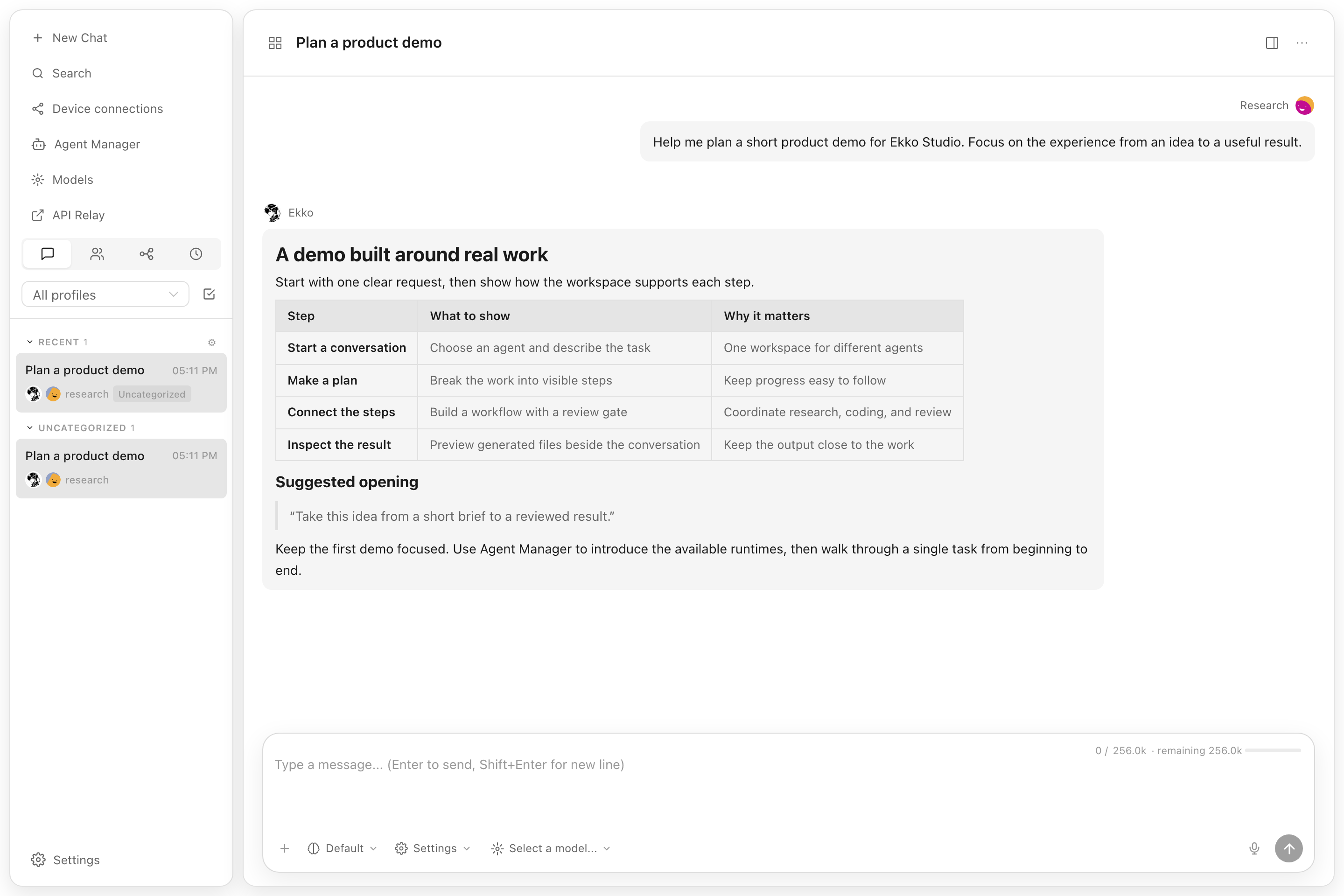



Ekko Studio was previously named Hermes Studio / Hermes Web UI. The GitHub
repository is `EKKOLearnAI/ekko-studio`. The primary npm package is
`ekko-studio`, with the `ekko-studio-web` command. The legacy `hermes-web-ui`
package and command remain supported and receive the same releases.
## Screenshots
Captured in Ekko Studio **v0.7.18** on 2026-09-10. Chat and workflow screens use demo data.
| Visual workflows | Agent Manager |
| --- | --- |
| [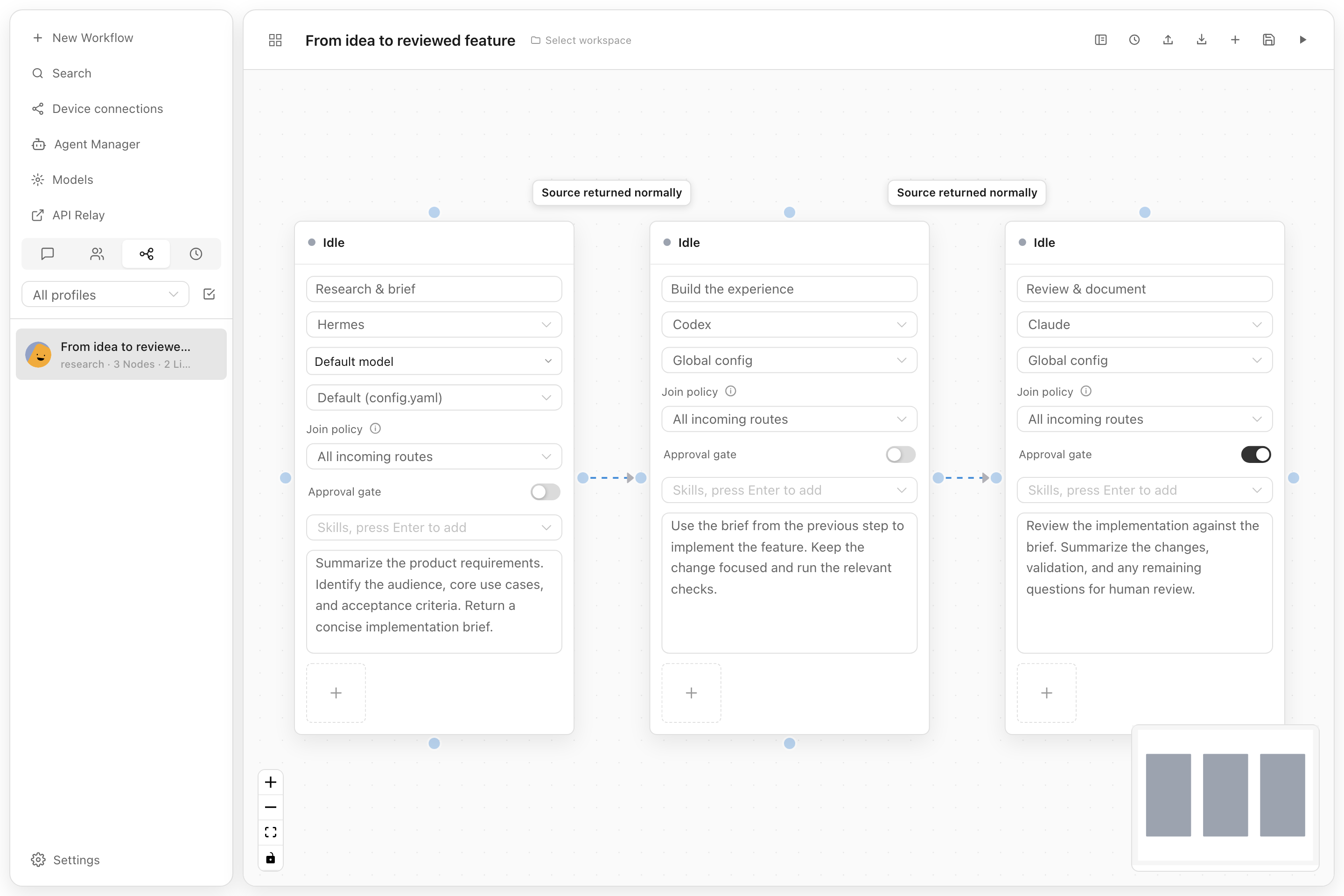](./docs/screenshots/overview/workflow.png) | [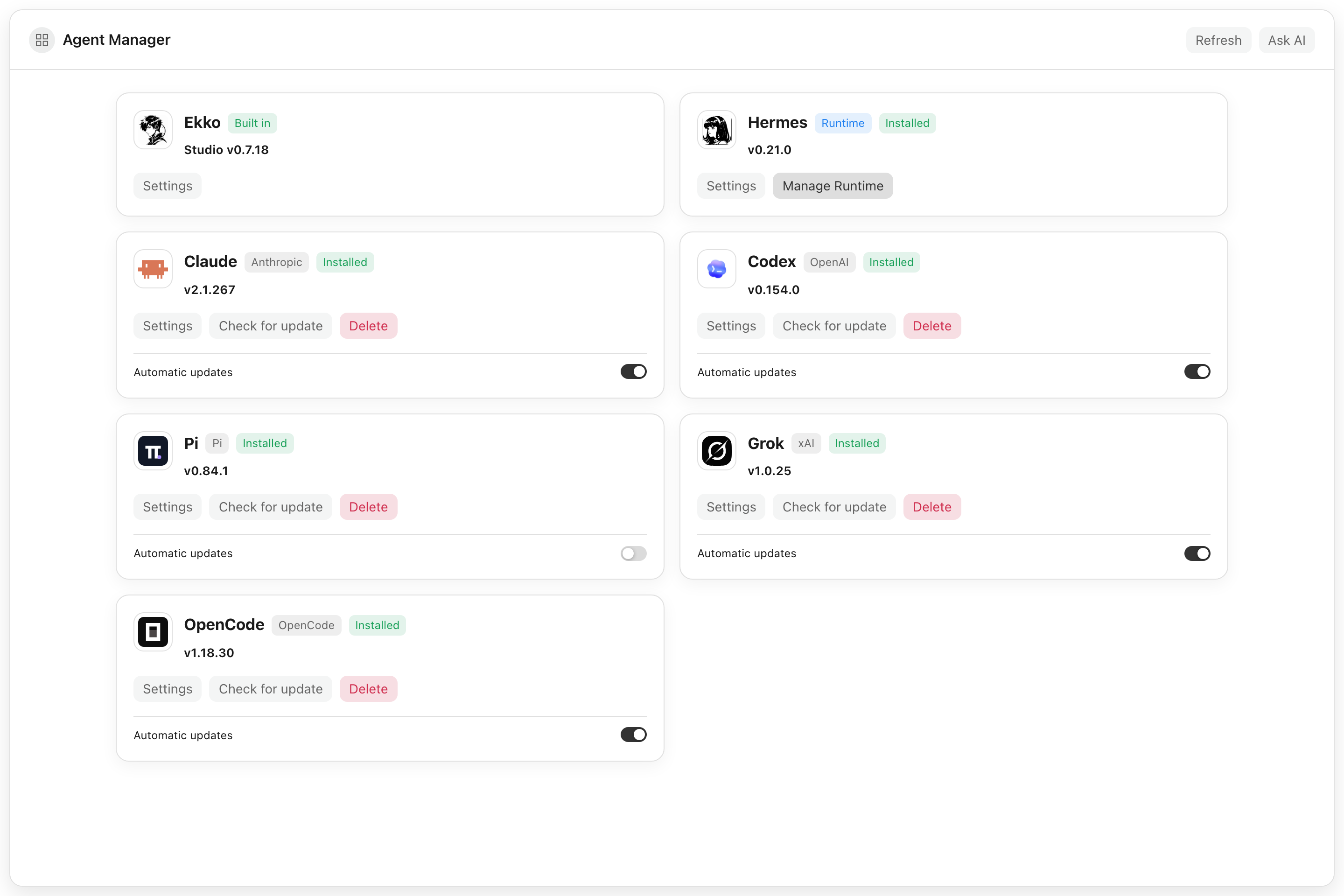](./docs/screenshots/overview/agent-manager.png) |
| Connect agent steps and add a human approval gate. | Manage agent installations, settings, and updates in one place. |
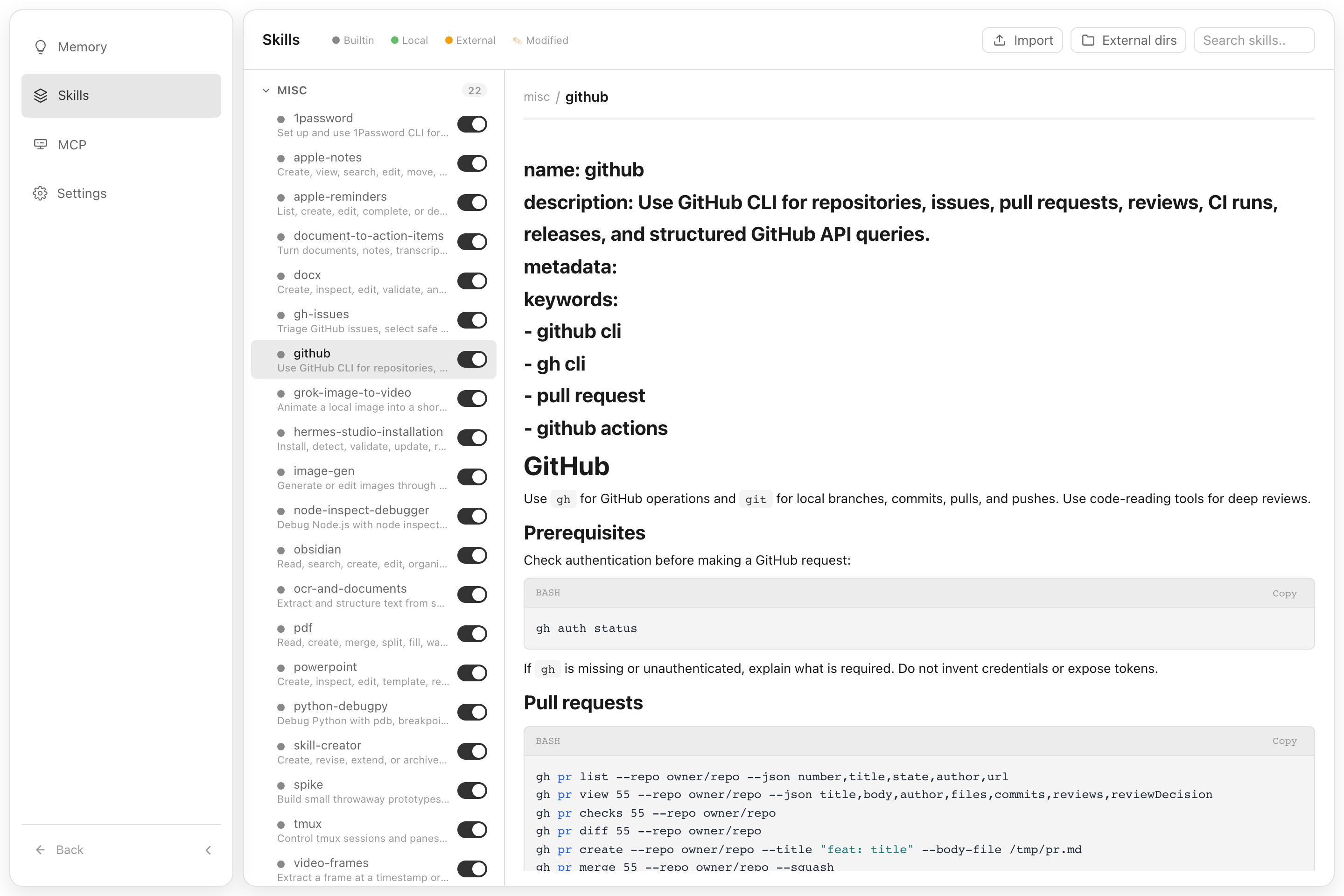
Explore the Skills interface
Browse installed skills, read their instructions, and enable them as needed.
## Core Capabilities
| Area | What Ekko Studio does |
| --- | --- |
| Multi-agent runtime | Runs Hermes, Ekko, Claude Code, Codex, Pi, Grok, OpenCode, and DeepSeek Harness (DSH) with streaming responses, tool traces, generated-file previews, persistent sessions, and standalone desktop chat windows. |
| Studio workspace | Provides shared chats, group chat, global-agent runs, workflows, files, voice, media, devices, themes, logs, usage, and App connectivity across agent runtimes. |
| Agent control planes | Keeps Hermes profiles, providers, models, memory, skills, plugins, jobs, Kanban, channels, and runtime management in their owning agent module. |
| Automation | Builds executable visual workflows and connects the supported runtimes through schedules, approval gates, group-chat rooms, platform channels, and MCP servers. |
| Workspace tools | Provides a file browser, web terminal, Desktop Agent Browser, voice input/output, coding-agent runners, device discovery, Journey graph, and performance views. |
| Distribution | Ships as a desktop app for Windows/macOS/Linux, an npm CLI package, and a Docker image. |
## Agent and Platform Boundaries
Ekko Studio provides a shared workspace for its supported agent runtimes,
grouped into three agent families:
| Agent family | Runtime | Owned behavior |
| --- | --- | --- |
| Hermes | Hermes | Profiles, providers, models, skills, plugins, memory, jobs, Kanban, channels, MCP, terminal, and Hermes runtime integration. |
| Ekko | Ekko | Ekko execution, approvals, clarifications, memory, MCP, and provider runtime behavior. |
| Coding | Claude Code, Codex, Pi, Grok, OpenCode, DSH | Coding-agent installation, configuration, proxies, sessions, and process execution. |
Studio owns capabilities shared by those families: single chat, group chat,
global-agent orchestration, workflows, webhooks, sessions, files and uploads,
TTS/STT, media, pets, themes, devices, networking, logs, usage, authentication,
and App connectivity. Studio-owned HTTP APIs use `/api/studio/*`; Hermes-owned
control-plane APIs use `/api/hermes/*`. Already-released mobile App paths are
handled by one centralized compatibility layer instead of duplicate legacy
controllers.
## Features
### AI Chat
- Real-time chat streaming over Socket.IO `/chat-run`; Studio dispatches each run to Hermes, Ekko, Claude Code, Codex, Pi, Grok, OpenCode, or DSH through runtime adapters
- Multi-session management — create, rename, delete, switch between sessions
- **Self-built session database** — local SQLite storage for Studio sessions; Hermes state.db remains a read-only source for Hermes history APIs
- Session grouping by source (Telegram, Discord, Slack, etc.) with collapsible accordion
- Active session indicator — live sessions pin to top with spinner icon
- Sessions sorted by latest message time
- Markdown rendering with syntax highlighting and code copy
- Tool call detail expansion (arguments / result)
- Profile-scoped file uploads, clipboard image/file paste, and workspace attachments
- File download support — download uploaded files and agent-generated files by resolved path across local, Docker, SSH, and Singularity backends
- Inline previews for generated HTML, PDF, DOCX, PPTX, XLSX, CSV, images, Markdown, and source files
- Session search — Ctrl+K search across the Studio local session database; read-only Hermes history sessions are not included
- Session categories, message references, compression progress, and durable background delegation results
- Profile-aware model selector — discovers models available to the signed-in account through authorized Hermes profiles
- Per-session model display badge and context token usage
### Platform Channels
Unified configuration for **10 platforms** in one page:
| Platform | Features |
| ------------- | ---------------------------------------------------------------------- |
| Telegram | Bot token, mention control, reactions, free-response chats |
| Discord | Bot token, mention, auto-thread, reactions, channel allow/ignore lists |
| Slack | Bot token, mention control, bot message handling |
| WhatsApp | Enable/disable, mention control, mention patterns |
| Matrix | Access token, homeserver, auto-thread, DM mention threads |
| Feishu (Lark) | App ID / Secret, mention control |
| DingTalk | Client ID / Secret, mention control |
| QQBot | App ID / Secret, mention control |
| WeChat | QR code login (scan in browser, auto-save credentials) |
| WeCom | Bot ID / Secret |
- Credential management writes to `~/.hermes/.env`
- Channel behavior settings write to `~/.hermes/config.yaml`
- Per-platform configured/unconfigured status detection
### Usage Analytics
- Total token usage breakdown (input / output)
- Session count with daily average
- Estimated cost tracking & cache hit rate
- Model usage distribution chart
- 30-day daily trend (bar chart + data table)
### Scheduled Jobs
- Create, edit, pause, resume, delete cron jobs
- Trigger immediate execution
- Cron expression quick presets
### Kanban
- Profile-aware Kanban board for planning and tracking agent work
- Task creation, updates, and status movement from the dashboard
- Shared with the same local Studio state and authentication model
### Visual Workflows
- Vue Flow canvas for Hermes, Ekko, Claude Code, Codex, Pi, Grok, OpenCode, and DeepSeek Harness (DSH) nodes with file/image attachments
- Directed edges, structured conditions, success/failure routes, loops, and approval gates
- Import/export for portable workflow definitions and profile-aware workspaces
- Run budgets, deadlines, stop/rerun controls, and persisted execution history
- Frozen run snapshots, node conversations, edge decisions, and evidence playback on the canvas
### Model Management
- Auto-discover models from credential pool (`~/.hermes/auth.json`)
- Fetch available models from each provider endpoint (`/v1/models`)
- Add, update, and delete providers (preset and custom OpenAI-compatible)
- OAuth/device flows for OpenAI Codex, Nous Portal, xAI, Claude, and GitHub Copilot
- Provider URL auto-detection for non-v1 API versions (e.g. `/v4`)
- Provider-level model grouping, visible-model controls, aliases, refresh, and default switching
- Separate STT and TTS provider catalogs under Models
### Multi-Profile
- Create, rename, delete, and switch between Hermes profiles
- Clone existing profile or import from archive (`.tar.gz`)
- Export profile for backup or sharing
- Profile-scoped configuration, cache, uploads, sessions, jobs, usage, memory, skills, plugins, providers, and model visibility
- Account-bound profile access: super administrators can manage every profile; regular administrators only see and use profiles assigned to their account
### File Browser
- Browse files on remote backends (local, Docker, SSH, Singularity)
- Upload, download, rename, copy, move, and delete files
- Store uploaded files under the selected/requested Hermes profile while keeping downloads path-based for agent-generated artifacts outside the upload directory
- Create directories
- Preview and edit supported files with syntax highlighting, then attach workspace files back to a chat
### Group Chat
- Multi-agent chat rooms with real-time messaging via Socket.IO
- @mention routing — mention an agent to trigger a contextual reply
- Context compression — automatic conversation summarization when history exceeds token threshold
- Typing status and reply progress indicators
- Room creation, deletion, and invite code management
- Agent management — add/remove agents from rooms with per-agent profiles
- SQLite message persistence
- Mobile responsive with collapsible sidebar
### Coding Agents
- Install, configure, launch, and monitor Claude Code, Codex, Pi, Grok, OpenCode, and DeepSeek Harness (DSH) from the dashboard
- Built-in coding-agent terminal, session history, workspace selection, images, and file diffs
- Dedicated proxy routes and API modes for provider/model compatibility
- Standalone desktop chat windows and persisted output/reasoning metadata
#### DeepSeek Harness (DSH)
- Use DSH in single chats, group-chat rooms, and workflow nodes, with Studio-selected providers/models or native global configuration.
- Select an Agent preset when creating a chat, adding a group member, or configuring a workflow node; resumed conversations retain their selected preset.
- Reuse the native `web` profile’s plugins. **Plugin configuration** embeds the plugins’ own settings UI with light/dark theme support; **Plugin list** manages installed packages. Agent presets have a separate Studio management page.
- Manage DSH settings, instructions, MCP, and private skills. Shared `~/.agents/skills` entries are display-only in every Coding Agent page; editing and deletion are blocked.
Install DSH on the machine running the Studio backend through Agent Manager. Native plugin installation requires `pnpm` on that machine’s PATH. See [DSH setup, profiles, and compatibility](docs/dsh-management.md) for details.
### Desktop Agent Browser
- Desktop-only multi-tab browser that agents can navigate through the managed MCP server
- Isolated browser profiles, per-tab control leases, proxy settings, downloads, cookies, and permissions
- Accessibility snapshots, screenshots, console logs, and page annotations for agent-assisted browsing
### Skills & Memory
- Browse and search installed skills
- View skill details and attached files
- Install and manage Skill Bundles with profile-aware usage statistics
- User notes, persistent Ekko Agent memory, and profile-scoped memory management
- Interactive Journey graph for skill/memory relationships, category filtering, detail inspection, and playback
### Theme Customization
- Light/dark mode, interface style, base font size, text color, and active color
- Per-account background images and live preview across the workspace
### Logs
- View agent / server / error logs
- Filter by log level, log file, and keyword
- Structured log parsing with HTTP access log highlighting
### Admin & Runtime Management
- Device and LAN peer views for local-network discovery and peer tooling
- MCP manager for the managed `ekko-studio-*` servers, profile injection, and `api` / `browser` / `devices` / `use` toolsets
- Runtime version and version-preview tooling for testing newer builds in isolation
- Performance monitor views for super administrators
### Authentication
- Token-based auth (auto-generated on first run or set via `AUTH_TOKEN` env var)
- Username/password login with account management in Settings
- Default bootstrap credentials are `admin` / `123456`; users are prompted after login to change the default username and password
- Super administrators can manage users and profile bindings; regular administrators can manage their own account details
CLI maintenance commands:
```bash
# Delete persisted login IP lock records
ekko-studio-web clear-login-locks
# Delete login locks and restart the running Studio server
ekko-studio-web clear-login-locks --restart
# Create or reset the default super administrator login to admin / 123456
ekko-studio-web reset-default-login
```
`clear-login-locks` removes `${HERMES_WEB_UI_HOME:-~/.hermes-web-ui}/.login-lock.json`. If the server is running, restart it to clear in-memory lock state. `reset-default-login` updates the Studio account database; if an `admin` user already exists, its password is reset to `123456` and the account is enabled as a super administrator.
### Settings
- Display (streaming, compact mode, reasoning, cost display)
- Agent (max turns, timeout, tool enforcement)
- Memory (enable/disable, char limits)
- Session reset (idle timeout, scheduled reset)
- Privacy (PII redaction)
- Model settings (default model & provider)
- Profile and provider configuration
### Voice / TTS / STT
- Manage voice providers under Models → STT and Models → TTS; existing Settings → Voice links redirect there.
- TTS adapters: Edge, OpenAI-compatible, MiMo, Doubao, ElevenLabs, Gemini, xAI, Mistral, MiniMax, and DeepInfra.
- STT adapters: Browser, OpenAI-compatible, Doubao, Groq, Mistral, xAI, ElevenLabs, and DeepInfra.
- Use editable turn-based voice input from the chat mic, or open the full-screen real-time voice stage for a continuous voice-focused experience.
- Provider keys and MiMo voice-clone audio stay server-side; the browser receives only masked secret status.
- Starting a new voice turn stops current assistant playback first, but does not implicitly cancel an active agent run.
- For supported settings, security notes, and current non-goals, see [`docs/voice-dialogue.md`](./docs/voice-dialogue.md).
- The real-time stage does not claim simultaneous full-duplex listen/speak; telephony and always-on wake-word listening remain out of scope.
### Web Terminal
- Integrated terminal powered by node-pty and @xterm/xterm
- Multi-session support — create, switch between, and close terminal sessions
- Real-time keyboard input and PTY output streaming via WebSocket
- Window resize support
### Desktop App & Updates
- Native Electron shell for Windows, macOS, and Linux
- Bundles the Studio runtime and starts the local server automatically
- Uses Cloudflare download endpoints for desktop auto-update metadata and assets first
- Falls back to GitHub Releases `latest` assets if the Cloudflare update feed is unavailable
- Windows upgrades attempt to close an existing Ekko Studio process before replacing files
---
## Quick Start
### Desktop App (Recommended)
Download the latest **Ekko Studio** desktop installer from
[GitHub Releases](https://github.com/EKKOLearnAI/ekko-studio/releases/latest).
Desktop builds are published for macOS, Windows, and Linux, with separate
architecture assets where applicable. The desktop app bundles the Studio
runtime and stores Hermes Agent data in `~/.hermes` on Windows, macOS, and Linux.
The desktop wrapper stores its own Studio state separately in
`~/.hermes-web-ui` unless `HERMES_WEB_UI_HOME` is set.
After the packaged desktop app starts, it installs managed command shims so the
desktop app, bundled Hermes Agent CLI, and bundled server CLI do not conflict:
| Command | Description |
| --- | --- |
| `ekko-studio` | Open the Ekko Studio desktop app |
| `ekko-studio cli ...` | Run the bundled Hermes Agent CLI |
| `ekko-studio web ...` | Run the bundled `hermes-web-ui` command |
| `ekko-studio -h` | Show wrapper help |
| `ekko-studio-mcp [api\|browser\|devices\|use]` | Run one managed Studio MCP toolset |
The desktop command is `ekko-studio`; the previous managed `hermes-studio`
command is removed when the new shim is installed. No compatibility alias is created.
Use `ekko-studio cli -h` for Hermes Agent CLI help and
`ekko-studio web -h` for server CLI help. `ekko-studio-mcp` defaults to the
`api` toolset; choose `browser`, `devices`, or `use` to keep the exposed MCP
surface focused on the current task.
Desktop auto-updates read the latest feed from
`https://download.ekkolearnai.com/latest` first. If that endpoint is
unavailable, the updater falls back to
`https://github.com/EKKOLearnAI/ekko-studio/releases/latest/download`.
### npm
```bash
npm install -g ekko-studio
ekko-studio-web start
```
The legacy package `hermes-web-ui` continues to receive the same releases.
Both packages expose `ekko-studio-web` and the existing commands. Install either
package; their global command aliases overlap. To switch, uninstall the old
package before installing the other. User data remains in `~/.hermes-web-ui`.
Open **http://localhost:8648**
### Docker Compose
Single-container deployment with integrated Hermes Agent:
```bash
# Use pre-built image (Recommended)
WEBUI_IMAGE=ekkoye8888/hermes-web-ui docker compose up -d
# Or build from source
docker compose up -d --build
docker compose logs -f hermes-webui
```
Open **http://localhost:6060**
- Persistent Hermes data is stored in `./hermes_data`
- Studio auth token is stored in `./hermes_data/hermes-web-ui/.token`
- On first run with auth enabled, the token is printed to container logs
- All runtime settings are environment-variable driven in `docker-compose.yml`
For detailed notes and troubleshooting, see [`docs/docker.md`](./docs/docker.md).
### Hermes Agent Runtime Discovery
When Studio starts backend chat features, it prefers a source checkout that
contains `run_agent.py` such as `~/.hermes/hermes-agent`. If no source checkout
is found, it falls back to the Python environment used by the installed
`hermes` command, then the system Python. This supports both source installs
and package installs such as `pip install hermes-agent`.
## Studio Environment Variables
These variables configure Ekko Studio, its local Hermes runtime integration, and development/preview helpers. Provider API keys and Hermes Agent settings are normally managed through Hermes profiles; environment variables here are process-level overrides.
| Variable | Default | Description |
| --- | --- | --- |
| `PORT` | `8648` | Studio server listen port. |
| `BIND_HOST` | `0.0.0.0` | Studio server bind host. Set `::` explicitly for IPv6. |
| `HERMES_LAN_ADVERTISE_URL` | unset | Reachable Studio origin used in App LAN QR codes. Set this to the Docker host's LAN URL when Studio is opened through `localhost`, for example `http://192.168.1.20:6060`. |
| `HERMES_APP_ENTITLEMENT_REQUIRED` | `true` | Require a valid cloud-signed App entitlement before accepting a LAN App relay connection. Set `false` only for temporary compatibility diagnostics. |
| `HERMES_APP_ENTITLEMENT_PUBLIC_KEY` | built in | Optional PEM public-key override for RS256 App entitlements. The expected issuer is `hermes-studio-server` and audience is `ekko-studio`. |
| `HERMES_WEB_UI_HOME` | `~/.hermes-web-ui` | Studio data home for auth token, credentials, logs, DB, and default uploads. `HERMES_WEBUI_STATE_DIR` is also supported as a compatibility alias. |
| `HERMES_WEBUI_STATE_DIR` | unset | Compatibility alias for `HERMES_WEB_UI_HOME`. |
| `HERMES_WEB_UI_DISABLE_MCP_AUTOINJECT` | unset | Disable startup injection of the managed `ekko-studio-*` MCP servers into Hermes profile configs. |
| `HERMES_WEB_UI_ALLOW_TRANSIENT_MCP_AUTOINJECT` | unset | Allow managed MCP injection when `HERMES_WEB_UI_HOME` is under a temporary directory, such as Version Preview runtimes. |
| `UPLOAD_DIR` | `$HERMES_WEB_UI_HOME/upload` | Upload root override. Files are stored below profile-scoped subdirectories. |
| `CORS_ORIGINS` | same host only | Comma- or space-separated cross-origin allowlist for HTTP, Socket.IO, and WebSocket requests. Set `*` only when you intentionally need legacy wildcard CORS. |
| `AUTH_TOKEN` | auto-generated | Explicit bearer token. If unset, Studio creates one under `HERMES_WEB_UI_HOME`. |
| `AUTH_JWT_SECRET` | `AUTH_TOKEN` | JWT signing secret override for username/password sessions. |
| `HERMES_WEB_UI_AUTH_JWT_EXPIRES_IN` | `30d` | Username/password session JWT lifetime. Accepts seconds or `s`/`m`/`h`/`d` suffixes, for example `12h` or `7d`. |
| `PROFILE` | `default` | Startup/default Hermes profile. Runtime requests use the profile selected by the frontend and authorized for the current account. |
| `LOG_LEVEL` | `info` | Server log level. |
| `BRIDGE_LOG_LEVEL` | `$LOG_LEVEL` or `info` | Bridge log level. |
| `MAX_DOWNLOAD_SIZE` | `200MB` | Maximum file download size. |
| `MAX_EDIT_SIZE` | `10MB` | Maximum editable file size. |
| `WORKSPACE_BASE` | current user's home directory | Base directory for workspace browsing. |
| `HERMES_HOME` | `~/.hermes` | Hermes data home on Windows, macOS, and Linux. |
| `HERMES_BIN` | `hermes` | Custom Hermes CLI binary path. |
| `HERMES_AGENT_ROOT` | auto-discovered | Hermes Agent source checkout containing `run_agent.py`. |
| `HERMES_AGENT_BRIDGE_PYTHON` | auto-discovered | Python interpreter used to launch the agent bridge. |
| `HERMES_AGENT_BRIDGE_UV` | auto-discovered | `uv` executable used to launch the agent bridge when available. |
| `UV` | auto-discovered | Fallback `uv` executable path. |
| `PYTHON` | auto-discovered | Fallback Python executable for the agent bridge. |
| `HERMES_AGENT_BRIDGE_ENDPOINT` | platform default | Agent bridge broker endpoint. Windows defaults to `tcp://127.0.0.1:18765`; macOS/Linux defaults to `ipc:///tmp/hermes-agent-bridge.sock`. |
| `HERMES_AGENT_BRIDGE_TIMEOUT_MS` | `120000` | Timeout for Node requests to the bridge broker. |
| `HERMES_AGENT_BRIDGE_CONNECT_RETRY_MS` | `5000` | Short retry window for connecting to the bridge socket. |
| `HERMES_AGENT_BRIDGE_STARTUP_TIMEOUT_MS` | `120000` | Timeout while waiting for the Python bridge to become ready. |
| `HERMES_AGENT_BRIDGE_STOP_ON_SHUTDOWN` | enabled | Stop the bridge broker during Studio shutdown and restart. Set `0`, `false`, `no`, or `off` to keep the bridge across restarts. |
| `HERMES_AGENT_BRIDGE_AUTO_RESTART` | enabled | Auto-restart the bridge broker after unexpected exit. Set `0`, `false`, `no`, or `off` to disable. |
| `HERMES_AGENT_BRIDGE_RESTART_DELAY_MS` | `1000` | Base delay for bridge auto-restart backoff. |
| `HERMES_AGENT_BRIDGE_PLATFORM` | `cli` | Platform identity passed to Hermes Agent. |
| `HERMES_AGENT_BRIDGE_WORKER_TRANSPORT` | platform default | Profile worker transport. Set `tcp` for loopback TCP or `ipc`/`unix` for Unix domain sockets; defaults to Windows TCP and macOS/Linux IPC. |
| `HERMES_AGENT_BRIDGE_WORKER_PORT_BASE` | `18780` | Base port for TCP worker endpoints. |
| `HERMES_BRIDGE_PROVIDER` | profile/default | Provider override for bridge runs. |
| `HERMES_BRIDGE_TOOLSETS` | profile/default | Toolset override for bridge runs. |
| `HERMES_BRIDGE_MAX_TURNS` | profile/default | Maximum turn override for bridge runs. |
| `HERMES_BRIDGE_SUPPRESS_PLATFORM_HINT` | `cli` | Controls bridge platform hint suppression passed to Hermes Agent. |
| `HERMES_OPENROUTER_APP_REFERER` | `https://ekkostudio.xyz` | OpenRouter attribution referer sent by bridge runs. |
| `HERMES_OPENROUTER_APP_TITLE` | `Ekko Studio` | OpenRouter attribution title sent by bridge runs. |
| `HERMES_OPENROUTER_APP_CATEGORIES` | `cli-agent,personal-agent` | OpenRouter attribution categories sent by bridge runs. |
| `HERMES_WEB_UI_MANAGED_GATEWAY` | enabled | Controls Studio-managed Hermes gateway process handling. Set `0`, `false`, `no`, or `off` to use `hermes gateway start` instead. |
| `HERMES_WEB_UI_DISABLE_GATEWAY_AUTOSTART` | unset | Skip startup gateway checks/autostart. Set `1`, `true`, `yes`, or `on` for dashboard-only deployments where another service owns Hermes gateway lifecycle. |
| `HERMES_WEB_UI_DISABLE_SKILL_INJECTION` | unset | Skip startup bundled skill injection. Set `1`, `true`, `yes`, or `on` when bundled skills are managed outside Studio. When injection is enabled, Studio updates only skills it previously installed or identical existing bundled copies; local edits and user-owned same-name skills are skipped. |
| `HERMES_WEB_UI_STOP_GATEWAYS_ON_SHUTDOWN` | enabled | Controls whether Studio shutdown also stops only the gateway processes started and tracked by this Studio process. Set `0` or `false` to detach them; externally discovered gateways are never adopted or stopped. |
| `HERMES_WEB_UI_SHUTDOWN_FORCE_EXIT_MS` | `10000` | Short cleanup budget before Studio force-stops its owned process trees and exits. |
| `HERMES_DESKTOP_STOP_TIMEOUT_MS` | `20000` | Desktop host's existing outer deadline before it force-stops the complete Web UI process tree; independent from the Web UI's 10-second cleanup budget. |
| `HERMES_GATEWAY_URL` / `GATEWAY_URL` | unset | Explicit Hermes gateway upstream URL for proxy routes. |
| `GATEWAY_HOST` | `127.0.0.1` | Default Hermes gateway upstream host for proxy routes. |
| `GATEWAY_PORT` | `8642` | Default Hermes gateway upstream port for proxy routes. |
| `HERMES_WEB_UI_PREVIEW_REPO` | package repository | GitHub repository used by Version Preview. |
| `HERMES_WEB_UI_PREVIEW_AGENT_BRIDGE_TRANSPORT` | platform default | Version Preview broker transport. Set `tcp` to use loopback TCP for Preview on macOS/Linux; when unset, Preview follows `HERMES_AGENT_BRIDGE_WORKER_TRANSPORT=tcp`. |
| `HERMES_WEB_UI_PREVIEW_AGENT_BRIDGE_ENDPOINT` | isolated preview endpoint | Directly overrides the Version Preview broker endpoint. |
| `HERMES_WEB_UI_BACKEND_PORT` | `8648` | Backend port used by the Vite dev proxy. |
| `HERMES_WEB_UI_FRONTEND_PORT` | `8649` | Frontend Vite dev server port. |
### CLI Commands
`hermes-web-ui` remains an alias for the `ekko-studio-web` commands below.
| Command | Description |
| --- | --- |
| `ekko-studio-web start [port]` | Start in background; accepts a positional port or `--port ` |
| `ekko-studio-web client [port]` | Start for a remote client with gateway autostart disabled and permissive CORS |
| `ekko-studio-web restart [port]` | Restart; stops the bridge by default |
| `ekko-studio-web stop` | Stop the background process |
| `ekko-studio-web status` | Check if running |
| `ekko-studio-web clear-login-locks [--restart]` | Clear persisted login locks, optionally restart |
| `ekko-studio-web reset-default-login` | Create or reset the default administrator login |
| `ekko-studio-web update` / `upgrade` | Update to the latest version and restart |
| `ekko-studio-web version` / `-v` | Show the version |
| `ekko-studio-web -h` | Show help |
| `hermes-web-ui-mcp [api\|browser\|devices\|use]` | Run one managed Studio MCP toolset (same as `ekko-studio-mcp`) |
Add `--no-open` to `start` or `client` when no browser should open.
`restart`, `update`, and `upgrade` stop the Agent Bridge broker by default so restarted or updated servers do not reuse stale Python bridge processes. Set `HERMES_AGENT_BRIDGE_STOP_ON_SHUTDOWN=0` before restarting only when you explicitly want to keep the bridge broker and running bridge sessions alive.
`update` / `upgrade` first attempt `npm cache clean --force`, then install the latest version of the running package (`ekko-studio@latest` or `hermes-web-ui@latest`) and restart that package. The Web UI version check uses the same package identity. Cache cleanup is best-effort; if it fails, the updater continues with the install.
### Auto Configuration
On startup the BFF server automatically:
- Initializes Studio data directories, local databases, and bundled skills
- Starts the Hermes agent bridge used by `/chat-run`
- Opens a browser on successful startup unless `--no-open` is set
---
## Development
```bash
git clone https://github.com/EKKOLearnAI/ekko-studio.git
cd ekko-studio
npm install
npm run dev
```
- Frontend: http://localhost:8649
- BFF Server: http://localhost:8647
```bash
npm run harness:check
npm run test
npm run build # outputs to dist/
```
See [DEVELOPMENT.md](./DEVELOPMENT.md) for contributor commands and
[ARCHITECTURE.md](./ARCHITECTURE.md) for the complete package and state model.
## Architecture
```text
Browser / Desktop / App
│ HTTP + Socket.IO
▼
Koa bootstrap (composition only)
│
├─ Studio platform ── chat, groups, global agent, workflows,
│ sessions, files, voice, devices, webhooks
├─ Hermes family ─── profiles, models, skills, memory, jobs,
│ Kanban, channels, terminal, Hermes bridge
├─ Ekko family ───── Ekko runtime and agent-owned services
└─ Coding family ─── Claude Code, Codex, Pi, Grok, OpenCode, DSH adapters
```
The server is organized by business ownership under
`packages/server/src/modules/{studio,hermes,ekko,coding-agents}`. Routes stay
thin, controllers own HTTP concerns, services own reusable behavior, and only
`packages/server/src/bootstrap` may compose concrete modules and adapters.
Cross-agent code belongs to Studio; an agent module must not absorb a shared
product surface merely because it uses that agent today.
Studio state and Hermes Agent state remain separate. Studio defaults to
`~/.hermes-web-ui`; Hermes profile data remains under the Hermes home. For the
full ownership tree, dependency rules, and API migration contract, see
[`docs/harness/server-module-boundaries.md`](./docs/harness/server-module-boundaries.md).
## Tech Stack
**Frontend:** Vue 3 + TypeScript + Vite + Naive UI + Pinia + Vue Router + vue-i18n + SCSS + markdown-it + highlight.js
**Backend:** Koa 2 + Socket.IO + SQLite + node-pty
## License
[BSL-1.1](./LICENSE)
The license covers Ekko Studio, the `hermes-web-ui` npm package and CLI,
desktop applications, firmware, release
artifacts, documentation, and associated files in this repository.
The MCP entry point is `bin/ekko-studio-mcp.mjs`; tools use the `ekko_studio_*` prefix. Existing `hermes-studio-mcp` / `hermes-web-ui-mcp` commands and `hermes_studio_*` calls remain compatible. Restart the MCP client to discover the new tool names. Studio migrates managed server configurations to `ekko-studio-api`, `ekko-studio-browser`, `ekko-studio-devices`, and `ekko-studio-use`.