Ekko Studio
中文
A local-first AI workspace for multi-agent chat, coding, and visual workflows.
Available as a desktop app and self-hosted web console, with support for
Hermes Agent, Ekko Agent, and 14 coding-agent integrations, including Claude Code and Codex.
Bring conversations, group collaboration, voice, files, and devices together in one place.
Download Ekko Studio Desktop
·
Documentation
·
npm install -g ekko-studio && ekko-studio-web start
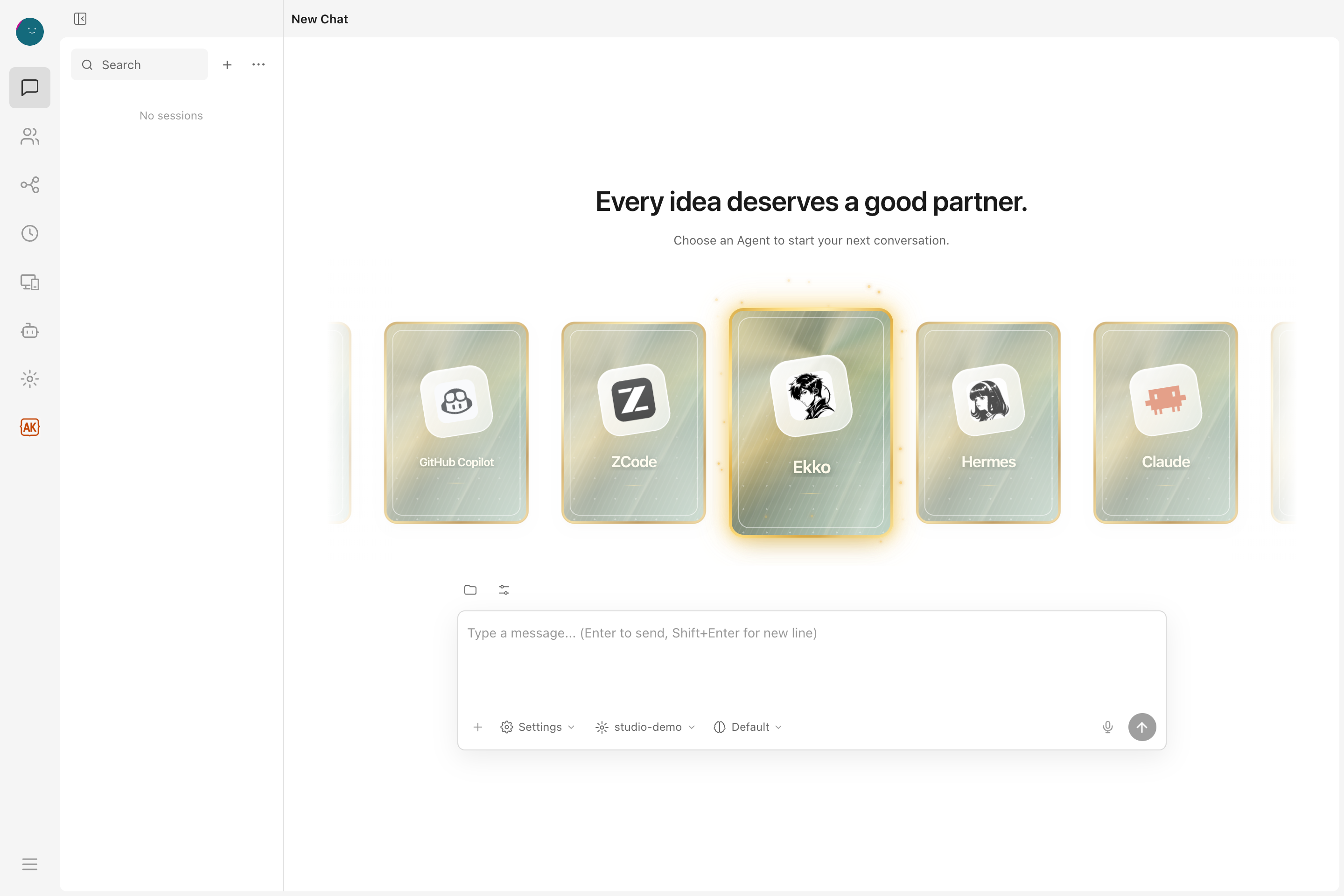



Ekko Studio was previously named Hermes Studio / Hermes Web UI. The GitHub
repository is `EKKOLearnAI/ekko-studio`. The primary npm package is
`ekko-studio`, with the `ekko-studio-web` command. The legacy `hermes-web-ui`
package and command remain supported and receive the same releases.
## Screenshots
Captured from the **v0.7.33** client on 2026-10-10. Chat, workflows, and Skills use demo data; Agent versions reflect a local installation. See [capture notes](./docs/screenshots/overview/README.md).
| Visual workflows | Agent Manager |
| --- | --- |
| [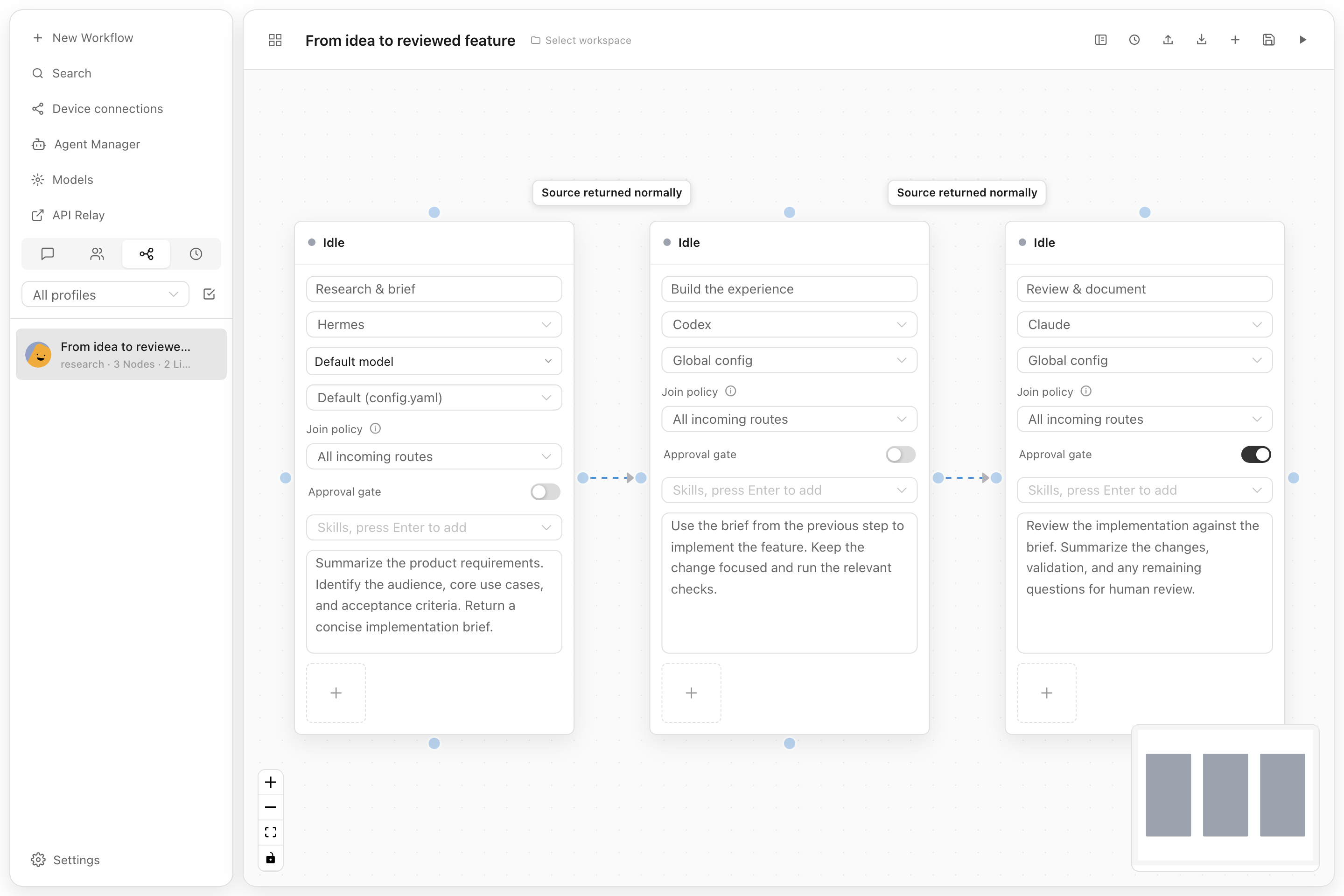](./docs/screenshots/overview/workflow.png) | [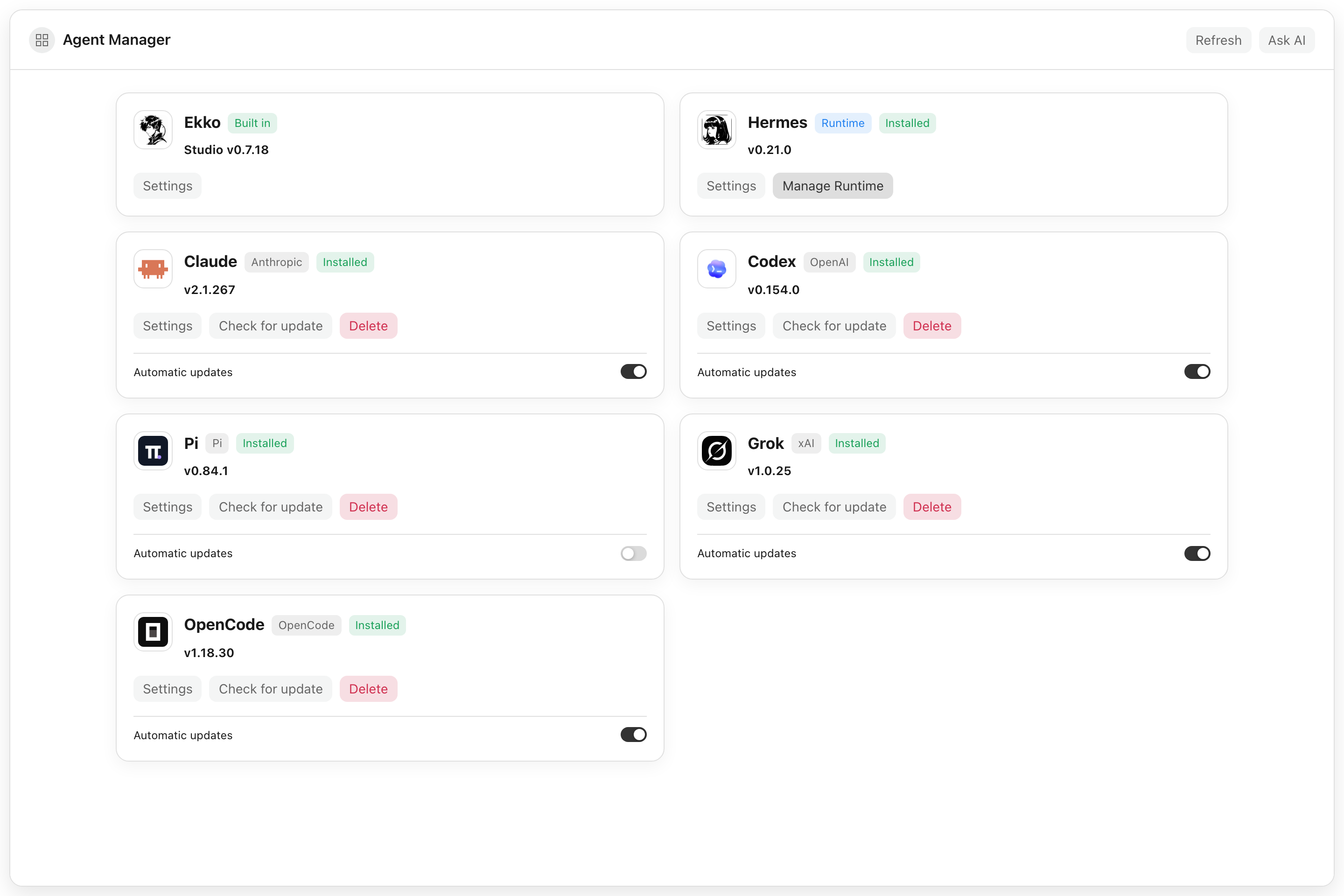](./docs/screenshots/overview/agent-manager.png) |
| Connect agent steps and add a human approval gate. | Manage agent installations, settings, and updates in one place. |
Explore chat progress and Skills
Follow a task in the conversation, including its plan and per-turn usage.
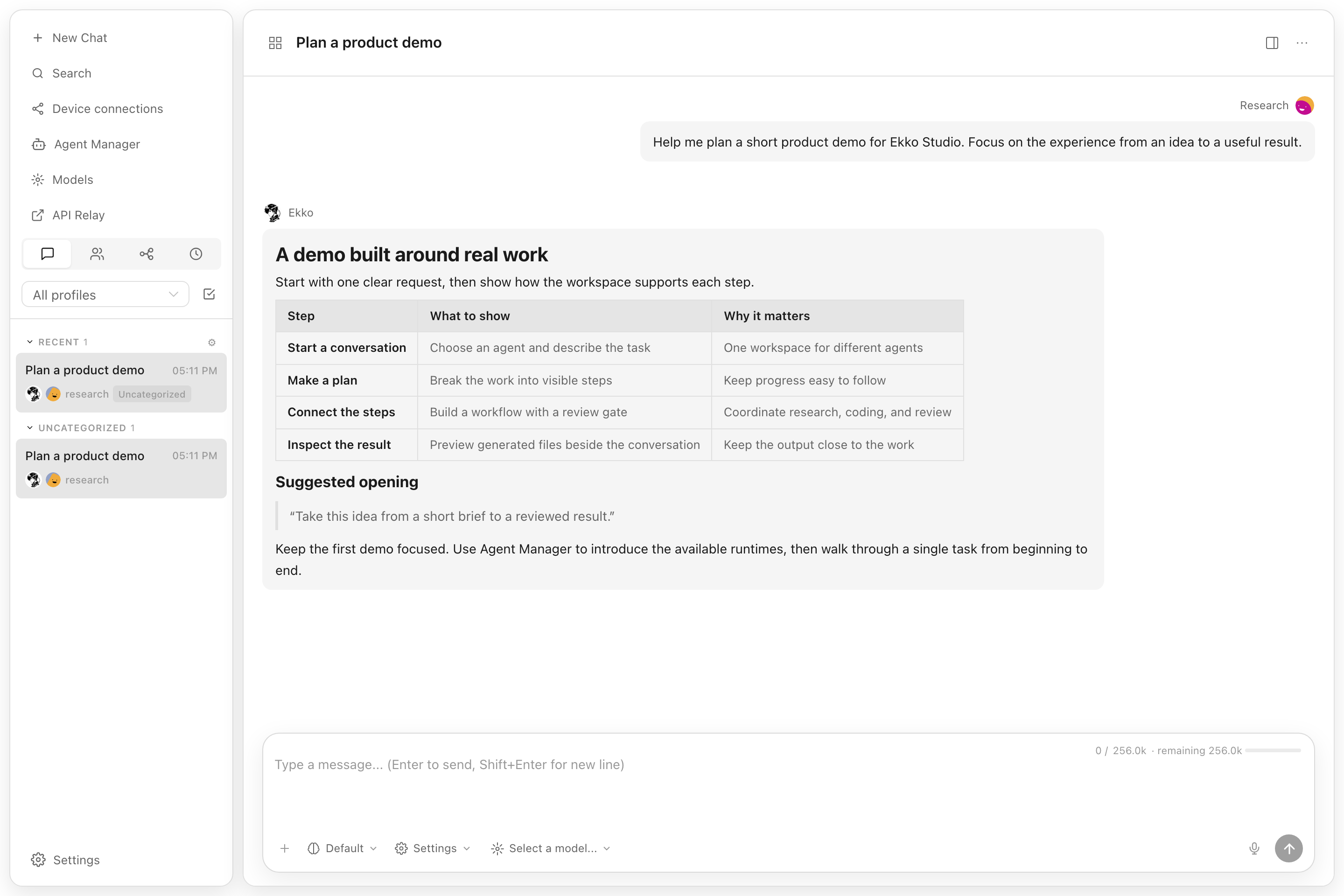
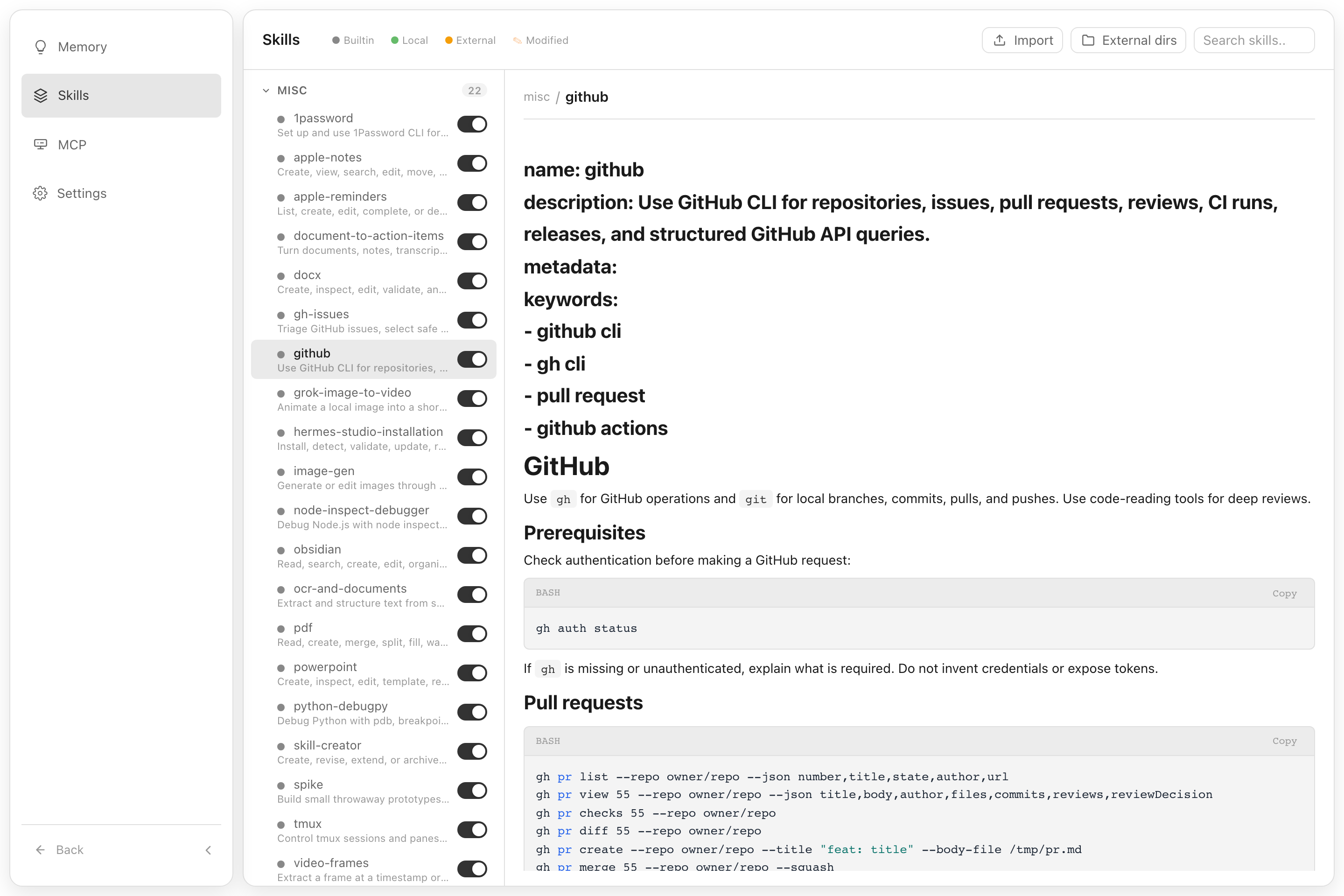
Browse installed skills, read their instructions, and enable them as needed.
## Core Capabilities
| Area | What Ekko Studio does |
| --- | --- |
| Multi-agent runtime | Connects the agents listed below with streaming responses, tool traces, generated-file previews, persistent sessions, and standalone desktop chat windows. |
| Studio workspace | Provides shared chats, group chat, global-agent runs, workflows, files, voice, media, devices, themes, logs, usage, and App connectivity across agent runtimes. |
| Agent control planes | Keeps Hermes profiles, providers, models, memory, skills, plugins, jobs, Kanban, channels, and runtime management in their owning agent module. |
| Automation | Builds executable visual workflows and connects the supported runtimes through schedules, approval gates, group-chat rooms, platform channels, and MCP servers. |
| Workspace tools | Provides a file browser, web terminal, Desktop Agent Browser, screenshot capture, voice input/output, coding-agent runners, device discovery, Journey graph, and performance views. |
| Distribution | Ships as a desktop app for Windows/macOS/Linux, an npm CLI package, and a Docker image. |
## Supported Agents
Single chat, group chat, and workflows share the same Agent catalog. Coding agents run on the machine hosting the Studio backend; their CLI must be installed there.
| Agents | Configuration and installation |
| --- | --- |
| Ekko Agent, Hermes Agent | Ekko is built in. Desktop and Docker bundle a Hermes runtime; npm installations discover an existing Hermes installation. |
| Claude Code, Codex, Pi, Grok, OpenCode, DeepSeek Harness (DSH) | Studio-scoped or native global configuration; installation and supported updates through Agent Manager. |
| Qwen Code, Kimi Code, CodeBuddy, GitHub Copilot CLI, ZCode | Studio-scoped or native global configuration. ZCode requires manual installation; the others support npm installation through Agent Manager. |
| Cursor, Qoder, Antigravity | Cursor and Qoder use native global configuration. Antigravity supports scoped and global launches. Cursor and Antigravity require manual installation. |
Scoped mode uses isolated session configuration; supported runtimes can use the selected Studio provider/model. Global mode uses the CLI's existing configuration and sign-in. Available models, tools, and context controls depend on the runtime.
See [native coding agents](./docs/native-coding-agents.md), [Antigravity CLI](./docs/antigravity-cli.md), and [DSH setup](./docs/dsh-management.md) for details.
## Features
### AI Chat
- Start a conversation from responsive Agent cards; Ekko is the initial default, and Studio remembers the last agent, model, workspace, launch mode, and reasoning options
- Real-time chat streaming over Socket.IO `/chat-run`; Studio dispatches each run to the selected runtime adapter
- Multi-session management — create, rename, delete, switch between sessions
- **Self-built session database** — local SQLite storage for Studio sessions; Hermes state.db remains a read-only source for Hermes history APIs
- Session grouping by source (Telegram, Discord, Slack, etc.) with collapsible accordion
- Active session indicator — live sessions pin to top with spinner icon
- Sessions sorted by latest message time
- Markdown rendering with syntax highlighting and code copy
- Tool call detail expansion (arguments / result)
- Profile-scoped file uploads, clipboard image/file paste, and workspace attachments
- File download support — download uploaded files and agent-generated files by resolved path across local, Docker, SSH, and Singularity backends
- Inline previews for generated HTML, PDF, DOCX, PPTX, XLSX, CSV, images, Markdown, and source files
- Session search — Ctrl+K search across the Studio local session database; read-only Hermes history sessions are not included
- Session categories, message references, compression progress, and durable background delegation results
- Persistent task cards with live step progress, approval prompts, and clarification questions
- Profile-aware model selector with runtime-specific provider/model availability
- Per-turn token usage, cache hits, estimated cost, and generation speed; supported runtimes also expose context usage and compression controls
### Platform Channels
Unified configuration for **10 platforms** in one page:
| Platform | Features |
| ------------- | ---------------------------------------------------------------------- |
| Telegram | Bot token, mention control, reactions, free-response chats |
| Discord | Bot token, mention, auto-thread, reactions, channel allow/ignore lists |
| Slack | Bot token, mention control, bot message handling |
| WhatsApp | Enable/disable, mention control, mention patterns |
| Matrix | Access token, homeserver, auto-thread, DM mention threads |
| Feishu (Lark) | App ID / Secret, mention control |
| DingTalk | Client ID / Secret, mention control |
| QQBot | App ID / Secret, mention control |
| WeChat | QR code login (scan in browser, auto-save credentials) |
| WeCom | Bot ID / Secret |
- Credentials and channel behavior settings write to `.env` and `config.yaml` under the selected Hermes profile
- Per-platform configured/unconfigured status detection
- Gateway autostart is opt-in under Hermes settings; ordinary Studio chat does not require a platform Gateway
### Usage Analytics
- Total token usage breakdown (input / output)
- Session count with daily average
- Estimated cost tracking & cache hit rate
- Model usage distribution chart
- 30-day daily trend (bar chart + data table)
### Scheduled Jobs
- Create, edit, pause, resume, delete cron jobs
- Trigger immediate execution
- Cron expression quick presets
### Kanban
- Profile-aware Kanban board for planning and tracking agent work
- Task creation, updates, and status movement from the dashboard
- Uses the Hermes Kanban CLI and its task storage, with Studio authentication and profile access controls
### Visual Workflows
- Vue Flow canvas for the supported Agent catalog, with file/image attachments and runtime-specific launch settings
- Directed edges, structured conditions, success/failure routes, loops, and approval gates
- Import/export for portable workflow definitions and profile-aware workspaces
- Run budgets, deadlines, stop/rerun controls, and persisted execution history
- Frozen run snapshots, node conversations, edge decisions, and evidence playback on the canvas
### Model Management
- Auto-discover models from credential pool (`~/.hermes/auth.json`)
- Fetch available models from each provider endpoint (`/v1/models`)
- Add, update, and delete providers (preset and custom OpenAI-compatible)
- OAuth/device flows for OpenAI Codex, Nous Portal, xAI, Claude, and GitHub Copilot
- Provider URL auto-detection for non-v1 API versions (e.g. `/v4`)
- Provider-level model grouping, visible-model controls, aliases, refresh, and default switching
- Separate STT and TTS provider catalogs under Models
### Multi-Profile
- Create, rename, delete, and switch between Hermes profiles
- Clone existing profile or import from archive (`.tar.gz`)
- Export profile for backup or sharing
- Profile-scoped configuration, cache, uploads, sessions, jobs, usage, memory, skills, plugins, providers, and model visibility
- Account-bound profile access: super administrators can manage every profile; regular administrators only see and use profiles assigned to their account
### File Browser
- Browse files on remote backends (local, Docker, SSH, Singularity)
- Upload, download, rename, copy, move, and delete files
- Store uploaded files under the selected/requested Hermes profile while keeping downloads path-based for agent-generated artifacts outside the upload directory
- Create directories
- Preview and edit supported files with syntax highlighting, then attach workspace files back to a chat
### Group Chat
- Multi-agent chat rooms with real-time messaging via Socket.IO
- @mention routing — mention an agent to trigger a contextual reply
- Context compression — automatic conversation summarization when history exceeds token threshold
- Typing status and reply progress indicators
- Room creation, deletion, and invite code management
- Agent management — add/remove agents from rooms with per-agent profiles
- SQLite message persistence
- Mobile responsive with collapsible sidebar
### Coding Agents
- Detect, configure, launch, and monitor the 14 coding-agent integrations listed above; install and update supported CLIs from Agent Manager
- Built-in coding-agent terminal, session history, workspace selection, images, and file diffs
- Dedicated proxy routes and API modes for provider/model compatibility
- Standalone desktop chat windows and persisted output/reasoning metadata
- Shared `~/.agents/skills` entries are read-only in Coding Agent pages; runtime-specific settings, private skills, and MCP controls vary by agent
#### DeepSeek Harness (DSH)
- Use DSH in single chats, group-chat rooms, and workflow nodes, with Studio-selected providers/models or native global configuration.
- Select an Agent preset when creating a chat, adding a group member, or configuring a workflow node; resumed conversations retain their selected preset.
- Reuse the native `web` profile’s plugins. **Plugin configuration** embeds the plugins’ own settings UI with light/dark theme support; **Plugin list** manages installed packages. Agent presets have a separate Studio management page.
- Manage DSH settings, instructions, MCP, and private skills. Shared `~/.agents/skills` entries are display-only in every Coding Agent page; editing and deletion are blocked.
Install DSH on the machine running the Studio backend through Agent Manager. Native plugin installation requires `pnpm` on that machine’s PATH. See [DSH setup, profiles, and compatibility](docs/dsh-management.md) for details.
### Desktop Agent Browser
- Desktop-only multi-tab browser that agents can navigate through the managed MCP server
- Isolated browser profiles, per-tab control leases, proxy settings, downloads, cookies, and permissions
- Accessibility snapshots, screenshots, console logs, and page annotations for agent-assisted browsing
- Bounded page queries and sequential action batches, with observations of changed text, selected values, and newly opened tabs
### Mobile App & Session Sharing
- Connect the App over LAN, authenticated direct transport, or cloud relay, with relay fallback when a direct connection is unavailable
- Follow single-chat, group-chat, and workflow progress through task cards and notifications; supported iOS builds also show Live Activities
- Share a single conversation with an App account, configure its input/file/voice/terminal permissions, and revoke access
- Use persistent terminal sessions from the App
See [App connectivity](./docs/app-relay.md) and [session sharing](./docs/session-share-tokens.md) for setup and permission boundaries.
### JEV Evaluation
- Profile-scoped evaluation settings for memory recall, skill matching, and learning
- Optional browser-action, group-chat, and workflow assessments with independent controls
See [JEV configuration and integration status](./docs/jev.md).
### Skills & Memory
- Browse and search installed skills
- View skill details and attached files
- Install and manage Skill Bundles with profile-aware usage statistics
- User notes, persistent Ekko Agent memory, and profile-scoped memory management
- Interactive Journey graph for skill/memory relationships, category filtering, detail inspection, and playback
### Theme Customization
- Light/dark mode, interface style, base font size, text color, and active color
- Per-account background images and live preview across the workspace
### Logs
- View agent / server / error logs
- Filter by log level, log file, and keyword
- Structured log parsing with HTTP access log highlighting
### Admin & Runtime Management
- Device and LAN peer views for local-network discovery and peer tooling
- MCP manager for the managed `ekko-studio-*` servers, profile injection, and `api` / `browser` / `devices` / `use` / `plan` toolsets; task plans and clarification use the dedicated `ekko-studio-interaction` server
- Runtime version and version-preview tooling for testing newer builds in isolation
- Performance monitor views for super administrators
### Authentication
- Token-based auth (auto-generated on first run or set via `AUTH_TOKEN` env var)
- Username/password login with account management in Settings
- Default bootstrap credentials are `admin` / `123456`; users are prompted after login to change the default username and password
- Super administrators can manage users and profile bindings; regular administrators can manage their own account details
CLI maintenance commands:
```bash
# Delete persisted login IP lock records
ekko-studio-web clear-login-locks
# Delete login locks and restart the running Studio server
ekko-studio-web clear-login-locks --restart
# Create or reset the default super administrator login to admin / 123456
ekko-studio-web reset-default-login
```
`clear-login-locks` removes `${HERMES_WEB_UI_HOME:-~/.hermes-web-ui}/.login-lock.json`. If the server is running, restart it to clear in-memory lock state. `reset-default-login` updates the Studio account database; if an `admin` user already exists, its password is reset to `123456` and the account is enabled as a super administrator.
### Settings
- Display (streaming, compact mode, reasoning, cost display)
- Agent (max turns, timeout, tool enforcement)
- Memory (enable/disable, char limits)
- Session reset (idle timeout, scheduled reset)
- Privacy (PII redaction)
- Model settings (default model & provider)
- Profile and provider configuration
### Voice / TTS / STT
- Manage voice providers under Models → STT and Models → TTS; existing Settings → Voice links redirect there.
- TTS adapters: Edge, OpenAI-compatible, MiMo, Doubao, ElevenLabs, Gemini, xAI, Mistral, MiniMax, and DeepInfra.
- STT adapters: Browser, OpenAI-compatible, Doubao, Groq, Mistral, xAI, ElevenLabs, and DeepInfra.
- Use editable turn-based voice input from the chat mic, or open the full-screen real-time voice stage for a continuous voice-focused experience.
- Provider keys and MiMo voice-clone audio stay server-side; the browser receives only masked secret status.
- Starting a new voice turn stops current assistant playback first, but does not implicitly cancel an active agent run.
- For supported settings, security notes, and current non-goals, see [`docs/voice-dialogue.md`](./docs/voice-dialogue.md).
- The real-time stage does not claim simultaneous full-duplex listen/speak; telephony and always-on wake-word listening remain out of scope.
### Web Terminal
- Integrated terminal powered by node-pty and @xterm/xterm
- Multi-session support — create, switch between, and close terminal sessions
- Real-time keyboard input and PTY output streaming via WebSocket
- Window resize support
### Desktop App & Updates
- Native Electron shell for Windows, macOS, and Linux
- Bundles the Studio runtime and starts the local server automatically
- Capture a screen region, annotate it, and attach it to single or group chat; configure an optional global screenshot shortcut
- Hide Studio during capture on supported Windows/macOS setups; Linux capture uses X11 or the system Screenshot Portal according to the desktop environment
- Uses Cloudflare download endpoints for desktop auto-update metadata and assets first
- Falls back to GitHub Releases `latest` assets if the Cloudflare update feed is unavailable
- Windows upgrades attempt to close an existing Ekko Studio process before replacing files
---
## Quick Start
### Desktop App (Recommended)
Download the latest **Ekko Studio** desktop installer from
[GitHub Releases](https://github.com/EKKOLearnAI/ekko-studio/releases/latest).
Desktop builds are published for macOS, Windows, and Linux, with separate
architecture assets where applicable. The desktop app bundles the Studio
runtime and stores Hermes Agent data in `~/.hermes` on Windows, macOS, and Linux.
The desktop wrapper stores its own Studio state separately in
`~/.hermes-web-ui` unless `HERMES_WEB_UI_HOME` is set.
After the packaged desktop app starts, it installs managed command shims so the
desktop app, bundled Hermes Agent CLI, and bundled server CLI do not conflict:
| Command | Description |
| --- | --- |
| `ekko-studio` | Open the Ekko Studio desktop app |
| `ekko-studio cli ...` | Run the bundled Hermes Agent CLI |
| `ekko-studio web ...` | Run the bundled `hermes-web-ui` command |
| `ekko-studio -h` | Show wrapper help |
| `ekko-studio-mcp [api\|browser\|devices\|use\|plan]` | Run one managed Studio MCP toolset |
The desktop command is `ekko-studio`; the previous managed `hermes-studio`
command is removed when the new shim is installed. No compatibility alias is created.
Use `ekko-studio cli -h` for Hermes Agent CLI help and
`ekko-studio web -h` for server CLI help. `ekko-studio-mcp` defaults to the
`api` toolset; choose `browser`, `devices`, `use`, or `plan` to keep the exposed MCP
surface focused on the current task.
Desktop auto-updates read the latest feed from
`https://download.ekkolearnai.com/latest` first. If that endpoint is
unavailable, the updater falls back to
`https://github.com/EKKOLearnAI/ekko-studio/releases/latest/download`.
### npm
```bash
npm install -g ekko-studio
ekko-studio-web start
```
The legacy package `hermes-web-ui` continues to receive the same releases.
Both packages expose `ekko-studio-web` and the existing commands. Install either
package; their global command aliases overlap. To switch, uninstall the old
package before installing the other. User data remains in `~/.hermes-web-ui`.
Open **http://localhost:8648**
Requires Node.js **23 or newer**. Ekko Agent is included; to use Hermes Agent, install its runtime on the same machine or use the bundled Desktop/Docker distribution.
### Docker Compose
Single-container deployment with integrated Hermes Agent:
```bash
# Use pre-built image (Recommended)
WEBUI_IMAGE=ekkoye8888/hermes-web-ui docker compose up -d
# Or build from source
docker compose up -d --build
docker compose logs -f hermes-webui
```
Open **http://localhost:6060**
- Persistent Hermes data is stored in `./hermes_data`
- Studio auth token is stored in `./hermes_data/hermes-web-ui/.token`
- On first run with auth enabled, the token is printed to container logs
- All runtime settings are environment-variable driven in `docker-compose.yml`
For detailed notes and troubleshooting, see [`docs/docker.md`](./docs/docker.md).
### Hermes Agent Runtime Discovery
When Studio starts backend chat features, it prefers a source checkout that
contains `run_agent.py` such as `~/.hermes/hermes-agent`. If no source checkout
is found, it falls back to the Python environment used by the installed
`hermes` command, then the system Python. This supports both source installs
and package installs such as `pip install hermes-agent`.
## Studio Environment Variables
These variables configure Ekko Studio, its local Hermes runtime integration, and development/preview helpers. Provider API keys and Hermes Agent settings are normally managed through Hermes profiles; environment variables here are process-level overrides.
| Variable | Default | Description |
| --- | --- | --- |
| `PORT` | `8648` | Studio server listen port. |
| `BIND_HOST` | `0.0.0.0` | Studio server bind host. Set `::` explicitly for IPv6. |
| `HERMES_LAN_ADVERTISE_URL` | unset | Reachable Studio origin used in App LAN QR codes. Set this to the Docker host's LAN URL when Studio is opened through `localhost`, for example `http://192.168.1.20:6060`. |
| `HERMES_APP_ENTITLEMENT_REQUIRED` | `true` | Require a valid cloud-signed App entitlement before accepting a LAN App relay connection. Set `false` only for temporary compatibility diagnostics. |
| `HERMES_APP_ENTITLEMENT_PUBLIC_KEY` | built in | Optional PEM public-key override for RS256 App entitlements. The expected issuer is `hermes-studio-server` and audience is `ekko-studio`. |
| `HERMES_WEB_UI_HOME` | `~/.hermes-web-ui` | Studio data home for auth token, credentials, logs, DB, and default uploads. `HERMES_WEBUI_STATE_DIR` is also supported as a compatibility alias. |
| `HERMES_WEBUI_STATE_DIR` | unset | Compatibility alias for `HERMES_WEB_UI_HOME`. |
| `HERMES_WEB_UI_DISABLE_MCP_AUTOINJECT` | unset | Disable startup injection of the managed `ekko-studio-*` MCP servers into Hermes profile configs. |
| `HERMES_WEB_UI_ALLOW_TRANSIENT_MCP_AUTOINJECT` | unset | Allow managed MCP injection when `HERMES_WEB_UI_HOME` is under a temporary directory, such as Version Preview runtimes. |
| `UPLOAD_DIR` | `$HERMES_WEB_UI_HOME/upload` | Upload root override. Files are stored below profile-scoped subdirectories. |
| `CORS_ORIGINS` | same host only | Comma- or space-separated cross-origin allowlist for HTTP, Socket.IO, and WebSocket requests. Set `*` only when you intentionally need legacy wildcard CORS. |
| `AUTH_TOKEN` | auto-generated | Explicit bearer token. If unset, Studio creates one under `HERMES_WEB_UI_HOME`. |
| `AUTH_JWT_SECRET` | `AUTH_TOKEN` | JWT signing secret override for username/password sessions. |
| `HERMES_WEB_UI_AUTH_JWT_EXPIRES_IN` | `30d` | Username/password session JWT lifetime. Accepts seconds or `s`/`m`/`h`/`d` suffixes, for example `12h` or `7d`. |
| `PROFILE` | `default` | Startup/default Hermes profile. Runtime requests use the profile selected by the frontend and authorized for the current account. |
| `LOG_LEVEL` | `info` | Server log level. |
| `BRIDGE_LOG_LEVEL` | `$LOG_LEVEL` or `info` | Bridge log level. |
| `MAX_DOWNLOAD_SIZE` | `200MB` | Maximum file download size. |
| `MAX_EDIT_SIZE` | `10MB` | Maximum editable file size. |
| `WORKSPACE_BASE` | current user's home directory | Base directory for workspace browsing. |
| `HERMES_HOME` | `~/.hermes` | Hermes data home on Windows, macOS, and Linux. |
| `HERMES_BIN` | `hermes` | Custom Hermes CLI binary path. |
| `HERMES_AGENT_ROOT` | auto-discovered | Hermes Agent source checkout containing `run_agent.py`. |
| `HERMES_AGENT_BRIDGE_PYTHON` | auto-discovered | Python interpreter used to launch the agent bridge. |
| `HERMES_AGENT_BRIDGE_UV` | auto-discovered | `uv` executable used to launch the agent bridge when available. |
| `UV` | auto-discovered | Fallback `uv` executable path. |
| `PYTHON` | auto-discovered | Fallback Python executable for the agent bridge. |
| `HERMES_AGENT_BRIDGE_ENDPOINT` | platform default | Agent bridge broker endpoint. Windows defaults to `tcp://127.0.0.1:18765`; macOS/Linux defaults to `ipc:///tmp/hermes-agent-bridge.sock`. |
| `HERMES_AGENT_BRIDGE_TIMEOUT_MS` | `120000` | Timeout for Node requests to the bridge broker. |
| `HERMES_AGENT_BRIDGE_CONNECT_RETRY_MS` | `5000` | Short retry window for connecting to the bridge socket. |
| `HERMES_AGENT_BRIDGE_STARTUP_TIMEOUT_MS` | `120000` | Timeout while waiting for the Python bridge to become ready. |
| `HERMES_AGENT_BRIDGE_STOP_ON_SHUTDOWN` | enabled | Stop the bridge broker during Studio shutdown and restart. Set `0`, `false`, `no`, or `off` to keep the bridge across restarts. |
| `HERMES_AGENT_BRIDGE_AUTO_RESTART` | enabled | Auto-restart the bridge broker after unexpected exit. Set `0`, `false`, `no`, or `off` to disable. |
| `HERMES_AGENT_BRIDGE_RESTART_DELAY_MS` | `1000` | Base delay for bridge auto-restart backoff. |
| `HERMES_AGENT_BRIDGE_PLATFORM` | `cli` | Platform identity passed to Hermes Agent. |
| `HERMES_AGENT_BRIDGE_WORKER_TRANSPORT` | platform default | Profile worker transport. Set `tcp` for loopback TCP or `ipc`/`unix` for Unix domain sockets; defaults to Windows TCP and macOS/Linux IPC. |
| `HERMES_AGENT_BRIDGE_WORKER_PORT_BASE` | `18780` | Base port for TCP worker endpoints. |
| `HERMES_BRIDGE_PROVIDER` | profile/default | Provider override for bridge runs. |
| `HERMES_BRIDGE_TOOLSETS` | profile/default | Toolset override for bridge runs. |
| `HERMES_BRIDGE_MAX_TURNS` | profile/default | Maximum turn override for bridge runs. |
| `HERMES_BRIDGE_SUPPRESS_PLATFORM_HINT` | `cli` | Controls bridge platform hint suppression passed to Hermes Agent. |
| `HERMES_OPENROUTER_APP_REFERER` | `https://ekkostudio.xyz` | OpenRouter attribution referer sent by bridge runs. |
| `HERMES_OPENROUTER_APP_TITLE` | `Ekko Studio` | OpenRouter attribution title sent by bridge runs. |
| `HERMES_OPENROUTER_APP_CATEGORIES` | `cli-agent,personal-agent` | OpenRouter attribution categories sent by bridge runs. |
| `HERMES_WEB_UI_MANAGED_GATEWAY` | enabled | Controls Studio-managed Hermes gateway process handling. Set `0`, `false`, `no`, or `off` to use `hermes gateway start` instead. |
| `HERMES_WEB_UI_DISABLE_GATEWAY_AUTOSTART` | unset | Override the opt-in Hermes Gateway autostart policy. Set `1`, `true`, `yes`, or `on` to disable startup checks and configuration-driven reconciliation even when enabled in settings. |
| `HERMES_WEB_UI_DISABLE_SKILL_INJECTION` | unset | Skip startup bundled skill injection. Set `1`, `true`, `yes`, or `on` when bundled skills are managed outside Studio. When injection is enabled, Studio updates only skills it previously installed or identical existing bundled copies; local edits and user-owned same-name skills are skipped. |
| `HERMES_WEB_UI_STOP_GATEWAYS_ON_SHUTDOWN` | enabled | Controls whether Studio shutdown also stops only the gateway processes started and tracked by this Studio process. Set `0` or `false` to detach them; externally discovered gateways are never adopted or stopped. |
| `HERMES_WEB_UI_SHUTDOWN_FORCE_EXIT_MS` | `10000` | Short cleanup budget before Studio force-stops its owned process trees and exits. |
| `HERMES_DESKTOP_STOP_TIMEOUT_MS` | `20000` | Desktop host's existing outer deadline before it force-stops the complete Web UI process tree; independent from the Web UI's 10-second cleanup budget. |
| `HERMES_GATEWAY_URL` / `GATEWAY_URL` | unset | Explicit Hermes gateway upstream URL for proxy routes. |
| `GATEWAY_HOST` | `127.0.0.1` | Default Hermes gateway upstream host for proxy routes. |
| `GATEWAY_PORT` | `8642` | Default Hermes gateway upstream port for proxy routes. |
| `HERMES_WEB_UI_PREVIEW_REPO` | package repository | GitHub repository used by Version Preview. |
| `HERMES_WEB_UI_PREVIEW_AGENT_BRIDGE_TRANSPORT` | platform default | Version Preview broker transport. Set `tcp` to use loopback TCP for Preview on macOS/Linux; when unset, Preview follows `HERMES_AGENT_BRIDGE_WORKER_TRANSPORT=tcp`. |
| `HERMES_WEB_UI_PREVIEW_AGENT_BRIDGE_ENDPOINT` | isolated preview endpoint | Directly overrides the Version Preview broker endpoint. |
| `HERMES_WEB_UI_BACKEND_PORT` | `8648` | Backend port used by the Vite dev proxy. |
| `HERMES_WEB_UI_FRONTEND_PORT` | `8649` | Frontend Vite dev server port. |
### CLI Commands
`hermes-web-ui` remains an alias for the `ekko-studio-web` commands below.
| Command | Description |
| --- | --- |
| `ekko-studio-web start [port]` | Start in background; accepts a positional port or `--port ` |
| `ekko-studio-web client [port]` | Start for a remote client with gateway autostart disabled and permissive CORS |
| `ekko-studio-web restart [port]` | Restart; stops the bridge by default |
| `ekko-studio-web stop` | Stop the background process |
| `ekko-studio-web status` | Check if running |
| `ekko-studio-web clear-login-locks [--restart]` | Clear persisted login locks, optionally restart |
| `ekko-studio-web reset-default-login` | Create or reset the default administrator login |
| `ekko-studio-web update` / `upgrade` | Update to the latest version and restart |
| `ekko-studio-web version` / `-v` | Show the version |
| `ekko-studio-web -h` | Show help |
| `hermes-web-ui-mcp [api\|browser\|devices\|use\|plan]` | Run one managed Studio MCP toolset (same as `ekko-studio-mcp`) |
Add `--no-open` to `start` or `client` when no browser should open.
`restart`, `update`, and `upgrade` stop the Agent Bridge broker by default so restarted or updated servers do not reuse stale Python bridge processes. Set `HERMES_AGENT_BRIDGE_STOP_ON_SHUTDOWN=0` before restarting only when you explicitly want to keep the bridge broker and running bridge sessions alive.
`update` / `upgrade` first attempt `npm cache clean --force`, then install the latest version of the running package (`ekko-studio@latest` or `hermes-web-ui@latest`) and restart that package. The Web UI version check uses the same package identity. Cache cleanup is best-effort; if it fails, the updater continues with the install.
### Auto Configuration
On startup the BFF server automatically:
- Initializes Studio data directories, local databases, and bundled skills
- Starts the Hermes agent bridge when a Hermes runtime is available; Gateway autostart follows the opt-in Hermes setting
- Opens a browser on successful startup unless `--no-open` is set
---
## Development
```bash
git clone https://github.com/EKKOLearnAI/ekko-studio.git
cd ekko-studio
npm install
npm run dev
```
- Frontend: http://localhost:8649
- BFF Server: http://localhost:8647
```bash
npm run harness:check
npm run test
npm run build # outputs to dist/
```
See [DEVELOPMENT.md](./DEVELOPMENT.md) for contributor commands and
[ARCHITECTURE.md](./ARCHITECTURE.md) for the complete package and state model.
## Architecture
```text
Browser / Desktop / App
│ HTTP + Socket.IO
▼
Koa bootstrap (composition only)
│
├─ Studio platform ── chat, groups, global agent, workflows,
│ sessions, files, voice, devices, webhooks
├─ Hermes family ─── profiles, models, skills, memory, jobs,
│ Kanban, channels, terminal, Hermes bridge
├─ Ekko family ───── Ekko runtime and agent-owned services
└─ Coding family ─── coding-agent adapters, scoped config, native CLI execution
```
The server is organized by business ownership under
`packages/server/src/modules/{studio,hermes,ekko,coding-agents}`. Routes stay
thin, controllers own HTTP concerns, services own reusable behavior, and only
`packages/server/src/bootstrap` may compose concrete modules and adapters.
Cross-agent code belongs to Studio; an agent module must not absorb a shared
product surface merely because it uses that agent today.
Studio state and Hermes Agent state remain separate. Studio defaults to
`~/.hermes-web-ui`; Hermes profile data remains under the Hermes home. For the
full ownership tree, dependency rules, and API migration contract, see
[`docs/harness/server-module-boundaries.md`](./docs/harness/server-module-boundaries.md).
## Tech Stack
**Frontend:** Vue 3 + TypeScript + Vite + Naive UI + Pinia + Vue Router + vue-i18n + SCSS + markdown-it + highlight.js
**Backend:** Koa 2 + Socket.IO + SQLite + node-pty
## License
[BSL-1.1](./LICENSE)
The license covers Ekko Studio, the `hermes-web-ui` npm package and CLI,
desktop applications, firmware, release
artifacts, documentation, and associated files in this repository.
The MCP entry point is `bin/ekko-studio-mcp.mjs`; tools use the `ekko_studio_*` prefix. Existing `hermes-studio-mcp` / `hermes-web-ui-mcp` commands and `hermes_studio_*` calls remain compatible. Restart the MCP client to discover the new tool names. Studio migrates managed server configurations to `ekko-studio-api`, `ekko-studio-browser`, `ekko-studio-devices`, `ekko-studio-use`, and `ekko-studio-interaction`.