# Echo-Server / Docker / Kubernetes / Helm
[](https://codecov.io/gh/Ealenn/Echo-Server)
[](https://www.codefactor.io/repository/github/ealenn/echo-server)
[](https://github.com/Ealenn/Echo-Server/stargazers)
[](https://github.com/Ealenn/Echo-Server/issues)
[](https://hub.docker.com/repository/docker/ealen/echo-server)
[](https://hub.docker.com/repository/docker/ealen/echo-server)
> Read the docs : [https://ealenn.github.io/Echo-Server](https://ealenn.github.io/Echo-Server)
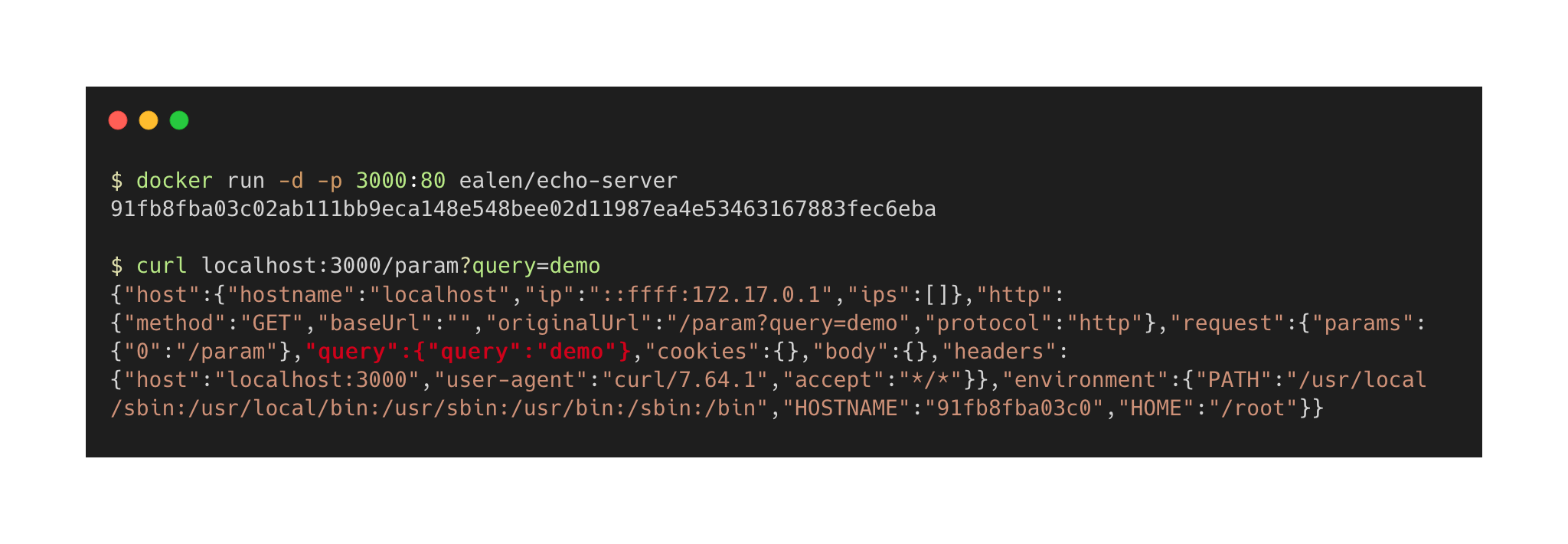
An echo server is a server that replicates the request sent by the client and sends it back.
Available:






- GET / POST / PUT / PATCH / DELETE
- Request (Query, Body, IPs, Host, Urls...)
- Request Headers / Response Headers
- Environment variables
- Control via Headers/Query
- Folders and Files
- Monitoring
## Table of contents
- [Echo-Server / Docker / Kubernetes / Helm](#echo-server--docker--kubernetes--helm)
- [Table of contents](#table-of-contents)
- [Configuration](#configuration)
- [Use Echo-Server](#use-echo-server)
- [Custom responses](#custom-responses)
- [Custom HTTP Status Code](#custom-http-status-code)
- [Custom Body](#custom-body)
- [Custom Body with Environment variable value](#custom-body-with-environment-variable-value)
- [Custom Headers](#custom-headers)
- [Custom response latency](#custom-response-latency)
- [File/Folder explorer](#filefolder-explorer)
- [Combine custom actions](#combine-custom-actions)
- [Change default Queries/Request commands](#change-default-queriesrequest-commands)
- [Loggers](#loggers)
- [Format](#format)
- [Seq](#seq)
- [ELK](#elk)
- [Setting up](#setting-up)
- [Docker](#docker)
- [Docker-Compose](#docker-compose)
- [Kubernetes](#kubernetes)
- [Kubernetes with Helm](#kubernetes-with-helm)
- [NodeJS](#nodejs)
- [Contributing](#contributing)
- [Versioning](#versioning)
- [License](#license)
- [Development](#development)
- [Documentation](#documentation)
- [Tests](#tests)
- [Release notes](#release-notes)
- [Update Helm Chart](#update-helm-chart)
## Configuration
| Environment | Helm | CLI | Default |
|---------------------|--------------------------------|----------------------|---------------|
| PORT | service.port | --port | `80` |
| LOGS__IGNORE__PING | application.logs.ignore.ping | --logs:ignore:ping | `false` |
| ENABLE__HOST | application.enable.host | --enable:host | `true` |
| ENABLE__HTTP | application.enable.http | --enable:http | `true` |
| ENABLE__REQUEST | application.enable.request | --enable:request | `true` |
| ENABLE__COOKIES | application.enable.cookies | --enable:cookies | `true` |
| ENABLE__HEADER | application.enable.header | --enable:header | `true` |
| ENABLE__ENVIRONMENT | application.enable.environment | --enable:environment | `true` |
| ENABLE__FILE | application.enable.file | --enable:file | `true` |
## Use Echo-Server
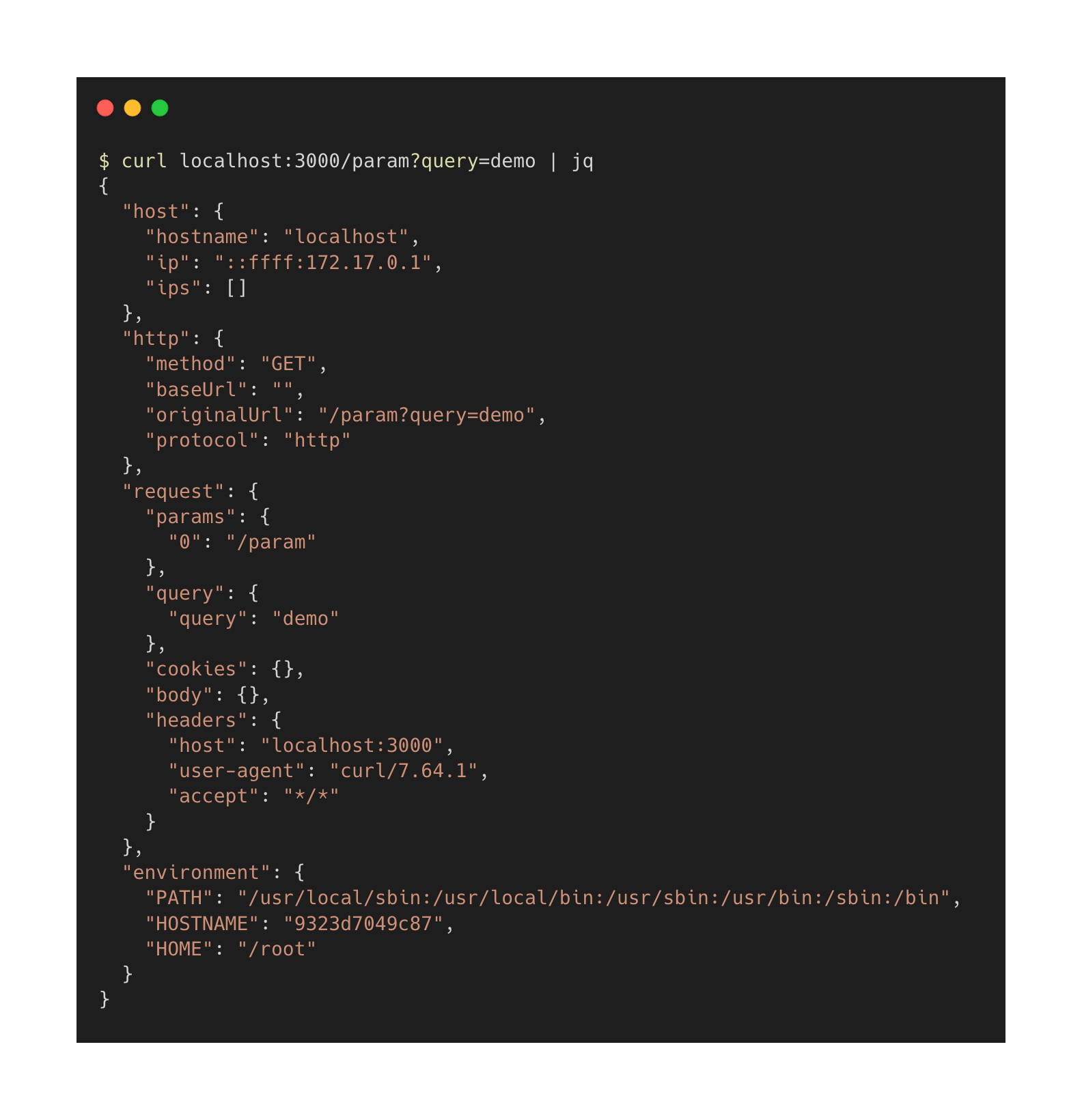
I use [jq](https://stedolan.github.io/jq) for nice `curl` results ;)
### Custom responses
| Query | Header | Content | Conditions |
|---------------------|-----------------------|----------------------------------| ------------------------- |
| ?echo_code= | X-ECHO-CODE | HTTP code `200`, `404` | 200 <= `CODE` <= 599 |
| | | `404-401` or `200-500-301` | |
| ?echo_body= | X-ECHO-BODY | Body message | |
| ?echo_env_body= | X-ECHO-ENV-BODY | The key of environment variable | Enable environment `true` |
| ?echo_header= | X-ECHO-HEADER | Response Header `Lang: en-US` | Enable header `true` |
| ?echo_time= | X-ECHO-TIME | Wait time in `ms` | 0 <= `TIME` <= 30.000 |
| ?echo_file= | X-ECHO-FILE | Path of Directory or File | Enable file `true` |
#### Custom HTTP Status Code
```bash
➜ curl -I --header 'X-ECHO-CODE: 404' localhost:8080
➜ curl -I localhost:8080/?echo_code=404
HTTP/1.1 404 Not Found
```
```bash
➜ curl -I --header 'X-ECHO-CODE: 404-300' localhost:8080
➜ curl -I localhost:8080/?echo_code=404-300
HTTP/1.1 404 Not Found
HTTP/1.1 300 Multiple Choices
```
```bash
➜ for i in {1..10}
➜ do
➜ curl -I localhost:8080/?echo_code=200-400-500
➜ done
HTTP/1.1 500 Internal Server Error
HTTP/1.1 400 Bad Request
HTTP/1.1 200 OK
HTTP/1.1 500 Internal Server Error
HTTP/1.1 200 OK
HTTP/1.1 500 Internal Server Error
```
#### Custom Body
```bash
➜ curl --header 'X-ECHO-BODY: amazing' localhost:8080
➜ curl localhost:8080/?echo_body=amazing
"amazing"
```
#### Custom Body with Environment variable value
```bash
➜ curl --header 'X-ECHO-ENV-BODY: HOSTNAME' localhost:8080
➜ curl localhost:8080/?echo_env_body=HOSTNAME
"c53a9ed79fa2"
```
```bash
➜ for i in {1..10}
➜ do
➜ curl localhost:8080/?echo_env_body=HOSTNAME
➜ done
"c53a9ed79fa2"
"f10c3af61e40"
"c53a9ed79fa2"
"f10c3af61e40"
"c53a9ed79fa2"
```
#### Custom Headers
```bash
➜ curl --header 'X-ECHO-HEADER: One:1' localhost:8080
➜ curl localhost:8080/?echo_header=One:1
HTTP/1.1 200 OK
One: 1
```
```bash
➜ curl --header 'X-ECHO-HEADER: One:1, Two:2' localhost:8080
➜ curl "localhost:8080/?echo_header=One:1,%20Two:2"
HTTP/1.1 200 OK
One: 1
Two: 2
```
#### Custom response latency
```bash
➜ curl --header 'X-ECHO-TIME: 5000' localhost:8080
➜ curl "localhost:8080/?echo_time=5000"
⏳... 5000 ms
```
You can change default validations with
| ENVIRONMENT | CLI | Default |
|----------------------------|---------------------------| ---------|
| CONTROLS__TIMES__MIN | --controls:times:min | `0` |
| CONTROLS__TIMES__MAX | --controls:times:max | `60000` |
*(Latency is defined in milliseconds)*
#### File/Folder explorer
```bash
➜ curl --header 'X-ECHO-FILE: /' localhost:8080
➜ curl "localhost:8080/?echo_file=/"
["app", "bin", "etc", "usr", "var"]
```
#### Combine custom actions
```bash
➜ curl --header 'X-ECHO-CODE: 401' --header 'X-ECHO-BODY: Oups' localhost:8080
➜ curl "localhost:8080/?echo_body=Oups&echo_code=401"
HTTP/1.1 401 Unauthorized
"Oups"
```
## Change default Queries/Request commands
[Read the docs](https://ealenn.github.io/Echo-Server/pages/configuration/commands.html)
| Environment | CLI | Default |
|------------------------------------|------------------------------------|--------------------|
| COMMANDS__HTTPBODY__QUERY | --commands:httpBody:query | `echo_body` |
| COMMANDS__HTTPBODY__HEADER | --commands:httpBody:header | `x-echo-body` |
| COMMANDS__HTTPENVBODY__QUERY | --commands:httpEnvBody:query | `echo_env_body` |
| COMMANDS__HTTPENVBODY__HEADER | --commands:httpEnvBody:header | `x-echo-env-body` |
| COMMANDS__HTTPCODE__QUERY | --commands:httpCode:query | `echo_code` |
| COMMANDS__HTTPCODE__HEADER | --commands:httpCode:header | `x-echo-code` |
| COMMANDS__HTTPHEADERS__QUERY | --commands:httpHeaders:query | `echo_header` |
| COMMANDS__HTTPHEADERS__HEADER | --commands:httpHeaders:header | `x-echo-header` |
| COMMANDS__TIME__QUERY | --commands:time:query | `echo_time` |
| COMMANDS__TIME__HEADER | --commands:time:header | `x-echo-time` |
| COMMANDS__FILE__QUERY | --commands:file:query | `echo_file` |
| COMMANDS__FILE__HEADER | --commands:file:header | `x-echo-file` |
## Loggers
[Read the docs](https://ealenn.github.io/Echo-Server/pages/configuration/loggers.html)
| Environment | CLI | Default |
|------------------------------------|------------------------------------|--------------------|
| LOGS__APP | --logs:app | `echo-server` |
| LOGS__LEVEL | --logs:level | `debug` |
| LOGS__FORMAT | --logs:format | `default` |
### Format
| LOG FORMAT | DESCRIPTION |
|-------------------|-----------------------------------------------------------------------------|
| default | Combine `line` & `object` |
| line | Simple `Fri, 22 Jan 2021 10:45:20 GMT | [GET] - http://localhost:8080/path` |
| object | JSON `{ "host": {}, http: {}, request: {}}` |
### Seq
[Full example](https://github.com/Ealenn/Echo-Server/tree/master/docker-compose) - [Documentation](https://ealenn.github.io/Echo-Server/pages/quick-start/docker-compose.html)
| Environment | CLI | Default |
|------------------------------------|------------------------------------|--------------------|
| LOGS__SEQ__ENABLED | --logs:seq:enabled | `false` |
| LOGS__SEQ__SERVER | --logs:seq:server | ` ` |
| LOGS__SEQ__KEY | --logs:seq:key | ` ` |
| LOGS__SEQ__LEVEL | --logs:seq:level | `info` |
### ELK
[Full example](https://github.com/Ealenn/Echo-Server/tree/master/docker-compose) - [Documentation](https://ealenn.github.io/Echo-Server/pages/quick-start/docker-compose.html)
## Setting up
### Docker
[Read the docs](https://ealenn.github.io/Echo-Server/pages/quick-start/docker.html)
```bash
docker run -p 8080:80 ealen/echo-server
```
### Docker-Compose
[Read the docs](https://ealenn.github.io/Echo-Server/pages/quick-start/docker-compose.html)
**Sample**
```yaml
version: "3"
services:
echo-server:
image: ealen/echo-server
ports:
- 8080:80
```
**With Seq**
```yaml
version: "3"
services:
echo:
image: ealen/echo-server
environment:
PORT: 80
LOGS__SEQ__ENABLED: "true"
LOGS__SEQ__SERVER: "http://seq:5341"
ports:
- 8080:80
seq:
image: datalust/seq
environment:
ACCEPT_EULA: "Y"
ports:
- 3010:80
```
### Kubernetes
[Read the docs](https://ealenn.github.io/Echo-Server/pages/quick-start/kubernetes.html)
```bash
curl -sL https://raw.githubusercontent.com/Ealenn/Echo-Server/master/docs/examples/echo.kube.yaml | kubectl apply -f -
```
### Kubernetes with Helm
[Read the docs](https://ealenn.github.io/Echo-Server/pages/quick-start/helm.html) - [Artifact Hub](https://artifacthub.io/packages/helm/ealenn/echo-server)
```bash
helm repo add ealenn https://ealenn.github.io/charts
helm repo update
helm install --set ingress.enable=true --name echoserver ealenn/echo-server
```
### NodeJS
[Read the docs](https://ealenn.github.io/Echo-Server/pages/quick-start/nodejs)
```bash
# Dependencies
npm ci
# Run with node
node ./src/webserver --port 8080
# Run with npm script
PORT=8080 npm run start
```
---
## Contributing
Please read [CONTRIBUTING.md](CONTRIBUTING.md) for details on our code of conduct, and the process for submitting pull requests to us.
## Versioning
We use [SemVer](http://semver.org/) for versioning.
For the versions available, see the [tags on this repository](https://github.com/Ealenn/Echo-Server/releases).
## License
This project is licensed under the GNU Lesser General Public License - see the [LICENSE.txt](https://github.com/Ealenn/Echo-Server/blob/master/LICENSE.txt) file for details.
---
## Development
### Documentation
Docker-Compose is available on `./docs` folder.
```bash
docker compose up -d
```
The documentation is here [localhost:4000](http://localhost:4000)
### Tests
```bash
npm ci
# Without code coverage
npm run test
# With code coverage
npm run test-with-coverage
```
### Release notes
```bash
git log --pretty=oneline
```
### Update Helm Chart
=> [https://github.com/Ealenn/charts/tree/master/charts/echo-server](https://github.com/Ealenn/charts/tree/master/charts/echo-server)